Joslyn Clark Controls
Fire Pump Controls
B-Series Diesel
Fire Pump Controller Training
and Customer Certification Class
January 2007
Fundamentals Of Controllers
 1) Monitor Sprinkler System
Pressures and Start the Pump
Driver When Needed.
 Pressure Switches
 Pressure Transducers
 Remote Starting from other signal
panel or device.
Fundamentals Of Controllers
 2) Monitor Pump Driver and Alarm
on Trouble Conditions.
 Phases Reversed Signal in Electric
Controllers
 Power Available in Electric Controllers
 Low Oil Pressure in Diesel Controllers
 High Engine Temperature in Diesel
Controllers
Fundamentals Of Controllers
 3) Allow a Distressed Pump to
Operate Even to the Point of
Damage to Pump or Driver
 Locked Rotor Protector set to trip at no
less than 300% of Motor Full Load
Current of an Electric Driver.
 Diesel Controllers do not shut down the
engine even though Low Oil Pressure is
observed or High Engine Temperature.
Fundamentals Of Controllers
 4) Shutdown the Pump and
Controller Only When the Possibility
Exists that Continued Operation of
the Pump Would Add to the Damage
already done by the Fire.
 Locked Rotor Protector will shut down the
controller when current reaches and excessive
amount indicating the pump has stopped.
 Diesel Controllers - Overspeed will Stop Fuel Flow
if Engine Speed increases beyond Overspeed
Setting.
Diesel Controllers
Let’s take a Look at the
B-Series Diesel Fire Pump
Controller
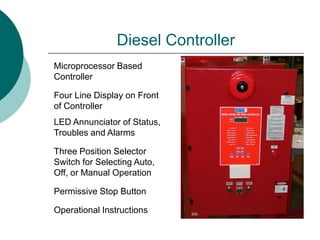
Diesel Controller
Microprocessor Based
Controller
Four Line Display on Front
of Controller
LED Annunciator of Status,
Troubles and Alarms
Three Position Selector
Switch for Selecting Auto,
Off, or Manual Operation
Permissive Stop Button
Operational Instructions
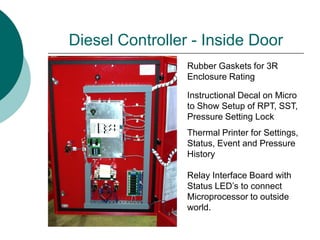
Diesel Controller - Inside Door
Rubber Gaskets for 3R
Enclosure Rating
Instructional Decal on Micro
to Show Setup of RPT, SST,
Pressure Setting Lock
Thermal Printer for Settings,
Status, Event and Pressure
History
Relay Interface Board with
Status LED’s to connect
Microprocessor to outside
world.
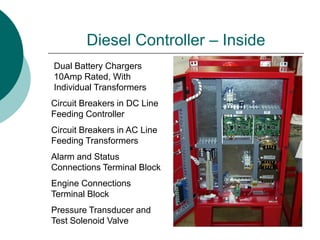
Diesel Controller – Inside
Dual Battery Chargers
10Amp Rated, With
Individual Transformers
Circuit Breakers in AC Line
Feeding Transformers
Circuit Breakers in DC Line
Feeding Controller
Alarm and Status
Connections Terminal Block
Pressure Transducer and
Test Solenoid Valve
Engine Connections
Terminal Block
Diesel Control Block Diagram
Pressure
Transducer
Charg
#1
Charg
#2
Micro-
Processor
Board
Bat
#1
Bat
#2
Diesel
Engine
TRAN
TRAN
120VAC
Battery Charger Circuits
Pressure
Transducer
Charg
#1
Charg
#2
TRAN
Micro-
Processor
Board
Bat
#1
Bat
#2
Diesel
Engine
TRAN
120VAC
Next Circuit
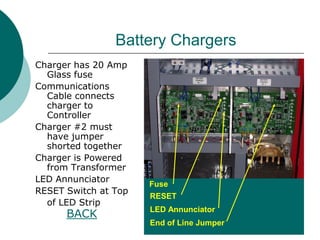
Battery Chargers
Charger has 20 Amp
Glass fuse
Communications
Cable connects
charger to
Controller
Charger #2 must
have jumper
shorted together
Charger is Powered
from Transformer
LED Annunciator
RESET Switch at Top
of LED Strip
BACK
Fuse
RESET
LED Annunciator
End of Line Jumper
Transformers for Battery
Chargers
120 VAC Supply for Chargers
is protected by Dual Circuit
Breakers.
120 Volts AC Input for
Battery Chargers
Secondary Voltage from
Transformer is Connected
Directly To The Charger Board
BACK
Battery Charger Transformers
Battery Power
Controller Must be
Ordered to Match Battery
Voltage of Engine.
Either 12 or 24 Volts DC.
Controller Operates
from Engine
Batteries
LEAD ACID Battery
12 V. Usually Has 2 Batteries
24 V. Usually has 4 Batteries
Back
Engine Monitor & Control
Pressure
Transducer
Charg
#1
Charg
#2
Micro-
Processor
Board
Bat
#1
Bat
#2
Diesel
Engine
TRAN
TRAN
120VAC
Next Circuit
Microprocessor Controller - Front
4 Line Display Showing Battery,
Charger, and Pressure Info.
Batt #1 - Volts, Amps, Mode
Batt #2 - Votls, Amps, Mode
Alarm Messages or Date & Time
Cut Out , Cut In, Line Pressures
Green LED’s for AC Power On
and Switch in Auto
14 Red LED’s for Alarm or Trouble
Membrane Buttons for
Cut Out & Cut In Pressure Settings
Lamp Test, Bell Silence, Engine Test,
Print Events/Pressure, Paper Feed
Back Rear View
Microprocessor – Rear View
Pressure Transducer
Input
Charger Comm.
Connection
DIP Switch for Setup
DIP Switch Setting
Decal
Regulated Voltage
Output from CPU
DC Voltage Input to
CPU
Memory Support
Battery
Back Front
Engine Control Connections
Back
Engine Control Wires are
attached to the engine at the
Engine Control Panel. Wires
for Starting and Stopping the
engine as well as monitoring
temperature, oil pressure and
speed, are used between the
engine and controller.
Battery charging and powering
the controller are also used in
this connection. Usually 9 to
11 wires are run between
engine and controller.
Pressure Control Circuit
Pressure
Transducer
Charg
#1
Charg
#2
Micro-
Processor
Board
Bat
#1
Bat
#2
Diesel
Engine
TRAN
TRAN
120VAC
Next
Pressure Transducer and
Test Solenoid Valve
A Pressure Transducer converts the sprinkler system
pressure to a variable voltage output. The controller
reacts to the changing voltage and causes the engine to
start or allows the engine to be stopped if pressure is
satisfied
The Test Solenoid Valve dumps pressure from the
Transducer for a simulated drop in pressure test.
Transducer
0-300 PSI
0-600 PSI
Test Solenoid Valve
Extra Printer Paper
BACK
Wiring Information
The Field Connection Drawing shows
Connections Between the Engine and the
Fire Pump Controller. A Chart on the
Drawing shows the minimum wire size to
be used for these connections.
This Drawing also shows connection
points for inputs such as Low Fuel Level,
Remote Start, Low Suction Pressure,
Pump Room Temperature, and others.
Connections for remote alarms are also
shown here. Pump Run, Engine Trouble,
Pump Room Trouble, and Controller
Trouble are normal alarms.
Electrical
Schematic
The Electrical Schematic
is used to troubleshoot a
failing controller, or
identify where a
particular wire should be
landed.
While this unit is a
Microprocessor based
unit, connections to the
outside world may need
to be handled by relays
or other higher current
devices. Schematics
show the interconnection
between these devices.
Diesel Fire Pump Controls
Testing the Fire Pump
Controller
Testing the Fire Pump Controller
When Testing the fire pump
Controller, the controller mounted
buttons and devices need to be
tested as well as the devices on the
engine and in the pump room.
Manual Operation, Automatic
Operation, Alarms, Shutdowns, all
should be checked out to make sure
they are working correctly.
Testing Manual Operation
 Place the Selector Switch in the
Manual Position.
 Monitor the Water Solenoid Valve
on the engine cooling loop. It
should energize when the selector is
moved to the Manual Position.
 Pushing the Controller Mounted
Start #1 Button Causes the Engine
to start.
Testing Continued
 When the engine starts, it should
run until you switch the Selector to
the OFF position. The Permissive
Stop does not operate in Manual
Mode.
 Moving the Selector to the Auto
Position tests the Automatic portion
of the controller.
Testing Automatic Operation
 If pressure at the sensing line is
above the start setpoint of the
controller, the unit will not start.
 Open the pressure line and drop the
pressure at the transducer. The
engine should start and run.
 Once the engine beings
acceleration, watch the front of the
controller for a Red LED at Engine
Running.
Testing Automatic Continued
 When the engine reaches about 15% of
its rated speed, a device called an Engine
Speed Switch, sends a signal back to the
controller telling it that engine is running
and stop trying to start. If the engine
accelerates over 120% rated speed,
another contact closes and causes the
engine to stop. A test button allows
testing of the overspeed device without
damage to the engine.
Testing Automatic Continued
 If the line pressure has exceeded
the upper set point of the pressure
controller, pressing the Permissive
Stop Push Button will cause the
Engine to Stop. If pressure is still
below upper set point, then the
selector must be moved to the OFF
position.
Testing Continued
 Next, Start the Engine in the Automatic
Mode.
 Go to the Engine Temperature Switch and
short the terminals with a piece of wire.
The Bell on the Controller should ring and
the Over-Temperature light should come
on. The engine should not stop.
 Using the same wire, short between
terminals 11 and 4 on the terminal strip.
Wait for 3 to 6 seconds for the Timer to
time out, then observe Low Oil Pressure
light on the Controller and ringing bell.
Again, the Engine should not stop
Testing Continued
 Next, Testing the Crank Cycle Timer
on the Controller and the engine
starting capabilities.
 Disable the Fuel Solenoid on the
engine so the engine will not start
 Allow the controller to attempt and
Automatic Start.
 The Engine should attempt a 15
second start.
Testing Continued
 Next, the engine should rest for 15
seconds.
 Then, the controller should switch
to the other battery set and attempt
another 15 sec. start.
 Then another 15 sec rest period.
 The controller should switch back to
the first battery set and another 15
sec. start attemp.
Testing Continued
 After 6 attempts to start, 3 on each
battery set, the controller issues a
Failed to Start Alarm. The Bell rings
and the Failed to Start LED lights
up.
 The selector switch must be moved
to the OFF position to clear the
controller and reset it.
Testing Controllers
Permissive Stop Button
Start #1 Pushbutton
Start #2 Pushbutton
Auto – Off – Manual
Selector Switch
BACK
Testing – Engine Sensors
Temperature Switch
Short two terminals together to simulate Over-Temperature
Back
Testing – Engine Sensors
Back
Disabling the Fuel Solenoid on the Clarke Engine will allow
testing of the Crank Cycle Timer and Alarm Function. Engine
Should attempt 6 Starts, each 15 sec. with 15 second rests
between starts. Alarm at failure of last start.
Fuel Solenoid
Remove Blue
Wire to Test
Crank Cycle.
Joslyn Clark Controls
Jockey Pump Controls
Auxiliary Panels
Remote Alarm Panel
Low Suction Control Panel
Jockey Pump Controls
 Across-The-Line Start
 Fusible Disconnect
 Potter Diaphragm Type
Switch,
 Mercoid Snap Switch
 Options for
 Circuit Breakers
 Minimum Run Timer
 Control Transformer
 Status Indicating Lamps
 Not Service Entrance
Rated
Jockey Controller Low/High Fuel
Level Switch
Auxiliary Equipment
 Remote Alarm Panel - Electric Controls
 Pump Run
 Power Failure
 Phases Reversed
 Pump Start (Optional)
 Remote Alarm Panel - Diesel Controls
 Pump Run
 Engine Failure
 Controller Not in Auto
Auxiliary Equipment
 Low Suction Cutoff Panel
 Manual Reset
 Delay on Cutoff, Automatic Reset
 Delay on Cutoff, Delay on Automatic Reset
Auxiliary Panels
 Low Suction Alarm Panels
 Not Required in all Locations, But Some Do!
 Requires a Second Source of 120V for
Supervisory Power.
 Connects to Fire Pump Controller. Not usually in
Electricians Contract, or so they say!
 Signal line should be on pump side of Suction
Control Valve for ease of testing.
Auxiliary Panels
 Remote Alarm Panels
 Usually Require Second Source of 120V for
Supervisory Power.
 If Building Already has Building Alarm System, Is
the Remote Alarm Panel needed?
 Should you Mount the Remote Alarm Panel Next
to the Fire Pump Controller? NO!!!

Diesel Fire Pump Controllers

  • 1.
    Joslyn Clark Controls FirePump Controls B-Series Diesel Fire Pump Controller Training and Customer Certification Class January 2007
  • 2.
    Fundamentals Of Controllers 1) Monitor Sprinkler System Pressures and Start the Pump Driver When Needed.  Pressure Switches  Pressure Transducers  Remote Starting from other signal panel or device.
  • 3.
    Fundamentals Of Controllers 2) Monitor Pump Driver and Alarm on Trouble Conditions.  Phases Reversed Signal in Electric Controllers  Power Available in Electric Controllers  Low Oil Pressure in Diesel Controllers  High Engine Temperature in Diesel Controllers
  • 4.
    Fundamentals Of Controllers 3) Allow a Distressed Pump to Operate Even to the Point of Damage to Pump or Driver  Locked Rotor Protector set to trip at no less than 300% of Motor Full Load Current of an Electric Driver.  Diesel Controllers do not shut down the engine even though Low Oil Pressure is observed or High Engine Temperature.
  • 5.
    Fundamentals Of Controllers 4) Shutdown the Pump and Controller Only When the Possibility Exists that Continued Operation of the Pump Would Add to the Damage already done by the Fire.  Locked Rotor Protector will shut down the controller when current reaches and excessive amount indicating the pump has stopped.  Diesel Controllers - Overspeed will Stop Fuel Flow if Engine Speed increases beyond Overspeed Setting.
  • 6.
    Diesel Controllers Let’s takea Look at the B-Series Diesel Fire Pump Controller
  • 7.
    Diesel Controller Microprocessor Based Controller FourLine Display on Front of Controller LED Annunciator of Status, Troubles and Alarms Three Position Selector Switch for Selecting Auto, Off, or Manual Operation Permissive Stop Button Operational Instructions
  • 8.
    Diesel Controller -Inside Door Rubber Gaskets for 3R Enclosure Rating Instructional Decal on Micro to Show Setup of RPT, SST, Pressure Setting Lock Thermal Printer for Settings, Status, Event and Pressure History Relay Interface Board with Status LED’s to connect Microprocessor to outside world.
  • 9.
    Diesel Controller –Inside Dual Battery Chargers 10Amp Rated, With Individual Transformers Circuit Breakers in AC Line Feeding Transformers Circuit Breakers in DC Line Feeding Controller Alarm and Status Connections Terminal Block Pressure Transducer and Test Solenoid Valve Engine Connections Terminal Block
  • 10.
    Diesel Control BlockDiagram Pressure Transducer Charg #1 Charg #2 Micro- Processor Board Bat #1 Bat #2 Diesel Engine TRAN TRAN 120VAC
  • 11.
  • 12.
    Battery Chargers Charger has20 Amp Glass fuse Communications Cable connects charger to Controller Charger #2 must have jumper shorted together Charger is Powered from Transformer LED Annunciator RESET Switch at Top of LED Strip BACK Fuse RESET LED Annunciator End of Line Jumper
  • 13.
    Transformers for Battery Chargers 120VAC Supply for Chargers is protected by Dual Circuit Breakers. 120 Volts AC Input for Battery Chargers Secondary Voltage from Transformer is Connected Directly To The Charger Board BACK Battery Charger Transformers
  • 14.
    Battery Power Controller Mustbe Ordered to Match Battery Voltage of Engine. Either 12 or 24 Volts DC. Controller Operates from Engine Batteries LEAD ACID Battery 12 V. Usually Has 2 Batteries 24 V. Usually has 4 Batteries Back
  • 15.
    Engine Monitor &Control Pressure Transducer Charg #1 Charg #2 Micro- Processor Board Bat #1 Bat #2 Diesel Engine TRAN TRAN 120VAC Next Circuit
  • 16.
    Microprocessor Controller -Front 4 Line Display Showing Battery, Charger, and Pressure Info. Batt #1 - Volts, Amps, Mode Batt #2 - Votls, Amps, Mode Alarm Messages or Date & Time Cut Out , Cut In, Line Pressures Green LED’s for AC Power On and Switch in Auto 14 Red LED’s for Alarm or Trouble Membrane Buttons for Cut Out & Cut In Pressure Settings Lamp Test, Bell Silence, Engine Test, Print Events/Pressure, Paper Feed Back Rear View
  • 17.
    Microprocessor – RearView Pressure Transducer Input Charger Comm. Connection DIP Switch for Setup DIP Switch Setting Decal Regulated Voltage Output from CPU DC Voltage Input to CPU Memory Support Battery Back Front
  • 18.
    Engine Control Connections Back EngineControl Wires are attached to the engine at the Engine Control Panel. Wires for Starting and Stopping the engine as well as monitoring temperature, oil pressure and speed, are used between the engine and controller. Battery charging and powering the controller are also used in this connection. Usually 9 to 11 wires are run between engine and controller.
  • 19.
  • 20.
    Pressure Transducer and TestSolenoid Valve A Pressure Transducer converts the sprinkler system pressure to a variable voltage output. The controller reacts to the changing voltage and causes the engine to start or allows the engine to be stopped if pressure is satisfied The Test Solenoid Valve dumps pressure from the Transducer for a simulated drop in pressure test. Transducer 0-300 PSI 0-600 PSI Test Solenoid Valve Extra Printer Paper BACK
  • 21.
    Wiring Information The FieldConnection Drawing shows Connections Between the Engine and the Fire Pump Controller. A Chart on the Drawing shows the minimum wire size to be used for these connections. This Drawing also shows connection points for inputs such as Low Fuel Level, Remote Start, Low Suction Pressure, Pump Room Temperature, and others. Connections for remote alarms are also shown here. Pump Run, Engine Trouble, Pump Room Trouble, and Controller Trouble are normal alarms.
  • 22.
    Electrical Schematic The Electrical Schematic isused to troubleshoot a failing controller, or identify where a particular wire should be landed. While this unit is a Microprocessor based unit, connections to the outside world may need to be handled by relays or other higher current devices. Schematics show the interconnection between these devices.
  • 23.
    Diesel Fire PumpControls Testing the Fire Pump Controller
  • 24.
    Testing the FirePump Controller When Testing the fire pump Controller, the controller mounted buttons and devices need to be tested as well as the devices on the engine and in the pump room. Manual Operation, Automatic Operation, Alarms, Shutdowns, all should be checked out to make sure they are working correctly.
  • 25.
    Testing Manual Operation Place the Selector Switch in the Manual Position.  Monitor the Water Solenoid Valve on the engine cooling loop. It should energize when the selector is moved to the Manual Position.  Pushing the Controller Mounted Start #1 Button Causes the Engine to start.
  • 26.
    Testing Continued  Whenthe engine starts, it should run until you switch the Selector to the OFF position. The Permissive Stop does not operate in Manual Mode.  Moving the Selector to the Auto Position tests the Automatic portion of the controller.
  • 27.
    Testing Automatic Operation If pressure at the sensing line is above the start setpoint of the controller, the unit will not start.  Open the pressure line and drop the pressure at the transducer. The engine should start and run.  Once the engine beings acceleration, watch the front of the controller for a Red LED at Engine Running.
  • 28.
    Testing Automatic Continued When the engine reaches about 15% of its rated speed, a device called an Engine Speed Switch, sends a signal back to the controller telling it that engine is running and stop trying to start. If the engine accelerates over 120% rated speed, another contact closes and causes the engine to stop. A test button allows testing of the overspeed device without damage to the engine.
  • 29.
    Testing Automatic Continued If the line pressure has exceeded the upper set point of the pressure controller, pressing the Permissive Stop Push Button will cause the Engine to Stop. If pressure is still below upper set point, then the selector must be moved to the OFF position.
  • 30.
    Testing Continued  Next,Start the Engine in the Automatic Mode.  Go to the Engine Temperature Switch and short the terminals with a piece of wire. The Bell on the Controller should ring and the Over-Temperature light should come on. The engine should not stop.  Using the same wire, short between terminals 11 and 4 on the terminal strip. Wait for 3 to 6 seconds for the Timer to time out, then observe Low Oil Pressure light on the Controller and ringing bell. Again, the Engine should not stop
  • 31.
    Testing Continued  Next,Testing the Crank Cycle Timer on the Controller and the engine starting capabilities.  Disable the Fuel Solenoid on the engine so the engine will not start  Allow the controller to attempt and Automatic Start.  The Engine should attempt a 15 second start.
  • 32.
    Testing Continued  Next,the engine should rest for 15 seconds.  Then, the controller should switch to the other battery set and attempt another 15 sec. start.  Then another 15 sec rest period.  The controller should switch back to the first battery set and another 15 sec. start attemp.
  • 33.
    Testing Continued  After6 attempts to start, 3 on each battery set, the controller issues a Failed to Start Alarm. The Bell rings and the Failed to Start LED lights up.  The selector switch must be moved to the OFF position to clear the controller and reset it.
  • 34.
    Testing Controllers Permissive StopButton Start #1 Pushbutton Start #2 Pushbutton Auto – Off – Manual Selector Switch BACK
  • 35.
    Testing – EngineSensors Temperature Switch Short two terminals together to simulate Over-Temperature Back
  • 36.
    Testing – EngineSensors Back Disabling the Fuel Solenoid on the Clarke Engine will allow testing of the Crank Cycle Timer and Alarm Function. Engine Should attempt 6 Starts, each 15 sec. with 15 second rests between starts. Alarm at failure of last start. Fuel Solenoid Remove Blue Wire to Test Crank Cycle.
  • 38.
    Joslyn Clark Controls JockeyPump Controls Auxiliary Panels Remote Alarm Panel Low Suction Control Panel
  • 39.
    Jockey Pump Controls Across-The-Line Start  Fusible Disconnect  Potter Diaphragm Type Switch,  Mercoid Snap Switch  Options for  Circuit Breakers  Minimum Run Timer  Control Transformer  Status Indicating Lamps  Not Service Entrance Rated
  • 40.
    Jockey Controller Low/HighFuel Level Switch
  • 41.
    Auxiliary Equipment  RemoteAlarm Panel - Electric Controls  Pump Run  Power Failure  Phases Reversed  Pump Start (Optional)  Remote Alarm Panel - Diesel Controls  Pump Run  Engine Failure  Controller Not in Auto
  • 42.
    Auxiliary Equipment  LowSuction Cutoff Panel  Manual Reset  Delay on Cutoff, Automatic Reset  Delay on Cutoff, Delay on Automatic Reset
  • 43.
    Auxiliary Panels  LowSuction Alarm Panels  Not Required in all Locations, But Some Do!  Requires a Second Source of 120V for Supervisory Power.  Connects to Fire Pump Controller. Not usually in Electricians Contract, or so they say!  Signal line should be on pump side of Suction Control Valve for ease of testing.
  • 44.
    Auxiliary Panels  RemoteAlarm Panels  Usually Require Second Source of 120V for Supervisory Power.  If Building Already has Building Alarm System, Is the Remote Alarm Panel needed?  Should you Mount the Remote Alarm Panel Next to the Fire Pump Controller? NO!!!