www.studymafia.org
Submitted To: Submitted By:
www.studymafia.org www.studymafia.org
Seminar
On
Database
Management System
Content
 What is Database Management System?
 Brief History
 Why Use a DBMS?
 Purpose of DBMS
 Data models
 Architecture of DBMS
 levels or layers of DBMS architecture
 Components of DBMS
 Advantage of DBMS
 Disadvantage of DBMS
 DBMS Languages
 References
What is Database Management
System?
A Database Management System (DBMS), or simply a Database
System (DBS) consist of :
 A collection of interrelated and persistent data (usually referred
to as the database (DB)).
 A set of application programs used to access, update and
manage that data (which form the data management system
(MS)).
Brief History
 Early 1960s: first general purpose database by Charles
Bachman from GE. Used the network data model.
 Late 1960s: IBM developed Information Management System
(IMS). Used the hierarchical data model. Led to SABRE, the
airline reservation system developed by AA and IBM. Still in
use today.
 1970: Edgar Code of IBM developed the relational data model.
Led to several DBMS based on relational model, as well as
important theoretical results. Code wins Turing award.
 1980s: relational model dominant. SQL standard.
 Late 1980s, 1990s: DBMS vendors extend systems, allowing
more complex data types (images, text).
Why Use a DBMS?
 Data independence and efficient access.
 Reduced application development time.
 Data integrity and security.
 Uniform data administration.
 Concurrent access, recovery from crashes.
Purpose of DBMS
1. Data redundancy and inconsistency
 Same information may be duplicated in several places.
 All copies may not be updated properly.
2. Difficulty in new program to carry out each new task
3. Data isolation —
 Data in different formats.
 Difficult to write new application programs.
 files and formats
Purpose of DBMS …
Security problems
Every user of the system should be able to access only the data
they are permitted to see.
 E.g. payroll people only handle employee records, and cannot
see customer accounts; tellers only access account data and
cannot see payroll data.
 Difficult to enforce this with application programs.
Integrity problems
 Data may be required to satisfy constraints.
 E.g. no account balance below $25.00.
 Again, difficult to enforce or to change constraints with the
file-processing approach.
Data models
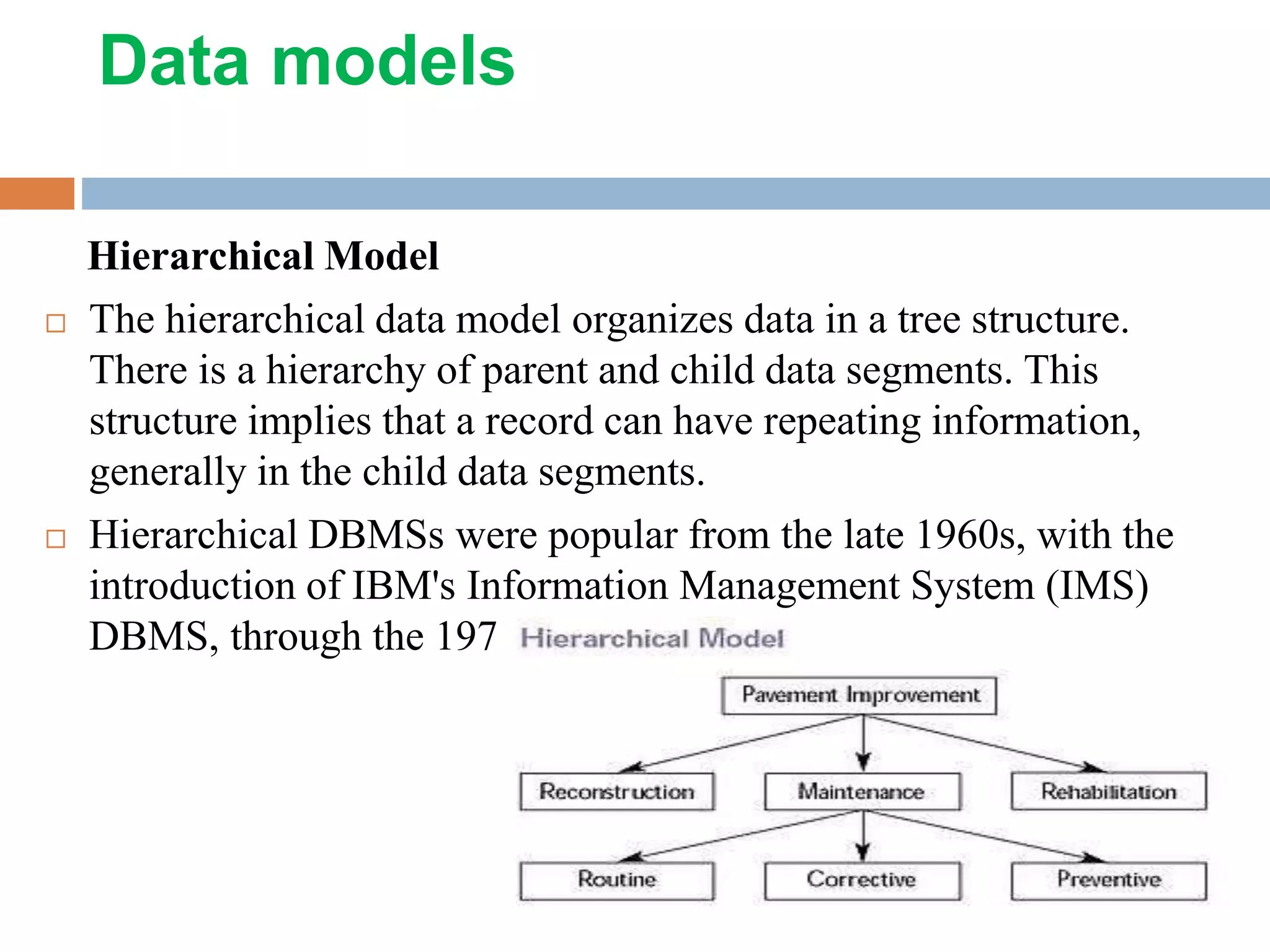
Hierarchical Model
 The hierarchical data model organizes data in a tree structure.
There is a hierarchy of parent and child data segments. This
structure implies that a record can have repeating information,
generally in the child data segments.
 Hierarchical DBMSs were popular from the late 1960s, with the
introduction of IBM's Information Management System (IMS)
DBMS, through the 1970s.
Network Model
 The popularity of the network data model coincided with the
popularity of the hierarchical data model. Some data were
more naturally modeled with more than one parent per child.
 So, the network model permitted the modeling of many-to-
many relationships in data. In 1971, the Conference on Data
Systems Languages (CODASYL) formally defined the
network model.
Relational Model
 (RDBMS - relational database management system) A
database based on the relational model developed by E.F.
Code.
 A relational database allows the definition of data structures,
storage and retrieval operations and integrity constraints.
 In such a database the data and relations between them are
organized in tables. A table is a collection of records and each
record in a table contains the same fields.
Properties of Relational Tables
 Values Are Atomic
 Each Row is Unique
 Column Values Are of the Same Kind
 The Sequence of Columns is Insignificant
 The Sequence of Rows is Insignificant
 Each Column Has a Unique Name
Object-Oriented Model
 Object DBMSs add database functionality to object
programming languages. They bring much more than
persistent storage of programming language objects.
 A major benefit of this approach is the unification of the
application and database development into a seamless data
model and language environment.
Semi structured Model
 In semi structured data model, the information that is normally
associated with a schema is contained within the data, which
is sometimes called ``self-describing''.
 In such database there is no clear separation between the data
and the schema, and the degree to which it is structured
depends on the application.
Architecture of DBMS
 An early proposal for a standard terminology and general
architecture database a system was produced in 1971 by the
DBTG (Data Base Task Group) appointed by the Conference
on data Systems and Languages.
 The DBTG recognized the need for a two level approach with
a system view called the schema and user view called
subschema. The American National Standard Institute
terminology and architecture in 1975.ANSI-SPARC
recognized the need for a three level approach with a system
catalog.
There are following three levels or layers of DBMS
architecture:
 1. External Level
 2. Conceptual Level
 3. Internal Level
Architecture of DBMS
levels or layers of DBMS
architecture
 External Level: - External Level is described by a schema i.e.
it consists of definition of logical records and relationship in
the external view.
 Conceptual Level: - Conceptual Level represents the entire
database. Conceptual schema describes the records and
relationship included in the Conceptual view. .
 Internal Level: - Internal level indicates hoe the data will be
stored and described the data structures and access method to
be used by the database.
Components of DBMS
1. Hardware: Can range from a PC to a network of
computers.
2. Software: DBMS, operating system, network software (if
necessary) and also the application programs.
3. Data: Used by the organization and a description of this
data called the schema.
4. People: Includes database designers, DBAs, application
programmers, and end-users.
5. Procedure: Instructions and rules that should be applied
to the design and use of the database and DBMS.
Advantage of DBMS
 Controlling Redundancy
 Sharing of Data
 Data Consistency
 Integration of Data
 Integration Constraints
 Data Security
 Report Writers
Advantage of DBMS…
 Control Over Concurrency
 Backup and Recovery Procedures
 Data Independence
Disadvantage of DBMS
 Cost of Hardware and Software
 Cost of Data Conversion
 Cost of Staff Training
 Appointing Technical Staff
 Database Damage
DBMS Languages
Data Definition Language-DDL
 Data Definition Language (DDL) statements are used to
define the database structure or schema.
Some examples:
 CREATE - to create objects in the database
 ALTER - alters the structure of the database
 DROP - delete objects from the database
 TRUNCATE - remove all records from a table, including all
spaces allocated for the records are removed
 COMMENT - add comments to the data dictionary
 RENAME - rename an object
Data Manipulation Language
(DML)
Data Manipulation Language (DML) statements are used for
managing data within schema objects.
Some examples:
 SELECT - Retrieve data from the a database
 INSERT - Insert data into a table
 UPDATE - Updates existing data within a table
 DELETE - deletes all records from a table, the space for the
records remain
 MERGE - UPSERT operation (insert or update)
 CALL - Call a PL/SQL or Java subprogram
 EXPLAIN PLAN - explain access path to data
 LOCK TABLE - control concurrency
Thanks….!!!!!!!
 Any Query….!!!!!!!

Database-management-system-dbms-ppt.pptx

  • 1.
    www.studymafia.org Submitted To: SubmittedBy: www.studymafia.org www.studymafia.org Seminar On Database Management System
  • 2.
    Content  What isDatabase Management System?  Brief History  Why Use a DBMS?  Purpose of DBMS  Data models  Architecture of DBMS  levels or layers of DBMS architecture  Components of DBMS  Advantage of DBMS  Disadvantage of DBMS  DBMS Languages  References
  • 3.
    What is DatabaseManagement System? A Database Management System (DBMS), or simply a Database System (DBS) consist of :  A collection of interrelated and persistent data (usually referred to as the database (DB)).  A set of application programs used to access, update and manage that data (which form the data management system (MS)).
  • 4.
    Brief History  Early1960s: first general purpose database by Charles Bachman from GE. Used the network data model.  Late 1960s: IBM developed Information Management System (IMS). Used the hierarchical data model. Led to SABRE, the airline reservation system developed by AA and IBM. Still in use today.  1970: Edgar Code of IBM developed the relational data model. Led to several DBMS based on relational model, as well as important theoretical results. Code wins Turing award.  1980s: relational model dominant. SQL standard.  Late 1980s, 1990s: DBMS vendors extend systems, allowing more complex data types (images, text).
  • 5.
    Why Use aDBMS?  Data independence and efficient access.  Reduced application development time.  Data integrity and security.  Uniform data administration.  Concurrent access, recovery from crashes.
  • 6.
    Purpose of DBMS 1.Data redundancy and inconsistency  Same information may be duplicated in several places.  All copies may not be updated properly. 2. Difficulty in new program to carry out each new task 3. Data isolation —  Data in different formats.  Difficult to write new application programs.  files and formats
  • 7.
    Purpose of DBMS… Security problems Every user of the system should be able to access only the data they are permitted to see.  E.g. payroll people only handle employee records, and cannot see customer accounts; tellers only access account data and cannot see payroll data.  Difficult to enforce this with application programs. Integrity problems  Data may be required to satisfy constraints.  E.g. no account balance below $25.00.  Again, difficult to enforce or to change constraints with the file-processing approach.
  • 8.
    Data models Hierarchical Model The hierarchical data model organizes data in a tree structure. There is a hierarchy of parent and child data segments. This structure implies that a record can have repeating information, generally in the child data segments.  Hierarchical DBMSs were popular from the late 1960s, with the introduction of IBM's Information Management System (IMS) DBMS, through the 1970s.
  • 9.
    Network Model  Thepopularity of the network data model coincided with the popularity of the hierarchical data model. Some data were more naturally modeled with more than one parent per child.  So, the network model permitted the modeling of many-to- many relationships in data. In 1971, the Conference on Data Systems Languages (CODASYL) formally defined the network model.
  • 10.
    Relational Model  (RDBMS- relational database management system) A database based on the relational model developed by E.F. Code.  A relational database allows the definition of data structures, storage and retrieval operations and integrity constraints.  In such a database the data and relations between them are organized in tables. A table is a collection of records and each record in a table contains the same fields.
  • 11.
    Properties of RelationalTables  Values Are Atomic  Each Row is Unique  Column Values Are of the Same Kind  The Sequence of Columns is Insignificant  The Sequence of Rows is Insignificant  Each Column Has a Unique Name
  • 12.
    Object-Oriented Model  ObjectDBMSs add database functionality to object programming languages. They bring much more than persistent storage of programming language objects.  A major benefit of this approach is the unification of the application and database development into a seamless data model and language environment.
  • 13.
    Semi structured Model In semi structured data model, the information that is normally associated with a schema is contained within the data, which is sometimes called ``self-describing''.  In such database there is no clear separation between the data and the schema, and the degree to which it is structured depends on the application.
  • 14.
    Architecture of DBMS An early proposal for a standard terminology and general architecture database a system was produced in 1971 by the DBTG (Data Base Task Group) appointed by the Conference on data Systems and Languages.  The DBTG recognized the need for a two level approach with a system view called the schema and user view called subschema. The American National Standard Institute terminology and architecture in 1975.ANSI-SPARC recognized the need for a three level approach with a system catalog. There are following three levels or layers of DBMS architecture:  1. External Level  2. Conceptual Level  3. Internal Level
  • 15.
  • 16.
    levels or layersof DBMS architecture  External Level: - External Level is described by a schema i.e. it consists of definition of logical records and relationship in the external view.  Conceptual Level: - Conceptual Level represents the entire database. Conceptual schema describes the records and relationship included in the Conceptual view. .  Internal Level: - Internal level indicates hoe the data will be stored and described the data structures and access method to be used by the database.
  • 17.
    Components of DBMS 1.Hardware: Can range from a PC to a network of computers. 2. Software: DBMS, operating system, network software (if necessary) and also the application programs. 3. Data: Used by the organization and a description of this data called the schema. 4. People: Includes database designers, DBAs, application programmers, and end-users. 5. Procedure: Instructions and rules that should be applied to the design and use of the database and DBMS.
  • 18.
    Advantage of DBMS Controlling Redundancy  Sharing of Data  Data Consistency  Integration of Data  Integration Constraints  Data Security  Report Writers
  • 19.
    Advantage of DBMS… Control Over Concurrency  Backup and Recovery Procedures  Data Independence
  • 20.
    Disadvantage of DBMS Cost of Hardware and Software  Cost of Data Conversion  Cost of Staff Training  Appointing Technical Staff  Database Damage
  • 21.
    DBMS Languages Data DefinitionLanguage-DDL  Data Definition Language (DDL) statements are used to define the database structure or schema. Some examples:  CREATE - to create objects in the database  ALTER - alters the structure of the database  DROP - delete objects from the database  TRUNCATE - remove all records from a table, including all spaces allocated for the records are removed  COMMENT - add comments to the data dictionary  RENAME - rename an object
  • 22.
    Data Manipulation Language (DML) DataManipulation Language (DML) statements are used for managing data within schema objects. Some examples:  SELECT - Retrieve data from the a database  INSERT - Insert data into a table  UPDATE - Updates existing data within a table  DELETE - deletes all records from a table, the space for the records remain  MERGE - UPSERT operation (insert or update)  CALL - Call a PL/SQL or Java subprogram  EXPLAIN PLAN - explain access path to data  LOCK TABLE - control concurrency
  • 23.