






DevOps (3)
- Ansible —
Mulodo Vietnam Co., Ltd.
Our Purpose
Make ourselves ‘Dev Company’ from
‘factory’.
Points
Engineering knowledge <- * TODAY *
Logical Thinking
Co-operation work
— Study Group —
What’s DevOps?
Mindset of filling gap between Dev and Ops.
It’s not any technologies or solutions.
C.A.M.S
Culture
Bust silos. Don’t say “no”. Involve everyone.
Automation
XXX as Code. Ask machines to do same things.
Metrics
monitor, find failure, Improve, make a plan.
Share
Dev->Ops, Ops->Dev, share metrics.
Feedback of previous study
Feedback of previous study (2)
What’s Vagrant?
manager of Virtual Machines
Vagrant can manage …
Virtual Box
VMware (Fusion)
AWS EC2 ….
Trigger of automation engine.
Vagrant run …
Ansible
Chef
Puppet ….
Ansible
simple IT automation engine
What’s Ansible?
Ansible is a radically simple IT
automation engine that
automates cloud provisioning,
configuration management,
application deployment, intra-
service orchestration, and many
other IT needs. 

(http://www.ansible.com/)
Goal
Server
Apps
Apache
PHP
MySQL
Product
Apps
Source
Data
Cron
Virtual server
Vagrant
+ ansible
+ fabric
automation
Today: learn Ansible
Goal
Server
Apps
Apache
PHP
MySQL
Product
Apps
Source
Data
Cron
Virtual server
Vagrant
+ ansible
+ fabric
automation
Today: learn Ansible
Goal
Server
Apps
Apache
PHP
MySQL
Product
Apps
Source
Data
Cron
Virtual server
Vagrant
+ ansible
+ fabric
automation
Today: learn Ansible
How Ansible work?
Hosts
[httpd]
192.168.33.40
192.168.33.41
[backend]
192.168.33.50
Playbook (YAML file)
- hosts: httpd
become: yes
tasks:
- name: be sure httpd is installed
yum: name=httpd state=installed
- name: be sure httpd is running and enabled
service: name=httpd state=started enabled=yes
target serves
tasks
Create hosts file
- Location
- Anywhere you want.
- Default: as you installed Ansible..
$ ansible --help
Usage: ansible <host-pattern> [options]
:
-i INVENTORY, --inventory-file=INVENTORY
specify inventory host file
(default=/usr/local/etc/ansible/hosts)
:
$
$ cd TEST <— Your test Vagrant location
TEST$ emacs hosts
:
TEST$ cat hosts
[test-servers]
192.168.33.10 <— IP address of Your Vagrant server
TEST$
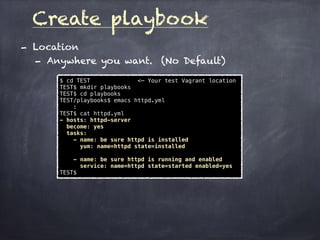
Create playbook
- Location
- Anywhere you want. (No Default)
$ cd TEST <— Your test Vagrant location
TEST$ mkdir playbooks
TEST$ cd playbooks
TEST/playbooks$ emacs httpd.yml
:
TEST$ cat httpd.yml
- hosts: httpd-server
become: yes
tasks:
- name: be sure httpd is installed
yum: name=httpd state=installed
- name: be sure httpd is running and enabled
service: name=httpd state=started enabled=yes
TEST$
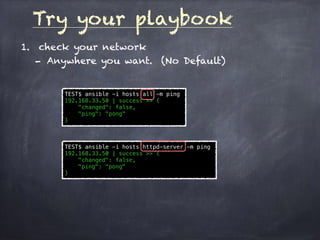
Try your playbook
1. check your network
- Anywhere you want. (No Default)
TEST$ ansible -i hosts all -m ping
192.168.33.50 | success >> {
"changed": false,
"ping": "pong"
}
TEST$ ansible -i hosts httpd-server -m ping
192.168.33.50 | success >> {
"changed": false,
"ping": "pong"
}
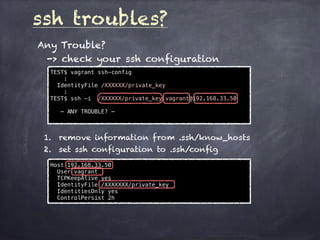
ssh troubles?
Any Trouble?
-> check your ssh configuration
TEST$ vagrant ssh-config
:
IdentityFile /XXXXXX/private_key
:
TEST$ ssh -i /XXXXXX/private_key vagrant@192.168.33.50
— ANY TROUBLE? —
1. remove information from .ssh/know_hosts
2. set ssh configuration to .ssh/config
Host 192.168.33.50
User vagrant
TCPKeepAlive yes
IdentityFile /XXXXXXX/private_key
IdentitiesOnly yes
ControlPersist 2h
Try your playbook (2)
2. check your playbook
TEST$ ansible-playbook -i ./hosts playbooks/httpd.yml --syntax-check
playbook: playbooks/httpd.yml
TEST$ ansible-playbook -i ./hosts playbooks/httpd.yml --list-tasks
playbook: playbooks/httpd.yml
play #1 (httpd-server): TAGS: []
be sure httpd is installed TAGS: []
be sure httpd is running and enabled TAGS: []
air:nemo@~/TEST_STUDY$
— set sandbox —
set sandbox to test many times
TEST$ vagrant sandbox status
[default] Sandbox mode is off
TEST$ vagrant sandbox on
[default] Starting sandbox mode...
0%...10%...20%...30%...40%...50%...60%...70%...80%...90%...100%
TEST$ vagrant sandbox status
[default] Sandbox mode is on
TEST$
Try your playbook (3)
3. do your playbook
TEST$ ansible-playbook -i ./hosts playbooks/httpd.yml
PLAY [httpd-server] ***********************************************************
GATHERING FACTS ***************************************************************
ok: [192.168.33.50]
TASK: [be sure httpd is installed] ********************************************
changed: [192.168.33.50]
TASK: [be sure httpd is running and enabled] **********************************
changed: [192.168.33.50]
PLAY RECAP ********************************************************************
192.168.33.50 : ok=3 changed=2 unreachable=0 failed=0
TEST$
—- inside Virtual machine —-
[vagrant@vagrant-centos65 init.d]$ ls /etc/init.d/httpd
ls: cannot access /etc/init.d/httpd: No such file or directory
[vagrant@vagrant-centos65 init.d]$
—- inside Virtual machine —-
[vagrant@vagrant-centos65 init.d]$ ls /etc/init.d/httpd
/etc/init.d/httpd
[vagrant@vagrant-centos65 init.d]$
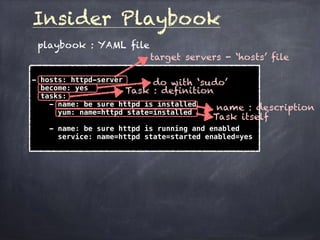
Insider Playbook
playbook : YAML file
- hosts: httpd-server
become: yes
tasks:
- name: be sure httpd is installed
yum: name=httpd state=installed
- name: be sure httpd is running and enabled
service: name=httpd state=started enabled=yes
target servers - ‘hosts’ file
do with ‘sudo’
Task : definition
name : description
Task itself
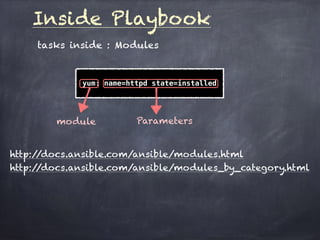
Inside Playbook
tasks inside : Modules
yum: name=httpd state=installed
module Parameters
http://docs.ansible.com/ansible/modules.html
http://docs.ansible.com/ansible/modules_by_category.html
— rollback sandbox —
Rollback sandbox :
back to server environment before install HTTPD
TEST$ vagrant sandbox rollback
[default] Rolling back the virtual machine...
0%...10%...20%...30%...40%...50%...60%...70%...80%...90%...100%
0%...10%...20%...30%...40%...50%...60%...70%...80%...90%...100%
air:nemo@~/TEST_STUDY$
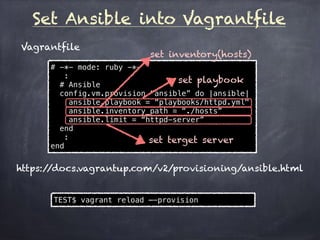
Set Ansible into Vagrantfile
Vagrantfile
# -*- mode: ruby -*- 

:
# Ansible 

config.vm.provision “ansible” do |ansible|
ansible.playbook = “playbooks/httpd.yml"
ansible.inventory_path = “./hosts”
ansible.limit = “httpd-server”
end
:
end
https://docs.vagrantup.com/v2/provisioning/ansible.html
set playbook
set inventory(hosts)
set terget server
TEST$ vagrant reload —-provision
Try : do Ansbile with Vagrant
TEST$ vagrant reload --provision
==> default: Attempting graceful shutdown of VM...
:
==> default: Machine booted and ready!
:
==> default: Running provisioner: ansible...
PLAY [httpd-server] ***********************************************************
GATHERING FACTS ***************************************************************
ok: [192.168.33.50]
TASK: [be sure httpd is installed] ********************************************
changed: [192.168.33.50]
TASK: [be sure httpd is running and enabled] **********************************
changed: [192.168.33.50]
PLAY RECAP ********************************************************************
192.168.33.50 : ok=3 changed=2 unreachable=0 failed=0
air:nemo@~/TEST_STUDY$
server has launched.
start Ansible tasks
Server setting was changed.
Task
Task
Server setting was changed.
Goal : Today’s archive
Server
Apps
Apache
PHP
MySQL
Product
Apps
Source
Data
Cron
Virtual server
Vagrant
+ ansible
+ fabric
automation
Homework
A. Please learn ‘Modules’ of Ansible.
- Note) Use ‘Official document’
- http://docs.ansible.com/ansible/modules.html
- http://docs.ansible.com/ansible/modules_by_category.html
- There are many useful ansible modules.
B. Please learn ‘Ansible Provisioner’ of
Vagrant.
- Note) Use ‘Official document’
- https://docs.vagrantup.com/v2/provisioning/ansible.html
- There are many useful provisioner related to ansible.
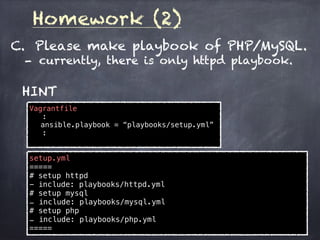
Homework (2)
C. Please make playbook of PHP/MySQL.
- currently, there is only httpd playbook.
HINT
Vagrantfile
:
ansible.playbook = “playbooks/setup.yml”
:
setup.yml
=====
# setup httpd
- include: playbooks/httpd.yml
# setup mysql
- include: playbooks/mysql.yml
# setup php
- include: playbooks/php.yml
=====
Next : Ansible(2)
A) What’s Idempotence??
B) Make spec list.
and use tarballs.

DevOps(3) : Ansible - (MOSG)

  • 1.
    DevOps (3) - Ansible— Mulodo Vietnam Co., Ltd.
  • 2.
    Our Purpose Make ourselves‘Dev Company’ from ‘factory’. Points Engineering knowledge <- * TODAY * Logical Thinking Co-operation work — Study Group —
  • 3.
    What’s DevOps? Mindset offilling gap between Dev and Ops. It’s not any technologies or solutions. C.A.M.S Culture Bust silos. Don’t say “no”. Involve everyone. Automation XXX as Code. Ask machines to do same things. Metrics monitor, find failure, Improve, make a plan. Share Dev->Ops, Ops->Dev, share metrics. Feedback of previous study
  • 4.
    Feedback of previousstudy (2) What’s Vagrant? manager of Virtual Machines Vagrant can manage … Virtual Box VMware (Fusion) AWS EC2 …. Trigger of automation engine. Vagrant run … Ansible Chef Puppet ….
  • 5.
  • 6.
    What’s Ansible? Ansible isa radically simple IT automation engine that automates cloud provisioning, configuration management, application deployment, intra- service orchestration, and many other IT needs. 
 (http://www.ansible.com/)
  • 7.
  • 8.
  • 9.
  • 10.
    How Ansible work? Hosts [httpd] 192.168.33.40 192.168.33.41 [backend] 192.168.33.50 Playbook(YAML file) - hosts: httpd become: yes tasks: - name: be sure httpd is installed yum: name=httpd state=installed - name: be sure httpd is running and enabled service: name=httpd state=started enabled=yes target serves tasks
  • 11.
    Create hosts file -Location - Anywhere you want. - Default: as you installed Ansible.. $ ansible --help Usage: ansible <host-pattern> [options] : -i INVENTORY, --inventory-file=INVENTORY specify inventory host file (default=/usr/local/etc/ansible/hosts) : $ $ cd TEST <— Your test Vagrant location TEST$ emacs hosts : TEST$ cat hosts [test-servers] 192.168.33.10 <— IP address of Your Vagrant server TEST$
  • 12.
    Create playbook - Location -Anywhere you want. (No Default) $ cd TEST <— Your test Vagrant location TEST$ mkdir playbooks TEST$ cd playbooks TEST/playbooks$ emacs httpd.yml : TEST$ cat httpd.yml - hosts: httpd-server become: yes tasks: - name: be sure httpd is installed yum: name=httpd state=installed - name: be sure httpd is running and enabled service: name=httpd state=started enabled=yes TEST$
  • 13.
    Try your playbook 1.check your network - Anywhere you want. (No Default) TEST$ ansible -i hosts all -m ping 192.168.33.50 | success >> { "changed": false, "ping": "pong" } TEST$ ansible -i hosts httpd-server -m ping 192.168.33.50 | success >> { "changed": false, "ping": "pong" }
  • 14.
    ssh troubles? Any Trouble? ->check your ssh configuration TEST$ vagrant ssh-config : IdentityFile /XXXXXX/private_key : TEST$ ssh -i /XXXXXX/private_key vagrant@192.168.33.50 — ANY TROUBLE? — 1. remove information from .ssh/know_hosts 2. set ssh configuration to .ssh/config Host 192.168.33.50 User vagrant TCPKeepAlive yes IdentityFile /XXXXXXX/private_key IdentitiesOnly yes ControlPersist 2h
  • 15.
    Try your playbook(2) 2. check your playbook TEST$ ansible-playbook -i ./hosts playbooks/httpd.yml --syntax-check playbook: playbooks/httpd.yml TEST$ ansible-playbook -i ./hosts playbooks/httpd.yml --list-tasks playbook: playbooks/httpd.yml play #1 (httpd-server): TAGS: [] be sure httpd is installed TAGS: [] be sure httpd is running and enabled TAGS: [] air:nemo@~/TEST_STUDY$
  • 16.
    — set sandbox— set sandbox to test many times TEST$ vagrant sandbox status [default] Sandbox mode is off TEST$ vagrant sandbox on [default] Starting sandbox mode... 0%...10%...20%...30%...40%...50%...60%...70%...80%...90%...100% TEST$ vagrant sandbox status [default] Sandbox mode is on TEST$
  • 17.
    Try your playbook(3) 3. do your playbook TEST$ ansible-playbook -i ./hosts playbooks/httpd.yml PLAY [httpd-server] *********************************************************** GATHERING FACTS *************************************************************** ok: [192.168.33.50] TASK: [be sure httpd is installed] ******************************************** changed: [192.168.33.50] TASK: [be sure httpd is running and enabled] ********************************** changed: [192.168.33.50] PLAY RECAP ******************************************************************** 192.168.33.50 : ok=3 changed=2 unreachable=0 failed=0 TEST$ —- inside Virtual machine —- [vagrant@vagrant-centos65 init.d]$ ls /etc/init.d/httpd ls: cannot access /etc/init.d/httpd: No such file or directory [vagrant@vagrant-centos65 init.d]$ —- inside Virtual machine —- [vagrant@vagrant-centos65 init.d]$ ls /etc/init.d/httpd /etc/init.d/httpd [vagrant@vagrant-centos65 init.d]$
  • 18.
    Insider Playbook playbook :YAML file - hosts: httpd-server become: yes tasks: - name: be sure httpd is installed yum: name=httpd state=installed - name: be sure httpd is running and enabled service: name=httpd state=started enabled=yes target servers - ‘hosts’ file do with ‘sudo’ Task : definition name : description Task itself
  • 19.
    Inside Playbook tasks inside: Modules yum: name=httpd state=installed module Parameters http://docs.ansible.com/ansible/modules.html http://docs.ansible.com/ansible/modules_by_category.html
  • 20.
    — rollback sandbox— Rollback sandbox : back to server environment before install HTTPD TEST$ vagrant sandbox rollback [default] Rolling back the virtual machine... 0%...10%...20%...30%...40%...50%...60%...70%...80%...90%...100% 0%...10%...20%...30%...40%...50%...60%...70%...80%...90%...100% air:nemo@~/TEST_STUDY$
  • 21.
    Set Ansible intoVagrantfile Vagrantfile # -*- mode: ruby -*- 
 : # Ansible 
 config.vm.provision “ansible” do |ansible| ansible.playbook = “playbooks/httpd.yml" ansible.inventory_path = “./hosts” ansible.limit = “httpd-server” end : end https://docs.vagrantup.com/v2/provisioning/ansible.html set playbook set inventory(hosts) set terget server TEST$ vagrant reload —-provision
  • 22.
    Try : doAnsbile with Vagrant TEST$ vagrant reload --provision ==> default: Attempting graceful shutdown of VM... : ==> default: Machine booted and ready! : ==> default: Running provisioner: ansible... PLAY [httpd-server] *********************************************************** GATHERING FACTS *************************************************************** ok: [192.168.33.50] TASK: [be sure httpd is installed] ******************************************** changed: [192.168.33.50] TASK: [be sure httpd is running and enabled] ********************************** changed: [192.168.33.50] PLAY RECAP ******************************************************************** 192.168.33.50 : ok=3 changed=2 unreachable=0 failed=0 air:nemo@~/TEST_STUDY$ server has launched. start Ansible tasks Server setting was changed. Task Task Server setting was changed.
  • 23.
    Goal : Today’sarchive Server Apps Apache PHP MySQL Product Apps Source Data Cron Virtual server Vagrant + ansible + fabric automation
  • 24.
    Homework A. Please learn‘Modules’ of Ansible. - Note) Use ‘Official document’ - http://docs.ansible.com/ansible/modules.html - http://docs.ansible.com/ansible/modules_by_category.html - There are many useful ansible modules. B. Please learn ‘Ansible Provisioner’ of Vagrant. - Note) Use ‘Official document’ - https://docs.vagrantup.com/v2/provisioning/ansible.html - There are many useful provisioner related to ansible.
  • 25.
    Homework (2) C. Pleasemake playbook of PHP/MySQL. - currently, there is only httpd playbook. HINT Vagrantfile : ansible.playbook = “playbooks/setup.yml” : setup.yml ===== # setup httpd - include: playbooks/httpd.yml # setup mysql - include: playbooks/mysql.yml # setup php - include: playbooks/php.yml =====
  • 26.
    Next : Ansible(2) A)What’s Idempotence?? B) Make spec list. and use tarballs.