
VAGRANT
Automate your development
environment with
Vagrant?
• Vagrant is a virtual machine manager. It allows you to
script the virtual machine configuration as well as the
provisioning.
• Vagrant provides easy to configure, reproducible, and
portable work environments built on top of industry-
standard technology and controlled by a single consistent
workflow to help maximize the productivity and flexibility
of you and your team.
• Vagrant gives you a disposable environment and
consistent workflow for developing and testing
infrastructure management scripts.You can quickly test
things like shell scripts, Salt modules, Chef cookbooks,
Puppet modules, and more using local virtualization such
asVirtualBox orVMware.Then, with the same
configuration, you can test these scripts on remote clouds
such as AWS or RackSpace with the same workflow.
Vagrant
vs
Docker
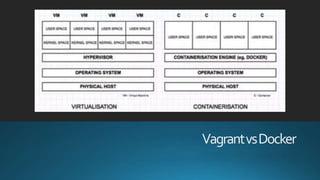
• Vagrant utilizes a much simpler architecture than Docker. It
uses virtual machines to run environments independent of
the host machine.This is done using what is called
“virtualization” software such asVirtualBox or VMware.
Each environment has its own virtual machine and is
configured by use of aVagrantfile.TheVagrantfile tells
Vagrant how to set up the virtual machine and what scripts
need to be run in order to provision the environment.
• The downside to this approach is that each virtual machine
includes not only your application and all of its libraries but
the entire guest operating system as well, which may well
be tens of GBs in size.
• Docker, however, uses “containers” which include your
application and all of its dependencies, but share the kernel
(operating system) with other containers. Containers run as
isolated processes on the host operating system but are
not tied to any specific infrastructure (they can run on any
computer).
Vagrant
vs
Docker
• Vagrant is easier to understand and is easier to get up
and running but can be very resource intensive (in terms
of RAM and space).
• Docker is much faster, uses much less CPU and RAM
and potentially uses much less space thanVagrantVM’s.
• Vagrant will allow you to run aWindows development
environment on Mac or Linux, as well. For microservice
heavy environments, Docker can be attractive because
you can easily start a single DockerVM and start many
containers above that very quickly.This is a good use
case for Docker.Vagrant can do this as well with the
Docker provider.
VagrantvsDocker
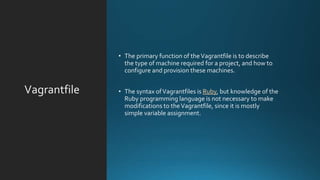
Vagrantfile
• The primary function of theVagrantfile is to describe
the type of machine required for a project, and how to
configure and provision these machines.
• The syntax ofVagrantfiles is Ruby, but knowledge of the
Ruby programming language is not necessary to make
modifications to theVagrantfile, since it is mostly
simple variable assignment.
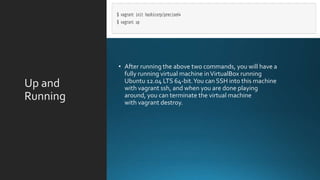
Up and
Running
• After running the above two commands, you will have a
fully running virtual machine inVirtualBox running
Ubuntu 12.04 LTS 64-bit.You can SSH into this machine
with vagrant ssh, and when you are done playing
around, you can terminate the virtual machine
with vagrant destroy.
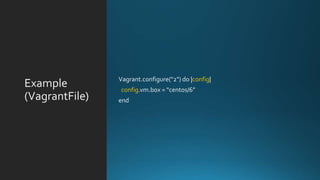
Example
(VagrantFile)
Vagrant.configure("2") do |config|
config.vm.box = "centos/6”
end
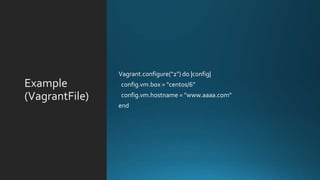
Example
(VagrantFile)
Vagrant.configure("2") do |config|
config.vm.box = "centos/6”
config.vm.hostname = "www.aaaa.com"
end
Example
(VagrantFile)
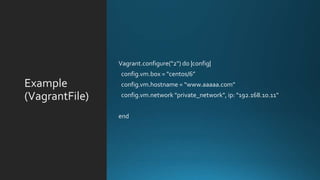
Vagrant.configure("2") do |config|
config.vm.box = "centos/6”
config.vm.hostname = “www.aaaaa.com”
config.vm.network "private_network", ip: "192.168.10.11"
end
Example
(VagrantFile)
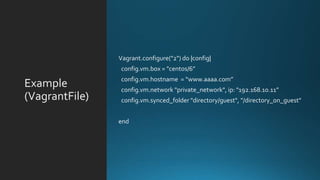
Vagrant.configure("2") do |config|
config.vm.box = "centos/6”
config.vm.hostname = “www.aaaa.com”
config.vm.network "private_network", ip: "192.168.10.11”
config.vm.synced_folder "directory/guest", "/directory_on_guest"
end
Example
(VagrantFile)
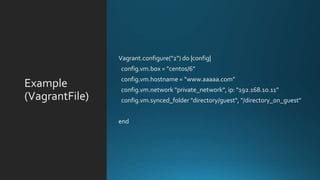
Vagrant.configure("2") do |config|
config.vm.box = "centos/6”
config.vm.hostname = “www.aaaaa.com”
config.vm.network "private_network", ip: "192.168.10.11”
config.vm.synced_folder "directory/guest", "/directory_on_guest"
end
Example
(VagrantFile)
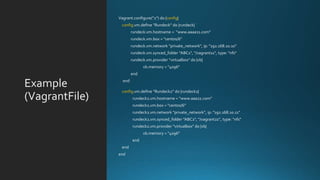
Vagrant.configure("2") do |config|
config.vm.define "Rundeck" do |rundeck|
rundeck.vm.hostname = “www.aaaa11.com”
rundeck.vm.box = "centos/6"
rundeck.vm.network "private_network", ip: "192.168.10.10"
rundeck.vm.synced_folder ”ABC1", "/vagrant11", type: "nfs"
rundeck.vm.provider "virtualbox" do |vb|
vb.memory = "4096"
end
end
config.vm.define "Rundeck2" do |rundeck2|
rundeck2.vm.hostname = “www.aaa22.com”
rundeck2.vm.box = "centos/6"
rundeck2.vm.network "private_network", ip: "192.168.10.11"
rundeck2.vm.synced_folder ”ABC2", "/vagrant22", type: "nfs"
rundeck2.vm.provider "virtualbox" do |vb|
vb.memory = "4096"
end
end
end
Example
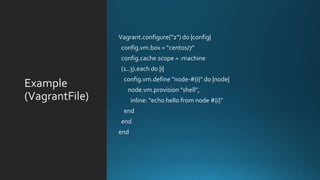
(VagrantFile)
Vagrant.configure("2") do |config|
config.vm.box = "centos/7"
config.cache.scope = :machine
(1..3).each do |i|
config.vm.define "node-#{i}" do |node|
node.vm.provision "shell",
inline: "echo hello from node #{i}"
end
end
end
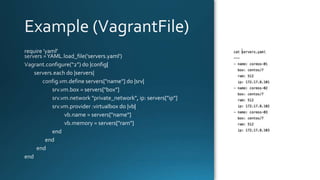
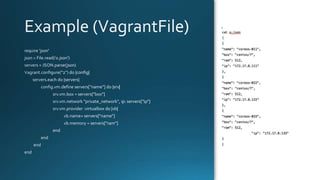
Example
Example
Provisioning
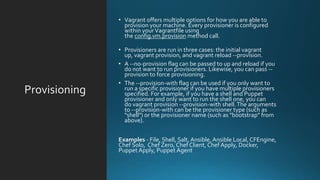
• Vagrant offers multiple options for how you are able to
provision your machine. Every provisioner is configured
within yourVagrantfile using
the config.vm.provision method call.
• Provisioners are run in three cases: the initial vagrant
up, vagrant provision, and vagrant reload --provision.
• A --no-provision flag can be passed to up and reload if you
do not want to run provisioners. Likewise, you can pass --
provision to force provisioning.
• The --provision-with flag can be used if you only want to
run a specific provisioner if you have multiple provisioners
specified. For example, if you have a shell and Puppet
provisioner and only want to run the shell one, you can
do vagrant provision --provision-with shell.The arguments
to --provision-with can be the provisioner type (such as
"shell") or the provisioner name (such as "bootstrap" from
above).
Examples - File, Shell, Salt, Ansible,Ansible Local, CFEngine,
Chef Solo, Chef Zero, Chef Client, Chef Apply, Docker,
Puppet Apply, Puppet Agent
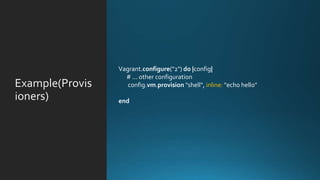
Example(
)
Vagrant.configure("2") do |config|
# ... other configuration
config.vm.provision "shell", inline: "echo hello"
end
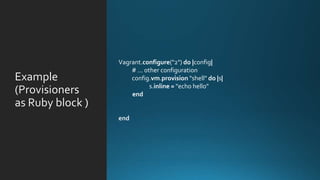
Example
(
as
Vagrant.configure("2") do |config|
# ... other configuration
config.vm.provision "shell" do |s|
s.inline = "echo hello"
end
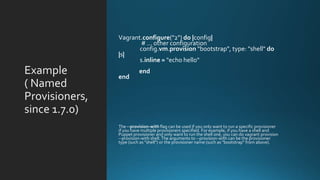
Example
( Named
Provisioners,
since 1.7.0)
Vagrant.configure("2") do |config|
# ... other configuration
config.vm.provision "bootstrap", type: "shell" do
|s|
s.inline = "echo hello"
end
end
The --provision-with flag can be used if you only want to run a specific provisioner
if you have multiple provisioners specified. For example, if you have a shell and
Puppet provisioner and only want to run the shell one, you can do vagrant provision
--provision-with shell.The arguments to --provision-with can be the provisioner
type (such as "shell") or the provisioner name (such as "bootstrap" from above).
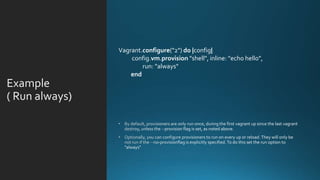
Example
( Run always
Vagrant.configure("2") do |config|
config.vm.provision "shell", inline: "echo hello",
run: "always"
end
Example
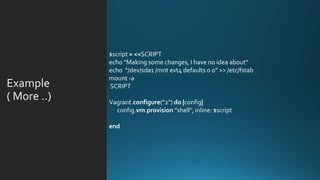
( More ..
$script = <<SCRIPT
echo “Making some changes, I have no idea about”
echo “/dev/sda1 /mnt ext4 defaults 0 0” >> /etc/fstab
mount -a
SCRIPT
Vagrant.configure("2") do |config|
config.vm.provision "shell", inline: $script
end
Example
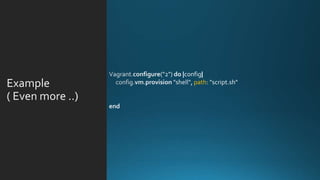
( Even more ..
path
Example
( Provision
with SALT )
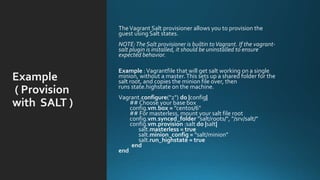
TheVagrant Salt provisioner allows you to provision the
guest using Salt states.
NOTE:The Salt provisioner is builtin toVagrant. If the vagrant-
salt plugin is installed, it should be uninstalled to ensure
expected behavior.
Example :Vagrantfile that will get salt working on a single
minion, without a master.This sets up a shared folder for the
salt root, and copies the minion file over, then
runs state.highstate on the machine.
Vagrant.configure("2") do |config|
## Choose your base box
config.vm.box = ”centos/6"
## For masterless, mount your salt file root
config.vm.synced_folder "salt/roots/", "/srv/salt/"
config.vm.provision :salt do |salt|
salt.masterless = true
salt.minion_config = "salt/minion"
salt.run_highstate = true
end
end
One More
Example
( Provision
with SALT)
mybox.vm.provision "salt" do |salt|
salt.install_type = 'git v2016.11.2'
salt.run_highstate = false
salt.log_level = 'debug'
salt.minion_config = "vagrant/#{settings['salt']['salt_mode']}/minion"
salt.bootstrap_script = 'vagrant/bootstrap-salt.sh'
salt.bootstrap_options = '-G -P -p python-gnupg -p gnupg2 -p tar'
if ($is_mode_master == true)
if ($is_salt_master == true)
salt.install_master = true
salt.master_config = 'vagrant/master/master'
salt.master_key = 'vagrant/master/pki/master.pem'
salt.master_pub = 'vagrant/master/pki/master.pub'
salt.seed_master = $salt_seed_master
end
salt.minion_key = "vagrant/master/pki/#{mcdp_host}.corp.adobe.com.pem"
salt.minion_pub = "vagrant/master/pki/#{mcdp_host}.corp.adobe.com.pub"
end
end
Further more
https://www.vagrantup.co
m/docs/provisioning/salt.ht
ml
1
https://scotch.io/tutorials/h
ow-to-create-a-vagrant-
base-box-from-an-existing-
one
3
https://atlas.hashicorp.com
/bento?_ga=2.118028426.2
075104851.1497086564-
1396228144.1497086564
4
https://developerkarma.co
m/post/2014/vagrant-
tricks/
5
http://fgrehm.viewdocs.io/
vagrant-cachier/how-does-
it-work/
6
Thankyou
Akshay Siwal
akshay231990@gmail.com

Vagrant

  • 1.
  • 2.
    Vagrant? • Vagrant isa virtual machine manager. It allows you to script the virtual machine configuration as well as the provisioning. • Vagrant provides easy to configure, reproducible, and portable work environments built on top of industry- standard technology and controlled by a single consistent workflow to help maximize the productivity and flexibility of you and your team. • Vagrant gives you a disposable environment and consistent workflow for developing and testing infrastructure management scripts.You can quickly test things like shell scripts, Salt modules, Chef cookbooks, Puppet modules, and more using local virtualization such asVirtualBox orVMware.Then, with the same configuration, you can test these scripts on remote clouds such as AWS or RackSpace with the same workflow.
  • 3.
    Vagrant vs Docker • Vagrant utilizesa much simpler architecture than Docker. It uses virtual machines to run environments independent of the host machine.This is done using what is called “virtualization” software such asVirtualBox or VMware. Each environment has its own virtual machine and is configured by use of aVagrantfile.TheVagrantfile tells Vagrant how to set up the virtual machine and what scripts need to be run in order to provision the environment. • The downside to this approach is that each virtual machine includes not only your application and all of its libraries but the entire guest operating system as well, which may well be tens of GBs in size. • Docker, however, uses “containers” which include your application and all of its dependencies, but share the kernel (operating system) with other containers. Containers run as isolated processes on the host operating system but are not tied to any specific infrastructure (they can run on any computer).
  • 4.
    Vagrant vs Docker • Vagrant iseasier to understand and is easier to get up and running but can be very resource intensive (in terms of RAM and space). • Docker is much faster, uses much less CPU and RAM and potentially uses much less space thanVagrantVM’s. • Vagrant will allow you to run aWindows development environment on Mac or Linux, as well. For microservice heavy environments, Docker can be attractive because you can easily start a single DockerVM and start many containers above that very quickly.This is a good use case for Docker.Vagrant can do this as well with the Docker provider.
  • 5.
  • 6.
    Vagrantfile • The primaryfunction of theVagrantfile is to describe the type of machine required for a project, and how to configure and provision these machines. • The syntax ofVagrantfiles is Ruby, but knowledge of the Ruby programming language is not necessary to make modifications to theVagrantfile, since it is mostly simple variable assignment.
  • 7.
    Up and Running • Afterrunning the above two commands, you will have a fully running virtual machine inVirtualBox running Ubuntu 12.04 LTS 64-bit.You can SSH into this machine with vagrant ssh, and when you are done playing around, you can terminate the virtual machine with vagrant destroy.
  • 8.
  • 9.
    Example (VagrantFile) Vagrant.configure("2") do |config| config.vm.box= "centos/6” config.vm.hostname = "www.aaaa.com" end
  • 10.
    Example (VagrantFile) Vagrant.configure("2") do |config| config.vm.box= "centos/6” config.vm.hostname = “www.aaaaa.com” config.vm.network "private_network", ip: "192.168.10.11" end
  • 11.
    Example (VagrantFile) Vagrant.configure("2") do |config| config.vm.box= "centos/6” config.vm.hostname = “www.aaaa.com” config.vm.network "private_network", ip: "192.168.10.11” config.vm.synced_folder "directory/guest", "/directory_on_guest" end
  • 12.
    Example (VagrantFile) Vagrant.configure("2") do |config| config.vm.box= "centos/6” config.vm.hostname = “www.aaaaa.com” config.vm.network "private_network", ip: "192.168.10.11” config.vm.synced_folder "directory/guest", "/directory_on_guest" end
  • 13.
    Example (VagrantFile) Vagrant.configure("2") do |config| config.vm.define"Rundeck" do |rundeck| rundeck.vm.hostname = “www.aaaa11.com” rundeck.vm.box = "centos/6" rundeck.vm.network "private_network", ip: "192.168.10.10" rundeck.vm.synced_folder ”ABC1", "/vagrant11", type: "nfs" rundeck.vm.provider "virtualbox" do |vb| vb.memory = "4096" end end config.vm.define "Rundeck2" do |rundeck2| rundeck2.vm.hostname = “www.aaa22.com” rundeck2.vm.box = "centos/6" rundeck2.vm.network "private_network", ip: "192.168.10.11" rundeck2.vm.synced_folder ”ABC2", "/vagrant22", type: "nfs" rundeck2.vm.provider "virtualbox" do |vb| vb.memory = "4096" end end end
  • 14.
    Example (VagrantFile) Vagrant.configure("2") do |config| config.vm.box= "centos/7" config.cache.scope = :machine (1..3).each do |i| config.vm.define "node-#{i}" do |node| node.vm.provision "shell", inline: "echo hello from node #{i}" end end end
  • 15.
  • 16.
  • 17.
    Provisioning • Vagrant offersmultiple options for how you are able to provision your machine. Every provisioner is configured within yourVagrantfile using the config.vm.provision method call. • Provisioners are run in three cases: the initial vagrant up, vagrant provision, and vagrant reload --provision. • A --no-provision flag can be passed to up and reload if you do not want to run provisioners. Likewise, you can pass -- provision to force provisioning. • The --provision-with flag can be used if you only want to run a specific provisioner if you have multiple provisioners specified. For example, if you have a shell and Puppet provisioner and only want to run the shell one, you can do vagrant provision --provision-with shell.The arguments to --provision-with can be the provisioner type (such as "shell") or the provisioner name (such as "bootstrap" from above). Examples - File, Shell, Salt, Ansible,Ansible Local, CFEngine, Chef Solo, Chef Zero, Chef Client, Chef Apply, Docker, Puppet Apply, Puppet Agent
  • 18.
    Example( ) Vagrant.configure("2") do |config| #... other configuration config.vm.provision "shell", inline: "echo hello" end
  • 19.
    Example ( as Vagrant.configure("2") do |config| #... other configuration config.vm.provision "shell" do |s| s.inline = "echo hello" end
  • 20.
    Example ( Named Provisioners, since 1.7.0) Vagrant.configure("2")do |config| # ... other configuration config.vm.provision "bootstrap", type: "shell" do |s| s.inline = "echo hello" end end The --provision-with flag can be used if you only want to run a specific provisioner if you have multiple provisioners specified. For example, if you have a shell and Puppet provisioner and only want to run the shell one, you can do vagrant provision --provision-with shell.The arguments to --provision-with can be the provisioner type (such as "shell") or the provisioner name (such as "bootstrap" from above).
  • 21.
    Example ( Run always Vagrant.configure("2")do |config| config.vm.provision "shell", inline: "echo hello", run: "always" end
  • 22.
    Example ( More .. $script= <<SCRIPT echo “Making some changes, I have no idea about” echo “/dev/sda1 /mnt ext4 defaults 0 0” >> /etc/fstab mount -a SCRIPT Vagrant.configure("2") do |config| config.vm.provision "shell", inline: $script end
  • 23.
  • 24.
    Example ( Provision with SALT) TheVagrant Salt provisioner allows you to provision the guest using Salt states. NOTE:The Salt provisioner is builtin toVagrant. If the vagrant- salt plugin is installed, it should be uninstalled to ensure expected behavior. Example :Vagrantfile that will get salt working on a single minion, without a master.This sets up a shared folder for the salt root, and copies the minion file over, then runs state.highstate on the machine. Vagrant.configure("2") do |config| ## Choose your base box config.vm.box = ”centos/6" ## For masterless, mount your salt file root config.vm.synced_folder "salt/roots/", "/srv/salt/" config.vm.provision :salt do |salt| salt.masterless = true salt.minion_config = "salt/minion" salt.run_highstate = true end end
  • 25.
    One More Example ( Provision withSALT) mybox.vm.provision "salt" do |salt| salt.install_type = 'git v2016.11.2' salt.run_highstate = false salt.log_level = 'debug' salt.minion_config = "vagrant/#{settings['salt']['salt_mode']}/minion" salt.bootstrap_script = 'vagrant/bootstrap-salt.sh' salt.bootstrap_options = '-G -P -p python-gnupg -p gnupg2 -p tar' if ($is_mode_master == true) if ($is_salt_master == true) salt.install_master = true salt.master_config = 'vagrant/master/master' salt.master_key = 'vagrant/master/pki/master.pem' salt.master_pub = 'vagrant/master/pki/master.pub' salt.seed_master = $salt_seed_master end salt.minion_key = "vagrant/master/pki/#{mcdp_host}.corp.adobe.com.pem" salt.minion_pub = "vagrant/master/pki/#{mcdp_host}.corp.adobe.com.pub" end end
  • 26.
  • 27.