EFFECTIVE PERFORMANCE REPORTING USING
            APACHE JMETER


             JULY 31, 2012
THE LOAD TESTING CLOUD
  A DEV-TEST CLOUD SERVICE 100%
 COMPATIBLE WITH THE OPEN-SOURCE
         APACHE JMETER
AGENDA
      Performance Attributes

  Understanding Performance KPIs

    Creating Load Test Reports

    JMeter Reporting Elements

Generating Advanced JMeter Reports

    BlazeMeter Reporting Plugin
PERFORMANCE ATTRIBUTES
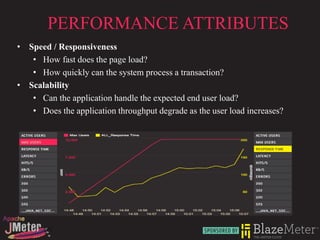
• Speed / Responsiveness
   • How fast does the page load?
   • How quickly can the system process a transaction?
• Scalability
   • Can the application handle the expected end user load?
   • Does the application throughput degrade as the user load increases?
PERFORMANCE ATTRIBUTES…

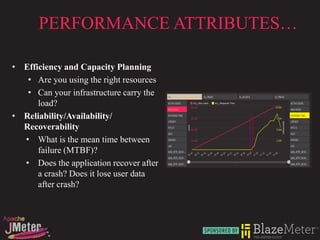
• Efficiency and Capacity Planning
   • Are you using the right resources
   • Can your infrastructure carry the
      load?
• Reliability/Availability/
  Recoverability
  • What is the mean time between
      failure (MTBF)?
  • Does the application recover after
      a crash? Does it lose user data
      after crash?
UNDERSTANDING PERFORMANCE KPIS
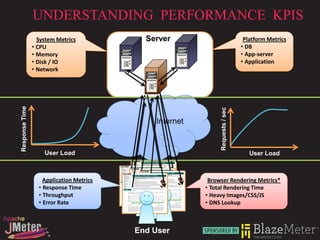
                  System Metrics            Server                              Platform Metrics
                • CPU                                                          • DB
                • Memory                                                       • App-server
                • Disk / IO                                                    • Application
                • Network
Response Time


                                                              Requests / sec
                                              Internet


                    User Load                                                     User Load


                    Application Metrics                   Browser Rendering Metrics*
                  • Response Time                        • Total Rendering Time
                  • Throughput                           • Heavy Images/CSS/JS
                  • Error Rate                           • DNS Lookup


                                          End User
UNDERSTANDING PERFORMANCE KPIS…
                   Response Time                                                      Throughput


                                                DB
           Inter   Response Time
                       Web             App
                                               Server

            net       Server
                                      Server
                                                DB
                                               Server


             Total Response Time =                                                 Throughput =
   Network latency + Application latency +                                 [TRANSACTIONS] / Second
           Browser Rendering Time
•Measured from the end-user perspective                           •Transactions are specific to applications
•Time taken to completely respond to request                      •In its simplest form, it is requests / sec
•TTLB TTFB

                                                          Error

                               •Defined in terms of the success of the request
                               •Error at HTTP level (404, 501)
                               •Application level error
CREATING LOAD TEST REPORTS
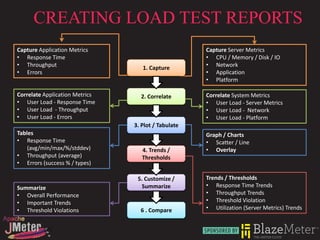
Capture Application Metrics                          Capture Server Metrics
• Response Time                                      • CPU / Memory / Disk / IO
• Throughput                       1. Capture        • Network
• Errors                                             • Application
                                                     • Platform

Correlate Application Metrics     2. Correlate       Correlate System Metrics
• User Load - Response Time                          • User Load - Server Metrics
• User Load - Throughput                             • User Load - Network
• User Load - Errors                                 • User Load - Platform
                                3. Plot / Tabulate
Tables                                               Graph / Charts
• Response Time                                      • Scatter / Line
    (avg/min/max/%/stddev)         4. Trends /       • Overlay
• Throughput (average)             Thresholds
• Errors (success % / types)

                                 5. Customize /      Trends / Thresholds
Summarize                          Summarize         • Response Time Trends
• Overall Performance                                • Throughput Trends
• Important Trends                                   • Threshold Violation
• Threshold Violations            6 . Compare        • Utilization (Server Metrics) Trends
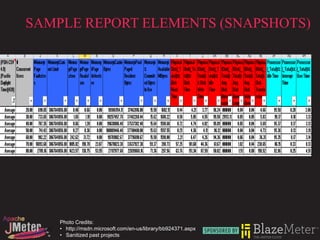
SAMPLE REPORT ELEMENTS (SNAPSHOTS)


    Photo Credits:
    • http://msdn.microsoft.com/en-us/library/bb924371.aspx
    • Sanitized past projects
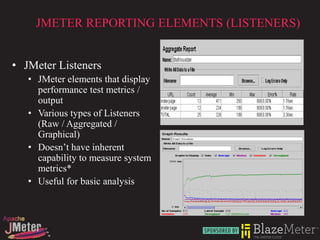
JMETER REPORTING ELEMENTS (LISTENERS)


• JMeter Listeners
   • JMeter elements that display
     performance test metrics /
     output
   • Various types of Listeners
     (Raw / Aggregated /
     Graphical)
   • Doesn’t have inherent
     capability to measure system
     metrics*
   • Useful for basic analysis
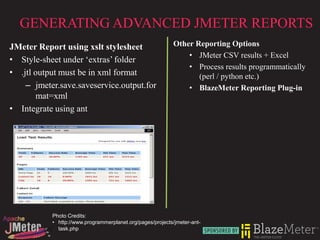
GENERATING ADVANCED JMETER REPORTS
JMeter Report using xslt stylesheet                        Other Reporting Options
                                                               • JMeter CSV results + Excel
• Style-sheet under ‘extras’ folder
                                                               • Process results programmatically
• .jtl output must be in xml format                               (perl / python etc.)
    – jmeter.save.saveservice.output.for                       • BlazeMeter Reporting Plug-in
        mat=xml
• Integrate using ant


           Photo Credits:
           • http://www.programmerplanet.org/pages/projects/jmeter-ant-
             task.php
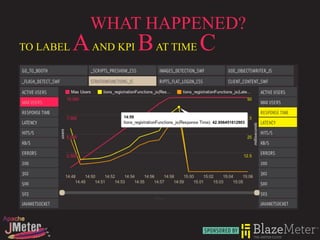
WHAT HAPPENED?
TO LABEL   A AND KPI B AT TIME C
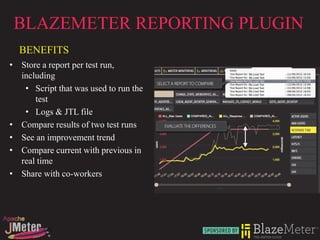
BLAZEMETER REPORTING PLUGIN
  BENEFITS
• Store a report per test run,
  including
   • Script that was used to run the
      test
   • Logs & JTL file
• Compare results of two test runs
• See an improvement trend
• Compare current with previous in
  real time
• Share with co-workers
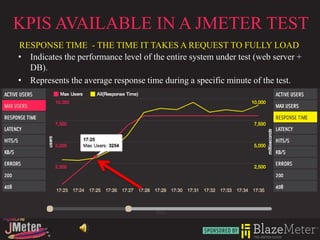
KPIS AVAILABLE IN A JMETER TEST
RESPONSE TIME - THE TIME IT TAKES A REQUEST TO FULLY LOAD
• Indicates the performance level of the entire system under test (web server +
  DB).
• Represents the average response time during a specific minute of the test.
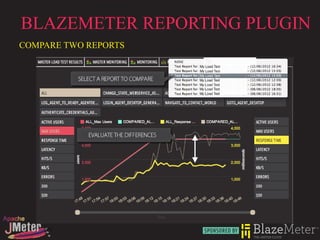
BLAZEMETER REPORTING PLUGIN
COMPARE TWO REPORTS
HTTP://BLAZEMETER.COM/

‘BlazeMeter - Startup Offers   ‘BlazeMeter - Code probing, not   BlazeMeter - Changing the
JMeter Cloud Load Testing at   Angry Birds will define cloud’s   Economics of Load Testing via the
Scale’                         success’                          Cloud’


       THANK YOU!

BlazeMeter- Effective Performance Reporting

  • 1.
    EFFECTIVE PERFORMANCE REPORTINGUSING APACHE JMETER JULY 31, 2012
  • 2.
    THE LOAD TESTINGCLOUD A DEV-TEST CLOUD SERVICE 100% COMPATIBLE WITH THE OPEN-SOURCE APACHE JMETER
  • 3.
    AGENDA Performance Attributes Understanding Performance KPIs Creating Load Test Reports JMeter Reporting Elements Generating Advanced JMeter Reports BlazeMeter Reporting Plugin
  • 4.
    PERFORMANCE ATTRIBUTES • Speed/ Responsiveness • How fast does the page load? • How quickly can the system process a transaction? • Scalability • Can the application handle the expected end user load? • Does the application throughput degrade as the user load increases?
  • 5.
    PERFORMANCE ATTRIBUTES… • Efficiencyand Capacity Planning • Are you using the right resources • Can your infrastructure carry the load? • Reliability/Availability/ Recoverability • What is the mean time between failure (MTBF)? • Does the application recover after a crash? Does it lose user data after crash?
  • 6.
    UNDERSTANDING PERFORMANCE KPIS System Metrics Server Platform Metrics • CPU • DB • Memory • App-server • Disk / IO • Application • Network Response Time Requests / sec Internet User Load User Load Application Metrics Browser Rendering Metrics* • Response Time • Total Rendering Time • Throughput • Heavy Images/CSS/JS • Error Rate • DNS Lookup End User
  • 7.
    UNDERSTANDING PERFORMANCE KPIS… Response Time Throughput DB Inter Response Time Web App Server net Server Server DB Server Total Response Time = Throughput = Network latency + Application latency + [TRANSACTIONS] / Second Browser Rendering Time •Measured from the end-user perspective •Transactions are specific to applications •Time taken to completely respond to request •In its simplest form, it is requests / sec •TTLB TTFB Error •Defined in terms of the success of the request •Error at HTTP level (404, 501) •Application level error
  • 8.
    CREATING LOAD TESTREPORTS Capture Application Metrics Capture Server Metrics • Response Time • CPU / Memory / Disk / IO • Throughput 1. Capture • Network • Errors • Application • Platform Correlate Application Metrics 2. Correlate Correlate System Metrics • User Load - Response Time • User Load - Server Metrics • User Load - Throughput • User Load - Network • User Load - Errors • User Load - Platform 3. Plot / Tabulate Tables Graph / Charts • Response Time • Scatter / Line (avg/min/max/%/stddev) 4. Trends / • Overlay • Throughput (average) Thresholds • Errors (success % / types) 5. Customize / Trends / Thresholds Summarize Summarize • Response Time Trends • Overall Performance • Throughput Trends • Important Trends • Threshold Violation • Threshold Violations 6 . Compare • Utilization (Server Metrics) Trends
  • 9.
    SAMPLE REPORT ELEMENTS(SNAPSHOTS) Photo Credits: • http://msdn.microsoft.com/en-us/library/bb924371.aspx • Sanitized past projects
  • 10.
    JMETER REPORTING ELEMENTS(LISTENERS) • JMeter Listeners • JMeter elements that display performance test metrics / output • Various types of Listeners (Raw / Aggregated / Graphical) • Doesn’t have inherent capability to measure system metrics* • Useful for basic analysis
  • 11.
    GENERATING ADVANCED JMETERREPORTS JMeter Report using xslt stylesheet Other Reporting Options • JMeter CSV results + Excel • Style-sheet under ‘extras’ folder • Process results programmatically • .jtl output must be in xml format (perl / python etc.) – jmeter.save.saveservice.output.for • BlazeMeter Reporting Plug-in mat=xml • Integrate using ant Photo Credits: • http://www.programmerplanet.org/pages/projects/jmeter-ant- task.php
  • 12.
    WHAT HAPPENED? TO LABEL A AND KPI B AT TIME C
  • 13.
    BLAZEMETER REPORTING PLUGIN BENEFITS • Store a report per test run, including • Script that was used to run the test • Logs & JTL file • Compare results of two test runs • See an improvement trend • Compare current with previous in real time • Share with co-workers
  • 14.
    KPIS AVAILABLE INA JMETER TEST RESPONSE TIME - THE TIME IT TAKES A REQUEST TO FULLY LOAD • Indicates the performance level of the entire system under test (web server + DB). • Represents the average response time during a specific minute of the test.
  • 15.
  • 16.
    HTTP://BLAZEMETER.COM/ ‘BlazeMeter - StartupOffers ‘BlazeMeter - Code probing, not BlazeMeter - Changing the JMeter Cloud Load Testing at Angry Birds will define cloud’s Economics of Load Testing via the Scale’ success’ Cloud’ THANK YOU!