DEVELOPING IN THE
CLOUD
Ryan Cuprak
Developing in the Cloud
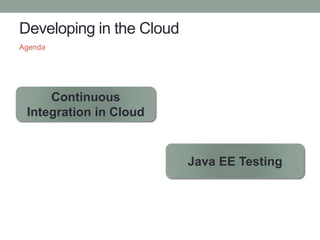
Agenda
Continuous
Integration in Cloud
Java EE Testing
Why Develop in the Cloud?
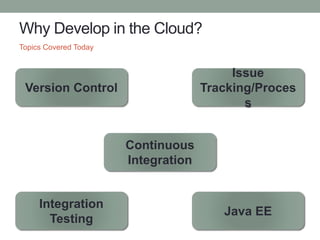
Topics Covered Today
Version Control
Continuous
Integration
Issue
Tracking/Proces
s
Integration
Testing
Java EE
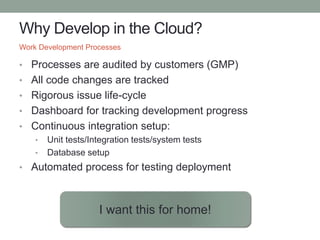
Why Develop in the Cloud?
• Processes are audited by customers (GMP)
• All code changes are tracked
• Rigorous issue life-cycle
• Dashboard for tracking development progress
• Continuous integration setup:
• Unit tests/Integration tests/system tests
• Database setup
• Automated process for testing deployment
Work Development Processes
I want this for home!
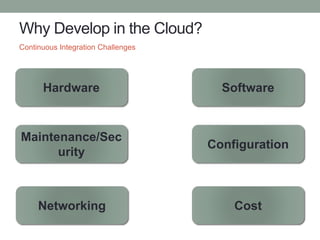
Why Develop in the Cloud?
Continuous Integration Challenges
Hardware Software
Maintenance/Sec
urity
Configuration
Networking Cost
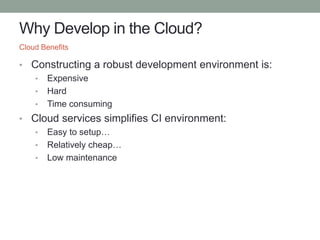
Why Develop in the Cloud?
• Constructing a robust development environment is:
• Expensive
• Hard
• Time consuming
• Cloud services simplifies CI environment:
• Easy to setup…
• Relatively cheap…
• Low maintenance
Cloud Benefits
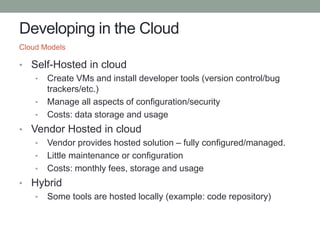
Developing in the Cloud
• Self-Hosted in cloud
• Create VMs and install developer tools (version control/bug
trackers/etc.)
• Manage all aspects of configuration/security
• Costs: data storage and usage
• Vendor Hosted in cloud
• Vendor provides hosted solution – fully configured/managed.
• Little maintenance or configuration
• Costs: monthly fees, storage and usage
• Hybrid
• Some tools are hosted locally (example: code repository)
Cloud Models
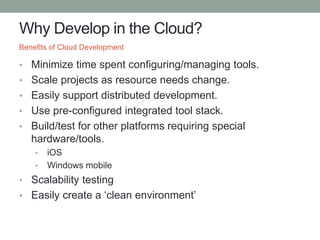
Why Develop in the Cloud?
• Minimize time spent configuring/managing tools.
• Scale projects as resource needs change.
• Easily support distributed development.
• Use pre-configured integrated tool stack.
• Build/test for other platforms requiring special
hardware/tools.
• iOS
• Windows mobile
• Scalability testing
• Easily create a ‘clean environment’
Benefits of Cloud Development
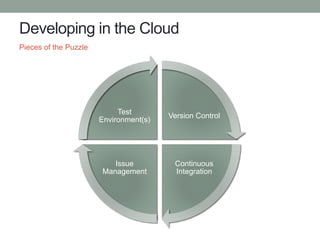
Developing in the Cloud
Pieces of the Puzzle
Version Control
Continuous
Integration
Issue
Management
Test
Environment(s)
Developing in the Cloud
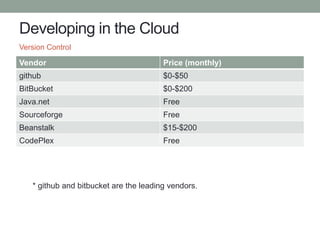
Vendor Price (monthly)
github $0-$50
BitBucket $0-$200
Java.net Free
Sourceforge Free
Beanstalk $15-$200
CodePlex Free
Version Control
* github and bitbucket are the leading vendors.
Developing in the Cloud
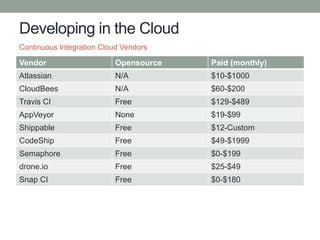
Vendor Opensource Paid (monthly)
Atlassian N/A $10-$1000
CloudBees N/A $60-$200
Travis CI Free $129-$489
AppVeyor None $19-$99
Shippable Free $12-Custom
CodeShip Free $49-$1999
Semaphore Free $0-$199
drone.io Free $25-$49
Snap CI Free $0-$180
Continuous Integration Cloud Vendors
Developing in the Cloud
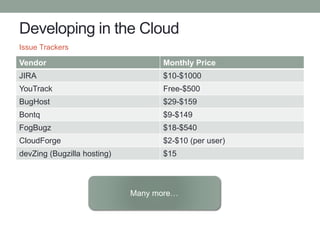
Vendor Monthly Price
JIRA $10-$1000
YouTrack Free-$500
BugHost $29-$159
Bontq $9-$149
FogBugz $18-$540
CloudForge $2-$10 (per user)
devZing (Bugzilla hosting) $15
Issue Trackers
Many more…
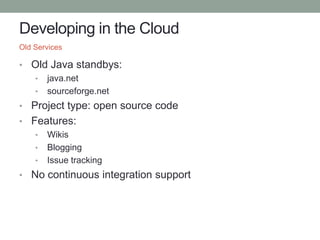
Developing in the Cloud
• Old Java standbys:
• java.net
• sourceforge.net
• Project type: open source code
• Features:
• Wikis
• Blogging
• Issue tracking
• No continuous integration support
Old Services
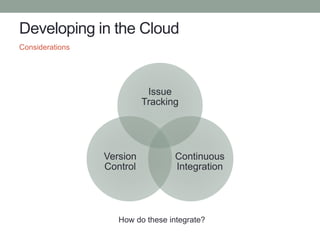
Developing in the Cloud
Considerations
Issue
Tracking
Continuous
Integration
Version
Control
How do these integrate?
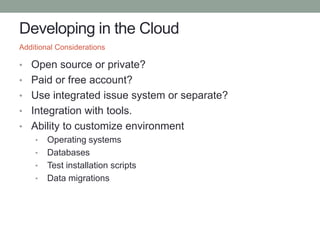
Developing in the Cloud
• Open source or private?
• Paid or free account?
• Use integrated issue system or separate?
• Integration with tools.
• Ability to customize environment
• Operating systems
• Databases
• Test installation scripts
• Data migrations
Additional Considerations
Developing in the Cloud
• Private projects
• Ability to switch from private to public and vice versa
• Version control: git
• Continuous integration Amazon
• Projects:
• Maven/Gradle builds
• Junit/Jasmine for unit testing
• NetBeans
• IDE
• IntelliJ
• NetBeans
• SourceTree
• xCode
Requirements
Developing in the Cloud
Cloud services:
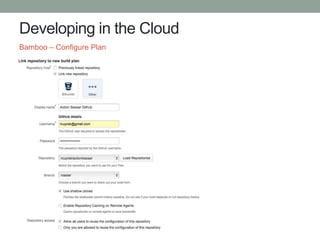
• Github – version control ($7 / month)
• Unlimited public repositories
• 5 private repositories
• Bamboo – Continuous Integration ($10 / month)
• 10 jobs / 1 agent
• Builds are executing on AWS EC2 instances.
• JIRA – issue tracking ($10 / month)
• 10 users
• Amazon Web Services
• VMs/databases
Total cost: $27 / month (excluding AWS usage).
What cloud services did I choose?
Developing in the Cloud
• Jenkins
• More popular than Bamboo.
• Easier to configure than Bamboo.
• Free
• Large pool of plugins (1000+)
• Bamboo
• Integrated with JIRA.
• Automated merging (git/mercurial)
• CI & CD pipelines
• Build agent
• Requires JIRA for cloud account
Bamboo versus Jenkins
Developing in the Cloud
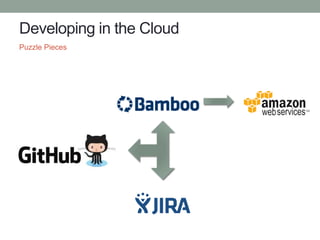
Puzzle Pieces
Developing in the Cloud
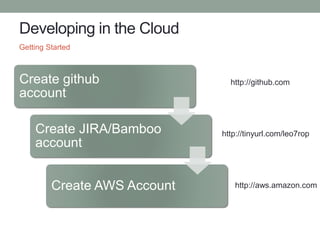
Getting Started
Create github
account
Create JIRA/Bamboo
account
Create AWS Account
http://tinyurl.com/leo7rop
http://aws.amazon.com
http://github.com
Developing in the Cloud
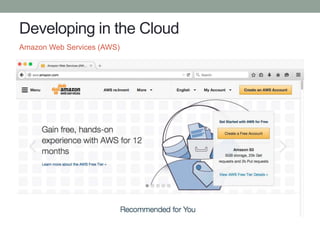
Amazon Web Services (AWS)
Developing in the Cloud
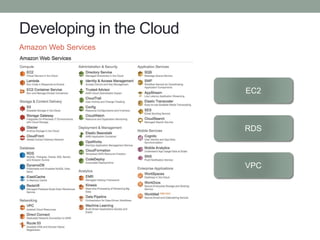
Amazon Web Services
EC2
RDS
VPC
Developing in the Cloud
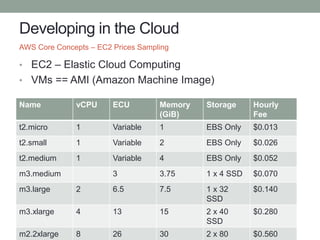
• EC2 – Elastic Cloud Computing
• VMs == AMI (Amazon Machine Image)
AWS Core Concepts – EC2 Prices Sampling
Name vCPU ECU Memory
(GiB)
Storage Hourly
Fee
t2.micro 1 Variable 1 EBS Only $0.013
t2.small 1 Variable 2 EBS Only $0.026
t2.medium 1 Variable 4 EBS Only $0.052
m3.medium 3 3.75 1 x 4 SSD $0.070
m3.large 2 6.5 7.5 1 x 32
SSD
$0.140
m3.xlarge 4 13 15 2 x 40
SSD
$0.280
m2.2xlarge 8 26 30 2 x 80 $0.560
Developing in the Cloud
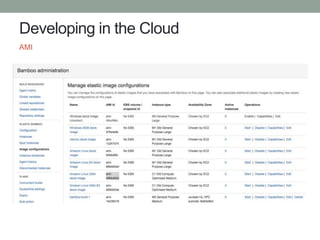
• Amazon provides a large library of AMIs.
• Bamboo has pre-configured AMIs with Bamboo agent
installed.
• Instances are accessed via ssh (download keys)
• Pick data center when launching an instance.
AWS Core Concepts – EC2
Developing in the Cloud
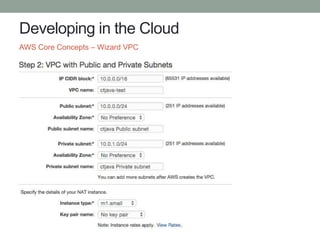
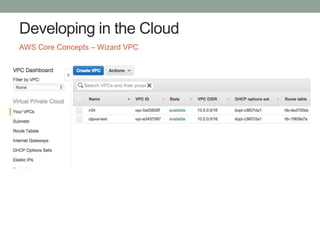
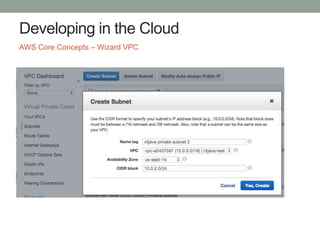
• VPC = Virtual Private Cloud
• Complete control over virtual networking environment:
• IP address range
• Subnets
• Routing tables
• Network gateways
• VPC can be connected to a corporate data center
• AMI instances can be launched into a VPC.
• Databases to a VPC.
AWS Core Concepts - VPC
Developing in the Cloud
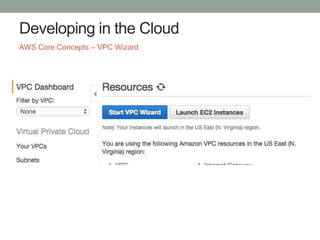
AWS Core Concepts – VPC Wizard
Developing in the Cloud
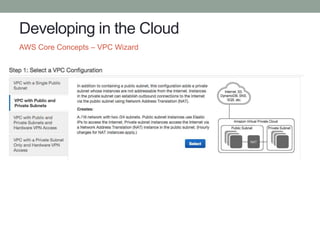
AWS Core Concepts – VPC Wizard
Developing in the Cloud
AWS Core Concepts – Wizard VPC
Developing in the Cloud
AWS Core Concepts – Wizard VPC
Developing in the Cloud
AWS Core Concepts – Wizard VPC
Developing in the Cloud
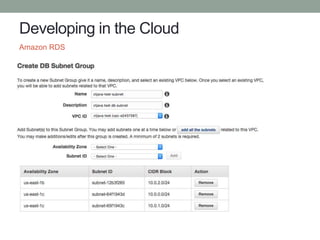
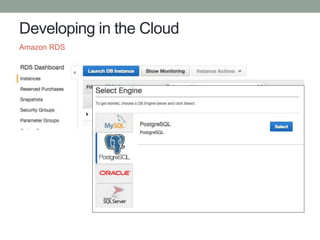
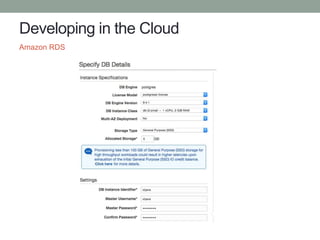
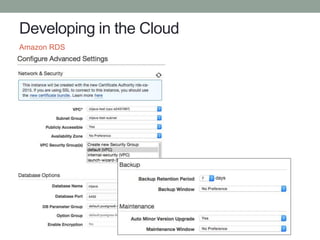
• Amazon RDS – Amazon Relational Database Service
• Supported databases:
• MySQL
• Oracle
• Microsoft SQL Server
• PostgreSQL
• Provisioned using SSD, IOPS Storage, Magnetic.
• Automated failover, backups, multiple-zones, mirroring
• Can attach to a VPC.
Amazon RDS
Developing in the Cloud
Amazon RDS
Developing in the Cloud
Amazon RDS
Developing in the Cloud
Amazon RDS
Developing in the Cloud
Amazon RDS
Developing in the Cloud
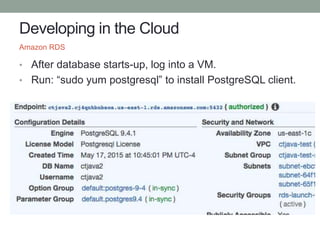
• After database starts-up, log into a VM.
• Run: “sudo yum postgresql” to install PostgreSQL client.
Amazon RDS
Developing in the Cloud
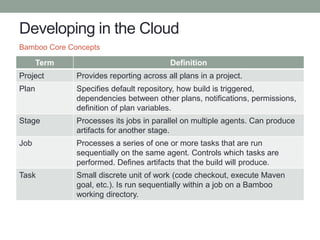
Term Definition
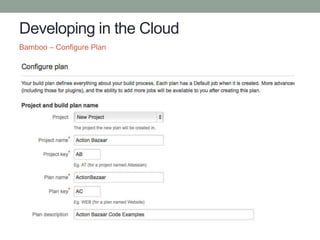
Project Provides reporting across all plans in a project.
Plan Specifies default repository, how build is triggered,
dependencies between other plans, notifications, permissions,
definition of plan variables.
Stage Processes its jobs in parallel on multiple agents. Can produce
artifacts for another stage.
Job Processes a series of one or more tasks that are run
sequentially on the same agent. Controls which tasks are
performed. Defines artifacts that the build will produce.
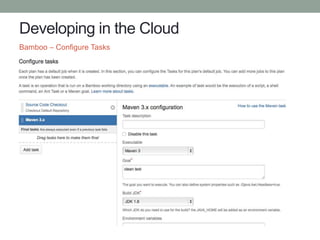
Task Small discrete unit of work (code checkout, execute Maven
goal, etc.). Is run sequentially within a job on a Bamboo
working directory.
Bamboo Core Concepts
Developing in the Cloud
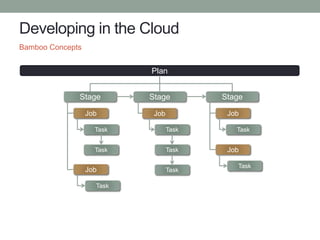
Bamboo Concepts
Plan
Stage Stage Stage
Job
Task
Task
Job
Task
Job
Task
Task
Task
Job
Task
Job
Task
Developing in the Cloud
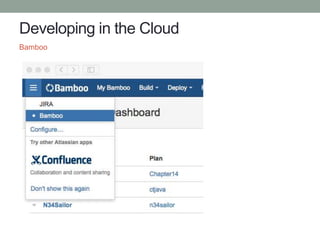
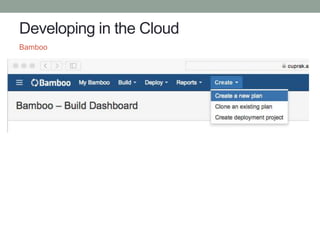
Bamboo
Developing in the Cloud
Bamboo
Developing in the Cloud
Bamboo – Configure Plan
Developing in the Cloud
Bamboo – Configure Plan
Developing in the Cloud
Bamboo – Configure Tasks
Developing in the Cloud
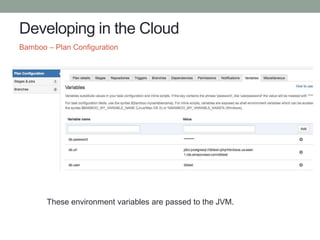
Bamboo – Plan Configuration
These environment variables are passed to the JVM.
Developing in the Cloud
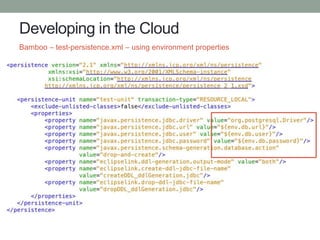
Bamboo – test-persistence.xml – using environment properties
Developing in the Cloud
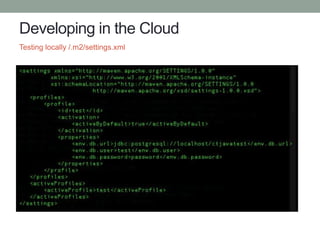
Testing locally /.m2/settings.xml
Developing in the Cloud
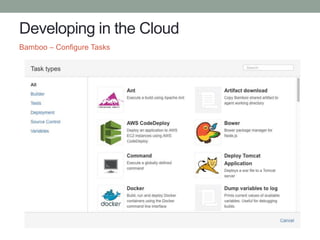
Bamboo – Configure Tasks
Developing in the Cloud
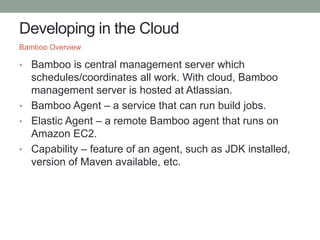
• Bamboo is central management server which
schedules/coordinates all work. With cloud, Bamboo
management server is hosted at Atlassian.
• Bamboo Agent – a service that can run build jobs.
• Elastic Agent – a remote Bamboo agent that runs on
Amazon EC2.
• Capability – feature of an agent, such as JDK installed,
version of Maven available, etc.
Bamboo Overview
Developing in the Cloud
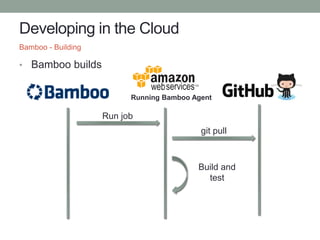
• Bamboo builds
Bamboo - Building
Running Bamboo Agent
git pull
Run job
Build and
test
Developing in the Cloud
AMI
Developing in the Cloud
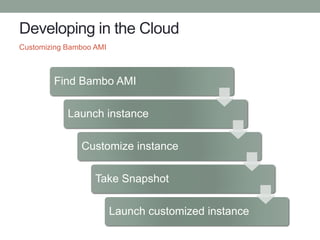
Customizing Bamboo AMI
Find Bambo AMI
Launch instance
Customize instance
Take Snapshot
Launch customized instance
Developing in the Cloud
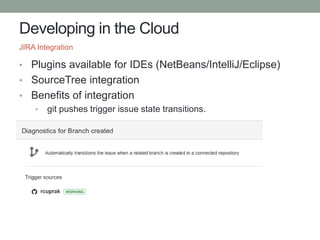
• Plugins available for IDEs (NetBeans/IntelliJ/Eclipse)
• SourceTree integration
• Benefits of integration
• git pushes trigger issue state transitions.
JIRA Integration
Developing in the Cloud
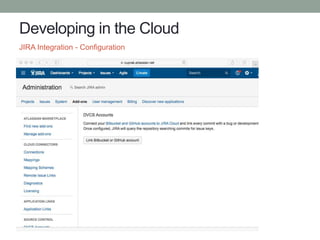
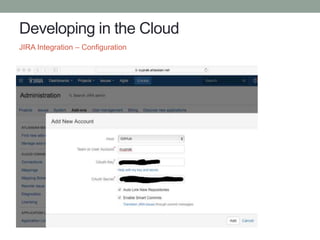
JIRA Integration - Configuration
Developing in the Cloud
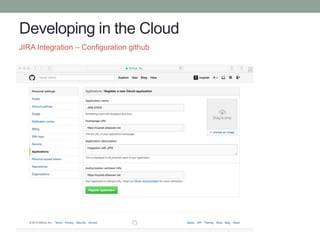
JIRA Integration – Configuration github
Developing in the Cloud
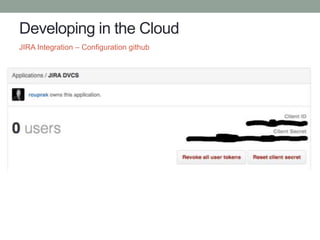
JIRA Integration – Configuration github
Developing in the Cloud
JIRA Integration – Configuration
Developing in the Cloud
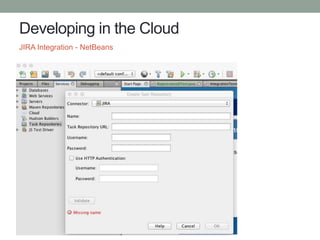
JIRA Integration - NetBeans
Developing in the Cloud
Testing challenges:
• RESTful webservices
• WebSocket endpoints
• Security
• Scalability
• JavaScript code
• JavaScript code using AJAX (with server)
• Real data, bad data, etc.
Testing Java EE
Developing in the Cloud
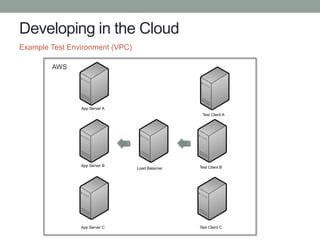
Example Test Environment (VPC)
App Server A
App Server B
App Server C
Load Balacner
Test Client A
Test Client B
Test Client C
AWS
Developing in the Cloud
• Bamboo + AWS = full testing in the cloud.
• Create custom environments for simulating a cluster.
• Test load balancing setup.
• Stress test server under heavy load.
• Testing: unit testing, integration testing, load testing.
Java EE + Bamboo + AWS
Developing in the Cloud
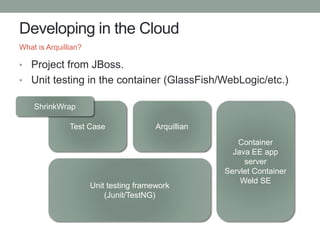
• Project from JBoss.
• Unit testing in the container (GlassFish/WebLogic/etc.)
What is Arquillian?
Container
Java EE app
server
Servlet Container
Weld SE
ArquillianTest Case
Unit testing framework
(Junit/TestNG)
ShrinkWrap
Developing in the Cloud
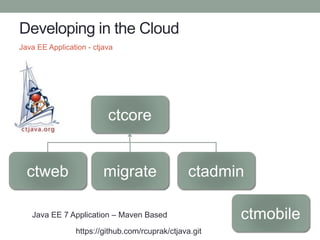
Java EE Application - ctjava
ctcore
ctweb migrate ctadmin
Java EE 7 Application – Maven Based ctmobile
https://github.com/rcuprak/ctjava.git
Developing in the Cloud
Project Overview
• Java EE 7 web application
• GlassFish 4.1
• PostgreSQL
• Maven based build
• Arquillian unit testing
Setup
• Modularized architecture
• Data model and DAOs in ctcore
• Unit and integration testing
Java EE Application - ctjava
Developing in the Cloud
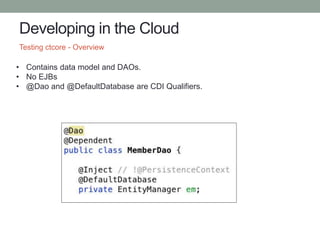
Testing ctcore - Overview
• Contains data model and DAOs.
• No EJBs
• @Dao and @DefaultDatabase are CDI Qualifiers.
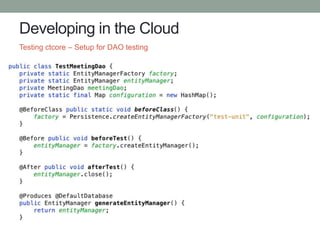
Developing in the Cloud
Testing ctcore – Setup for DAO testing
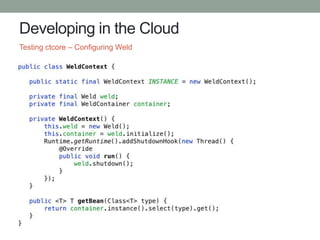
Developing in the Cloud
Testing ctcore – Configuring Weld
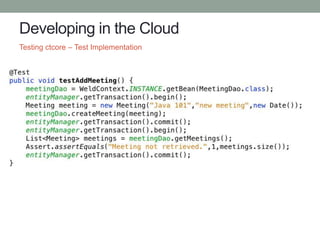
Developing in the Cloud
Testing ctcore – Test Implementation
Developing in the Cloud
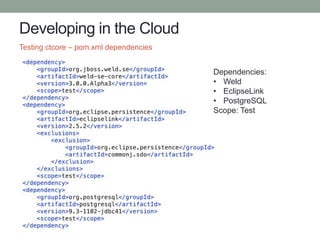
Testing ctcore – pom.xml dependencies
Dependencies:
• Weld
• EclipseLink
• PostgreSQL
Scope: Test
Developing in the Cloud
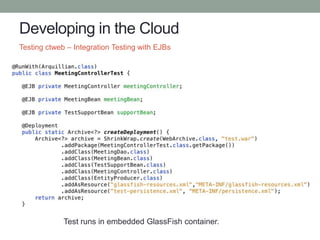
Testing ctweb – Integration Testing with EJBs
Test runs in embedded GlassFish container.
Developing in the Cloud
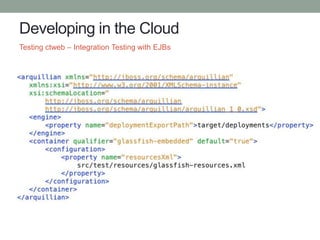
Testing ctweb – Integration Testing with EJBs
Developing in the Cloud
• Testing RESTful webservices and WebSockets easier
with Arquillian.
• Best practices:
• Test API first using Java
• Test using AJAX using Jasmine + Arquillian +
REST & WebSockets
Developing in the Cloud
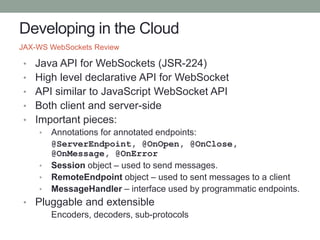
• Java API for WebSockets (JSR-224)
• High level declarative API for WebSocket
• API similar to JavaScript WebSocket API
• Both client and server-side
• Important pieces:
• Annotations for annotated endpoints:
@ServerEndpoint, @OnOpen, @OnClose,
@OnMessage, @OnError
• Session object – used to send messages.
• RemoteEndpoint object – used to sent messages to a client
• MessageHandler – interface used by programmatic endpoints.
• Pluggable and extensible
Encoders, decoders, sub-protocols
JAX-WS WebSockets Review
Developing in the Cloud
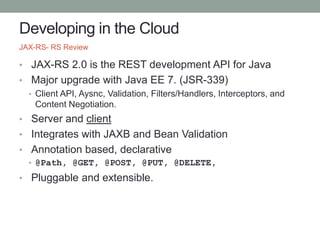
• JAX-RS 2.0 is the REST development API for Java
• Major upgrade with Java EE 7. (JSR-339)
• Client API, Aysnc, Validation, Filters/Handlers, Interceptors, and
Content Negotiation.
• Server and client
• Integrates with JAXB and Bean Validation
• Annotation based, declarative
• @Path, @GET, @POST, @PUT, @DELETE,
• Pluggable and extensible.
JAX-RS- RS Review
Developing in the Cloud
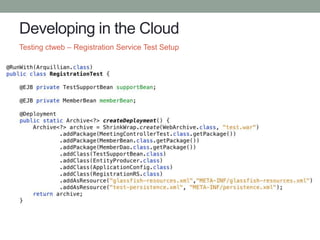
Testing ctweb – Registration Service Test Setup
Developing in the Cloud
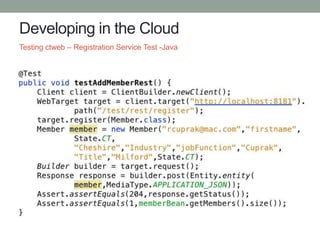
Testing ctweb – Registration Service Test -Java
Developing in the Cloud
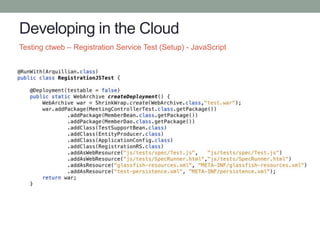
Testing ctweb – Registration Service Test (Setup) - JavaScript
Developing in the Cloud
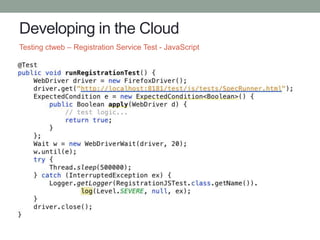
Testing ctweb – Registration Service Test - JavaScript
Developing in the Cloud
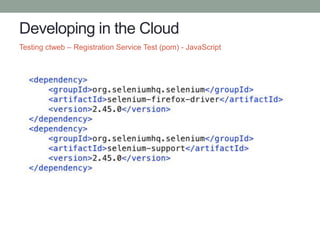
Testing ctweb – Registration Service Test (pom) - JavaScript
Developing in the Cloud
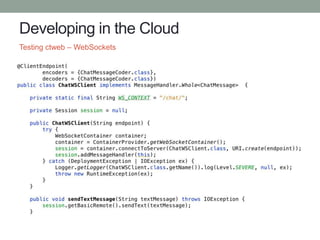
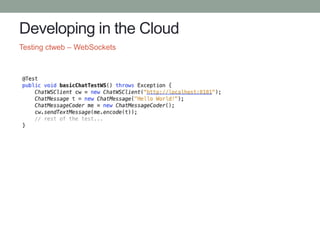
Testing ctweb – WebSockets
Developing in the Cloud
Testing ctweb – WebSockets
Developing in the Cloud
Cloud tools + Java EE = Garage Startup!
Conclusion
Q&A
Twitter: ctjava
Email: ryan.cuprak@3ds.com
Blog: http://cuprak.info
Contact

Developing in the Cloud

  • 1.
  • 2.
    Developing in theCloud Agenda Continuous Integration in Cloud Java EE Testing
  • 3.
    Why Develop inthe Cloud? Topics Covered Today Version Control Continuous Integration Issue Tracking/Proces s Integration Testing Java EE
  • 4.
    Why Develop inthe Cloud? • Processes are audited by customers (GMP) • All code changes are tracked • Rigorous issue life-cycle • Dashboard for tracking development progress • Continuous integration setup: • Unit tests/Integration tests/system tests • Database setup • Automated process for testing deployment Work Development Processes I want this for home!
  • 5.
    Why Develop inthe Cloud? Continuous Integration Challenges Hardware Software Maintenance/Sec urity Configuration Networking Cost
  • 6.
    Why Develop inthe Cloud? • Constructing a robust development environment is: • Expensive • Hard • Time consuming • Cloud services simplifies CI environment: • Easy to setup… • Relatively cheap… • Low maintenance Cloud Benefits
  • 7.
    Developing in theCloud • Self-Hosted in cloud • Create VMs and install developer tools (version control/bug trackers/etc.) • Manage all aspects of configuration/security • Costs: data storage and usage • Vendor Hosted in cloud • Vendor provides hosted solution – fully configured/managed. • Little maintenance or configuration • Costs: monthly fees, storage and usage • Hybrid • Some tools are hosted locally (example: code repository) Cloud Models
  • 8.
    Why Develop inthe Cloud? • Minimize time spent configuring/managing tools. • Scale projects as resource needs change. • Easily support distributed development. • Use pre-configured integrated tool stack. • Build/test for other platforms requiring special hardware/tools. • iOS • Windows mobile • Scalability testing • Easily create a ‘clean environment’ Benefits of Cloud Development
  • 9.
    Developing in theCloud Pieces of the Puzzle Version Control Continuous Integration Issue Management Test Environment(s)
  • 10.
    Developing in theCloud Vendor Price (monthly) github $0-$50 BitBucket $0-$200 Java.net Free Sourceforge Free Beanstalk $15-$200 CodePlex Free Version Control * github and bitbucket are the leading vendors.
  • 11.
    Developing in theCloud Vendor Opensource Paid (monthly) Atlassian N/A $10-$1000 CloudBees N/A $60-$200 Travis CI Free $129-$489 AppVeyor None $19-$99 Shippable Free $12-Custom CodeShip Free $49-$1999 Semaphore Free $0-$199 drone.io Free $25-$49 Snap CI Free $0-$180 Continuous Integration Cloud Vendors
  • 12.
    Developing in theCloud Vendor Monthly Price JIRA $10-$1000 YouTrack Free-$500 BugHost $29-$159 Bontq $9-$149 FogBugz $18-$540 CloudForge $2-$10 (per user) devZing (Bugzilla hosting) $15 Issue Trackers Many more…
  • 13.
    Developing in theCloud • Old Java standbys: • java.net • sourceforge.net • Project type: open source code • Features: • Wikis • Blogging • Issue tracking • No continuous integration support Old Services
  • 14.
    Developing in theCloud Considerations Issue Tracking Continuous Integration Version Control How do these integrate?
  • 15.
    Developing in theCloud • Open source or private? • Paid or free account? • Use integrated issue system or separate? • Integration with tools. • Ability to customize environment • Operating systems • Databases • Test installation scripts • Data migrations Additional Considerations
  • 16.
    Developing in theCloud • Private projects • Ability to switch from private to public and vice versa • Version control: git • Continuous integration Amazon • Projects: • Maven/Gradle builds • Junit/Jasmine for unit testing • NetBeans • IDE • IntelliJ • NetBeans • SourceTree • xCode Requirements
  • 17.
    Developing in theCloud Cloud services: • Github – version control ($7 / month) • Unlimited public repositories • 5 private repositories • Bamboo – Continuous Integration ($10 / month) • 10 jobs / 1 agent • Builds are executing on AWS EC2 instances. • JIRA – issue tracking ($10 / month) • 10 users • Amazon Web Services • VMs/databases Total cost: $27 / month (excluding AWS usage). What cloud services did I choose?
  • 18.
    Developing in theCloud • Jenkins • More popular than Bamboo. • Easier to configure than Bamboo. • Free • Large pool of plugins (1000+) • Bamboo • Integrated with JIRA. • Automated merging (git/mercurial) • CI & CD pipelines • Build agent • Requires JIRA for cloud account Bamboo versus Jenkins
  • 19.
    Developing in theCloud Puzzle Pieces
  • 20.
    Developing in theCloud Getting Started Create github account Create JIRA/Bamboo account Create AWS Account http://tinyurl.com/leo7rop http://aws.amazon.com http://github.com
  • 21.
    Developing in theCloud Amazon Web Services (AWS)
  • 22.
    Developing in theCloud Amazon Web Services EC2 RDS VPC
  • 23.
    Developing in theCloud • EC2 – Elastic Cloud Computing • VMs == AMI (Amazon Machine Image) AWS Core Concepts – EC2 Prices Sampling Name vCPU ECU Memory (GiB) Storage Hourly Fee t2.micro 1 Variable 1 EBS Only $0.013 t2.small 1 Variable 2 EBS Only $0.026 t2.medium 1 Variable 4 EBS Only $0.052 m3.medium 3 3.75 1 x 4 SSD $0.070 m3.large 2 6.5 7.5 1 x 32 SSD $0.140 m3.xlarge 4 13 15 2 x 40 SSD $0.280 m2.2xlarge 8 26 30 2 x 80 $0.560
  • 24.
    Developing in theCloud • Amazon provides a large library of AMIs. • Bamboo has pre-configured AMIs with Bamboo agent installed. • Instances are accessed via ssh (download keys) • Pick data center when launching an instance. AWS Core Concepts – EC2
  • 25.
    Developing in theCloud • VPC = Virtual Private Cloud • Complete control over virtual networking environment: • IP address range • Subnets • Routing tables • Network gateways • VPC can be connected to a corporate data center • AMI instances can be launched into a VPC. • Databases to a VPC. AWS Core Concepts - VPC
  • 26.
    Developing in theCloud AWS Core Concepts – VPC Wizard
  • 27.
    Developing in theCloud AWS Core Concepts – VPC Wizard
  • 28.
    Developing in theCloud AWS Core Concepts – Wizard VPC
  • 29.
    Developing in theCloud AWS Core Concepts – Wizard VPC
  • 30.
    Developing in theCloud AWS Core Concepts – Wizard VPC
  • 31.
    Developing in theCloud • Amazon RDS – Amazon Relational Database Service • Supported databases: • MySQL • Oracle • Microsoft SQL Server • PostgreSQL • Provisioned using SSD, IOPS Storage, Magnetic. • Automated failover, backups, multiple-zones, mirroring • Can attach to a VPC. Amazon RDS
  • 32.
    Developing in theCloud Amazon RDS
  • 33.
    Developing in theCloud Amazon RDS
  • 34.
    Developing in theCloud Amazon RDS
  • 35.
    Developing in theCloud Amazon RDS
  • 36.
    Developing in theCloud • After database starts-up, log into a VM. • Run: “sudo yum postgresql” to install PostgreSQL client. Amazon RDS
  • 37.
    Developing in theCloud Term Definition Project Provides reporting across all plans in a project. Plan Specifies default repository, how build is triggered, dependencies between other plans, notifications, permissions, definition of plan variables. Stage Processes its jobs in parallel on multiple agents. Can produce artifacts for another stage. Job Processes a series of one or more tasks that are run sequentially on the same agent. Controls which tasks are performed. Defines artifacts that the build will produce. Task Small discrete unit of work (code checkout, execute Maven goal, etc.). Is run sequentially within a job on a Bamboo working directory. Bamboo Core Concepts
  • 38.
    Developing in theCloud Bamboo Concepts Plan Stage Stage Stage Job Task Task Job Task Job Task Task Task Job Task Job Task
  • 39.
    Developing in theCloud Bamboo
  • 40.
    Developing in theCloud Bamboo
  • 41.
    Developing in theCloud Bamboo – Configure Plan
  • 42.
    Developing in theCloud Bamboo – Configure Plan
  • 43.
    Developing in theCloud Bamboo – Configure Tasks
  • 44.
    Developing in theCloud Bamboo – Plan Configuration These environment variables are passed to the JVM.
  • 45.
    Developing in theCloud Bamboo – test-persistence.xml – using environment properties
  • 46.
    Developing in theCloud Testing locally /.m2/settings.xml
  • 47.
    Developing in theCloud Bamboo – Configure Tasks
  • 48.
    Developing in theCloud • Bamboo is central management server which schedules/coordinates all work. With cloud, Bamboo management server is hosted at Atlassian. • Bamboo Agent – a service that can run build jobs. • Elastic Agent – a remote Bamboo agent that runs on Amazon EC2. • Capability – feature of an agent, such as JDK installed, version of Maven available, etc. Bamboo Overview
  • 49.
    Developing in theCloud • Bamboo builds Bamboo - Building Running Bamboo Agent git pull Run job Build and test
  • 50.
  • 51.
    Developing in theCloud Customizing Bamboo AMI Find Bambo AMI Launch instance Customize instance Take Snapshot Launch customized instance
  • 52.
    Developing in theCloud • Plugins available for IDEs (NetBeans/IntelliJ/Eclipse) • SourceTree integration • Benefits of integration • git pushes trigger issue state transitions. JIRA Integration
  • 53.
    Developing in theCloud JIRA Integration - Configuration
  • 54.
    Developing in theCloud JIRA Integration – Configuration github
  • 55.
    Developing in theCloud JIRA Integration – Configuration github
  • 56.
    Developing in theCloud JIRA Integration – Configuration
  • 57.
    Developing in theCloud JIRA Integration - NetBeans
  • 58.
    Developing in theCloud Testing challenges: • RESTful webservices • WebSocket endpoints • Security • Scalability • JavaScript code • JavaScript code using AJAX (with server) • Real data, bad data, etc. Testing Java EE
  • 59.
    Developing in theCloud Example Test Environment (VPC) App Server A App Server B App Server C Load Balacner Test Client A Test Client B Test Client C AWS
  • 60.
    Developing in theCloud • Bamboo + AWS = full testing in the cloud. • Create custom environments for simulating a cluster. • Test load balancing setup. • Stress test server under heavy load. • Testing: unit testing, integration testing, load testing. Java EE + Bamboo + AWS
  • 61.
    Developing in theCloud • Project from JBoss. • Unit testing in the container (GlassFish/WebLogic/etc.) What is Arquillian? Container Java EE app server Servlet Container Weld SE ArquillianTest Case Unit testing framework (Junit/TestNG) ShrinkWrap
  • 62.
    Developing in theCloud Java EE Application - ctjava ctcore ctweb migrate ctadmin Java EE 7 Application – Maven Based ctmobile https://github.com/rcuprak/ctjava.git
  • 63.
    Developing in theCloud Project Overview • Java EE 7 web application • GlassFish 4.1 • PostgreSQL • Maven based build • Arquillian unit testing Setup • Modularized architecture • Data model and DAOs in ctcore • Unit and integration testing Java EE Application - ctjava
  • 64.
    Developing in theCloud Testing ctcore - Overview • Contains data model and DAOs. • No EJBs • @Dao and @DefaultDatabase are CDI Qualifiers.
  • 65.
    Developing in theCloud Testing ctcore – Setup for DAO testing
  • 66.
    Developing in theCloud Testing ctcore – Configuring Weld
  • 67.
    Developing in theCloud Testing ctcore – Test Implementation
  • 68.
    Developing in theCloud Testing ctcore – pom.xml dependencies Dependencies: • Weld • EclipseLink • PostgreSQL Scope: Test
  • 69.
    Developing in theCloud Testing ctweb – Integration Testing with EJBs Test runs in embedded GlassFish container.
  • 70.
    Developing in theCloud Testing ctweb – Integration Testing with EJBs
  • 71.
    Developing in theCloud • Testing RESTful webservices and WebSockets easier with Arquillian. • Best practices: • Test API first using Java • Test using AJAX using Jasmine + Arquillian + REST & WebSockets
  • 72.
    Developing in theCloud • Java API for WebSockets (JSR-224) • High level declarative API for WebSocket • API similar to JavaScript WebSocket API • Both client and server-side • Important pieces: • Annotations for annotated endpoints: @ServerEndpoint, @OnOpen, @OnClose, @OnMessage, @OnError • Session object – used to send messages. • RemoteEndpoint object – used to sent messages to a client • MessageHandler – interface used by programmatic endpoints. • Pluggable and extensible Encoders, decoders, sub-protocols JAX-WS WebSockets Review
  • 73.
    Developing in theCloud • JAX-RS 2.0 is the REST development API for Java • Major upgrade with Java EE 7. (JSR-339) • Client API, Aysnc, Validation, Filters/Handlers, Interceptors, and Content Negotiation. • Server and client • Integrates with JAXB and Bean Validation • Annotation based, declarative • @Path, @GET, @POST, @PUT, @DELETE, • Pluggable and extensible. JAX-RS- RS Review
  • 74.
    Developing in theCloud Testing ctweb – Registration Service Test Setup
  • 75.
    Developing in theCloud Testing ctweb – Registration Service Test -Java
  • 76.
    Developing in theCloud Testing ctweb – Registration Service Test (Setup) - JavaScript
  • 77.
    Developing in theCloud Testing ctweb – Registration Service Test - JavaScript
  • 78.
    Developing in theCloud Testing ctweb – Registration Service Test (pom) - JavaScript
  • 79.
    Developing in theCloud Testing ctweb – WebSockets
  • 80.
    Developing in theCloud Testing ctweb – WebSockets
  • 81.
    Developing in theCloud Cloud tools + Java EE = Garage Startup! Conclusion
  • 82.

Editor's Notes

  • #18 So what cloud hosting services did I choose?