

DevOpShift
Implementing Devops with Python
Presented at the 24th Oracle Week By Yaniv Cohen
My Info
CV
https://goo.gl/9ivmRP
https://www.linkedin.com/in/yanivos/
Linkedin
Q&A SESSION AT:
goo.gl/slides/gk46pp
Main Agenda
● DevOps hotspots
○ The Problem[s]
○ DEVOPS HOTSPOTS
○ IAC With Ansible
○ CI/CD
○ TRAVISCI & CIRCLECI
○ Open Mic: Monitoring and Automated Tests
The Problem[s]
● Everything is software BUT it still runs on Servers to operate...
● Delivering a service is painfully slow
● Errors and faulty functionality
● Internal frictions between Product / R&D / IT creates the problem
● Delay in Delivery = Money
● The company culture is usually the bottleneck in the transition to “the DevOps
concept”
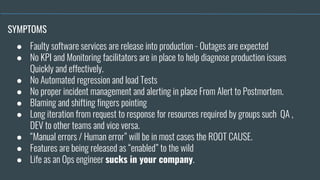
● Faulty software services are release into production - Outages are expected
● No KPI and Monitoring facilitators are in place to help diagnose production issues
Quickly and effectively.
● No Automated regression and load Tests
● No proper incident management and alerting in place From Alert to Postmortem.
● Blaming and shifting fingers pointing
● Long iteration from request to response for resources required by groups such QA ,
DEV to other teams and vice versa.
● “Manual errors / Human error” will be in most cases the ROOT CAUSE.
● Features are being released as “enabled” to the wild
● Life as an Ops engineer sucks in your company.
SYMPTOMS
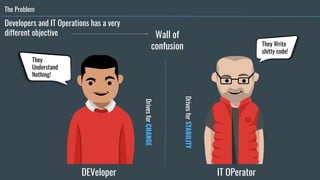
The Problem
Wall of
confusion
IT OPeratorDEVeloper
DrivesforSTABILITY
DrivesforCHANGE
They Write
shitty code!
They
Understand
Nothing!
Developers and IT Operations has a very
different objective
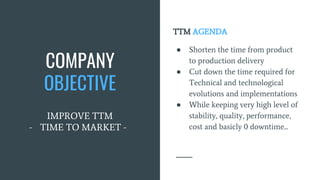
TTM AGENDA
● Shorten the time from product
to production delivery
● Cut down the time required for
Technical and technological
evolutions and implementations
● While keeping very high level of
stability, quality, performance,
cost and basicly 0 downtime...
COMPANY
OBJECTIVE
IMPROVE TTM
- TIME TO MARKET -
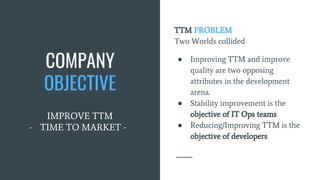
COMPANY
OBJECTIVE
IMPROVE TTM
- TIME TO MARKET -
TTM PROBLEM
Two Worlds collided
● Improving TTM and improve
quality are two opposing
attributes in the development
arena.
● Stability improvement is the
objective of IT Ops teams
● Reducing/Improving TTM is the
objective of developers
How do we
solve it
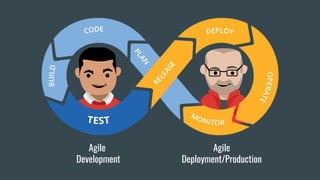
Agile
Development
Agile
Deployment/Production
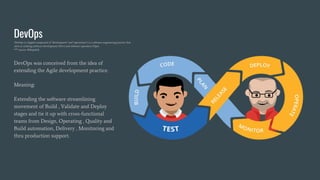
DevOps was conceived from the idea of
extending the Agile development practice.
Meaning:
Extending the software streamlining
movement of Build , Validate and Deploy
stages and tie it up with cross-functional
teams from Design, Operating , Quality and
Build automation, Delivery , Monitoring and
thru production support.
DevOps
DevOps (a clipped compound of "development" and "operations") is a software engineering practice that
aims at unifying software development (Dev) and software operation (Ops).
*** source: WikipediA
What do we expect to
gain from a DevOps
culture in our company
and why...
Idealy
● Standardizing development
environments
● IAC - Infrastructure as a code
● CD - Automate delivery process
to improve delivery predictability ,
efficiency , security and
maintainability
● Monitoring and Log shipping
frameworks
● Culture of collaboration
Why should we ?
Provide Developers with more control of the
production environment and a better
understanding of the production
infrastructure
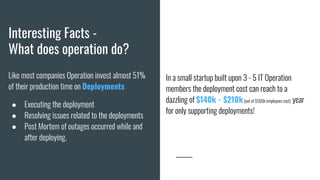
Interesting Facts -
What does operation do?
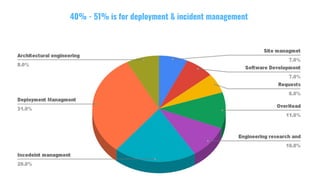
Like most companies Operation invest almost 51%
of their production time on Deployments
● Executing the deployment
● Resolving issues related to the deployments
● Post Mortem of outages occurred while and
after deploying.
In a small startup built upon 3 - 5 IT Operation
members the deployment cost can reach to a
dazzling of $140k - $210k(out of $560k employees cost) year
for only supporting deployments!
40% - 51% is for deployment & incident management
Time to move forward
DEVOPS HOTSPOTS
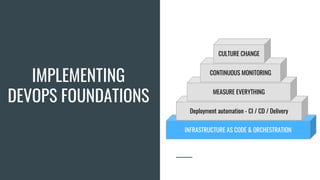
IMPLEMENTING
DEVOPS FOUNDATIONS
INFRASTRUCTURE AS CODE & ORCHESTRATION
Deployment automation - CI / CD / Delivery
MEASURE EVERYTHING
CONTINUOUS MONITORING
CULTURE CHANGE
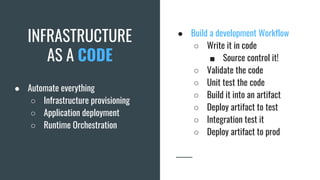
INFRASTRUCTURE
AS A CODE
● Automate everything
○ Infrastructure provisioning
○ Application deployment
○ Runtime Orchestration
● Build a development Workflow
○ Write it in code
■ Source control it!
○ Validate the code
○ Unit test the code
○ Build it into an artifact
○ Deploy artifact to test
○ Integration test it
○ Deploy artifact to prod
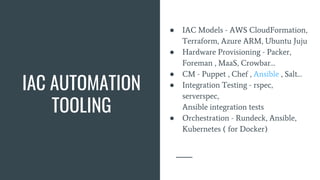
IAC AUTOMATION
TOOLING
● IAC Models - AWS CloudFormation,
Terraform, Azure ARM, Ubuntu Juju
● Hardware Provisioning - Packer,
Foreman , MaaS, Crowbar…
● CM - Puppet , Chef , Ansible , Salt…
● Integration Testing - rspec,
serverspec,
Ansible integration tests
● Orchestration - Rundeck, Ansible,
Kubernetes ( for Docker)
IAC ORCHESTRATION & AUTOMATION
WITH ANSIBLE
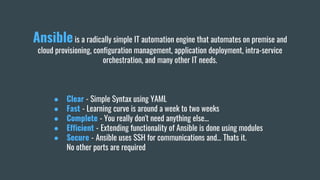
Ansibleis a radically simple IT automation engine that automates on premise and
cloud provisioning, configuration management, application deployment, intra-service
orchestration, and many other IT needs.
● Clear - Simple Syntax using YAML
● Fast - Learning curve is around a week to two weeks
● Complete - You really don't need anything else...
● Efficient - Extending functionality of Ansible is done using modules
● Secure - Ansible uses SSH for communications and… Thats it.
No other ports are required
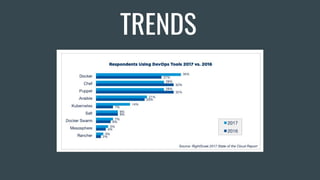
TRENDS
Dive into Ansible
Ansible - An Agentless Architecture
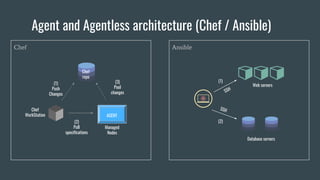
AnsibleChef
Agent and Agentless architecture (Chef / Ansible)
(1)
Push
Changes
Chef
WorkStation
(2)
Pull
specifications
(3)
Pool
changes
AGENT
Managed
Nodes
Chef
repo
(1)
Web servers
Database servers
(2)
SSH
SSH
Ansible - As an Orchestration Engine
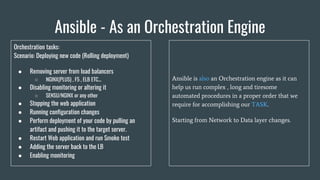
Ansible is also an Orchestration engine as it can
help us run complex , long and tiresome
automated procedures in a proper order that we
require for accomplishing our TASK.
Starting from Network to Data layer changes.
Orchestration tasks:
Scenario: Deploying new code (Rolling deployment)
● Removing server from load balancers
○ NGINX(PLUS) , F5 , ELB ETC...
● Disabling monitoring or altering it
○ SENSU/NGINX or any other
● Stopping the web application
● Running configuration changes
● Perform deployment of your code by pulling an
artifact and pushing it to the target server.
● Restart Web application and run Smoke test
● Adding the server back to the LB
● Enabling monitoring
Ansible - As an Orchestration Engine
Ansible Core Concepts
Inventories
“/etc/ansible/hosts”
--- Groups and Groups of Groups
[webservers]
173.194.11.22
web1.devopshift.com
web[2:10].devopshift.com
[databases]
db-[b-g].devopshift.com
db-[1-5].devopshift.com
[databases:mysql]
db-b.devopshift.com
[databases:staging]
db-g.devopshift.com
Inventory file
Specify in what environments ansible should operate in
- Groups and hosts
- Staging and Production
- INI-Like format or YAML
Requirements: Connection by SSH Without password
Ad-hoc commands
Demo of how we use the inventory and ad-hoc
Ad-hoc commands
Orchestra conductor
- Use it to test things
- Use it for one time command
- Use it in an outage or in critical scenarios where you
need to run a command on multiple hosts
Ad-Hoc examples:
Execute remote Shell commands
ansible appservers -m shell -a 'echo $TERM'
ansible all -a "free -m" / ansible appservers -a "df -h"
Copy Files:
ansible all -m copy -a "src=/etc/hosts dest=/tmp/hosts"
Run long tasks in the background asynchronously with time out
ansible all -B 3600 -P 0 -a "/usr/bin/long_running_operation --do-stuff"
Poll Task status using module “async_status” on a specific host
ansible web1 -m async_status -a "jid=488359678239.2844
Enable auto polling of information every 60 seconds
ansible all -B 1800 -P 60 -a "/usr/bin/long_running_operation --do-stuff"
Gathering facts on host[s]
ansible all -m setup
Main Shell Commands
Just before we continue our dive into to the big blue
- ansible-doc [options] [module...]
- ansible-playbook playbook.yml [options]
- Ansible <host-pattern> <command>
[options]
- Ansible-galaxy [init|info|install|list|remove] [--help] [options]
- ansible-galaxy install -vvv geerlingguy.apache
- ansible-pull [options] [playbook.yml]
- Pull a playbook from VCS and execute it locally
- Ansible-vault [create|decrypt|edit|encrypt|rekey] [--help]
[options file_name]
- encryption/decryption utility for Ansible data files
Out of
scope
Out of
scope
Modules
Power of life (for Ansible...)
Modules are the core functionality of Ansible
● All core modules are written in Python
● You can write custom modules in any language ( do check if one is not already exists… )
● With modules we can
○ Run Shell commands
○ File manipulation
○ Packages and Daemon management
○ Manage User and Groups
○ Collect Facts
○ Control network layer and Cloud providers and much more
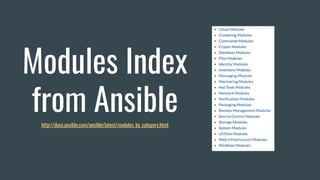
Modules Index
from Ansiblehttp://docs.ansible.com/ansible/latest/modules_by_category.html
PlayBook
Ansible Playbook is a list of commands or roles that will be executed on the remote machines
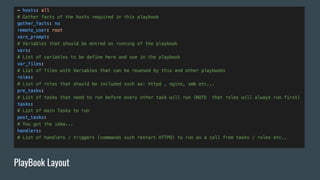
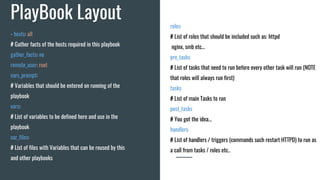
PlayBook Layout
PlayBook Layout roles:
# List of roles that should be included such as: httpd
nginx, smb etc...
pre_tasks:
# List of tasks that need to run before every other task will run (NOTE
that roles will always run first)
tasks:
# List of main Tasks to run
post_tasks:
# You got the idea...
handlers:
# List of handlers / triggers (commands such restart HTTPD) to run as
a call from tasks / roles etc..
- hosts: all
# Gather facts of the hosts required in this playbook
gather_facts: no
remote_user: root
vars_prompt:
# Variables that should be entered on running of the
playbook
vars:
# List of variables to be defined here and use in the
playbook
var_files:
# List of files with Variables that can be reused by this
and other playbooks
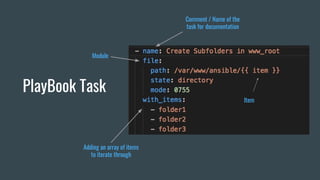
PlayBook Task
Module
Adding an array of items
to iterate through
Comment / Name of the
task for documentation
Item
PlayBook Templates - Jinja2
Template engine for the Python programming - Awesome thing… not going to talk about it in this lecture :-)
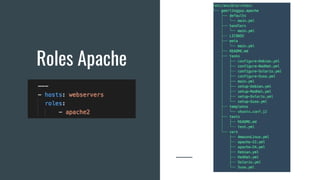
PlayBook Roles
Ansible power to get things organized and simple
Roles Apache
So how do we start?
Start Small - Migrate Shell scripts and run them in ansible
STEPS
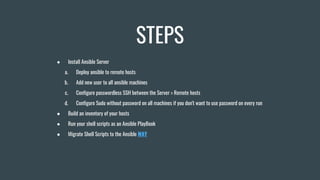
● Install Ansible Server
a. Deploy ansible to remote hosts
b. Add new user to all ansible machines
c. Configure passwordless SSH between the Server > Remote hosts
d. Configure Sudo without password on all machines if you don't want to use password on every run
● Build an inventory of your hosts
● Run your shell scripts as an Ansible PlayBook
● Migrate Shell Scripts to the Ansible WAY
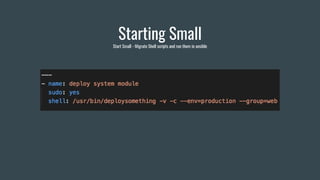
Starting Small
Start Small - Migrate Shell scripts and run them in ansible
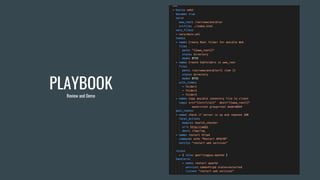
PLAYBOOK
Than go large!
PLAYBOOK
Review and Demo
Ansible and & Python - Custom modules
demo
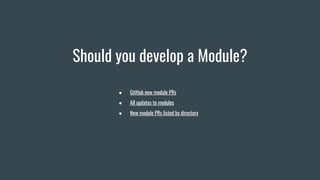
Should you develop a Module?
● GitHub new module PRs
● All updates to modules
● New module PRs listed by directory
AGENDA
● Forking and checkout Ansible repo
● Install pip requirements
● Module layout
● Writing a Module
a. Testing it
● Writing PlayBook for our module
a. Demo
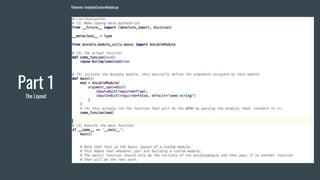
Part 1
The Layout
Filename: templateCustomModule.py
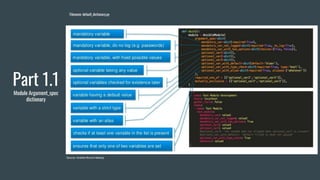
Part 1.1
Module Argument_spec
dictionary
Filename: default_dictionary.py
Source: Ansible Munich Meetup
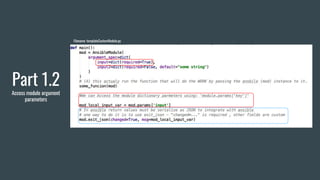
Part 1.2
Access module argument
parameters
Filename: templateCustomModule.py
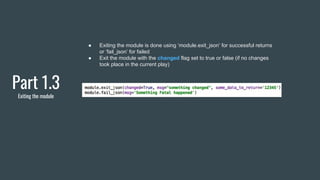
Part 1.3
Exiting the module
● Exiting the module is done using ‘module.exit_json’ for successful returns
or ‘fail_json’ for failed
● Exit the module with the changed flag set to true or false (if no changes
took place in the current play)
Part 2 - Putting it to work!
Part 2
Building The Module
● Module Name: health_checker
● Short Description: Simple HTTP check
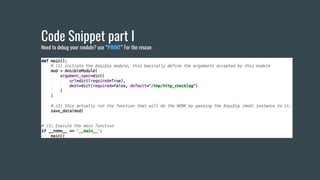
Code Snippet part I
Need to debug your module? use “PRINT” For the rescue
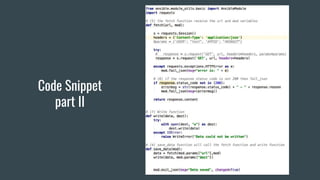
Code Snippet
part II
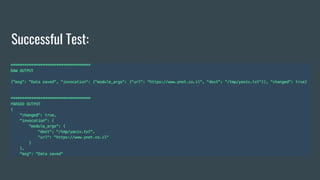
Successful Test:
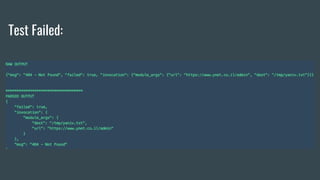
Test Failed:
Part 3
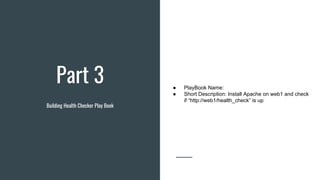
Building Health Checker Play Book
● PlayBook Name:
● Short Description: Install Apache on web1 and check
if “http://web1/health_check” is up
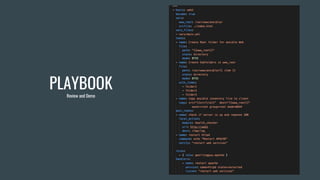
PLAYBOOK
Review and Demo
What Other Infrastructures
ANSIBLE Supports ?
QUESTIONS
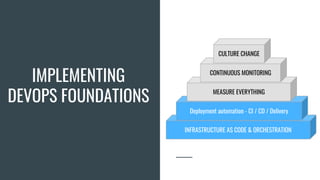
IMPLEMENTING
DEVOPS FOUNDATIONS
INFRASTRUCTURE AS CODE & ORCHESTRATION
Deployment automation - CI / CD / Delivery
MEASURE EVERYTHING
CONTINUOUS MONITORING
CULTURE CHANGE
INTRO
CI - Continuous Integration
Continuous Integration (CI) is a software development practice that is based on a frequent integration of the
code into a shared repository. Each check-in is then verified by an automated build.
main goal of continuous integration is to identify the problems that may occur during the development process
earlier and more easily. If you integrate regularly — there is much less to check while looking for errors. That
results in less time spent for debugging and more time for adding features.
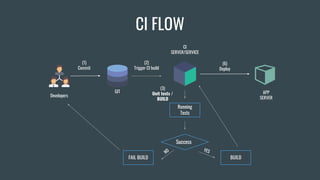
(1)
Commit
GIT
(2)
Trigger CI build
(3)
Unit tests /
BUILD
CI
SERVER/SERVICE
Developers
(6)
Deploy
Running
Tests
Success
YES
BUILD
NO
FAIL BUILD
CI FLOW
APP
SERVER
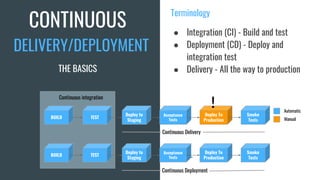
CONTINUOUS
Terminology
● Integration (CI) - Build and test
● Deployment (CD) - Deploy and
integration test
● Delivery - All the way to production
BUILD TEST
Deploy to
Staging
Acceptance
Tests
Deploy To
Production
Smoke
Tests
BUILD TEST
Deploy to
Staging
Acceptance
Tests
Deploy To
Production
Smoke
Tests
Continuous integration
Continuous Delivery
!
DELIVERY/DEPLOYMENT
THE BASICS
Automatic
Manual
Continuous Deployment
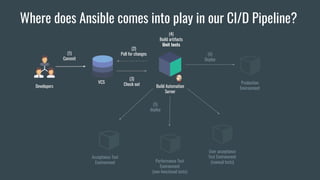
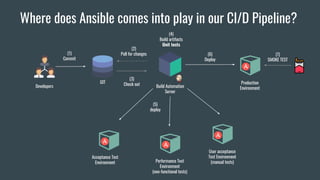
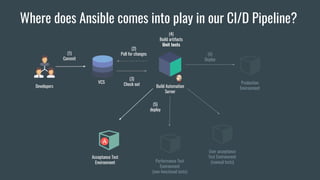
Where does Ansible comes into play in our CI/D Pipeline?
(1)
Commit
VCS
(2)
Poll for changes
(3)
Check out
(4)
Build artifacts
Unit tests
Build Automation
Server
(5)
deploy
Acceptance Test
Environment Performance Test
Environment
(non-functional tests)
User acceptance
Test Environment
(manual tests)
Developers
Production
Environment
(6)
Deploy
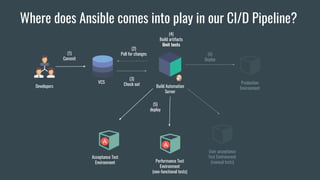
Where does Ansible comes into play in our CI/D Pipeline?
(1)
Commit
VCS
(2)
Poll for changes
(3)
Check out
(4)
Build artifacts
Unit tests
Build Automation
Server
(5)
deploy
Acceptance Test
Environment Performance Test
Environment
(non-functional tests)
User acceptance
Test Environment
(manual tests)
Developers
Production
Environment
(6)
Deploy
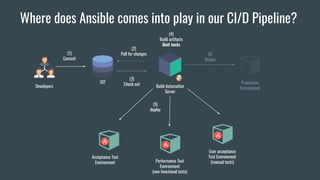
Where does Ansible comes into play in our CI/D Pipeline?
(1)
Commit
VCS
(2)
Poll for changes
(3)
Check out
(4)
Build artifacts
Unit tests
Build Automation
Server
(5)
deploy
Acceptance Test
Environment Performance Test
Environment
(non-functional tests)
User acceptance
Test Environment
(manual tests)
Developers
Production
Environment
(6)
Deploy
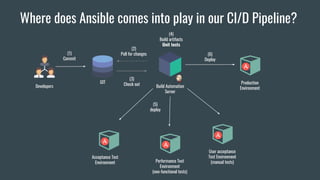
Where does Ansible comes into play in our CI/D Pipeline?
(1)
Commit
GIT
(2)
Poll for changes
(3)
Check out
(4)
Build artifacts
Unit tests
Build Automation
Server
(5)
deploy
Acceptance Test
Environment Performance Test
Environment
(non-functional tests)
User acceptance
Test Environment
(manual tests)
Developers
Production
Environment
(6)
Deploy
Where does Ansible comes into play in our CI/D Pipeline?
(1)
Commit
GIT
(2)
Poll for changes
(3)
Check out
(4)
Build artifacts
Unit tests
Build Automation
Server
(5)
deploy
Acceptance Test
Environment Performance Test
Environment
(non-functional tests)
User acceptance
Test Environment
(manual tests)
Developers
Production
Environment
(6)
Deploy
Where does Ansible comes into play in our CI/D Pipeline?
(1)
Commit
GIT
(2)
Poll for changes
(3)
Check out
(4)
Build artifacts
Unit tests
Build Automation
Server
(5)
deploy
Acceptance Test
Environment Performance Test
Environment
(non-functional tests)
User acceptance
Test Environment
(manual tests)
Developers
Production
Environment
(6)
Deploy
(7)
SMOKE TEST
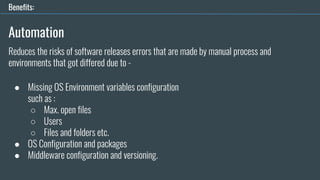
Automation
● Missing OS Environment variables configuration
such as :
○ Max. open files
○ Users
○ Files and folders etc.
● OS Configuration and packages
● Middleware configuration and versioning.
Benefits:
Reduces the risks of software releases errors that are made by manual process and
environments that got differed due to -
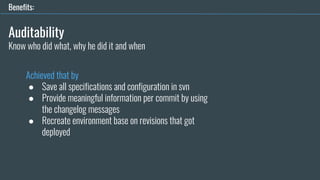
Auditability
Achieved that by
● Save all specifications and configuration in svn
● Provide meaningful information per commit by using
the changelog messages
● Recreate environment base on revisions that got
deployed
Benefits:
Know who did what, why he did it and when
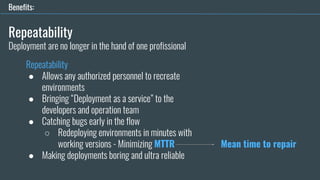
Repeatability
Repeatability
● Allows any authorized personnel to recreate
environments
● Bringing “Deployment as a service” to the
developers and operation team
● Catching bugs early in the flow
○ Redeploying environments in minutes with
working versions - Minimizing MTTR
● Making deployments boring and ultra reliable
Benefits:
Deployment are no longer in the hand of one profissional
Mean time to repair
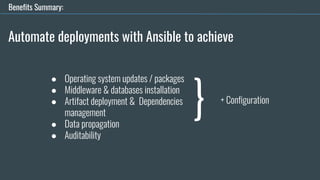
Automate deployments with Ansible to achieve
● Operating system updates / packages
● Middleware & databases installation
● Artifact deployment & Dependencies
management
● Data propagation
● Auditability
} + Configuration
Benefits Summary:
TRAVIS CI / CIRCLE CI / Jenkins
Integration made easy
Features
● CircleCI is a cloud-based system — no dedicated server required, and you do not need to
administrate it. However, it also offers an on-prem solution that allows you to run it in
your private cloud or data center.
● Free plan available - Limits the number of concurrent builds
● SSH to the container that ran the build is possible for debug and investigation
● No configuration and long tiresome process is required to operate and start doing some
CI
● Compatible with almost every language including .NET …
● Build environment AWS, AZURE , Heroku, Docker, dedicated servers and more
Source: Hackernoon
Pros
● Fast start
● CircleCI has a free plan for enterprise projects
● It’s easy and fast to start
● Supports Pipelines and matrix builds (if this than that…)
● Lightweight, easily readable YAML config
● You do not need any dedicated server to run CircleCI
Source: Hackernoon
Cons
● CircleCI supports only 2 versions of Ubuntu for free (12.04 , 14.04) and MacOS
as a paid part
● Despite the fact CircleCI do work with and run on all languages tt supports
only the following programming languages “out of the box”: Go (Golang),
Haskell, Java, PHP, Python, Ruby/Rails, Scala. Meaning that some 3rd party
software will be required
Source: Hackernoon
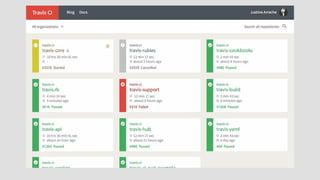
Features
Travis CI is one of the more common names in the CI/CD ecosystem, created for open source projects and
then expanded to closed source projects over the years. It’s focused on the CI level, improving the
performance of the build process with automated testing and an alert system.
Source: Hackernoon
Features
Source: Hackernoon
Travis CI and CircleCI are almost the same
Both of them:
● Have YAML file as a config
● Are cloud-based
● Have support of Docker to run tests
What does TravisCI offer that CircleCI doesn’t?
● Option to run tests on Linux and Mac OS X at same time
● Supports more languages out of the box
Pros
Same as CircleCI
Source: Hackernoon
Cons
● Price is higher compared to CircleCI, no free enterprise plan
● Customization (for some stuff you’ll need 3rd parties)
● Only cloud solution. No on premise installation option
Blocker for some companies
Source: Hackernoon
If you got time and resource to
● Configure and build your CI/CD server flow and pipeline,
● You got complex project styles and require multiple branch pipeline supports
● You need to have 10 concurrent jobs and you got private and on premise VCS
Go with Jenkins
Features
Pros
● Completely free with huge open source community
● Hundred of integration plugins to practically every tool one can imagine
● Infinite possibilities for extending its core functionality
● Various job modes: Freestyle project, Pipeline, External Job,
Multi-configuration project, Folder, GitHub Organization, Multibranch Pipeline
● Integration of CI / CD / Deployment Pipelines and Pipelines “as a code”
● Rest API have access to Controlling the amount of data you fetch,
Fetch/Update config.xml, Delete a job, Retrieving all builds, Fetch/Update job
description, Perform a build, Disable/Enable a job
● Time and learning curve
● Dedicated personnel to handle it
● No cloud hosting solution (SaaS)
● Time to configure / customize / maintain
Cons
TRAVIS CI
AGENDA
● Configure Travis CI with GitHub
● Configure A Python Project
● Configure .travis File
● BUILD / DEMO
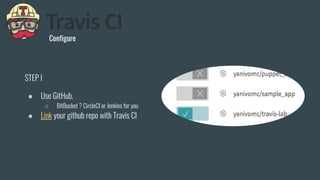
Configure
STEP I
● Use GitHub.
○ BitBucket ? CircleCI or Jenkins for you
● Link your github repo with Travis CI
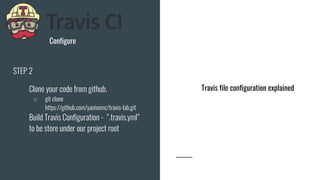
Configure
STEP 2
● Clone your code from github.
○ git clone
https://github.com/yanivomc/travis-lab.git
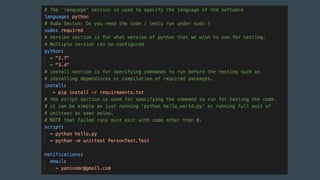
● Build Travis Configuration - “.travis.yml”
to be store under our project root
Travis file configuration explained
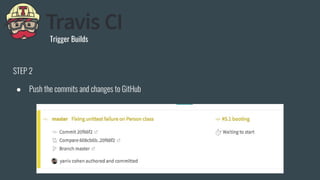
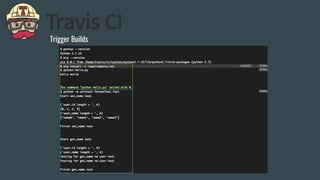
Trigger Builds
STEP 2
● Push the commits and changes to GitHub
Trigger Builds
Advanced Topics to read about
● Testing with DB
● Browser testing
● Parallel builds
● Pipelines
● Pre / Post commands
● Deployment of artifacts
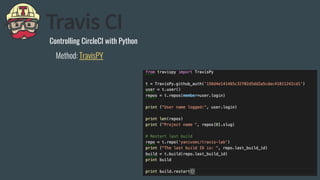
Controlling CircleCI with Python
Method: TravisPY
CircleCI (cloud)
AGENDA
● Configure Circle CI with GitHub
● Configure A Python Project
● Configure .circle.yml File
● BUILD / DEMO
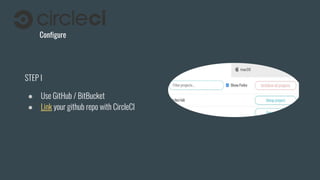
Configure
STEP I
● Use GitHub / BitBucket
● Link your github repo with CircleCI
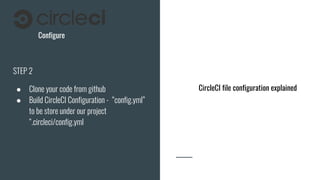
Configure
STEP 2
● Clone your code from github
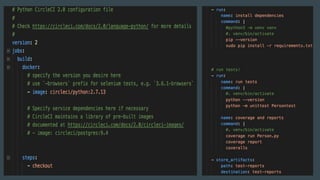
● Build CircleCI Configuration - “config.yml”
to be store under our project
“.circleci/config.yml
CircleCI file configuration explained
STEP 2
● Push the commits and changes to GitHub
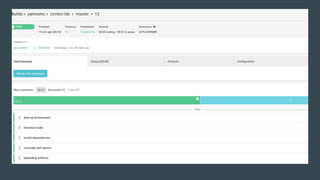
Trigger build
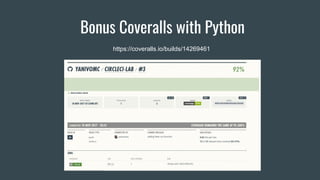
Bonus Coveralls with Python
https://coveralls.io/builds/14269461
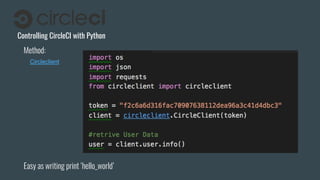
Easy as writing print ‘hello_world’
Controlling CircleCI with Python
Circleclient
Method:
JENKINS SUPPORT FOR PYTHON
AutoJenkins
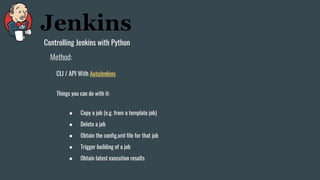
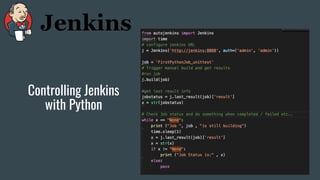
Controlling Jenkins with Python
CLI / API With AutoJenkins
Method:
Things you can do with it:
● Copy a job (e.g. from a template job)
● Delete a job
● Obtain the config.xml file for that job
● Trigger building of a job
● Obtain latest execution results
Controlling Jenkins
with Python
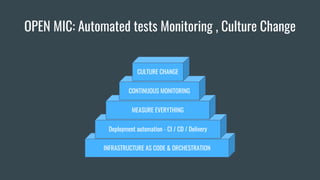
OPEN MIC: Automated tests Monitoring , Culture Change
INFRASTRUCTURE AS CODE & ORCHESTRATION
Deployment automation - CI / CD / Delivery
MEASURE EVERYTHING
CONTINUOUS MONITORING
CULTURE CHANGE
MONITORING
MEASURE, MONITOR, MEASURE… ACTIVE CHECKS
AUTOMATED TESTING
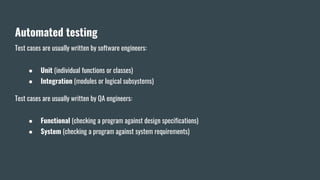
Automated testing
Test cases are usually written by software engineers:
● Unit (individual functions or classes)
● Integration (modules or logical subsystems)
Test cases are usually written by QA engineers:
● Functional (checking a program against design specifications)
● System (checking a program against system requirements)
END!

Devops with Python by Yaniv Cohen DevopShift

  • 2.
    DevOpShift Implementing Devops withPython Presented at the 24th Oracle Week By Yaniv Cohen
  • 4.
  • 5.
  • 6.
    Main Agenda ● DevOpshotspots ○ The Problem[s] ○ DEVOPS HOTSPOTS ○ IAC With Ansible ○ CI/CD ○ TRAVISCI & CIRCLECI ○ Open Mic: Monitoring and Automated Tests
  • 7.
    The Problem[s] ● Everythingis software BUT it still runs on Servers to operate... ● Delivering a service is painfully slow ● Errors and faulty functionality ● Internal frictions between Product / R&D / IT creates the problem ● Delay in Delivery = Money ● The company culture is usually the bottleneck in the transition to “the DevOps concept”
  • 8.
    ● Faulty softwareservices are release into production - Outages are expected ● No KPI and Monitoring facilitators are in place to help diagnose production issues Quickly and effectively. ● No Automated regression and load Tests ● No proper incident management and alerting in place From Alert to Postmortem. ● Blaming and shifting fingers pointing ● Long iteration from request to response for resources required by groups such QA , DEV to other teams and vice versa. ● “Manual errors / Human error” will be in most cases the ROOT CAUSE. ● Features are being released as “enabled” to the wild ● Life as an Ops engineer sucks in your company. SYMPTOMS
  • 9.
    The Problem Wall of confusion ITOPeratorDEVeloper DrivesforSTABILITY DrivesforCHANGE They Write shitty code! They Understand Nothing! Developers and IT Operations has a very different objective
  • 10.
    TTM AGENDA ● Shortenthe time from product to production delivery ● Cut down the time required for Technical and technological evolutions and implementations ● While keeping very high level of stability, quality, performance, cost and basicly 0 downtime... COMPANY OBJECTIVE IMPROVE TTM - TIME TO MARKET -
  • 11.
    COMPANY OBJECTIVE IMPROVE TTM - TIMETO MARKET - TTM PROBLEM Two Worlds collided ● Improving TTM and improve quality are two opposing attributes in the development arena. ● Stability improvement is the objective of IT Ops teams ● Reducing/Improving TTM is the objective of developers
  • 12.
  • 13.
  • 14.
    DevOps was conceivedfrom the idea of extending the Agile development practice. Meaning: Extending the software streamlining movement of Build , Validate and Deploy stages and tie it up with cross-functional teams from Design, Operating , Quality and Build automation, Delivery , Monitoring and thru production support. DevOps DevOps (a clipped compound of "development" and "operations") is a software engineering practice that aims at unifying software development (Dev) and software operation (Ops). *** source: WikipediA
  • 15.
    What do weexpect to gain from a DevOps culture in our company and why... Idealy ● Standardizing development environments ● IAC - Infrastructure as a code ● CD - Automate delivery process to improve delivery predictability , efficiency , security and maintainability ● Monitoring and Log shipping frameworks ● Culture of collaboration Why should we ?
  • 16.
    Provide Developers withmore control of the production environment and a better understanding of the production infrastructure
  • 17.
    Interesting Facts - Whatdoes operation do? Like most companies Operation invest almost 51% of their production time on Deployments ● Executing the deployment ● Resolving issues related to the deployments ● Post Mortem of outages occurred while and after deploying. In a small startup built upon 3 - 5 IT Operation members the deployment cost can reach to a dazzling of $140k - $210k(out of $560k employees cost) year for only supporting deployments!
  • 18.
    40% - 51%is for deployment & incident management
  • 19.
    Time to moveforward DEVOPS HOTSPOTS
  • 20.
    IMPLEMENTING DEVOPS FOUNDATIONS INFRASTRUCTURE ASCODE & ORCHESTRATION Deployment automation - CI / CD / Delivery MEASURE EVERYTHING CONTINUOUS MONITORING CULTURE CHANGE
  • 21.
    INFRASTRUCTURE AS A CODE ●Automate everything ○ Infrastructure provisioning ○ Application deployment ○ Runtime Orchestration ● Build a development Workflow ○ Write it in code ■ Source control it! ○ Validate the code ○ Unit test the code ○ Build it into an artifact ○ Deploy artifact to test ○ Integration test it ○ Deploy artifact to prod
  • 22.
    IAC AUTOMATION TOOLING ● IACModels - AWS CloudFormation, Terraform, Azure ARM, Ubuntu Juju ● Hardware Provisioning - Packer, Foreman , MaaS, Crowbar… ● CM - Puppet , Chef , Ansible , Salt… ● Integration Testing - rspec, serverspec, Ansible integration tests ● Orchestration - Rundeck, Ansible, Kubernetes ( for Docker)
  • 23.
    IAC ORCHESTRATION &AUTOMATION WITH ANSIBLE
  • 24.
    Ansibleis a radicallysimple IT automation engine that automates on premise and cloud provisioning, configuration management, application deployment, intra-service orchestration, and many other IT needs. ● Clear - Simple Syntax using YAML ● Fast - Learning curve is around a week to two weeks ● Complete - You really don't need anything else... ● Efficient - Extending functionality of Ansible is done using modules ● Secure - Ansible uses SSH for communications and… Thats it. No other ports are required
  • 25.
  • 27.
  • 28.
    Ansible - AnAgentless Architecture
  • 29.
    AnsibleChef Agent and Agentlessarchitecture (Chef / Ansible) (1) Push Changes Chef WorkStation (2) Pull specifications (3) Pool changes AGENT Managed Nodes Chef repo (1) Web servers Database servers (2) SSH SSH
  • 30.
    Ansible - Asan Orchestration Engine
  • 31.
    Ansible is alsoan Orchestration engine as it can help us run complex , long and tiresome automated procedures in a proper order that we require for accomplishing our TASK. Starting from Network to Data layer changes. Orchestration tasks: Scenario: Deploying new code (Rolling deployment) ● Removing server from load balancers ○ NGINX(PLUS) , F5 , ELB ETC... ● Disabling monitoring or altering it ○ SENSU/NGINX or any other ● Stopping the web application ● Running configuration changes ● Perform deployment of your code by pulling an artifact and pushing it to the target server. ● Restart Web application and run Smoke test ● Adding the server back to the LB ● Enabling monitoring Ansible - As an Orchestration Engine
  • 32.
  • 33.
  • 34.
    “/etc/ansible/hosts” --- Groups andGroups of Groups [webservers] 173.194.11.22 web1.devopshift.com web[2:10].devopshift.com [databases] db-[b-g].devopshift.com db-[1-5].devopshift.com [databases:mysql] db-b.devopshift.com [databases:staging] db-g.devopshift.com Inventory file Specify in what environments ansible should operate in - Groups and hosts - Staging and Production - INI-Like format or YAML Requirements: Connection by SSH Without password
  • 35.
    Ad-hoc commands Demo ofhow we use the inventory and ad-hoc
  • 36.
    Ad-hoc commands Orchestra conductor -Use it to test things - Use it for one time command - Use it in an outage or in critical scenarios where you need to run a command on multiple hosts Ad-Hoc examples: Execute remote Shell commands ansible appservers -m shell -a 'echo $TERM' ansible all -a "free -m" / ansible appservers -a "df -h" Copy Files: ansible all -m copy -a "src=/etc/hosts dest=/tmp/hosts" Run long tasks in the background asynchronously with time out ansible all -B 3600 -P 0 -a "/usr/bin/long_running_operation --do-stuff" Poll Task status using module “async_status” on a specific host ansible web1 -m async_status -a "jid=488359678239.2844 Enable auto polling of information every 60 seconds ansible all -B 1800 -P 60 -a "/usr/bin/long_running_operation --do-stuff" Gathering facts on host[s] ansible all -m setup
  • 37.
    Main Shell Commands Justbefore we continue our dive into to the big blue
  • 38.
    - ansible-doc [options][module...] - ansible-playbook playbook.yml [options] - Ansible <host-pattern> <command> [options]
  • 39.
    - Ansible-galaxy [init|info|install|list|remove][--help] [options] - ansible-galaxy install -vvv geerlingguy.apache - ansible-pull [options] [playbook.yml] - Pull a playbook from VCS and execute it locally - Ansible-vault [create|decrypt|edit|encrypt|rekey] [--help] [options file_name] - encryption/decryption utility for Ansible data files Out of scope Out of scope
  • 40.
    Modules Power of life(for Ansible...)
  • 41.
    Modules are thecore functionality of Ansible ● All core modules are written in Python ● You can write custom modules in any language ( do check if one is not already exists… ) ● With modules we can ○ Run Shell commands ○ File manipulation ○ Packages and Daemon management ○ Manage User and Groups ○ Collect Facts ○ Control network layer and Cloud providers and much more
  • 42.
  • 43.
    PlayBook Ansible Playbook isa list of commands or roles that will be executed on the remote machines
  • 44.
  • 45.
    PlayBook Layout roles: #List of roles that should be included such as: httpd nginx, smb etc... pre_tasks: # List of tasks that need to run before every other task will run (NOTE that roles will always run first) tasks: # List of main Tasks to run post_tasks: # You got the idea... handlers: # List of handlers / triggers (commands such restart HTTPD) to run as a call from tasks / roles etc.. - hosts: all # Gather facts of the hosts required in this playbook gather_facts: no remote_user: root vars_prompt: # Variables that should be entered on running of the playbook vars: # List of variables to be defined here and use in the playbook var_files: # List of files with Variables that can be reused by this and other playbooks
  • 46.
    PlayBook Task Module Adding anarray of items to iterate through Comment / Name of the task for documentation Item
  • 47.
    PlayBook Templates -Jinja2 Template engine for the Python programming - Awesome thing… not going to talk about it in this lecture :-)
  • 48.
    PlayBook Roles Ansible powerto get things organized and simple
  • 49.
  • 50.
    So how dowe start? Start Small - Migrate Shell scripts and run them in ansible
  • 51.
    STEPS ● Install AnsibleServer a. Deploy ansible to remote hosts b. Add new user to all ansible machines c. Configure passwordless SSH between the Server > Remote hosts d. Configure Sudo without password on all machines if you don't want to use password on every run ● Build an inventory of your hosts ● Run your shell scripts as an Ansible PlayBook ● Migrate Shell Scripts to the Ansible WAY
  • 52.
    Starting Small Start Small- Migrate Shell scripts and run them in ansible
  • 53.
  • 54.
  • 55.
    Ansible and &Python - Custom modules demo
  • 56.
    Should you developa Module? ● GitHub new module PRs ● All updates to modules ● New module PRs listed by directory
  • 57.
    AGENDA ● Forking andcheckout Ansible repo ● Install pip requirements ● Module layout ● Writing a Module a. Testing it ● Writing PlayBook for our module a. Demo
  • 58.
    Part 1 The Layout Filename:templateCustomModule.py
  • 59.
    Part 1.1 Module Argument_spec dictionary Filename:default_dictionary.py Source: Ansible Munich Meetup
  • 60.
    Part 1.2 Access moduleargument parameters Filename: templateCustomModule.py
  • 61.
    Part 1.3 Exiting themodule ● Exiting the module is done using ‘module.exit_json’ for successful returns or ‘fail_json’ for failed ● Exit the module with the changed flag set to true or false (if no changes took place in the current play)
  • 62.
    Part 2 -Putting it to work!
  • 63.
    Part 2 Building TheModule ● Module Name: health_checker ● Short Description: Simple HTTP check
  • 64.
    Code Snippet partI Need to debug your module? use “PRINT” For the rescue
  • 65.
  • 66.
  • 67.
  • 68.
    Part 3 Building HealthChecker Play Book ● PlayBook Name: ● Short Description: Install Apache on web1 and check if “http://web1/health_check” is up
  • 69.
  • 70.
  • 71.
  • 72.
    IMPLEMENTING DEVOPS FOUNDATIONS INFRASTRUCTURE ASCODE & ORCHESTRATION Deployment automation - CI / CD / Delivery MEASURE EVERYTHING CONTINUOUS MONITORING CULTURE CHANGE
  • 73.
  • 74.
    CI - ContinuousIntegration Continuous Integration (CI) is a software development practice that is based on a frequent integration of the code into a shared repository. Each check-in is then verified by an automated build. main goal of continuous integration is to identify the problems that may occur during the development process earlier and more easily. If you integrate regularly — there is much less to check while looking for errors. That results in less time spent for debugging and more time for adding features.
  • 75.
    (1) Commit GIT (2) Trigger CI build (3) Unittests / BUILD CI SERVER/SERVICE Developers (6) Deploy Running Tests Success YES BUILD NO FAIL BUILD CI FLOW APP SERVER
  • 76.
    CONTINUOUS Terminology ● Integration (CI)- Build and test ● Deployment (CD) - Deploy and integration test ● Delivery - All the way to production BUILD TEST Deploy to Staging Acceptance Tests Deploy To Production Smoke Tests BUILD TEST Deploy to Staging Acceptance Tests Deploy To Production Smoke Tests Continuous integration Continuous Delivery ! DELIVERY/DEPLOYMENT THE BASICS Automatic Manual Continuous Deployment
  • 77.
    Where does Ansiblecomes into play in our CI/D Pipeline? (1) Commit VCS (2) Poll for changes (3) Check out (4) Build artifacts Unit tests Build Automation Server (5) deploy Acceptance Test Environment Performance Test Environment (non-functional tests) User acceptance Test Environment (manual tests) Developers Production Environment (6) Deploy
  • 78.
    Where does Ansiblecomes into play in our CI/D Pipeline? (1) Commit VCS (2) Poll for changes (3) Check out (4) Build artifacts Unit tests Build Automation Server (5) deploy Acceptance Test Environment Performance Test Environment (non-functional tests) User acceptance Test Environment (manual tests) Developers Production Environment (6) Deploy
  • 79.
    Where does Ansiblecomes into play in our CI/D Pipeline? (1) Commit VCS (2) Poll for changes (3) Check out (4) Build artifacts Unit tests Build Automation Server (5) deploy Acceptance Test Environment Performance Test Environment (non-functional tests) User acceptance Test Environment (manual tests) Developers Production Environment (6) Deploy
  • 80.
    Where does Ansiblecomes into play in our CI/D Pipeline? (1) Commit GIT (2) Poll for changes (3) Check out (4) Build artifacts Unit tests Build Automation Server (5) deploy Acceptance Test Environment Performance Test Environment (non-functional tests) User acceptance Test Environment (manual tests) Developers Production Environment (6) Deploy
  • 81.
    Where does Ansiblecomes into play in our CI/D Pipeline? (1) Commit GIT (2) Poll for changes (3) Check out (4) Build artifacts Unit tests Build Automation Server (5) deploy Acceptance Test Environment Performance Test Environment (non-functional tests) User acceptance Test Environment (manual tests) Developers Production Environment (6) Deploy
  • 82.
    Where does Ansiblecomes into play in our CI/D Pipeline? (1) Commit GIT (2) Poll for changes (3) Check out (4) Build artifacts Unit tests Build Automation Server (5) deploy Acceptance Test Environment Performance Test Environment (non-functional tests) User acceptance Test Environment (manual tests) Developers Production Environment (6) Deploy (7) SMOKE TEST
  • 83.
    Automation ● Missing OSEnvironment variables configuration such as : ○ Max. open files ○ Users ○ Files and folders etc. ● OS Configuration and packages ● Middleware configuration and versioning. Benefits: Reduces the risks of software releases errors that are made by manual process and environments that got differed due to -
  • 84.
    Auditability Achieved that by ●Save all specifications and configuration in svn ● Provide meaningful information per commit by using the changelog messages ● Recreate environment base on revisions that got deployed Benefits: Know who did what, why he did it and when
  • 85.
    Repeatability Repeatability ● Allows anyauthorized personnel to recreate environments ● Bringing “Deployment as a service” to the developers and operation team ● Catching bugs early in the flow ○ Redeploying environments in minutes with working versions - Minimizing MTTR ● Making deployments boring and ultra reliable Benefits: Deployment are no longer in the hand of one profissional Mean time to repair
  • 86.
    Automate deployments withAnsible to achieve ● Operating system updates / packages ● Middleware & databases installation ● Artifact deployment & Dependencies management ● Data propagation ● Auditability } + Configuration Benefits Summary:
  • 87.
    TRAVIS CI /CIRCLE CI / Jenkins Integration made easy
  • 88.
    Features ● CircleCI isa cloud-based system — no dedicated server required, and you do not need to administrate it. However, it also offers an on-prem solution that allows you to run it in your private cloud or data center. ● Free plan available - Limits the number of concurrent builds ● SSH to the container that ran the build is possible for debug and investigation ● No configuration and long tiresome process is required to operate and start doing some CI ● Compatible with almost every language including .NET … ● Build environment AWS, AZURE , Heroku, Docker, dedicated servers and more Source: Hackernoon
  • 89.
    Pros ● Fast start ●CircleCI has a free plan for enterprise projects ● It’s easy and fast to start ● Supports Pipelines and matrix builds (if this than that…) ● Lightweight, easily readable YAML config ● You do not need any dedicated server to run CircleCI Source: Hackernoon
  • 90.
    Cons ● CircleCI supportsonly 2 versions of Ubuntu for free (12.04 , 14.04) and MacOS as a paid part ● Despite the fact CircleCI do work with and run on all languages tt supports only the following programming languages “out of the box”: Go (Golang), Haskell, Java, PHP, Python, Ruby/Rails, Scala. Meaning that some 3rd party software will be required Source: Hackernoon
  • 91.
    Features Travis CI isone of the more common names in the CI/CD ecosystem, created for open source projects and then expanded to closed source projects over the years. It’s focused on the CI level, improving the performance of the build process with automated testing and an alert system. Source: Hackernoon
  • 92.
    Features Source: Hackernoon Travis CIand CircleCI are almost the same Both of them: ● Have YAML file as a config ● Are cloud-based ● Have support of Docker to run tests What does TravisCI offer that CircleCI doesn’t? ● Option to run tests on Linux and Mac OS X at same time ● Supports more languages out of the box
  • 93.
  • 94.
    Cons ● Price ishigher compared to CircleCI, no free enterprise plan ● Customization (for some stuff you’ll need 3rd parties) ● Only cloud solution. No on premise installation option Blocker for some companies Source: Hackernoon
  • 96.
    If you gottime and resource to ● Configure and build your CI/CD server flow and pipeline, ● You got complex project styles and require multiple branch pipeline supports ● You need to have 10 concurrent jobs and you got private and on premise VCS Go with Jenkins Features
  • 97.
    Pros ● Completely freewith huge open source community ● Hundred of integration plugins to practically every tool one can imagine ● Infinite possibilities for extending its core functionality ● Various job modes: Freestyle project, Pipeline, External Job, Multi-configuration project, Folder, GitHub Organization, Multibranch Pipeline ● Integration of CI / CD / Deployment Pipelines and Pipelines “as a code” ● Rest API have access to Controlling the amount of data you fetch, Fetch/Update config.xml, Delete a job, Retrieving all builds, Fetch/Update job description, Perform a build, Disable/Enable a job
  • 98.
    ● Time andlearning curve ● Dedicated personnel to handle it ● No cloud hosting solution (SaaS) ● Time to configure / customize / maintain Cons
  • 99.
    TRAVIS CI AGENDA ● ConfigureTravis CI with GitHub ● Configure A Python Project ● Configure .travis File ● BUILD / DEMO
  • 100.
    Configure STEP I ● UseGitHub. ○ BitBucket ? CircleCI or Jenkins for you ● Link your github repo with Travis CI
  • 101.
    Configure STEP 2 ● Cloneyour code from github. ○ git clone https://github.com/yanivomc/travis-lab.git ● Build Travis Configuration - “.travis.yml” to be store under our project root Travis file configuration explained
  • 103.
    Trigger Builds STEP 2 ●Push the commits and changes to GitHub
  • 104.
  • 105.
    Advanced Topics toread about ● Testing with DB ● Browser testing ● Parallel builds ● Pipelines ● Pre / Post commands ● Deployment of artifacts
  • 106.
    Controlling CircleCI withPython Method: TravisPY
  • 107.
    CircleCI (cloud) AGENDA ● ConfigureCircle CI with GitHub ● Configure A Python Project ● Configure .circle.yml File ● BUILD / DEMO
  • 108.
    Configure STEP I ● UseGitHub / BitBucket ● Link your github repo with CircleCI
  • 109.
    Configure STEP 2 ● Cloneyour code from github ● Build CircleCI Configuration - “config.yml” to be store under our project “.circleci/config.yml CircleCI file configuration explained
  • 111.
    STEP 2 ● Pushthe commits and changes to GitHub Trigger build
  • 113.
    Bonus Coveralls withPython https://coveralls.io/builds/14269461
  • 114.
    Easy as writingprint ‘hello_world’ Controlling CircleCI with Python Circleclient Method:
  • 115.
    JENKINS SUPPORT FORPYTHON AutoJenkins
  • 116.
    Controlling Jenkins withPython CLI / API With AutoJenkins Method: Things you can do with it: ● Copy a job (e.g. from a template job) ● Delete a job ● Obtain the config.xml file for that job ● Trigger building of a job ● Obtain latest execution results
  • 117.
  • 118.
    OPEN MIC: Automatedtests Monitoring , Culture Change INFRASTRUCTURE AS CODE & ORCHESTRATION Deployment automation - CI / CD / Delivery MEASURE EVERYTHING CONTINUOUS MONITORING CULTURE CHANGE
  • 119.
  • 120.
  • 121.
    Automated testing Test casesare usually written by software engineers: ● Unit (individual functions or classes) ● Integration (modules or logical subsystems) Test cases are usually written by QA engineers: ● Functional (checking a program against design specifications) ● System (checking a program against system requirements)
  • 122.