Provisioning part
You can download me here:
https://github.com/akranga/devops-hackathon-2
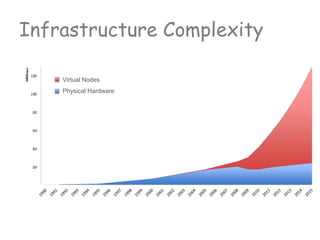
Infrastructure Complexity
Virtual Nodes
Physical Hardware
Infrastructure as Code
- Declarative approach: You describe what
you want to get, not how
- You describe state of the VM you want to
achieve in cookbook or manifest.
- Chef (or other tool like Puppet or Ansible)
will bring your VM into described state
- This operation called provisioning or
convergence
include_recipe "java"
package "tomcat6"
service "tomcat6" do
action [:enable, :start]
end
Cookbooks vs Scripts
- Cookbooks are repeatable
- Cookbooks are unit testable
- Cookbooks has dependencies and versions
- Cookbooks are written on Ruby DSL
- Over 1300+ cookbooks available from the
community
- For Ops: no programming experience
required
- For Devs: no sys-admin experience
required
include_recipe "java"
package "tomcat6"
service "tomcat6" do
action [:enable, :start]
end
Chef
- Very popular provisioning tool
- Huge community
Vagrant and Chef
- Vagrant manages VM
(operates outside)
- Vagrant triggers Chef
(provisioning)
- Chef runs inside existingVM
- Chef installs Services
(Tomcat, MySQL, RabbitMQ)
Use Cases
- DevOps are using Vagrant + Chef for Cookbook development
- Dev & QA are using t host environment locally
- Ops using test deployments before roll-out to prod
- Jenkins using to run Infrastructure Automation Tests
- Jenkins using to do true Integration Tests of the App
+
recipe example
Cookbooks vs Scripts
- Cookbooks are repeatable
- Cookbooks are unit testable
- Cookbooks are written on Ruby DSL
- Over 1300+ cookbooks available from the
community
- For Ops: no programming experience
required
- For Devs: no sys-admin experience
required
include_recipe "java"
package "tomcat6"
service "tomcat6" do
action [:enable, :start]
end
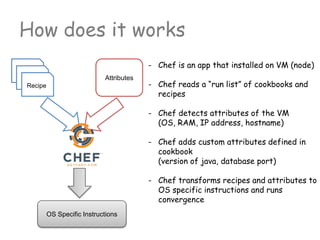
How does it works
- Chef is an app that installed on VM (node)
- Chef reads a “run list” of cookbooks and
recipes
- Chef detects attributes of the VM
(OS, RAM, IP address, hostname)
- Chef adds custom attributes defined in
cookbook
(version of java, database port)
- Chef transforms recipes and attributes to
OS specific instructions and runs
convergence
Recipe
Attributes
OS Specific Instructions
Anatomy of Cookbook
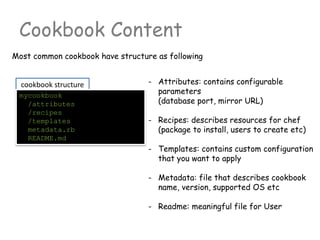
Cookbook Content
- Attributes: contains configurable
parameters
(database port, mirror URL)
- Recipes: describes resources for chef
(package to install, users to create etc)
- Templates: contains custom configuration
that you want to apply
- Metadata: file that describes cookbook
name, version, supported OS etc
- Readme: meaningful file for User
Most common cookbook have structure as following
cookbook structure
mycookbook
/attributes
/recipes
/templates
metadata.rb
README.md
cookbook structure
Attributes
- Attributes defined in file
<cookbook>/attributes/default.rb
- Recipe specific attributes can be defined
in file
<cookbook>/attributes/<recipe_name>.rb
- Attributes are hierarchical
(structured as multi dimensional map)
- Attributes can be defined as
default[:tomcat][:home] = "/var/tomat“
(valid ruby code)
- Attributes can be accessed in recipe or
template as the following
node.tomcat.home or node[:tomcat][:home]
mycookbook
/attributes
default.rb
<recipe>.rb
/recipes
/templates
metadata.rb
README.md
All cookbook configurables can be exposed as attributes. Cookbook contains
default attributes that user can override with their own
All about attributes:
http://docs.opscode.com/chef_overview_attributes.html
cookbook structure
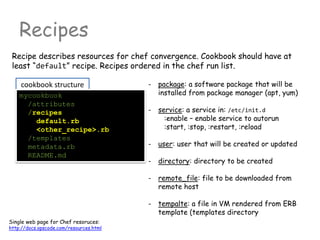
Recipes
mycookbook
/attributes
/recipes
default.rb
<other_recipe>.rb
/templates
metadata.rb
README.md
Recipe describes resources for chef convergence. Cookbook should have at
least “default” recipe. Recipes ordered in the chef run list.
Single web page for Chef resoruces:
http://docs.opscode.com/resources.html
- package: a software package that will be
installed from package manager (apt, yum)
- service: a service in: /etc/init.d
:enable – enable service to autorun
:start, :stop, :restart, :reload
- user: user that will be created or updated
- directory: directory to be created
- remote_file: file to be downloaded from
remote host
- tempalte: a file in VM rendered from ERB
template (templates directory
cookbook structure
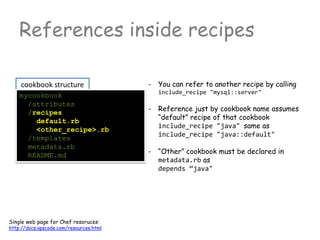
References inside recipes
mycookbook
/attributes
/recipes
default.rb
<other_recipe>.rb
/templates
metadata.rb
README.md
Single web page for Chef resoruces:
http://docs.opscode.com/resources.html
- You can refer to another recipe by calling
include_recipe "mysql::server"
- Reference just by cookbook name assumes
“default” recipe of that cookbook
include_recipe "java" same as
include_recipe "java::default"
- “Other” cookbook must be declared in
metadata.rb as
depends “java"
cookbook structure
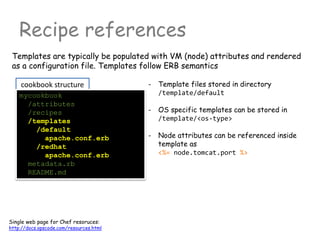
Recipe references
mycookbook
/attributes
/recipes
/templates
/default
apache.conf.erb
/redhat
apache.conf.erb
metadata.rb
README.md
Single web page for Chef resoruces:
http://docs.opscode.com/resources.html
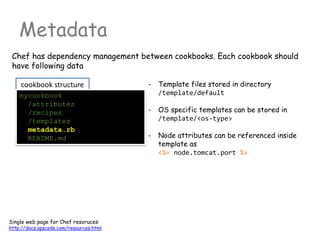
- Template files stored in directory
/template/default
- OS specific templates can be stored in
/template/<os-type>
- Node attributes can be referenced inside
template as
<%= node.tomcat.port %>
Templates are typically be populated with VM (node) attributes and rendered
as a configuration file. Templates follow ERB semantics
cookbook structure
Metadata
mycookbook
/attributes
/recipes
/templates
metadata.rb
README.md
Single web page for Chef resoruces:
http://docs.opscode.com/resources.html
- Template files stored in directory
/template/default
- OS specific templates can be stored in
/template/<os-type>
- Node attributes can be referenced inside
template as
<%= node.tomcat.port %>
Chef has dependency management between cookbooks. Each cookbook should
have following data
Activity 1
Create a custom cookbook that
- Installs and configures nginx
Berksfile: TODO2
Vagrantfile: TODO1
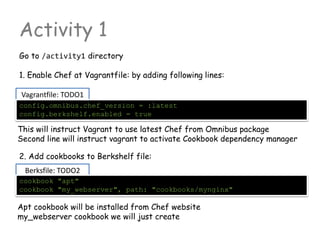
Activity 1
Go to /activity1 directory
1. Enable Chef at Vagrantfile: by adding following lines:
config.omnibus.chef_version = :latest
config.berkshelf.enabled = true
2. Add cookbooks to Berkshelf file:
This will instruct Vagrant to use latest Chef from Omnibus package
Second line will instruct vagrant to activate Cookbook dependency manager
cookbook "apt"
cookbook "my_webserver", path: "cookbooks/mynginx"
Apt cookbook will be installed from Chef website
my_webserver cookbook we will just create
my_webserver::default TODO4
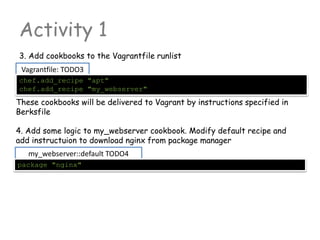
Activity 1
3. Add cookbooks to the Vagrantfile runlist
4. Add some logic to my_webserver cookbook. Modify default recipe and
add instructuion to download nginx from package manager
package "nginx"
Vagrantfile: TODO3
chef.add_recipe "apt"
chef.add_recipe "my_webserver"
These cookbooks will be delivered to Vagrant by instructions specified in
Berksfile
my_webserver::default TODO5
Activity 1
5. Add resource that will declare service “nginx”. Enable it as auto-run and
start it
service "nginx" do
action [ :enable, :start ]
end
6. Start vagrant machine
$ vagrant up
If you have existing vagrant VM (not empty) you might want to destroy it
$ vagrant destroy --force
$ vagrant up
7. Go to http://localhost:2080 with your browser
Activity 2
Add Tomcat and Java to web server
Reconfigure nginx to work as reverse proxy
Vagrantfile: TODO2
Berksfile: TODO1
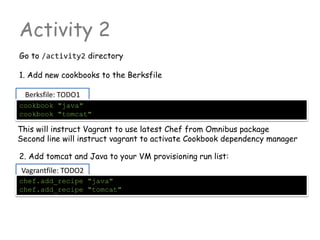
Activity 2
Go to /activity2 directory
1. Add new cookbooks to the Berksfile
cookbook "java"
cookbook "tomcat"
2. Add tomcat and Java to your VM provisioning run list:
This will instruct Vagrant to use latest Chef from Omnibus package
Second line will instruct vagrant to activate Cookbook dependency manager
chef.add_recipe "java"
chef.add_recipe "tomcat"
Activity 2
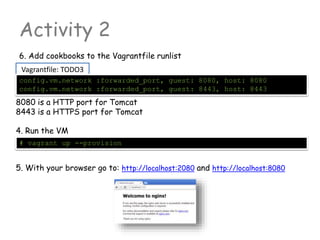
6. Add cookbooks to the Vagrantfile runlist
4. Run the VM
# vagrant up --provision
Vagrantfile: TODO3
config.vm.network :forwarded_port, guest: 8080, host: 8080
config.vm.network :forwarded_port, guest: 8443, host: 8443
8080 is a HTTP port for Tomcat
8443 is a HTTPS port for Tomcat
5. With your browser go to: http://localhost:2080 and http://localhost:8080
Activity 2
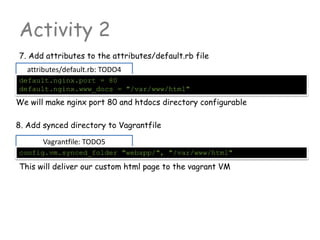
7. Add attributes to the attributes/default.rb file
8. Add synced directory to Vagrantfile
attributes/default.rb: TODO4
default.nginx.port = 80
default.nginx.www_docs = "/var/www/html"
We will make nginx port 80 and htdocs directory configurable
Vagrantfile: TODO5
config.vm.synced_folder "webapp/", "/var/www/html"
This will deliver our custom html page to the vagrant VM
Activity 2
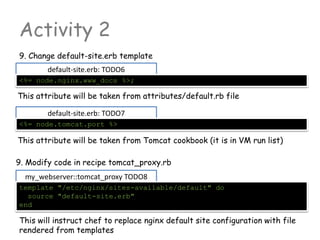
9. Change default-site.erb template
9. Modify code in recipe tomcat_proxy.rb
default-site.erb: TODO6
<%= node.nginx.www_docs %>;
my_webserver::tomcat_proxy TODO8
template "/etc/nginx/sites-available/default" do
source "default-site.erb"
end
This will instruct chef to replace nginx default site configuration with file
rendered from templates
default-site.erb: TODO7
<%= node.tomcat.port %>
This attribute will be taken from attributes/default.rb file
This attribute will be taken from Tomcat cookbook (it is in VM run list)
Activity 2
10. Add logic that will notify service declared in “default.rb” recipe to
reload after template have been rendered. Please change yellow line
my_webserver::tomcat_proxy TODO9
template "/etc/nginx/sites-available/default" do
source "default-site.erb”
notifies :reload, "service[nginx]"
end
We must instruct service that it should support “service reload” action
(which is disabled by default)
my_webserver::default TODO10
service "nginx" do
action [ :enable, :start ]
supports :reload => true
end
Activity 2
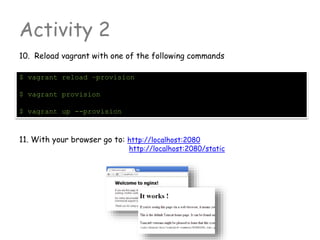
10. Reload vagrant with one of the following commands
11. With your browser go to: http://localhost:2080
http://localhost:2080/static
$ vagrant reload –provision
$ vagrant provision
$ vagrant up --provision
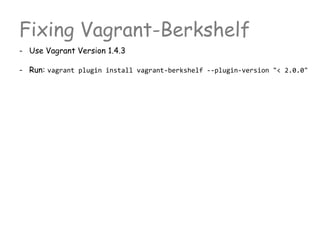
Fixing Vagrant-Berkshelf
- Use Vagrant Version 1.4.3
- Run: vagrant plugin install vagrant-berkshelf --plugin-version "< 2.0.0"
Activity 3 (install mysql server)
Add Tomcat and Java to web server
Reconfigure nginx to work as reverse proxy
Vagrantfile: TODO2
Change: TODO1
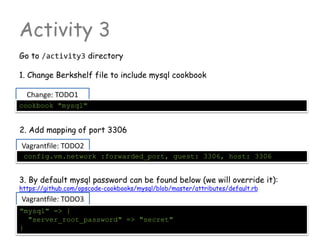
Activity 3
Go to /activity3 directory
1. Change Berkshelf file to include mysql cookbook
cookbook "mysql"
2. Add mapping of port 3306
config.vm.network :forwarded_port, guest: 3306, host: 3306
Vagrantfile: TODO3
"mysql" => {
"server_root_password" => "secret"
}
3. By default mysql password can be found below (we will override it):
https://github.com/opscode-cookbooks/mysql/blob/master/attributes/default.rb
Retrospective

DevOps hackathon Session 2: Basics of Chef

  • 1.
    Provisioning part You candownload me here: https://github.com/akranga/devops-hackathon-2
  • 2.
  • 3.
    Infrastructure as Code -Declarative approach: You describe what you want to get, not how - You describe state of the VM you want to achieve in cookbook or manifest. - Chef (or other tool like Puppet or Ansible) will bring your VM into described state - This operation called provisioning or convergence include_recipe "java" package "tomcat6" service "tomcat6" do action [:enable, :start] end
  • 4.
    Cookbooks vs Scripts -Cookbooks are repeatable - Cookbooks are unit testable - Cookbooks has dependencies and versions - Cookbooks are written on Ruby DSL - Over 1300+ cookbooks available from the community - For Ops: no programming experience required - For Devs: no sys-admin experience required include_recipe "java" package "tomcat6" service "tomcat6" do action [:enable, :start] end
  • 5.
    Chef - Very popularprovisioning tool - Huge community
  • 6.
    Vagrant and Chef -Vagrant manages VM (operates outside) - Vagrant triggers Chef (provisioning) - Chef runs inside existingVM - Chef installs Services (Tomcat, MySQL, RabbitMQ)
  • 7.
    Use Cases - DevOpsare using Vagrant + Chef for Cookbook development - Dev & QA are using t host environment locally - Ops using test deployments before roll-out to prod - Jenkins using to run Infrastructure Automation Tests - Jenkins using to do true Integration Tests of the App +
  • 8.
    recipe example Cookbooks vsScripts - Cookbooks are repeatable - Cookbooks are unit testable - Cookbooks are written on Ruby DSL - Over 1300+ cookbooks available from the community - For Ops: no programming experience required - For Devs: no sys-admin experience required include_recipe "java" package "tomcat6" service "tomcat6" do action [:enable, :start] end
  • 9.
    How does itworks - Chef is an app that installed on VM (node) - Chef reads a “run list” of cookbooks and recipes - Chef detects attributes of the VM (OS, RAM, IP address, hostname) - Chef adds custom attributes defined in cookbook (version of java, database port) - Chef transforms recipes and attributes to OS specific instructions and runs convergence Recipe Attributes OS Specific Instructions
  • 10.
  • 11.
    Cookbook Content - Attributes:contains configurable parameters (database port, mirror URL) - Recipes: describes resources for chef (package to install, users to create etc) - Templates: contains custom configuration that you want to apply - Metadata: file that describes cookbook name, version, supported OS etc - Readme: meaningful file for User Most common cookbook have structure as following cookbook structure mycookbook /attributes /recipes /templates metadata.rb README.md
  • 12.
    cookbook structure Attributes - Attributesdefined in file <cookbook>/attributes/default.rb - Recipe specific attributes can be defined in file <cookbook>/attributes/<recipe_name>.rb - Attributes are hierarchical (structured as multi dimensional map) - Attributes can be defined as default[:tomcat][:home] = "/var/tomat“ (valid ruby code) - Attributes can be accessed in recipe or template as the following node.tomcat.home or node[:tomcat][:home] mycookbook /attributes default.rb <recipe>.rb /recipes /templates metadata.rb README.md All cookbook configurables can be exposed as attributes. Cookbook contains default attributes that user can override with their own All about attributes: http://docs.opscode.com/chef_overview_attributes.html
  • 13.
    cookbook structure Recipes mycookbook /attributes /recipes default.rb <other_recipe>.rb /templates metadata.rb README.md Recipe describesresources for chef convergence. Cookbook should have at least “default” recipe. Recipes ordered in the chef run list. Single web page for Chef resoruces: http://docs.opscode.com/resources.html - package: a software package that will be installed from package manager (apt, yum) - service: a service in: /etc/init.d :enable – enable service to autorun :start, :stop, :restart, :reload - user: user that will be created or updated - directory: directory to be created - remote_file: file to be downloaded from remote host - tempalte: a file in VM rendered from ERB template (templates directory
  • 14.
    cookbook structure References insiderecipes mycookbook /attributes /recipes default.rb <other_recipe>.rb /templates metadata.rb README.md Single web page for Chef resoruces: http://docs.opscode.com/resources.html - You can refer to another recipe by calling include_recipe "mysql::server" - Reference just by cookbook name assumes “default” recipe of that cookbook include_recipe "java" same as include_recipe "java::default" - “Other” cookbook must be declared in metadata.rb as depends “java"
  • 15.
    cookbook structure Recipe references mycookbook /attributes /recipes /templates /default apache.conf.erb /redhat apache.conf.erb metadata.rb README.md Singleweb page for Chef resoruces: http://docs.opscode.com/resources.html - Template files stored in directory /template/default - OS specific templates can be stored in /template/<os-type> - Node attributes can be referenced inside template as <%= node.tomcat.port %> Templates are typically be populated with VM (node) attributes and rendered as a configuration file. Templates follow ERB semantics
  • 16.
    cookbook structure Metadata mycookbook /attributes /recipes /templates metadata.rb README.md Single webpage for Chef resoruces: http://docs.opscode.com/resources.html - Template files stored in directory /template/default - OS specific templates can be stored in /template/<os-type> - Node attributes can be referenced inside template as <%= node.tomcat.port %> Chef has dependency management between cookbooks. Each cookbook should have following data
  • 17.
    Activity 1 Create acustom cookbook that - Installs and configures nginx
  • 18.
    Berksfile: TODO2 Vagrantfile: TODO1 Activity1 Go to /activity1 directory 1. Enable Chef at Vagrantfile: by adding following lines: config.omnibus.chef_version = :latest config.berkshelf.enabled = true 2. Add cookbooks to Berkshelf file: This will instruct Vagrant to use latest Chef from Omnibus package Second line will instruct vagrant to activate Cookbook dependency manager cookbook "apt" cookbook "my_webserver", path: "cookbooks/mynginx" Apt cookbook will be installed from Chef website my_webserver cookbook we will just create
  • 19.
    my_webserver::default TODO4 Activity 1 3.Add cookbooks to the Vagrantfile runlist 4. Add some logic to my_webserver cookbook. Modify default recipe and add instructuion to download nginx from package manager package "nginx" Vagrantfile: TODO3 chef.add_recipe "apt" chef.add_recipe "my_webserver" These cookbooks will be delivered to Vagrant by instructions specified in Berksfile
  • 20.
    my_webserver::default TODO5 Activity 1 5.Add resource that will declare service “nginx”. Enable it as auto-run and start it service "nginx" do action [ :enable, :start ] end 6. Start vagrant machine $ vagrant up If you have existing vagrant VM (not empty) you might want to destroy it $ vagrant destroy --force $ vagrant up 7. Go to http://localhost:2080 with your browser
  • 21.
    Activity 2 Add Tomcatand Java to web server Reconfigure nginx to work as reverse proxy
  • 22.
    Vagrantfile: TODO2 Berksfile: TODO1 Activity2 Go to /activity2 directory 1. Add new cookbooks to the Berksfile cookbook "java" cookbook "tomcat" 2. Add tomcat and Java to your VM provisioning run list: This will instruct Vagrant to use latest Chef from Omnibus package Second line will instruct vagrant to activate Cookbook dependency manager chef.add_recipe "java" chef.add_recipe "tomcat"
  • 23.
    Activity 2 6. Addcookbooks to the Vagrantfile runlist 4. Run the VM # vagrant up --provision Vagrantfile: TODO3 config.vm.network :forwarded_port, guest: 8080, host: 8080 config.vm.network :forwarded_port, guest: 8443, host: 8443 8080 is a HTTP port for Tomcat 8443 is a HTTPS port for Tomcat 5. With your browser go to: http://localhost:2080 and http://localhost:8080
  • 24.
    Activity 2 7. Addattributes to the attributes/default.rb file 8. Add synced directory to Vagrantfile attributes/default.rb: TODO4 default.nginx.port = 80 default.nginx.www_docs = "/var/www/html" We will make nginx port 80 and htdocs directory configurable Vagrantfile: TODO5 config.vm.synced_folder "webapp/", "/var/www/html" This will deliver our custom html page to the vagrant VM
  • 25.
    Activity 2 9. Changedefault-site.erb template 9. Modify code in recipe tomcat_proxy.rb default-site.erb: TODO6 <%= node.nginx.www_docs %>; my_webserver::tomcat_proxy TODO8 template "/etc/nginx/sites-available/default" do source "default-site.erb" end This will instruct chef to replace nginx default site configuration with file rendered from templates default-site.erb: TODO7 <%= node.tomcat.port %> This attribute will be taken from attributes/default.rb file This attribute will be taken from Tomcat cookbook (it is in VM run list)
  • 26.
    Activity 2 10. Addlogic that will notify service declared in “default.rb” recipe to reload after template have been rendered. Please change yellow line my_webserver::tomcat_proxy TODO9 template "/etc/nginx/sites-available/default" do source "default-site.erb” notifies :reload, "service[nginx]" end We must instruct service that it should support “service reload” action (which is disabled by default) my_webserver::default TODO10 service "nginx" do action [ :enable, :start ] supports :reload => true end
  • 27.
    Activity 2 10. Reloadvagrant with one of the following commands 11. With your browser go to: http://localhost:2080 http://localhost:2080/static $ vagrant reload –provision $ vagrant provision $ vagrant up --provision
  • 28.
    Fixing Vagrant-Berkshelf - UseVagrant Version 1.4.3 - Run: vagrant plugin install vagrant-berkshelf --plugin-version "< 2.0.0"
  • 29.
    Activity 3 (installmysql server) Add Tomcat and Java to web server Reconfigure nginx to work as reverse proxy
  • 30.
    Vagrantfile: TODO2 Change: TODO1 Activity3 Go to /activity3 directory 1. Change Berkshelf file to include mysql cookbook cookbook "mysql" 2. Add mapping of port 3306 config.vm.network :forwarded_port, guest: 3306, host: 3306 Vagrantfile: TODO3 "mysql" => { "server_root_password" => "secret" } 3. By default mysql password can be found below (we will override it): https://github.com/opscode-cookbooks/mysql/blob/master/attributes/default.rb
  • 31.