Satellite 6
Automation with Puppet
Michael Lessard, RHCA
Senior Solutions Architect, Red Hat
mlessard@redhat.com
michaellessard
April 2014
Contributors :
Jerome Doucerain (Bell)
Simon Piette (Savoir-faire Linux)
2 Satellite 6 – Automation with Puppet
Agenda
● Configuration management with Satellite 5.x
● Satellite 6 new features
● Introduction to Puppet
● Demonstration
● Puppet and Satellite 6
● Why Puppet ?
● Considerations if you want to move to Satellite 6
3
Satellite 6 – Automation with Puppet
Satellite 5.x
Configuration management
4 Satellite 6 – Automation with Puppet
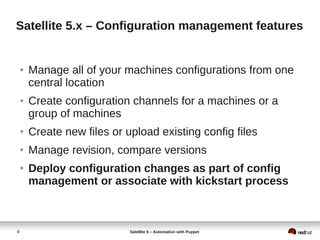
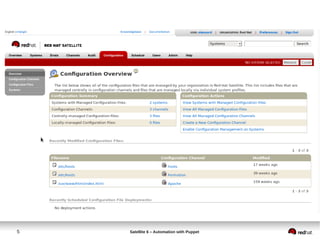
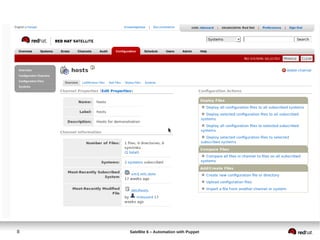
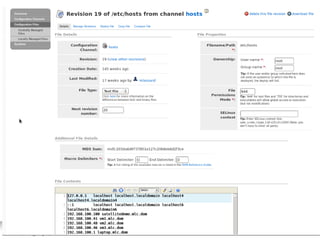
Satellite 5.x – Configuration management features
● Manage all of your machines configurations from one
central location
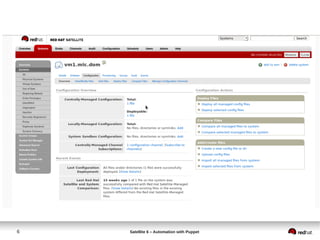
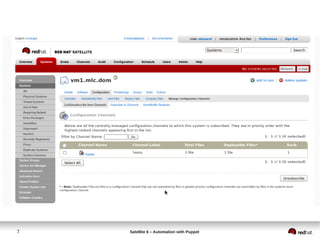
● Create configuration channels for a machines or a
group of machines
● Create new files or upload existing config files
● Manage revision, compare versions
● Deploy configuration changes as part of config
management or associate with kickstart process
5 Satellite 6 – Automation with Puppet
6 Satellite 6 – Automation with Puppet
7 Satellite 6 – Automation with Puppet
8 Satellite 6 – Automation with Puppet
Row 1 Row 2 Row 3 Row 4
0
2
4
6
8
10
12
Column 1
Column 2
Column 3
9 Satellite 6 – Automation with Puppet
10 Satellite 6 – Automation with Puppet
Satellite 5.x – Configuration management cl
[r/]# rhncfg-manager create-channel rhel6-prod
Creating config channel rhel6-prod
[r/]# rhncfg-manager add --channel rhel6-prod /etc/hosts
Using server name satellitedemo.mlc.dom
Pushing to channel rhel6-prod
[r/]# rhncfg-manager diff --channel=rhel6-prod /etc/hosts
- 192.168.100.4 vm2.mlc.dom
+ 192.168.100.56 friday.mlc.dom
[r/]# rhncfg-client get /etc/hosts
Deploying /etc/hosts
11 Satellite 6 – Automation with Puppet
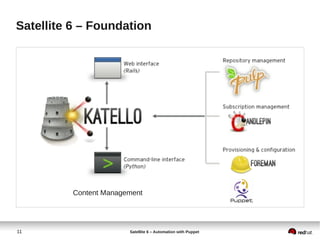
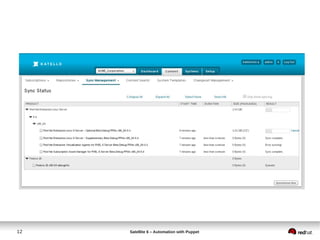
Satellite 6 – Foundation
Content Management
12 Satellite 6 – Automation with Puppet
13 Satellite 6 – Automation with Puppet
14 Satellite 6 – Automation with Puppet
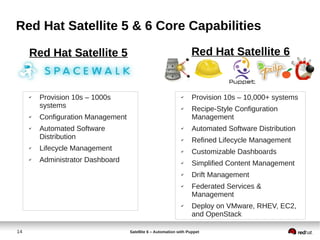
Red Hat Satellite 5 & 6 Core Capabilities
✔ Provision 10s – 1000s
systems
✔ Configuration Management
✔ Automated Software
Distribution
✔ Lifecycle Management
✔ Administrator Dashboard
✔ Provision 10s – 10,000+ systems
✔ Recipe-Style Configuration
Management
✔ Automated Software Distribution
✔ Refined Lifecycle Management
✔ Customizable Dashboards
✔ Simplified Content Management
✔ Drift Management
✔ Federated Services &
Management
✔ Deploy on VMware, RHEV, EC2,
and OpenStack
Red Hat Satellite 5 Red Hat Satellite 6
15
Satellite 6 – Automation with Puppet
Introduction to Puppet
16 Satellite 6 – Automation with Puppet
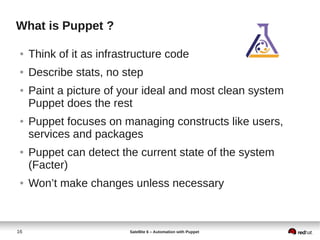
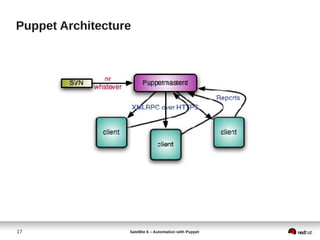
What is Puppet ?
● Think of it as infrastructure code
● Describe stats, no step
● Paint a picture of your ideal and most clean system
Puppet does the rest
● Puppet focuses on managing constructs like users,
services and packages
● Puppet can detect the current state of the system
(Facter)
● Won’t make changes unless necessary
17 Satellite 6 – Automation with Puppet
Puppet Architecture
18 Satellite 6 – Automation with Puppet
PUPPET DSL
Example – managing ntp services with puppet
class ntp {
package { "ntp":
ensure => installed,
}
file { "ntp.conf":
path => '/etc/ntp.conf',
ensure => file,
require => Package[ "ntp" ],
source => "puppet:///modules/ntp/ntp.conf",
}
service { 'ntp':
name => 'ntpd',
ensure => running,
enable => true,
subscribe => File[ "ntp.conf" ],
}
}
PACKAGEPACKAGE
CONFIGURATIONCONFIGURATION
SERVICESERVICE
19 Satellite 6 – Automation with Puppet
Example – managing sshd service
class sshd {
augeas { "sshd_config":
context => "/files/etc/ssh/sshd_config",
changes => [
"set PermitRootLogin yes",
"set UsePAM no",
],
notify => Service[ "sshd" ]
}
service { "sshd":
ensure => running,
enable => true,
hasrestart => true,
}
}
20 Satellite 6 – Automation with Puppet
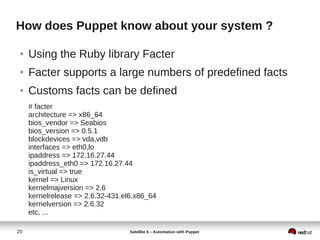
How does Puppet know about your system ?
● Using the Ruby library Facter
● Facter supports a large numbers of predefined facts
● Customs facts can be defined
# facter
architecture => x86_64
bios_vendor => Seabios
bios_version => 0.5.1
blockdevices => vda,vdb
interfaces => eth0,lo
ipaddress => 172.16.27.44
ipaddress_eth0 => 172.16.27.44
is_virtual => true
kernel => Linux
kernelmajversion => 2.6
kernelrelease => 2.6.32-431.el6.x86_64
kernelversion => 2.6.32
etc, ...
21
Satellite 6 – Automation with Puppet
Installation
22 Satellite 6 – Automation with Puppet
Installation Puppet server (RHEL 6)
[r/]# rhn-channel -a -c rhel-x86_64-server-optional-6
[r/]# rpm -ivh http://yum.puppetlabs.com/puppetlabs-release-el-6.noarch.rpm
[r/]# yum install puppet-server puppet
[r/]# puppet --version
3.4.3
[r/]# chkconfig puppetmaster on ; service puppetmaster start
[r/]# chkconfig puppet on ; service puppet start
DON’T FORGET DNS RESOLUTION AND TIME SYNCHRONISATION
23 Satellite 6 – Automation with Puppet
Installation Puppet client (RHEL 6)
[r/]# rhn-channel -a -c rhel-x86_64-server-optional-6
[r/]# rpm -ivh http://yum.puppetlabs.com/puppetlabs-release-el-6.noarch.rpm
[r/]# yum install puppet
[r/]# vim/etc/puppet/puppet.conf (add the following at the bottom)
server = puppet.example.com
runinterval = 120
report = true
[r/]# chkconfig puppet on ; service puppet start
On the puppetmaster server, sign the certs (possible to auto-sign)
[r/]# puppet cert sign puppet-client.example.com
DON’T FORGET DNS RESOLUTION AND TIME SYNCHRONISATION
24
Satellite 6 – Automation with Puppet
Demonstration
25 Satellite 6 – Automation with Puppet
First example 1/2 - deploy some files
On the puppetmaster server :
[r/]# cd /etc/puppet/modules
[r/]# mkdir -p specdirs/{files,manifests}
[r/]# vim /etc/puppet/modules/specfirs/manifest
class specdirs {
file { ['/test/','/test/etc','/test/etc/rc/','/test/etc/rc/shared']:
ensure => "directory",
owner => "root",
group => "root",
mode => "750",
}
}
26 Satellite 6 – Automation with Puppet
First example 2/2
[r/]# vim /etc/puppet/manifests/site.pp
#-----------------------------------------------------
# site.pp
#-----------------------------------------------------
include specdirs
[r/]# puppet apply /etc/puppet/manifests/site.pp
Notice: Compiled catalog for puppetmaster.mlc.dom in environment production in 0.05
seconds
Notice: /Stage[main]/Specdirs/File[/test/]/ensure: created
Notice: /Stage[main]/Specdirs/File[/test/etc]/ensure: created
Notice: /Stage[main]/Specdirs/File[/test/etc/rc/]/ensure: created
Notice: /Stage[main]/Specdirs/File[/test/etc/rc/shared]/ensure: created
Notice: Finished catalog run in 0.09 seconds
On the puppet client :
Test the communication with the server
[r/]# puppet agent --test --waitforcert 60
27
Satellite 6 – Automation with Puppet
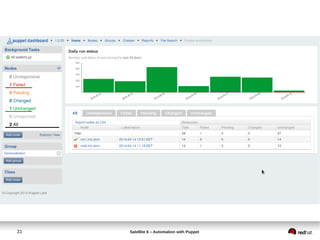
Puppet dashboard
Installation
28 Satellite 6 – Automation with Puppet
Install Puppet – Dashboard 1/3
On the Puppetmaster server
[r/]# yum install mysql mysql-server puppet-dashboard
[r/]# vi /etc/my.cnf (add the following)
max_allowed_packet = 32M
[r/]# chkconfig mysqld on ; service mysqld start
[r/]# vi /usr/share/puppet-dashboard/config/settings.yml (change the following)
(run rake time:zones:local to find your timezone)
time_zone: 'Eastern Time (US & Canada)'
29 Satellite 6 – Automation with Puppet
Install Puppet – Dashboard 2/3
[r/]# mysql
mysql> CREATE DATABASE dashboard CHARACTER SET utf8;
mysql> CREATE USER 'dashboard'@'localhost' IDENTIFIED BY 'my_password';
mysql> GRANT ALL PRIVILEGES ON dashboard.* TO 'dashboard'@'localhost';
mysql> quit
[r/]# cd ~puppet-dashboard && rake RAILS_ENV=production db:migrat
30 Satellite 6 – Automation with Puppet
Install Puppet – Dashboard 3/3
[r/]# chkconfig puppet-dasboard on ; service puppet-dashboard start
[r/]# vi /etc/puppet/puppet.conf
[master]
reports = store, http
reporturl = http://puppet.example.com:3000/reports/upload
[r/]# touch /usr/share/puppet-dashboard/log/production.log
[r/]# chmod 666 /usr/share/puppet-dashboard/log/production.log
[r/]# chkconfig puppet-dashboard-workers on ; service puppet-dashboard-workers
start
http://puppetmaster.mlc.dom:3000
31 Satellite 6 – Automation with Puppet
32
Satellite 6 – Automation with Puppet
PUPPET AND SATELLITE 6
33 Satellite 6 – Automation with Puppet
What Puppet does than Satellite doesn’t
● Start/restart services
● Restart a service after a configuration change
● Create users, remove users
● Aware of your systems state
● Enforce something
● Manages BSD/*nix and Windows (2003, 2008, 7)
● Resources relationship
● Edit a configuration file
34 Satellite 6 – Automation with Puppet
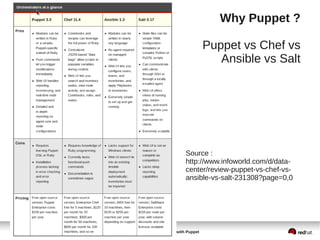
Why Puppet ?
Puppet vs Chef vs
Ansible vs Salt
Source :
http://www.infoworld.com/d/data-
center/review-puppet-vs-chef-vs-
ansible-vs-salt-231308?page=0,0
35 Satellite 6 – Automation with Puppet
Puppet / Satellite 6 considerations
● Keep Puppet modules as modular as possible and
single tasked
● Using role and profile classes is recommended.
● This will allow users to map the modules or role and
profile classes to Satellite host groups.
● User should consider building module artifacts as
archives as if using Puppet Forge. This will allow
import of modules into Satellite 6 and for it to display
details of the module.
● Define Modulefiles for modules so dependencies are
explicitly declared
36 Satellite 6 – Automation with Puppet
Puppet / Satellite 6 considerations
● Manifests inside of modules are supported, but
manifests containing classes outside of modules will
not be supported
● The use of node definitions within manifests is not
supported
node vm1.example.com {
file { '/tmp/test.txt' :
content => "Bye bye !!n",
}
}
● Hiera function call will be supported. (Foreman, alt:
smart variables)
37 Satellite 6 – Automation with Puppet
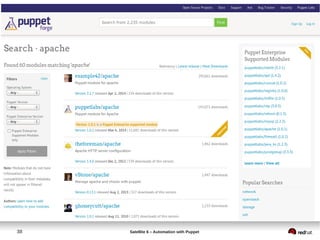
Puppet Forge
● A community driven web service
● A repository of modules
[r/]# puppet module list
[r/]# puppet module search apache
[r/]# puppet module install puppetlabs-apache
[r/]# puppet module upgrade puppetlabs-apach –version -.0.3
http://docs.puppetlabs.com/guides/module_guides/bgtm.html
38 Satellite 6 – Automation with Puppet
39
Satellite 6 – Automation with Puppet
References
40 Satellite 6 – Automation with Puppet
References
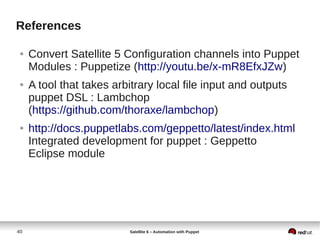
● Convert Satellite 5 Configuration channels into Puppet
Modules : Puppetize (http://youtu.be/x-mR8EfxJZw)
● A tool that takes arbitrary local file input and outputs
puppet DSL : Lambchop
(https://github.com/thoraxe/lambchop)
● http://docs.puppetlabs.com/geppetto/latest/index.html
Integrated development for puppet : Geppetto
Eclipse module
41
Satellite 6 – Automation with Puppet
Questions ?
42 Satellite 6 – Automation with Puppet
Puppet debugging notes
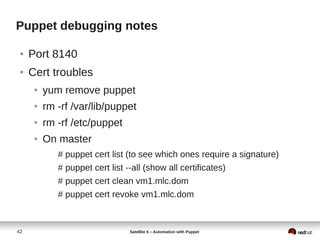
● Port 8140
● Cert troubles
● yum remove puppet
● rm -rf /var/lib/puppet
● rm -rf /etc/puppet
● On master
# puppet cert list (to see which ones require a signature)
# puppet cert list --all (show all certificates)
# puppet cert clean vm1.mlc.dom
# puppet cert revoke vm1.mlc.dom
43 Satellite 6 – Automation with Puppet
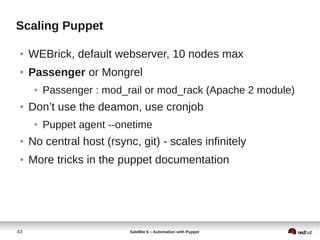
Scaling Puppet
● WEBrick, default webserver, 10 nodes max
● Passenger or Mongrel
● Passenger : mod_rail or mod_rack (Apache 2 module)
● Don’t use the deamon, use cronjob
● Puppet agent --onetime
● No central host (rsync, git) - scales infinitely
● More tricks in the puppet documentation
44
Satellite 6 – Automation with Puppet
THANK YOU !
Michael Lessard, RHCA
Senior Solutions Architect, Red Hat
mlessard@redhat.com
michaellessard

Red Hat Satellite 6 - Automation with Puppet

  • 1.
    Satellite 6 Automation withPuppet Michael Lessard, RHCA Senior Solutions Architect, Red Hat mlessard@redhat.com michaellessard April 2014 Contributors : Jerome Doucerain (Bell) Simon Piette (Savoir-faire Linux)
  • 2.
    2 Satellite 6– Automation with Puppet Agenda ● Configuration management with Satellite 5.x ● Satellite 6 new features ● Introduction to Puppet ● Demonstration ● Puppet and Satellite 6 ● Why Puppet ? ● Considerations if you want to move to Satellite 6
  • 3.
    3 Satellite 6 –Automation with Puppet Satellite 5.x Configuration management
  • 4.
    4 Satellite 6– Automation with Puppet Satellite 5.x – Configuration management features ● Manage all of your machines configurations from one central location ● Create configuration channels for a machines or a group of machines ● Create new files or upload existing config files ● Manage revision, compare versions ● Deploy configuration changes as part of config management or associate with kickstart process
  • 5.
    5 Satellite 6– Automation with Puppet
  • 6.
    6 Satellite 6– Automation with Puppet
  • 7.
    7 Satellite 6– Automation with Puppet
  • 8.
    8 Satellite 6– Automation with Puppet Row 1 Row 2 Row 3 Row 4 0 2 4 6 8 10 12 Column 1 Column 2 Column 3
  • 9.
    9 Satellite 6– Automation with Puppet
  • 10.
    10 Satellite 6– Automation with Puppet Satellite 5.x – Configuration management cl [r/]# rhncfg-manager create-channel rhel6-prod Creating config channel rhel6-prod [r/]# rhncfg-manager add --channel rhel6-prod /etc/hosts Using server name satellitedemo.mlc.dom Pushing to channel rhel6-prod [r/]# rhncfg-manager diff --channel=rhel6-prod /etc/hosts - 192.168.100.4 vm2.mlc.dom + 192.168.100.56 friday.mlc.dom [r/]# rhncfg-client get /etc/hosts Deploying /etc/hosts
  • 11.
    11 Satellite 6– Automation with Puppet Satellite 6 – Foundation Content Management
  • 12.
    12 Satellite 6– Automation with Puppet
  • 13.
    13 Satellite 6– Automation with Puppet
  • 14.
    14 Satellite 6– Automation with Puppet Red Hat Satellite 5 & 6 Core Capabilities ✔ Provision 10s – 1000s systems ✔ Configuration Management ✔ Automated Software Distribution ✔ Lifecycle Management ✔ Administrator Dashboard ✔ Provision 10s – 10,000+ systems ✔ Recipe-Style Configuration Management ✔ Automated Software Distribution ✔ Refined Lifecycle Management ✔ Customizable Dashboards ✔ Simplified Content Management ✔ Drift Management ✔ Federated Services & Management ✔ Deploy on VMware, RHEV, EC2, and OpenStack Red Hat Satellite 5 Red Hat Satellite 6
  • 15.
    15 Satellite 6 –Automation with Puppet Introduction to Puppet
  • 16.
    16 Satellite 6– Automation with Puppet What is Puppet ? ● Think of it as infrastructure code ● Describe stats, no step ● Paint a picture of your ideal and most clean system Puppet does the rest ● Puppet focuses on managing constructs like users, services and packages ● Puppet can detect the current state of the system (Facter) ● Won’t make changes unless necessary
  • 17.
    17 Satellite 6– Automation with Puppet Puppet Architecture
  • 18.
    18 Satellite 6– Automation with Puppet PUPPET DSL Example – managing ntp services with puppet class ntp { package { "ntp": ensure => installed, } file { "ntp.conf": path => '/etc/ntp.conf', ensure => file, require => Package[ "ntp" ], source => "puppet:///modules/ntp/ntp.conf", } service { 'ntp': name => 'ntpd', ensure => running, enable => true, subscribe => File[ "ntp.conf" ], } } PACKAGEPACKAGE CONFIGURATIONCONFIGURATION SERVICESERVICE
  • 19.
    19 Satellite 6– Automation with Puppet Example – managing sshd service class sshd { augeas { "sshd_config": context => "/files/etc/ssh/sshd_config", changes => [ "set PermitRootLogin yes", "set UsePAM no", ], notify => Service[ "sshd" ] } service { "sshd": ensure => running, enable => true, hasrestart => true, } }
  • 20.
    20 Satellite 6– Automation with Puppet How does Puppet know about your system ? ● Using the Ruby library Facter ● Facter supports a large numbers of predefined facts ● Customs facts can be defined # facter architecture => x86_64 bios_vendor => Seabios bios_version => 0.5.1 blockdevices => vda,vdb interfaces => eth0,lo ipaddress => 172.16.27.44 ipaddress_eth0 => 172.16.27.44 is_virtual => true kernel => Linux kernelmajversion => 2.6 kernelrelease => 2.6.32-431.el6.x86_64 kernelversion => 2.6.32 etc, ...
  • 21.
    21 Satellite 6 –Automation with Puppet Installation
  • 22.
    22 Satellite 6– Automation with Puppet Installation Puppet server (RHEL 6) [r/]# rhn-channel -a -c rhel-x86_64-server-optional-6 [r/]# rpm -ivh http://yum.puppetlabs.com/puppetlabs-release-el-6.noarch.rpm [r/]# yum install puppet-server puppet [r/]# puppet --version 3.4.3 [r/]# chkconfig puppetmaster on ; service puppetmaster start [r/]# chkconfig puppet on ; service puppet start DON’T FORGET DNS RESOLUTION AND TIME SYNCHRONISATION
  • 23.
    23 Satellite 6– Automation with Puppet Installation Puppet client (RHEL 6) [r/]# rhn-channel -a -c rhel-x86_64-server-optional-6 [r/]# rpm -ivh http://yum.puppetlabs.com/puppetlabs-release-el-6.noarch.rpm [r/]# yum install puppet [r/]# vim/etc/puppet/puppet.conf (add the following at the bottom) server = puppet.example.com runinterval = 120 report = true [r/]# chkconfig puppet on ; service puppet start On the puppetmaster server, sign the certs (possible to auto-sign) [r/]# puppet cert sign puppet-client.example.com DON’T FORGET DNS RESOLUTION AND TIME SYNCHRONISATION
  • 24.
    24 Satellite 6 –Automation with Puppet Demonstration
  • 25.
    25 Satellite 6– Automation with Puppet First example 1/2 - deploy some files On the puppetmaster server : [r/]# cd /etc/puppet/modules [r/]# mkdir -p specdirs/{files,manifests} [r/]# vim /etc/puppet/modules/specfirs/manifest class specdirs { file { ['/test/','/test/etc','/test/etc/rc/','/test/etc/rc/shared']: ensure => "directory", owner => "root", group => "root", mode => "750", } }
  • 26.
    26 Satellite 6– Automation with Puppet First example 2/2 [r/]# vim /etc/puppet/manifests/site.pp #----------------------------------------------------- # site.pp #----------------------------------------------------- include specdirs [r/]# puppet apply /etc/puppet/manifests/site.pp Notice: Compiled catalog for puppetmaster.mlc.dom in environment production in 0.05 seconds Notice: /Stage[main]/Specdirs/File[/test/]/ensure: created Notice: /Stage[main]/Specdirs/File[/test/etc]/ensure: created Notice: /Stage[main]/Specdirs/File[/test/etc/rc/]/ensure: created Notice: /Stage[main]/Specdirs/File[/test/etc/rc/shared]/ensure: created Notice: Finished catalog run in 0.09 seconds On the puppet client : Test the communication with the server [r/]# puppet agent --test --waitforcert 60
  • 27.
    27 Satellite 6 –Automation with Puppet Puppet dashboard Installation
  • 28.
    28 Satellite 6– Automation with Puppet Install Puppet – Dashboard 1/3 On the Puppetmaster server [r/]# yum install mysql mysql-server puppet-dashboard [r/]# vi /etc/my.cnf (add the following) max_allowed_packet = 32M [r/]# chkconfig mysqld on ; service mysqld start [r/]# vi /usr/share/puppet-dashboard/config/settings.yml (change the following) (run rake time:zones:local to find your timezone) time_zone: 'Eastern Time (US & Canada)'
  • 29.
    29 Satellite 6– Automation with Puppet Install Puppet – Dashboard 2/3 [r/]# mysql mysql> CREATE DATABASE dashboard CHARACTER SET utf8; mysql> CREATE USER 'dashboard'@'localhost' IDENTIFIED BY 'my_password'; mysql> GRANT ALL PRIVILEGES ON dashboard.* TO 'dashboard'@'localhost'; mysql> quit [r/]# cd ~puppet-dashboard && rake RAILS_ENV=production db:migrat
  • 30.
    30 Satellite 6– Automation with Puppet Install Puppet – Dashboard 3/3 [r/]# chkconfig puppet-dasboard on ; service puppet-dashboard start [r/]# vi /etc/puppet/puppet.conf [master] reports = store, http reporturl = http://puppet.example.com:3000/reports/upload [r/]# touch /usr/share/puppet-dashboard/log/production.log [r/]# chmod 666 /usr/share/puppet-dashboard/log/production.log [r/]# chkconfig puppet-dashboard-workers on ; service puppet-dashboard-workers start http://puppetmaster.mlc.dom:3000
  • 31.
    31 Satellite 6– Automation with Puppet
  • 32.
    32 Satellite 6 –Automation with Puppet PUPPET AND SATELLITE 6
  • 33.
    33 Satellite 6– Automation with Puppet What Puppet does than Satellite doesn’t ● Start/restart services ● Restart a service after a configuration change ● Create users, remove users ● Aware of your systems state ● Enforce something ● Manages BSD/*nix and Windows (2003, 2008, 7) ● Resources relationship ● Edit a configuration file
  • 34.
    34 Satellite 6– Automation with Puppet Why Puppet ? Puppet vs Chef vs Ansible vs Salt Source : http://www.infoworld.com/d/data- center/review-puppet-vs-chef-vs- ansible-vs-salt-231308?page=0,0
  • 35.
    35 Satellite 6– Automation with Puppet Puppet / Satellite 6 considerations ● Keep Puppet modules as modular as possible and single tasked ● Using role and profile classes is recommended. ● This will allow users to map the modules or role and profile classes to Satellite host groups. ● User should consider building module artifacts as archives as if using Puppet Forge. This will allow import of modules into Satellite 6 and for it to display details of the module. ● Define Modulefiles for modules so dependencies are explicitly declared
  • 36.
    36 Satellite 6– Automation with Puppet Puppet / Satellite 6 considerations ● Manifests inside of modules are supported, but manifests containing classes outside of modules will not be supported ● The use of node definitions within manifests is not supported node vm1.example.com { file { '/tmp/test.txt' : content => "Bye bye !!n", } } ● Hiera function call will be supported. (Foreman, alt: smart variables)
  • 37.
    37 Satellite 6– Automation with Puppet Puppet Forge ● A community driven web service ● A repository of modules [r/]# puppet module list [r/]# puppet module search apache [r/]# puppet module install puppetlabs-apache [r/]# puppet module upgrade puppetlabs-apach –version -.0.3 http://docs.puppetlabs.com/guides/module_guides/bgtm.html
  • 38.
    38 Satellite 6– Automation with Puppet
  • 39.
    39 Satellite 6 –Automation with Puppet References
  • 40.
    40 Satellite 6– Automation with Puppet References ● Convert Satellite 5 Configuration channels into Puppet Modules : Puppetize (http://youtu.be/x-mR8EfxJZw) ● A tool that takes arbitrary local file input and outputs puppet DSL : Lambchop (https://github.com/thoraxe/lambchop) ● http://docs.puppetlabs.com/geppetto/latest/index.html Integrated development for puppet : Geppetto Eclipse module
  • 41.
    41 Satellite 6 –Automation with Puppet Questions ?
  • 42.
    42 Satellite 6– Automation with Puppet Puppet debugging notes ● Port 8140 ● Cert troubles ● yum remove puppet ● rm -rf /var/lib/puppet ● rm -rf /etc/puppet ● On master # puppet cert list (to see which ones require a signature) # puppet cert list --all (show all certificates) # puppet cert clean vm1.mlc.dom # puppet cert revoke vm1.mlc.dom
  • 43.
    43 Satellite 6– Automation with Puppet Scaling Puppet ● WEBrick, default webserver, 10 nodes max ● Passenger or Mongrel ● Passenger : mod_rail or mod_rack (Apache 2 module) ● Don’t use the deamon, use cronjob ● Puppet agent --onetime ● No central host (rsync, git) - scales infinitely ● More tricks in the puppet documentation
  • 44.
    44 Satellite 6 –Automation with Puppet THANK YOU ! Michael Lessard, RHCA Senior Solutions Architect, Red Hat mlessard@redhat.com michaellessard