







Deploying Fully Automated, Highly Available
Django Application Stacks with Chef


       schisamo@opscode.com
          www.opscode.com
Who am I?
Who am I?


•   Seth Chisamore
    Senior Technical Consultant/Evangelist
    Opscode, Inc.
Who am I?


•   Seth Chisamore
    Senior Technical Consultant/Evangelist
    Opscode, Inc.


•   Project lead for many Opscode sponsored
    open source projects:
    •   Opscode Cookbooks
    •   Knife cloud provisioning plugins (ec2,
        rackspace & openstack)
    •   Knife Windows plugin (knife-windows)
Who are you?


 http://www.flickr.com/photos/timyates/2854357446/sizes/l/
Who are you?


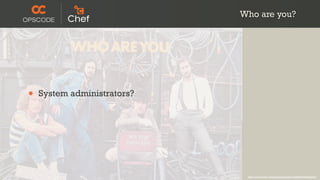
•   System administrators?


                              http://www.flickr.com/photos/timyates/2854357446/sizes/l/
Who are you?


•   System administrators?
•   Developers?


                              http://www.flickr.com/photos/timyates/2854357446/sizes/l/
Who are you?


•   System administrators?
•   Developers?
•   “Business” People?


                              http://www.flickr.com/photos/timyates/2854357446/sizes/l/
What are we talking
      about?

     http://www.flickr.com/photos/peterkaminski/2174679908/
Agenda


http://www.flickr.com/photos/koalazymonkey/3590953001/
Agenda


•   How’s and Why’s


                      http://www.flickr.com/photos/koalazymonkey/3590953001/
Agenda


•   How’s and Why’s
•   Chef 101


                      http://www.flickr.com/photos/koalazymonkey/3590953001/
Agenda


•   How’s and Why’s
•   Chef 101
•   Deploying n-tier Django app stacks
    with Chef


                                         http://www.flickr.com/photos/koalazymonkey/3590953001/
Agenda


•   How’s and Why’s
•   Chef 101
•   Deploying n-tier Django app stacks
    with Chef
•   Leveraging the same Chef code to
    deploy different configurations of
    our stack


                                         http://www.flickr.com/photos/koalazymonkey/3590953001/
Infrastructure as Code
A technical domain
revolving around
building and
managing
infrastructure
programmatically
Enable the reconstruction
   of the business from
nothing but a source code
repository, an application
  data backup, and bare
     metal resources.
Configuration
Management
Configuration
Management
System Integration


     http://www.flickr.com/photos/opalsson/3773629074/
The Chef Framework


   With thanks (and apologies) to Stephen Nelson-Smith
The Chef Framework
The Chef Framework


•   Idempotent
The Chef Framework


•   Idempotent
•   Library & Primitives
The Chef Framework


•   Idempotent
•   Library & Primitives
•   Flexibility
The Chef Framework


•   Idempotent
•   Library & Primitives
•   Flexibility
•   Reasonability
The Chef Framework


•   Idempotent
•   Library & Primitives
•   Flexibility
•   Reasonability
•   TIMTOWTDI
Multiple applications of
 an operation do not
  change the result
We start with APIs, you
     supply data
Defaults are sane, but
  easily changed
There is more than one
     way to do it
The Chef Tool(s)


 With thanks (and apologies) to Stephen Nelson-Smith
The Chef Tool(s)
The Chef Tool(s)


•   ohai
The Chef Tool(s)


•   ohai
•   chef-client
The Chef Tool(s)


•   ohai
•   chef-client
•   knife
The Chef Tool(s)


•   ohai
•   chef-client
•   knife
•   shef
The Chef API


With thanks (and apologies) to Stephen Nelson-Smith
The Chef API
The Chef API


•   Fat Client/Thin Server
The Chef API


•   Fat Client/Thin Server
•   RESTful API w/ JSON
The Chef API


•   Fat Client/Thin Server
•   RESTful API w/ JSON
•   Search Service
The Chef API


•   Fat Client/Thin Server
•   RESTful API w/ JSON
•   Search Service
•   Derivative Services (mash-up your
    infrastructure)
The Chef Community


   With thanks (and apologies) to Stephen Nelson-Smith
The Chef Community
The Chef Community


•   Apache License, Version 2.0
The Chef Community


•   Apache License, Version 2.0
•   360+ Individual contributors
The Chef Community


•   Apache License, Version 2.0
•   360+ Individual contributors
•   70+ Corporate contributors
The Chef Community


•   Apache License, Version 2.0
•   360+ Individual contributors
•   70+ Corporate contributors
    •   Dell, Rackspace,VMware, RightScale,
        Heroku, and more
The Chef Community


•   Apache License, Version 2.0
•   360+ Individual contributors
•   70+ Corporate contributors
    •   Dell, Rackspace,VMware, RightScale,
        Heroku, and more
•   240+ cookbooks
The Chef Community


•   Apache License, Version 2.0
•   360+ Individual contributors
•   70+ Corporate contributors
    •   Dell, Rackspace,VMware, RightScale,
        Heroku, and more
•   240+ cookbooks
•   http://community.opscode.com
Chef client runs on your
        systems
Clients talk to a Chef
       server
Clients authenticate with
        RSA keys
Each system you
configure is a managed
         node
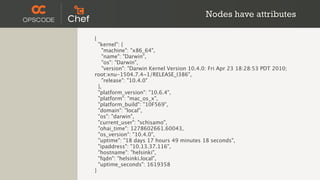
Nodes have attributes

{
  "kernel": {
    "machine": "x86_64",
    "name": "Darwin",
    "os": "Darwin",
    "version": "Darwin Kernel Version 10.4.0: Fri Apr 23 18:28:53 PDT 2010;
root:xnu-1504.7.4~1/RELEASE_I386",
    "release": "10.4.0"
  },
  "platform_version": "10.6.4",
  "platform": "mac_os_x",
  "platform_build": "10F569",
  "domain": "local",
  "os": "darwin",
  "current_user": "schisamo",
  "ohai_time": 1278602661.60043,
  "os_version": "10.4.0",
  "uptime": "18 days 17 hours 49 minutes 18 seconds",
  "ipaddress": "10.13.37.116",
  "hostname": "helsinki",
  "fqdn": "helsinki.local",
  "uptime_seconds": 1619358
}
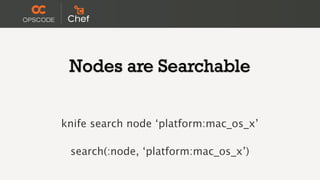
Nodes are Searchable


knife search node ‘platform:mac_os_x’

 search(:node, ‘platform:mac_os_x’)
Chef Enables Infrastructure as Code

                       package "haproxy" do
                        action :install
                       end


•   Resources          template "/etc/haproxy/haproxy.cfg" do
                        source "haproxy.cfg.erb"
•   Recipes             owner "root"
                        group "root"
•   Cookbooks           mode 0644

•
                        notifies :restart, "service[haproxy]"
    Roles              end

•   Data Bags          service "haproxy" do

•   Source Code         supports :restart => true
                        action [:enable, :start]
                       end
Chef manages
Resources on Nodes
Chef Resources

package "haproxy" do
 action :install
end

template "/etc/haproxy/haproxy.cfg" do
 source "haproxy.cfg.erb"
 owner "root"
 group "root"
 mode 0644
 notifies :restart, "service[haproxy]"
end

service "haproxy" do
 supports :restart => true
 action [:enable, :start]
end
Chef Resources

                   package "haproxy" do
                    action :install
                   end

•   Have a type.   template "/etc/haproxy/haproxy.cfg" do
                    source "haproxy.cfg.erb"
                    owner "root"
                    group "root"
                    mode 0644
                    notifies :restart, "service[haproxy]"
                   end

                   service "haproxy" do
                    supports :restart => true
                    action [:enable, :start]
                   end
Chef Resources

                   package "haproxy" do
                    action :install
                   end

•   Have a type.   template "/etc/haproxy/haproxy.cfg" do

•
                    source "haproxy.cfg.erb"
    Have a name.    owner "root"
                    group "root"
                    mode 0644
                    notifies :restart, "service[haproxy]"
                   end

                   service "haproxy" do
                    supports :restart => true
                    action [:enable, :start]
                   end
Chef Resources

                       package "haproxy" do
                        action :install
                       end

•   Have a type.       template "/etc/haproxy/haproxy.cfg" do

•
                        source "haproxy.cfg.erb"
    Have a name.        owner "root"

•   Have parameters.    group "root"
                        mode 0644
                        notifies :restart, "service[haproxy]"
                       end

                       service "haproxy" do
                        supports :restart => true
                        action [:enable, :start]
                       end
Chef Resources

                                      package "haproxy" do
                                       action :install
                                      end

•   Have a type.                      template "/etc/haproxy/haproxy.cfg" do

•
                                       source "haproxy.cfg.erb"
    Have a name.                       owner "root"

•   Have parameters.                   group "root"
                                       mode 0644

•   Take action to put the resource    notifies :restart, "service[haproxy]"
                                      end
    in the declared state.
                                      service "haproxy" do
                                       supports :restart => true
                                       action [:enable, :start]
                                      end
Chef Resources

                                      package "haproxy" do
                                       action :install
                                      end

•   Have a type.                      template "/etc/haproxy/haproxy.cfg" do

•
                                       source "haproxy.cfg.erb"
    Have a name.                       owner "root"

•   Have parameters.                   group "root"
                                       mode 0644

•   Take action to put the resource    notifies :restart, "service[haproxy]"
                                      end
    in the declared state.
•   Can send notifications to other   service "haproxy" do
                                       supports :restart => true
    resources.                         action [:enable, :start]
                                      end
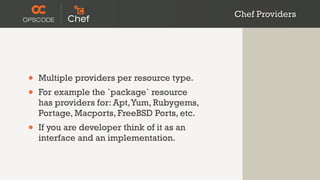
Resources take action
 through Providers
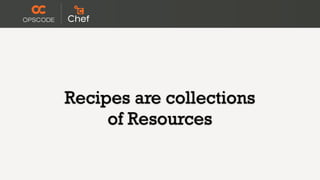
Chef Providers


•   Multiple providers per resource type.
•   For example the `package` resource
    has providers for: Apt, Yum, Rubygems,
    Portage, Macports, FreeBSD Ports, etc.
•   If you are developer think of it as an
    interface and an implementation.
Recipes are collections
     of Resources
Chef Recipes

                                    package "haproxy" do
                                     action :install
                                    end

                                    template "/etc/haproxy/haproxy.cfg" do
                                     source "haproxy.cfg.erb"
•   Recipes are evaluated for        owner "root"
    resources in the order they      group "root"
                                     mode 0644
    appear.                          notifies :restart, "service[haproxy]"

•   Each resource object is added   end

    to the Resource Collection.     service "haproxy" do
                                     supports :restart => true
                                     action [:enable, :start]
                                    end
Chef Recipes


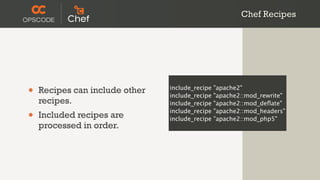
•   Recipes can include other   include_recipe
                                include_recipe
                                                 "apache2"
                                                 "apache2::mod_rewrite"
    recipes.                    include_recipe   "apache2::mod_deflate"

•   Included recipes are
                                include_recipe
                                include_recipe
                                                 "apache2::mod_headers"
                                                 "apache2::mod_php5"
    processed in order.
Chef Recipes

%w{ python python-dev }.each do |pkg|

 package pkg do
  action :install
 end

end

pool_members = search("node", "role:django_cms")

template "/etc/haproxy/haproxy.cfg" do
 source "haproxy.cfg.erb"
 owner "root"
 group "root"
 mode 0644
 variables :pool_members => pool_members
 notifies :restart, "service[haproxy]"
end
Chef Recipes

                          %w{ python python-dev }.each do |pkg|

                           package pkg do
                            action :install
                           end

                          end
•   Extend recipes with
                          pool_members = search("node", "role:django_cms")
    Ruby.
                          template "/etc/haproxy/haproxy.cfg" do
                           source "haproxy.cfg.erb"
                           owner "root"
                           group "root"
                           mode 0644
                           variables :pool_members => pool_members
                           notifies :restart, "service[haproxy]"
                          end
Chef Recipes

                            %w{ python python-dev }.each do |pkg|

                             package pkg do
                              action :install
                             end

                            end
•   Extend recipes with
                            pool_members = search("node", "role:django_cms")
    Ruby.
•   Dynamic configuration   template "/etc/haproxy/haproxy.cfg" do
                             source "haproxy.cfg.erb"
    through search.          owner "root"
                             group "root"
                             mode 0644
                             variables :pool_members => pool_members
                             notifies :restart, "service[haproxy]"
                            end
Cookbooks are
packages for recipes
Cookbook Metadata


•   Cookbooks are like packages.
•   Cookbooks have dependencies.
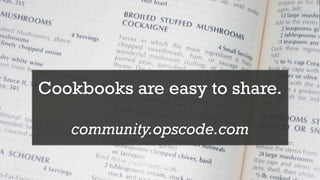
Cookbooks are easy to share.

   community.opscode.com
Chef Roles

name "django_cms"
description "django cms app server"
run_list(
  "recipe[mysql::client]",
  "recipe[application]"
)

name "django_cms_load_balancer"
description "Django CMS load balancer"
run_list(
  "recipe[haproxy::app_lb]"
)
override_attributes(
  "haproxy" => {
    "app_server_role" => "django_cms"
  }
)
Chef Roles

                            name "django_cms"
                            description "django cms app server"
                            run_list(
                              "recipe[mysql::client]",
                              "recipe[application]"
                            )

•   Roles describe nodes.   name "django_cms_load_balancer"
                            description "Django CMS load balancer"
                            run_list(
                              "recipe[haproxy::app_lb]"
                            )
                            override_attributes(
                              "haproxy" => {
                                "app_server_role" => "django_cms"
                              }
                            )
Chef Roles

                             name "django_cms"
                             description "django cms app server"
                             run_list(
                               "recipe[mysql::client]",
                               "recipe[application]"
                             )

•   Roles describe nodes.    name "django_cms_load_balancer"

•   Roles have a run list.
                             description "Django CMS load balancer"
                             run_list(
                               "recipe[haproxy::app_lb]"
                             )
                             override_attributes(
                               "haproxy" => {
                                 "app_server_role" => "django_cms"
                               }
                             )
Chef Roles

                                 name "django_cms"
                                 description "django cms app server"
                                 run_list(
                                   "recipe[mysql::client]",
                                   "recipe[application]"
                                 )

•   Roles describe nodes.        name "django_cms_load_balancer"

•   Roles have a run list.
                                 description "Django CMS load balancer"
                                 run_list(

•   Roles can have attributes.   )
                                   "recipe[haproxy::app_lb]"

                                 override_attributes(
                                   "haproxy" => {
                                     "app_server_role" => "django_cms"
                                   }
                                 )
Data bags store
 arbitrary data
Data Bags

% knife data bag show apps django_cms
database_master_role: ["django_cms_database_master"]
databases:
  production:
    adapter: mysql
    database: django_cms_production
    encoding: utf8
    password: awesome_password
    port:   3306
    username: django_cms
deploy_to:          /srv/django_cms
group:             nogroup
id:              django_cms
local_settings_file: local_settings.py
mysql_root_password:
  production: mysql_root
owner:             nobody
packages:
  curl:
pips:
  django: 1.2.5
repository:         https://github.com/opscode/django-quick-start-cms.git
revision:
  production: master
server_roles:       ["django_cms"]
type:
  django_cms:
     django
     gunicorn
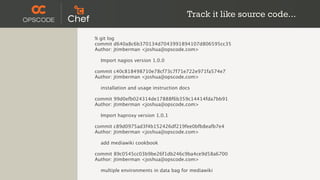
Track it like source code...

% git log
commit d640a8c6b370134d7043991894107d806595cc35
Author: jtimberman <joshua@opscode.com>

  Import nagios version 1.0.0

commit c40c818498710e78cf73c7f71e722e971fa574e7
Author: jtimberman <joshua@opscode.com>

  installation and usage instruction docs

commit 99d0efb024314de17888f6b359c14414fda7bb91
Author: jtimberman <joshua@opscode.com>

  Import haproxy version 1.0.1

commit c89d0975ad3f4b152426df219fee0bfb8eafb7e4
Author: jtimberman <joshua@opscode.com>

  add mediawiki cookbook

commit 89c0545cc03b9be26f1db246c9ba4ce9d58a6700
Author: jtimberman <joshua@opscode.com>

  multiple environments in data bag for mediawiki
Ponies ,
(green )Unicorns and
    n-tier oh my!
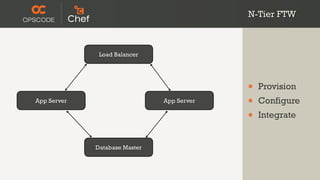
N-Tier FTW


•   Provision
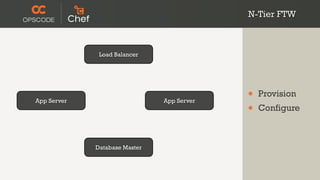
N-Tier FTW


              Load Balancer


App Server                     App Server
                                            •   Provision
                                            •   Configure


             Database Master
N-Tier FTW


              Load Balancer


                                            •   Provision
App Server                     App Server
                                            •   Configure
                                            •   Integrate


             Database Master
Chef Enables Systems Integration


•   Chef searches allow nodes to be aware of
    each other and self configure
Chef Enables Systems Integration


•   Chef searches allow nodes to be aware of
    each other and self configure
•   A shared application data bag allows:
Chef Enables Systems Integration


•   Chef searches allow nodes to be aware of
    each other and self configure
•   A shared application data bag allows:
    •   many app servers to checkout the same
        application code during initial
        bootstrapping
Chef Enables Systems Integration


•   Chef searches allow nodes to be aware of
    each other and self configure
•   A shared application data bag allows:
    •   many app servers to checkout the same
        application code during initial
        bootstrapping
    •   app server and database servers to
        initialize off of the same database config
Database Master
Database Master


% knife role show django_cms_database_master
default_attributes: {}
description:       db master for the django_cms app.
env_run_lists:      {}
json_class:        Chef::Role
name:             django_cms_database_master
override_attributes: {}
run_list:        recipe[database::master]
Database Master
Database Master


•   Install and configure MySQL
Database Master


•   Install and configure MySQL
•   Create the application database
Database Master


•   Install and configure MySQL
•   Create the application database
•   Grant the application user access
Django App Servers
      (1..n)
Django App Servers


% knife role show django_cms
chef_type:         role
default_attributes: {}
description:       django_cms front end application server.
env_run_lists:      {}
json_class:        Chef::Role
name:             django_cms
override_attributes: {}
run_list:        recipe[mysql::client], recipe[application]
Django App Servers
Django App Servers


•   Deploy the Code
Django App Servers


•   Deploy the Code
    •   checkout the code with git
Django App Servers


•   Deploy the Code
    •   checkout the code with git
    •   install required packages (os and python)
Django App Servers


•   Deploy the Code
    •   checkout the code with git
    •   install required packages (os and python)
    •   create environment specific config files
Django App Servers


•   Deploy the Code
    •   checkout the code with git
    •   install required packages (os and python)
    •   create environment specific config files
•   Serve the Code
Django App Servers


•   Deploy the Code
    •   checkout the code with git
    •   install required packages (os and python)
    •   create environment specific config files
•   Serve the Code
    •   install Gunicorn (or apache2/mod_wsgi)
Django App Servers


•   Deploy the Code
    •   checkout the code with git
    •   install required packages (os and python)
    •   create environment specific config files
•   Serve the Code
    •   install Gunicorn (or apache2/mod_wsgi)
    •   create an app specific config file (vhost)
Search for Database Master


results = search(:node, "role:django_cms_database_master")

template "/srv/django_cms/shared/local_settings.py" do
 source "settings.py.erb"
 mode "644"
 variables(
   :host => results[0]['fqdn']
 )
end
Load Balancer
Load Balancer


% knife role show django_cms_load_balancer
chef_type:         role
default_attributes: {}
description:       Django CMS load balancer
env_run_lists:      {}
json_class:        Chef::Role
name:             django_cms_load_balancer
override_attributes:
  haproxy:
   app_server_role: django_cms
run_list:        recipe[haproxy::app_lb]
Load Balancer


•   The balancing pool should grow as more
    application servers are brought online
Search for App Servers


pool_members = search(:node, "role:django_cms")

template "/etc/haproxy/haproxy.cfg" do
 source "haproxy-app_lb.cfg.erb"
 owner "root"
 group "root"
 mode 0644
  variables :pool_members => pool_members
 notifies :restart, "service[haproxy]"
end
One set of codez....
 ...to rule them all
Same Code Different Configurations


•   We can deploy the same app stack on:
Same Code Different Configurations


•   We can deploy the same app stack on:
    •   a single node or a fully redundant
        cluster of nodes.
Same Code Different Configurations


•   We can deploy the same app stack on:
    •   a single node or a fully redundant
        cluster of nodes.
    •   physical hardware or any number of
        public/private cloud providers.
Same Code Different Configurations


•   We can deploy the same app stack on:
    •   a single node or a fully redundant
        cluster of nodes.
    •   physical hardware or any number of
        public/private cloud providers.
    •   a developer workstation fully virtualized
        with Vagrant + VirtualBox
Staging/QA - Single Node


# launch stack in your data center
% knife bootstrap 123.123.3.3 
  -r ‘role[django_cms_database_master]’, 
    ‘role[django_cms]’, 
    ‘role[django_cms_load_balancer]’

# launch stack in EC2
% knife ec2 server create 
  -r ‘role[django_cms_database_master]’, 
    ‘role[django_cms]’, 
    ‘role[django_cms_load_balancer]’

# launch stack in Rackspace
% knife rackspace server create 
  -r ‘role[django_cms_database_master]’, 
    ‘role[django_cms]’, 
    ‘role[django_cms_load_balancer]’
Production - Multi-Machine Cluster


% knife ec2 server create 
  -r ‘role[django_cms_database_master]’

% knife ec2 server create 
  -r ‘role[django_cms]’

% knife ec2 server create 
  -r ‘role[django_cms]’

% knife ec2 server create 
  -r ‘role[django_cms_load_balancer]’
Developer Workstation

% cat Vagrantfile
Vagrant::Config.run do |config|
 config.vm.box = base_box

 config.vm.provision :chef_server do |chef|

  chef.chef_server_url = "https://api.opscode.com/organizations/foo"
  chef.validation_key_path = "~/.chef/private-pems/foo-validator.pem"
  chef.validation_client_name = "#{ENV['ORGNAME']}-validator"

  chef.provisioning_path = "/etc/chef"

  chef.run_list = [
    'role[django_cms_database_master]',
    'role[django_cms]',
    'role[django_cms_load_balancer]'
  ]
 end
end


% vagrant up
BONUS: deploy [insert
   your favorite web
framework here] stacks
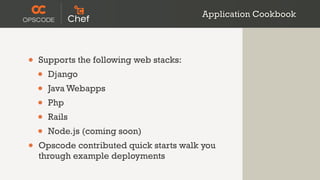
Application Cookbook


•   Supports the following web stacks:
    •   Django
    •   Java Webapps
    •   Php
    •   Rails
    •   Node.js (coming soon)
•   Opscode contributed quick starts walk you
    through example deployments
Further Resources & Closing


•   www.opscode.com
•   wiki.opscode.com
•   @opscode, #opschef
•   irc.freenode.net, #chef, #chef-hacking
•   lists.opscode.com
Questions?


 http://www.flickr.com/photos/oberazzi/318947873/
Thanks!


   schisamo@opscode.com
      www.opscode.com

SELF 2011: Deploying Django Application Stacks with Chef

  • 1.
    Deploying Fully Automated,Highly Available Django Application Stacks with Chef schisamo@opscode.com www.opscode.com
  • 2.
  • 3.
    Who am I? • Seth Chisamore Senior Technical Consultant/Evangelist Opscode, Inc.
  • 4.
    Who am I? • Seth Chisamore Senior Technical Consultant/Evangelist Opscode, Inc. • Project lead for many Opscode sponsored open source projects: • Opscode Cookbooks • Knife cloud provisioning plugins (ec2, rackspace & openstack) • Knife Windows plugin (knife-windows)
  • 5.
    Who are you? http://www.flickr.com/photos/timyates/2854357446/sizes/l/
  • 6.
    Who are you? • System administrators? http://www.flickr.com/photos/timyates/2854357446/sizes/l/
  • 7.
    Who are you? • System administrators? • Developers? http://www.flickr.com/photos/timyates/2854357446/sizes/l/
  • 8.
    Who are you? • System administrators? • Developers? • “Business” People? http://www.flickr.com/photos/timyates/2854357446/sizes/l/
  • 9.
    What are wetalking about? http://www.flickr.com/photos/peterkaminski/2174679908/
  • 10.
  • 11.
    Agenda • How’s and Why’s http://www.flickr.com/photos/koalazymonkey/3590953001/
  • 12.
    Agenda • How’s and Why’s • Chef 101 http://www.flickr.com/photos/koalazymonkey/3590953001/
  • 13.
    Agenda • How’s and Why’s • Chef 101 • Deploying n-tier Django app stacks with Chef http://www.flickr.com/photos/koalazymonkey/3590953001/
  • 14.
    Agenda • How’s and Why’s • Chef 101 • Deploying n-tier Django app stacks with Chef • Leveraging the same Chef code to deploy different configurations of our stack http://www.flickr.com/photos/koalazymonkey/3590953001/
  • 15.
  • 16.
    A technical domain revolvingaround building and managing infrastructure programmatically
  • 17.
    Enable the reconstruction of the business from nothing but a source code repository, an application data backup, and bare metal resources.
  • 18.
  • 19.
  • 20.
    System Integration http://www.flickr.com/photos/opalsson/3773629074/
  • 22.
    The Chef Framework With thanks (and apologies) to Stephen Nelson-Smith
  • 23.
  • 24.
  • 25.
    The Chef Framework • Idempotent • Library & Primitives
  • 26.
    The Chef Framework • Idempotent • Library & Primitives • Flexibility
  • 27.
    The Chef Framework • Idempotent • Library & Primitives • Flexibility • Reasonability
  • 28.
    The Chef Framework • Idempotent • Library & Primitives • Flexibility • Reasonability • TIMTOWTDI
  • 29.
    Multiple applications of an operation do not change the result
  • 30.
    We start withAPIs, you supply data
  • 31.
    Defaults are sane,but easily changed
  • 32.
    There is morethan one way to do it
  • 33.
    The Chef Tool(s) With thanks (and apologies) to Stephen Nelson-Smith
  • 34.
  • 35.
  • 36.
    The Chef Tool(s) • ohai • chef-client
  • 37.
    The Chef Tool(s) • ohai • chef-client • knife
  • 38.
    The Chef Tool(s) • ohai • chef-client • knife • shef
  • 39.
    The Chef API Withthanks (and apologies) to Stephen Nelson-Smith
  • 40.
  • 41.
    The Chef API • Fat Client/Thin Server
  • 42.
    The Chef API • Fat Client/Thin Server • RESTful API w/ JSON
  • 43.
    The Chef API • Fat Client/Thin Server • RESTful API w/ JSON • Search Service
  • 44.
    The Chef API • Fat Client/Thin Server • RESTful API w/ JSON • Search Service • Derivative Services (mash-up your infrastructure)
  • 45.
    The Chef Community With thanks (and apologies) to Stephen Nelson-Smith
  • 46.
  • 47.
    The Chef Community • Apache License, Version 2.0
  • 48.
    The Chef Community • Apache License, Version 2.0 • 360+ Individual contributors
  • 49.
    The Chef Community • Apache License, Version 2.0 • 360+ Individual contributors • 70+ Corporate contributors
  • 50.
    The Chef Community • Apache License, Version 2.0 • 360+ Individual contributors • 70+ Corporate contributors • Dell, Rackspace,VMware, RightScale, Heroku, and more
  • 51.
    The Chef Community • Apache License, Version 2.0 • 360+ Individual contributors • 70+ Corporate contributors • Dell, Rackspace,VMware, RightScale, Heroku, and more • 240+ cookbooks
  • 52.
    The Chef Community • Apache License, Version 2.0 • 360+ Individual contributors • 70+ Corporate contributors • Dell, Rackspace,VMware, RightScale, Heroku, and more • 240+ cookbooks • http://community.opscode.com
  • 53.
    Chef client runson your systems
  • 54.
    Clients talk toa Chef server
  • 55.
  • 56.
    Each system you configureis a managed node
  • 57.
    Nodes have attributes { "kernel": { "machine": "x86_64", "name": "Darwin", "os": "Darwin", "version": "Darwin Kernel Version 10.4.0: Fri Apr 23 18:28:53 PDT 2010; root:xnu-1504.7.4~1/RELEASE_I386", "release": "10.4.0" }, "platform_version": "10.6.4", "platform": "mac_os_x", "platform_build": "10F569", "domain": "local", "os": "darwin", "current_user": "schisamo", "ohai_time": 1278602661.60043, "os_version": "10.4.0", "uptime": "18 days 17 hours 49 minutes 18 seconds", "ipaddress": "10.13.37.116", "hostname": "helsinki", "fqdn": "helsinki.local", "uptime_seconds": 1619358 }
  • 58.
    Nodes are Searchable knifesearch node ‘platform:mac_os_x’ search(:node, ‘platform:mac_os_x’)
  • 59.
    Chef Enables Infrastructureas Code package "haproxy" do action :install end • Resources template "/etc/haproxy/haproxy.cfg" do source "haproxy.cfg.erb" • Recipes owner "root" group "root" • Cookbooks mode 0644 • notifies :restart, "service[haproxy]" Roles end • Data Bags service "haproxy" do • Source Code supports :restart => true action [:enable, :start] end
  • 60.
  • 61.
    Chef Resources package "haproxy"do action :install end template "/etc/haproxy/haproxy.cfg" do source "haproxy.cfg.erb" owner "root" group "root" mode 0644 notifies :restart, "service[haproxy]" end service "haproxy" do supports :restart => true action [:enable, :start] end
  • 62.
    Chef Resources package "haproxy" do action :install end • Have a type. template "/etc/haproxy/haproxy.cfg" do source "haproxy.cfg.erb" owner "root" group "root" mode 0644 notifies :restart, "service[haproxy]" end service "haproxy" do supports :restart => true action [:enable, :start] end
  • 63.
    Chef Resources package "haproxy" do action :install end • Have a type. template "/etc/haproxy/haproxy.cfg" do • source "haproxy.cfg.erb" Have a name. owner "root" group "root" mode 0644 notifies :restart, "service[haproxy]" end service "haproxy" do supports :restart => true action [:enable, :start] end
  • 64.
    Chef Resources package "haproxy" do action :install end • Have a type. template "/etc/haproxy/haproxy.cfg" do • source "haproxy.cfg.erb" Have a name. owner "root" • Have parameters. group "root" mode 0644 notifies :restart, "service[haproxy]" end service "haproxy" do supports :restart => true action [:enable, :start] end
  • 65.
    Chef Resources package "haproxy" do action :install end • Have a type. template "/etc/haproxy/haproxy.cfg" do • source "haproxy.cfg.erb" Have a name. owner "root" • Have parameters. group "root" mode 0644 • Take action to put the resource notifies :restart, "service[haproxy]" end in the declared state. service "haproxy" do supports :restart => true action [:enable, :start] end
  • 66.
    Chef Resources package "haproxy" do action :install end • Have a type. template "/etc/haproxy/haproxy.cfg" do • source "haproxy.cfg.erb" Have a name. owner "root" • Have parameters. group "root" mode 0644 • Take action to put the resource notifies :restart, "service[haproxy]" end in the declared state. • Can send notifications to other service "haproxy" do supports :restart => true resources. action [:enable, :start] end
  • 67.
    Resources take action through Providers
  • 68.
    Chef Providers • Multiple providers per resource type. • For example the `package` resource has providers for: Apt, Yum, Rubygems, Portage, Macports, FreeBSD Ports, etc. • If you are developer think of it as an interface and an implementation.
  • 69.
  • 70.
    Chef Recipes package "haproxy" do action :install end template "/etc/haproxy/haproxy.cfg" do source "haproxy.cfg.erb" • Recipes are evaluated for owner "root" resources in the order they group "root" mode 0644 appear. notifies :restart, "service[haproxy]" • Each resource object is added end to the Resource Collection. service "haproxy" do supports :restart => true action [:enable, :start] end
  • 71.
    Chef Recipes • Recipes can include other include_recipe include_recipe "apache2" "apache2::mod_rewrite" recipes. include_recipe "apache2::mod_deflate" • Included recipes are include_recipe include_recipe "apache2::mod_headers" "apache2::mod_php5" processed in order.
  • 72.
    Chef Recipes %w{ pythonpython-dev }.each do |pkg| package pkg do action :install end end pool_members = search("node", "role:django_cms") template "/etc/haproxy/haproxy.cfg" do source "haproxy.cfg.erb" owner "root" group "root" mode 0644 variables :pool_members => pool_members notifies :restart, "service[haproxy]" end
  • 73.
    Chef Recipes %w{ python python-dev }.each do |pkg| package pkg do action :install end end • Extend recipes with pool_members = search("node", "role:django_cms") Ruby. template "/etc/haproxy/haproxy.cfg" do source "haproxy.cfg.erb" owner "root" group "root" mode 0644 variables :pool_members => pool_members notifies :restart, "service[haproxy]" end
  • 74.
    Chef Recipes %w{ python python-dev }.each do |pkg| package pkg do action :install end end • Extend recipes with pool_members = search("node", "role:django_cms") Ruby. • Dynamic configuration template "/etc/haproxy/haproxy.cfg" do source "haproxy.cfg.erb" through search. owner "root" group "root" mode 0644 variables :pool_members => pool_members notifies :restart, "service[haproxy]" end
  • 75.
  • 76.
    Cookbook Metadata • Cookbooks are like packages. • Cookbooks have dependencies.
  • 77.
    Cookbooks are easyto share. community.opscode.com
  • 78.
    Chef Roles name "django_cms" description"django cms app server" run_list( "recipe[mysql::client]", "recipe[application]" ) name "django_cms_load_balancer" description "Django CMS load balancer" run_list( "recipe[haproxy::app_lb]" ) override_attributes( "haproxy" => { "app_server_role" => "django_cms" } )
  • 79.
    Chef Roles name "django_cms" description "django cms app server" run_list( "recipe[mysql::client]", "recipe[application]" ) • Roles describe nodes. name "django_cms_load_balancer" description "Django CMS load balancer" run_list( "recipe[haproxy::app_lb]" ) override_attributes( "haproxy" => { "app_server_role" => "django_cms" } )
  • 80.
    Chef Roles name "django_cms" description "django cms app server" run_list( "recipe[mysql::client]", "recipe[application]" ) • Roles describe nodes. name "django_cms_load_balancer" • Roles have a run list. description "Django CMS load balancer" run_list( "recipe[haproxy::app_lb]" ) override_attributes( "haproxy" => { "app_server_role" => "django_cms" } )
  • 81.
    Chef Roles name "django_cms" description "django cms app server" run_list( "recipe[mysql::client]", "recipe[application]" ) • Roles describe nodes. name "django_cms_load_balancer" • Roles have a run list. description "Django CMS load balancer" run_list( • Roles can have attributes. ) "recipe[haproxy::app_lb]" override_attributes( "haproxy" => { "app_server_role" => "django_cms" } )
  • 82.
    Data bags store arbitrary data
  • 83.
    Data Bags % knifedata bag show apps django_cms database_master_role: ["django_cms_database_master"] databases: production: adapter: mysql database: django_cms_production encoding: utf8 password: awesome_password port: 3306 username: django_cms deploy_to: /srv/django_cms group: nogroup id: django_cms local_settings_file: local_settings.py mysql_root_password: production: mysql_root owner: nobody packages: curl: pips: django: 1.2.5 repository: https://github.com/opscode/django-quick-start-cms.git revision: production: master server_roles: ["django_cms"] type: django_cms: django gunicorn
  • 84.
    Track it likesource code... % git log commit d640a8c6b370134d7043991894107d806595cc35 Author: jtimberman <joshua@opscode.com> Import nagios version 1.0.0 commit c40c818498710e78cf73c7f71e722e971fa574e7 Author: jtimberman <joshua@opscode.com> installation and usage instruction docs commit 99d0efb024314de17888f6b359c14414fda7bb91 Author: jtimberman <joshua@opscode.com> Import haproxy version 1.0.1 commit c89d0975ad3f4b152426df219fee0bfb8eafb7e4 Author: jtimberman <joshua@opscode.com> add mediawiki cookbook commit 89c0545cc03b9be26f1db246c9ba4ce9d58a6700 Author: jtimberman <joshua@opscode.com> multiple environments in data bag for mediawiki
  • 85.
    Ponies , (green )Unicornsand n-tier oh my!
  • 86.
    N-Tier FTW • Provision
  • 87.
    N-Tier FTW Load Balancer App Server App Server • Provision • Configure Database Master
  • 88.
    N-Tier FTW Load Balancer • Provision App Server App Server • Configure • Integrate Database Master
  • 89.
  • 90.
    Chef Enables SystemsIntegration • Chef searches allow nodes to be aware of each other and self configure
  • 91.
    Chef Enables SystemsIntegration • Chef searches allow nodes to be aware of each other and self configure • A shared application data bag allows:
  • 92.
    Chef Enables SystemsIntegration • Chef searches allow nodes to be aware of each other and self configure • A shared application data bag allows: • many app servers to checkout the same application code during initial bootstrapping
  • 93.
    Chef Enables SystemsIntegration • Chef searches allow nodes to be aware of each other and self configure • A shared application data bag allows: • many app servers to checkout the same application code during initial bootstrapping • app server and database servers to initialize off of the same database config
  • 94.
  • 95.
    Database Master % kniferole show django_cms_database_master default_attributes: {} description: db master for the django_cms app. env_run_lists: {} json_class: Chef::Role name: django_cms_database_master override_attributes: {} run_list: recipe[database::master]
  • 96.
  • 97.
    Database Master • Install and configure MySQL
  • 98.
    Database Master • Install and configure MySQL • Create the application database
  • 99.
    Database Master • Install and configure MySQL • Create the application database • Grant the application user access
  • 100.
  • 101.
    Django App Servers %knife role show django_cms chef_type: role default_attributes: {} description: django_cms front end application server. env_run_lists: {} json_class: Chef::Role name: django_cms override_attributes: {} run_list: recipe[mysql::client], recipe[application]
  • 102.
  • 103.
    Django App Servers • Deploy the Code
  • 104.
    Django App Servers • Deploy the Code • checkout the code with git
  • 105.
    Django App Servers • Deploy the Code • checkout the code with git • install required packages (os and python)
  • 106.
    Django App Servers • Deploy the Code • checkout the code with git • install required packages (os and python) • create environment specific config files
  • 107.
    Django App Servers • Deploy the Code • checkout the code with git • install required packages (os and python) • create environment specific config files • Serve the Code
  • 108.
    Django App Servers • Deploy the Code • checkout the code with git • install required packages (os and python) • create environment specific config files • Serve the Code • install Gunicorn (or apache2/mod_wsgi)
  • 109.
    Django App Servers • Deploy the Code • checkout the code with git • install required packages (os and python) • create environment specific config files • Serve the Code • install Gunicorn (or apache2/mod_wsgi) • create an app specific config file (vhost)
  • 110.
    Search for DatabaseMaster results = search(:node, "role:django_cms_database_master") template "/srv/django_cms/shared/local_settings.py" do source "settings.py.erb" mode "644" variables( :host => results[0]['fqdn'] ) end
  • 111.
  • 112.
    Load Balancer % kniferole show django_cms_load_balancer chef_type: role default_attributes: {} description: Django CMS load balancer env_run_lists: {} json_class: Chef::Role name: django_cms_load_balancer override_attributes: haproxy: app_server_role: django_cms run_list: recipe[haproxy::app_lb]
  • 113.
    Load Balancer • The balancing pool should grow as more application servers are brought online
  • 114.
    Search for AppServers pool_members = search(:node, "role:django_cms") template "/etc/haproxy/haproxy.cfg" do source "haproxy-app_lb.cfg.erb" owner "root" group "root" mode 0644 variables :pool_members => pool_members notifies :restart, "service[haproxy]" end
  • 115.
    One set ofcodez.... ...to rule them all
  • 116.
    Same Code DifferentConfigurations
  • 117.
    Same Code DifferentConfigurations • We can deploy the same app stack on:
  • 118.
    Same Code DifferentConfigurations • We can deploy the same app stack on: • a single node or a fully redundant cluster of nodes.
  • 119.
    Same Code DifferentConfigurations • We can deploy the same app stack on: • a single node or a fully redundant cluster of nodes. • physical hardware or any number of public/private cloud providers.
  • 120.
    Same Code DifferentConfigurations • We can deploy the same app stack on: • a single node or a fully redundant cluster of nodes. • physical hardware or any number of public/private cloud providers. • a developer workstation fully virtualized with Vagrant + VirtualBox
  • 121.
    Staging/QA - SingleNode # launch stack in your data center % knife bootstrap 123.123.3.3 -r ‘role[django_cms_database_master]’, ‘role[django_cms]’, ‘role[django_cms_load_balancer]’ # launch stack in EC2 % knife ec2 server create -r ‘role[django_cms_database_master]’, ‘role[django_cms]’, ‘role[django_cms_load_balancer]’ # launch stack in Rackspace % knife rackspace server create -r ‘role[django_cms_database_master]’, ‘role[django_cms]’, ‘role[django_cms_load_balancer]’
  • 122.
    Production - Multi-MachineCluster % knife ec2 server create -r ‘role[django_cms_database_master]’ % knife ec2 server create -r ‘role[django_cms]’ % knife ec2 server create -r ‘role[django_cms]’ % knife ec2 server create -r ‘role[django_cms_load_balancer]’
  • 123.
    Developer Workstation % catVagrantfile Vagrant::Config.run do |config| config.vm.box = base_box config.vm.provision :chef_server do |chef| chef.chef_server_url = "https://api.opscode.com/organizations/foo" chef.validation_key_path = "~/.chef/private-pems/foo-validator.pem" chef.validation_client_name = "#{ENV['ORGNAME']}-validator" chef.provisioning_path = "/etc/chef" chef.run_list = [ 'role[django_cms_database_master]', 'role[django_cms]', 'role[django_cms_load_balancer]' ] end end % vagrant up
  • 124.
    BONUS: deploy [insert your favorite web framework here] stacks
  • 125.
    Application Cookbook • Supports the following web stacks: • Django • Java Webapps • Php • Rails • Node.js (coming soon) • Opscode contributed quick starts walk you through example deployments
  • 126.
    Further Resources &Closing • www.opscode.com • wiki.opscode.com • @opscode, #opschef • irc.freenode.net, #chef, #chef-hacking • lists.opscode.com
  • 127.
  • 128.
    Thanks! schisamo@opscode.com www.opscode.com

Editor's Notes

  • #2 \n
  • #3 \n
  • #4 \n
  • #5 \n
  • #6 \n
  • #7 \n
  • #8 Managing infrastructure with Chef.\n
  • #9 How&amp;#x2019;s and why&amp;#x2019;s of managing infrastructure with Chef.\nA quick overview of Chef\nWe&amp;#x2019;ll talk about the steps involved for automatically building our n-tier Django stack\nWe&amp;#x2019;ll discuss how your Chef code is reusable across environments\n\n
  • #10 How&amp;#x2019;s and why&amp;#x2019;s of managing infrastructure with Chef.\nA quick overview of Chef\nWe&amp;#x2019;ll talk about the steps involved for automatically building our n-tier Django stack\nWe&amp;#x2019;ll discuss how your Chef code is reusable across environments\n\n
  • #11 How&amp;#x2019;s and why&amp;#x2019;s of managing infrastructure with Chef.\nA quick overview of Chef\nWe&amp;#x2019;ll talk about the steps involved for automatically building our n-tier Django stack\nWe&amp;#x2019;ll discuss how your Chef code is reusable across environments\n\n
  • #12 How&amp;#x2019;s and why&amp;#x2019;s of managing infrastructure with Chef.\nA quick overview of Chef\nWe&amp;#x2019;ll talk about the steps involved for automatically building our n-tier Django stack\nWe&amp;#x2019;ll discuss how your Chef code is reusable across environments\n\n
  • #13 Why not just use some shell scripts?\n
  • #14 \n
  • #15 This is the dream. When everyone&amp;#x2019;s 2nd girlfriend &amp;#x2018;nagios&amp;#x2019; wakes you up in the middle of the night you are ready for the worst.\n
  • #16 Keep track of all the steps required to take bare metal systems to doing their job in the infrastructure.\n\nIt is all about the policy. This can be lo-fi (ie a wiki page and the &amp;#x2018;meat&amp;#x2019; cloud) or fully automated with something like Chef.\n\nUsually this is the context of a single node.\n
  • #17 Taking all the systems that have been configured to do their job, and make them work together to actually run the infrastructure.\n\nWRT Chef, we talk about Fully Automated Infrastructure.\n\nThis brings all the single nodes together.\n
  • #18 Introducing Chef.\n\nMaybe you&amp;#x2019;ve already met!\n
  • #19 Chef provides a framework for fully automating infrastructure, and has some important design principles.\n
  • #20 Chef makes it easy to reason about your infrastructure, at scale. The declarative Ruby configuration language is easy to read, and the predictable ordering makes it easy to understand what&amp;#x2019;s going on.\n\nChef is flexible, and designed to allow you to build infrastructure. &amp;#x201C;Tim Toady&amp;#x201D;\n
  • #21 Chef makes it easy to reason about your infrastructure, at scale. The declarative Ruby configuration language is easy to read, and the predictable ordering makes it easy to understand what&amp;#x2019;s going on.\n\nChef is flexible, and designed to allow you to build infrastructure. &amp;#x201C;Tim Toady&amp;#x201D;\n
  • #22 Chef makes it easy to reason about your infrastructure, at scale. The declarative Ruby configuration language is easy to read, and the predictable ordering makes it easy to understand what&amp;#x2019;s going on.\n\nChef is flexible, and designed to allow you to build infrastructure. &amp;#x201C;Tim Toady&amp;#x201D;\n
  • #23 Chef makes it easy to reason about your infrastructure, at scale. The declarative Ruby configuration language is easy to read, and the predictable ordering makes it easy to understand what&amp;#x2019;s going on.\n\nChef is flexible, and designed to allow you to build infrastructure. &amp;#x201C;Tim Toady&amp;#x201D;\n
  • #24 Chef makes it easy to reason about your infrastructure, at scale. The declarative Ruby configuration language is easy to read, and the predictable ordering makes it easy to understand what&amp;#x2019;s going on.\n\nChef is flexible, and designed to allow you to build infrastructure. &amp;#x201C;Tim Toady&amp;#x201D;\n
  • #25 Idempotent: Consistency, known system state, easy to build\nChef takes idempotent actions to put the system in the desired state.\n
  • #26 Chef makes it easy to reason about your infrastructure.\n\nWe build an API, with primitives and libraries, and let you model your data. We don&amp;#x2019;t try to discover because we might make an incorrect assumption about the system.\n\nYou need an API to manage your infrastructure. The standard tools on Unix and Windows already use APIs to the system. Use an API to manage your infrastructure.\n
  • #27 Chef comes from the perspective that the tool should do pretty much what you expect, hence sane defaults. To get there we had express some opinions. Those opinions can be changed easily, whether that is modifying the configuration of the chef-client, or how Apache is set up.\n
  • #28 Chef is a flexible framework. You can make it do pretty much anything you want. Just like Perl doesn&amp;#x2019;t tell the programmer how to program, Chef doesn&amp;#x2019;t tell the system administrator how to manage the system. You can extend it, mold it and modify it to do what you need.\n\nBeing written in Ruby, using Ruby for the main language was very purposeful. The tool shouldn&amp;#x2019;t get in your way.\n
  • #29 \n
  • #30 -Chef is a library for building and managing infrastructure, and as such it happens to have some tools we wrote that help with that.\n-Ohai gathers data about your nodes.\n-Chef client runs on your nodes to configure them.\n-Knife is the CLI tool used to access the API.\n-Shef is an interactive console debugger.\n
  • #31 -Chef is a library for building and managing infrastructure, and as such it happens to have some tools we wrote that help with that.\n-Ohai gathers data about your nodes.\n-Chef client runs on your nodes to configure them.\n-Knife is the CLI tool used to access the API.\n-Shef is an interactive console debugger.\n
  • #32 -Chef is a library for building and managing infrastructure, and as such it happens to have some tools we wrote that help with that.\n-Ohai gathers data about your nodes.\n-Chef client runs on your nodes to configure them.\n-Knife is the CLI tool used to access the API.\n-Shef is an interactive console debugger.\n
  • #33 -Chef is a library for building and managing infrastructure, and as such it happens to have some tools we wrote that help with that.\n-Ohai gathers data about your nodes.\n-Chef client runs on your nodes to configure them.\n-Knife is the CLI tool used to access the API.\n-Shef is an interactive console debugger.\n
  • #34 \n
  • #35 -thin server...fat clients =&gt; all execution happens down on the nodes...server is dumb REST/file server\n-easy to scale horizontally (like a stateless web app)\n
  • #36 -thin server...fat clients =&gt; all execution happens down on the nodes...server is dumb REST/file server\n-easy to scale horizontally (like a stateless web app)\n
  • #37 -thin server...fat clients =&gt; all execution happens down on the nodes...server is dumb REST/file server\n-easy to scale horizontally (like a stateless web app)\n
  • #38 -thin server...fat clients =&gt; all execution happens down on the nodes...server is dumb REST/file server\n-easy to scale horizontally (like a stateless web app)\n
  • #39 \n
  • #40 Community is important.\n\nhttp://apache.org/licenses/LICENSE-2.0.html\nhttp://www.opscode.com/blog/2009/08/11/why-we-chose-the-apache-license/\nhttp://wiki.opscode.com/display/chef/How+to+Contribute\nhttp://wiki.opscode.com/display/chef/Approved+Contributors\n\n
  • #41 Community is important.\n\nhttp://apache.org/licenses/LICENSE-2.0.html\nhttp://www.opscode.com/blog/2009/08/11/why-we-chose-the-apache-license/\nhttp://wiki.opscode.com/display/chef/How+to+Contribute\nhttp://wiki.opscode.com/display/chef/Approved+Contributors\n\n
  • #42 Community is important.\n\nhttp://apache.org/licenses/LICENSE-2.0.html\nhttp://www.opscode.com/blog/2009/08/11/why-we-chose-the-apache-license/\nhttp://wiki.opscode.com/display/chef/How+to+Contribute\nhttp://wiki.opscode.com/display/chef/Approved+Contributors\n\n
  • #43 Community is important.\n\nhttp://apache.org/licenses/LICENSE-2.0.html\nhttp://www.opscode.com/blog/2009/08/11/why-we-chose-the-apache-license/\nhttp://wiki.opscode.com/display/chef/How+to+Contribute\nhttp://wiki.opscode.com/display/chef/Approved+Contributors\n\n
  • #44 Community is important.\n\nhttp://apache.org/licenses/LICENSE-2.0.html\nhttp://www.opscode.com/blog/2009/08/11/why-we-chose-the-apache-license/\nhttp://wiki.opscode.com/display/chef/How+to+Contribute\nhttp://wiki.opscode.com/display/chef/Approved+Contributors\n\n
  • #45 Community is important.\n\nhttp://apache.org/licenses/LICENSE-2.0.html\nhttp://www.opscode.com/blog/2009/08/11/why-we-chose-the-apache-license/\nhttp://wiki.opscode.com/display/chef/How+to+Contribute\nhttp://wiki.opscode.com/display/chef/Approved+Contributors\n\n
  • #46 \n
  • #47 \n
  • #48 Communication with the server is secure. Clients hold the private key, the server has the public key. The server is not a centralized store of authentication information, pushing the responsibility to the nodes.\n
  • #49 \n
  • #50 \n
  • #51 \n
  • #52 Manage system configuration as resources.\nPut resources together in recipes.\nDistribute recipes with cookbooks.\nAssign recipes to systems through roles.\nStore arbitrary data in data bags.\nTrack it all like source code.\n
  • #53 Resources are an abstraction we feed data into. When you write recipes in Chef, you create resources of things you want to configure.\n
  • #54 Resources declare a description of the state a part of the node should be in.\n
  • #55 Resources declare a description of the state a part of the node should be in.\n
  • #56 Resources declare a description of the state a part of the node should be in.\n
  • #57 Resources declare a description of the state a part of the node should be in.\n
  • #58 Resources declare a description of the state a part of the node should be in.\n
  • #59 Resources declare a description of the state a part of the node should be in.\n
  • #60 Resources declare a description of the state a part of the node should be in.\n
  • #61 Resources declare a description of the state a part of the node should be in.\n
  • #62 Resources declare a description of the state a part of the node should be in.\n
  • #63 Resources declare a description of the state a part of the node should be in.\n
  • #64 Resources declare a description of the state a part of the node should be in.\n
  • #65 Resources declare a description of the state a part of the node should be in.\n
  • #66 Resources declare a description of the state a part of the node should be in.\n
  • #67 Resources declare a description of the state a part of the node should be in.\n
  • #68 Resources declare a description of the state a part of the node should be in.\n
  • #69 Resources declare a description of the state a part of the node should be in.\n
  • #70 Resources declare a description of the state a part of the node should be in.\n
  • #71 Resources declare a description of the state a part of the node should be in.\n
  • #72 Resources declare a description of the state a part of the node should be in.\n
  • #73 Resources declare a description of the state a part of the node should be in.\n
  • #74 Resources declare a description of the state a part of the node should be in.\n
  • #75 Resources declare a description of the state a part of the node should be in.\n
  • #76 Resources declare a description of the state a part of the node should be in.\n
  • #77 Resources declare a description of the state a part of the node should be in.\n
  • #78 Resources declare a description of the state a part of the node should be in.\n
  • #79 Resources declare a description of the state a part of the node should be in.\n
  • #80 The abstraction over the commands or API calls that will configure the resource to be in the state you have defined.\n
  • #81 Providers know how to actually configure the resources to be in the declared state\n\n
  • #82 \n
  • #83 \n
  • #84 Just like recipes themselves are processed in order, the recipes included are processed in order, so when you include a recipe, all its resources are added to the resource collection, then Chef continues to the next.\n\n\n
  • #85 \n
  • #86 \n
  • #87 \n
  • #88 \n
  • #89 \n
  • #90 \n
  • #91 \n
  • #92 -the cpan, PyPI or rubygems.org of the cookbbook world!\n
  • #93 \n
  • #94 \n
  • #95 \n
  • #96 \n
  • #97 \n
  • #98 \n
  • #99 \n
  • #100 \n
  • #101 \n
  • #102 \n
  • #103 \n
  • #104 \n
  • #105 Data bags are containers of grouped information.\n\nUsers, application information, network info, cabinet/rack locations. Describe components of your infrastructure with data, and use that data to configure systems.\n\nProcess data bags in recipes to configure systems dynamically.\n
  • #106 \n
  • #107 \n
  • #108 In our example we are deploy Django CMS but this would apply to any Django application.\n
  • #109 Provisioning is the first step. We need some computers on the internet. They&amp;#x2019;re going to be load balancers, webservers, database servers. Launch those with a cloud API. Every cloud does this.\n
  • #110 You need to do something and you manage the configuration. Install packages, create users, etc. You can use pre-built images for this, but then just for a simple infrastructure (w/o monitoring/trending, middleware, etc) you have four discrete images to maintain for updates both for the OS and app updates.\n
  • #111 This is the last mile. The systems are configured, but also need to be configured to talk to each other.\n
  • #112 \n
  • #113 \n
  • #114 \n
  • #115 \n
  • #116 Every database backed application needs a master database. For this simple example we haven&amp;#x2019;t done any complex setup of master/slave replication, but the recipes are built such that this would be relatively easy to add.\n
  • #117 The database master recipe will read the application information from the data bag and use it to create the database so the application can store its data.\n
  • #118 all done fully automated\n
  • #119 all done fully automated\n
  • #120 all done fully automated\n
  • #121 We start with one but scale horizontally as needed. We can even scale up and down based on demands.\n
  • #122 The main thing in this role is the application recipe. \n\nThe recipe will read in data from the data bag (in a predefined format) to determine what kind of application to deploy, the repository where it lives, details on where to put it, what roles to search for to find the database, and many more customizable properties.\n\nWe launched two of these to have something to load balance :).\n
  • #123 -acquire the code (remote file or scm)...create required config files (database.yml, local_settings.py etc.)\n-install the server software...create an application config for server\n
  • #124 -acquire the code (remote file or scm)...create required config files (database.yml, local_settings.py etc.)\n-install the server software...create an application config for server\n
  • #125 -acquire the code (remote file or scm)...create required config files (database.yml, local_settings.py etc.)\n-install the server software...create an application config for server\n
  • #126 -acquire the code (remote file or scm)...create required config files (database.yml, local_settings.py etc.)\n-install the server software...create an application config for server\n
  • #127 -acquire the code (remote file or scm)...create required config files (database.yml, local_settings.py etc.)\n-install the server software...create an application config for server\n
  • #128 -acquire the code (remote file or scm)...create required config files (database.yml, local_settings.py etc.)\n-install the server software...create an application config for server\n
  • #129 -acquire the code (remote file or scm)...create required config files (database.yml, local_settings.py etc.)\n-install the server software...create an application config for server\n
  • #130 You no longer need to track which system has an IP that should be applied as the database master. We can just use its fqdn from a search.\n
  • #131 \n
  • #132 We&amp;#x2019;re using haproxy, and we&amp;#x2019;ll search for a specific application to load balance. The recipe is written to search for the django_cms role to find systems that should be pool members.\n
  • #133 \n
  • #134 -This search occurs everytime Chef runs on the load balancer.\n-If you add more app servers to the mix, the load balancer will *automatically* become aware!\n
  • #135 A single set of Chef cookbooks, roles and databags allows you to deploy your application stack in numerous ways.\n
  • #136 \n
  • #137 \n
  • #138 \n
  • #139 \n
  • #140 \n
  • #141 \n
  • #142 \n
  • #143 \n
  • #144 https://github.com/opscode/cookbooks/tree/master/application\nhttp://www.opscode.com/blog/category/quickstarts/\n
  • #145 Before we go to questions, here&amp;#x2019;s some resources to be aware of.\n
  • #146 \n
  • #147 \n