Yury Pliashkou 
CTO, IdeaSoft 
pliashkou@gmail.com 
Minsk, 2014
Requirements: 
ruby, rubygems 
Installation: 
gem install capifony 
Setup project: 
cd path/to/your/project 
capifony .
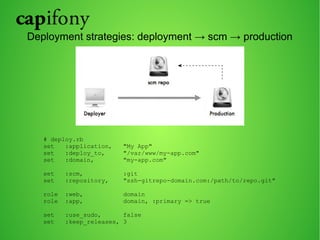
Deployment strategies: deployment → scm → production 
# deploy.rb 
set :application, "My App" 
set :deploy_to, "/var/www/my-app.com" 
set :domain, "my-app.com" 
set :scm, :git 
set :repository, "ssh-gitrepo-domain.com:/path/to/repo.git" 
role :web, domain 
role :app, domain, :primary => true 
set :use_sudo, false 
set :keep_releases, 3
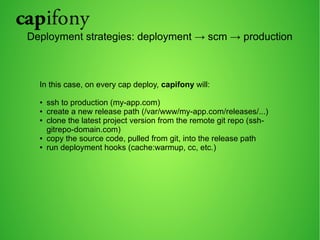
Deployment strategies: deployment → scm → production 
In this case, on every cap deploy, capifony will: 
● ssh to production (my-app.com) 
● create a new release path (/var/www/my-app.com/releases/...) 
● clone the latest project version from the remote git repo (ssh-gitrepo- 
domain.com) 
● copy the source code, pulled from git, into the release path 
● run deployment hooks (cache:warmup, cc, etc.)
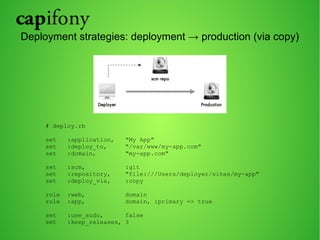
Deployment strategies: deployment → production (via copy) 
# deploy.rb 
set :application, "My App" 
set :deploy_to, "/var/www/my-app.com" 
set :domain, "my-app.com" 
set :scm, :git 
set :repository, "file:///Users/deployer/sites/my-app" 
set :deploy_via, :copy 
role :web, domain 
role :app, domain, :primary => true 
set :use_sudo, false 
set :keep_releases, 3
Deployment strategies: deployment → production (via copy) 
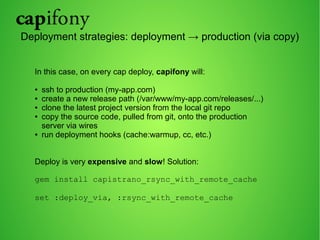
In this case, on every cap deploy, capifony will: 
● ssh to production (my-app.com) 
● create a new release path (/var/www/my-app.com/releases/...) 
● clone the latest project version from the local git repo 
● copy the source code, pulled from git, onto the production 
server via wires 
● run deployment hooks (cache:warmup, cc, etc.) 
Deploy is very expensive and slow! Solution: 
gem install capistrano_rsync_with_remote_cache 
set :deploy_via, :rsync_with_remote_cache
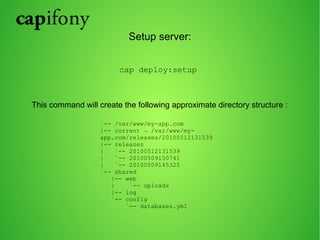
Setup server: 
cap deploy:setup 
This command will create the following approximate directory structure : 
`-- /var/www/my-app.com 
|-- current → /var/www/my-app. 
com/releases/20100512131539 
|-- releases 
| `-- 20100512131539 
| `-- 20100509150741 
| `-- 20100509145325 
`-- shared 
|-- web 
| `-- uploads 
|-- log 
`-- config 
`-- databases.yml
Deploy! 
cap deploy 
Something went wrong??? 
cap deploy:rollback
Symfony2 Deployment 
First, add the following to your app/config/deploy.rb file so 
that theparameters.yml file is shared between all 
deployments: 
set :shared_files, ["app/config/parameters.yml"] 
Next, share the vendor directory between all deployments to make deploying 
faster: 
set :shared_children, [app_path + "/logs", web_path + "/uploads", "vendor"] 
To install your vendors, capifony will rely on bin/vendors by default. But the 
recommended dependency manager is now Composer. In order to use it, just add 
the following configuration: 
set :use_composer, true 
set :update_vendors, true
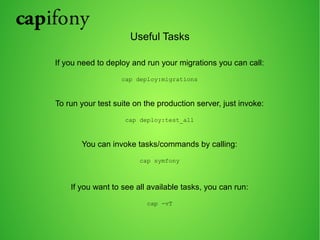
Useful Tasks 
If you need to deploy and run your migrations you can call: 
cap deploy:migrations 
To run your test suite on the production server, just invoke: 
cap deploy:test_all 
You can invoke tasks/commands by calling: 
cap symfony 
If you want to see all available tasks, you can run: 
cap -vT
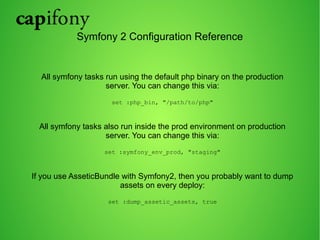
Symfony 2 Configuration Reference 
All symfony tasks run using the default php binary on the production 
server. You can change this via: 
set :php_bin, "/path/to/php" 
All symfony tasks also run inside the prod environment on production 
server. You can change this via: 
set :symfony_env_prod, "staging" 
If you use AsseticBundle with Symfony2, then you probably want to dump 
assets on every deploy: 
set :dump_assetic_assets, true
Recipe: Automatically set proper permissions 
set :writable_dirs, ["app/cache", "app/logs"] 
set :webserver_user, "www-data" 
set :permission_method, :acl 
set :use_set_permissions, true 
Recipe: Speeding up deploy 
before 'symfony:composer:install', 'composer:copy_vendors' 
before 'symfony:composer:update', 'composer:copy_vendors' 
namespace :composer do 
task :copy_vendors, :except => { :no_release => true } do 
run "vendorDir=#{current_path}/vendor; if [ -d $vendorDir ] || [ -h 
$vendorDir ]; then cp -a $vendorDir #{latest_release}/vendor; fi;" 
end 
end
Recipe: How to keep Symfony2 sessions after deploy 
In order to change sessions save path change the save_path parameter 
under a framework node in your application’s config.yml 
framework: 
session: 
save_path: "%kernel.root_dir%/sessions/" 
You have to add also your sessions directory to Capifony’s :shared_children 
# deploy.rb 
set :shared_children, [log_path, ..., app_path + "/sessions"]
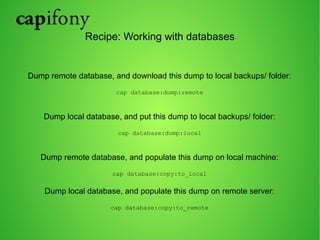
Recipe: Working with databases 
Dump remote database, and download this dump to local backups/ folder: 
cap database:dump:remote 
Dump local database, and put this dump to local backups/ folder: 
cap database:dump:local 
Dump remote database, and populate this dump on local machine: 
cap database:copy:to_local 
Dump local database, and populate this dump on remote server: 
cap database:copy:to_remote
Demo
Questions ? 
Yury Pliashkou 
CTO, IdeaSoft 
pliashkou@gmail.com

Capifony. Minsk PHP MeetUp #11

  • 1.
    Yury Pliashkou CTO,IdeaSoft pliashkou@gmail.com Minsk, 2014
  • 2.
    Requirements: ruby, rubygems Installation: gem install capifony Setup project: cd path/to/your/project capifony .
  • 3.
    Deployment strategies: deployment→ scm → production # deploy.rb set :application, "My App" set :deploy_to, "/var/www/my-app.com" set :domain, "my-app.com" set :scm, :git set :repository, "ssh-gitrepo-domain.com:/path/to/repo.git" role :web, domain role :app, domain, :primary => true set :use_sudo, false set :keep_releases, 3
  • 4.
    Deployment strategies: deployment→ scm → production In this case, on every cap deploy, capifony will: ● ssh to production (my-app.com) ● create a new release path (/var/www/my-app.com/releases/...) ● clone the latest project version from the remote git repo (ssh-gitrepo- domain.com) ● copy the source code, pulled from git, into the release path ● run deployment hooks (cache:warmup, cc, etc.)
  • 5.
    Deployment strategies: deployment→ production (via copy) # deploy.rb set :application, "My App" set :deploy_to, "/var/www/my-app.com" set :domain, "my-app.com" set :scm, :git set :repository, "file:///Users/deployer/sites/my-app" set :deploy_via, :copy role :web, domain role :app, domain, :primary => true set :use_sudo, false set :keep_releases, 3
  • 6.
    Deployment strategies: deployment→ production (via copy) In this case, on every cap deploy, capifony will: ● ssh to production (my-app.com) ● create a new release path (/var/www/my-app.com/releases/...) ● clone the latest project version from the local git repo ● copy the source code, pulled from git, onto the production server via wires ● run deployment hooks (cache:warmup, cc, etc.) Deploy is very expensive and slow! Solution: gem install capistrano_rsync_with_remote_cache set :deploy_via, :rsync_with_remote_cache
  • 7.
    Setup server: capdeploy:setup This command will create the following approximate directory structure : `-- /var/www/my-app.com |-- current → /var/www/my-app. com/releases/20100512131539 |-- releases | `-- 20100512131539 | `-- 20100509150741 | `-- 20100509145325 `-- shared |-- web | `-- uploads |-- log `-- config `-- databases.yml
  • 8.
    Deploy! cap deploy Something went wrong??? cap deploy:rollback
  • 9.
    Symfony2 Deployment First,add the following to your app/config/deploy.rb file so that theparameters.yml file is shared between all deployments: set :shared_files, ["app/config/parameters.yml"] Next, share the vendor directory between all deployments to make deploying faster: set :shared_children, [app_path + "/logs", web_path + "/uploads", "vendor"] To install your vendors, capifony will rely on bin/vendors by default. But the recommended dependency manager is now Composer. In order to use it, just add the following configuration: set :use_composer, true set :update_vendors, true
  • 10.
    Useful Tasks Ifyou need to deploy and run your migrations you can call: cap deploy:migrations To run your test suite on the production server, just invoke: cap deploy:test_all You can invoke tasks/commands by calling: cap symfony If you want to see all available tasks, you can run: cap -vT
  • 11.
    Symfony 2 ConfigurationReference All symfony tasks run using the default php binary on the production server. You can change this via: set :php_bin, "/path/to/php" All symfony tasks also run inside the prod environment on production server. You can change this via: set :symfony_env_prod, "staging" If you use AsseticBundle with Symfony2, then you probably want to dump assets on every deploy: set :dump_assetic_assets, true
  • 12.
    Recipe: Automatically setproper permissions set :writable_dirs, ["app/cache", "app/logs"] set :webserver_user, "www-data" set :permission_method, :acl set :use_set_permissions, true Recipe: Speeding up deploy before 'symfony:composer:install', 'composer:copy_vendors' before 'symfony:composer:update', 'composer:copy_vendors' namespace :composer do task :copy_vendors, :except => { :no_release => true } do run "vendorDir=#{current_path}/vendor; if [ -d $vendorDir ] || [ -h $vendorDir ]; then cp -a $vendorDir #{latest_release}/vendor; fi;" end end
  • 13.
    Recipe: How tokeep Symfony2 sessions after deploy In order to change sessions save path change the save_path parameter under a framework node in your application’s config.yml framework: session: save_path: "%kernel.root_dir%/sessions/" You have to add also your sessions directory to Capifony’s :shared_children # deploy.rb set :shared_children, [log_path, ..., app_path + "/sessions"]
  • 14.
    Recipe: Working withdatabases Dump remote database, and download this dump to local backups/ folder: cap database:dump:remote Dump local database, and put this dump to local backups/ folder: cap database:dump:local Dump remote database, and populate this dump on local machine: cap database:copy:to_local Dump local database, and populate this dump on remote server: cap database:copy:to_remote
  • 15.
  • 16.
    Questions ? YuryPliashkou CTO, IdeaSoft pliashkou@gmail.com