1
STEPHEN SAMUEL
TEXT
WHAT YOU WILL LEARN
▸ Chef?
▸ Use Chef Resources to define the state of your system
▸ Write and use Chef recipes and cookbooks
▸ Create chef organization
▸ Test Kitchen
▸ Inspec
▸ Integrate to CI
2
TEXT
WHAT IS CHEF?
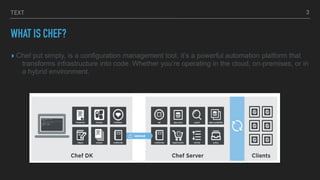
▸ Chef put simply, is a configuration management tool, it’s a powerful automation platform that
transforms infrastructure into code. Whether you’re operating in the cloud, on-premises, or in
a hybrid environment.
3
TEXT
CHEF BASICS
▸ Chef lets you automate all the things—infrastructure, applications, compliance
and more
▸ Chef helps you express your infrastructure policy – how your software is
delivered and maintained on your servers – as code. When infrastructure is
code, it becomes more maintainable, versionable, testable, and collaborative.
▸ A great way to get started with Chef is to log in to a server, or node, and
configure it directly.
4
TEXT
ADVANTAGES
▸ Flexibility
▸ Version control of infrastructure
▸ Human-readable infrastructure – the code is the documentation! Create testable
infrastructures just like testable code!
▸ Easily scalable to thousands of systems, multiple clouds, and on-premises
▸ Use existing cookbooks created on Chef Supermarket as well as automate
deployments and compliance
5
TEXT
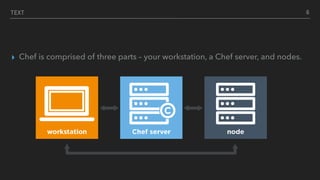
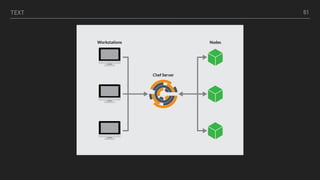
▸ Chef is comprised of three parts – your workstation, a Chef server, and nodes.
6
TEXT
HAVE YOU INSTALLED THE TOOLS?
▸ chef --version && foodcritic --version
▸ && rubocop —version
▸ Windows machine
▸ ssh
▸ git —version
▸ VBoxManage - -version
▸ environment variable $PATH: c:ProgramfilesOracleVirtualBox
▸ vagrant - - version
This is to verify that all required software is installed properly
7
TEXT
CHEF RESOURCES
▸ A resource describes the desired state and steps for achieving the desired
configuration.
▸ Resources are managed within "recipes" (which will be covered in later) and
are generally grouped together within cookbooks for management-specific
software and tasks.
8
TEXT
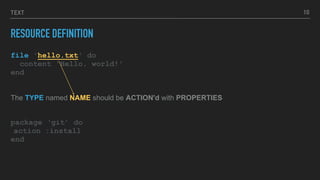
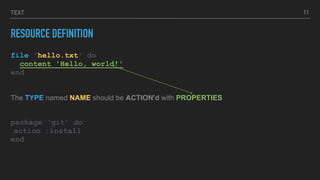
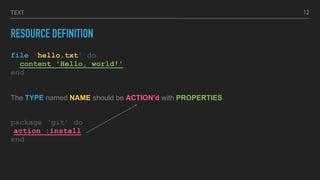
RESOURCE DEFINITION
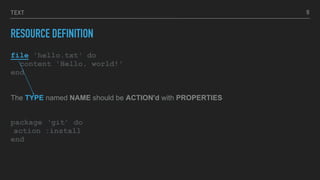
file 'hello.txt' do
content 'Hello, world!'
end
The TYPE named NAME should be ACTION'd with PROPERTIES
package ‘git’ do
action :install
end
9
TEXT
RESOURCE DEFINITION
file 'hello.txt' do
content 'Hello, world!'
end
The TYPE named NAME should be ACTION'd with PROPERTIES
package ‘git’ do
action :install
end
10
TEXT
RESOURCE DEFINITION
file 'hello.txt' do
content 'Hello, world!'
end
The TYPE named NAME should be ACTION'd with PROPERTIES
package ‘git’ do
action :install
end
11
TEXT
RESOURCE DEFINITION
file 'hello.txt' do
content 'Hello, world!'
end
The TYPE named NAME should be ACTION'd with PROPERTIES
package ‘git’ do
action :install
end
12
TEXT
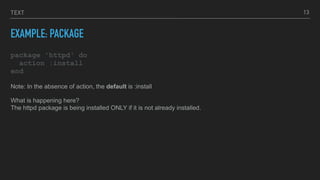
EXAMPLE: PACKAGE
package 'httpd' do
action :install
end
13
Note: In the absence of action, the default is :install
What is happening here?
The httpd package is being installed ONLY if it is not already installed.
TEXT
EXAMPLE: SERVICE
service 'httpd' do
action [:enable, :start]
end
14
Note: In the absence of action, the default is :nothing
The service httpd is enabled so it starts at boot time and then started so that it is currently running.
TEXT
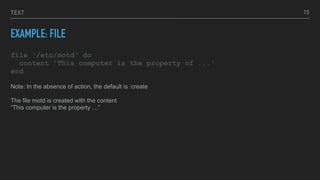
EXAMPLE: FILE
file ‘/etc/motd‘ do
content 'This computer is the property of ...'
end
15
Note: In the absence of action, the default is :create
The file motd is created with the content
“This computer is the property …”
TEXT
RECIPE
▸ Recipes are a collection of resources, defined and written using patterns.
Helper code, such as loops and if statements, can be written around those
resources to help customize the configurations of specific nodes.
▸ For example, if or case statements around package names.
16
TEXT
COOKBOOK
▸ Recipes are stored in cookbooks
▸ Cookbooks contain recipes, templates, files, custom resources, etc.,
▸ Code re-use
17
TEXT
CHEF-CLIENT
▸ chef-client is an agent that runs locally on every node that is under
management by Chef.
▸ When a chef-client is run, it will perform all of the steps that are required to
bring the node into the expected state.
18
TEXT
IDEMPOTENT
▸ An idempotent operation can be repeated an arbitrary number of times and the
result will be the same as if it had been done only once.
▸ Examples:
▸ Setting a Boolean flag. No matter how many times you do it, the flag stays set.
▸ Deleting a row from a database with a given ID. If you try it again, the row is
still gone.
19
TEXT
BERKSHELF
▸ Berkshelf is a dependency manager for Chef cookbooks.
20
KITCHEN
▸ Use Test Kitchen to automatically test cookbook data across any combination
of platforms and test suites
22
TEXT
▸ Objective
Write a recipe to install ‘cowsay’ package
Apply the recipe to the workstation
Use ‘cowsay’ to say something
23
TEXT
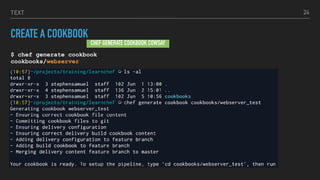
CREATE A COOKBOOK
$ chef generate cookbook
cookbooks/webserver
24
CHEF GENERATE COOKBOOK COWSAY
TEXT
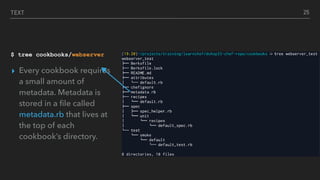
$ tree cookbooks/webserver
▸ Every cookbook requires
a small amount of
metadata. Metadata is
stored in a file called
metadata.rb that lives at
the top of each
cookbook’s directory.
25
TEXT
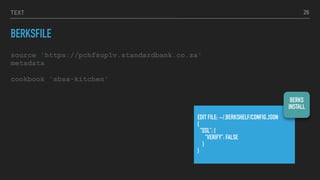
BERKSFILE
EDIT FILE: ~/.BERKSHELF/CONFIG.JSON
{
"SSL": {
"VERIFY": FALSE
}
}
26
source 'https://pchfsup1v.standardbank.co.za'
metadata
cookbook 'sbsa-kitchen'
BERKS
INSTALL
VALIDATING OUR RECIPES IN VIRTUAL ENVIRONMENTS
KITCHEN
▸ Defined in a .kitchen.yml file
▸ Uses a driver plugin architecture
▸ Supports cookbook testing across many cloud providers and virtualization
technologies
▸ Read more here: https://docs.chef.io/kitchen.html
TEXT
.KITCHEN.YML SCHEMA
▸ When chef generates a cookbook, a default .kitchen.yml is created.
▸ It contains kitchen configuration for the driver, provisioner, platform, and suites.
TEXT
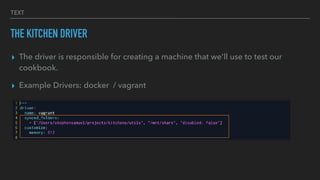
THE KITCHEN DRIVER
▸ The driver is responsible for creating a machine that we'll use to test our
cookbook.
▸ Example Drivers: docker / vagrant
TEXT
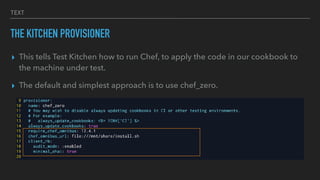
THE KITCHEN PROVISIONER
▸ This tells Test Kitchen how to run Chef, to apply the code in our cookbook to
the machine under test.
▸ The default and simplest approach is to use chef_zero.
TEXT
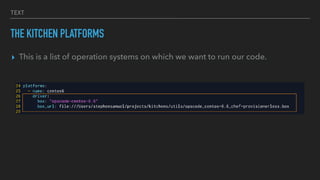
THE KITCHEN PLATFORMS
▸ This is a list of operation systems on which we want to run our code.
TEXT
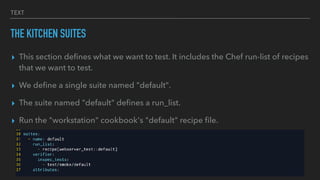
THE KITCHEN SUITES
▸ This section defines what we want to test. It includes the Chef run-list of recipes
that we want to test.
▸ We define a single suite named "default".
▸ The suite named "default" defines a run_list.
▸ Run the "workstation" cookbook's "default" recipe file.
TEXT
EDIT .KITCHEN.YML
driver:
name: vagrant
synced_folders:
- ["E:cheftrainingutils", "/mnt/share", "disabled: false"]
customize:
memory: 512
provisioner:
name: chef_zero
require_chef_omnibus: 12.4.1
chef_omnibus_url: file:///mnt/share/install.sh
client_rb:
audit_mode: :enabled
minimal_ohai: true
always_update_cookbooks: true
TEXT
EDIT .KITCHEN.YML
verifier:
name: inspec
platforms:
- name: cowsay
driver:
box: "opscode-centos-6.6"
box_url: file:E:cheftrainingutilsopscode_centos-6.6_chef-provisionerless.box
network:
- ["private_network", {ip: "192.168.56.X"}]
suites:
- name: default
run_list:
- recipe[mycook::default]
TEXT
LETS SPIN A ‘VM’
KITCHEN CREATE
35
KITCHEN CONVERGE
TEXT
LETS SPIN A ‘VM’
KITCHEN CREATE
36
KITCHEN CONVERGE
TEXT
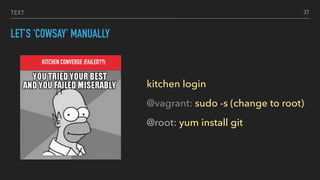
LET’S ‘COWSAY’ MANUALLY
37
KITCHEN CONVERGE (FAILED??)
kitchen login
@vagrant: sudo -s (change to root)
@root: yum install git
TEXT
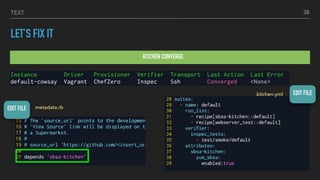
LET’S FIX IT
KITCHEN CONVERGE
38
EDIT FILE
metadata.rbEDIT FILE
.kitchen.yml
TEXT
▸ vi moo.rb [ VI editor:: i- to insert / :wq (write and quit) ]
Write a recipe to install ‘cowsay’ package
Apply the recipe to the workstation
Use ‘cowsay’ to say something
39
KITCHEN LOGIN
cowsay/recipes/default.rb
TEXT
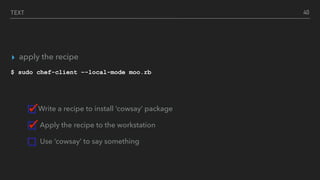
▸ apply the recipe
$ sudo chef-client –-local-mode moo.rb
Write a recipe to install ‘cowsay’ package
Apply the recipe to the workstation
Use ‘cowsay’ to say something
40
TEXT
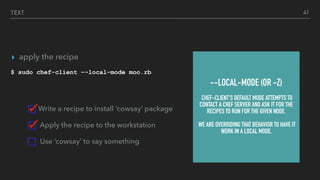
▸ apply the recipe
$ sudo chef-client –-local-mode moo.rb
Write a recipe to install ‘cowsay’ package
Apply the recipe to the workstation
Use ‘cowsay’ to say something
41
--LOCAL-MODE (OR -Z)
CHEF-CLIENT'S DEFAULT MODE ATTEMPTS TO
CONTACT A CHEF SERVER AND ASK IT FOR THE
RECIPES TO RUN FOR THE GIVEN NODE.
WE ARE OVERRIDING THAT BEHAVIOR TO HAVE IT
WORK IN A LOCAL MODE.
TEXT
[root@default-cowsay vagrant]# cowsay "hello im a rockstar"
_____________________
< hello im a rockstar >
---------------------
 ^__^
 (oo)_______
(__) )/
||----w |
|| ||
Write a recipe to install ‘cowsay’ package
Apply the recipe to the workstation
Use ‘cowsay’ to say something
42
TEXT 43
TEXT 44
TEST KITCHEN
TEXT
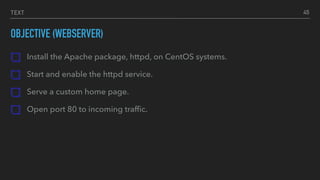
OBJECTIVE (WEBSERVER)
Install the Apache package, httpd, on CentOS systems.
Start and enable the httpd service.
Serve a custom home page.
Open port 80 to incoming traffic.
45
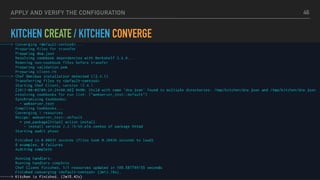
APPLY AND VERIFY THE CONFIGURATION
KITCHEN CREATE / KITCHEN CONVERGE
46
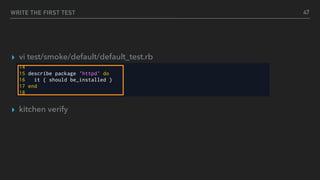
WRITE THE FIRST TEST
▸ vi test/smoke/default/default_test.rb
▸ kitchen verify
47
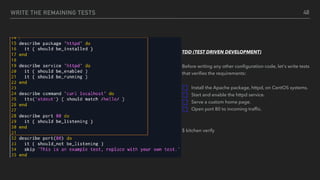
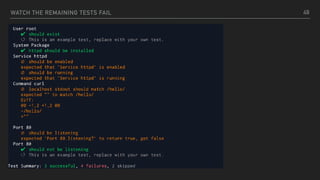
WRITE THE REMAINING TESTS 48
TDD (TEST DRIVEN DEVELOPMENT)
Before writing any other configuration code, let's write tests
that verifies the requirements:
Install the Apache package, httpd, on CentOS systems.
Start and enable the httpd service.
Serve a custom home page.
Open port 80 to incoming traffic.
$ kitchen verify
WATCH THE REMAINING TESTS FAIL 49
TEXT
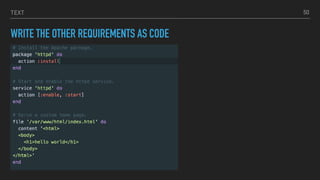
WRITE THE OTHER REQUIREMENTS AS CODE
50
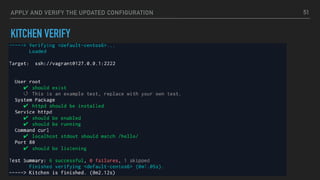
APPLY AND VERIFY THE UPDATED CONFIGURATION
KITCHEN VERIFY
51
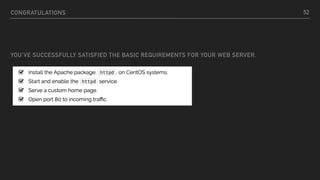
CONGRATULATIONS
YOU'VE SUCCESSFULLY SATISFIED THE BASIC REQUIREMENTS FOR YOUR WEB SERVER.
52
TEXT
TEST KITCHEN COMMANDS AND CONFIGURATION
$ kitchen create [INSTANCE|REGEXP|all]
Create one or more instances.
TEXT
TEST KITCHEN COMMANDS AND CONFIGURATION
$ kitchen converge [INSTANCE|REGEXP|
all]
Create the instance (if necessary) and
then apply
the run list to one or more instances.
TEXT
TEST KITCHEN COMMANDS AND CONFIGURATION
$ kitchen verify [INSTANCE|REGEXP|all]
Create the instance (if necessary) and
then apply
the run list to one or more instances,
run the tests and destroy the instances
TEXT
TEST KITCHEN COMMANDS AND CONFIGURATION
$ kitchen destroy [INSTANCE|REGEXP|all]
destroy the instance
TEXT 57
TEXT 58
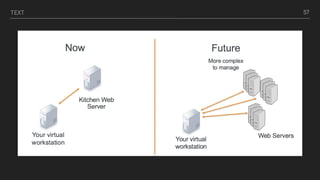
CHEF SERVER
TEXT
CHEF SERVER (OBJECTIVE)
▸ Connect local workstation (laptop) to a Chef Server
▸ Upload cookbooks to a Chef Server
▸ Bootstrap a node
▸ Manage a node via a Chef Server
59
TEXT
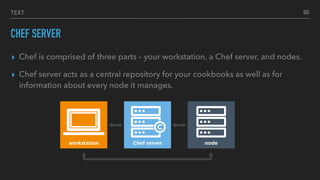
CHEF SERVER
▸ Chef is comprised of three parts – your workstation, a Chef server, and nodes.
▸ Chef server acts as a central repository for your cookbooks as well as for
information about every node it manages.
60
TEXT 61
CONNECT LOCAL WORKSTATION (LAPTOP) TO A CHEF SERVER
SETUP WORKSTATION
▸ Download starter kit from chef organization
▸ use knife to talk to chef-server and manage nodes
▸ knife is a command-line tool that provides an interface between a local chef-
repo and the Chef Server.
▸ knife node list
62
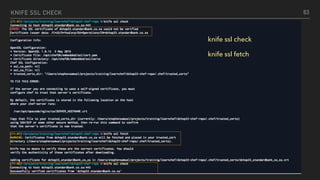
KNIFE SSL CHECK
∑
63
knife ssl check
knife ssl fetch
TEXT
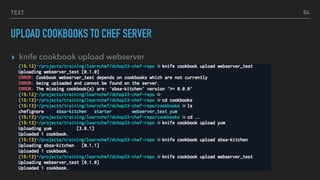
UPLOAD COOKBOOKS TO CHEF SERVER
▸ knife cookbook upload webserver
64
TEXT
BOOTSTRAP NODE TO CHEF SERVER
▸ knife bootstrap ADDRESS --ssh-user USER --ssh-password 'PASSWORD' --sudo
--use-sudo-password --node-name node1-centos --run-list
'recipe[learn_chef_httpd]'
65
TEXT
BOOTSTRAP NODE TO CHEF SERVER
▸ knife bootstrap ADDRESS --ssh-user USER --ssh-password 'PASSWORD' --sudo
--use-sudo-password --node-name node1-centos --run-list
‘recipe[learn_chef_httpd]
66
(FQDN)
FULLY QUALIFIED DOMAIN NAME
TEXT
BOOTSTRAP NODE TO CHEF SERVER
▸ knife bootstrap ADDRESS --ssh-user USER --ssh-password 'PASSWORD' --sudo
--use-sudo-password --node-name node1-centos --run-list
‘recipe[learn_chef_httpd]
67
(FQDN)
FULLY QUALIFIED DOMAIN NAME
USER NAME
TEXT
BOOTSTRAP NODE TO CHEF SERVER
▸ knife bootstrap ADDRESS --ssh-user USER --ssh-password 'PWD' --sudo --use-
sudo-password --node-name node1-centos --run-list ‘recipe[learn_chef_httpd]
68
(FQDN)
FULLY QUALIFIED DOMAIN NAME
USER NAME
PASSWORD
TEXT
BOOTSTRAP NODE TO CHEF SERVER
▸ knife bootstrap ADDRESS --ssh-user USER --ssh-password 'PWD' --sudo --use-
sudo-password --node-name node1-centos --run-list ‘recipe[learn_chef_httpd]
69
(FQDN)
FULLY QUALIFIED DOMAIN NAME
USER NAME
PASSWORD
NODE NAME
TEXT
RUN-LIST [--RUN-LIST “RECIPE[COOKBOOK::RECIPE]”]
▸ the run list is a collection of policies that the node should follow
▸ chef-client obtains the run list from the chef-server
▸ chef client ensures the node complies with the policy in the run list
70
TEXT
RUN-LIST
▸ the run list is a collection of
policies that the node should
follow
▸ chef-client obtains the run list
from the chef-server
▸ chef client ensures the node
complies with the policy in
the run list
—run-list “recipe[cookbook::recipe]”
71
TEXT
MANAGE NODE
▸ knife node list
▸ knife node show node1-sbsa
72
TEXT
ROLES
▸ A role describes a run list of recipes that are executed on the node.
▸ A role may also define new defaults or overrides for existing cookbook
attribute values.
▸ When you assign a role to a node you do so in its run list.
▸ This allows you to configure many nodes in a similar fashion.
73
TEXT 74
TEST INFRASTRUCTURE
TEXT
INSPEC TEST FRAMEWORK
▸ Open-source testing framework
▸ Human readable language
▸ Assert status of infrastructure tests and compliance controls
▸ Scan locally or remotely
75
TEXT
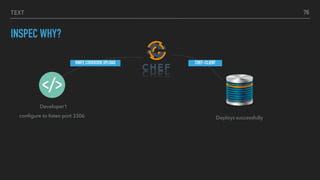
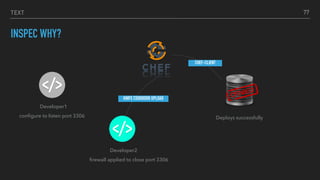
INSPEC WHY?
76
Developer1
configure to listen port 3306
KNIFE COOKBOOK UPLOAD CHEF-CLIENT
Deploys successfully
TEXT
INSPEC WHY?
77
Developer1
configure to listen port 3306
CHEF-CLIENT
Deploys successfully
Developer2
firewall applied to close port 3306
KNIFE COOKBOOK UPLOAD
TEXT
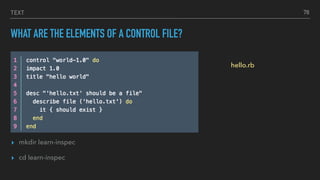
WHAT ARE THE ELEMENTS OF A CONTROL FILE?
▸ mkdir learn-inspec
▸ cd learn-inspec
78
hello.rb
TEXT
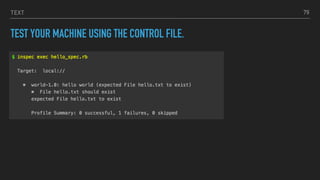
TEST YOUR MACHINE USING THE CONTROL FILE.
79
TEXT
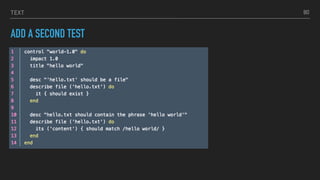
ADD A SECOND TEST
80
TEXT
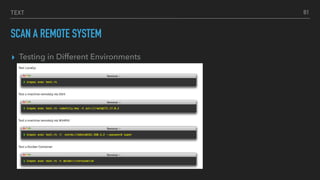
SCAN A REMOTE SYSTEM
▸ Testing in Different Environments
81
TEXT
CHECK STYLE AND SYNTAX OF RECIPE
$ foodcritic hello.rb
$ ruby –c hello.rb
foodcritic hello.rb
Checking 1 files
x
FC011: Missing README in markdown format: ../README.md:1
FC031: Cookbook without metadata file: ../metadata.rb:1
FC045: Metadata does not contain cookbook name: ../metadata.rb:1
[centos@workstation-163634-13 ~]$ ruby -c hello.rb
Syntax OK
82
TEXT
INTEGRATE INSPEC WITH JENKINS
DEMO
83
TEXT
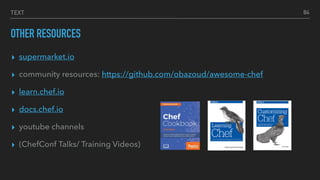
OTHER RESOURCES
▸ supermarket.io
▸ community resources: https://github.com/obazoud/awesome-chef
▸ learn.chef.io
▸ docs.chef.io
▸ youtube channels
▸ (ChefConf Talks/ Training Videos)
84

Chef basics - write infrastructure as code

  • 1.
  • 2.
    TEXT WHAT YOU WILLLEARN ▸ Chef? ▸ Use Chef Resources to define the state of your system ▸ Write and use Chef recipes and cookbooks ▸ Create chef organization ▸ Test Kitchen ▸ Inspec ▸ Integrate to CI 2
  • 3.
    TEXT WHAT IS CHEF? ▸Chef put simply, is a configuration management tool, it’s a powerful automation platform that transforms infrastructure into code. Whether you’re operating in the cloud, on-premises, or in a hybrid environment. 3
  • 4.
    TEXT CHEF BASICS ▸ Cheflets you automate all the things—infrastructure, applications, compliance and more ▸ Chef helps you express your infrastructure policy – how your software is delivered and maintained on your servers – as code. When infrastructure is code, it becomes more maintainable, versionable, testable, and collaborative. ▸ A great way to get started with Chef is to log in to a server, or node, and configure it directly. 4
  • 5.
    TEXT ADVANTAGES ▸ Flexibility ▸ Versioncontrol of infrastructure ▸ Human-readable infrastructure – the code is the documentation! Create testable infrastructures just like testable code! ▸ Easily scalable to thousands of systems, multiple clouds, and on-premises ▸ Use existing cookbooks created on Chef Supermarket as well as automate deployments and compliance 5
  • 6.
    TEXT ▸ Chef iscomprised of three parts – your workstation, a Chef server, and nodes. 6
  • 7.
    TEXT HAVE YOU INSTALLEDTHE TOOLS? ▸ chef --version && foodcritic --version ▸ && rubocop —version ▸ Windows machine ▸ ssh ▸ git —version ▸ VBoxManage - -version ▸ environment variable $PATH: c:ProgramfilesOracleVirtualBox ▸ vagrant - - version This is to verify that all required software is installed properly 7
  • 8.
    TEXT CHEF RESOURCES ▸ Aresource describes the desired state and steps for achieving the desired configuration. ▸ Resources are managed within "recipes" (which will be covered in later) and are generally grouped together within cookbooks for management-specific software and tasks. 8
  • 9.
    TEXT RESOURCE DEFINITION file 'hello.txt'do content 'Hello, world!' end The TYPE named NAME should be ACTION'd with PROPERTIES package ‘git’ do action :install end 9
  • 10.
    TEXT RESOURCE DEFINITION file 'hello.txt'do content 'Hello, world!' end The TYPE named NAME should be ACTION'd with PROPERTIES package ‘git’ do action :install end 10
  • 11.
    TEXT RESOURCE DEFINITION file 'hello.txt'do content 'Hello, world!' end The TYPE named NAME should be ACTION'd with PROPERTIES package ‘git’ do action :install end 11
  • 12.
    TEXT RESOURCE DEFINITION file 'hello.txt'do content 'Hello, world!' end The TYPE named NAME should be ACTION'd with PROPERTIES package ‘git’ do action :install end 12
  • 13.
    TEXT EXAMPLE: PACKAGE package 'httpd'do action :install end 13 Note: In the absence of action, the default is :install What is happening here? The httpd package is being installed ONLY if it is not already installed.
  • 14.
    TEXT EXAMPLE: SERVICE service 'httpd'do action [:enable, :start] end 14 Note: In the absence of action, the default is :nothing The service httpd is enabled so it starts at boot time and then started so that it is currently running.
  • 15.
    TEXT EXAMPLE: FILE file ‘/etc/motd‘do content 'This computer is the property of ...' end 15 Note: In the absence of action, the default is :create The file motd is created with the content “This computer is the property …”
  • 16.
    TEXT RECIPE ▸ Recipes area collection of resources, defined and written using patterns. Helper code, such as loops and if statements, can be written around those resources to help customize the configurations of specific nodes. ▸ For example, if or case statements around package names. 16
  • 17.
    TEXT COOKBOOK ▸ Recipes arestored in cookbooks ▸ Cookbooks contain recipes, templates, files, custom resources, etc., ▸ Code re-use 17
  • 18.
    TEXT CHEF-CLIENT ▸ chef-client isan agent that runs locally on every node that is under management by Chef. ▸ When a chef-client is run, it will perform all of the steps that are required to bring the node into the expected state. 18
  • 19.
    TEXT IDEMPOTENT ▸ An idempotentoperation can be repeated an arbitrary number of times and the result will be the same as if it had been done only once. ▸ Examples: ▸ Setting a Boolean flag. No matter how many times you do it, the flag stays set. ▸ Deleting a row from a database with a given ID. If you try it again, the row is still gone. 19
  • 20.
    TEXT BERKSHELF ▸ Berkshelf isa dependency manager for Chef cookbooks. 20
  • 21.
    KITCHEN ▸ Use Test Kitchen toautomatically test cookbook data across any combination of platforms and test suites
  • 22.
  • 23.
    TEXT ▸ Objective Write arecipe to install ‘cowsay’ package Apply the recipe to the workstation Use ‘cowsay’ to say something 23
  • 24.
    TEXT CREATE A COOKBOOK $chef generate cookbook cookbooks/webserver 24 CHEF GENERATE COOKBOOK COWSAY
  • 25.
    TEXT $ tree cookbooks/webserver ▸Every cookbook requires a small amount of metadata. Metadata is stored in a file called metadata.rb that lives at the top of each cookbook’s directory. 25
  • 26.
    TEXT BERKSFILE EDIT FILE: ~/.BERKSHELF/CONFIG.JSON { "SSL":{ "VERIFY": FALSE } } 26 source 'https://pchfsup1v.standardbank.co.za' metadata cookbook 'sbsa-kitchen' BERKS INSTALL
  • 27.
    VALIDATING OUR RECIPESIN VIRTUAL ENVIRONMENTS KITCHEN ▸ Defined in a .kitchen.yml file ▸ Uses a driver plugin architecture ▸ Supports cookbook testing across many cloud providers and virtualization technologies ▸ Read more here: https://docs.chef.io/kitchen.html
  • 28.
    TEXT .KITCHEN.YML SCHEMA ▸ Whenchef generates a cookbook, a default .kitchen.yml is created. ▸ It contains kitchen configuration for the driver, provisioner, platform, and suites.
  • 29.
    TEXT THE KITCHEN DRIVER ▸The driver is responsible for creating a machine that we'll use to test our cookbook. ▸ Example Drivers: docker / vagrant
  • 30.
    TEXT THE KITCHEN PROVISIONER ▸This tells Test Kitchen how to run Chef, to apply the code in our cookbook to the machine under test. ▸ The default and simplest approach is to use chef_zero.
  • 31.
    TEXT THE KITCHEN PLATFORMS ▸This is a list of operation systems on which we want to run our code.
  • 32.
    TEXT THE KITCHEN SUITES ▸This section defines what we want to test. It includes the Chef run-list of recipes that we want to test. ▸ We define a single suite named "default". ▸ The suite named "default" defines a run_list. ▸ Run the "workstation" cookbook's "default" recipe file.
  • 33.
    TEXT EDIT .KITCHEN.YML driver: name: vagrant synced_folders: -["E:cheftrainingutils", "/mnt/share", "disabled: false"] customize: memory: 512 provisioner: name: chef_zero require_chef_omnibus: 12.4.1 chef_omnibus_url: file:///mnt/share/install.sh client_rb: audit_mode: :enabled minimal_ohai: true always_update_cookbooks: true
  • 34.
    TEXT EDIT .KITCHEN.YML verifier: name: inspec platforms: -name: cowsay driver: box: "opscode-centos-6.6" box_url: file:E:cheftrainingutilsopscode_centos-6.6_chef-provisionerless.box network: - ["private_network", {ip: "192.168.56.X"}] suites: - name: default run_list: - recipe[mycook::default]
  • 35.
    TEXT LETS SPIN A‘VM’ KITCHEN CREATE 35 KITCHEN CONVERGE
  • 36.
    TEXT LETS SPIN A‘VM’ KITCHEN CREATE 36 KITCHEN CONVERGE
  • 37.
    TEXT LET’S ‘COWSAY’ MANUALLY 37 KITCHENCONVERGE (FAILED??) kitchen login @vagrant: sudo -s (change to root) @root: yum install git
  • 38.
    TEXT LET’S FIX IT KITCHENCONVERGE 38 EDIT FILE metadata.rbEDIT FILE .kitchen.yml
  • 39.
    TEXT ▸ vi moo.rb[ VI editor:: i- to insert / :wq (write and quit) ] Write a recipe to install ‘cowsay’ package Apply the recipe to the workstation Use ‘cowsay’ to say something 39 KITCHEN LOGIN cowsay/recipes/default.rb
  • 40.
    TEXT ▸ apply therecipe $ sudo chef-client –-local-mode moo.rb Write a recipe to install ‘cowsay’ package Apply the recipe to the workstation Use ‘cowsay’ to say something 40
  • 41.
    TEXT ▸ apply therecipe $ sudo chef-client –-local-mode moo.rb Write a recipe to install ‘cowsay’ package Apply the recipe to the workstation Use ‘cowsay’ to say something 41 --LOCAL-MODE (OR -Z) CHEF-CLIENT'S DEFAULT MODE ATTEMPTS TO CONTACT A CHEF SERVER AND ASK IT FOR THE RECIPES TO RUN FOR THE GIVEN NODE. WE ARE OVERRIDING THAT BEHAVIOR TO HAVE IT WORK IN A LOCAL MODE.
  • 42.
    TEXT [root@default-cowsay vagrant]# cowsay"hello im a rockstar" _____________________ < hello im a rockstar > --------------------- ^__^ (oo)_______ (__) )/ ||----w | || || Write a recipe to install ‘cowsay’ package Apply the recipe to the workstation Use ‘cowsay’ to say something 42
  • 43.
  • 44.
  • 45.
    TEXT OBJECTIVE (WEBSERVER) Install theApache package, httpd, on CentOS systems. Start and enable the httpd service. Serve a custom home page. Open port 80 to incoming traffic. 45
  • 46.
    APPLY AND VERIFYTHE CONFIGURATION KITCHEN CREATE / KITCHEN CONVERGE 46
  • 47.
    WRITE THE FIRSTTEST ▸ vi test/smoke/default/default_test.rb ▸ kitchen verify 47
  • 48.
    WRITE THE REMAININGTESTS 48 TDD (TEST DRIVEN DEVELOPMENT) Before writing any other configuration code, let's write tests that verifies the requirements: Install the Apache package, httpd, on CentOS systems. Start and enable the httpd service. Serve a custom home page. Open port 80 to incoming traffic. $ kitchen verify
  • 49.
    WATCH THE REMAININGTESTS FAIL 49
  • 50.
    TEXT WRITE THE OTHERREQUIREMENTS AS CODE 50
  • 51.
    APPLY AND VERIFYTHE UPDATED CONFIGURATION KITCHEN VERIFY 51
  • 52.
    CONGRATULATIONS YOU'VE SUCCESSFULLY SATISFIEDTHE BASIC REQUIREMENTS FOR YOUR WEB SERVER. 52
  • 53.
    TEXT TEST KITCHEN COMMANDSAND CONFIGURATION $ kitchen create [INSTANCE|REGEXP|all] Create one or more instances.
  • 54.
    TEXT TEST KITCHEN COMMANDSAND CONFIGURATION $ kitchen converge [INSTANCE|REGEXP| all] Create the instance (if necessary) and then apply the run list to one or more instances.
  • 55.
    TEXT TEST KITCHEN COMMANDSAND CONFIGURATION $ kitchen verify [INSTANCE|REGEXP|all] Create the instance (if necessary) and then apply the run list to one or more instances, run the tests and destroy the instances
  • 56.
    TEXT TEST KITCHEN COMMANDSAND CONFIGURATION $ kitchen destroy [INSTANCE|REGEXP|all] destroy the instance
  • 57.
  • 58.
  • 59.
    TEXT CHEF SERVER (OBJECTIVE) ▸Connect local workstation (laptop) to a Chef Server ▸ Upload cookbooks to a Chef Server ▸ Bootstrap a node ▸ Manage a node via a Chef Server 59
  • 60.
    TEXT CHEF SERVER ▸ Chefis comprised of three parts – your workstation, a Chef server, and nodes. ▸ Chef server acts as a central repository for your cookbooks as well as for information about every node it manages. 60
  • 61.
  • 62.
    CONNECT LOCAL WORKSTATION(LAPTOP) TO A CHEF SERVER SETUP WORKSTATION ▸ Download starter kit from chef organization ▸ use knife to talk to chef-server and manage nodes ▸ knife is a command-line tool that provides an interface between a local chef- repo and the Chef Server. ▸ knife node list 62
  • 63.
    KNIFE SSL CHECK ∑ 63 knifessl check knife ssl fetch
  • 64.
    TEXT UPLOAD COOKBOOKS TOCHEF SERVER ▸ knife cookbook upload webserver 64
  • 65.
    TEXT BOOTSTRAP NODE TOCHEF SERVER ▸ knife bootstrap ADDRESS --ssh-user USER --ssh-password 'PASSWORD' --sudo --use-sudo-password --node-name node1-centos --run-list 'recipe[learn_chef_httpd]' 65
  • 66.
    TEXT BOOTSTRAP NODE TOCHEF SERVER ▸ knife bootstrap ADDRESS --ssh-user USER --ssh-password 'PASSWORD' --sudo --use-sudo-password --node-name node1-centos --run-list ‘recipe[learn_chef_httpd] 66 (FQDN) FULLY QUALIFIED DOMAIN NAME
  • 67.
    TEXT BOOTSTRAP NODE TOCHEF SERVER ▸ knife bootstrap ADDRESS --ssh-user USER --ssh-password 'PASSWORD' --sudo --use-sudo-password --node-name node1-centos --run-list ‘recipe[learn_chef_httpd] 67 (FQDN) FULLY QUALIFIED DOMAIN NAME USER NAME
  • 68.
    TEXT BOOTSTRAP NODE TOCHEF SERVER ▸ knife bootstrap ADDRESS --ssh-user USER --ssh-password 'PWD' --sudo --use- sudo-password --node-name node1-centos --run-list ‘recipe[learn_chef_httpd] 68 (FQDN) FULLY QUALIFIED DOMAIN NAME USER NAME PASSWORD
  • 69.
    TEXT BOOTSTRAP NODE TOCHEF SERVER ▸ knife bootstrap ADDRESS --ssh-user USER --ssh-password 'PWD' --sudo --use- sudo-password --node-name node1-centos --run-list ‘recipe[learn_chef_httpd] 69 (FQDN) FULLY QUALIFIED DOMAIN NAME USER NAME PASSWORD NODE NAME
  • 70.
    TEXT RUN-LIST [--RUN-LIST “RECIPE[COOKBOOK::RECIPE]”] ▸the run list is a collection of policies that the node should follow ▸ chef-client obtains the run list from the chef-server ▸ chef client ensures the node complies with the policy in the run list 70
  • 71.
    TEXT RUN-LIST ▸ the runlist is a collection of policies that the node should follow ▸ chef-client obtains the run list from the chef-server ▸ chef client ensures the node complies with the policy in the run list —run-list “recipe[cookbook::recipe]” 71
  • 72.
    TEXT MANAGE NODE ▸ knifenode list ▸ knife node show node1-sbsa 72
  • 73.
    TEXT ROLES ▸ A roledescribes a run list of recipes that are executed on the node. ▸ A role may also define new defaults or overrides for existing cookbook attribute values. ▸ When you assign a role to a node you do so in its run list. ▸ This allows you to configure many nodes in a similar fashion. 73
  • 74.
  • 75.
    TEXT INSPEC TEST FRAMEWORK ▸Open-source testing framework ▸ Human readable language ▸ Assert status of infrastructure tests and compliance controls ▸ Scan locally or remotely 75
  • 76.
    TEXT INSPEC WHY? 76 Developer1 configure tolisten port 3306 KNIFE COOKBOOK UPLOAD CHEF-CLIENT Deploys successfully
  • 77.
    TEXT INSPEC WHY? 77 Developer1 configure tolisten port 3306 CHEF-CLIENT Deploys successfully Developer2 firewall applied to close port 3306 KNIFE COOKBOOK UPLOAD
  • 78.
    TEXT WHAT ARE THEELEMENTS OF A CONTROL FILE? ▸ mkdir learn-inspec ▸ cd learn-inspec 78 hello.rb
  • 79.
    TEXT TEST YOUR MACHINEUSING THE CONTROL FILE. 79
  • 80.
  • 81.
    TEXT SCAN A REMOTESYSTEM ▸ Testing in Different Environments 81
  • 82.
    TEXT CHECK STYLE ANDSYNTAX OF RECIPE $ foodcritic hello.rb $ ruby –c hello.rb foodcritic hello.rb Checking 1 files x FC011: Missing README in markdown format: ../README.md:1 FC031: Cookbook without metadata file: ../metadata.rb:1 FC045: Metadata does not contain cookbook name: ../metadata.rb:1 [centos@workstation-163634-13 ~]$ ruby -c hello.rb Syntax OK 82
  • 83.
  • 84.
    TEXT OTHER RESOURCES ▸ supermarket.io ▸community resources: https://github.com/obazoud/awesome-chef ▸ learn.chef.io ▸ docs.chef.io ▸ youtube channels ▸ (ChefConf Talks/ Training Videos) 84