Developing online listening
exercises for natural English
Presented at the TESOL Arabia
Conference in Dubai, March 13, 2015
by Vance Stevens
Access this presentation later
• Written version of this presentation
http://tinyurl.com/tacon2015vance
That’s - tacon2015vance
• Slides on http://slideshare.net/vances
Pedagogical challenges
• “Teaching” listening materials in large classes
• Getting machine-readable text from audio
media
• Creating exercises accessible on student
devices (PC’s, iPads) in 1-to-1 contexts
• Tracking student progress efficiently
Easy: Getting text from print
• Scan it to OCR
• PDF to Word conversion
• One Note – copy text from image
• Speech recognition
More difficult: Text from speech
Speech Recognition SR
• Discrete
– Phone routing systems
– Traci Talk
• Continuous
– Natural language processing
– Dragon Systems
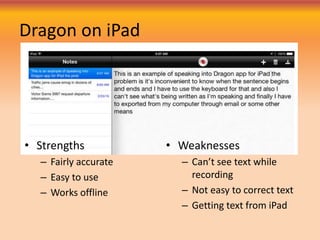
Dragon on iPad
• Strengths
– Fairly accurate
– Easy to use
– Works offline
• Weaknesses
– Can’t see text while
recording
– Not easy to correct text
– Getting text from iPad
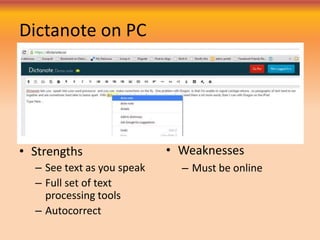
Dictanote on PC
• Strengths
– See text as you speak
– Full set of text
processing tools
– Autocorrect
• Weaknesses
– Must be online
Affordances for combined skills
• Start with Audio
– Speak it into an SR
engine to get text
– Present student with
audio enhanced with
• Reading material
• Machine-readable text
support
• Online audio practice
exercises
• Start with text
– Speak it into an SR
engine to get soft text
– Record it in Audacity
simultaneously
– Present student with a
reading enhanced with
• Audio support
• Machine-readable text
support
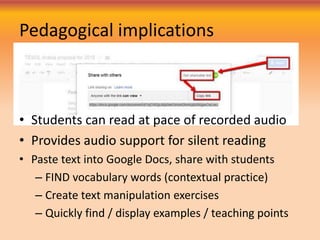
Pedagogical implications
• Students can read at pace of recorded audio
• Provides audio support for silent reading
• Paste text into Google Docs, share with students
– FIND vocabulary words (contextual practice)
– Create text manipulation exercises
– Quickly find / display examples / teaching points
Getting text from unclear speech
• Develop Hot Potatoes
exercises that
– Embed audio or video
– Allow students to pace
and repeat audio
– Provide copious
materials to teach /
assess listening
comprehension
– Allow teachers to track
completion of assigned
tasks
• Start with unclear audio
– Speak it into an SR
engine
– Present student with
audio enhanced with
• Reading material
• Machine-readable text
support
• Online audio practice
exercises
Air Traffic Control recordings
tend to be unclear in places
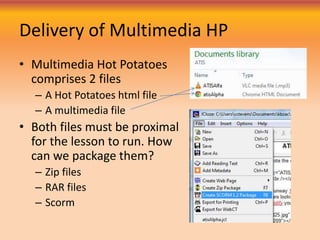
Delivery of Multimedia HP
• Multimedia Hot Potatoes
comprises 2 files
– A Hot Potatoes html file
– A multimedia file
• Both files must be proximal
for the lesson to run. How
can we package them?
– Zip files
– RAR files
– Scorm
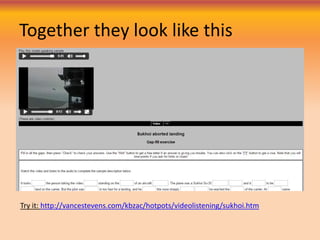
Together they look like this
Try it: http://vancestevens.com/kbzac/hotpots/videolistening/sukhoi.htm
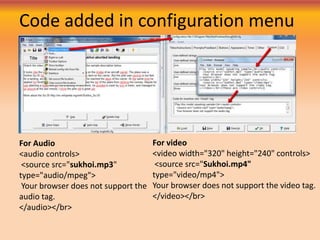
Code added in configuration menu
For Audio
<audio controls>
<source src="sukhoi.mp3"
type="audio/mpeg">
Your browser does not support the
audio tag.
</audio></br>
For video
<video width="320" height="240" controls>
<source src="Sukhoi.mp4"
type="video/mp4">
Your browser does not support the video tag.
</video></br>
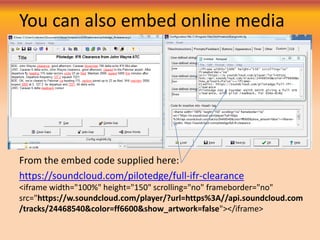
You can also embed online media
From the embed code supplied here:
https://soundcloud.com/pilotedge/full-ifr-clearance
<iframe width="100%" height="150" scrolling="no" frameborder="no"
src="https://w.soundcloud.com/player/?url=https%3A//api.soundcloud.com
/tracks/24468540&color=ff6600&show_artwork=false"></iframe>
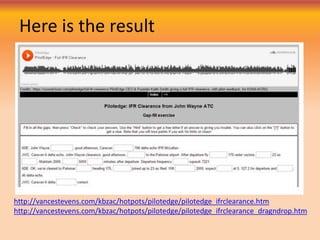
Here is the result
http://vancestevens.com/kbzac/hotpots/pilotedge/pilotedge_ifrclearance.htm
http://vancestevens.com/kbzac/hotpots/pilotedge/pilotedge_ifrclearance_dragndrop.htm
For more information
• Written version of this presentation
http://tinyurl.com/tacon2015vance
That’s - tacon2015vance
• Slides on http://slideshare.net/vances
That took 30 minutes
Vance Stevens
http://adVancEducation.blogspot.com
http://learning2gether.net
http://twitter.com/vances

Developing online listening exercises for natural English

  • 1.
    Developing online listening exercisesfor natural English Presented at the TESOL Arabia Conference in Dubai, March 13, 2015 by Vance Stevens
  • 2.
    Access this presentationlater • Written version of this presentation http://tinyurl.com/tacon2015vance That’s - tacon2015vance • Slides on http://slideshare.net/vances
  • 3.
    Pedagogical challenges • “Teaching”listening materials in large classes • Getting machine-readable text from audio media • Creating exercises accessible on student devices (PC’s, iPads) in 1-to-1 contexts • Tracking student progress efficiently
  • 4.
    Easy: Getting textfrom print • Scan it to OCR • PDF to Word conversion • One Note – copy text from image • Speech recognition More difficult: Text from speech
  • 5.
    Speech Recognition SR •Discrete – Phone routing systems – Traci Talk • Continuous – Natural language processing – Dragon Systems
  • 6.
    Dragon on iPad •Strengths – Fairly accurate – Easy to use – Works offline • Weaknesses – Can’t see text while recording – Not easy to correct text – Getting text from iPad
  • 7.
    Dictanote on PC •Strengths – See text as you speak – Full set of text processing tools – Autocorrect • Weaknesses – Must be online
  • 8.
    Affordances for combinedskills • Start with Audio – Speak it into an SR engine to get text – Present student with audio enhanced with • Reading material • Machine-readable text support • Online audio practice exercises • Start with text – Speak it into an SR engine to get soft text – Record it in Audacity simultaneously – Present student with a reading enhanced with • Audio support • Machine-readable text support
  • 9.
    Pedagogical implications • Studentscan read at pace of recorded audio • Provides audio support for silent reading • Paste text into Google Docs, share with students – FIND vocabulary words (contextual practice) – Create text manipulation exercises – Quickly find / display examples / teaching points
  • 10.
    Getting text fromunclear speech • Develop Hot Potatoes exercises that – Embed audio or video – Allow students to pace and repeat audio – Provide copious materials to teach / assess listening comprehension – Allow teachers to track completion of assigned tasks • Start with unclear audio – Speak it into an SR engine – Present student with audio enhanced with • Reading material • Machine-readable text support • Online audio practice exercises Air Traffic Control recordings tend to be unclear in places
  • 11.
    Delivery of MultimediaHP • Multimedia Hot Potatoes comprises 2 files – A Hot Potatoes html file – A multimedia file • Both files must be proximal for the lesson to run. How can we package them? – Zip files – RAR files – Scorm
  • 12.
    Together they looklike this Try it: http://vancestevens.com/kbzac/hotpots/videolistening/sukhoi.htm
  • 13.
    Code added inconfiguration menu For Audio <audio controls> <source src="sukhoi.mp3" type="audio/mpeg"> Your browser does not support the audio tag. </audio></br> For video <video width="320" height="240" controls> <source src="Sukhoi.mp4" type="video/mp4"> Your browser does not support the video tag. </video></br>
  • 14.
    You can alsoembed online media From the embed code supplied here: https://soundcloud.com/pilotedge/full-ifr-clearance <iframe width="100%" height="150" scrolling="no" frameborder="no" src="https://w.soundcloud.com/player/?url=https%3A//api.soundcloud.com /tracks/24468540&color=ff6600&show_artwork=false"></iframe>
  • 15.
    Here is theresult http://vancestevens.com/kbzac/hotpots/pilotedge/pilotedge_ifrclearance.htm http://vancestevens.com/kbzac/hotpots/pilotedge/pilotedge_ifrclearance_dragndrop.htm
  • 16.
    For more information •Written version of this presentation http://tinyurl.com/tacon2015vance That’s - tacon2015vance • Slides on http://slideshare.net/vances
  • 17.
    That took 30minutes Vance Stevens http://adVancEducation.blogspot.com http://learning2gether.net http://twitter.com/vances