Qualcomm Developer Network Presents
Developing for Industrial IoT with
Embedded Linux OS on DragonBoard™ 410c
by Timesys University
Co-sponsored by Qualcomm Technologies, Inc. and
Arrow Electronics
www.timesys.com ©2017 Timesys Corp.
Session 4
Embedded Products Security
Dieter Kiermaier, Senior Field Application Engineer
Arrow Electronics
Maciej Halasz, Vice President of Technology
Timesys Corporation
www.timesys.com ©2017 Timesys Corp.
3 Webinar Series
 Session 1: Introduction to DragonBoard 410c SoC and Starting Development of Your
Embedded Linux based “Industrial Internet of Things” (IIoT) Device
• Setup for designing IIoT products
• How to assemble and deploy initial BSP
 Session 2: Application Development for Embedded Linux
• Application development environment setup
• How to reflect product requirements in the BSP
• Communication in the IIoT system
 Session 3: Building a Cutting-Edge User Interface with Qt®
• Developing modern, rich UIs for factory terminals
 Session 4: Embedded Products Security
• Designing security-rich devices
www.timesys.com ©2017 Timesys Corp.
4 Session 3 Recap
 What we did
• Discussed the MQTT protocol as an example of inter-device communication
• Talked about the Qt Software
– How to integrate it into an OpenEmbedded RPB BSP
– How to build an SDK with Qt5 libraries and utilities
– How to setup DragonBoard 410c SDK in the QtCreator
 Qt Software
• Packages: Application, Device Creation, Boot to Qt®
• What modules are in Qt software
• How Qt is licensed
• How to develop and deploy an application on a DragonBoard 410c
• Qt for Automation
 Key takeaways
• MQTT is a lightweight, energy efficient protocol for IoT
• Qt Software declarative programing allows for slick animated UIs with gesture controls
• Qt Software is available within OpenEmbedded RPB BSP for the DragonBoard 410c
www.timesys.com ©2017 Timesys Corp.
5 Session 4 — Agenda
 Is security important? Why?
 Security in an embedded Linux device
 Techniques to help secure embedded Linux product
• Signing
• Encryption
 Security – an ongoing challenge
• Timesys security feed
 Trusted Platform Module
 Q & A
CLICK HERE TO VIEW WEBINAR RECORDING
www.timesys.com ©2017 Timesys Corp.
6
Is Security Important?
www.timesys.com ©2017 Timesys Corp.
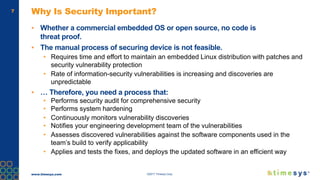
7 Why Is Security Important?
▪ Whether a commercial embedded OS or open source, no code is
threat proof.
▪ The manual process of securing device is not feasible.
• Requires time and effort to maintain an embedded Linux distribution with patches and
security vulnerability protection
• Rate of information-security vulnerabilities is increasing and discoveries are
unpredictable
▪ … Therefore, you need a process that:
• Performs security audit for comprehensive security
• Performs system hardening
• Continuously monitors vulnerability discoveries
• Notifies your engineering development team of the vulnerabilities
• Assesses discovered vulnerabilities against the software components used in the
team’s build to verify applicability
• Applies and tests the fixes, and deploys the updated software in an efficient way
www.timesys.com ©2017 Timesys Corp.
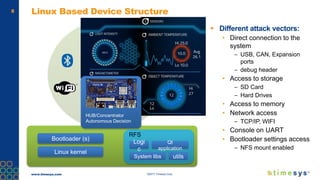
8 Linux Based Device Structure
 Different attack vectors:
• Direct connection to the
system
– USB, CAN, Expansion
ports
– debug header
• Access to storage
– SD Card
– Hard Drives
• Access to memory
• Network access
– TCP/IP, WIFI
• Console on UART
• Bootloader settings access
– NFS mount enabled
Bootloader (s)
Linux kernel
RFS
Logi
c
Qt
application
System libs utils
HUB/Concentrator
Autonomous Decision
www.timesys.com ©2017 Timesys Corp.
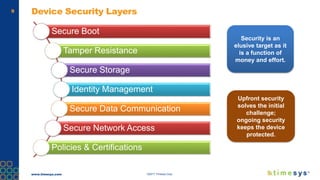
9 Device Security Layers
Secure Boot
Tamper Resistance
Secure Storage
Identity Management
Secure Data Communication
Secure Network Access
Policies & Certifications
Security is an
elusive target as it
is a function of
money and effort.
Upfront security
solves the initial
challenge;
ongoing security
keeps the device
protected.
www.timesys.com ©2017 Timesys Corp.
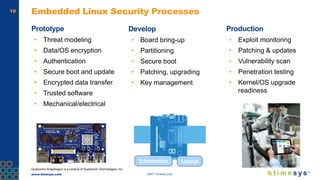
10 Embedded Linux Security Processes
Prototype
• Threat modeling
• Data/OS encryption
• Authentication
• Secure boot and update
• Encrypted data transfer
• Trusted software
• Mechanical/electrical
Production
• Exploit monitoring
• Patching & updates
• Vulnerability scan
• Penetration testing
• Kernel/OS upgrade
readiness
Schematics Layout
Develop
• Board bring-up
• Partitioning
• Secure boot
• Patching, upgrading
• Key management
Qualcomm Snapdragon is a product of Qualcomm Technologies, Inc.
www.timesys.com ©2017 Timesys Corp.
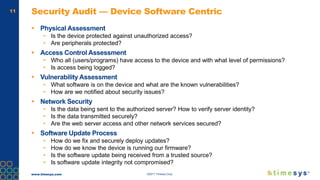
11 Security Audit — Device Software Centric
 Physical Assessment
• Is the device protected against unauthorized access?
• Are peripherals protected?
 Access Control Assessment
• Who all (users/programs) have access to the device and with what level of permissions?
• Is access being logged?
 Vulnerability Assessment
• What software is on the device and what are the known vulnerabilities?
• How are we notified about security issues?
 Network Security
• Is the data being sent to the authorized server? How to verify server identity?
• Is the data transmitted securely?
• Are the web server access and other network services secured?
 Software Update Process
• How do we fix and securely deploy updates?
• How do we know the device is running our firmware?
• Is the software update being received from a trusted source?
• Is software update integrity not compromised?
www.timesys.com ©2017 Timesys Corp.
12
Signing Images —
Authenticating Software
www.timesys.com ©2017 Timesys Corp.
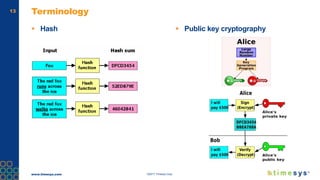
13 Terminology
 Hash  Public key cryptography
www.timesys.com ©2017 Timesys Corp.
14 Secure Boot Without Encryption
 Provides
• Authentication (unauthorized images not allowed to run)
• Integrity (authorized images can not be ‘tampered’ with)
 Does not provide
• Anti-cloning
 Uses asymmetric key for signing
• Private key -> used for signing
• Public key -> used to verify signature
 Bootloader verification performed by ROM code
• SoC specific
www.timesys.com ©2017 Timesys Corp.
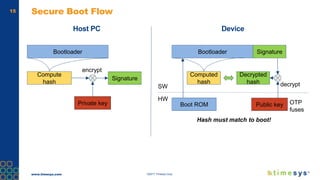
15 Secure Boot Flow
Host PC Device
Bootloader
Compute
hash
Signature
Private key
encrypt
Bootloader
Computed
hash
Decrypted
hash
Public key
decrypt
Signature
Boot ROM
SW
HW
Hash must match to boot!
OTP
fuses
www.timesys.com ©2017 Timesys Corp.
16 Chain of Trust
 The whole software needs to be authenticated and validated — not just the
bootloader
• Single failure along the chain will render the process insecure
 Extending secure boot scheme to user space
• ROM
• Bootloader (eg: SBL and/or Little-Kernel)
• Kernel/Device tree
• RFS
www.timesys.com ©2017 Timesys Corp.
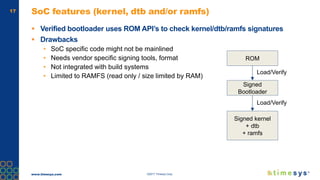
17 SoC features (kernel, dtb and/or ramfs)
 Verified bootloader uses ROM API’s to check kernel/dtb/ramfs signatures
 Drawbacks
• SoC specific code might not be mainlined
• Needs vendor specific signing tools, format
• Not integrated with build systems
• Limited to RAMFS (read only / size limited by RAM)
ROM
Signed
Bootloader
Signed kernel
+ dtb
+ ramfs
Load/Verify
Load/Verify
www.timesys.com ©2017 Timesys Corp.
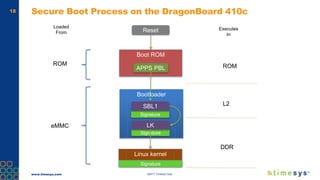
18 Secure Boot Process on the DragonBoard 410c
Reset
Boot ROM
APPS PBL
Bootloader
Signature
SBL1
Signature
LK
Linux kernel
Signature
ROM
eMMC
Loaded
From
Executes
In
ROM
L2
DDR
www.timesys.com ©2017 Timesys Corp.
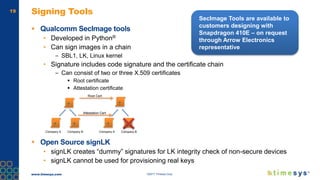
19 Signing Tools
 Qualcomm SecImage tools
• Developed in Python®
• Can sign images in a chain
– SBL1, LK, Linux kernel
• Signature includes code signature and the certificate chain
– Can consist of two or three X.509 certificates
 Root certificate
 Attestation certificate
 Open Source signLK
• signLK creates “dummy” signatures for LK integrity check of non-secure devices
• signLK cannot be used for provisioning real keys
Company A Company B Company A Company B
Root Cert
Attestation Cert
SecImage Tools are available to
customers designing with
Snapdragon 410E – on request
through Arrow Electronics
representative
www.timesys.com ©2017 Timesys Corp.
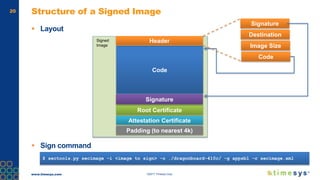
20 Structure of a Signed Image
 Layout
 Sign command
Code
Root Certificate
Header
Signature
Signed
Image
Signature
Destination
Image Size
Code
Attestation Certificate
Padding (to nearest 4k)
$ sectools.py secimage -i <image to sign> -o ./dragonboard-410c/ -g appsbl -c secimage.xml
www.timesys.com ©2017 Timesys Corp.
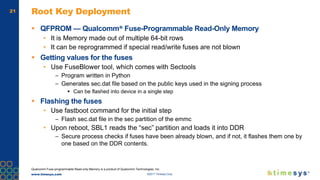
21 Root Key Deployment
 QFPROM — Qualcomm® Fuse-Programmable Read-Only Memory
• It is Memory made out of multiple 64-bit rows
• It can be reprogrammed if special read/write fuses are not blown
 Getting values for the fuses
• Use FuseBlower tool, which comes with Sectools
– Program written in Python
– Generates sec.dat file based on the public keys used in the signing process
 Can be flashed into device in a single step
 Flashing the fuses
• Use fastboot command for the initial step
– Flash sec.dat file in the sec partition of the emmc
• Upon reboot, SBL1 reads the “sec” partition and loads it into DDR
– Secure process checks if fuses have been already blown, and if not, it flashes them one by
one based on the DDR contents.
Qualcomm Fuse-programmable Read-only Memory is a product of Qualcomm Technologies, Inc.
www.timesys.com ©2017 Timesys Corp.
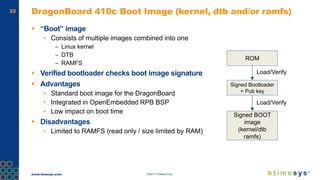
22 DragonBoard 410c Boot Image (kernel, dtb and/or ramfs)
 “Boot” image
• Consists of multiple images combined into one
– Linux kernel
– DTB
– RAMFS
 Verified bootloader checks boot image signature
 Advantages
• Standard boot image for the DragonBoard
• Integrated in OpenEmbedded RPB BSP
• Low impact on boot time
 Disadvantages
• Limited to RAMFS (read only / size limited by RAM)
ROM
Signed Bootloader
+ Pub key
Signed BOOT
image
(kernel/dtb
ramfs)
Load/Verify
Load/Verify
www.timesys.com ©2017 Timesys Corp.
23 LAB — Secure Boot Implementation Example
 Sign and deploy secured image on the DragonBoard 410c
www.timesys.com ©2017 Timesys Corp.
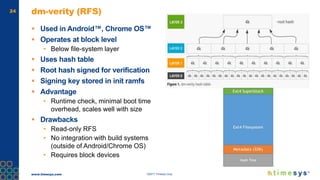
24 dm-verity (RFS)
 Used in Android™, Chrome OS™
 Operates at block level
• Below file-system layer
 Uses hash table
 Root hash signed for verification
 Signing key stored in init ramfs
 Advantage
• Runtime check, minimal boot time
overhead, scales well with size
 Drawbacks
• Read-only RFS
• No integration with build systems
(outside of Android/Chrome OS)
• Requires block devices
www.timesys.com ©2017 Timesys Corp.
25
Encryption —
Protecting Access
www.timesys.com ©2017 Timesys Corp.
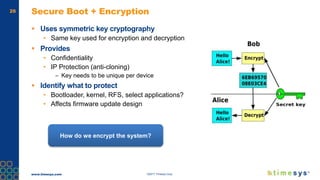
26 Secure Boot + Encryption
 Uses symmetric key cryptography
• Same key used for encryption and decryption
 Provides
• Confidentiality
• IP Protection (anti-cloning)
– Key needs to be unique per device
 Identify what to protect
• Bootloader, kernel, RFS, select applications?
• Affects firmware update design
How do we encrypt the system?
www.timesys.com ©2017 Timesys Corp.
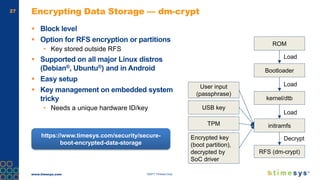
27 Encrypting Data Storage — dm-crypt
 Block level
 Option for RFS encryption or partitions
• Key stored outside RFS
 Supported on all major Linux distros
(Debian®, Ubuntu®) and in Android
 Easy setup
 Key management on embedded system
tricky
• Needs a unique hardware ID/key
ROM
Bootloader
kernel/dtb
Load
Load
initramfs
Load
RFS (dm-crypt)
Decrypt
User input
(passphrase)
USB key
TPM
Encrypted key
(boot partition),
decrypted by
SoC driver
https://www.timesys.com/security/secure-
boot-encrypted-data-storage
www.timesys.com ©2017 Timesys Corp.
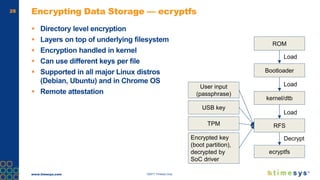
28 Encrypting Data Storage — ecryptfs
 Directory level encryption
 Layers on top of underlying filesystem
 Encryption handled in kernel
 Can use different keys per file
 Supported in all major Linux distros
(Debian, Ubuntu) and in Chrome OS
 Remote attestation
ROM
Bootloader
kernel/dtb
Load
Load
RFS
Load
ecryptfs
Decrypt
User input
(passphrase)
USB key
TPM
Encrypted key
(boot partition),
decrypted by
SoC driver
www.timesys.com ©2017 Timesys Corp.
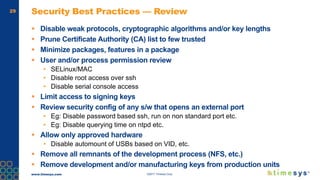
29 Security Best Practices — Review
 Disable weak protocols, cryptographic algorithms and/or key lengths
 Prune Certificate Authority (CA) list to few trusted
 Minimize packages, features in a package
 User and/or process permission review
• SELinux/MAC
• Disable root access over ssh
• Disable serial console access
 Limit access to signing keys
 Review security config of any s/w that opens an external port
• Eg: Disable password based ssh, run on non standard port etc.
• Eg: Disable querying time on ntpd etc.
 Allow only approved hardware
• Disable automount of USBs based on VID, etc.
 Remove all remnants of the development process (NFS, etc.)
 Remove development and/or manufacturing keys from production units
www.timesys.com ©2017 Timesys Corp.
30
Ongoing Security
www.timesys.com ©2017 Timesys Corp.
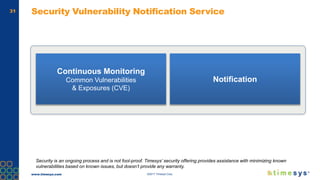
31 Security Vulnerability Notification Service
Security is an ongoing process and is not fool-proof. Timesys’ security offering provides assistance with minimizing known
vulnerabilities based on known issues, but doesn’t provide any warranty.
Continuous Monitoring
Common Vulnerabilities
& Exposures (CVE)
Notification
www.timesys.com ©2017 Timesys Corp.
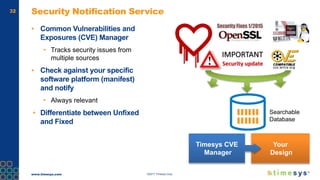
32 Security Notification Service
▪ Common Vulnerabilities and
Exposures (CVE) Manager
• Tracks security issues from
multiple sources
▪ Check against your specific
software platform (manifest)
and notify
• Always relevant
• Differentiate between Unfixed
and Fixed
Searchable
Database
Your
Design
Timesys CVE
Manager
www.timesys.com ©2017 Timesys Corp.
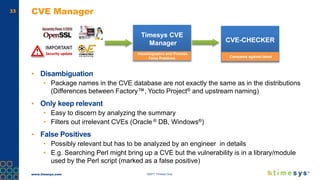
33 CVE Manager
▪ Disambiguation
• Package names in the CVE database are not exactly the same as in the distributions
(Differences between Factory™, Yocto Project® and upstream naming)
▪ Only keep relevant
• Easy to discern by analyzing the summary
• Filters out irrelevant CVEs (Oracle ® DB, Windows®)
▪ False Positives
• Possibly relevant but has to be analyzed by an engineer in details
• E.g. Searching Perl might bring up a CVE but the vulnerability is in a library/module
used by the Perl script (marked as a false positive)
Timesys CVE
Manager
disambiguation and Process
False Positives
CVE-CHECKER
Campares against latest
www.timesys.com ©2017 Timesys Corp.
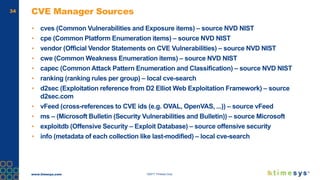
34 CVE Manager Sources
▪ cves (Common Vulnerabilities and Exposure items) – source NVD NIST
▪ cpe (Common Platform Enumeration items) – source NVD NIST
▪ vendor (Official Vendor Statements on CVE Vulnerabilities) – source NVD NIST
▪ cwe (Common Weakness Enumeration items) – source NVD NIST
▪ capec (Common Attack Pattern Enumeration and Classification) – source NVD NIST
▪ ranking (ranking rules per group) – local cve-search
▪ d2sec (Exploitation reference from D2 Elliot Web Exploitation Framework) – source
d2sec.com
▪ vFeed (cross-references to CVE ids (e.g. OVAL, OpenVAS, ...)) – source vFeed
▪ ms – (Microsoft Bulletin (Security Vulnerabilities and Bulletin)) – source Microsoft
▪ exploitdb (Offensive Security – Exploit Database) – source offensive security
▪ info (metadata of each collection like last-modified) – local cve-search
www.timesys.com ©2017 Timesys Corp.
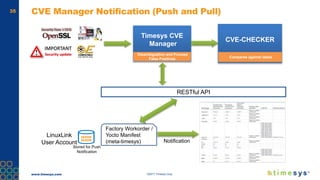
35 CVE Manager Notification (Push and Pull)
Factory Workorder /
Yocto Manifest
(meta-timesys)
RESTful API
Notification
Timesys CVE
Manager
Disambiguation and Process
False Positives
CVE-CHECKER
Compares against latest
LinuxLink
User Account
Stored for Push
Notification
www.timesys.com ©2017 Timesys Corp.
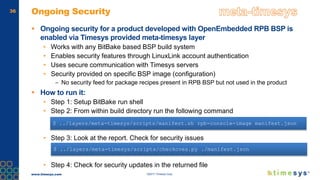
36 Ongoing Security
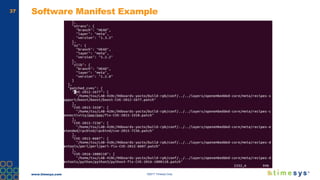
 Ongoing security for a product developed with OpenEmbedded RPB BSP is
enabled via Timesys provided meta-timesys layer
• Works with any BitBake based BSP build system
• Enables security features through LinuxLink account authentication
• Uses secure communication with Timesys servers
• Security provided on specific BSP image (configuration)
– No security feed for package recipes present in RPB BSP but not used in the product
 How to run it:
• Step 1: Setup BitBake run shell
• Step 2: From within build directory run the following command
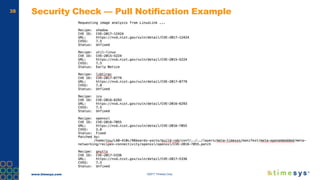
• Step 3: Look at the report. Check for security issues
• Step 4: Check for security updates in the returned file
$ ../layers/meta-timesys/scripts/manifest.sh rpb-console-image manifest.json
$ ../layers/meta-timesys/scripts/checkcves.py ./manifest.json
www.timesys.com ©2017 Timesys Corp.
37 Software Manifest Example
www.timesys.com ©2017 Timesys Corp.
38 Security Check — Pull Notification Example
www.timesys.com ©2017 Timesys Corp.
39 LAB — Ongoing security
 Generate a software manifest
 Submit the software manifest for security check
www.timesys.com ©2017 Timesys Corp.
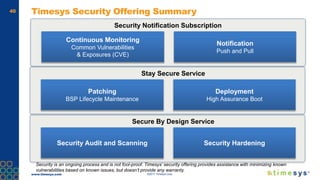
40
Notification
Push and Pull
Continuous Monitoring
Common Vulnerabilities
& Exposures (CVE)
Timesys Security Offering Summary
Security Notification Subscription
Security is an ongoing process and is not fool-proof. Timesys’ security offering provides assistance with minimizing known
vulnerabilities based on known issues, but doesn’t provide any warranty.
Deployment
High Assurance Boot
Patching
BSP Lifecycle Maintenance
Stay Secure Service
Security HardeningSecurity Audit and Scanning
Secure By Design Service
www.timesys.com ©2017 Timesys Corp.
41
Trusted Platform Module (TPM)
www.timesys.com ©2017 Timesys Corp.
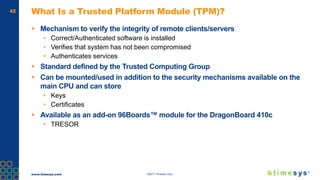
42 What Is a Trusted Platform Module (TPM)?
 Mechanism to verify the integrity of remote clients/servers
• Correct/Authenticated software is installed
• Verifies that system has not been compromised
• Authenticates services
 Standard defined by the Trusted Computing Group
 Can be mounted/used in addition to the security mechanisms available on the
main CPU and can store
• Keys
• Certificates
 Available as an add-on 96Boards™ module for the DragonBoard 410c
• TRESOR
www.timesys.com ©2017 Timesys Corp.
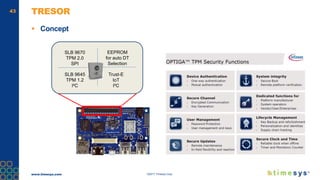
43 TRESOR
 Concept
SLB 9670
TPM 2.0
SPI
SLB 9645
TPM 1.2
I²C
Trust-E
IoT
I²C
EEPROM
for auto DT
Selection
www.timesys.com ©2017 Timesys Corp.
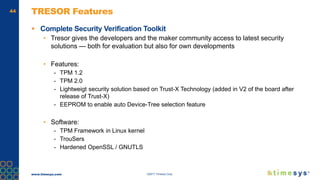
44 TRESOR Features
 Complete Security Verification Toolkit
• Tresor gives the developers and the maker community access to latest security
solutions — both for evaluation but also for own developments
• Features:
- TPM 1.2
- TPM 2.0
- Lightweigt security solution based on Trust-X Technology (added in V2 of the board after
release of Trust-X)
- EEPROM to enable auto Device-Tree selection feature
• Software:
- TPM Framework in Linux kernel
- TrouSers
- Hardened OpenSSL / GNUTLS
www.timesys.com ©2017 Timesys Corp.
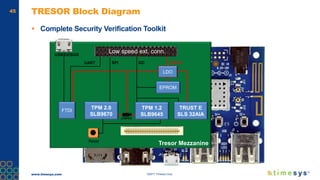
45 TRESOR Block Diagram
 Complete Security Verification Toolkit
Tresor Mezzanine
TPM 1.2
SLB9645
TPM 2.0
SLB9670
FTDI
LDO
UART SPI I2C
JUMPER
EPROM
USB DEBUG
DC IN
Reset
Low speed ext. conn.
TRUST E
SLS 32AIA
www.timesys.com ©2017 Timesys Corp.
46 Software Enablement
 The use of the TRESOR TPM module requires additional software
• Linux kernel device driver for the TPM
• TPM utilities
 Device driver is TPM module specific
• Available for the 96Boards module, present in the Linux kernel source tree
• Requires Linux kernel reconfiguration to enable
• Uses additional definitions in the DTB file
 User space enablement
• Requires additional packages to be installed in the RFS
– tpm-tools
– trousers
– openssl_tpm_engine
• Recipes available for both, provided by the meta-security metalayer
 Once all software is integrated, RPB BSP images must be generated
www.timesys.com ©2017 Timesys Corp.
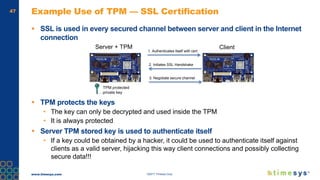
47 Example Use of TPM — SSL Certification
 SSL is used in every secured channel between server and client in the Internet
connection
 TPM protects the keys
• The key can only be decrypted and used inside the TPM
• It is always protected
 Server TPM stored key is used to authenticate itself
• If a key could be obtained by a hacker, it could be used to authenticate itself against
clients as a valid server, hijacking this way client connections and possibly collecting
secure data!!!
Server + TPM Client
TPM protected
private key
1. Authenticates itself with cert
2. Initiates SSL Handshake
3. Negotiate secure channel
www.timesys.com ©2017 Timesys Corp.
48
Questions?
Source code, deployment images and SDK can be downloaded from
linuxlink.timesys.com
developer.qualcomm.com 96boards.org arrow.com timesys.com
Thank you
All data and information contained in or disclosed by this document is confidential and proprietary information of Qualcomm Technologies, Inc. and/or its affiliated
companies and all rights therein are expressly reserved. By accepting this material the recipient agrees that this material and the information contained therein is to
be held in confidence and in trust and will not be used, copied, reproduced in whole or in part, nor its contents revealed in any manner to others without the express
written permission of Qualcomm Technologies, Inc. Nothing in these materials is an offer to sell any of the components or devices referenced herein.
Qualcomm, Snapdragon and DragonBoard are trademarks of Qualcomm Incorporated, registered in the United States and other countries. Other products and
brand names may be trademarks or registered trademarks of their respective owners.
References in this presentation to “Qualcomm” may mean Qualcomm Incorporated, Qualcomm Technologies, Inc., and/or other subsidiaries or business units within
the Qualcomm corporate structure, as applicable. Qualcomm Incorporated includes Qualcomm’s licensing business, QTL, and the vast majority of its patent
portfolio. Qualcomm Technologies, Inc., a wholly-owned subsidiary of Qualcomm Incorporated, operates, along with its subsidiaries, substantially all of Qualcomm’s
engineering, research and development functions, and substantially all of its product and services businesses, including its semiconductor business, QCT.
Follow us on:
For more information, visit us at:
www.qualcomm.com & www.qualcomm.com/blog

Developing for Industrial IoT with Linux OS on DragonBoard™ 410c: Session 4

  • 1.
    Qualcomm Developer NetworkPresents Developing for Industrial IoT with Embedded Linux OS on DragonBoard™ 410c by Timesys University Co-sponsored by Qualcomm Technologies, Inc. and Arrow Electronics
  • 2.
    www.timesys.com ©2017 TimesysCorp. Session 4 Embedded Products Security Dieter Kiermaier, Senior Field Application Engineer Arrow Electronics Maciej Halasz, Vice President of Technology Timesys Corporation
  • 3.
    www.timesys.com ©2017 TimesysCorp. 3 Webinar Series  Session 1: Introduction to DragonBoard 410c SoC and Starting Development of Your Embedded Linux based “Industrial Internet of Things” (IIoT) Device • Setup for designing IIoT products • How to assemble and deploy initial BSP  Session 2: Application Development for Embedded Linux • Application development environment setup • How to reflect product requirements in the BSP • Communication in the IIoT system  Session 3: Building a Cutting-Edge User Interface with Qt® • Developing modern, rich UIs for factory terminals  Session 4: Embedded Products Security • Designing security-rich devices
  • 4.
    www.timesys.com ©2017 TimesysCorp. 4 Session 3 Recap  What we did • Discussed the MQTT protocol as an example of inter-device communication • Talked about the Qt Software – How to integrate it into an OpenEmbedded RPB BSP – How to build an SDK with Qt5 libraries and utilities – How to setup DragonBoard 410c SDK in the QtCreator  Qt Software • Packages: Application, Device Creation, Boot to Qt® • What modules are in Qt software • How Qt is licensed • How to develop and deploy an application on a DragonBoard 410c • Qt for Automation  Key takeaways • MQTT is a lightweight, energy efficient protocol for IoT • Qt Software declarative programing allows for slick animated UIs with gesture controls • Qt Software is available within OpenEmbedded RPB BSP for the DragonBoard 410c
  • 5.
    www.timesys.com ©2017 TimesysCorp. 5 Session 4 — Agenda  Is security important? Why?  Security in an embedded Linux device  Techniques to help secure embedded Linux product • Signing • Encryption  Security – an ongoing challenge • Timesys security feed  Trusted Platform Module  Q & A CLICK HERE TO VIEW WEBINAR RECORDING
  • 6.
    www.timesys.com ©2017 TimesysCorp. 6 Is Security Important?
  • 7.
    www.timesys.com ©2017 TimesysCorp. 7 Why Is Security Important? ▪ Whether a commercial embedded OS or open source, no code is threat proof. ▪ The manual process of securing device is not feasible. • Requires time and effort to maintain an embedded Linux distribution with patches and security vulnerability protection • Rate of information-security vulnerabilities is increasing and discoveries are unpredictable ▪ … Therefore, you need a process that: • Performs security audit for comprehensive security • Performs system hardening • Continuously monitors vulnerability discoveries • Notifies your engineering development team of the vulnerabilities • Assesses discovered vulnerabilities against the software components used in the team’s build to verify applicability • Applies and tests the fixes, and deploys the updated software in an efficient way
  • 8.
    www.timesys.com ©2017 TimesysCorp. 8 Linux Based Device Structure  Different attack vectors: • Direct connection to the system – USB, CAN, Expansion ports – debug header • Access to storage – SD Card – Hard Drives • Access to memory • Network access – TCP/IP, WIFI • Console on UART • Bootloader settings access – NFS mount enabled Bootloader (s) Linux kernel RFS Logi c Qt application System libs utils HUB/Concentrator Autonomous Decision
  • 9.
    www.timesys.com ©2017 TimesysCorp. 9 Device Security Layers Secure Boot Tamper Resistance Secure Storage Identity Management Secure Data Communication Secure Network Access Policies & Certifications Security is an elusive target as it is a function of money and effort. Upfront security solves the initial challenge; ongoing security keeps the device protected.
  • 10.
    www.timesys.com ©2017 TimesysCorp. 10 Embedded Linux Security Processes Prototype • Threat modeling • Data/OS encryption • Authentication • Secure boot and update • Encrypted data transfer • Trusted software • Mechanical/electrical Production • Exploit monitoring • Patching & updates • Vulnerability scan • Penetration testing • Kernel/OS upgrade readiness Schematics Layout Develop • Board bring-up • Partitioning • Secure boot • Patching, upgrading • Key management Qualcomm Snapdragon is a product of Qualcomm Technologies, Inc.
  • 11.
    www.timesys.com ©2017 TimesysCorp. 11 Security Audit — Device Software Centric  Physical Assessment • Is the device protected against unauthorized access? • Are peripherals protected?  Access Control Assessment • Who all (users/programs) have access to the device and with what level of permissions? • Is access being logged?  Vulnerability Assessment • What software is on the device and what are the known vulnerabilities? • How are we notified about security issues?  Network Security • Is the data being sent to the authorized server? How to verify server identity? • Is the data transmitted securely? • Are the web server access and other network services secured?  Software Update Process • How do we fix and securely deploy updates? • How do we know the device is running our firmware? • Is the software update being received from a trusted source? • Is software update integrity not compromised?
  • 12.
    www.timesys.com ©2017 TimesysCorp. 12 Signing Images — Authenticating Software
  • 13.
    www.timesys.com ©2017 TimesysCorp. 13 Terminology  Hash  Public key cryptography
  • 14.
    www.timesys.com ©2017 TimesysCorp. 14 Secure Boot Without Encryption  Provides • Authentication (unauthorized images not allowed to run) • Integrity (authorized images can not be ‘tampered’ with)  Does not provide • Anti-cloning  Uses asymmetric key for signing • Private key -> used for signing • Public key -> used to verify signature  Bootloader verification performed by ROM code • SoC specific
  • 15.
    www.timesys.com ©2017 TimesysCorp. 15 Secure Boot Flow Host PC Device Bootloader Compute hash Signature Private key encrypt Bootloader Computed hash Decrypted hash Public key decrypt Signature Boot ROM SW HW Hash must match to boot! OTP fuses
  • 16.
    www.timesys.com ©2017 TimesysCorp. 16 Chain of Trust  The whole software needs to be authenticated and validated — not just the bootloader • Single failure along the chain will render the process insecure  Extending secure boot scheme to user space • ROM • Bootloader (eg: SBL and/or Little-Kernel) • Kernel/Device tree • RFS
  • 17.
    www.timesys.com ©2017 TimesysCorp. 17 SoC features (kernel, dtb and/or ramfs)  Verified bootloader uses ROM API’s to check kernel/dtb/ramfs signatures  Drawbacks • SoC specific code might not be mainlined • Needs vendor specific signing tools, format • Not integrated with build systems • Limited to RAMFS (read only / size limited by RAM) ROM Signed Bootloader Signed kernel + dtb + ramfs Load/Verify Load/Verify
  • 18.
    www.timesys.com ©2017 TimesysCorp. 18 Secure Boot Process on the DragonBoard 410c Reset Boot ROM APPS PBL Bootloader Signature SBL1 Signature LK Linux kernel Signature ROM eMMC Loaded From Executes In ROM L2 DDR
  • 19.
    www.timesys.com ©2017 TimesysCorp. 19 Signing Tools  Qualcomm SecImage tools • Developed in Python® • Can sign images in a chain – SBL1, LK, Linux kernel • Signature includes code signature and the certificate chain – Can consist of two or three X.509 certificates  Root certificate  Attestation certificate  Open Source signLK • signLK creates “dummy” signatures for LK integrity check of non-secure devices • signLK cannot be used for provisioning real keys Company A Company B Company A Company B Root Cert Attestation Cert SecImage Tools are available to customers designing with Snapdragon 410E – on request through Arrow Electronics representative
  • 20.
    www.timesys.com ©2017 TimesysCorp. 20 Structure of a Signed Image  Layout  Sign command Code Root Certificate Header Signature Signed Image Signature Destination Image Size Code Attestation Certificate Padding (to nearest 4k) $ sectools.py secimage -i <image to sign> -o ./dragonboard-410c/ -g appsbl -c secimage.xml
  • 21.
    www.timesys.com ©2017 TimesysCorp. 21 Root Key Deployment  QFPROM — Qualcomm® Fuse-Programmable Read-Only Memory • It is Memory made out of multiple 64-bit rows • It can be reprogrammed if special read/write fuses are not blown  Getting values for the fuses • Use FuseBlower tool, which comes with Sectools – Program written in Python – Generates sec.dat file based on the public keys used in the signing process  Can be flashed into device in a single step  Flashing the fuses • Use fastboot command for the initial step – Flash sec.dat file in the sec partition of the emmc • Upon reboot, SBL1 reads the “sec” partition and loads it into DDR – Secure process checks if fuses have been already blown, and if not, it flashes them one by one based on the DDR contents. Qualcomm Fuse-programmable Read-only Memory is a product of Qualcomm Technologies, Inc.
  • 22.
    www.timesys.com ©2017 TimesysCorp. 22 DragonBoard 410c Boot Image (kernel, dtb and/or ramfs)  “Boot” image • Consists of multiple images combined into one – Linux kernel – DTB – RAMFS  Verified bootloader checks boot image signature  Advantages • Standard boot image for the DragonBoard • Integrated in OpenEmbedded RPB BSP • Low impact on boot time  Disadvantages • Limited to RAMFS (read only / size limited by RAM) ROM Signed Bootloader + Pub key Signed BOOT image (kernel/dtb ramfs) Load/Verify Load/Verify
  • 23.
    www.timesys.com ©2017 TimesysCorp. 23 LAB — Secure Boot Implementation Example  Sign and deploy secured image on the DragonBoard 410c
  • 24.
    www.timesys.com ©2017 TimesysCorp. 24 dm-verity (RFS)  Used in Android™, Chrome OS™  Operates at block level • Below file-system layer  Uses hash table  Root hash signed for verification  Signing key stored in init ramfs  Advantage • Runtime check, minimal boot time overhead, scales well with size  Drawbacks • Read-only RFS • No integration with build systems (outside of Android/Chrome OS) • Requires block devices
  • 25.
    www.timesys.com ©2017 TimesysCorp. 25 Encryption — Protecting Access
  • 26.
    www.timesys.com ©2017 TimesysCorp. 26 Secure Boot + Encryption  Uses symmetric key cryptography • Same key used for encryption and decryption  Provides • Confidentiality • IP Protection (anti-cloning) – Key needs to be unique per device  Identify what to protect • Bootloader, kernel, RFS, select applications? • Affects firmware update design How do we encrypt the system?
  • 27.
    www.timesys.com ©2017 TimesysCorp. 27 Encrypting Data Storage — dm-crypt  Block level  Option for RFS encryption or partitions • Key stored outside RFS  Supported on all major Linux distros (Debian®, Ubuntu®) and in Android  Easy setup  Key management on embedded system tricky • Needs a unique hardware ID/key ROM Bootloader kernel/dtb Load Load initramfs Load RFS (dm-crypt) Decrypt User input (passphrase) USB key TPM Encrypted key (boot partition), decrypted by SoC driver https://www.timesys.com/security/secure- boot-encrypted-data-storage
  • 28.
    www.timesys.com ©2017 TimesysCorp. 28 Encrypting Data Storage — ecryptfs  Directory level encryption  Layers on top of underlying filesystem  Encryption handled in kernel  Can use different keys per file  Supported in all major Linux distros (Debian, Ubuntu) and in Chrome OS  Remote attestation ROM Bootloader kernel/dtb Load Load RFS Load ecryptfs Decrypt User input (passphrase) USB key TPM Encrypted key (boot partition), decrypted by SoC driver
  • 29.
    www.timesys.com ©2017 TimesysCorp. 29 Security Best Practices — Review  Disable weak protocols, cryptographic algorithms and/or key lengths  Prune Certificate Authority (CA) list to few trusted  Minimize packages, features in a package  User and/or process permission review • SELinux/MAC • Disable root access over ssh • Disable serial console access  Limit access to signing keys  Review security config of any s/w that opens an external port • Eg: Disable password based ssh, run on non standard port etc. • Eg: Disable querying time on ntpd etc.  Allow only approved hardware • Disable automount of USBs based on VID, etc.  Remove all remnants of the development process (NFS, etc.)  Remove development and/or manufacturing keys from production units
  • 30.
    www.timesys.com ©2017 TimesysCorp. 30 Ongoing Security
  • 31.
    www.timesys.com ©2017 TimesysCorp. 31 Security Vulnerability Notification Service Security is an ongoing process and is not fool-proof. Timesys’ security offering provides assistance with minimizing known vulnerabilities based on known issues, but doesn’t provide any warranty. Continuous Monitoring Common Vulnerabilities & Exposures (CVE) Notification
  • 32.
    www.timesys.com ©2017 TimesysCorp. 32 Security Notification Service ▪ Common Vulnerabilities and Exposures (CVE) Manager • Tracks security issues from multiple sources ▪ Check against your specific software platform (manifest) and notify • Always relevant • Differentiate between Unfixed and Fixed Searchable Database Your Design Timesys CVE Manager
  • 33.
    www.timesys.com ©2017 TimesysCorp. 33 CVE Manager ▪ Disambiguation • Package names in the CVE database are not exactly the same as in the distributions (Differences between Factory™, Yocto Project® and upstream naming) ▪ Only keep relevant • Easy to discern by analyzing the summary • Filters out irrelevant CVEs (Oracle ® DB, Windows®) ▪ False Positives • Possibly relevant but has to be analyzed by an engineer in details • E.g. Searching Perl might bring up a CVE but the vulnerability is in a library/module used by the Perl script (marked as a false positive) Timesys CVE Manager disambiguation and Process False Positives CVE-CHECKER Campares against latest
  • 34.
    www.timesys.com ©2017 TimesysCorp. 34 CVE Manager Sources ▪ cves (Common Vulnerabilities and Exposure items) – source NVD NIST ▪ cpe (Common Platform Enumeration items) – source NVD NIST ▪ vendor (Official Vendor Statements on CVE Vulnerabilities) – source NVD NIST ▪ cwe (Common Weakness Enumeration items) – source NVD NIST ▪ capec (Common Attack Pattern Enumeration and Classification) – source NVD NIST ▪ ranking (ranking rules per group) – local cve-search ▪ d2sec (Exploitation reference from D2 Elliot Web Exploitation Framework) – source d2sec.com ▪ vFeed (cross-references to CVE ids (e.g. OVAL, OpenVAS, ...)) – source vFeed ▪ ms – (Microsoft Bulletin (Security Vulnerabilities and Bulletin)) – source Microsoft ▪ exploitdb (Offensive Security – Exploit Database) – source offensive security ▪ info (metadata of each collection like last-modified) – local cve-search
  • 35.
    www.timesys.com ©2017 TimesysCorp. 35 CVE Manager Notification (Push and Pull) Factory Workorder / Yocto Manifest (meta-timesys) RESTful API Notification Timesys CVE Manager Disambiguation and Process False Positives CVE-CHECKER Compares against latest LinuxLink User Account Stored for Push Notification
  • 36.
    www.timesys.com ©2017 TimesysCorp. 36 Ongoing Security  Ongoing security for a product developed with OpenEmbedded RPB BSP is enabled via Timesys provided meta-timesys layer • Works with any BitBake based BSP build system • Enables security features through LinuxLink account authentication • Uses secure communication with Timesys servers • Security provided on specific BSP image (configuration) – No security feed for package recipes present in RPB BSP but not used in the product  How to run it: • Step 1: Setup BitBake run shell • Step 2: From within build directory run the following command • Step 3: Look at the report. Check for security issues • Step 4: Check for security updates in the returned file $ ../layers/meta-timesys/scripts/manifest.sh rpb-console-image manifest.json $ ../layers/meta-timesys/scripts/checkcves.py ./manifest.json
  • 37.
    www.timesys.com ©2017 TimesysCorp. 37 Software Manifest Example
  • 38.
    www.timesys.com ©2017 TimesysCorp. 38 Security Check — Pull Notification Example
  • 39.
    www.timesys.com ©2017 TimesysCorp. 39 LAB — Ongoing security  Generate a software manifest  Submit the software manifest for security check
  • 40.
    www.timesys.com ©2017 TimesysCorp. 40 Notification Push and Pull Continuous Monitoring Common Vulnerabilities & Exposures (CVE) Timesys Security Offering Summary Security Notification Subscription Security is an ongoing process and is not fool-proof. Timesys’ security offering provides assistance with minimizing known vulnerabilities based on known issues, but doesn’t provide any warranty. Deployment High Assurance Boot Patching BSP Lifecycle Maintenance Stay Secure Service Security HardeningSecurity Audit and Scanning Secure By Design Service
  • 41.
    www.timesys.com ©2017 TimesysCorp. 41 Trusted Platform Module (TPM)
  • 42.
    www.timesys.com ©2017 TimesysCorp. 42 What Is a Trusted Platform Module (TPM)?  Mechanism to verify the integrity of remote clients/servers • Correct/Authenticated software is installed • Verifies that system has not been compromised • Authenticates services  Standard defined by the Trusted Computing Group  Can be mounted/used in addition to the security mechanisms available on the main CPU and can store • Keys • Certificates  Available as an add-on 96Boards™ module for the DragonBoard 410c • TRESOR
  • 43.
    www.timesys.com ©2017 TimesysCorp. 43 TRESOR  Concept SLB 9670 TPM 2.0 SPI SLB 9645 TPM 1.2 I²C Trust-E IoT I²C EEPROM for auto DT Selection
  • 44.
    www.timesys.com ©2017 TimesysCorp. 44 TRESOR Features  Complete Security Verification Toolkit • Tresor gives the developers and the maker community access to latest security solutions — both for evaluation but also for own developments • Features: - TPM 1.2 - TPM 2.0 - Lightweigt security solution based on Trust-X Technology (added in V2 of the board after release of Trust-X) - EEPROM to enable auto Device-Tree selection feature • Software: - TPM Framework in Linux kernel - TrouSers - Hardened OpenSSL / GNUTLS
  • 45.
    www.timesys.com ©2017 TimesysCorp. 45 TRESOR Block Diagram  Complete Security Verification Toolkit Tresor Mezzanine TPM 1.2 SLB9645 TPM 2.0 SLB9670 FTDI LDO UART SPI I2C JUMPER EPROM USB DEBUG DC IN Reset Low speed ext. conn. TRUST E SLS 32AIA
  • 46.
    www.timesys.com ©2017 TimesysCorp. 46 Software Enablement  The use of the TRESOR TPM module requires additional software • Linux kernel device driver for the TPM • TPM utilities  Device driver is TPM module specific • Available for the 96Boards module, present in the Linux kernel source tree • Requires Linux kernel reconfiguration to enable • Uses additional definitions in the DTB file  User space enablement • Requires additional packages to be installed in the RFS – tpm-tools – trousers – openssl_tpm_engine • Recipes available for both, provided by the meta-security metalayer  Once all software is integrated, RPB BSP images must be generated
  • 47.
    www.timesys.com ©2017 TimesysCorp. 47 Example Use of TPM — SSL Certification  SSL is used in every secured channel between server and client in the Internet connection  TPM protects the keys • The key can only be decrypted and used inside the TPM • It is always protected  Server TPM stored key is used to authenticate itself • If a key could be obtained by a hacker, it could be used to authenticate itself against clients as a valid server, hijacking this way client connections and possibly collecting secure data!!! Server + TPM Client TPM protected private key 1. Authenticates itself with cert 2. Initiates SSL Handshake 3. Negotiate secure channel
  • 48.
    www.timesys.com ©2017 TimesysCorp. 48 Questions? Source code, deployment images and SDK can be downloaded from linuxlink.timesys.com developer.qualcomm.com 96boards.org arrow.com timesys.com
  • 49.
    Thank you All dataand information contained in or disclosed by this document is confidential and proprietary information of Qualcomm Technologies, Inc. and/or its affiliated companies and all rights therein are expressly reserved. By accepting this material the recipient agrees that this material and the information contained therein is to be held in confidence and in trust and will not be used, copied, reproduced in whole or in part, nor its contents revealed in any manner to others without the express written permission of Qualcomm Technologies, Inc. Nothing in these materials is an offer to sell any of the components or devices referenced herein. Qualcomm, Snapdragon and DragonBoard are trademarks of Qualcomm Incorporated, registered in the United States and other countries. Other products and brand names may be trademarks or registered trademarks of their respective owners. References in this presentation to “Qualcomm” may mean Qualcomm Incorporated, Qualcomm Technologies, Inc., and/or other subsidiaries or business units within the Qualcomm corporate structure, as applicable. Qualcomm Incorporated includes Qualcomm’s licensing business, QTL, and the vast majority of its patent portfolio. Qualcomm Technologies, Inc., a wholly-owned subsidiary of Qualcomm Incorporated, operates, along with its subsidiaries, substantially all of Qualcomm’s engineering, research and development functions, and substantially all of its product and services businesses, including its semiconductor business, QCT. Follow us on: For more information, visit us at: www.qualcomm.com & www.qualcomm.com/blog