








November 23rd, 2013

The New Design Manager!
What does it mean for you?

Louis-Philippe Lavoie
SharePoint Specialist
GSoft
@lplavoie / louis-philippe.lavoie@gsoft.com
Description
SharePoint Designer no longer has the Design view to help you
build your brand in SharePoint. However SharePoint 2013 now
offers the new Design Manager to help you convert your Designer’s
HTML design into a Master Page. In this session, we will cover the
features the Design Manager introduces:
HTML to Master Page conversion
Device Channels
Display Templates
Creating Design Packages
This session will help you get ahead by understanding what comes
out out-of-the-box with the Design Manager to help you build your
brand on SharePoint.
Thank you to all of our Sponsors!!
Original Slides by:

Benjamin Niaulin






twitter.com/bniaulin

ca.linkedin.com/in/bniaulin

benjamin.niaulin@share-gate.com

bniaulin.wordpress.com
en.share-gate.com/blog
Who am I?
Louis-Philippe Lavoie
SharePoint Specialist
louis-philippe.lavoie@gsoft.com
lplavoie
http://ca.linkedin.com/in/lplavoie/
Agenda
Introduction – Problems and Previous Solutions
The Design Manager
Requirements and working with it
Convert HTML to Master Page
Device Channels
Display Templates
Page Layouts
Design Packages
Composed Looks
INTRODUCTION
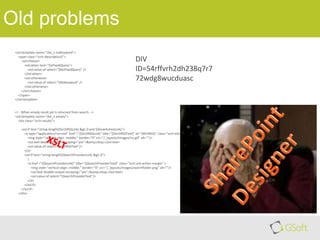
Old problems
<xsl:template name="dvt_1.noKeyword">
<span class="srch-description2">
<xsl:choose>
<xsl:when test="$IsFixedQuery">
<xsl:value-of select="$NoFixedQuery" />
</xsl:when>
<xsl:otherwise>
<xsl:value-of select="$NoKeyword" />
</xsl:otherwise>
</xsl:choose>
</span>
</xsl:template>

DIV
ID=54rffvrh2dh238q7r7
72wdg8wucduasc

<!-- When empty result set is returned from search -->
<xsl:template name="dvt_1.empty">
<div class="srch-results">

<xsl:if test="string-length($SrchRSSLink) &gt; 0 and $ShowActionLinks">
<a type="application/rss+xml" href ="{$SrchRSSLink}" title="{$SrchRSSText}" id="SRCHRSSL" class="srch-ext-action-margin">
<img style="vertical-align: middle;" border="0" src="/_layouts/images/rss.gif" alt=""/>
<xsl:text disable-output-escaping="yes">&amp;nbsp;</xsl:text>
<xsl:value-of select="$SrchRSSText"/>
</a>
<xsl:if test="string-length($SearchProviderLink) &gt; 0">
|
<a href ="{$SearchProviderLink}" title="{$SearchProviderText}" class="srch-ext-action-margin" >
<img style="vertical-align: middle;" border="0" src="/_layouts/images/searchfolder.png" alt=""/>
<xsl:text disable-output-escaping="yes">&amp;nbsp;</xsl:text>
<xsl:value-of select="$SearchProviderText"/>
</a>
</xsl:if>
</xsl:if>
</div>
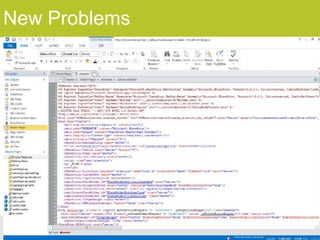
New Problems
The Design Manager
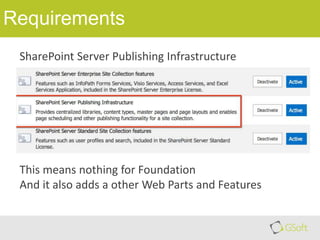
Requirements
SharePoint Server Publishing Infrastructure

This means nothing for Foundation
And it also adds a other Web Parts and Features
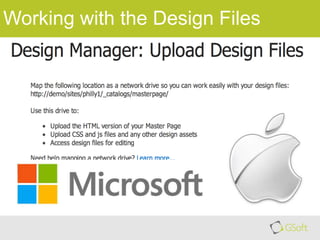
Working with the Design Files
DEMO
ACTIVATE FEATURE
CONNECT FILES
Convert HTML to Master Page
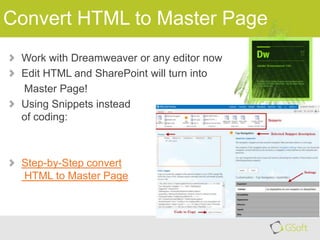
Work with Dreamweaver or any editor now
Edit HTML and SharePoint will turn into
Master Page!
Using Snippets instead
of coding:

Step-by-Step convert
HTML to Master Page
DEMO
CONVERT HTML TO
MASTER PAGE
DEVICE CHANNELS
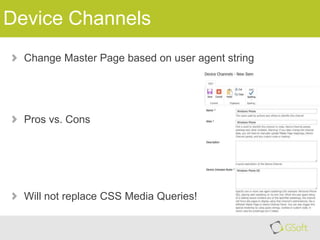
Device Channels
Change Master Page based on user agent string

Pros vs. Cons

Will not replace CSS Media Queries!
DISPLAY TEMPLATES
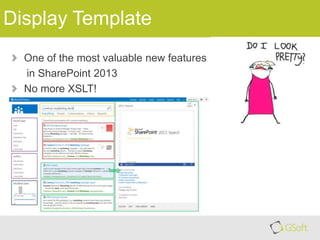
Display Template
One of the most valuable new features
in SharePoint 2013
No more XSLT!
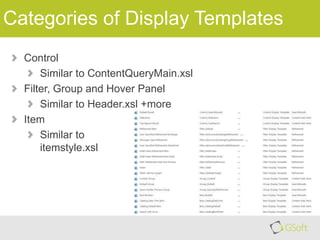
Categories of Display Templates
Control
Similar to ContentQueryMain.xsl
Filter, Group and Hover Panel
Similar to Header.xsl +more
Item
Similar to
itemstyle.xsl
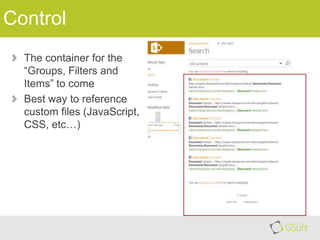
Control
The container for the
“Groups, Filters and
Items” to come
Best way to reference
custom files (JavaScript,
CSS, etc…)
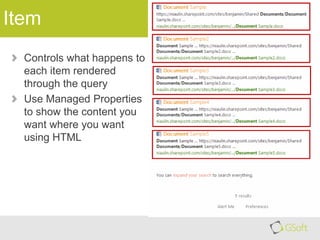
Item
Controls what happens to
each item rendered
through the query
Use Managed Properties
to show the content you
want where you want
using HTML
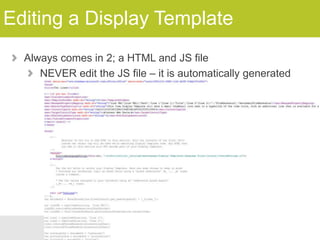
Editing a Display Template
Always comes in 2; a HTML and JS file
NEVER edit the JS file – it is automatically generated
What is it made of?
The Content Search Web Part is essentially 2 things

1. Query Builder

2. Display Templates
DESIGN PACKAGES
Design Packages
Used to be complicated (Unless you had Visual Studio and
knew how to use it)
Makes it easy to work with
third party
Creates a WSP for you to
deploy in SharePoint
Watch out… it’s not perfect
COMPOSED LOOKS
NOT REALLY DESIGN
MANAGER BUT CLOSE
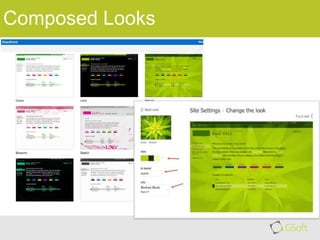
Composed Looks
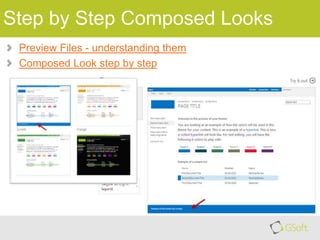
Step by Step Composed Looks
Preview Files - understanding them
Composed Look step by step
Remember to fill out your evaluation forms to win some great prizes!

&
Join us for SharePint today!

Nov 23rd, 2013 @6:00 pm
The Observatory Pub,
Algonquin Student’s Association
Address:
A-170 on Algonquin Campus
Parking:
No need to move your car!*
Site: http://www.algonquinsa.com/ob.aspx
Date & Time:
Location:

*Please drive responsibly! We are happy to call you a cab 

Design Manager 2013

  • 1.
    November 23rd, 2013 TheNew Design Manager! What does it mean for you? Louis-Philippe Lavoie SharePoint Specialist GSoft @lplavoie / louis-philippe.lavoie@gsoft.com
  • 2.
    Description SharePoint Designer nolonger has the Design view to help you build your brand in SharePoint. However SharePoint 2013 now offers the new Design Manager to help you convert your Designer’s HTML design into a Master Page. In this session, we will cover the features the Design Manager introduces: HTML to Master Page conversion Device Channels Display Templates Creating Design Packages This session will help you get ahead by understanding what comes out out-of-the-box with the Design Manager to help you build your brand on SharePoint.
  • 3.
    Thank you toall of our Sponsors!!
  • 4.
    Original Slides by: BenjaminNiaulin     twitter.com/bniaulin ca.linkedin.com/in/bniaulin benjamin.niaulin@share-gate.com bniaulin.wordpress.com en.share-gate.com/blog
  • 5.
    Who am I? Louis-PhilippeLavoie SharePoint Specialist louis-philippe.lavoie@gsoft.com lplavoie http://ca.linkedin.com/in/lplavoie/
  • 6.
    Agenda Introduction – Problemsand Previous Solutions The Design Manager Requirements and working with it Convert HTML to Master Page Device Channels Display Templates Page Layouts Design Packages Composed Looks
  • 7.
  • 8.
    Old problems <xsl:template name="dvt_1.noKeyword"> <spanclass="srch-description2"> <xsl:choose> <xsl:when test="$IsFixedQuery"> <xsl:value-of select="$NoFixedQuery" /> </xsl:when> <xsl:otherwise> <xsl:value-of select="$NoKeyword" /> </xsl:otherwise> </xsl:choose> </span> </xsl:template> DIV ID=54rffvrh2dh238q7r7 72wdg8wucduasc <!-- When empty result set is returned from search --> <xsl:template name="dvt_1.empty"> <div class="srch-results"> <xsl:if test="string-length($SrchRSSLink) &gt; 0 and $ShowActionLinks"> <a type="application/rss+xml" href ="{$SrchRSSLink}" title="{$SrchRSSText}" id="SRCHRSSL" class="srch-ext-action-margin"> <img style="vertical-align: middle;" border="0" src="/_layouts/images/rss.gif" alt=""/> <xsl:text disable-output-escaping="yes">&amp;nbsp;</xsl:text> <xsl:value-of select="$SrchRSSText"/> </a> <xsl:if test="string-length($SearchProviderLink) &gt; 0"> | <a href ="{$SearchProviderLink}" title="{$SearchProviderText}" class="srch-ext-action-margin" > <img style="vertical-align: middle;" border="0" src="/_layouts/images/searchfolder.png" alt=""/> <xsl:text disable-output-escaping="yes">&amp;nbsp;</xsl:text> <xsl:value-of select="$SearchProviderText"/> </a> </xsl:if> </xsl:if> </div>
  • 9.
  • 10.
  • 11.
    Requirements SharePoint Server PublishingInfrastructure This means nothing for Foundation And it also adds a other Web Parts and Features
  • 12.
    Working with theDesign Files
  • 13.
  • 14.
    Convert HTML toMaster Page Work with Dreamweaver or any editor now Edit HTML and SharePoint will turn into Master Page! Using Snippets instead of coding: Step-by-Step convert HTML to Master Page
  • 15.
  • 16.
  • 17.
    Device Channels Change MasterPage based on user agent string Pros vs. Cons Will not replace CSS Media Queries!
  • 18.
  • 19.
    Display Template One ofthe most valuable new features in SharePoint 2013 No more XSLT!
  • 20.
    Categories of DisplayTemplates Control Similar to ContentQueryMain.xsl Filter, Group and Hover Panel Similar to Header.xsl +more Item Similar to itemstyle.xsl
  • 21.
    Control The container forthe “Groups, Filters and Items” to come Best way to reference custom files (JavaScript, CSS, etc…)
  • 22.
    Item Controls what happensto each item rendered through the query Use Managed Properties to show the content you want where you want using HTML
  • 23.
    Editing a DisplayTemplate Always comes in 2; a HTML and JS file NEVER edit the JS file – it is automatically generated
  • 24.
    What is itmade of? The Content Search Web Part is essentially 2 things 1. Query Builder 2. Display Templates
  • 25.
  • 26.
    Design Packages Used tobe complicated (Unless you had Visual Studio and knew how to use it) Makes it easy to work with third party Creates a WSP for you to deploy in SharePoint Watch out… it’s not perfect
  • 27.
    COMPOSED LOOKS NOT REALLYDESIGN MANAGER BUT CLOSE
  • 28.
  • 29.
    Step by StepComposed Looks Preview Files - understanding them Composed Look step by step
  • 30.
    Remember to fillout your evaluation forms to win some great prizes! & Join us for SharePint today! Nov 23rd, 2013 @6:00 pm The Observatory Pub, Algonquin Student’s Association Address: A-170 on Algonquin Campus Parking: No need to move your car!* Site: http://www.algonquinsa.com/ob.aspx Date & Time: Location: *Please drive responsibly! We are happy to call you a cab 

Editor's Notes

  • #4 At the end of the day, please ensure your evaluation is signed and handed in for door prizes. The draw takes place in Room 102A.