#SPFestDC @pgbhoyar
Advanced Office365-SharePoint Online
Workflows
Prashant G Bhoyar (PGB)
SharePoint Fest DC 2016
28 April 2016
#SPFestDC @pgbhoyar
2
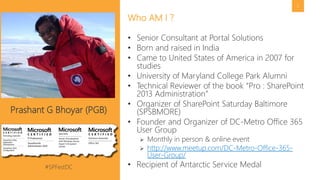
• Senior Consultant at Portal Solutions
• Born and raised in India
• Came to United States of America in 2007 for
studies
• University of Maryland College Park Alumni
• Technical Reviewer of the book “Pro : SharePoint
2013 Administration”
• Organizer of SharePoint Saturday Baltimore
(SPSBMORE)
• Founder and Organizer of DC-Metro Office 365
User Group
 Monthly in person & online event
 http://www.meetup.com/DC-Metro-Office-365-
User-Group/
• Recipient of Antarctic Service Medal
Who AM I ?
Prashant G Bhoyar (PGB)
#SPFestDC @pgbhoyar
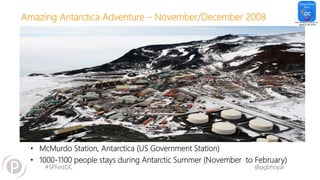
Amazing Antarctica Adventure – November/December 2008
#SPFestDC @pgbhoyar
Amazing Antarctica Adventure – November/December 2008
• McMurdo Station, Antarctica (US Government Station)
• 1000-1100 people stays during Antarctic Summer (November to February)
#SPFestDC @pgbhoyar
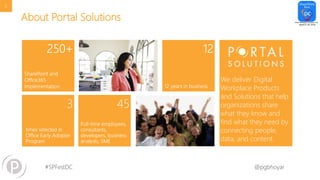
About Portal Solutions
We deliver Digital
Workplace Products
and Solutions that help
organizations share
what they know and
find what they need by
connecting people,
data, and content.
5
#SPFestDC @pgbhoyar
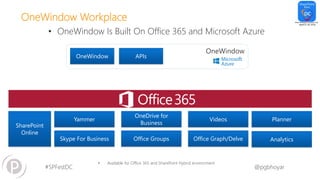
OneWindow Workplace
• OneWindow Is Built On Office 365 and Microsoft Azure
• Available for Office 365 and SharePoint Hybrid environment
OneWindow
Yammer
SharePoint
Online
Skype For Business Office Groups Office Graph/Delve
Videos
OneDrive for
Business
OneWindow APIs
Planner
Analytics
#SPFestDC @pgbhoyar
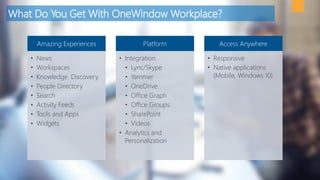
What Do You Get With OneWindow Workplace?
7
Amazing Experiences
• News
• Workspaces
• Knowledge Discovery
• People Directory
• Search
• Activity Feeds
• Tools and Apps
• Widgets
Platform
• Integration
• Lync/Skype
• Yammer
• OneDrive
• Office Graph
• Office Groups
• SharePoint
• Videos
• Analytics and
Personalization
Access Anywhere
• Responsive
• Native applications
(Mobile, Windows 10)
#SPFestDC @pgbhoyar
Next Steps
8
Interested in assessing if OneWindow Workplace
is right for you?
Let’s talk. Click here or go to http://www.onewindowapp.com to learn more.
#SPFestDC @pgbhoyar
Upcoming Local Speaking Engagements
• Northern Virginia (NOVA) Code Camp – 30th April 2016
 https://nvite.com/novacodecamp/adbb
• SharePoint User Group of DC (SUGDC) –12th May 2016
 http://www.meetup.com/SUG-DC/
• Capital Area .NET SharePoint Special Interest Group Meetup -
18th May 2016
 http://www.meetup.com/CapArea-NET-SPSIG/events/229709059/
• Federal SP User Group (FEDSPUG) – 19th May 2016
 http://www.meetup.com/fedspug-wspdc/
9
#SPFestDC @pgbhoyar
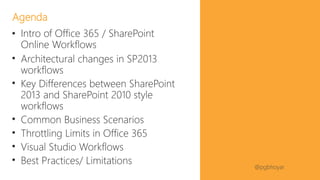
• Intro of Office 365 / SharePoint
Online Workflows
• Architectural changes in SP2013
workflows
• Key Differences between SharePoint
2013 and SharePoint 2010 style
workflows
• Common Business Scenarios
• Throttling Limits in Office 365
• Visual Studio Workflows
• Best Practices/ Limitations
Agenda
#SPFestDC @pgbhoyar
#SPFestDC @pgbhoyar
Audience Poll
• How many of you are IT pros?
• How many of you are Developers?
• How many of you are Power Users?
• How many of you are End Users?
• How many of you develop/manages/maintains the
workflows?
12
#SPFestDC @pgbhoyar
#SPFestDC @pgbhoyar
14
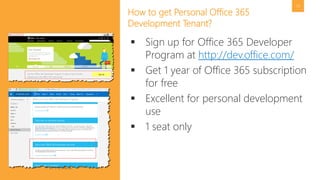
How to get Personal Office 365
Development Tenant?
 Sign up for Office 365 Developer
Program at http://dev.office.com/
 Get 1 year of Office 365 subscription
for free
 Excellent for personal development
use
 1 seat only
#SPFestDC @pgbhoyar
15
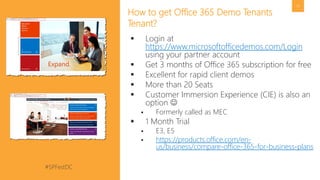
How to get Office 365 Demo Tenants
Tenant?
 Login at
https://www.microsoftofficedemos.com/Login
using your partner account
 Get 3 months of Office 365 subscription for free
 Excellent for rapid client demos
 More than 20 Seats
 Customer Immersion Experience (CIE) is also an
option 
 Formerly called as MEC
 1 Month Trial
 E3, E5
 https://products.office.com/en-
us/business/compare-office-365-for-business-plans
#SPFestDC @pgbhoyar
#SPFestDC @pgbhoyar
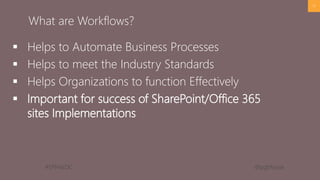
 Helps to Automate Business Processes
 Helps to meet the Industry Standards
 Helps Organizations to function Effectively
 Important for success of SharePoint/Office 365
sites Implementations
17
What are Workflows?
#SPFestDC @pgbhoyar
#SPFestDC @pgbhoyar
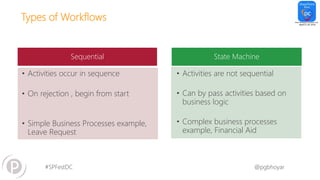
Types of Workflows
Sequential State Machine
• Activities occur in sequence
• On rejection , begin from start
• Simple Business Processes example,
Leave Request
• Activities are not sequential
• Can by pass activities based on
business logic
• Complex business processes
example, Financial Aid
#SPFestDC @pgbhoyar
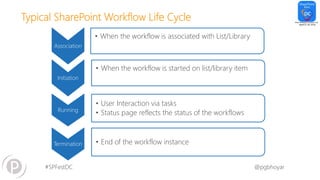
Typical SharePoint Workflow Life Cycle
Initiation
• When the workflow is started on list/library item
Running
• User Interaction via tasks
• Status page reflects the status of the workflows
Termination • End of the workflow instance
Association
• When the workflow is associated with List/Library
#SPFestDC @pgbhoyar
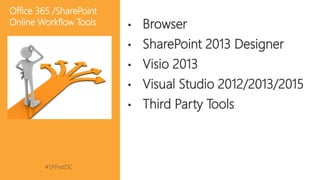
• Browser
• SharePoint 2013 Designer
• Visio 2013
• Visual Studio 2012/2013/2015
• Third Party Tools
Office 365 /SharePoint
Online Workflow Tools
#SPFestDC @pgbhoyar
22
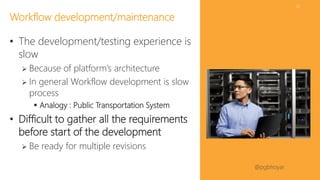
• The development/testing experience is
slow
 Because of platform’s architecture
 In general Workflow development is slow
process
 Analogy : Public Transportation System
• Difficult to gather all the requirements
before start of the development
 Be ready for multiple revisions
Workflow development/maintenance
#SPFestDC @pgbhoyar
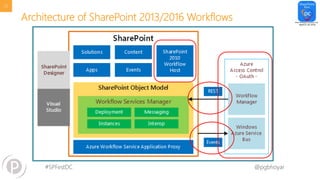
Architecture of SharePoint 2013/2016 Workflows
23
#SPFestDC @pgbhoyar
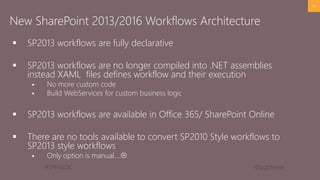
 SP2013 workflows are fully declarative
 SP2013 workflows are no longer compiled into .NET assemblies
instead XAML files defines workflow and their execution
 No more custom code
 Build WebServices for custom business logic
 SP2013 workflows are available in Office 365/ SharePoint Online
 There are no tools available to convert SP2010 Style workflows to
SP2013 style workflows
 Only option is manual….
24
New SharePoint 2013/2016 Workflows Architecture
#SPFestDC @pgbhoyar
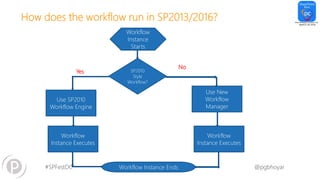
How does the workflow run in SP2013/2016?
Workflow
Instance
Starts
SP2010
Style
Workflow?
Use SP2010
Workflow Engine
Use New
Workflow
Manager
Workflow
Instance Executes
Workflow Instance Ends
Workflow
Instance Executes
Yes
No
#SPFestDC @pgbhoyar
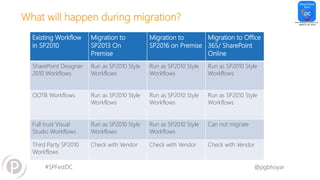
What will happen during migration?
Existing Workflow
in SP2010
Migration to
SP2013 On
Premise
Migration to
SP2016 on Premise
Migration to Office
365/ SharePoint
Online
SharePoint Designer
2010 Workflows
Run as SP2010 Style
Workflows
Run as SP2010 Style
Workflows
Run as SP2010 Style
Workflows
OOTB Workflows Run as SP2010 Style
Workflows
Run as SP2010 Style
Workflows
Run as SP2010 Style
Workflows
Full trust Visual
Studio Workflows
Run as SP2010 Style
Workflows
Run as SP2010 Style
Workflows
Can not migrate
Third Party SP2010
Workflows
Check with Vendor Check with Vendor Check with Vendor
#SPFestDC @pgbhoyar
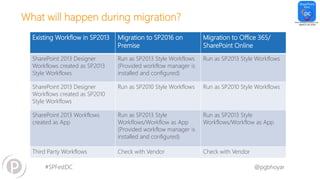
What will happen during migration?
Existing Workflow in SP2013 Migration to SP2016 on
Premise
Migration to Office 365/
SharePoint Online
SharePoint 2013 Designer
Workflows created as SP2013
Style Workflows
Run as SP2013 Style Workflows
(Provided workflow manager is
installed and configured)
Run as SP2013 Style Workflows
SharePoint 2013 Designer
Workflows created as SP2010
Style Workflows
Run as SP2010 Style Workflows Run as SP2010 Style Workflows
SharePoint 2013 Workflows
created as App
Run as SP2013 Style
Workflows/Workflow as App
(Provided workflow manager is
installed and configured)
Run as SP2013 Style
Workflows/Workflow as App
Third Party Workflows Check with Vendor Check with Vendor
#SPFestDC @pgbhoyar
28
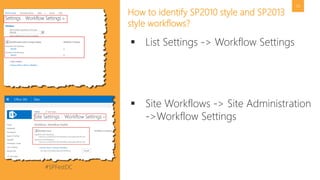
How to identify SP2010 style and SP2013
style workflows?
 List Settings -> Workflow Settings
 Site Workflows -> Site Administration
->Workflow Settings
#SPFestDC @pgbhoyar
#SPFestDC @pgbhoyar
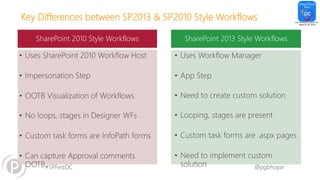
Key Differences between SP2013 & SP2010 Style Workflows
SharePoint 2010 Style Workflows SharePoint 2013 Style Workflows
• Uses SharePoint 2010 Workflow Host
• Impersonation Step
• OOTB Visualization of Workflows
• No loops, stages in Designer WFs
• Custom task forms are InfoPath forms
• Can capture Approval comments
OOTB
• Uses Workflow Manager
• App Step
• Need to create custom solution
• Looping, stages are present
• Custom task forms are .aspx pages
• Need to implement custom
solution
#SPFestDC @pgbhoyar
#SPFestDC @pgbhoyar
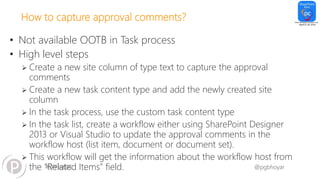
How to capture approval comments?
• Not available OOTB in Task process
• High level steps
 Create a new site column of type text to capture the approval
comments
 Create a new task content type and add the newly created site
column
 In the task process, use the custom task content type
 In the task list, create a workflow either using SharePoint Designer
2013 or Visual Studio to update the approval comments in the
workflow host (list item, document or document set).
 This workflow will get the information about the workflow host from
the “Related Items” field.
#SPFestDC @pgbhoyar
33
• Information about associated Item we
select in the Task Process
• Saves in the Information in Jason Format
 [{"ItemId":5,"WebId":"3409b5b9-7fea-49b9-
a325-63c730a63a96","ListId":"9e6939fa-
bf53-4021-91bb-b73bed0efa39"}]
 ItemID
 WebId
 ListId
• We can retrieve the “ItemId” from the
related items and use it to update/email
captured comments
What are related Items?
#SPFestDC @pgbhoyar
#SPFestDC @pgbhoyar
#SPFestDC @pgbhoyar
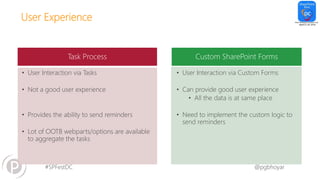
User Experience
Task Process Custom SharePoint Forms
• User Interaction via Tasks
• Not a good user experience
• Provides the ability to send reminders
• Lot of OOTB webparts/options are available
to aggregate the tasks
• User Interaction via Custom Forms
• Can provide good user experience
• All the data is at same place
• Need to implement the custom logic to
send reminders
#SPFestDC @pgbhoyar
#SPFestDC @pgbhoyar
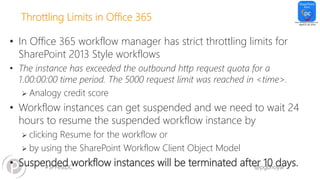
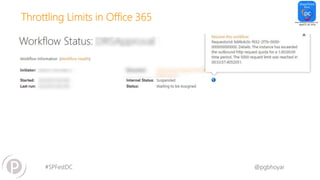
Throttling Limits in Office 365
• In Office 365 workflow manager has strict throttling limits for
SharePoint 2013 Style workflows
• The instance has exceeded the outbound http request quota for a
1.00:00:00 time period. The 5000 request limit was reached in <time>.
 Analogy credit score
• Workflow instances can get suspended and we need to wait 24
hours to resume the suspended workflow instance by
 clicking Resume for the workflow or
 by using the SharePoint Workflow Client Object Model
• Suspended workflow instances will be terminated after 10 days.
#SPFestDC @pgbhoyar
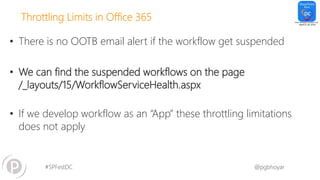
Throttling Limits in Office 365
• There is no OOTB email alert if the workflow get suspended
• We can find the suspended workflows on the page
/_layouts/15/WorkflowServiceHealth.aspx
• If we develop workflow as an “App” these throttling limitations
does not apply
#SPFestDC @pgbhoyar
Throttling Limits in Office 365
#SPFestDC @pgbhoyar
Throttling Limits in Office 365 – Design Consideration
• Avoid infinite loops
 We may use “Wait for field change in current item”
• Avoid using a workflow to execute complex algorithms
 Workflows are intended to manage document-driven, human
processes and not to dispatch significant computational tasks.
• Avoid the use of the “Wait for Event in List Item" activity
#SPFestDC @pgbhoyar
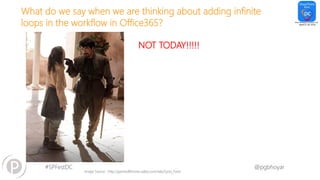
What do we say when we are thinking about adding infinite
loops in the workflow in Office365?
NOT TODAY!!!!!
Image Source : http://gameofthrones.wikia.com/wiki/Syrio_Forel
#SPFestDC @pgbhoyar
#SPFestDC @pgbhoyar
Tips for developing maintainable custom workflows
• Naming Convention for Custom Workflows
 Use the naming convention that works best for you and your
organization
 For example, List or Library + ListName + Purpose
• Use activity “Add a comment” to write informative comments in
the workflow
 End users will not see these comments unlike workflow history list
logs
#SPFestDC @pgbhoyar
Tips for developing maintainable custom workflows
• Do not modify the OOTB global workflows
 Create copy and then modify
• Log information in the History List
 Log variables, important info that will be helpful during
debugging/troubleshooting
 End users can see the logs 
• Create custom task content types for tasks with only one
logical outcome
#SPFestDC @pgbhoyar
Tips for developing maintainable custom workflows
• Use new Task List and History list for each workflow
 To create the new tasks list and history list, we can use
 Workflow Settings page
 SharePoint Designer
 SharePoint UI
 OOTB “Workflow Tasks” List has additional notifications
 To turn off -> List Settings – Advanced Settings -> Uncheck “Send e-mail
when ownership is assigned?”
#SPFestDC @pgbhoyar
Tips for developing maintainable custom workflows
• Don’t create the variable if you don’t have to
 50 is the limit
• Use SharePoint groups to assign the tasks/send emails instead of
individual users
• Keep workflow initiation activity to minimum
#SPFestDC @pgbhoyar
Tips for developing maintainable custom workflows
• Capture the dates of various approval steps
 Good for generating audit logs
• Save the Workflow status in a separate field
 Avoid default workflow name
 Helps if you divide workflows into multiple workflows
• Create a separate Workflow status field as text
 Gives the ability of filtering and sorting
 Approvers love this option
#SPFestDC @pgbhoyar
Tips for developing maintainable custom workflows
• Pay extra attention while modifying the Custom Task content
types
 Task outcome field must be the last field
• Review the workflow starting logic
 Limit how many times the workflow gets started
 Make sure they won’t start unnecessarily after the workflow is ended
successfully
• Restrict the access
#SPFestDC @pgbhoyar
Tips for developing maintainable custom workflows?
• If possible Break down the workflows in multiple WFs
 Helps a lot in development and maintenance
 We can start SharePoint 2010 workflows from SharePoint 2013 only
 We can not start SharePoint 2013 workflows from SharePoint 2013
workflows
 You can use “Wait for field change in current item” to trigger the
workflows
• For large lists, don’t remove the workflow, but set to no new
instance
 Do it in non business hours
#SPFestDC @pgbhoyar
Tips for developing maintainable custom workflows
• Implement the logic to stop/start at a particular stage
 Super helpful in case the workflow instance terminates
 Super helpful during migration (For on premise customers)
 Helpful to update the business logic
• Using If condition and a custom variable, we can pick and
choose the additional logging
 Similar to #if debug directive in C#
 The workflow will be long, but it can save a lot of
troubleshooting/development time
 End users will not see additional comments in Production 
#SPFestDC @pgbhoyar
#SPFestDC @pgbhoyar
53
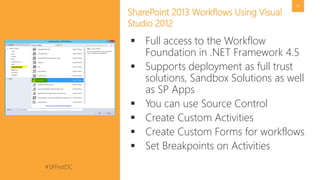
SharePoint 2013 Workflows Using Visual
Studio 2012
 Full access to the Workflow
Foundation in .NET Framework 4.5
 Supports deployment as full trust
solutions, Sandbox Solutions as well
as SP Apps
 You can use Source Control
 Create Custom Activities
 Create Custom Forms for workflows
 Set Breakpoints on Activities
#SPFestDC @pgbhoyar
#SPFestDC @pgbhoyar
#SPFestDC @pgbhoyar
56
Limitations
 We can not start workflows on delete
event
 50 variable limit
 No source control
 String functions are limited
 For advance implementations you will
need to involve devs/architects
 You can not start the workflows on Task
lists whenever new tasks gets created by
SP2013 style workflows
 Workaround : Create SP2010 style workflow
in Task List
#SPFestDC @pgbhoyar
#SPFestDC @pgbhoyar
SharePint
Image Source :http://iscreamsundae.com/some-of-the-best-game-of-thrones-dialogues/
#SPFestDC @pgbhoyar
Questions? Feedback? Contact me:
 Twitter: @PGBhoyar
 Blog: http://pgbhoyar.com (limited contents)
 Email: pgbhoyar@gmail.com
 Feedback : Please provide feedback
 Email or
 Session Evaluations or
 Anonymous Suggestions: https://www.suggestionox.com/r/pgb
Thank You
Organizers, Sponsors and You for Making this Possible.

SharePoint Fest DC 2016_Advanced Office365 SharePoint Online Workflows

  • 1.
    #SPFestDC @pgbhoyar Advanced Office365-SharePointOnline Workflows Prashant G Bhoyar (PGB) SharePoint Fest DC 2016 28 April 2016
  • 2.
    #SPFestDC @pgbhoyar 2 • SeniorConsultant at Portal Solutions • Born and raised in India • Came to United States of America in 2007 for studies • University of Maryland College Park Alumni • Technical Reviewer of the book “Pro : SharePoint 2013 Administration” • Organizer of SharePoint Saturday Baltimore (SPSBMORE) • Founder and Organizer of DC-Metro Office 365 User Group  Monthly in person & online event  http://www.meetup.com/DC-Metro-Office-365- User-Group/ • Recipient of Antarctic Service Medal Who AM I ? Prashant G Bhoyar (PGB)
  • 3.
    #SPFestDC @pgbhoyar Amazing AntarcticaAdventure – November/December 2008
  • 4.
    #SPFestDC @pgbhoyar Amazing AntarcticaAdventure – November/December 2008 • McMurdo Station, Antarctica (US Government Station) • 1000-1100 people stays during Antarctic Summer (November to February)
  • 5.
    #SPFestDC @pgbhoyar About PortalSolutions We deliver Digital Workplace Products and Solutions that help organizations share what they know and find what they need by connecting people, data, and content. 5
  • 6.
    #SPFestDC @pgbhoyar OneWindow Workplace •OneWindow Is Built On Office 365 and Microsoft Azure • Available for Office 365 and SharePoint Hybrid environment OneWindow Yammer SharePoint Online Skype For Business Office Groups Office Graph/Delve Videos OneDrive for Business OneWindow APIs Planner Analytics
  • 7.
    #SPFestDC @pgbhoyar What DoYou Get With OneWindow Workplace? 7 Amazing Experiences • News • Workspaces • Knowledge Discovery • People Directory • Search • Activity Feeds • Tools and Apps • Widgets Platform • Integration • Lync/Skype • Yammer • OneDrive • Office Graph • Office Groups • SharePoint • Videos • Analytics and Personalization Access Anywhere • Responsive • Native applications (Mobile, Windows 10)
  • 8.
    #SPFestDC @pgbhoyar Next Steps 8 Interestedin assessing if OneWindow Workplace is right for you? Let’s talk. Click here or go to http://www.onewindowapp.com to learn more.
  • 9.
    #SPFestDC @pgbhoyar Upcoming LocalSpeaking Engagements • Northern Virginia (NOVA) Code Camp – 30th April 2016  https://nvite.com/novacodecamp/adbb • SharePoint User Group of DC (SUGDC) –12th May 2016  http://www.meetup.com/SUG-DC/ • Capital Area .NET SharePoint Special Interest Group Meetup - 18th May 2016  http://www.meetup.com/CapArea-NET-SPSIG/events/229709059/ • Federal SP User Group (FEDSPUG) – 19th May 2016  http://www.meetup.com/fedspug-wspdc/ 9
  • 10.
    #SPFestDC @pgbhoyar • Introof Office 365 / SharePoint Online Workflows • Architectural changes in SP2013 workflows • Key Differences between SharePoint 2013 and SharePoint 2010 style workflows • Common Business Scenarios • Throttling Limits in Office 365 • Visual Studio Workflows • Best Practices/ Limitations Agenda
  • 11.
  • 12.
    #SPFestDC @pgbhoyar Audience Poll •How many of you are IT pros? • How many of you are Developers? • How many of you are Power Users? • How many of you are End Users? • How many of you develop/manages/maintains the workflows? 12
  • 13.
  • 14.
    #SPFestDC @pgbhoyar 14 How toget Personal Office 365 Development Tenant?  Sign up for Office 365 Developer Program at http://dev.office.com/  Get 1 year of Office 365 subscription for free  Excellent for personal development use  1 seat only
  • 15.
    #SPFestDC @pgbhoyar 15 How toget Office 365 Demo Tenants Tenant?  Login at https://www.microsoftofficedemos.com/Login using your partner account  Get 3 months of Office 365 subscription for free  Excellent for rapid client demos  More than 20 Seats  Customer Immersion Experience (CIE) is also an option   Formerly called as MEC  1 Month Trial  E3, E5  https://products.office.com/en- us/business/compare-office-365-for-business-plans
  • 16.
  • 17.
    #SPFestDC @pgbhoyar  Helpsto Automate Business Processes  Helps to meet the Industry Standards  Helps Organizations to function Effectively  Important for success of SharePoint/Office 365 sites Implementations 17 What are Workflows?
  • 18.
  • 19.
    #SPFestDC @pgbhoyar Types ofWorkflows Sequential State Machine • Activities occur in sequence • On rejection , begin from start • Simple Business Processes example, Leave Request • Activities are not sequential • Can by pass activities based on business logic • Complex business processes example, Financial Aid
  • 20.
    #SPFestDC @pgbhoyar Typical SharePointWorkflow Life Cycle Initiation • When the workflow is started on list/library item Running • User Interaction via tasks • Status page reflects the status of the workflows Termination • End of the workflow instance Association • When the workflow is associated with List/Library
  • 21.
    #SPFestDC @pgbhoyar • Browser •SharePoint 2013 Designer • Visio 2013 • Visual Studio 2012/2013/2015 • Third Party Tools Office 365 /SharePoint Online Workflow Tools
  • 22.
    #SPFestDC @pgbhoyar 22 • Thedevelopment/testing experience is slow  Because of platform’s architecture  In general Workflow development is slow process  Analogy : Public Transportation System • Difficult to gather all the requirements before start of the development  Be ready for multiple revisions Workflow development/maintenance
  • 23.
    #SPFestDC @pgbhoyar Architecture ofSharePoint 2013/2016 Workflows 23
  • 24.
    #SPFestDC @pgbhoyar  SP2013workflows are fully declarative  SP2013 workflows are no longer compiled into .NET assemblies instead XAML files defines workflow and their execution  No more custom code  Build WebServices for custom business logic  SP2013 workflows are available in Office 365/ SharePoint Online  There are no tools available to convert SP2010 Style workflows to SP2013 style workflows  Only option is manual…. 24 New SharePoint 2013/2016 Workflows Architecture
  • 25.
    #SPFestDC @pgbhoyar How doesthe workflow run in SP2013/2016? Workflow Instance Starts SP2010 Style Workflow? Use SP2010 Workflow Engine Use New Workflow Manager Workflow Instance Executes Workflow Instance Ends Workflow Instance Executes Yes No
  • 26.
    #SPFestDC @pgbhoyar What willhappen during migration? Existing Workflow in SP2010 Migration to SP2013 On Premise Migration to SP2016 on Premise Migration to Office 365/ SharePoint Online SharePoint Designer 2010 Workflows Run as SP2010 Style Workflows Run as SP2010 Style Workflows Run as SP2010 Style Workflows OOTB Workflows Run as SP2010 Style Workflows Run as SP2010 Style Workflows Run as SP2010 Style Workflows Full trust Visual Studio Workflows Run as SP2010 Style Workflows Run as SP2010 Style Workflows Can not migrate Third Party SP2010 Workflows Check with Vendor Check with Vendor Check with Vendor
  • 27.
    #SPFestDC @pgbhoyar What willhappen during migration? Existing Workflow in SP2013 Migration to SP2016 on Premise Migration to Office 365/ SharePoint Online SharePoint 2013 Designer Workflows created as SP2013 Style Workflows Run as SP2013 Style Workflows (Provided workflow manager is installed and configured) Run as SP2013 Style Workflows SharePoint 2013 Designer Workflows created as SP2010 Style Workflows Run as SP2010 Style Workflows Run as SP2010 Style Workflows SharePoint 2013 Workflows created as App Run as SP2013 Style Workflows/Workflow as App (Provided workflow manager is installed and configured) Run as SP2013 Style Workflows/Workflow as App Third Party Workflows Check with Vendor Check with Vendor
  • 28.
    #SPFestDC @pgbhoyar 28 How toidentify SP2010 style and SP2013 style workflows?  List Settings -> Workflow Settings  Site Workflows -> Site Administration ->Workflow Settings
  • 29.
  • 30.
    #SPFestDC @pgbhoyar Key Differencesbetween SP2013 & SP2010 Style Workflows SharePoint 2010 Style Workflows SharePoint 2013 Style Workflows • Uses SharePoint 2010 Workflow Host • Impersonation Step • OOTB Visualization of Workflows • No loops, stages in Designer WFs • Custom task forms are InfoPath forms • Can capture Approval comments OOTB • Uses Workflow Manager • App Step • Need to create custom solution • Looping, stages are present • Custom task forms are .aspx pages • Need to implement custom solution
  • 31.
  • 32.
    #SPFestDC @pgbhoyar How tocapture approval comments? • Not available OOTB in Task process • High level steps  Create a new site column of type text to capture the approval comments  Create a new task content type and add the newly created site column  In the task process, use the custom task content type  In the task list, create a workflow either using SharePoint Designer 2013 or Visual Studio to update the approval comments in the workflow host (list item, document or document set).  This workflow will get the information about the workflow host from the “Related Items” field.
  • 33.
    #SPFestDC @pgbhoyar 33 • Informationabout associated Item we select in the Task Process • Saves in the Information in Jason Format  [{"ItemId":5,"WebId":"3409b5b9-7fea-49b9- a325-63c730a63a96","ListId":"9e6939fa- bf53-4021-91bb-b73bed0efa39"}]  ItemID  WebId  ListId • We can retrieve the “ItemId” from the related items and use it to update/email captured comments What are related Items?
  • 34.
  • 35.
  • 36.
    #SPFestDC @pgbhoyar User Experience TaskProcess Custom SharePoint Forms • User Interaction via Tasks • Not a good user experience • Provides the ability to send reminders • Lot of OOTB webparts/options are available to aggregate the tasks • User Interaction via Custom Forms • Can provide good user experience • All the data is at same place • Need to implement the custom logic to send reminders
  • 37.
  • 38.
    #SPFestDC @pgbhoyar Throttling Limitsin Office 365 • In Office 365 workflow manager has strict throttling limits for SharePoint 2013 Style workflows • The instance has exceeded the outbound http request quota for a 1.00:00:00 time period. The 5000 request limit was reached in <time>.  Analogy credit score • Workflow instances can get suspended and we need to wait 24 hours to resume the suspended workflow instance by  clicking Resume for the workflow or  by using the SharePoint Workflow Client Object Model • Suspended workflow instances will be terminated after 10 days.
  • 39.
    #SPFestDC @pgbhoyar Throttling Limitsin Office 365 • There is no OOTB email alert if the workflow get suspended • We can find the suspended workflows on the page /_layouts/15/WorkflowServiceHealth.aspx • If we develop workflow as an “App” these throttling limitations does not apply
  • 40.
  • 41.
    #SPFestDC @pgbhoyar Throttling Limitsin Office 365 – Design Consideration • Avoid infinite loops  We may use “Wait for field change in current item” • Avoid using a workflow to execute complex algorithms  Workflows are intended to manage document-driven, human processes and not to dispatch significant computational tasks. • Avoid the use of the “Wait for Event in List Item" activity
  • 42.
    #SPFestDC @pgbhoyar What dowe say when we are thinking about adding infinite loops in the workflow in Office365? NOT TODAY!!!!! Image Source : http://gameofthrones.wikia.com/wiki/Syrio_Forel
  • 43.
  • 44.
    #SPFestDC @pgbhoyar Tips fordeveloping maintainable custom workflows • Naming Convention for Custom Workflows  Use the naming convention that works best for you and your organization  For example, List or Library + ListName + Purpose • Use activity “Add a comment” to write informative comments in the workflow  End users will not see these comments unlike workflow history list logs
  • 45.
    #SPFestDC @pgbhoyar Tips fordeveloping maintainable custom workflows • Do not modify the OOTB global workflows  Create copy and then modify • Log information in the History List  Log variables, important info that will be helpful during debugging/troubleshooting  End users can see the logs  • Create custom task content types for tasks with only one logical outcome
  • 46.
    #SPFestDC @pgbhoyar Tips fordeveloping maintainable custom workflows • Use new Task List and History list for each workflow  To create the new tasks list and history list, we can use  Workflow Settings page  SharePoint Designer  SharePoint UI  OOTB “Workflow Tasks” List has additional notifications  To turn off -> List Settings – Advanced Settings -> Uncheck “Send e-mail when ownership is assigned?”
  • 47.
    #SPFestDC @pgbhoyar Tips fordeveloping maintainable custom workflows • Don’t create the variable if you don’t have to  50 is the limit • Use SharePoint groups to assign the tasks/send emails instead of individual users • Keep workflow initiation activity to minimum
  • 48.
    #SPFestDC @pgbhoyar Tips fordeveloping maintainable custom workflows • Capture the dates of various approval steps  Good for generating audit logs • Save the Workflow status in a separate field  Avoid default workflow name  Helps if you divide workflows into multiple workflows • Create a separate Workflow status field as text  Gives the ability of filtering and sorting  Approvers love this option
  • 49.
    #SPFestDC @pgbhoyar Tips fordeveloping maintainable custom workflows • Pay extra attention while modifying the Custom Task content types  Task outcome field must be the last field • Review the workflow starting logic  Limit how many times the workflow gets started  Make sure they won’t start unnecessarily after the workflow is ended successfully • Restrict the access
  • 50.
    #SPFestDC @pgbhoyar Tips fordeveloping maintainable custom workflows? • If possible Break down the workflows in multiple WFs  Helps a lot in development and maintenance  We can start SharePoint 2010 workflows from SharePoint 2013 only  We can not start SharePoint 2013 workflows from SharePoint 2013 workflows  You can use “Wait for field change in current item” to trigger the workflows • For large lists, don’t remove the workflow, but set to no new instance  Do it in non business hours
  • 51.
    #SPFestDC @pgbhoyar Tips fordeveloping maintainable custom workflows • Implement the logic to stop/start at a particular stage  Super helpful in case the workflow instance terminates  Super helpful during migration (For on premise customers)  Helpful to update the business logic • Using If condition and a custom variable, we can pick and choose the additional logging  Similar to #if debug directive in C#  The workflow will be long, but it can save a lot of troubleshooting/development time  End users will not see additional comments in Production 
  • 52.
  • 53.
    #SPFestDC @pgbhoyar 53 SharePoint 2013Workflows Using Visual Studio 2012  Full access to the Workflow Foundation in .NET Framework 4.5  Supports deployment as full trust solutions, Sandbox Solutions as well as SP Apps  You can use Source Control  Create Custom Activities  Create Custom Forms for workflows  Set Breakpoints on Activities
  • 54.
  • 55.
  • 56.
    #SPFestDC @pgbhoyar 56 Limitations  Wecan not start workflows on delete event  50 variable limit  No source control  String functions are limited  For advance implementations you will need to involve devs/architects  You can not start the workflows on Task lists whenever new tasks gets created by SP2013 style workflows  Workaround : Create SP2010 style workflow in Task List
  • 57.
  • 58.
    #SPFestDC @pgbhoyar SharePint Image Source:http://iscreamsundae.com/some-of-the-best-game-of-thrones-dialogues/
  • 59.
    #SPFestDC @pgbhoyar Questions? Feedback?Contact me:  Twitter: @PGBhoyar  Blog: http://pgbhoyar.com (limited contents)  Email: pgbhoyar@gmail.com  Feedback : Please provide feedback  Email or  Session Evaluations or  Anonymous Suggestions: https://www.suggestionox.com/r/pgb Thank You Organizers, Sponsors and You for Making this Possible.