








ERIC OVERFIELD | PixelMill
Microsoft MVP
BROADEN YOUR DEV SKILLSET
WITH INSPIRED SHAREPOINT
BRANDING
http://pxml.ly/EO-Branding-Options
ERIC OVERFIELD
President & Co-Founder of PixelMill
Microsoft MVP, Office Servers & Services
Published SharePoint Author
SharePoint Community Organizer & Contributor
@ericoverfield
ericoverfield.com
PixelMill is a modern SharePoint Design Agency based in Northern California. On the forefront of
web design trends since 1998, PixelMill provides innovative collaboration portals to enhance the
user adoption of SharePoint intranets, extranets, and public facing sites.
PIXELMILL
@pixelmillteam
pixelmill.com
1. The Evolution of SharePoint Branding
2. Current Options for Branding SharePoint
3. Your Branding Tool Options
4. Branding Installation Methodologies
OVERVIEW
THE EVOLUTION OF
SHAREPOINT BRANDING OPTIONS
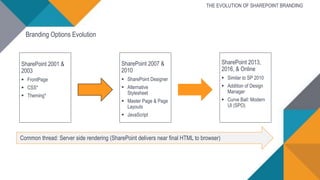
Common thread: Server side rendering (SharePoint delivers near final HTML to browser)
SharePoint 2001 &
2003
 FrontPage
 CSS*
 Theming*
SharePoint 2007 &
2010
 SharePoint Designer
 Alternative
Stylesheet
 Master Page & Page
Layouts
 JavaScript
SharePoint 2013,
2016, & Online
 Similar to SP 2010
 Addition of Design
Manager
 Curve Ball: Modern
UI (SPO)
THE EVOLUTION OF SHAREPOINT BRANDING
Branding Options Evolution
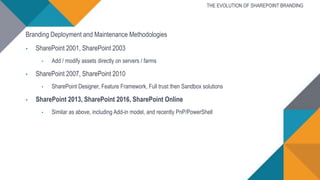
Branding Deployment and Maintenance Methodologies
• SharePoint 2001, SharePoint 2003
• Add / modify assets directly on servers / farms
• SharePoint 2007, SharePoint 2010
• SharePoint Designer, Feature Framework, Full trust then Sandbox solutions
• SharePoint 2013, SharePoint 2016, SharePoint Online
• Similar as above, including Add-in model, and recently PnP/PowerShell
THE EVOLUTION OF SHAREPOINT BRANDING
CURRENT OPTIONS FOR
BRANDING SHAREPOINT
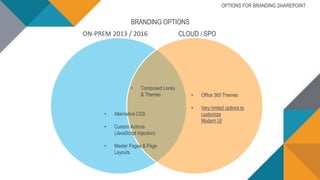
OPTIONS FOR BRANDING SHAREPOINT
CLOUD / SPOON-PREM 2013 / 2016
• Alternative CSS
• Custom Actions
(JavaScript Injection)
• Master Pages & Page
Layouts
• Office 365 Themes
• Very limited options to
customize
Modern UI
BRANDING OPTIONS
• Composed Looks
& Themes
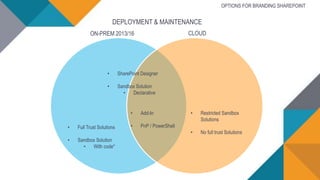
DEPLOYMENT & MAINTENANCE
CLOUDON-PREM 2013/16
• Full Trust Solutions
• Sandbox Solution
• With code*
• Restricted Sandbox
Solutions
• No full trust Solutions
OPTIONS FOR BRANDING SHAREPOINT
• SharePoint Designer
• Sandbox Solution
• Declarative
• Add-In
• PnP / PowerShell
BRANDING SHAREPOINT
OPTIONS IN DETAIL
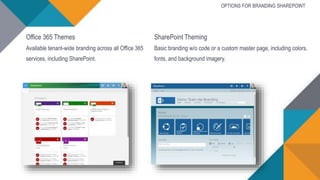
Office 365 Themes
Available tenant-wide branding across all Office 365
services, including SharePoint.
SharePoint Theming
Basic branding w/o code or a custom master page, including colors,
fonts, and background imagery.
OPTIONS FOR BRANDING SHAREPOINT
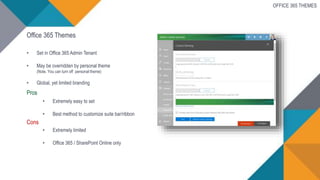
Office 365 Themes
• Set in Office 365 Admin Tenant
• May be overridden by personal theme
(Note. You can turn off personal theme)
• Global, yet limited branding
Pros
• Extremely easy to set
• Best method to customize suite bar/ribbon
Cons
• Extremely limited
• Office 365 / SharePoint Online only
OFFICE 365 THEMES
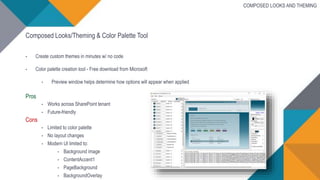
Composed Looks/Theming & Color Palette Tool
• Create custom themes in minutes w/ no code
• Color palette creation tool - Free download from Microsoft
• Preview window helps determine how options will appear when applied
Pros
• Works across SharePoint tenant
• Future-friendly
Cons
• Limited to color palette
• No layout changes
• Modern UI limited to:
• Background image
• ContentAccent1
• PageBackground
• BackgroundOverlay
COMPOSED LOOKS AND THEMING
Demo
THEMING
ALTERNATIVE CSS
JAVASCRIPT EMBED
Alternative CSS
Provide styling w/o a custom master page
• Ability to set via browser w/ Publishing enabled
• Or use the AlternateCSSUrl web object property via CSOM API
• Even responsive abilities
• Note: New portal experiences are natively responsive
Pros
• More sophisticated styling options than theming
• Control of colors & layouts
• Simple to install & maintain
• No custom masterpage required, but combination available
Cons
• No Modern UI support
• Limited to what CSS can accomplish
ALTERNATIVE CSS
JavaScript Embed
Inject custom JavaScript without a custom master page
 Adds reference to custom JavaScript w/o a custom master page
 Use to provide client-side rendering,
utilize CSOM, REST API’s & more
 Add as a custom action
Pros
 Provides the ability for client side rendering (i.e. DOM manipulation)
 Combine w/ Alternative CSS to provide advanced layout changes w/o custom Master Page
 Reasonable installation methods w/ PnP / Add-ins
Cons
 Does require JavaScript pros
 No Modern UI support
 Custom DOM manipulation may break w/ SharePoint updates
JAVASCRIPT EMBED
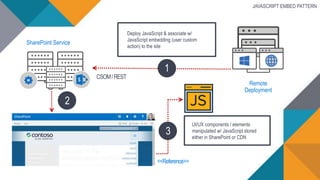
SharePoint Service
Deploy JavaScript & associate w/
JavaScript embedding (user custom
action) to the site
<<Reference>>
UI/UX components / elements
manipulated w/ JavaScript stored
either in SharePoint or CDN
2
CSOM/REST
1
Remote
Deployment
3
JAVASCRIPT EMBED PATTERN
Demo
ALTERNATIVE CSS
JAVASCRIPT EMBEDDING
CUSTOM LOGO
Custom Master Pages and Page Layouts provide near complete control of UI
• Based on ASP.NET / server side rendering
• i.e. .NET 2.0 Master Pages and Page layouts
Pros
• Complete control over UI
• Good for hard coded HTML DOM control
• If you can dream it, it should be possible
Cons
• Old technology, not based on client side rendering
• Not overly future-friendly
• May require manual update w/ SharePoint updates
• No Modern UI support / not expected in any way soon or ever
CUSTOM MASTER PAGES AND PAGE LAYOUTS
Groups & Modern Team Sites
• Only basic modifications available w/ Modern Team Sites & the Modern UI
• Limited to Theming / Composed Looks
• SharePoint Framework (SPFx) may provide a long-term solution
• Classic Team Sites & Master Pages will be available until feature parity
• Groups may get choice between modern and classic team site template
Demo
CUSTOM MASTER PAGES
YOUR BRANDING TOOL
OPTIONS
Classic Branding
• SharePoint Designer
• Visual Studio
• Browser Dev toolbar
BRANDING TOOL OPTIONS
Modern Toolset - Use Pro Tools
For CSS and JS modifications, including SPFx
• Modern toolchain
• NodeJS
• Yeoman
• Gulp
• TypeScript
• React
• VS Code
• PowerShell
MAINTAINING
BRANDING
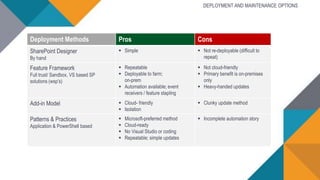
Deployment Methods Pros Cons
SharePoint Designer
By hand
 Simple  Not re-deployable (difficult to
repeat)
Feature Framework
Full trust/ Sandbox, VS based SP
solutions (wsp’s)
 Repeatable
 Deployable to farm;
on-prem
 Automation available; event
receivers / feature stapling
 Not cloud-friendly
 Primary benefit is on-premises
only
 Heavy-handed updates
Add-in Model  Cloud- friendly
 Isolation
 Clunky update method
Patterns & Practices
Application & PowerShell based
 Microsoft-preferred method
 Cloud-ready
 No Visual Studio or coding
 Repeatable; simple updates
 Incomplete automation story
DEPLOYMENT AND MAINTENANCE OPTIONS
Demo
PROVISIONING BRANDING USING
PNP POWERSHELL
BRANDING AND THE SHAREPOINT
FRAMEWORK
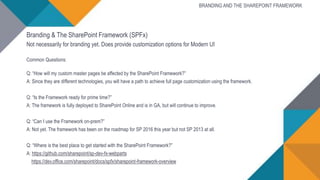
Branding & The SharePoint Framework (SPFx)
Not necessarily for branding yet. Does provide customization options for Modern UI
Common Questions:
Q: “How will my custom master pages be affected by the SharePoint Framework?”
A: Since they are different technologies, you will have a path to achieve full page customization using the framework.
Q: “Is the Framework ready for prime time?”
A: The framework is fully deployed to SharePoint Online and is in GA, but will continue to improve.
Q: “Can I use the Framework on-prem?”
A: Not yet. The framework has been on the roadmap for SP 2016 this year but not SP 2013 at all.
Q: “Where is the best place to get started with the SharePoint Framework?”
A: https://github.com/sharepoint/sp-dev-fx-webparts
https://dev.office.com/sharepoint/docs/spfx/sharepoint-framework-overview
BRANDING AND THE SHAREPOINT FRAMEWORK
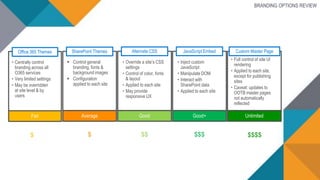
Office 365 Themes
• Centrally control
branding across all
O365 services
• Very limited settings
• May be overridden
at site level & by
users
Fair
$
SharePoint Themes
 Control general
branding, fonts &
background images
 Configuration
applied to each site
Average
$
• Override a site’s CSS
settings
• Control of color, fonts
& layout
• Applied to each site
• May provide
responsive UX
Alternate CSS
Good
$$
JavaScript Embed
• Inject custom
JavaScript
• Manipulate DOM
• Interact with
SharePoint data
• Applied to each site
Good+
$$$
Custom Master Page
• Full control of site UI
rendering
• Applied to each site,
except for publishing
sites
• Caveat: updates to
OOTB master pages
not automatically
reflected
Unlimited
$$$$
BRANDING OPTIONS REVIEW
1. The Evolution of SharePoint Branding
2. Current Options for Branding SharePoint
3. Your Branding Tool Options
4. Branding Installation Methodologies
REVIEW
RESOURCES
RESOURCES
• Customizing "modern" team sites
https://msdn.microsoft.com/en-us/pnp_articles/modern-experience-customizations-customize-sites
• Customize your team site
https://support.office.com/en-us/article/Customize-your-team-site-06bbadc3-6b04-4a60-9d14-894f6a170818
• Overview: best practices for managing how people use your team site
https://support.office.com/en-us/article/Overview-best-practices-for-managing-how-people-use-your-team-site-95e83c3d-e1b0-4aae-9d08-e94dcaa4942e
• Use composed looks to brand your site
https://msdn.microsoft.com/en-us/pnp_articles/use-composed-looks-to-brand-sharepoint-sites
• Branding SharePoint sites in the SharePoint add-in model
https://msdn.microsoft.com/en-us/pnp_articles/branding-sharepoint-sites-sharepoint-add-in
• Customize your SharePoint site UI by using JavaScript
https://msdn.microsoft.com/en-us/pnp_articles/customize-your-sharepoint-site-ui-by-using-javascript
• Embedding JavaScript into SharePoint
https://msdn.microsoft.com/en-us/pnp_articles/embedding-javascript-into-sharepoint
• Patterns and Practices
http://dev.office.com/patterns-and-practices
• PnP Partner Pack 2
https://github.com/SharePoint/PnP-Partner-Pack
RESOURCES
THANK YOU
BROADEN YOUR DEV SKILLSET
WITH INSPIRED SHAREPOINT
BRANDING
@ericoverfield
ericoverfield.com

Broaden your dev skillset with SharePoint branding options

  • 1.
    ERIC OVERFIELD |PixelMill Microsoft MVP BROADEN YOUR DEV SKILLSET WITH INSPIRED SHAREPOINT BRANDING http://pxml.ly/EO-Branding-Options
  • 2.
    ERIC OVERFIELD President &Co-Founder of PixelMill Microsoft MVP, Office Servers & Services Published SharePoint Author SharePoint Community Organizer & Contributor @ericoverfield ericoverfield.com
  • 3.
    PixelMill is amodern SharePoint Design Agency based in Northern California. On the forefront of web design trends since 1998, PixelMill provides innovative collaboration portals to enhance the user adoption of SharePoint intranets, extranets, and public facing sites. PIXELMILL @pixelmillteam pixelmill.com
  • 4.
    1. The Evolutionof SharePoint Branding 2. Current Options for Branding SharePoint 3. Your Branding Tool Options 4. Branding Installation Methodologies OVERVIEW
  • 5.
  • 6.
    Common thread: Serverside rendering (SharePoint delivers near final HTML to browser) SharePoint 2001 & 2003  FrontPage  CSS*  Theming* SharePoint 2007 & 2010  SharePoint Designer  Alternative Stylesheet  Master Page & Page Layouts  JavaScript SharePoint 2013, 2016, & Online  Similar to SP 2010  Addition of Design Manager  Curve Ball: Modern UI (SPO) THE EVOLUTION OF SHAREPOINT BRANDING Branding Options Evolution
  • 7.
    Branding Deployment andMaintenance Methodologies • SharePoint 2001, SharePoint 2003 • Add / modify assets directly on servers / farms • SharePoint 2007, SharePoint 2010 • SharePoint Designer, Feature Framework, Full trust then Sandbox solutions • SharePoint 2013, SharePoint 2016, SharePoint Online • Similar as above, including Add-in model, and recently PnP/PowerShell THE EVOLUTION OF SHAREPOINT BRANDING
  • 8.
  • 9.
    OPTIONS FOR BRANDINGSHAREPOINT CLOUD / SPOON-PREM 2013 / 2016 • Alternative CSS • Custom Actions (JavaScript Injection) • Master Pages & Page Layouts • Office 365 Themes • Very limited options to customize Modern UI BRANDING OPTIONS • Composed Looks & Themes
  • 10.
    DEPLOYMENT & MAINTENANCE CLOUDON-PREM2013/16 • Full Trust Solutions • Sandbox Solution • With code* • Restricted Sandbox Solutions • No full trust Solutions OPTIONS FOR BRANDING SHAREPOINT • SharePoint Designer • Sandbox Solution • Declarative • Add-In • PnP / PowerShell
  • 11.
  • 12.
    Office 365 Themes Availabletenant-wide branding across all Office 365 services, including SharePoint. SharePoint Theming Basic branding w/o code or a custom master page, including colors, fonts, and background imagery. OPTIONS FOR BRANDING SHAREPOINT
  • 13.
    Office 365 Themes •Set in Office 365 Admin Tenant • May be overridden by personal theme (Note. You can turn off personal theme) • Global, yet limited branding Pros • Extremely easy to set • Best method to customize suite bar/ribbon Cons • Extremely limited • Office 365 / SharePoint Online only OFFICE 365 THEMES
  • 14.
    Composed Looks/Theming &Color Palette Tool • Create custom themes in minutes w/ no code • Color palette creation tool - Free download from Microsoft • Preview window helps determine how options will appear when applied Pros • Works across SharePoint tenant • Future-friendly Cons • Limited to color palette • No layout changes • Modern UI limited to: • Background image • ContentAccent1 • PageBackground • BackgroundOverlay COMPOSED LOOKS AND THEMING
  • 15.
  • 16.
  • 17.
    Alternative CSS Provide stylingw/o a custom master page • Ability to set via browser w/ Publishing enabled • Or use the AlternateCSSUrl web object property via CSOM API • Even responsive abilities • Note: New portal experiences are natively responsive Pros • More sophisticated styling options than theming • Control of colors & layouts • Simple to install & maintain • No custom masterpage required, but combination available Cons • No Modern UI support • Limited to what CSS can accomplish ALTERNATIVE CSS
  • 18.
    JavaScript Embed Inject customJavaScript without a custom master page  Adds reference to custom JavaScript w/o a custom master page  Use to provide client-side rendering, utilize CSOM, REST API’s & more  Add as a custom action Pros  Provides the ability for client side rendering (i.e. DOM manipulation)  Combine w/ Alternative CSS to provide advanced layout changes w/o custom Master Page  Reasonable installation methods w/ PnP / Add-ins Cons  Does require JavaScript pros  No Modern UI support  Custom DOM manipulation may break w/ SharePoint updates JAVASCRIPT EMBED
  • 19.
    SharePoint Service Deploy JavaScript& associate w/ JavaScript embedding (user custom action) to the site <<Reference>> UI/UX components / elements manipulated w/ JavaScript stored either in SharePoint or CDN 2 CSOM/REST 1 Remote Deployment 3 JAVASCRIPT EMBED PATTERN
  • 20.
  • 21.
    Custom Master Pagesand Page Layouts provide near complete control of UI • Based on ASP.NET / server side rendering • i.e. .NET 2.0 Master Pages and Page layouts Pros • Complete control over UI • Good for hard coded HTML DOM control • If you can dream it, it should be possible Cons • Old technology, not based on client side rendering • Not overly future-friendly • May require manual update w/ SharePoint updates • No Modern UI support / not expected in any way soon or ever CUSTOM MASTER PAGES AND PAGE LAYOUTS
  • 22.
    Groups & ModernTeam Sites • Only basic modifications available w/ Modern Team Sites & the Modern UI • Limited to Theming / Composed Looks • SharePoint Framework (SPFx) may provide a long-term solution • Classic Team Sites & Master Pages will be available until feature parity • Groups may get choice between modern and classic team site template
  • 23.
  • 24.
  • 25.
    Classic Branding • SharePointDesigner • Visual Studio • Browser Dev toolbar BRANDING TOOL OPTIONS Modern Toolset - Use Pro Tools For CSS and JS modifications, including SPFx • Modern toolchain • NodeJS • Yeoman • Gulp • TypeScript • React • VS Code • PowerShell
  • 26.
  • 27.
    Deployment Methods ProsCons SharePoint Designer By hand  Simple  Not re-deployable (difficult to repeat) Feature Framework Full trust/ Sandbox, VS based SP solutions (wsp’s)  Repeatable  Deployable to farm; on-prem  Automation available; event receivers / feature stapling  Not cloud-friendly  Primary benefit is on-premises only  Heavy-handed updates Add-in Model  Cloud- friendly  Isolation  Clunky update method Patterns & Practices Application & PowerShell based  Microsoft-preferred method  Cloud-ready  No Visual Studio or coding  Repeatable; simple updates  Incomplete automation story DEPLOYMENT AND MAINTENANCE OPTIONS
  • 28.
  • 29.
    BRANDING AND THESHAREPOINT FRAMEWORK
  • 30.
    Branding & TheSharePoint Framework (SPFx) Not necessarily for branding yet. Does provide customization options for Modern UI Common Questions: Q: “How will my custom master pages be affected by the SharePoint Framework?” A: Since they are different technologies, you will have a path to achieve full page customization using the framework. Q: “Is the Framework ready for prime time?” A: The framework is fully deployed to SharePoint Online and is in GA, but will continue to improve. Q: “Can I use the Framework on-prem?” A: Not yet. The framework has been on the roadmap for SP 2016 this year but not SP 2013 at all. Q: “Where is the best place to get started with the SharePoint Framework?” A: https://github.com/sharepoint/sp-dev-fx-webparts https://dev.office.com/sharepoint/docs/spfx/sharepoint-framework-overview BRANDING AND THE SHAREPOINT FRAMEWORK
  • 31.
    Office 365 Themes •Centrally control branding across all O365 services • Very limited settings • May be overridden at site level & by users Fair $ SharePoint Themes  Control general branding, fonts & background images  Configuration applied to each site Average $ • Override a site’s CSS settings • Control of color, fonts & layout • Applied to each site • May provide responsive UX Alternate CSS Good $$ JavaScript Embed • Inject custom JavaScript • Manipulate DOM • Interact with SharePoint data • Applied to each site Good+ $$$ Custom Master Page • Full control of site UI rendering • Applied to each site, except for publishing sites • Caveat: updates to OOTB master pages not automatically reflected Unlimited $$$$ BRANDING OPTIONS REVIEW
  • 32.
    1. The Evolutionof SharePoint Branding 2. Current Options for Branding SharePoint 3. Your Branding Tool Options 4. Branding Installation Methodologies REVIEW
  • 33.
  • 34.
    RESOURCES • Customizing "modern"team sites https://msdn.microsoft.com/en-us/pnp_articles/modern-experience-customizations-customize-sites • Customize your team site https://support.office.com/en-us/article/Customize-your-team-site-06bbadc3-6b04-4a60-9d14-894f6a170818 • Overview: best practices for managing how people use your team site https://support.office.com/en-us/article/Overview-best-practices-for-managing-how-people-use-your-team-site-95e83c3d-e1b0-4aae-9d08-e94dcaa4942e • Use composed looks to brand your site https://msdn.microsoft.com/en-us/pnp_articles/use-composed-looks-to-brand-sharepoint-sites • Branding SharePoint sites in the SharePoint add-in model https://msdn.microsoft.com/en-us/pnp_articles/branding-sharepoint-sites-sharepoint-add-in • Customize your SharePoint site UI by using JavaScript https://msdn.microsoft.com/en-us/pnp_articles/customize-your-sharepoint-site-ui-by-using-javascript • Embedding JavaScript into SharePoint https://msdn.microsoft.com/en-us/pnp_articles/embedding-javascript-into-sharepoint • Patterns and Practices http://dev.office.com/patterns-and-practices • PnP Partner Pack 2 https://github.com/SharePoint/PnP-Partner-Pack
  • 35.
  • 36.
    THANK YOU BROADEN YOURDEV SKILLSET WITH INSPIRED SHAREPOINT BRANDING @ericoverfield ericoverfield.com

Editor's Notes

  • #2 Slides will be available from blog and twitter A look at current methods and techniques for branding modern sharepoint
  • #15 Modern UI limited to documentation: https://msdn.microsoft.com/en-us/pnp_articles/modern-experience-customizations-customize-sites
  • #16 O365 themes have definite limits, but it is very cost effective Look in bucket 10 for background color and set to AA Build theme with color palette tool, create’s spcolor file, testing with master page. Let’s stay real simple on branding Then deploy - Lots of ways to deploy composed looks.
  • #21 Let me actually show you Alt CSS, JS Embedded and even setting a custom logo using Pnp powershell in practice. --This will be a 10 minute demo. Use Pnp powershell to deploy and set alternative css, that being mostly responsive Then enhance with JS embed after demo is done, take over and tee up custom master page
  • #24 If you are considering a custom master page, let me show you in practice how this could look. At end of demo, lead to custom master page review
  • #29 http://github.com/sharepoint/pnp http://github.com/sharepoint/pnp-powershell https://github.com/SharePoint/PnP-Provisioning-Schema Look at Alt css and JS example