Your SharePoint 2013 
Branding Initiation 
http://pxml.ly/EO-SP2013-BrandingIntro 
Eric Overfield 
SharePoint Advocate and Enthusiast 
PixelMill
Introduction – Eric Overfield 
 Founder and SharePoint Branding/UI Lead, PixelMill 
 Speaker, Teacher, Advocate 
 Author, SharePoint Community Organizer 
 Located in Davis, CA 
Co-author: “Pro SharePoint 2013 Branding and Responsive 
Web Development” (Apress – June 12th, 2013) 
Order Your Copy 
http://pxml.ly/zsqykd 
ericoverfield.com 
@EricOverfield 
Co-author: “Black Magic Solutions for 
White Hat SharePoint” (August, 2013)
Agenda 
 Why Brand SharePoint 
 Branding Tools in SharePoint 2013 
 Choosing the Right Strategy 
@EricOverfield - pixelmill.com
Why Brand 
SharePoint? 
@EricOverfield - pixelmill.com
The Benefits of Branding 
 Improve SharePoint User eXperience (UX) 
 Enhance user adoption 
@EricOverfield - pixelmill.com 
 Further your organization brand 
 Provide a cohesive strategy 
 In other words, make it not look like SharePoint
@EricOverfield - pixelmill.com 
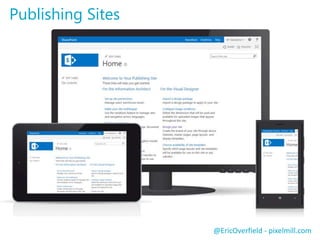
Publishing Sites
@EricOverfield - pixelmill.com 
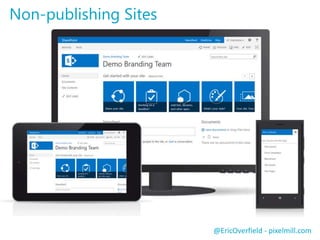
Non-publishing Sites
@EricOverfield - pixelmill.com 
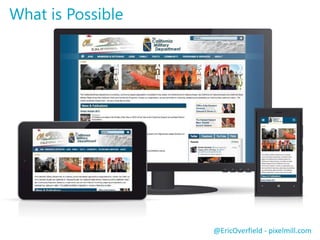
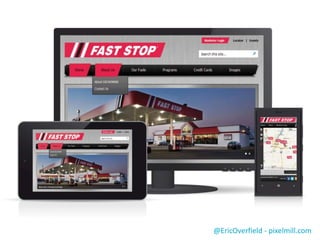
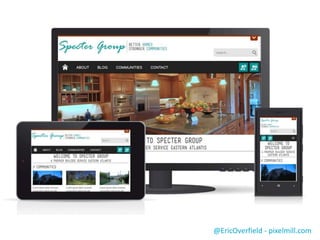
What is Possible
@EricOverfield - pixelmill.com
SharePoint 2013 
Branding Tools 
@EricOverfield - pixelmill.com
No-Code / Minimal Code Solutions 
 Composed Looks 
 Replaces SharePoint 2010 themes 
 Use SharePoint Color Palette Tool to generate custom looks 
 Use OOTB Composed Looks or create your own 
@EricOverfield - pixelmill.com 
 Logo replacement 
 Custom CSS 
 Use browser developer toolbar for inspection
No-code 
Demo 
@EricOverfield - pixelmill.com
What to do When You Need More 
 Customize Master Pages and Page Layouts 
@EricOverfield - pixelmill.com 
 Custom CSS and JavaScript 
 Display Templates 
 Device Channels
Master Pages 
 Provides main HTML wrapper used by all pages 
 Defines HTML <html />, <head /> and <body /> tags 
 Loads resources such as JS and CSS files 
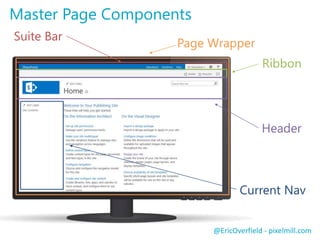
 Defines page flow and shared page components 
 Header, footer, logo, navigation, suite bar / ribbon, etc. 
 Uses ContentPlaceHolders for replaceable areas 
 OOTB, no longer uses tables for layout! 
@EricOverfield - pixelmill.com
@EricOverfield - pixelmill.com 
Suite Bar 
Ribbon 
Header 
Current Nav 
Master Page Components 
Page Wrapper
Page Layouts 
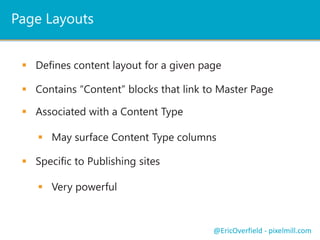
 Defines content layout for a given page 
 Contains “Content” blocks that link to Master Page 
 May surface Content Type columns 
@EricOverfield - pixelmill.com 
 Associated with a Content Type 
 Specific to Publishing sites 
 Very powerful
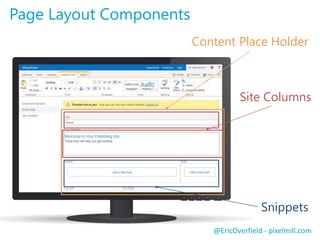
Content Place Holder 
@EricOverfield - pixelmill.com 
Page Layout Components 
Site Columns 
Snippets
The New SharePoint Branding Tool 
Design Manager 
SharePoint Designer not required 
@EricOverfield - pixelmill.com
Design Manager Overview 
 New to SharePoint 2013 
@EricOverfield - pixelmill.com 
 Requires Publishing Infrastructure 
 Import a HTML prototype directly into SharePoint 
 SharePoint handles conversion 
 Interface for custom Master Pages and Page Layouts 
 Also includes Display Templates and Device Channels 
 No longer limited by SharePoint Designer
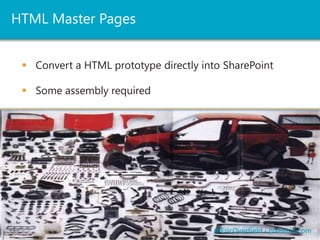
HTML Master Pages 
 Convert a HTML prototype directly into SharePoint 
@EricOverfield - pixelmill.com 
 Some assembly required
HTML Page Layouts 
@EricOverfield - pixelmill.com 
 Must derive from a Master Page 
 Many out of the box layouts 
 Also uses Snippets and Snippet Manager 
 Only edit what is in “Content” blocks
Design Manager 
Demo 
@EricOverfield - pixelmill.com
Display Templates 
Dump the XSLT 
Custom Search and Results 
@EricOverfield - pixelmill.com
Display Templates 
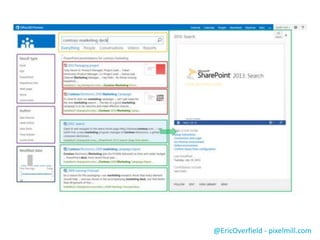
 The center of displaying SharePoint 2013 Search 
 Replaces XSLT with HTML and JavaScript! 
@EricOverfield - pixelmill.com 
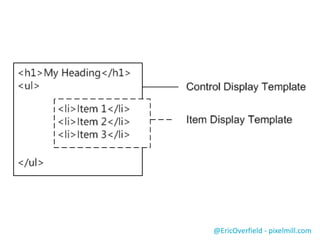
 Control Templates 
 Item Templates
@EricOverfield - pixelmill.com
Display Templates 
Demo 
@EricOverfield - pixelmill.com 
Thanks to TouchTouch 
http://tutorialzine.com/2012/04/mobile-touch-gallery/
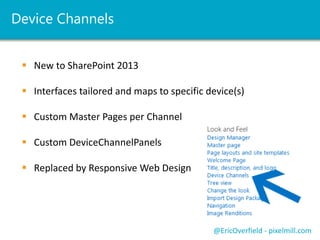
Device Channels 
 New to SharePoint 2013 
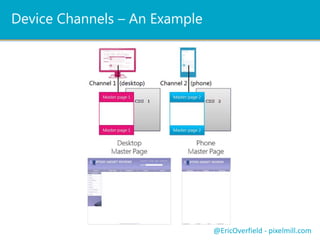
 Interfaces tailored and maps to specific device(s) 
 Custom Master Pages per Channel 
 Custom DeviceChannelPanels 
 Replaced by Responsive Web Design 
@EricOverfield - pixelmill.com
Device Channels – An Example 
@EricOverfield - pixelmill.com
Choose the 
Right Strategy 
@EricOverfield - pixelmill.com
What is Best for You? 
 Build a solid foundation first 
 Line up project sponsors 
 Secure resources, talent and budget 
 Get the content right before branding 
 Sitemaps, IA, wireframes, mockups 
@EricOverfield - pixelmill.com
What is Best for You? 
 Effort based on budget, requirements and talent 
 Composed looks are quick and easy 
 Custom Master Pages / Page Layouts require developers 
 Developer skillset dependent on branding requirements 
 Is mobile important? If so find experts in HTML, CSS, JS 
@EricOverfield - pixelmill.com
What About SharePoint Online? 
 Public Facing SPO site contains Design Manager 
 Few limitations in branding 
 Limited by backend customization 
 You can still import prototypes and use Snippet Gallery 
 Private sites can be fully customized 
@EricOverfield - pixelmill.com
Resources 
SharePoint 2013 Design Manager branding and design capabilities 
@EricOverfield - pixelmill.com 
Responsive Frameworks for SharePoint 2010 and 2013 
http://responsivesharepoint.codeplex.com 
SP Blueprint for SharePoint 2013 
http://pxml.ly/1ql6Dqa 
Starter on learning SharePoint Branding 
http://pxml.ly/1CHNXKc 
http://pxml.ly/1vBC3PD 
Master pages, the Master Page Gallery, and page layouts in SharePoint 2013 
http://pxml.ly/1rBdcLJ 
Public Website help for Office 365 
http://pxml.ly/1uhffnU 
SharePoint 2013 Starter Master Pages 
http://pxml.ly/1uFeG8Z 
Theming and Composed Looks Demo from SPC 2014 
http://pxml.ly/2BTVW42 
SharePoint Color Palette Tool 
http://pxml.ly/RGZND8
Your SharePoint 2013 
Branding Initiation 
Eric Overfield 
@EricOverfield 
ericoverfield.com 
http://pxml.ly/EO-SP2013-BrandingIntro 
“Pro SharePoint 2013 Branding and Responsive 
Web Development” (Apress – June 12th, 2013) 
Order Your Copy 
http://pxml.ly/zsqykd 
Thank You

Your SharePoint 2013 Branding Initiation

  • 1.
    Your SharePoint 2013 Branding Initiation http://pxml.ly/EO-SP2013-BrandingIntro Eric Overfield SharePoint Advocate and Enthusiast PixelMill
  • 2.
    Introduction – EricOverfield  Founder and SharePoint Branding/UI Lead, PixelMill  Speaker, Teacher, Advocate  Author, SharePoint Community Organizer  Located in Davis, CA Co-author: “Pro SharePoint 2013 Branding and Responsive Web Development” (Apress – June 12th, 2013) Order Your Copy http://pxml.ly/zsqykd ericoverfield.com @EricOverfield Co-author: “Black Magic Solutions for White Hat SharePoint” (August, 2013)
  • 3.
    Agenda  WhyBrand SharePoint  Branding Tools in SharePoint 2013  Choosing the Right Strategy @EricOverfield - pixelmill.com
  • 4.
    Why Brand SharePoint? @EricOverfield - pixelmill.com
  • 5.
    The Benefits ofBranding  Improve SharePoint User eXperience (UX)  Enhance user adoption @EricOverfield - pixelmill.com  Further your organization brand  Provide a cohesive strategy  In other words, make it not look like SharePoint
  • 6.
  • 7.
    @EricOverfield - pixelmill.com Non-publishing Sites
  • 8.
  • 9.
  • 10.
  • 11.
    SharePoint 2013 BrandingTools @EricOverfield - pixelmill.com
  • 12.
    No-Code / MinimalCode Solutions  Composed Looks  Replaces SharePoint 2010 themes  Use SharePoint Color Palette Tool to generate custom looks  Use OOTB Composed Looks or create your own @EricOverfield - pixelmill.com  Logo replacement  Custom CSS  Use browser developer toolbar for inspection
  • 13.
  • 14.
    What to doWhen You Need More  Customize Master Pages and Page Layouts @EricOverfield - pixelmill.com  Custom CSS and JavaScript  Display Templates  Device Channels
  • 15.
    Master Pages Provides main HTML wrapper used by all pages  Defines HTML <html />, <head /> and <body /> tags  Loads resources such as JS and CSS files  Defines page flow and shared page components  Header, footer, logo, navigation, suite bar / ribbon, etc.  Uses ContentPlaceHolders for replaceable areas  OOTB, no longer uses tables for layout! @EricOverfield - pixelmill.com
  • 16.
    @EricOverfield - pixelmill.com Suite Bar Ribbon Header Current Nav Master Page Components Page Wrapper
  • 17.
    Page Layouts Defines content layout for a given page  Contains “Content” blocks that link to Master Page  May surface Content Type columns @EricOverfield - pixelmill.com  Associated with a Content Type  Specific to Publishing sites  Very powerful
  • 18.
    Content Place Holder @EricOverfield - pixelmill.com Page Layout Components Site Columns Snippets
  • 19.
    The New SharePointBranding Tool Design Manager SharePoint Designer not required @EricOverfield - pixelmill.com
  • 20.
    Design Manager Overview  New to SharePoint 2013 @EricOverfield - pixelmill.com  Requires Publishing Infrastructure  Import a HTML prototype directly into SharePoint  SharePoint handles conversion  Interface for custom Master Pages and Page Layouts  Also includes Display Templates and Device Channels  No longer limited by SharePoint Designer
  • 21.
    HTML Master Pages  Convert a HTML prototype directly into SharePoint @EricOverfield - pixelmill.com  Some assembly required
  • 22.
    HTML Page Layouts @EricOverfield - pixelmill.com  Must derive from a Master Page  Many out of the box layouts  Also uses Snippets and Snippet Manager  Only edit what is in “Content” blocks
  • 23.
    Design Manager Demo @EricOverfield - pixelmill.com
  • 24.
    Display Templates Dumpthe XSLT Custom Search and Results @EricOverfield - pixelmill.com
  • 25.
    Display Templates The center of displaying SharePoint 2013 Search  Replaces XSLT with HTML and JavaScript! @EricOverfield - pixelmill.com  Control Templates  Item Templates
  • 26.
  • 27.
  • 28.
    Display Templates Demo @EricOverfield - pixelmill.com Thanks to TouchTouch http://tutorialzine.com/2012/04/mobile-touch-gallery/
  • 29.
    Device Channels New to SharePoint 2013  Interfaces tailored and maps to specific device(s)  Custom Master Pages per Channel  Custom DeviceChannelPanels  Replaced by Responsive Web Design @EricOverfield - pixelmill.com
  • 30.
    Device Channels –An Example @EricOverfield - pixelmill.com
  • 31.
    Choose the RightStrategy @EricOverfield - pixelmill.com
  • 32.
    What is Bestfor You?  Build a solid foundation first  Line up project sponsors  Secure resources, talent and budget  Get the content right before branding  Sitemaps, IA, wireframes, mockups @EricOverfield - pixelmill.com
  • 33.
    What is Bestfor You?  Effort based on budget, requirements and talent  Composed looks are quick and easy  Custom Master Pages / Page Layouts require developers  Developer skillset dependent on branding requirements  Is mobile important? If so find experts in HTML, CSS, JS @EricOverfield - pixelmill.com
  • 34.
    What About SharePointOnline?  Public Facing SPO site contains Design Manager  Few limitations in branding  Limited by backend customization  You can still import prototypes and use Snippet Gallery  Private sites can be fully customized @EricOverfield - pixelmill.com
  • 35.
    Resources SharePoint 2013Design Manager branding and design capabilities @EricOverfield - pixelmill.com Responsive Frameworks for SharePoint 2010 and 2013 http://responsivesharepoint.codeplex.com SP Blueprint for SharePoint 2013 http://pxml.ly/1ql6Dqa Starter on learning SharePoint Branding http://pxml.ly/1CHNXKc http://pxml.ly/1vBC3PD Master pages, the Master Page Gallery, and page layouts in SharePoint 2013 http://pxml.ly/1rBdcLJ Public Website help for Office 365 http://pxml.ly/1uhffnU SharePoint 2013 Starter Master Pages http://pxml.ly/1uFeG8Z Theming and Composed Looks Demo from SPC 2014 http://pxml.ly/2BTVW42 SharePoint Color Palette Tool http://pxml.ly/RGZND8
  • 36.
    Your SharePoint 2013 Branding Initiation Eric Overfield @EricOverfield ericoverfield.com http://pxml.ly/EO-SP2013-BrandingIntro “Pro SharePoint 2013 Branding and Responsive Web Development” (Apress – June 12th, 2013) Order Your Copy http://pxml.ly/zsqykd Thank You

Editor's Notes

  • #2 Slides will be available from blog and twitter Look at branding tools available to us in SharePoint 2013
  • #3 Will make available on blog and twitter (slideshare.net), so if you remember one of those then you can always review everything we discuss
  • #9 http://www.calguard.ca.gov/
  • #10 http://www.efaststop.com
  • #11 http://sp2013demo/sites/demo-specter/
  • #14 Logo replacement Alternative CSS with look at finding classes Composed looks with BG image and linking to Oslo
  • #20 Web Distributed Authoring and Versioning
  • #24 Convert prototype
  • #25 Web Distributed Authoring and Versioning
  • #27 Screenshot from http://sharepoint.microsoft.com/blog/Pages/BlogPost.aspx?pID=1041
  • #28 Screenshot from http://msdn.microsoft.com/en-us/library/jj945138.aspx
  • #30 Device Channels work only with Publishing Sites Allow for one interface for all desktops and another for most tablets let's say. Only 10 device channels per site collection, but do you really want to maintain 10 MP’s?
  • #31 Device Channels work only with Publishing Sites Allow for one interface for all desktops and another for most tablets let's say. Only 10 device channels per site collection, but do you really want to maintain 10 MP’s?
  • #37 Thank You! Don’t forget to check out my blog where you can download this presentation or the recording. Easiest way to get to the material I referenced