From HTML to SharePoint
Eric Overfield
SharePoint Advocate and Enthusiast
PixelMill
The 2013 Design Manager
Introduction – Eric Overfield
 Founder and SharePoint Branding/UI Lead, PixelMill
 Speaker, Teacher, Advocate
 Author, SharePoint Community Organizer
 Located in Davis, CA
ericoverfield.com
@EricOverfield
Order Your Copy
http://pxml.ly/zsqykd
Co-author: “Pro SharePoint 2013 Branding and Responsive
Web Development” (Apress – June 12th, 2013)
Co-author: “Black Magic Solutions for
White Hat SharePoint” (August, 2013)
Agenda
 Why Design Manager?
 Accessing Design Manager
 Import a Site Design
 Page Layouts
@EricOverfield - pixelmill.com
 Display Templates
 Device Channels
 Design Packages
 Publish and Apply
Why Design
Manager?
@EricOverfield - pixelmill.com
Tools Already Exist
@EricOverfield - pixelmill.com
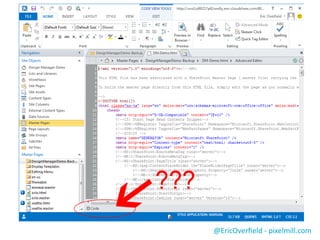
Design Tools not SP Focus
No Design View – Help!
@EricOverfield - pixelmill.com
Tools Already Exist
Design Tools not SP Focus
No Design View – Help!
@EricOverfield - pixelmill.com
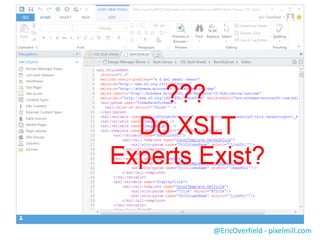
XSLT? What is That?
@EricOverfield - pixelmill.com
Tools Already Exist
Design Tools not SP Focus
No Design View – Help!
XSLT? What is That?
@EricOverfield - pixelmill.com
Open the Door to Designers
Agenda
 Why Design Manager?
 Accessing Design Manager
 Import a Site Design
 Page Layouts
@EricOverfield - pixelmill.com
 Display Templates
 Device Channels
 Design Packages
 Publish and Apply
Design Manager
 Publishing Infrastructure Required
@EricOverfield - pixelmill.com
 Sorry Collaboration Sites
 Unless you enable Publishing
 Treat Branding Assets as Local Files!
@EricOverfield - pixelmill.com
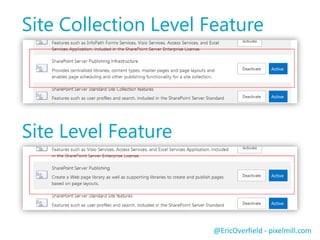
Site Collection Level Feature
Site Level Feature
Using WebDAV
Mac/PC – Dreamweaver, Notepad, Your Choice
Access Your Design Files
@EricOverfield - pixelmill.com
Access Design Manager
Demo
@EricOverfield - pixelmill.com
Agenda
 Why Design Manager?
 Accessing Design Manager
 Import a Site Design
 Page Layouts
@EricOverfield - pixelmill.com
 Display Templates
 Device Channels
 Design Packages
 Publish and Apply
Import a Site Design
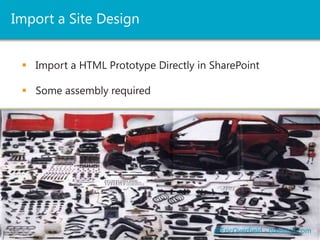
 Import a HTML Prototype Directly in SharePoint
@EricOverfield - pixelmill.com
 Some assembly required
HTML Master Page
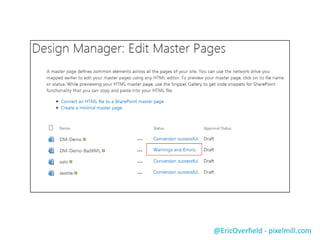
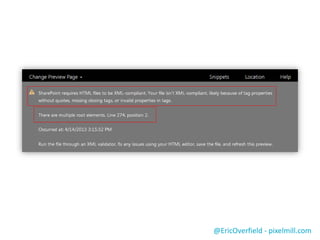
 HTML Prototype must by XML Compliant
@EricOverfield - pixelmill.com
XML Compliancy error
@EricOverfield - pixelmill.com
HTML Master Page
 HTML Prototype must by XML Compliant
@EricOverfield - pixelmill.com
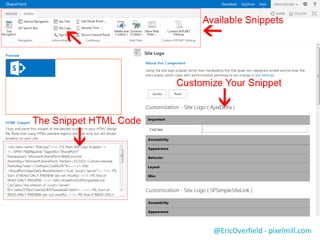
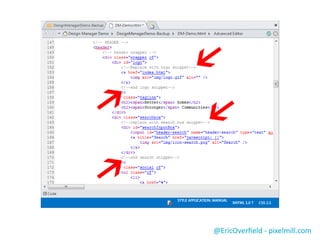
 Add SharePoint functionality with Snippet Manager
@EricOverfield - pixelmill.com
HTML Master Page
 HTML Prototype must by XML Compliant
 Add SharePoint functionality with Snippet Manager
@EricOverfield - pixelmill.com
 Plan your prototype with Design Manager in mind
@EricOverfield - pixelmill.com
HTML Master Page
 HTML Prototype must by XML Compliant
 Add SharePoint functionality with Snippet Manager
@EricOverfield - pixelmill.com
 Plan your prototype with Design Manager in mind
 Don’t touch the .master!
HTML Master Page
Demo
@EricOverfield - pixelmill.com
Agenda
 Why Design Manager?
 Accessing Design Manager
 Import a Site Design
 Page Layouts
@EricOverfield - pixelmill.com
 Display Templates
 Device Channels
 Design Packages
 Publish and Apply
Page Layouts
 Controls layout of main content
 Many out the of box layouts
 Also uses Snippets and Snippet Manager
 With Design Manage, associated with a Master Page
 Don’t touch the .aspx file!
@EricOverfield - pixelmill.com
Page Layout
Demo
@EricOverfield - pixelmill.com
Agenda
 Why Design Manager?
 Accessing Design Manager
 Import a Site Design
 Page Layouts
@EricOverfield - pixelmill.com
 Display Templates
 Device Channels
 Design Packages
 Publish and Apply
Display Templates
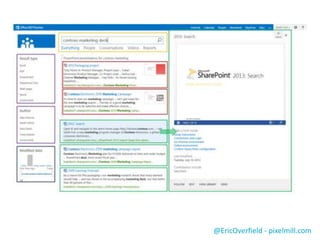
 The center of displaying SharePoint 2013 Search
 Replaces XSLT!
@EricOverfield - pixelmill.com
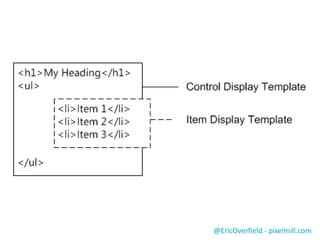
 Control Templates
 Item Templates
 Do not touch the JavaScript!
@EricOverfield - pixelmill.com
Display Templates
Demo
@EricOverfield - pixelmill.com
Agenda
 Why Design Manager?
 Accessing Design Manager
 Import a Site Design
 Page Layouts
@EricOverfield - pixelmill.com
 Display Templates
 Device Channels
 Design Packages
 Publish and Apply
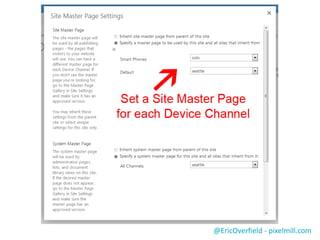
Device Channels
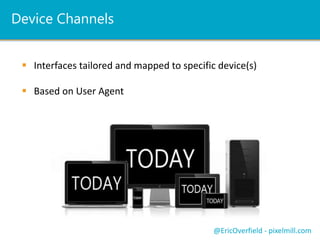
 Interfaces tailored and mapped to specific device(s)
 Based on User Agent
@EricOverfield - pixelmill.com
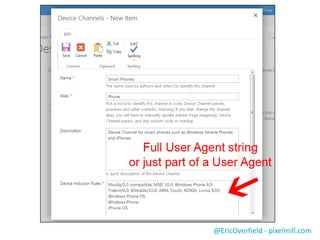
Screen shot of creating a device channel
and maping to a master page
@EricOverfield - pixelmill.com
Screen shot of creating a device channel
and maping to a master page
Agenda
 Why Design Manager?
 Accessing Design Manager
 Import a Site Design
 Page Layouts
@EricOverfield - pixelmill.com
 Display Templates
 Device Channels
 Design Packages
 Publish and Apply
Design Packages
 Design Manager will package your custom branding
 Redeployable, even to another farm
 Creates a wsp (i.e. a sandboxed solution – really? – Yup)
@EricOverfield - pixelmill.com
 Not ready for primetime
Design Package
Demo
@EricOverfield - pixelmill.com
Agenda
 Why Design Manager?
 Accessing Design Manager
 Import a Site Design
 Page Layouts
@EricOverfield - pixelmill.com
 Display Templates
 Device Channels
 Design Packages
 Publish and Apply
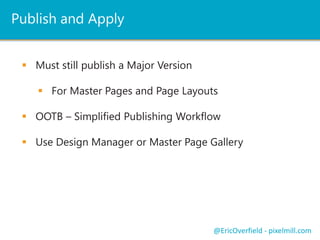
Publish and Apply
 Must still publish a Major Version
 For Master Pages and Page Layouts
 OOTB – Simplified Publishing Workflow
 Use Design Manager or Master Page Gallery
@EricOverfield - pixelmill.com
Publish and Apply
Demo
@EricOverfield - pixelmill.com
It can be your friend
If you let it
Embrace Design Manager
@EricOverfield - pixelmill.com
Eric Overfield
@EricOverfield
ericoverfield.com
eoverfield@pixelmill.com
Thank You
From HTML to SharePoint
The 2013 Design Manager

SharePoint 2013 Design manager – from HTML to SharePoint

Editor's Notes

  • #2 Slides will be available from blog and twitterIn-depth look a SharePoint 2013 Design ManagerMeat will be in the demos
  • #3 Will make available on blog and twitter (slideshare.net), so if you remember one of those then you can always review everything we discuss
  • #14 Web Distributed Authoring and Versioning
  • #15 Access Design ManagerMap a network drive
  • #26 Review a prototypeLook for snippet commentsImportAdd logo snippetMove main placeholder
  • #29 Create a page layoutMove to a new directoryMove layout from Master PageReplace area with a WPZ snippet
  • #32 Screenshot from http://sharepoint.microsoft.com/blog/Pages/BlogPost.aspx?pID=1041
  • #33 Screenshot from http://msdn.microsoft.com/en-us/library/jj945138.aspx
  • #34 Show search results pageThen find display templatesCreate new control templateEdit control templateMight be too much
  • #36 Allow for one interface for all desktops and another for most tablets let's say.Only 10 device channels per site collection, but do you really want to maintain 10 MP’s?
  • #41 Quickly create a design package
  • #43 Screenshot of composed looks to right
  • #44 Quickly create a design package
  • #46 Thank You!Don’t forget to check out my blog where you can download this presentation or the recording.Easiest way to get to the material I referenced