Design and Optimize your code for high-performance with
Intel® Advisor
and
Intel® VTune™ Profiler
Vinutha SV
Technical Consulting Engineer
March 4, 2021
2
Agenda
• Introduction to Intel® Advisor
• Overview of Offload Advisor
• Overview of GPU Roofline Analysis
• Overview of GPU Analysis in Intel® VTune™ Profiler
• GPU Offload Analysis
• GPU Compute/Media Hotspots Analysis
• Summary
3
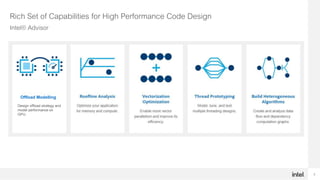
Offload Modelling
Design offload strategy and
model performance on
GPU.
Rich Set of Capabilities for High Performance Code Design
Intel® Advisor
4
Intel® Advisor - Offload Advisor
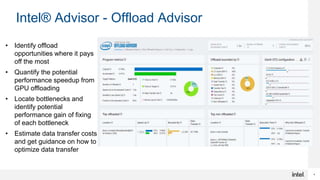
• Identify offload
opportunities where it pays
off the most
• Quantify the potential
performance speedup from
GPU offloading
• Locate bottlenecks and
identify potential
performance gain of fixing
of each bottleneck
• Estimate data transfer costs
and get guidance on how to
optimize data transfer
5
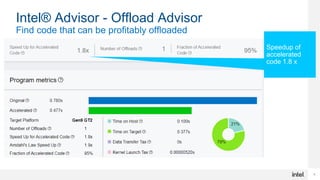
Intel® Advisor - Offload Advisor
Find code that can be profitably offloaded
Speedup of
accelerated
code 1.8 x
6
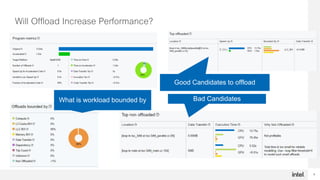
Will Offload Increase Performance?
What is workload bounded by
Good Candidates to offload
Bad Candidates
7
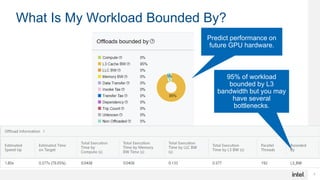
What Is My Workload Bounded By?
95% of workload
bounded by L3
bandwidth but you may
have several
bottlenecks.
Predict performance on
future GPU hardware.
8
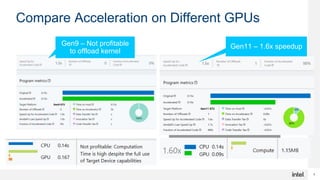
Compare Acceleration on Different GPUs
Gen9 – Not profitable
to offload kernel
Gen11 – 1.6x speedup
9
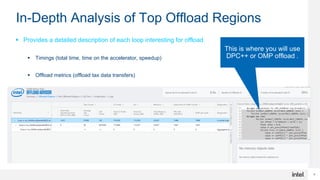
In-Depth Analysis of Top Offload Regions
 Provides a detailed description of each loop interesting for offload
 Timings (total time, time on the accelerator, speedup)
 Offload metrics (offload tax data transfers)
 Memory traffic (DRAM, L3, L2, L1), trip count
 Highlight which part of the code should run on the accelerator
This is where you will use
DPC++ or OMP offload .
10
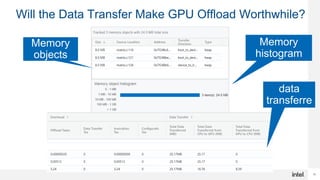
Will the Data Transfer Make GPU Offload Worthwhile?
Memory
histogram
Memory
objects
Total
data
transferre
d
11
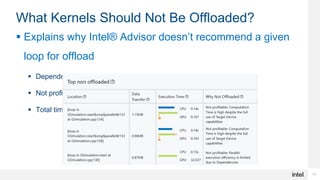
What Kernels Should Not Be Offloaded?
 Explains why Intel® Advisor doesn’t recommend a given
loop for offload
 Dependency issues
 Not profitable
 Total time is too small
12
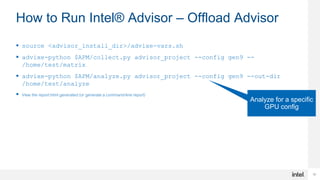
How to Run Intel® Advisor – Offload Advisor
 source <advisor_install_dir>/advixe-vars.sh
 advixe-python $APM/collect.py advisor_project --config gen9 --
/home/test/matrix
 advixe-python $APM/analyze.py advisor_project --config gen9 --out-dir
/home/test/analyze
 View the report.html generated (or generate a command-line report)
Analyze for a specific
GPU config
14
Find Effective Optimization Strategies
Intel® Advisor - GPU Roofline
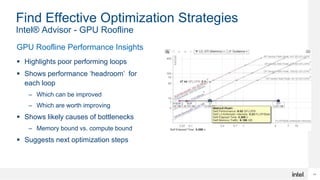
GPU Roofline Performance Insights
 Highlights poor performing loops
 Shows performance ‘headroom’ for
each loop
– Which can be improved
– Which are worth improving
 Shows likely causes of bottlenecks
– Memory bound vs. compute bound
 Suggests next optimization steps
15
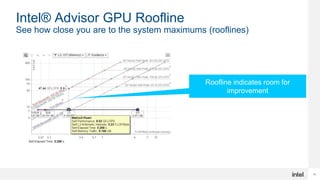
Intel® Advisor GPU Roofline
See how close you are to the system maximums (rooflines)
Roofline indicates room for
improvement
16
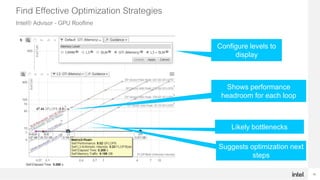
Find Effective Optimization Strategies
Intel® Advisor - GPU Roofline
Configure levels to
display
Shows performance
headroom for each loop
Likely bottlenecks
Suggests optimization next
steps
17
How to Run Intel® Advisor – GPU Roofline
Run 2 collections
advixe-cl –collect=survey --enable-gpu-profiling --project-
dir=<my_project_directory> --search-dir src:r=<my_source_directory> --
./myapp [app_parameters]
Run the Trip Counts and FLOP analysis with --enable-gpu-profiling option:
advixe-cl –collect=tripcounts --stacks --flop --enable-gpu-profiling --
project-dir=<my_project_directory> --search-dir
src:r=<my_source_directory> -- ./myapp [app_parameters]
Generate a GPU Roofline report:
advixe-cl --report=roofline --gpu --project-dir=<my_project_directory> --
report-output=roofline.html
Open the generated roofline.html in a web browser to visualize GPU performance.
18
Intel® VTune™ Profiler
GPU Profiling
19
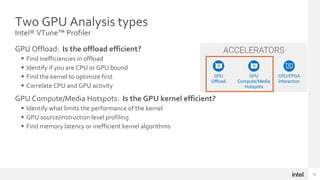
Two GPU Analysis types
Intel® VTune™ Profiler
GPU Offload: Is the offload efficient?
 Find inefficiencies in offload
 Identify if you are CPU or GPU bound
 Find the kernel to optimize first
 Correlate CPU and GPU activity
GPU Compute/Media Hotspots: Is the GPU kernel efficient?
 Identify what limits the performance of the kernel
 GPU source/instruction level profiling
 Find memory latency or inefficient kernel algorithms
20
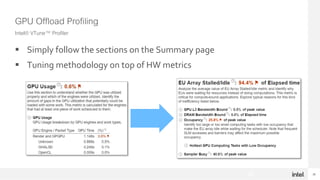
GPU Offload Profiling
Intel® VTune™ Profiler
 Simply follow the sections on the Summary page
 Tuning methodology on top of HW metrics
20
21
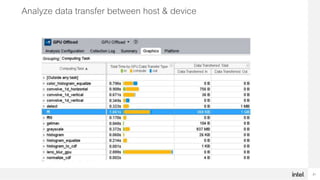
Analyze data transfer between host & device
22
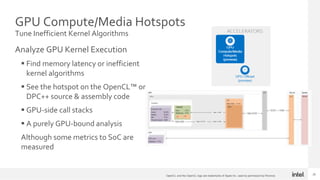
GPU Compute/Media Hotspots
Tune Inefficient Kernel Algorithms
Analyze GPU Kernel Execution
 Find memory latency or inefficient
kernel algorithms
 See the hotspot on the OpenCL™ or
DPC++ source & assembly code
 GPU-side call stacks
 A purely GPU-bound analysis
Although some metrics to SoC are
measured
22
OpenCL and the OpenCL logo are trademarks of Apple Inc. used by permission by Khronos
23
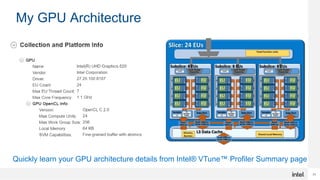
My GPU Architecture
Quickly learn your GPU architecture details from Intel® VTune™ Profiler Summary page
24
24
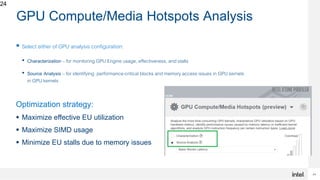
GPU Compute/Media Hotspots Analysis
 Select either of GPU analysis configuration:
• Characterization – for monitoring GPU Engine usage, effectiveness, and stalls
• Source Analysis – for identifying performance-critical blocks and memory access issues in GPU kernels
in GPU kernels
Optimization strategy:
 Maximize effective EU utilization
 Maximize SIMD usage
 Minimize EU stalls due to memory issues
25
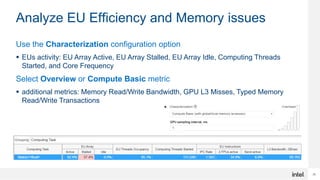
Analyze EU Efficiency and Memory issues
Use the Characterization configuration option
 EUs activity: EU Array Active, EU Array Stalled, EU Array Idle, Computing Threads
Started, and Core Frequency
Select Overview or Compute Basic metric
 additional metrics: Memory Read/Write Bandwidth, GPU L3 Misses, Typed Memory
Read/Write Transactions
27
27
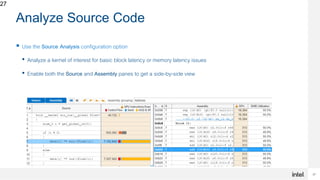
Analyze Source Code
 Use the Source Analysis configuration option
• Analyze a kernel of interest for basic block latency or memory latency issues
• Enable both the Source and Assembly panes to get a side-by-side view
28
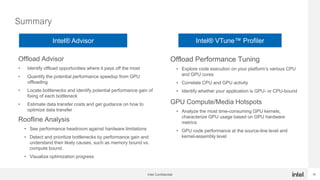
Summary
Intel Confidential
Offload Advisor
• Identify offload opportunities where it pays off the most
• Quantify the potential performance speedup from GPU
offloading
• Locate bottlenecks and identify potential performance gain of
fixing of each bottleneck
• Estimate data transfer costs and get guidance on how to
optimize data transfer
Roofline Analysis
• See performance headroom against hardware limitations
• Detect and prioritize bottlenecks by performance gain and
understand their likely causes, such as memory bound vs.
compute bound.
• Visualize optimization progress
Offload Performance Tuning
• Explore code execution on your platform’s various CPU
and GPU cores
• Correlate CPU and GPU activity
• Identify whether your application is GPU- or CPU-bound
GPU Compute/Media Hotspots
• Analyze the most time-consuming GPU kernels,
characterize GPU usage based on GPU hardware
metrics
• GPU code performance at the source-line level and
kernel-assembly level
Intel® Advisor Intel® VTune™ Profiler
29
Resources & Learn More
 oneAPI Specification - Cross-Industry, open, standards-based unified programming model – Learn More
 Essentials of Data Parallel C++ - Learn the fundamentals of this language designed for data parallel and
heterogenous compute – Learn More
 Develop, Run & Learn for Free - No hardware acquisitions, system configurations, or software
installations. Intel® DevCloud development sandbox – Sign Up Today
 Download the Tools and Get Started – Intel® oneAPI Toolkits delivering the tools to develop and deploy
for oneAPI for Intel® Platforms – Learn More
 Transition FAQs for Intel® Parallel Studio XE to Intel® oneAPI Base & HPC Toolkit – Get more
information about the transition – Learn More
 Port CUDA code – Intel® DPC++ Compatibility Tool helps migrate your CUDA applications into
standards-based Data Parallel C++ Code – Learn More
 oneAPI Community Contribution of NVIDIA GPU Support – Community member Codeplay delivers
support for Data Parallel C++ Programming on NVIDIA GPUs – Learn More
30
Notices and Disclaimers
30
Optimization Notice: Intel's compilers may or may not optimize to the same degree for non-Intel microprocessors for optimizations
that are not unique to Intel microprocessors. These optimizations include SSE2, SSE3, and SSSE3 instruction sets and other
optimizations. Intel does not guarantee the availability, functionality, or effectiveness of any optimization on microprocessors not
manufactured by Intel. Microprocessor-dependent optimizations in this product are intended for use with Intel microprocessors.
Certain optimizations not specific to Intel microarchitecture are reserved for Intel microprocessors. Please refer to the applicable
product User and Reference Guides for more information regarding the specific instruction sets covered by this notice.
All product plans and roadmaps are subject to change without notice.
Intel technologies may require enabled hardware, software or service activation.
Results have been estimated or simulated.
No product or component can be absolutely secure.
Intel does not control or audit third-party data. You should consult other sources to evaluate accuracy.
No license (express or implied, by estoppel or otherwise) to any intellectual property rights is granted by this document.
Intel disclaims all express and implied warranties, including without limitation, the implied warranties of merchantability, fitness for a
particular purpose, and non-infringement, as well as any warranty arising from course of performance, course of dealing, or usage in
trade.
Intel and the Intel logo are trademarks of Intel Corporation in the U.S. and/or other countries. Other names and brands may be
claimed as the property of others. © Intel Corporation.
31
Legal Disclaimer & Optimization Notice
Optimization Notice
Intel’s compilers may or may not optimize to the same degree for non-Intel microprocessors for optimizations that are not unique to Intel
microprocessors. These optimizations include SSE2, SSE3, and SSSE3 instruction sets and other optimizations. Intel does not guarantee the
availability, functionality, or effectiveness of any optimization on microprocessors not manufactured by Intel. Microprocessor-dependent
optimizations in this product are intended for use with Intel microprocessors. Certain optimizations not specific to Intel microarchitecture are
reserved for Intel microprocessors. Please refer to the applicable product User and Reference Guides for more information regarding the specific
instruction sets covered by this notice.
Notice revision #20110804
31
 Software and workloads used in performance tests may have been optimized for performance only on Intel microprocessors. Performance tests, such as SYSmark and MobileMark, are measured using specific
computer systems, components, software, operations and functions. Any change to any of those factors may cause the results to vary. You should consult other information and performance tests to assist you in fully
evaluating your contemplated purchases, including the performance of that product when combined with other products. For more complete information visit www.intel.com/benchmarks.
 INFORMATION IN THIS DOCUMENT IS PROVIDED “AS IS”. NO LICENSE, EXPRESS OR IMPLIED, BY ESTOPPEL OR OTHERWISE, TO ANY INTELLECTUAL PROPERTY RIGHTS IS GRANTED BY THIS DOCUMENT.
INTEL ASSUMES NO LIABILITY WHATSOEVER AND INTEL DISCLAIMS ANY EXPRESS OR IMPLIED WARRANTY, RELATING TO THIS INFORMATIONINCLUDINGLIABILITY OR WARRANTIES RELATING TO FITNESS
FOR A PARTICULAR PURPOSE, MERCHANTABILITY, OR INFRINGEMENT OF ANY PATENT, COPYRIGHT OR OTHER INTELLECTUAL PROPERTY RIGHT.
 Copyright © 2018, Intel Corporation. All rights reserved. Intel, Pentium, Xeon, Xeon Phi, Core, VTune, Cilk, and the Intel logo are trademarks of Intel Corporation in the U.S. and other countries.

Design and Optimize your code for high-performance with Intel® Advisor and Intel® VTune™ Profiler

  • 1.
    Design and Optimizeyour code for high-performance with Intel® Advisor and Intel® VTune™ Profiler Vinutha SV Technical Consulting Engineer March 4, 2021
  • 2.
    2 Agenda • Introduction toIntel® Advisor • Overview of Offload Advisor • Overview of GPU Roofline Analysis • Overview of GPU Analysis in Intel® VTune™ Profiler • GPU Offload Analysis • GPU Compute/Media Hotspots Analysis • Summary
  • 3.
    3 Offload Modelling Design offloadstrategy and model performance on GPU. Rich Set of Capabilities for High Performance Code Design Intel® Advisor
  • 4.
    4 Intel® Advisor -Offload Advisor • Identify offload opportunities where it pays off the most • Quantify the potential performance speedup from GPU offloading • Locate bottlenecks and identify potential performance gain of fixing of each bottleneck • Estimate data transfer costs and get guidance on how to optimize data transfer
  • 5.
    5 Intel® Advisor -Offload Advisor Find code that can be profitably offloaded Speedup of accelerated code 1.8 x
  • 6.
    6 Will Offload IncreasePerformance? What is workload bounded by Good Candidates to offload Bad Candidates
  • 7.
    7 What Is MyWorkload Bounded By? 95% of workload bounded by L3 bandwidth but you may have several bottlenecks. Predict performance on future GPU hardware.
  • 8.
    8 Compare Acceleration onDifferent GPUs Gen9 – Not profitable to offload kernel Gen11 – 1.6x speedup
  • 9.
    9 In-Depth Analysis ofTop Offload Regions  Provides a detailed description of each loop interesting for offload  Timings (total time, time on the accelerator, speedup)  Offload metrics (offload tax data transfers)  Memory traffic (DRAM, L3, L2, L1), trip count  Highlight which part of the code should run on the accelerator This is where you will use DPC++ or OMP offload .
  • 10.
    10 Will the DataTransfer Make GPU Offload Worthwhile? Memory histogram Memory objects Total data transferre d
  • 11.
    11 What Kernels ShouldNot Be Offloaded?  Explains why Intel® Advisor doesn’t recommend a given loop for offload  Dependency issues  Not profitable  Total time is too small
  • 12.
    12 How to RunIntel® Advisor – Offload Advisor  source <advisor_install_dir>/advixe-vars.sh  advixe-python $APM/collect.py advisor_project --config gen9 -- /home/test/matrix  advixe-python $APM/analyze.py advisor_project --config gen9 --out-dir /home/test/analyze  View the report.html generated (or generate a command-line report) Analyze for a specific GPU config
  • 14.
    14 Find Effective OptimizationStrategies Intel® Advisor - GPU Roofline GPU Roofline Performance Insights  Highlights poor performing loops  Shows performance ‘headroom’ for each loop – Which can be improved – Which are worth improving  Shows likely causes of bottlenecks – Memory bound vs. compute bound  Suggests next optimization steps
  • 15.
    15 Intel® Advisor GPURoofline See how close you are to the system maximums (rooflines) Roofline indicates room for improvement
  • 16.
    16 Find Effective OptimizationStrategies Intel® Advisor - GPU Roofline Configure levels to display Shows performance headroom for each loop Likely bottlenecks Suggests optimization next steps
  • 17.
    17 How to RunIntel® Advisor – GPU Roofline Run 2 collections advixe-cl –collect=survey --enable-gpu-profiling --project- dir=<my_project_directory> --search-dir src:r=<my_source_directory> -- ./myapp [app_parameters] Run the Trip Counts and FLOP analysis with --enable-gpu-profiling option: advixe-cl –collect=tripcounts --stacks --flop --enable-gpu-profiling -- project-dir=<my_project_directory> --search-dir src:r=<my_source_directory> -- ./myapp [app_parameters] Generate a GPU Roofline report: advixe-cl --report=roofline --gpu --project-dir=<my_project_directory> -- report-output=roofline.html Open the generated roofline.html in a web browser to visualize GPU performance.
  • 18.
  • 19.
    19 Two GPU Analysistypes Intel® VTune™ Profiler GPU Offload: Is the offload efficient?  Find inefficiencies in offload  Identify if you are CPU or GPU bound  Find the kernel to optimize first  Correlate CPU and GPU activity GPU Compute/Media Hotspots: Is the GPU kernel efficient?  Identify what limits the performance of the kernel  GPU source/instruction level profiling  Find memory latency or inefficient kernel algorithms
  • 20.
    20 GPU Offload Profiling Intel®VTune™ Profiler  Simply follow the sections on the Summary page  Tuning methodology on top of HW metrics 20
  • 21.
    21 Analyze data transferbetween host & device
  • 22.
    22 GPU Compute/Media Hotspots TuneInefficient Kernel Algorithms Analyze GPU Kernel Execution  Find memory latency or inefficient kernel algorithms  See the hotspot on the OpenCL™ or DPC++ source & assembly code  GPU-side call stacks  A purely GPU-bound analysis Although some metrics to SoC are measured 22 OpenCL and the OpenCL logo are trademarks of Apple Inc. used by permission by Khronos
  • 23.
    23 My GPU Architecture Quicklylearn your GPU architecture details from Intel® VTune™ Profiler Summary page
  • 24.
    24 24 GPU Compute/Media HotspotsAnalysis  Select either of GPU analysis configuration: • Characterization – for monitoring GPU Engine usage, effectiveness, and stalls • Source Analysis – for identifying performance-critical blocks and memory access issues in GPU kernels in GPU kernels Optimization strategy:  Maximize effective EU utilization  Maximize SIMD usage  Minimize EU stalls due to memory issues
  • 25.
    25 Analyze EU Efficiencyand Memory issues Use the Characterization configuration option  EUs activity: EU Array Active, EU Array Stalled, EU Array Idle, Computing Threads Started, and Core Frequency Select Overview or Compute Basic metric  additional metrics: Memory Read/Write Bandwidth, GPU L3 Misses, Typed Memory Read/Write Transactions
  • 26.
    27 27 Analyze Source Code Use the Source Analysis configuration option • Analyze a kernel of interest for basic block latency or memory latency issues • Enable both the Source and Assembly panes to get a side-by-side view
  • 27.
    28 Summary Intel Confidential Offload Advisor •Identify offload opportunities where it pays off the most • Quantify the potential performance speedup from GPU offloading • Locate bottlenecks and identify potential performance gain of fixing of each bottleneck • Estimate data transfer costs and get guidance on how to optimize data transfer Roofline Analysis • See performance headroom against hardware limitations • Detect and prioritize bottlenecks by performance gain and understand their likely causes, such as memory bound vs. compute bound. • Visualize optimization progress Offload Performance Tuning • Explore code execution on your platform’s various CPU and GPU cores • Correlate CPU and GPU activity • Identify whether your application is GPU- or CPU-bound GPU Compute/Media Hotspots • Analyze the most time-consuming GPU kernels, characterize GPU usage based on GPU hardware metrics • GPU code performance at the source-line level and kernel-assembly level Intel® Advisor Intel® VTune™ Profiler
  • 28.
    29 Resources & LearnMore  oneAPI Specification - Cross-Industry, open, standards-based unified programming model – Learn More  Essentials of Data Parallel C++ - Learn the fundamentals of this language designed for data parallel and heterogenous compute – Learn More  Develop, Run & Learn for Free - No hardware acquisitions, system configurations, or software installations. Intel® DevCloud development sandbox – Sign Up Today  Download the Tools and Get Started – Intel® oneAPI Toolkits delivering the tools to develop and deploy for oneAPI for Intel® Platforms – Learn More  Transition FAQs for Intel® Parallel Studio XE to Intel® oneAPI Base & HPC Toolkit – Get more information about the transition – Learn More  Port CUDA code – Intel® DPC++ Compatibility Tool helps migrate your CUDA applications into standards-based Data Parallel C++ Code – Learn More  oneAPI Community Contribution of NVIDIA GPU Support – Community member Codeplay delivers support for Data Parallel C++ Programming on NVIDIA GPUs – Learn More
  • 29.
    30 Notices and Disclaimers 30 OptimizationNotice: Intel's compilers may or may not optimize to the same degree for non-Intel microprocessors for optimizations that are not unique to Intel microprocessors. These optimizations include SSE2, SSE3, and SSSE3 instruction sets and other optimizations. Intel does not guarantee the availability, functionality, or effectiveness of any optimization on microprocessors not manufactured by Intel. Microprocessor-dependent optimizations in this product are intended for use with Intel microprocessors. Certain optimizations not specific to Intel microarchitecture are reserved for Intel microprocessors. Please refer to the applicable product User and Reference Guides for more information regarding the specific instruction sets covered by this notice. All product plans and roadmaps are subject to change without notice. Intel technologies may require enabled hardware, software or service activation. Results have been estimated or simulated. No product or component can be absolutely secure. Intel does not control or audit third-party data. You should consult other sources to evaluate accuracy. No license (express or implied, by estoppel or otherwise) to any intellectual property rights is granted by this document. Intel disclaims all express and implied warranties, including without limitation, the implied warranties of merchantability, fitness for a particular purpose, and non-infringement, as well as any warranty arising from course of performance, course of dealing, or usage in trade. Intel and the Intel logo are trademarks of Intel Corporation in the U.S. and/or other countries. Other names and brands may be claimed as the property of others. © Intel Corporation.
  • 30.
    31 Legal Disclaimer &Optimization Notice Optimization Notice Intel’s compilers may or may not optimize to the same degree for non-Intel microprocessors for optimizations that are not unique to Intel microprocessors. These optimizations include SSE2, SSE3, and SSSE3 instruction sets and other optimizations. Intel does not guarantee the availability, functionality, or effectiveness of any optimization on microprocessors not manufactured by Intel. Microprocessor-dependent optimizations in this product are intended for use with Intel microprocessors. Certain optimizations not specific to Intel microarchitecture are reserved for Intel microprocessors. Please refer to the applicable product User and Reference Guides for more information regarding the specific instruction sets covered by this notice. Notice revision #20110804 31  Software and workloads used in performance tests may have been optimized for performance only on Intel microprocessors. Performance tests, such as SYSmark and MobileMark, are measured using specific computer systems, components, software, operations and functions. Any change to any of those factors may cause the results to vary. You should consult other information and performance tests to assist you in fully evaluating your contemplated purchases, including the performance of that product when combined with other products. For more complete information visit www.intel.com/benchmarks.  INFORMATION IN THIS DOCUMENT IS PROVIDED “AS IS”. NO LICENSE, EXPRESS OR IMPLIED, BY ESTOPPEL OR OTHERWISE, TO ANY INTELLECTUAL PROPERTY RIGHTS IS GRANTED BY THIS DOCUMENT. INTEL ASSUMES NO LIABILITY WHATSOEVER AND INTEL DISCLAIMS ANY EXPRESS OR IMPLIED WARRANTY, RELATING TO THIS INFORMATIONINCLUDINGLIABILITY OR WARRANTIES RELATING TO FITNESS FOR A PARTICULAR PURPOSE, MERCHANTABILITY, OR INFRINGEMENT OF ANY PATENT, COPYRIGHT OR OTHER INTELLECTUAL PROPERTY RIGHT.  Copyright © 2018, Intel Corporation. All rights reserved. Intel, Pentium, Xeon, Xeon Phi, Core, VTune, Cilk, and the Intel logo are trademarks of Intel Corporation in the U.S. and other countries.

Editor's Notes

  • #4 What’s New in 2019 Enhanced Roofline Analysis Hierarchical – visualize the call chain Use Customizable Roofline Analysis - tailor roofs for the number of threads Share Roofline chart with others, save in HTML format Technical Preview: Try Roofline analysis with integers - great for machine learning MacOS* User Interface - Analyze data collected from Linux* or Windows* targets Flow Graph Analyzer - Visualize Parallelism - Interactively build, validate, and analyze algorithms Use new rapid visual prototyping and analysis tool Interactively build, validate, and visualize algorithms Visually generate code stubs Generate parallel C++ programs Click and zoom through your algorithm’s nodes and edges to understand parallel data and program flow Analyze load balancing, concurrency, and other parallel attributes to fine tune your program Use Intel® TBB or OpenMP* 5 (draft) OMPT APIs --------------------------------- Roofline analysis helps you optimize effectively Find high impact, but under optimized loops Does it need cache or vectorization optimization? Is a more numerically intensive algorithm a better choice?  Faster data collection Filter by module - Calculate only what is needed. Track refinement analysis – Stop when every site has executed Make better decisions with more data, more recommendations Intel MKL friendly – Is the code optimized? Is the best variant used? Function call counts in addition to trip counts Top 5 recommendations added to summary Dynamic instruction mix – Expert feature shows exact count of each instruction Easier MPI launching -- MPI support in the command line dialog Flow Graph Analyzer: Design, Validate and Model for Heterogeneous Systems FGA provides a rapid visual prototyping environment for Threading Building Blocks flow graph API, which has built-in support for designing, validating, and modeling the design before generating TBB source code. Using this tool, you can build algorithms for heterogeneous systems. FGA also enables you to collect traces from an TBB flow graph application and analyze the application for performance issues.
  • #5 Offload Advisor Identify which kernels to offload Predict kernel performance on current or future GPUs Identify bottlenecks and potential issues (for example data transfer to GPU) The output generated from offload advisor is self contained on an HTML page. Everything is neatly integrated, including code snippets of identified kernels.
  • #6 Some key observations The workload was accelerated 4.4x You can see in program metrics that the original workload ran in 25.07s and the accelerated workload ran in 5.85s
  • #8 Your performance will ultimately have an upper bound based on your hardware’s limitations. There are several limitations that Offload Advisor can indicate but they generally come down to compute, memory and data transfer. Knowing what your application is bounded by is critical to developing an optimization strategy
  • #9 Gen9 – No efficient to offload Gen11 – 1 offload 98% of code accelerated Accelerated 1.6x … 98% bound by compute (not on slide)
  • #11 As your port your application to a discrete GPU, it is important to consider how much of your data will be transferred from your CPU to your GPU and also back to your CPU. This data transfer cost can often dictate whether GPU offload is worthwhile for your application. Offload Advisor gives the data transferred and uses this in addition to other metrics in determining whether you should offload based upon your GPUs characteristics.
  • #12 Backup Vectorization Advisor allows you to identify high-impact, under-optimized loops, what is blocking vectorization, and where it is safe to force vectorization. Threading Advisor allows you to analyze, design, tune, and check threading design options without disrupting your normal development. Offload Advisor allows you to collect performance predictor data in addition to the profiling capabilities of Intel Advisor. View output files containing metrics and performance data such as total speedup, fraction of code accelerated, number of loops and functions offloaded, and a call tree showing offloadable and accelerated regions. Flow Graph Analyzer (FGA) is a rapid visual prototyping environment. It assists developers with analyzing and designing parallel applications that use the Intel® Threading Building Blocks (Intel® TBB) flow graph interface.
  • #13 Offload Advisor is currently run from the command-line
  • #17 GPU Roofline Performance Insights Highlights poor performing loops Shows performance ‘headroom’ for each loop Which can be improved Which are worth improving Shows likely causes of bottlenecks Memory bound vs. compute bound Suggests next optimization steps As an example you can see from the roofline chart, our L3 dot is very close to the L3 maximum bandwidth, to get more FLOPS we need to optimize our caches further. A cache blocking optimization strategy can make better use of memory and should increase our performance. The GTI (traffic between our GPU, GPU uncore (LLC) and main memory)is far from the GTI roofline, transfer costs between out CPU to GPU does not seem to be an issue.
  • #23 See more info in product help articles: https://software.intel.com/en-us/vtune-help-gpu-application-analysis
  • #34 Your performance will ultimately have an upper bound based on your hardware’s limitations. There are several limitations that Offload Advisor can indicate but they generally come down to compute, memory and data transfer. Knowing what your application is bounded by is critical to developing an optimization strategy