


My Experience:
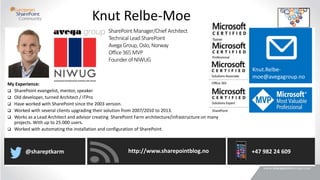
 SharePoint evangelist, mentor, speaker
 Old developer, turned Architect / ITPro
 Have worked with SharePoint since the 2003 version.
 Worked with several clients upgrading their solution from 2007/2010 to 2013.
 Works as a Lead Architect and advisor creating SharePoint Farm architecture/infrastructure on many
projects. With up to 25.000 users.
 Worked with automating the installation and configuration of SharePoint.
Knut Relbe-Moe
SharePoint Manager/Chief Architect
Technical LeadSharePoint
AvegaGroup, Oslo, Norway
Office 365 MVP
Founder of NIWUG
Knut.Relbe-
moe@avegagroup.no
http://www.sharepointblog.no@shareptkarm +47 982 24 609
What we deliver
Sky services
Search and taxonomy
Infrastructure
Migration
Governance
Integration
Yammer
Delve, Video
SharePoint Experts
Office 365 Experts
Workflow
Analyze environment,
best practice
Security
Best practice Intranet
BI, Power BI
Document management
Records management
Collaboration
Electronic forms
Nintex
K2
Intro
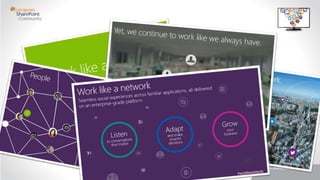
Work like a network
•https://www.youtube.com/watch?v=PSktb_Hrdj8
Introducing Office Delve
•https://www.youtube.com/watch?v=cCbyer0Xupg
Stay In the Know Find What you Need Discover New Connections
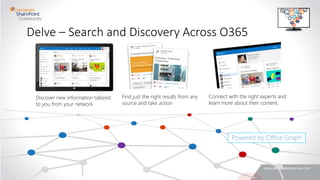
Connect with the right experts and
learn more about their content.
Find just the right results from any
source and take action
Discover new information tailored
to you from your network
Delve – Search and Discovery Across O365
Powered by Office Graph
So what is Delve
•Delve is a windows 8/10 or Office 365 application
•It builds on top of Office Graph
•“Delve is not a place where you go to find
information, however it is where information finds
you”
The goal for Delve
•The goal for Delve was not just to reimagine
search, but to help people get their work done in
a quicker, more informed, and even delightful
manner.
”Boards” Content Tagging Tool for Office 365 Users
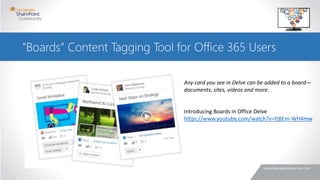
Any card you see in Delve can be added to a board—
documents, sites, videos and more.
Introducing Boards in Office Delve
https://www.youtube.com/watch?v=YjBEm-WH4mw
”Boards” Content Tagging Tool for Office 365 Users
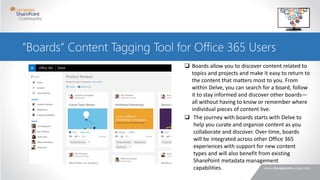
 Boards allow you to discover content related to
topics and projects and make it easy to return to
the content that matters most to you. From
within Delve, you can search for a board, follow
it to stay informed and discover other boards—
all without having to know or remember where
individual pieces of content live.
 The journey with boards starts with Delve to
help you curate and organize content as you
collaborate and discover. Over time, boards
will be integrated across other Office 365
experiences with support for new content
types and will also benefit from existing
SharePoint metadata management
capabilities.
Demo
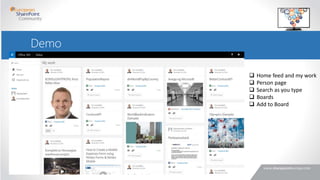
 Home feed and my work
 Person page
 Search as you type
 Boards
 Add to Board
So what is Office Graph
•Office Graph is based on Yammer Enterprise Graph
•Both the Yammer Enterprise Graph and
Microsoft Office Graph are two separate
frameworks
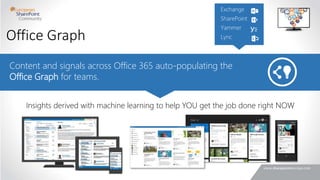
Content and signals across Office 365 auto-populating the
Office Graph for teams.
Insights derived with machine learning to help YOU get the job done right NOW
Office Graph
So what is Office Graph
•Office Graph is a visualization of relations between
users, groups, files, conversations, and other contents
through machine learning and captures information
the way it can be used to intelligently connect people
each other and consumed as personalized experience
to surface the most relevant content to the user as
“Me, Myself, and Mine” interface.
So what is Office Graph
•Office Graphs is nothing but mix of search, machine
learning and gathering data about everything you do
(“signals”) based on your personal network
•Office Graph brings content what is relevant to
you and who is relevant for you.
•Office Graph and Delve are NOT SharePoint
Search
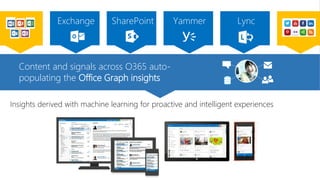
Content and signals across O365 auto-
populating the Office Graph insights
Insights derived with machine learning for proactive and intelligent experiences
Roadmap
•1st are Office365, Yammer, Lync, Exchange
•Released to “First release” customers last year.
•All customers with a E1-E4 plan will get access to it
early 2015.
•Microsoft have not yet said anything about if it would
come to On-Premise, besides mentioned Hybrid in the
same sentence.
Summary
• What I like is that you don’t need to change behavior
• Delve makes the messy and unorganized Yammer, Sites
OneDrive, look clean and attractive
• It’s suggest for me the most important content, I don’t need to
remember where it’s stored anymore.
• It’s responsive, and it works, and it looks really nice! Great work
Microsoft!
• It connects all the different dots for you, Exchange, yammer,
sites in SharePoint, OneDrive. And you get one place to find
your information.
• Microsoft promise that the API should be open. Kudos!
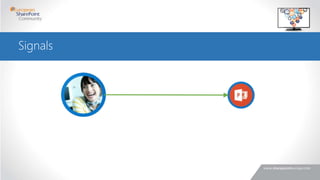
Signals
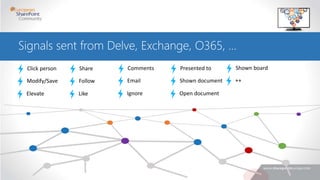
Signals sent from Delve, Exchange, O365, …
Click person
Modify/Save
Elevate
Share
Follow
Like
Comments
Email
Ignore
Presented to
Shown document
Open document
Shown board
++
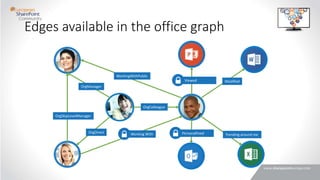
Edges available in the office graph
OrgDirect
OrgColleague
OrgManager
OrgSkipLevelManager
Working With
WorkingWithPublic
Modified
Trending around mePersonalFeed
Viewed
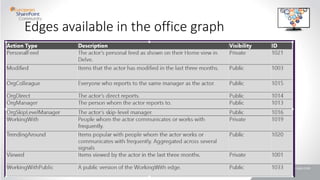
Edges available in the office graph
Slide “borrowed” from Cem Aykan
Permissions in source systems respected
Delve is security trimmed for current user
Note: A document may be shown as trending around a user
without access to that document
Security and permissions
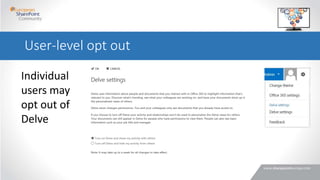
Individual
users may
opt out of
Delve
User-level opt out
•Personalization
•Productivity
•Collaboration
From a business
perspective, Delve
serves three needs
in the increasingly
social organization:
What are our next steps?
Where do I
start with
Delve?
• It depends 
Crawl
• Understand your short term goals
• Be patient, as the platform is being expanded to include
more signals and content
Walk
• Look at how your team is collaborating today, and where
they are collaborating, and move those conversations to
where Delve picks up its signals
• Provide your feedback to Microsoft
Run
• Take advantage of the expanding APIs
Take the time to develop your strategy
People Process Technology
Resources
Office Delve:
• http://products.office.com/en-us/business/explore-office-delve
Introducing Delve and the Office Graph
• http://channel9.msdn.com/Events/TechEd/Europe/2014/OFC-B219
Developing apps against the Office Graph
• http://blogs.msdn.com/b/richard_dizeregas_blog/archive/2014/09/15/developing-apps-against-the-
office-graph.aspx
Building solutions with Office Graph
• http://blog.mastykarz.nl/building-solutions-office-graph/
IT Unity:
• http://www.itunity.com/article/office-delve-office-graph-664
• Knut Relbe-Moe
• knutrelbemoe@outlook.com
• LinkedIn: http://no.linkedin.com/pub/knut-relbe-moe/2/70b/6a
Questions?
http://www.sharepointblog.no@shareptkarm +47 982 24 609
Knut.Relbe-
moe@avegagroup.no

Delve and Office Graph

  • 2.
    My Experience:  SharePointevangelist, mentor, speaker  Old developer, turned Architect / ITPro  Have worked with SharePoint since the 2003 version.  Worked with several clients upgrading their solution from 2007/2010 to 2013.  Works as a Lead Architect and advisor creating SharePoint Farm architecture/infrastructure on many projects. With up to 25.000 users.  Worked with automating the installation and configuration of SharePoint. Knut Relbe-Moe SharePoint Manager/Chief Architect Technical LeadSharePoint AvegaGroup, Oslo, Norway Office 365 MVP Founder of NIWUG Knut.Relbe- moe@avegagroup.no http://www.sharepointblog.no@shareptkarm +47 982 24 609
  • 3.
    What we deliver Skyservices Search and taxonomy Infrastructure Migration Governance Integration Yammer Delve, Video SharePoint Experts Office 365 Experts Workflow Analyze environment, best practice Security Best practice Intranet BI, Power BI Document management Records management Collaboration Electronic forms Nintex K2
  • 4.
    Intro Work like anetwork •https://www.youtube.com/watch?v=PSktb_Hrdj8 Introducing Office Delve •https://www.youtube.com/watch?v=cCbyer0Xupg
  • 8.
    Stay In theKnow Find What you Need Discover New Connections Connect with the right experts and learn more about their content. Find just the right results from any source and take action Discover new information tailored to you from your network Delve – Search and Discovery Across O365 Powered by Office Graph
  • 9.
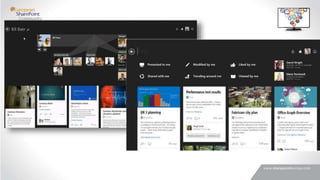
    So what isDelve •Delve is a windows 8/10 or Office 365 application •It builds on top of Office Graph •“Delve is not a place where you go to find information, however it is where information finds you”
  • 10.
    The goal forDelve •The goal for Delve was not just to reimagine search, but to help people get their work done in a quicker, more informed, and even delightful manner.
  • 11.
    ”Boards” Content TaggingTool for Office 365 Users Any card you see in Delve can be added to a board— documents, sites, videos and more. Introducing Boards in Office Delve https://www.youtube.com/watch?v=YjBEm-WH4mw
  • 12.
    ”Boards” Content TaggingTool for Office 365 Users  Boards allow you to discover content related to topics and projects and make it easy to return to the content that matters most to you. From within Delve, you can search for a board, follow it to stay informed and discover other boards— all without having to know or remember where individual pieces of content live.  The journey with boards starts with Delve to help you curate and organize content as you collaborate and discover. Over time, boards will be integrated across other Office 365 experiences with support for new content types and will also benefit from existing SharePoint metadata management capabilities.
  • 13.
    Demo  Home feedand my work  Person page  Search as you type  Boards  Add to Board
  • 14.
    So what isOffice Graph •Office Graph is based on Yammer Enterprise Graph •Both the Yammer Enterprise Graph and Microsoft Office Graph are two separate frameworks
  • 15.
    Content and signalsacross Office 365 auto-populating the Office Graph for teams. Insights derived with machine learning to help YOU get the job done right NOW Office Graph
  • 16.
    So what isOffice Graph •Office Graph is a visualization of relations between users, groups, files, conversations, and other contents through machine learning and captures information the way it can be used to intelligently connect people each other and consumed as personalized experience to surface the most relevant content to the user as “Me, Myself, and Mine” interface.
  • 17.
    So what isOffice Graph •Office Graphs is nothing but mix of search, machine learning and gathering data about everything you do (“signals”) based on your personal network •Office Graph brings content what is relevant to you and who is relevant for you. •Office Graph and Delve are NOT SharePoint Search
  • 18.
    Content and signalsacross O365 auto- populating the Office Graph insights Insights derived with machine learning for proactive and intelligent experiences
  • 19.
    Roadmap •1st are Office365,Yammer, Lync, Exchange •Released to “First release” customers last year. •All customers with a E1-E4 plan will get access to it early 2015. •Microsoft have not yet said anything about if it would come to On-Premise, besides mentioned Hybrid in the same sentence.
  • 20.
    Summary • What Ilike is that you don’t need to change behavior • Delve makes the messy and unorganized Yammer, Sites OneDrive, look clean and attractive • It’s suggest for me the most important content, I don’t need to remember where it’s stored anymore. • It’s responsive, and it works, and it looks really nice! Great work Microsoft! • It connects all the different dots for you, Exchange, yammer, sites in SharePoint, OneDrive. And you get one place to find your information. • Microsoft promise that the API should be open. Kudos!
  • 21.
  • 22.
    Signals sent fromDelve, Exchange, O365, … Click person Modify/Save Elevate Share Follow Like Comments Email Ignore Presented to Shown document Open document Shown board ++
  • 23.
    Edges available inthe office graph OrgDirect OrgColleague OrgManager OrgSkipLevelManager Working With WorkingWithPublic Modified Trending around mePersonalFeed Viewed
  • 24.
    Edges available inthe office graph
  • 25.
  • 26.
    Permissions in sourcesystems respected Delve is security trimmed for current user Note: A document may be shown as trending around a user without access to that document Security and permissions
  • 27.
    Individual users may opt outof Delve User-level opt out
  • 29.
    •Personalization •Productivity •Collaboration From a business perspective,Delve serves three needs in the increasingly social organization:
  • 31.
    What are ournext steps?
  • 32.
    Where do I startwith Delve? • It depends  Crawl • Understand your short term goals • Be patient, as the platform is being expanded to include more signals and content Walk • Look at how your team is collaborating today, and where they are collaborating, and move those conversations to where Delve picks up its signals • Provide your feedback to Microsoft Run • Take advantage of the expanding APIs
  • 33.
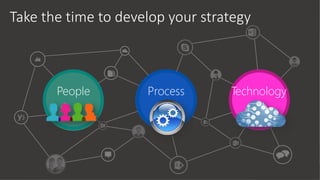
    Take the timeto develop your strategy People Process Technology
  • 35.
    Resources Office Delve: • http://products.office.com/en-us/business/explore-office-delve IntroducingDelve and the Office Graph • http://channel9.msdn.com/Events/TechEd/Europe/2014/OFC-B219 Developing apps against the Office Graph • http://blogs.msdn.com/b/richard_dizeregas_blog/archive/2014/09/15/developing-apps-against-the- office-graph.aspx Building solutions with Office Graph • http://blog.mastykarz.nl/building-solutions-office-graph/ IT Unity: • http://www.itunity.com/article/office-delve-office-graph-664
  • 36.
    • Knut Relbe-Moe •knutrelbemoe@outlook.com • LinkedIn: http://no.linkedin.com/pub/knut-relbe-moe/2/70b/6a Questions? http://www.sharepointblog.no@shareptkarm +47 982 24 609 Knut.Relbe- moe@avegagroup.no

Editor's Notes

  • #16 Machine learning is the key to building those better filters, mapping the relationships between people, content, and experiences
  • #29 Microsoft tells us to:
  • #32 Delve is able to bring you content not based on your search terms, but based on what the systems learns and understands about you and your usage patterns. And you'll see more from the people and the projects and topics that you interact the most with. Talk about the limitations of traditional search: how do you find what it is you do not know to look for?