Delve and the Office Graph for IT-Pros & Admins
NICKI BORELL
EXPERTS INSIDE
SPONSORS
• ROLLOUT COMPLETED
• FIRST VERSION…
• COMING AS PART OF O365
• NOT AVAILABLE NATIVE
FOR ON-PREM
• PART OF SEARCH HYBRID…
• APPS FOR MOBILE
Nicki Borell
Consultant / Evangelist
SharePoint & Office 365
MCSE, MCDBA, MCITP
Author:
REFERENT
“…if you ask why you will never understand“
TARGET
AUDIENCE
ENDUSER DEVELOPER
DECISION MAKER ADMIN / ARCHITECTS
TOPICS
Delve
Office
Graph
Roadmap
Graph
Concepts
Privacy
Populating the
Office Graph
Architecture
Query the
Graph
DELVE
WHAT IS “DELVE”
› Delve = to delve into sth. => synonyms for: engross, search through
etc.
› Next generation Search Driven Publishing
› A really cool idea
› Based on Search, Analytics + machine learning
› A feature for O365
› Yet an other feature that’s sounds super simple but can get tricky
SIMPLE – NOT EASY
› My Documents
› Recent Documents
› Docs I'm following
› Documents Shared with Me
› Documents we have in common
› Suggested documents to follow (with social impact)
› Items related to current user (based on a system result source)
and now:
› Delve
ENABLING / DISABLING DELVE
Per User Per Tenant
• Content, based on your relationships with
coworkers and your behavior
• Designed to provide you with the content you
want, and the content you didn’t even know you
needed
• Delve shows you content from across your
O365 tenant
• Home – Delve curated view, containing what
delve considers to be relevant to you
• Me - find and resume content that you’ve
worked on recently.
• Delve only shows you content that you have
access to
• Boards are visible for everyone, but content is
security trimmed
OVERVIEW
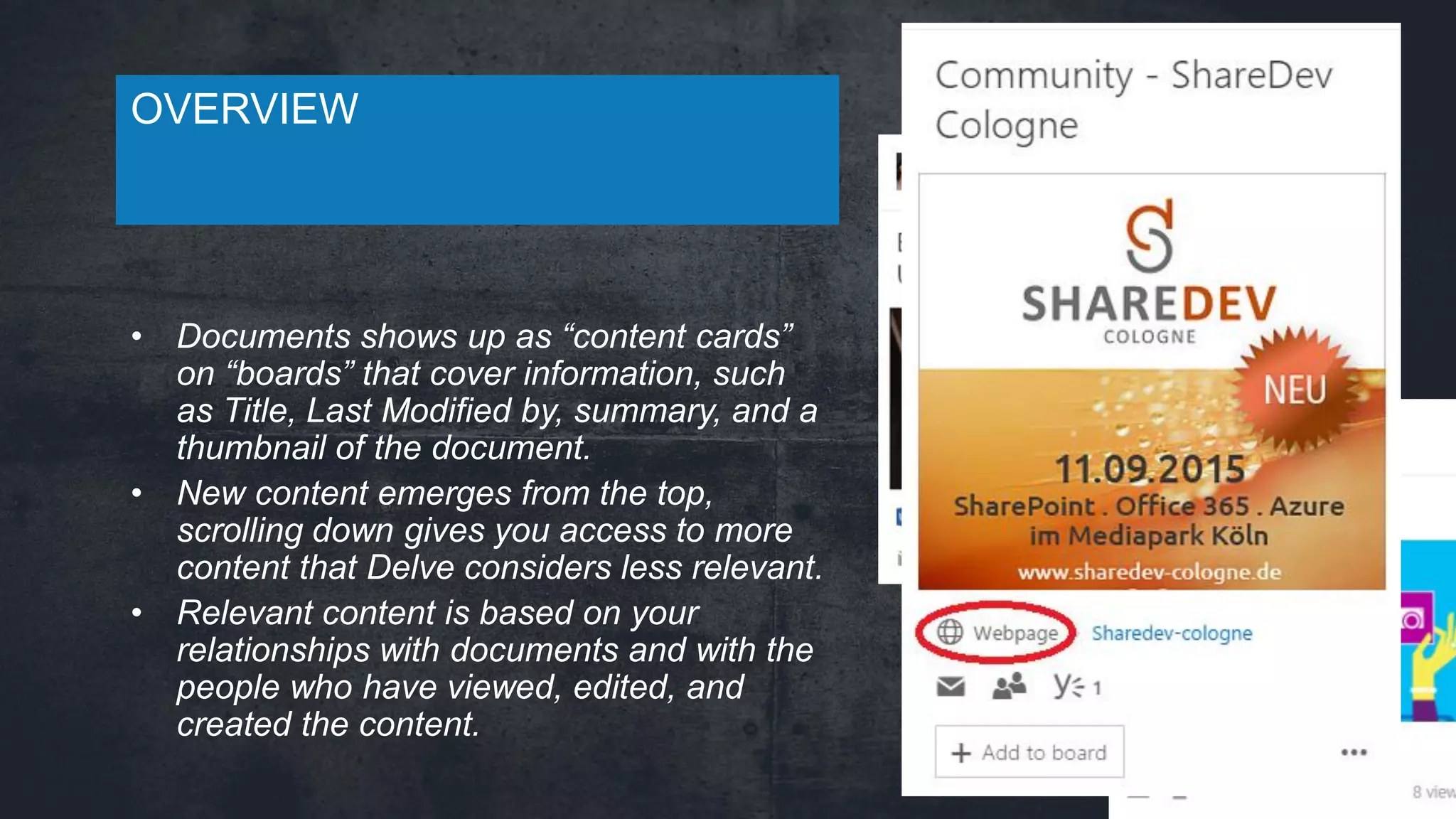
• Documents shows up as “content cards”
on “boards” that cover information, such
as Title, Last Modified by, summary, and a
thumbnail of the document.
• New content emerges from the top,
scrolling down gives you access to more
content that Delve considers less relevant.
• Relevant content is based on your
relationships with documents and with the
people who have viewed, edited, and
created the content.
OVERVIEW
THE OFFICE GRAPH
WHAT IS A GRAPH
› http://en.wikipedia.org/wiki/Graph_(abstract_data_type)
A drawing of a labeled graph on 6
vertices and 7 edges.
A graph with
3 nodes and
3 edges
› Graphs
› Provide data abstraction
› Graph Composition
› Nodes – the data points
› Edges – the relationships
between those points
GRAPH DB
› NoSQL Database
› Consists of three elements:
› Nodes
› Edges
› Properties
› Every element contains a direct pointer to its
adjacent elements
HOW IT WORKS - EDGE
› The Office Graph contains information about
enterprise objects such as people and documents,
as well as the relationships and interactions
between these objects.
› The relationships and interactions
are represented as edges.
HOW IT WORKS
› Search & Analytics:
› A user is searching for “Contoso”
› 100 times per day someone is searching for
“marketing”.
› Office Graph:
› User John Doo (Actor) modified (Edge)
Contoso.docx (Object)
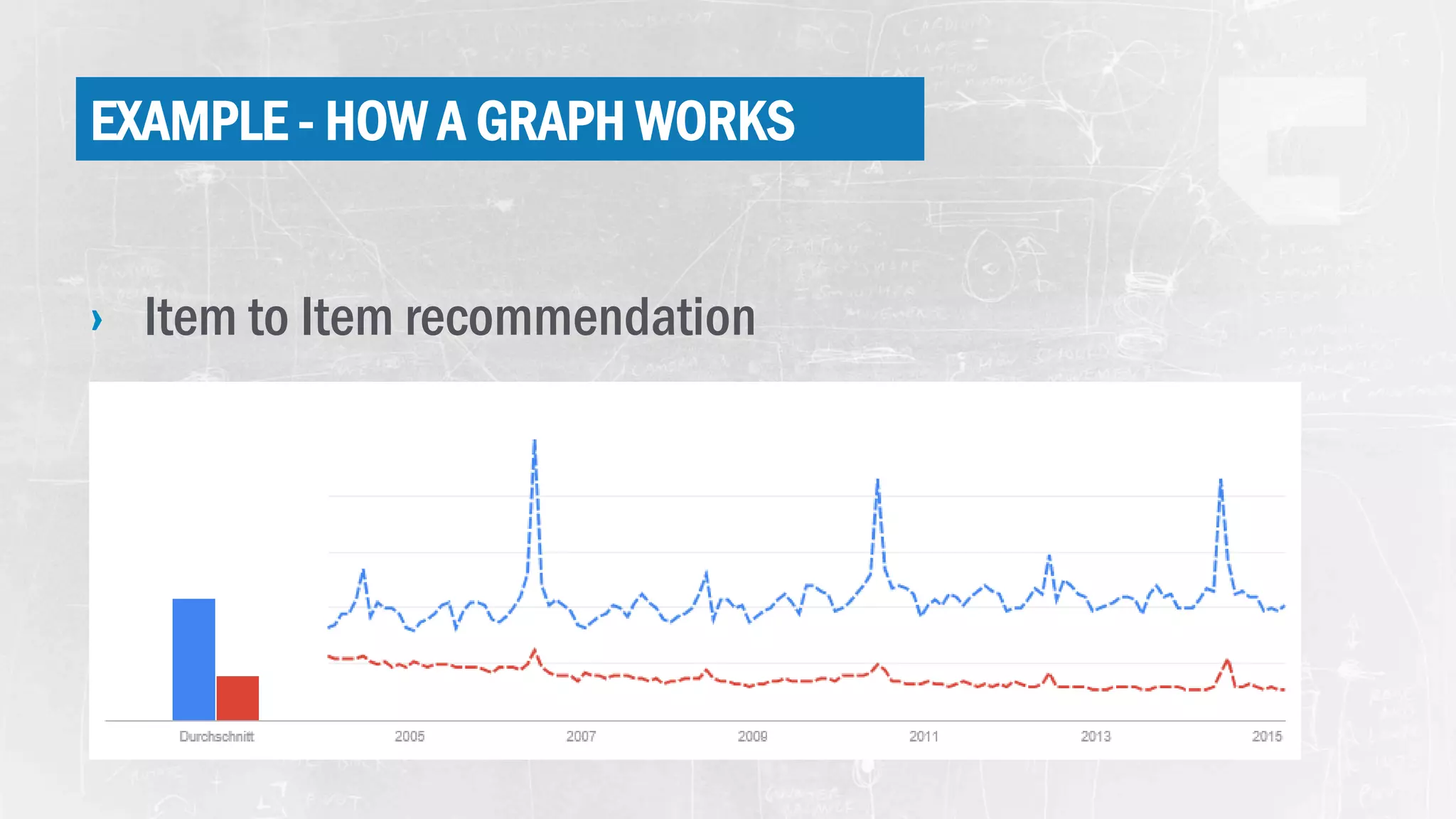
EXAMPLE - HOW A GRAPH WORKS
› Item to Item recommendation
GRAPH BENEFITS AND DRAWBACKS
› Benefits
› Graphs out perform SQL in topological and
locational searches, seeking out all records
that have relationships with each other
› The non reliance of a schema allows the
structure of the graph database to be changed
as new edge and node types are defined
› Drawbacks
› Data duplication. Because each
relationship is a record, many nodes can
have the same kind of relationships
› The more records that must be traversed,
the slower the query. SQL can handle large
result sets better
Database structured to capture and analyze metadata across all Office365 workloads: Exchange
Online, SharePoint Online, OneDrive for Business, Yammer etc…
The actual data is not stored, the Graph only stores metadata in the form of Nodes, and Edges.
HOW IT WORKS - EDGE
› Some edges represent a single interaction:
› Modified: Carl modified a document
› Viewed: Jarvis viewed a presentation
› Some edges are computed based on multiple interactions:
› WorkingWith: People whom you frequently interact with
› TrendingAround: Items that are popular in your circle of colleagues
› Some edges are relationships between enterprise objects:
› OrgManager, OrgColleague, and so on: Organizational structure edges
HOW IT WORKS - PRIVACY
› Public:
› object is connected to the Actor by a public edge
› visible for everyone
› can be discovered by others using Delve (with security trimming, of
course!)
› Example: "modify" or "create"
› Private:
› Object is connected to the Actor by a private edge
› cannot be discovered by other users.
› Example: "view" relationship is always private. If I view a
document, nobody will know about it.
Search ACL + Private & Public Edges
HOW IT WORKS - PRIVACY
› Public:
› object is connected to the Actor by a public edge
› visible for everyone
› can be discovered by others using Delve (with security trimming, of
course!)
› Example: "modify" or "create"
› Private:
› Object is connected to the Actor by a private edge
› cannot be discovered by other users.
› Example: "view" relationship is always private. If I view a
document, nobody will know about it.
Search ACL + Private & Public Edges
ROUNDUP - SECURITY
› All nodes contain an ACL used for security trimming
› If you do not have access to the node, it will not be included
in the result set
› Edges are classified as public or private
› Anyone with access to a node can traverse the public edge.
› Only the user that created a private edge can traverse it.
Search ACL + Private & Public Edges
QUERY THE
GRAPH
GQL QUERIES
› Related to Me
› https://<tenant_address>/_api/search/query?Querytext='*'&a
mp;Properties='GraphQuery:ACTOR(ME)‘
› Related to Me & Someone Else
› https://<tenant_address>/_api/search/query?Querytext='*'&a
mp;Properties='GraphQuery:AND(ACTOR(ME),ACTOR(<ID>))'
MICROSOFT GRAPH API
› Microsoft Graph (NOT OFFICE GRAPH!!!), the single endpoint that you can use to
access a number of Microsoft's cloud technologies.
› Currently there are two insights from the Office Graph that you can
query for:
› TrendingAround: GET https://graph.microsoft.com/beta/me/trendingAround
› WorkingWith: GET https://graph.microsoft.com/beta/me/workingWith
POPULATING
THE OFFICE
GRAPH
OneDrive for Business
Video
Sites
Delve
Office Graph
POPULATING THE OFFICE GRAPH
› SharePoint content (default inclusion)
› Outlook Online attachments
› No documented «signal API»
› Use the undocumented HTTP API at own risk.
› Throttling per user
ARCHITECTURE
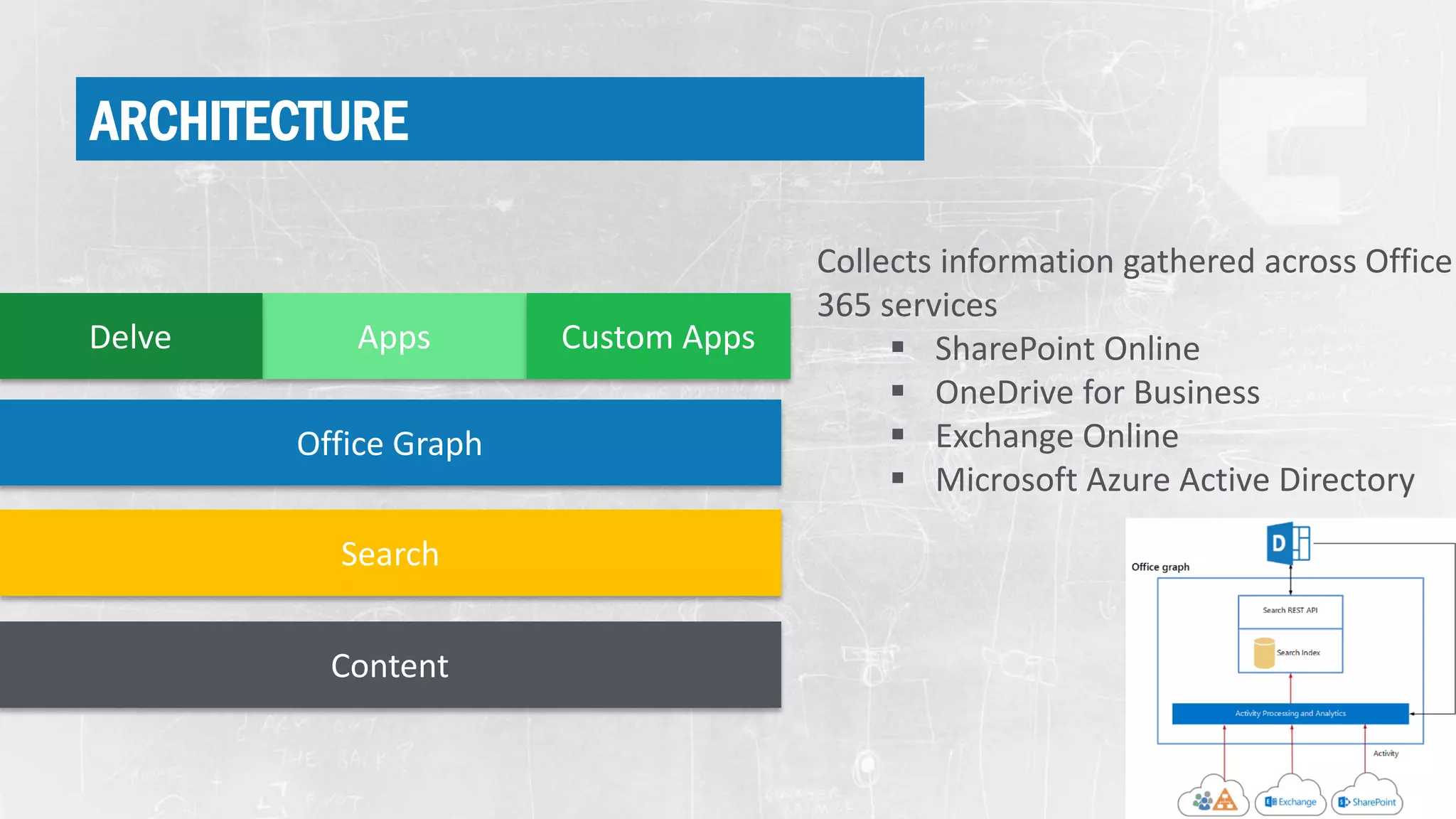
ARCHITECTURE
AppsDelve Custom Apps
Office Graph
Search
Content
Collects information gathered across Office
365 services
 SharePoint Online
 OneDrive for Business
 Exchange Online
 Microsoft Azure Active Directory
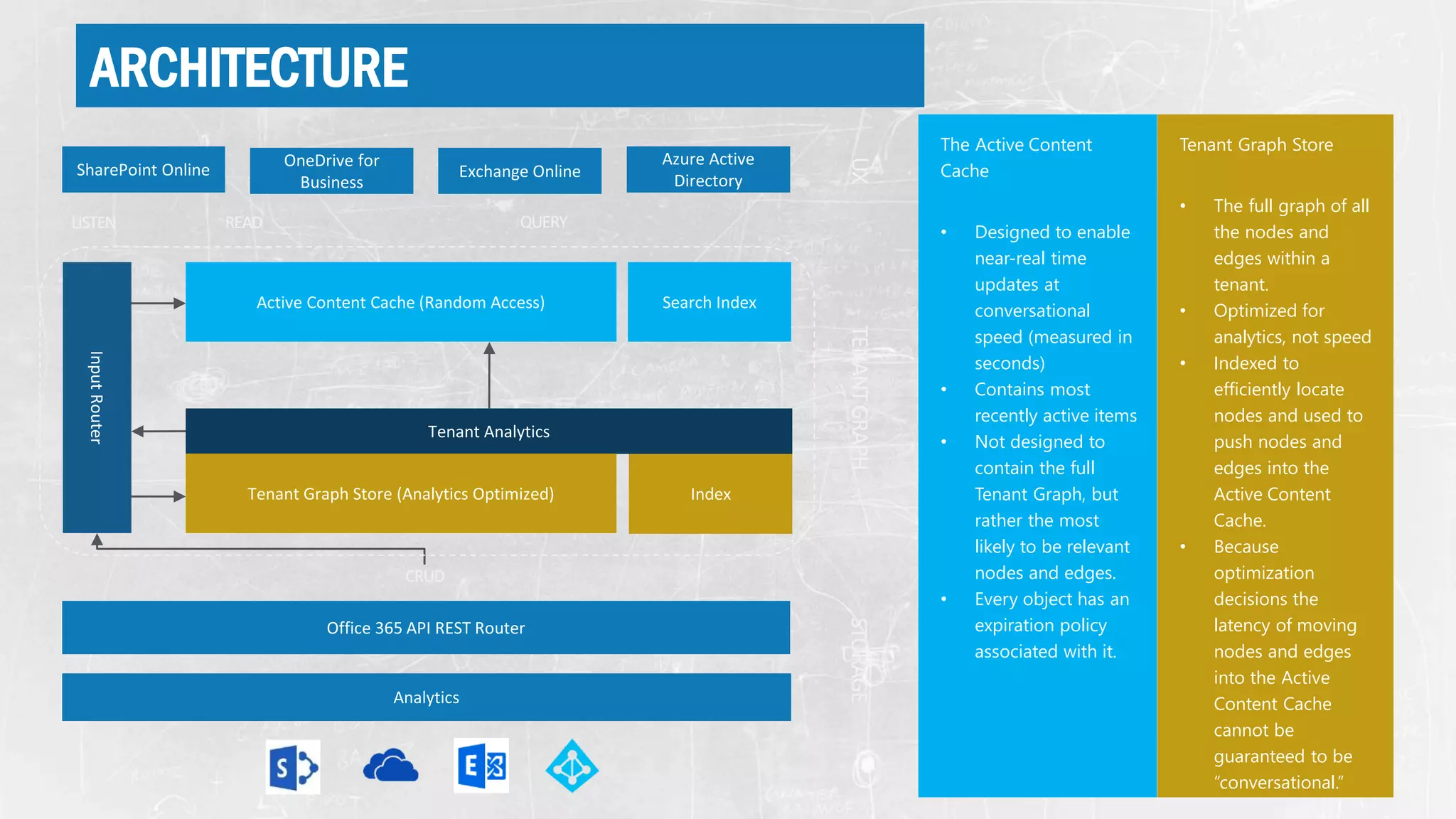
ARCHITECTURE
The Active Content
Cache
• Designed to enable
near-real time
updates at
conversational
speed (measured in
seconds)
• Contains most
recently active items
• Not designed to
contain the full
Tenant Graph, but
rather the most
likely to be relevant
nodes and edges.
• Every object has an
expiration policy
associated with it.
Tenant Graph Store
• The full graph of all
the nodes and
edges within a
tenant.
• Optimized for
analytics, not speed
• Indexed to
efficiently locate
nodes and used to
push nodes and
edges into the
Active Content
Cache.
• Because
optimization
decisions the
latency of moving
nodes and edges
into the Active
Content Cache
cannot be
guaranteed to be
“conversational.”
ARCHITECTURE
Input Router
• Directs the incoming
edits to the Active
Content Cache and
Tenant Graph Store
• Updates external
applications
regarding these
edits
• Powers the
Conversational
Experience
Workload Analytics
• Specific to each
workload, this is the
piece responsible
for reviewing local
data and updating
the Graph through
the REST API.
• Only changes to the
Active Content
Cache or to Tenant
Analytics are
pushed by the API
ROUNDUP - WHAT IS THE “OFFICE
GRAPH”
› Office Graph is an underling technology for Delve and a suite-wide intelligence
fabric that will help you discover content and make new connections.
› The Office Graph represents a collection of analyzed signals (edges) via
machine learning, also called insights.
› These new insights are derived from each user’s behavior, their relationships to
content, topics and one another.
› Content and signals are captured from Exchange Online, SharePoint Online,
Azure, Yammer and more coming soon…
COMING SOON
DASHBOARDS IN DELVE
PROFIL IN DELVE
GROUPS IN DELVE
THE NEW TEAMSITE EXPERIENCE
HYBRID CRAWLER
Nicki Borell
nb@expertsinside.com
@nickiborell
thank you
questions?
live ratings
SHAREPOINTTALK.NET@NICKIBORELL
spca.biz/LT3L

Delve and the Office Graph for IT- Pros & Admins

  • 1.
    Delve and theOffice Graph for IT-Pros & Admins NICKI BORELL EXPERTS INSIDE
  • 2.
  • 3.
    • ROLLOUT COMPLETED •FIRST VERSION… • COMING AS PART OF O365 • NOT AVAILABLE NATIVE FOR ON-PREM • PART OF SEARCH HYBRID… • APPS FOR MOBILE
  • 4.
    Nicki Borell Consultant /Evangelist SharePoint & Office 365 MCSE, MCDBA, MCITP Author: REFERENT “…if you ask why you will never understand“
  • 5.
  • 6.
  • 7.
  • 8.
    WHAT IS “DELVE” ›Delve = to delve into sth. => synonyms for: engross, search through etc. › Next generation Search Driven Publishing › A really cool idea › Based on Search, Analytics + machine learning › A feature for O365 › Yet an other feature that’s sounds super simple but can get tricky
  • 9.
    SIMPLE – NOTEASY › My Documents › Recent Documents › Docs I'm following › Documents Shared with Me › Documents we have in common › Suggested documents to follow (with social impact) › Items related to current user (based on a system result source) and now: › Delve
  • 10.
    ENABLING / DISABLINGDELVE Per User Per Tenant
  • 12.
    • Content, basedon your relationships with coworkers and your behavior • Designed to provide you with the content you want, and the content you didn’t even know you needed • Delve shows you content from across your O365 tenant • Home – Delve curated view, containing what delve considers to be relevant to you • Me - find and resume content that you’ve worked on recently. • Delve only shows you content that you have access to • Boards are visible for everyone, but content is security trimmed OVERVIEW
  • 13.
    • Documents showsup as “content cards” on “boards” that cover information, such as Title, Last Modified by, summary, and a thumbnail of the document. • New content emerges from the top, scrolling down gives you access to more content that Delve considers less relevant. • Relevant content is based on your relationships with documents and with the people who have viewed, edited, and created the content. OVERVIEW
  • 15.
  • 16.
    WHAT IS AGRAPH › http://en.wikipedia.org/wiki/Graph_(abstract_data_type) A drawing of a labeled graph on 6 vertices and 7 edges. A graph with 3 nodes and 3 edges › Graphs › Provide data abstraction › Graph Composition › Nodes – the data points › Edges – the relationships between those points
  • 17.
    GRAPH DB › NoSQLDatabase › Consists of three elements: › Nodes › Edges › Properties › Every element contains a direct pointer to its adjacent elements
  • 18.
    HOW IT WORKS- EDGE › The Office Graph contains information about enterprise objects such as people and documents, as well as the relationships and interactions between these objects. › The relationships and interactions are represented as edges.
  • 19.
    HOW IT WORKS ›Search & Analytics: › A user is searching for “Contoso” › 100 times per day someone is searching for “marketing”. › Office Graph: › User John Doo (Actor) modified (Edge) Contoso.docx (Object)
  • 20.
    EXAMPLE - HOWA GRAPH WORKS › Item to Item recommendation
  • 22.
    GRAPH BENEFITS ANDDRAWBACKS › Benefits › Graphs out perform SQL in topological and locational searches, seeking out all records that have relationships with each other › The non reliance of a schema allows the structure of the graph database to be changed as new edge and node types are defined › Drawbacks › Data duplication. Because each relationship is a record, many nodes can have the same kind of relationships › The more records that must be traversed, the slower the query. SQL can handle large result sets better Database structured to capture and analyze metadata across all Office365 workloads: Exchange Online, SharePoint Online, OneDrive for Business, Yammer etc… The actual data is not stored, the Graph only stores metadata in the form of Nodes, and Edges.
  • 23.
    HOW IT WORKS- EDGE › Some edges represent a single interaction: › Modified: Carl modified a document › Viewed: Jarvis viewed a presentation › Some edges are computed based on multiple interactions: › WorkingWith: People whom you frequently interact with › TrendingAround: Items that are popular in your circle of colleagues › Some edges are relationships between enterprise objects: › OrgManager, OrgColleague, and so on: Organizational structure edges
  • 24.
    HOW IT WORKS- PRIVACY › Public: › object is connected to the Actor by a public edge › visible for everyone › can be discovered by others using Delve (with security trimming, of course!) › Example: "modify" or "create" › Private: › Object is connected to the Actor by a private edge › cannot be discovered by other users. › Example: "view" relationship is always private. If I view a document, nobody will know about it. Search ACL + Private & Public Edges
  • 25.
    HOW IT WORKS- PRIVACY › Public: › object is connected to the Actor by a public edge › visible for everyone › can be discovered by others using Delve (with security trimming, of course!) › Example: "modify" or "create" › Private: › Object is connected to the Actor by a private edge › cannot be discovered by other users. › Example: "view" relationship is always private. If I view a document, nobody will know about it. Search ACL + Private & Public Edges
  • 26.
    ROUNDUP - SECURITY ›All nodes contain an ACL used for security trimming › If you do not have access to the node, it will not be included in the result set › Edges are classified as public or private › Anyone with access to a node can traverse the public edge. › Only the user that created a private edge can traverse it. Search ACL + Private & Public Edges
  • 27.
  • 28.
    GQL QUERIES › Relatedto Me › https://<tenant_address>/_api/search/query?Querytext='*'&a mp;Properties='GraphQuery:ACTOR(ME)‘ › Related to Me & Someone Else › https://<tenant_address>/_api/search/query?Querytext='*'&a mp;Properties='GraphQuery:AND(ACTOR(ME),ACTOR(<ID>))'
  • 29.
    MICROSOFT GRAPH API ›Microsoft Graph (NOT OFFICE GRAPH!!!), the single endpoint that you can use to access a number of Microsoft's cloud technologies. › Currently there are two insights from the Office Graph that you can query for: › TrendingAround: GET https://graph.microsoft.com/beta/me/trendingAround › WorkingWith: GET https://graph.microsoft.com/beta/me/workingWith
  • 31.
    POPULATING THE OFFICE GRAPH OneDrive forBusiness Video Sites Delve Office Graph
  • 32.
    POPULATING THE OFFICEGRAPH › SharePoint content (default inclusion) › Outlook Online attachments › No documented «signal API» › Use the undocumented HTTP API at own risk. › Throttling per user
  • 33.
  • 34.
    ARCHITECTURE AppsDelve Custom Apps OfficeGraph Search Content Collects information gathered across Office 365 services  SharePoint Online  OneDrive for Business  Exchange Online  Microsoft Azure Active Directory
  • 35.
    ARCHITECTURE The Active Content Cache •Designed to enable near-real time updates at conversational speed (measured in seconds) • Contains most recently active items • Not designed to contain the full Tenant Graph, but rather the most likely to be relevant nodes and edges. • Every object has an expiration policy associated with it. Tenant Graph Store • The full graph of all the nodes and edges within a tenant. • Optimized for analytics, not speed • Indexed to efficiently locate nodes and used to push nodes and edges into the Active Content Cache. • Because optimization decisions the latency of moving nodes and edges into the Active Content Cache cannot be guaranteed to be “conversational.”
  • 36.
    ARCHITECTURE Input Router • Directsthe incoming edits to the Active Content Cache and Tenant Graph Store • Updates external applications regarding these edits • Powers the Conversational Experience Workload Analytics • Specific to each workload, this is the piece responsible for reviewing local data and updating the Graph through the REST API. • Only changes to the Active Content Cache or to Tenant Analytics are pushed by the API
  • 37.
    ROUNDUP - WHATIS THE “OFFICE GRAPH” › Office Graph is an underling technology for Delve and a suite-wide intelligence fabric that will help you discover content and make new connections. › The Office Graph represents a collection of analyzed signals (edges) via machine learning, also called insights. › These new insights are derived from each user’s behavior, their relationships to content, topics and one another. › Content and signals are captured from Exchange Online, SharePoint Online, Azure, Yammer and more coming soon…
  • 38.
  • 39.
  • 40.
  • 41.
  • 42.
    THE NEW TEAMSITEEXPERIENCE
  • 43.
  • 44.
  • 45.