Optimizing Merge on Delta Lake
Justin Breese
Who am I?
Justin Breese
justin.breese@databricks.com | Los Angeles
Senior Strategic Solutions Architect
Drums, guitar, soccer, and old Porsches
Agenda
▪ Merge basics
▪ Partition/File pruning
▪ OperationMetrics
▪ Large merge tips
▪ Sample configs
▪ Various ramblings and observations
Merge overview
▪ Phase 1: Find the input files in target that are touched by the rows that
satisfy the condition and verify that no two source rows match with the
same target row [innerJoin]
▪ Phase 2: Read the touched files again and write new files with updated
and/or inserted rows
▪ Phase 3: Use the Delta protocol to atomically remove the touched files and
add the new files
Merge overview: phase 2 double click
Phase 2: Read the touched files again and write new files with updated and/or
inserted rows.
The type of join can vary depending on the conditions of the merge:
▪ Insert only merge (e.g. no updates/deletes) → leftAntiJoin on the source to
find the inserts
▪ Matched only clauses (e.g. when matched) → rightOuterJoin
▪ Else (e.g. you have updates, deletes, and inserts) → fullOuterJoin
Merge is really these three phases. Now that we know that, we can figure out
how to optimize each phase.
Merge basics
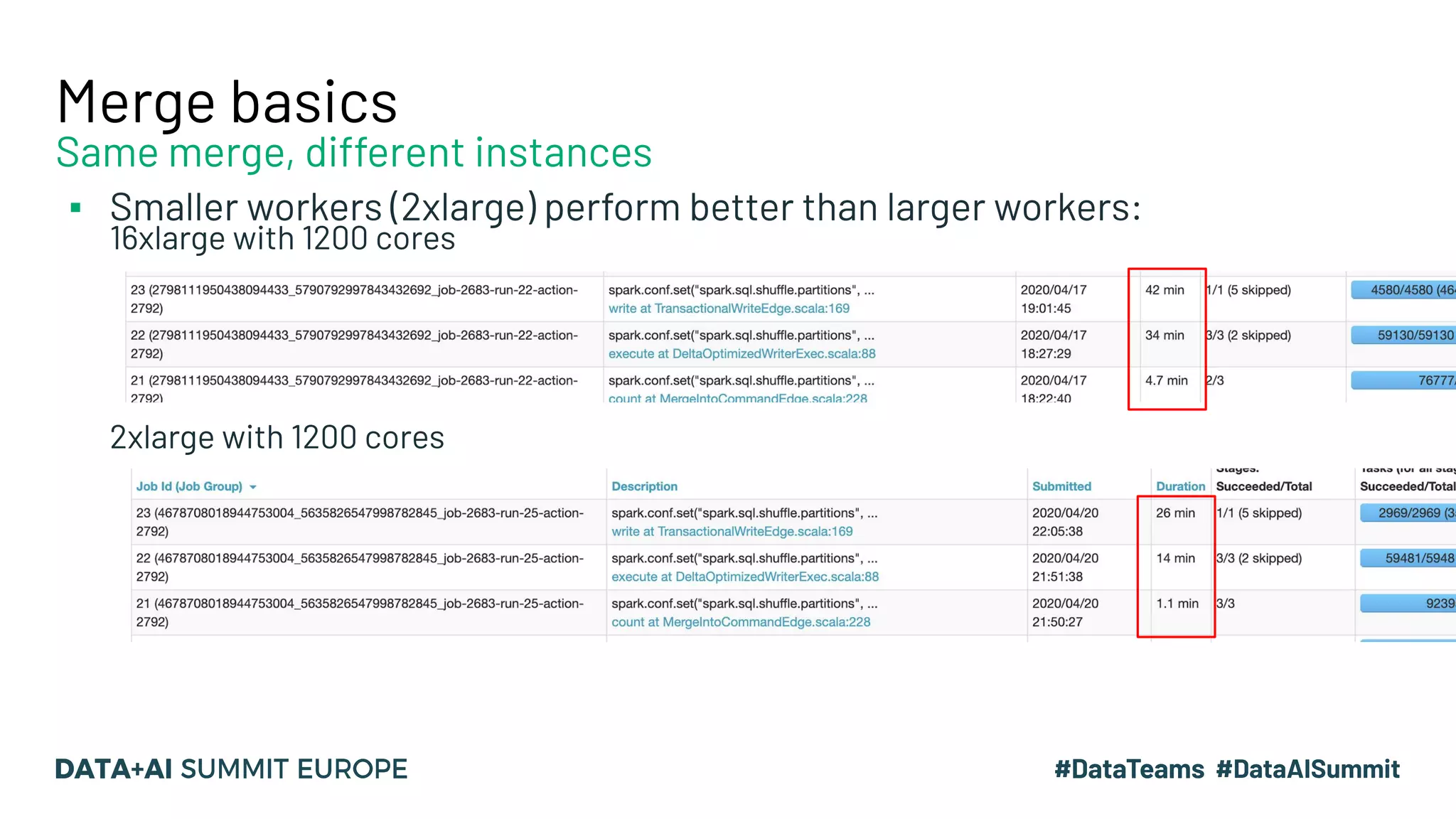
▪ Smaller workers (2xlarge) perform better than larger workers:
16xlarge with 1200 cores
2xlarge with 1200 cores
Same merge, different instances
Merge basics
▪ Tale of two joins: inner join and full outer join
▪ Want to go faster? Partition pruning and file pruning
▪ Unpersist dataframes that you don’t need - clear up your memory:
df.unpersist
System.gc
▪ Change Delta file size depending on your use case (default 1GB)
spark.databricks.delta.optimize.maxFileSize sizeInBytes
Write intensive: 32MB or less
Read intensive: 1GB (default Delta size)
*We are working on changing this for you automatically
▪ Normal Spark rules apply: partitionSize, shuffle partitions, etc.
innerJoin
full outer join +
optimizeWrite (optional)
write to s3/adls
Prunes: not just delicious juice for my grandparents
▪ Partition prune: disregard specific partitions
▪ File prune: disregard specific files within a partition
▪ You have to be explicit about both of these - kb on this topic - if
you do not tell Delta to prune, then it won’t
→ We will improve this in the future to be more automagic
▪ Prune on the left (source) and the right (target)
Partition Prune Example
// get a partition prune string from the date partition
var ListofDatesList = sourceDF.select($"date").distinct.collect.map(x => x.apply(0).toString())
var partitionPruneString = "'"+ListofDatesList.mkString("','")+"'"
// use the pruning string for partitions
val source = sourceDF.filter(s"""date in (${ partitionPruneString })""") // pruned the left side
baselineTable .as("baseline")
.merge(broadcast(source.as("inputs")), "baseline.date IN (" + partitionPruneString + ")" + "AND baseline.compositePk =
inputs.compositePk ")
.whenMatched("inputs.deleted = true")
.delete()
.whenMatched("inputs.deleted = false")
.updateExpr…...
OMG partition pruning!
Matching PK
You will know it worked if PartitionCount < totalPartitions in your table for the physical plan
Broadcast if you can
File Prune Example
// get a partition prune string
var ListofDatesList = sourceDF.select($"date").distinct.collect.map(x => x.apply(0).toString())
var partitionPruneString = "'"+ListofDatesList.mkString("','")+"'"
// use the pruning string for partitions
val source = sourceDF.filter(s"""date in (${ partitionPruneString })""") // pruned the left side
baselineTable .as("baseline")
.merge(broadcast( source.as("inputs")), "baseline.date IN (" + partitionPruneString + ") AND baseline.zOrderedCol < 123 AND
baseline.compositePk = inputs.compositePk ")
.whenMatched("inputs.deleted = true")
.delete()
.whenMatched("inputs.deleted = false")
.updateExpr…...
OMG partition pruning!
Matching PK
File pruning!
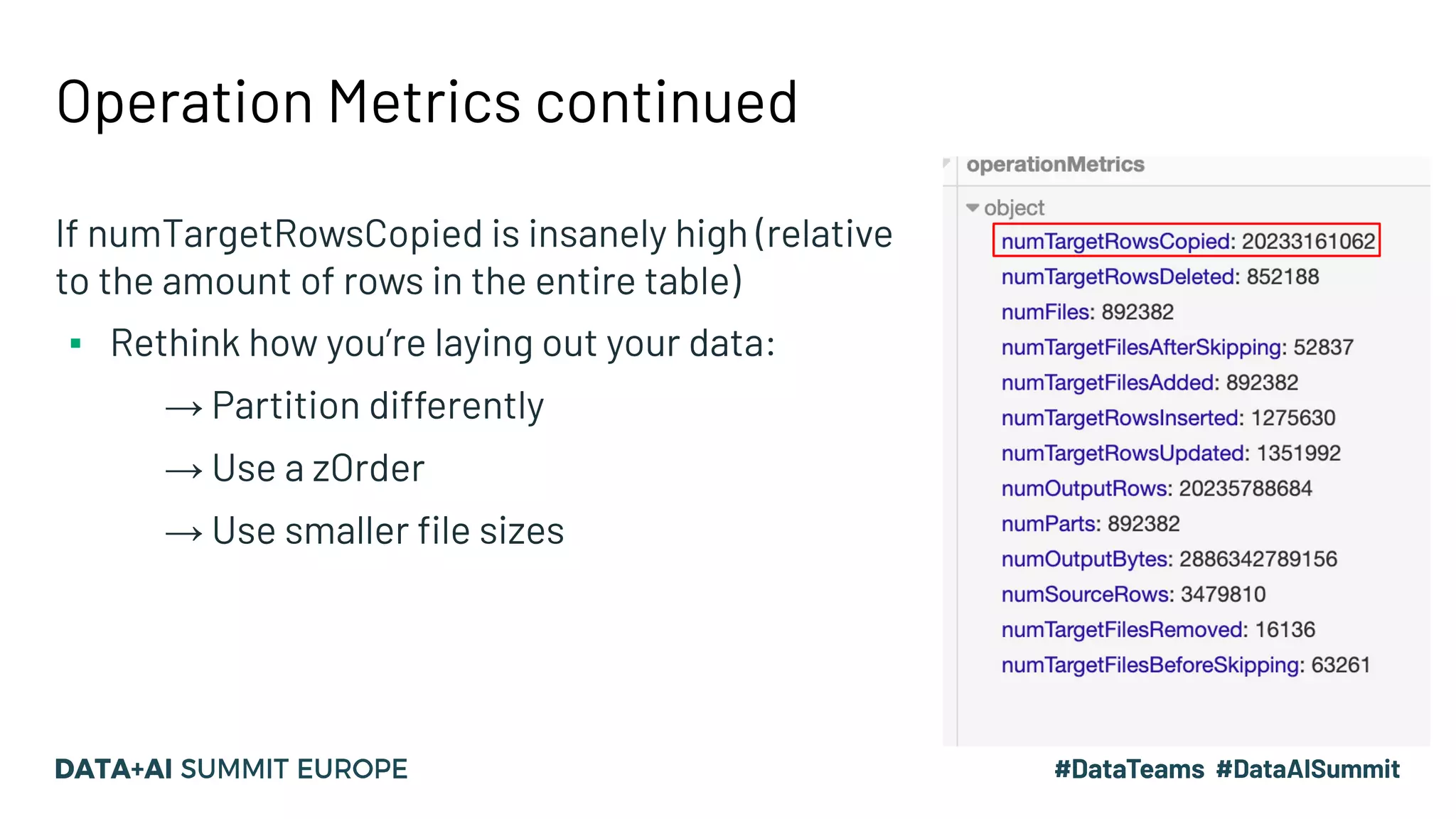
Operation Metrics (%sql describe history tableName)
▪ Use DBR 6.5+ to get improved operationMetrics
▪ They are THE source of truth for a DML event
▪ Things to look at:
→ numTargetRowsCopied (this is the enemy!)
→ numOutputBytes
→ numTargetFilesAdded
→ numTargetRowsInserted/Updated/Deleted
Operation Metrics continued
If numTargetRowsCopied is insanely high (relative
to the amount of rows in the entire table)
▪ Rethink how you’re laying out your data:
→ Partition differently
→ Use a zOrder
→ Use smaller file sizes
Large merge tips
▪ s3 bucket: write at the root - s3 parallelism is defined by the prefix
Each large table should have its own s3 bucket and another bucket for
checkpointing (if it is a stream)
Good! :-)
s3:/jbreese-databricks-bucket
--year=2019
--year=2018
Bad! :-/
s3:/jbreese-databricks-bucket/data/tableA
--year=2019
--year=2018
s3:/jbreese-databricks-bucket/data/tableB
--year=2019
--year=2018
‘data’ is considered a prefix and you are subject to s3 prefix limits
▪ s3 prefix limits: 3500 reads / 5500 writes per second
* yes I know that S3 will eventually re-partition - it just depends on how long it takes or how patient you are
Large merge tips
▪ Using a huge cluster (more than 900 cores):
optimizedWrites along with Delta random prefixes and write at root
optimizedWrites ensure 1 core writes to 1 partition (via a final shuffle)
Configs
spark.hadoop.fs.s3a.multipart.threshold 204857600
spark.databricks.delta.optimizeWrite true
spark.databricks.delta.optimizeWrite.numShuffleBlocks xxxxxx
spark.databricks.delta.properties.defaults.randomizeFilePrefixes true
spark.databricks.optimizer.dynamicFilePruning true
This works: I wrote a 2.7TB changeset with 2400 cores in 17 minutes - no s3
throttling
Final recap
▪ Merge basics
▪ Partition/File pruning
▪ OperationMetrics
▪ Large merge tips
▪ Sample configs
Feedback
Your feedback is important to us.
Don’t forget to rate
and review the sessions.

Delta Lake: Optimizing Merge

  • 1.
    Optimizing Merge onDelta Lake Justin Breese
  • 2.
    Who am I? JustinBreese justin.breese@databricks.com | Los Angeles Senior Strategic Solutions Architect Drums, guitar, soccer, and old Porsches
  • 3.
    Agenda ▪ Merge basics ▪Partition/File pruning ▪ OperationMetrics ▪ Large merge tips ▪ Sample configs ▪ Various ramblings and observations
  • 4.
    Merge overview ▪ Phase1: Find the input files in target that are touched by the rows that satisfy the condition and verify that no two source rows match with the same target row [innerJoin] ▪ Phase 2: Read the touched files again and write new files with updated and/or inserted rows ▪ Phase 3: Use the Delta protocol to atomically remove the touched files and add the new files
  • 5.
    Merge overview: phase2 double click Phase 2: Read the touched files again and write new files with updated and/or inserted rows. The type of join can vary depending on the conditions of the merge: ▪ Insert only merge (e.g. no updates/deletes) → leftAntiJoin on the source to find the inserts ▪ Matched only clauses (e.g. when matched) → rightOuterJoin ▪ Else (e.g. you have updates, deletes, and inserts) → fullOuterJoin Merge is really these three phases. Now that we know that, we can figure out how to optimize each phase.
  • 6.
    Merge basics ▪ Smallerworkers (2xlarge) perform better than larger workers: 16xlarge with 1200 cores 2xlarge with 1200 cores Same merge, different instances
  • 7.
    Merge basics ▪ Taleof two joins: inner join and full outer join ▪ Want to go faster? Partition pruning and file pruning ▪ Unpersist dataframes that you don’t need - clear up your memory: df.unpersist System.gc ▪ Change Delta file size depending on your use case (default 1GB) spark.databricks.delta.optimize.maxFileSize sizeInBytes Write intensive: 32MB or less Read intensive: 1GB (default Delta size) *We are working on changing this for you automatically ▪ Normal Spark rules apply: partitionSize, shuffle partitions, etc. innerJoin full outer join + optimizeWrite (optional) write to s3/adls
  • 8.
    Prunes: not justdelicious juice for my grandparents ▪ Partition prune: disregard specific partitions ▪ File prune: disregard specific files within a partition ▪ You have to be explicit about both of these - kb on this topic - if you do not tell Delta to prune, then it won’t → We will improve this in the future to be more automagic ▪ Prune on the left (source) and the right (target)
  • 9.
    Partition Prune Example //get a partition prune string from the date partition var ListofDatesList = sourceDF.select($"date").distinct.collect.map(x => x.apply(0).toString()) var partitionPruneString = "'"+ListofDatesList.mkString("','")+"'" // use the pruning string for partitions val source = sourceDF.filter(s"""date in (${ partitionPruneString })""") // pruned the left side baselineTable .as("baseline") .merge(broadcast(source.as("inputs")), "baseline.date IN (" + partitionPruneString + ")" + "AND baseline.compositePk = inputs.compositePk ") .whenMatched("inputs.deleted = true") .delete() .whenMatched("inputs.deleted = false") .updateExpr…... OMG partition pruning! Matching PK You will know it worked if PartitionCount < totalPartitions in your table for the physical plan Broadcast if you can
  • 10.
    File Prune Example //get a partition prune string var ListofDatesList = sourceDF.select($"date").distinct.collect.map(x => x.apply(0).toString()) var partitionPruneString = "'"+ListofDatesList.mkString("','")+"'" // use the pruning string for partitions val source = sourceDF.filter(s"""date in (${ partitionPruneString })""") // pruned the left side baselineTable .as("baseline") .merge(broadcast( source.as("inputs")), "baseline.date IN (" + partitionPruneString + ") AND baseline.zOrderedCol < 123 AND baseline.compositePk = inputs.compositePk ") .whenMatched("inputs.deleted = true") .delete() .whenMatched("inputs.deleted = false") .updateExpr…... OMG partition pruning! Matching PK File pruning!
  • 11.
    Operation Metrics (%sqldescribe history tableName) ▪ Use DBR 6.5+ to get improved operationMetrics ▪ They are THE source of truth for a DML event ▪ Things to look at: → numTargetRowsCopied (this is the enemy!) → numOutputBytes → numTargetFilesAdded → numTargetRowsInserted/Updated/Deleted
  • 12.
    Operation Metrics continued IfnumTargetRowsCopied is insanely high (relative to the amount of rows in the entire table) ▪ Rethink how you’re laying out your data: → Partition differently → Use a zOrder → Use smaller file sizes
  • 13.
    Large merge tips ▪s3 bucket: write at the root - s3 parallelism is defined by the prefix Each large table should have its own s3 bucket and another bucket for checkpointing (if it is a stream) Good! :-) s3:/jbreese-databricks-bucket --year=2019 --year=2018 Bad! :-/ s3:/jbreese-databricks-bucket/data/tableA --year=2019 --year=2018 s3:/jbreese-databricks-bucket/data/tableB --year=2019 --year=2018 ‘data’ is considered a prefix and you are subject to s3 prefix limits ▪ s3 prefix limits: 3500 reads / 5500 writes per second * yes I know that S3 will eventually re-partition - it just depends on how long it takes or how patient you are
  • 14.
    Large merge tips ▪Using a huge cluster (more than 900 cores): optimizedWrites along with Delta random prefixes and write at root optimizedWrites ensure 1 core writes to 1 partition (via a final shuffle) Configs spark.hadoop.fs.s3a.multipart.threshold 204857600 spark.databricks.delta.optimizeWrite true spark.databricks.delta.optimizeWrite.numShuffleBlocks xxxxxx spark.databricks.delta.properties.defaults.randomizeFilePrefixes true spark.databricks.optimizer.dynamicFilePruning true This works: I wrote a 2.7TB changeset with 2400 cores in 17 minutes - no s3 throttling
  • 15.
    Final recap ▪ Mergebasics ▪ Partition/File pruning ▪ OperationMetrics ▪ Large merge tips ▪ Sample configs
  • 16.
    Feedback Your feedback isimportant to us. Don’t forget to rate and review the sessions.