Microsoft Graph
Becky Bertram
April 13, 2017
SharePoint User Group
About Me
• Owner of Savvy Technical Solutions
• 8x SharePoint MVP
• Co-author of Wrox’s SharePont Six-in-One
• Authored several Microsoft professional
exams
• Microsoft Certified Trainer alum
• Instructor of online Office 365 courseware at
Opsgility
• Wife and mother of 3 kids, aged 5, 3, and 1
http://www.savvytechnicalsolutions.com
@beckybertram
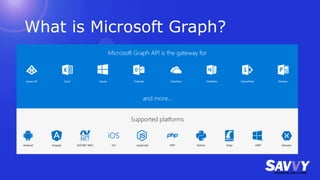
What is Microsoft Graph?
No Really, What is Microsoft Graph?
• Microsoft Graph exposes multiple APIs from Office 365
and other Microsoft cloud services through a single
endpoint: https://graph.microsoft.com. Microsoft
Graph simplifies queries that would otherwise be more
complex.
• Bottom line: unified REST API for Office 365
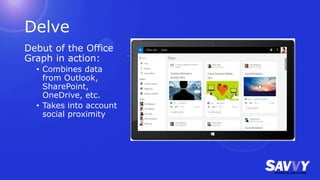
Delve
Debut of the Office
Graph in action:
• Combines data
from Outlook,
SharePoint,
OneDrive, etc.
• Takes into account
social proximity
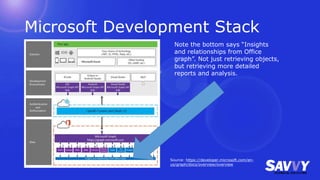
Microsoft Development Stack
Source: https://developer.microsoft.com/en-
us/graph/docs/overview/overview
Note the bottom says “Insights
and relationships from Office
graph”. Not just retrieving objects,
but retrieving more detailed
reports and analysis.
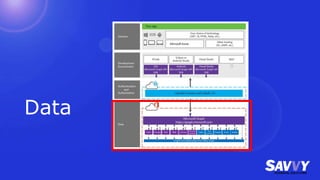
Data
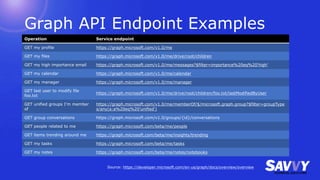
Graph API Endpoint Examples
Operation Service endpoint
GET my profile https://graph.microsoft.com/v1.0/me
GET my files https://graph.microsoft.com/v1.0/me/drive/root/children
GET my high importance email https://graph.microsoft.com/v1.0/me/messages?$filter=importance%20eq%20'high'
GET my calendar https://graph.microsoft.com/v1.0/me/calendar
GET my manager https://graph.microsoft.com/v1.0/me/manager
GET last user to modify file
foo.txt
https://graph.microsoft.com/v1.0/me/drive/root/children/foo.txt/lastModifiedByUser
GET unified groups I’m member
of
https://graph.microsoft.com/v1.0/me/memberOf/$/microsoft.graph.group?$filter=groupType
s/any(a:a%20eq%20'unified')
GET group conversations https://graph.microsoft.com/v1.0/groups/{id}/conversations
GET people related to me https://graph.microsoft.com/beta/me/people
GET items trending around me https://graph.microsoft.com/beta/me/insights/trending
GET my tasks https://graph.microsoft.com/beta/me/tasks
GET my notes https://graph.microsoft.com/beta/me/notes/notebooks
Source: https://developer.microsoft.com/en-us/graph/docs/overview/overview
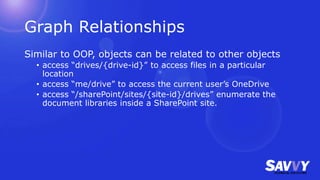
Graph Relationships
Similar to OOP, objects can be related to other objects
• access “drives/{drive-id}” to access files in a particular
location
• access “me/drive” to access the current user’s OneDrive
• access “/sharePoint/sites/{site-id}/drives” enumerate the
document libraries inside a SharePoint site.
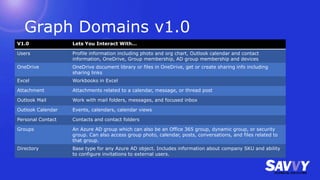
Graph Domains v1.0
V1.0 Lets You Interact With…
Users Profile information including photo and org chart, Outlook calendar and contact
information, OneDrive, Group membership, AD group membership and devices
OneDrive OneDrive document library or files in OneDrive, get or create sharing info including
sharing links
Excel Workbooks in Excel
Attachment Attachments related to a calendar, message, or thread post
Outlook Mail Work with mail folders, messages, and focused inbox
Outlook Calendar Events, calendars, calendar views
Personal Contact Contacts and contact folders
Groups An Azure AD group which can also be an Office 365 group, dynamic group, or security
group. Can also access group photo, calendar, posts, conversations, and files related to
that group.
Directory Base type for any Azure AD object. Includes information about company SKU and ability
to configure invitations to external users.
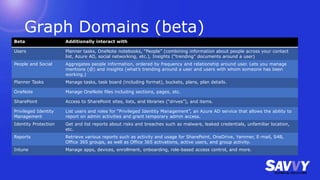
Graph Domains (beta)
Beta Additionally interact with
Users Planner tasks, OneNote notebooks, “People” (combining information about people across your contact
list, Azure AD, social networking, etc.), Insights (“trending” documents around a user)
People and Social Aggregates people information, ordered by frequency and relationship around user. Lets you manage
mentions (@) and insights (what’s trending around a user and users with whom someone has been
working.)
Planner Tasks Manage tasks, task board (including format), buckets, plans, plan details.
OneNote Manage OneNote files including sections, pages, etc.
SharePoint Access to SharePoint sites, lists, and libraries (“drives”), and items.
Privileged Identity
Management
List users and roles for “Privileged Identity Management”, an Azure AD service that allows the ability to
report on admin activities and grant temporary admin access.
Identity Protection Get and list reports about risks and breaches such as malware, leaked credentials, unfamiliar location,
etc.
Reports Retrieve various reports such as activity and usage for SharePoint, OneDrive, Yammer, E-mail, S4B,
Office 365 groups, as well as Office 365 activations, active users, and group activity.
Intune Manage apps, devices, enrollment, onboarding, role-based access control, and more.
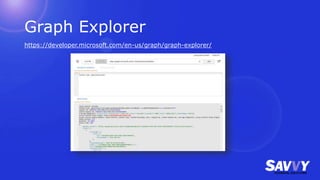
Graph Explorer
https://developer.microsoft.com/en-us/graph/graph-explorer/
Webhooks
Graph uses webhooks to deliver notifications to clients.
An app can subscribe to changes on the following resources:
• Messages
• Events
• Contacts
• Group conversations
• Drive root items
After Microsoft Graph accepts the subscription request, it pushes
notifications to the URL specified in the subscription.
Source: https://developer.microsoft.com/en-us/graph/docs/api-reference/v1.0/resources/webhooks
Paging
Possible to enable paging using $skiptoken to retrieve
next page of results.
When used with “previous-page=true”, it’s possible to
page backwards.
https://graph.microsoft.com/v1.0/users?$top=5$skiptok
en=X'4453707.....00000'&previous-page=true
Extensions
Open Extensions
• Possible to perform CRUD operations on untyped data
not already included in Graph.
• Use your own (reverse) namespace.
POST https://graph.microsoft.com/beta/me/messages
{
"subject": "Annual review",
"body": {
"contentType": "HTML",
"content": "You should be proud!"
},
"toRecipients": [
{
"emailAddress": {
"address": "rufus@contoso.com"
}
}
],
"extensions": [
{
"@odata.type": "Microsoft.Graph.OpenTypeExtension",
"extensionName": "Com.Contoso.Referral",
"companyName": "Wingtip Toys",
"expirationDate": "2015-12-30T11:00:00.000Z",
"dealValue": 10000
}
]
}
Schema Extensions (preview)
Create strongly typed extensions to the Graph which can
be used in CRUD operations
1. Check to see if your extension namespace is already
being used. (If so, perhaps you can reuse it.)
2. Register a schema extension definition.
3. Create your new resource using your new schema.
4. Retrieve and/or update resource with extension data.
POST https://graph.microsoft.com/beta/schemaExtensions
Content-type: application/json
{
"id":"graphlearn_courses",
"description": "Graph Learn training courses extensions",
"targetTypes": [
"Group"
],
"properties": [
{
"name": "courseId",
"type": "Integer"
},
{
"name": "courseName",
"type": "String"
},
{
"name": "courseType",
"type": "String"
}
]
}
POST https://graph.microsoft.com/beta/groups
Content-type: application/json
{
"displayName": "New Managers March 2017",
"description": "New Managers training course
for March 2017",
"groupTypes": ["Unified"],
"mailEnabled": true,
"mailNickname": "newMan201703",
"securityEnabled": false,
"graphlearn_courses": {
"courseId":"123",
"courseName":"New Managers",
"courseType":"Online"
}
}
Delta query (preview)
• Ability to perform multiple queries and retrieve only
what has changed.
• Works for:
• Calendar events in primary calendar
• Groups
• Mail folders
• Messages in a folder
• Personal contact folders
• Personal contacts in a folder
• Users
• Drive items
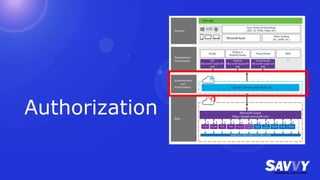
Authorization
Authorization Types
To access a user's Microsoft data, your application must
enable users to authenticate their identity and give their
consent for the app to perform actions on their behalf.
The Microsoft Graph supports two authentication
providers:
Note: Your app might not work if your enterprise customer turns on
enterprise mobility security features like conditional device access.
Azure AD 2.0 endpoint Azure AD
Works with Organizational and personal accounts Orgnizational accounts
Register App Using Microsoft Application Registration Portal
https://apps.dev.microsoft.com
Azure Portal
Source: https://developer.microsoft.com/en-us/graph/docs/authorization/auth_overview
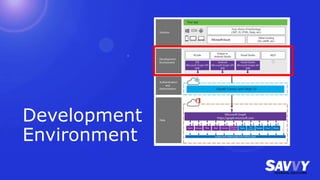
Development
Environment
Available Toolsets
• ASP.NET MVC
• Universal Windows App
• iOS
• Android
• Angular
• Node.js
• PHP
• Python
• Ruby
• REST
• Xamarin
Visual Studio and ASP.NET MVC
• Get Microsoft.Graph API via NuGet Manager
• Use Microsoft.Identity.Client –Pre
• Not available when browsing nuget but can be manually
installed using Nuget Package Manager Console
PM > Install-Package Microsoft.Identity.Client -Pre
https://www.nuget.org/packages/Microsoft.Identity.Client
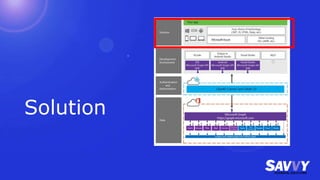
Solution
Sample Apps
• Documentation very good for implementation
• ASP.NET MVC provides a download solution (browsable
in GitHub) and gives detailed instructions how to modify
the project to add authentication and app code)
ASP.NET MVC Example
Graph and SharePoint
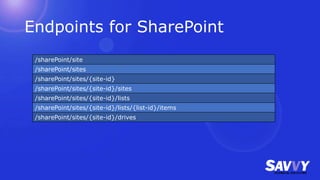
Endpoints for SharePoint
/sharePoint/site
/sharePoint/sites
/sharePoint/sites/{site-id}
/sharePoint/sites/{site-id}/sites
/sharePoint/sites/{site-id}/lists
/sharePoint/sites/{site-id}/lists/{list-id}/items
/sharePoint/sites/{site-id}/drives
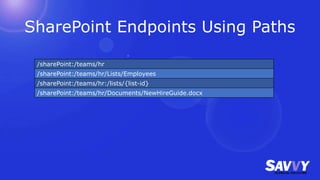
SharePoint Endpoints Using Paths
/sharePoint:/teams/hr
/sharePoint:/teams/hr/Lists/Employees
/sharePoint:/teams/hr:/lists/{list-id}
/sharePoint:/teams/hr/Documents/NewHireGuide.docx
SPFx and Graph
Problematic at best but still possible
Things to consider
• OAuth implicit flow and page registrations
• Multiple web parts per page
• SPFx web parts are highly trusted
• The web parts using OAuth and the Auzre AD login
(https://login.microsoftonline.com) page must be in the
same zone
• Short authentication window means frequent log-ins
Source: https://dev.office.com/sharepoint/docs/spfx/web-parts/guidance/call-microsoft-graph-from-your-web-part
Questions?

Microsoft Graph

  • 1.
    Microsoft Graph Becky Bertram April13, 2017 SharePoint User Group
  • 2.
    About Me • Ownerof Savvy Technical Solutions • 8x SharePoint MVP • Co-author of Wrox’s SharePont Six-in-One • Authored several Microsoft professional exams • Microsoft Certified Trainer alum • Instructor of online Office 365 courseware at Opsgility • Wife and mother of 3 kids, aged 5, 3, and 1 http://www.savvytechnicalsolutions.com @beckybertram
  • 3.
  • 4.
    No Really, Whatis Microsoft Graph? • Microsoft Graph exposes multiple APIs from Office 365 and other Microsoft cloud services through a single endpoint: https://graph.microsoft.com. Microsoft Graph simplifies queries that would otherwise be more complex. • Bottom line: unified REST API for Office 365
  • 5.
    Delve Debut of theOffice Graph in action: • Combines data from Outlook, SharePoint, OneDrive, etc. • Takes into account social proximity
  • 6.
    Microsoft Development Stack Source:https://developer.microsoft.com/en- us/graph/docs/overview/overview Note the bottom says “Insights and relationships from Office graph”. Not just retrieving objects, but retrieving more detailed reports and analysis.
  • 7.
  • 8.
    Graph API EndpointExamples Operation Service endpoint GET my profile https://graph.microsoft.com/v1.0/me GET my files https://graph.microsoft.com/v1.0/me/drive/root/children GET my high importance email https://graph.microsoft.com/v1.0/me/messages?$filter=importance%20eq%20'high' GET my calendar https://graph.microsoft.com/v1.0/me/calendar GET my manager https://graph.microsoft.com/v1.0/me/manager GET last user to modify file foo.txt https://graph.microsoft.com/v1.0/me/drive/root/children/foo.txt/lastModifiedByUser GET unified groups I’m member of https://graph.microsoft.com/v1.0/me/memberOf/$/microsoft.graph.group?$filter=groupType s/any(a:a%20eq%20'unified') GET group conversations https://graph.microsoft.com/v1.0/groups/{id}/conversations GET people related to me https://graph.microsoft.com/beta/me/people GET items trending around me https://graph.microsoft.com/beta/me/insights/trending GET my tasks https://graph.microsoft.com/beta/me/tasks GET my notes https://graph.microsoft.com/beta/me/notes/notebooks Source: https://developer.microsoft.com/en-us/graph/docs/overview/overview
  • 9.
    Graph Relationships Similar toOOP, objects can be related to other objects • access “drives/{drive-id}” to access files in a particular location • access “me/drive” to access the current user’s OneDrive • access “/sharePoint/sites/{site-id}/drives” enumerate the document libraries inside a SharePoint site.
  • 10.
    Graph Domains v1.0 V1.0Lets You Interact With… Users Profile information including photo and org chart, Outlook calendar and contact information, OneDrive, Group membership, AD group membership and devices OneDrive OneDrive document library or files in OneDrive, get or create sharing info including sharing links Excel Workbooks in Excel Attachment Attachments related to a calendar, message, or thread post Outlook Mail Work with mail folders, messages, and focused inbox Outlook Calendar Events, calendars, calendar views Personal Contact Contacts and contact folders Groups An Azure AD group which can also be an Office 365 group, dynamic group, or security group. Can also access group photo, calendar, posts, conversations, and files related to that group. Directory Base type for any Azure AD object. Includes information about company SKU and ability to configure invitations to external users.
  • 11.
    Graph Domains (beta) BetaAdditionally interact with Users Planner tasks, OneNote notebooks, “People” (combining information about people across your contact list, Azure AD, social networking, etc.), Insights (“trending” documents around a user) People and Social Aggregates people information, ordered by frequency and relationship around user. Lets you manage mentions (@) and insights (what’s trending around a user and users with whom someone has been working.) Planner Tasks Manage tasks, task board (including format), buckets, plans, plan details. OneNote Manage OneNote files including sections, pages, etc. SharePoint Access to SharePoint sites, lists, and libraries (“drives”), and items. Privileged Identity Management List users and roles for “Privileged Identity Management”, an Azure AD service that allows the ability to report on admin activities and grant temporary admin access. Identity Protection Get and list reports about risks and breaches such as malware, leaked credentials, unfamiliar location, etc. Reports Retrieve various reports such as activity and usage for SharePoint, OneDrive, Yammer, E-mail, S4B, Office 365 groups, as well as Office 365 activations, active users, and group activity. Intune Manage apps, devices, enrollment, onboarding, role-based access control, and more.
  • 12.
  • 13.
    Webhooks Graph uses webhooksto deliver notifications to clients. An app can subscribe to changes on the following resources: • Messages • Events • Contacts • Group conversations • Drive root items After Microsoft Graph accepts the subscription request, it pushes notifications to the URL specified in the subscription. Source: https://developer.microsoft.com/en-us/graph/docs/api-reference/v1.0/resources/webhooks
  • 14.
    Paging Possible to enablepaging using $skiptoken to retrieve next page of results. When used with “previous-page=true”, it’s possible to page backwards. https://graph.microsoft.com/v1.0/users?$top=5$skiptok en=X'4453707.....00000'&previous-page=true
  • 15.
  • 16.
    Open Extensions • Possibleto perform CRUD operations on untyped data not already included in Graph. • Use your own (reverse) namespace. POST https://graph.microsoft.com/beta/me/messages { "subject": "Annual review", "body": { "contentType": "HTML", "content": "You should be proud!" }, "toRecipients": [ { "emailAddress": { "address": "rufus@contoso.com" } } ], "extensions": [ { "@odata.type": "Microsoft.Graph.OpenTypeExtension", "extensionName": "Com.Contoso.Referral", "companyName": "Wingtip Toys", "expirationDate": "2015-12-30T11:00:00.000Z", "dealValue": 10000 } ] }
  • 17.
    Schema Extensions (preview) Createstrongly typed extensions to the Graph which can be used in CRUD operations 1. Check to see if your extension namespace is already being used. (If so, perhaps you can reuse it.) 2. Register a schema extension definition. 3. Create your new resource using your new schema. 4. Retrieve and/or update resource with extension data. POST https://graph.microsoft.com/beta/schemaExtensions Content-type: application/json { "id":"graphlearn_courses", "description": "Graph Learn training courses extensions", "targetTypes": [ "Group" ], "properties": [ { "name": "courseId", "type": "Integer" }, { "name": "courseName", "type": "String" }, { "name": "courseType", "type": "String" } ] } POST https://graph.microsoft.com/beta/groups Content-type: application/json { "displayName": "New Managers March 2017", "description": "New Managers training course for March 2017", "groupTypes": ["Unified"], "mailEnabled": true, "mailNickname": "newMan201703", "securityEnabled": false, "graphlearn_courses": { "courseId":"123", "courseName":"New Managers", "courseType":"Online" } }
  • 18.
    Delta query (preview) •Ability to perform multiple queries and retrieve only what has changed. • Works for: • Calendar events in primary calendar • Groups • Mail folders • Messages in a folder • Personal contact folders • Personal contacts in a folder • Users • Drive items
  • 19.
  • 20.
    Authorization Types To accessa user's Microsoft data, your application must enable users to authenticate their identity and give their consent for the app to perform actions on their behalf. The Microsoft Graph supports two authentication providers: Note: Your app might not work if your enterprise customer turns on enterprise mobility security features like conditional device access. Azure AD 2.0 endpoint Azure AD Works with Organizational and personal accounts Orgnizational accounts Register App Using Microsoft Application Registration Portal https://apps.dev.microsoft.com Azure Portal Source: https://developer.microsoft.com/en-us/graph/docs/authorization/auth_overview
  • 21.
  • 22.
    Available Toolsets • ASP.NETMVC • Universal Windows App • iOS • Android • Angular • Node.js • PHP • Python • Ruby • REST • Xamarin
  • 23.
    Visual Studio andASP.NET MVC • Get Microsoft.Graph API via NuGet Manager • Use Microsoft.Identity.Client –Pre • Not available when browsing nuget but can be manually installed using Nuget Package Manager Console PM > Install-Package Microsoft.Identity.Client -Pre https://www.nuget.org/packages/Microsoft.Identity.Client
  • 24.
  • 25.
    Sample Apps • Documentationvery good for implementation • ASP.NET MVC provides a download solution (browsable in GitHub) and gives detailed instructions how to modify the project to add authentication and app code)
  • 26.
  • 27.
  • 28.
  • 29.
    SharePoint Endpoints UsingPaths /sharePoint:/teams/hr /sharePoint:/teams/hr/Lists/Employees /sharePoint:/teams/hr:/lists/{list-id} /sharePoint:/teams/hr/Documents/NewHireGuide.docx
  • 30.
    SPFx and Graph Problematicat best but still possible Things to consider • OAuth implicit flow and page registrations • Multiple web parts per page • SPFx web parts are highly trusted • The web parts using OAuth and the Auzre AD login (https://login.microsoftonline.com) page must be in the same zone • Short authentication window means frequent log-ins Source: https://dev.office.com/sharepoint/docs/spfx/web-parts/guidance/call-microsoft-graph-from-your-web-part
  • 31.

Editor's Notes

  • #5 As we’re going to see, though, the REST API has been wrapped into other API’s (such as a .NET library) for ease of use.
  • #9 The Graph is OData v.4 compliant
  • #13 Point out you can use it anonymously or logged in to your own tenant. https://graph.microsoft.com/beta/sharePoint/site/sites/050f2276-5851-4005-82c7-385f83b9cfd7/lists/7622c65c-9d22-4136-bf34-735ac129d808/items https://graph.microsoft.com/beta/sharePoint/site/sites/050f2276-5851-4005-82c7-385f83b9cfd7/drives/b!opF3t8LwIk-j5CaRL79rsHYiDwVRWAVAgsc4X4O5z9dWqfVkv_J5RqXnofP03KSi/root/children
  • #14  A client is a web service that configures its own URL to receive notifications. Client apps use notifications to update their state upon changes.
  • #21 Authorization is still a claims provider scenario where you’re going to claim a token from Azure AD and then pass it along with your requests.
  • #25 Not a lot to say about this, other than, go ahead and deploy it!
  • #31 Uses OAuth implicit flow which requires a publicly available client ID and URL Registration type works with single page apps (and iOS/Android apps) You must register every single page on which the web part will be hosted with Azure AD Use ADAL JS v1.0.12 or higher to apply a patch that allows each web part to process the authentication on its own; otherwise, all the web parts would process the authentication at the same time and collide, since the app is registered on a per-page basis and doesn’t take into account multiple app “instance” (i.e. web parts) at the same time in the same location. SPFx web parts have access to the whole page DOM, not just themselves (as with a SharePoint add-in) and user data is stored in the browser storage or local storage. A malicious user could access your token if it was placed on the same page as your SPFx web part. That’s why tenant admins have to OK SPFx web parts. Since there’s no way to store a client secret, the tokens are scoped for a short period of time, which means the user will have to refresh their token more frequently, which means more frequent log-ins for users.