Microsoft Graph API
and Xamarin
Lorenzo Barbieri
Cloud Solution Architect
Microsoft Western Europe
@_geniodelmale
The opportuny
1.2B
Office users
300%
growth in share
using 3rd-party
apps
85%
of Fortune 500
has MS Cloud
services
50K+
new O365
small businesses
per month
USERS
4T+
emails sent with O365 per month
3Bminutes
of Skype
calls daily
1B+
meetings
created
per month
DATA
Microsoft Graph API calls
420% monthly growth
INTELLIGENCE
4 trillion
data nodes
Shift in solution model
CLOUD MODELLEGACY MODEL
.NET
SHAREPOINT SERVER
Add in
USER’S MACHINE
Add in
Spreadsheet
SVS
Document
SVS
Files SVS
Presentation SVS
Mail SVS
Notes SVS
3rd Party Data
SVS
Communication
SVS
CLOUD SOLUTION
(running on any cloud platform)
Calendar SVS
WHAT CAN I BUILD?
Office Platform
ADD-INS AND WEB PARTS:
Make your solution a native
part of the modern Office
WEB AND DEVICE APPS:
Build smarter apps by
connecting to Office services
VOICE, VIDEO,
CONNECTORS, AND BOTS:
Create the next generation of
productivity solutions
Microsoft
Graph
Microsoft Graph
User Files Conversations People & Groups Events
COLLEAGUES
MESSAGES
EVENTS
FILES
EMAILS
PEOPLE
Intelligence in Microsoft Graph
USERS FILES MAIL CALENDAR TASKSGROUPS
Microsoft Graph API (graph.microsoft.com)
Microsoft Graph rich relationships and insights
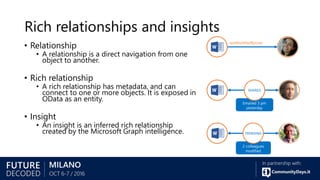
Rich relationships and insights
• Relationship
• A relationship is a direct navigation from one
object to another.
• Rich relationship
• A rich relationship has metadata, and can
connect to one or more objects. It is exposed in
OData as an entity.
• Insight
• An insight is an inferred rich relationship
created by the Microsoft Graph intelligence.
lastModifiedByUser
Emailed 3 pm
yesterday
2 colleagues
modified
TRENDING
SHARED
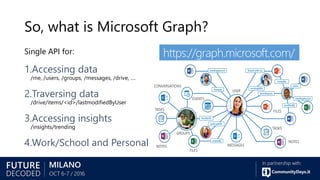
So, what is Microsoft Graph?
Single API for:
1.Accessing data
/me, /users, /groups, /messages, /drive, ….
2.Traversing data
/drive/items/<id>/lastmodifiedByUser
3.Accessing insights
/insights/trending
4.Work/School and Personal
https://graph.microsoft.com/
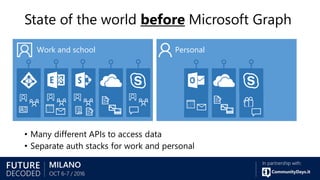
State of the world before Microsoft Graph
• Many different APIs to access data
• Separate auth stacks for work and personal
Work and school Personal
Diverse API styles and endpoints
https://graph.windows.net/contoso.com/users
https://graph.windows.net/contoso.com/groups
https://apis.live.net/v5.0/me
https://contoso.sharepoint.com/_api/SP.UserProfiles.PeopleManager/GetMyProperties
https://graph.microsoft.com/v1.0/me/photo
https://outlook.office.com/api/v2.0/me/Messages
https://outlook.office.com/api/v2.0/me/Events
https://contoso-my.sharepoint.com/personal
/yina_contoso_com/_api/v2.0/drive
https://contoso.sharepoint.com/sites
/designCouncil/_api/v2./drive https://api.onedrive.com/v1.0/drive
https://contoso.sharepoint.com/_api/search/query?Querytext='*'&Prop
erties='GraphQuery:actor(ME,action:1020,or(action:1020,action:1003
,action:1001,action:1024,action:1005,action:1037,action:1039,action
:1036)'&SelectProperties='Docid,Title
Today’s world with Microsoft Graph
Microsoft Graph
https://graph.microsoft.com
Work and school Personal
…
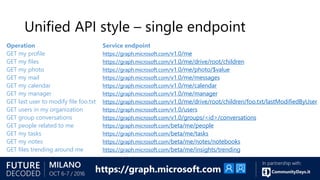
Unified API style – single endpoint
Operation Service endpoint
GET my profile https://graph.microsoft.com/v1.0/me
GET my files https://graph.microsoft.com/v1.0/me/drive/root/children
GET my photo https://graph.microsoft.com/v1.0/me/photo/$value
GET my mail https://graph.microsoft.com/v1.0/me/messages
GET my calendar https://graph.microsoft.com/v1.0/me/calendar
GET my manager https://graph.microsoft.com/v1.0/me/manager
GET last user to modify file foo.txt https://graph.microsoft.com/v1.0/me/drive/root/children/foo.txt/lastModifiedByUser
GET users in my organization https://graph.microsoft.com/v1.0/users
GET group conversations https://graph.microsoft.com/v1.0/groups/<id>/conversations
GET people related to me https://graph.microsoft.com/beta/me/people
GET my tasks https://graph.microsoft.com/beta/me/tasks
GET my notes https://graph.microsoft.com/beta/me/notes/notebooks
GET files trending around me https://graph.microsoft.com/beta/me/insights/trending
https://graph.microsoft.com
Demo
https://graph.microsoft.io/
en-us/graph-explorer#
What’s
New?
What’s been GA over the last year?
• Azure Active Directory
• Outlook mail, calendar and
contacts
• Office 365 groups and
conversations
• OneDrive drives and files
• SharePoint & LiveID profiles
• WebHooks (callbacks) for
Outlook and OneDrive data
• Excel API
• Extend Graph with your own
LOB info for Outlook
• FindMeetingTimes scheduling
API
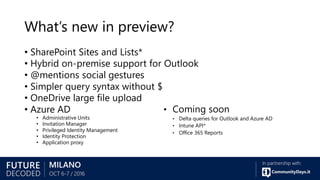
What’s new in preview?
• SharePoint Sites and Lists*
• Hybrid on-premise support for Outlook
• @mentions social gestures
• Simpler query syntax without $
• OneDrive large file upload
• Azure AD
• Administrative Units
• Invitation Manager
• Privileged Identity Management
• Identity Protection
• Application proxy
• Coming soon
• Delta queries for Outlook and Azure AD
• Intune API*
• Office 365 Reports
Excel REST
APIs
Modern and easy to use
Example resource path:
https://graph.microsoft.com/v1.0/me/drive/items/{id}/workbook/worksheets
Excel file location and scopes
• /v1.0/me/drive
• /v1.0/me/groups/{id}/drive
• /beta/sharePoint/sites/{site-id}/drives/{id}
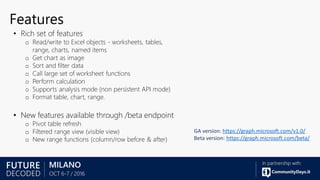
Features
• Rich set of features
o Read/write to Excel objects - worksheets, tables,
range, charts, named items
o Get chart as image
o Sort and filter data
o Call large set of worksheet functions
o Perform calculation
o Supports analysis mode (non persistent API mode)
o Format table, chart, range.
• New features available through /beta endpoint
o Pivot table refresh
o Filtered range view (visible view)
o New range functions (column/row before & after)
GA version: https://graph.microsoft.com/v1.0/
Beta version: https://graph.microsoft.com/beta/
Upcoming features
Named items – write operations
Custom XML documents
Data connection refresh
Document properties
Conditional formatting
Copy to import worksheet
Range as image
Table – add multiple rows with single call
Post your suggestions/questions:
• https://officespdev.uservoice.com/
• Stackoverflow #microsoftgraph
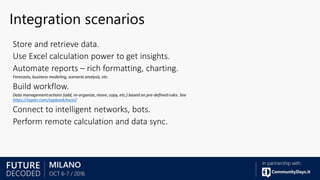
Integration scenarios
https://zapier.com/zapbook/excel/
WebHooks
3. NOTIFY2. VALIDATE
Webhooks on the Microsoft Graph
/subscriptions
/notifications
1. CREATE
Outlook/OneDrive Apps
1. CREATE
Subscription API
• Create, read, delete a subscription
• Update a subscription to extend the
expiry date
• Synchronous part of subscription
creation
• Respond by echoing back the
parameter
• Use clientState to check validity
{
changeType: "created
updated
deleted",
notificationUrl: "URL",
resource: "string",
expirationDateTime:
"ISO Date",
clientState: "string",
id: "string"
}
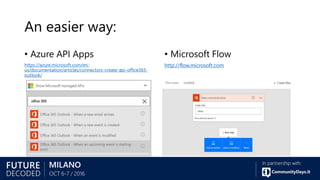
An easier way:
• Azure API Apps
https://azure.microsoft.com/en-
us/documentation/articles/connectors-create-api-office365-
outlook/
• Microsoft Flow
http://flow.microsoft.com
Solution
architecture
App
Registration
Register your app to use the Microsoft
Graph
• Every app must (v1)
• be registered in an Azure Active Directory tenant
• declare in advance that it will access the Microsoft Graph
• declare in advance all of the permission scopes it needs for the Microsoft
Graph
• Every app must (v2)
• be registered in the Application Registration Portal
(https://apps.dev.microsoft.com/)
“Spend most of your time building the parts of your app that add value
and differentiate it from the crowd.” – Application Registration Portal
https://blogs.msdn.microsoft.com/italy/2016/04/19/azure-ad-single-sign-on-in-una-web-app-multi-tenant-
con-openid-connect-e-adal/
Microsoft
Graph SDKs
Microsoft Graph SDK
• Target the /v1.0 branch
• Decoupled for easy
authentication integration
• Active Directory Authentication
Library (ADAL) – old -
• Microsoft Authentication Library
(MSAL)
• …
• Available on multiple platforms
• Consistent primitives
Consistent primitives
// C#
var user = await graphServiceClient.Me.Request().GetAsync();
// Do something...
// Java
graphServiceClient.getMe().buildRequest().get(new ICallback<User>() {
// Do something…
});
// Obj-C
[[[graphServiceClient me] request] getWithCompletion:^(MSGraphUser *user, NSError *error){
// Do something…
}];
Other useful info
Codename “Viper”
• https://github.com/microsoftgraph/MSGraph-SDK-Code-
Generator
Authenticate Mobile Apps using MSAL
• https://blog.xamarin.com/authenticate-mobile-apps-using-
microsoft-authentication-library/
aka.ms/xplat-graph
Cross-Platform
notes
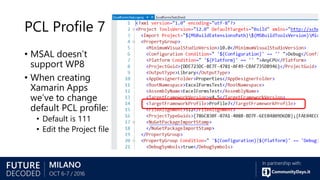
PCL Profile 7
• MSAL doesn’t
support WP8
• When creating
Xamarin Apps
we’ve to change
default PCL profile:
• Default is 111
• Edit the Project file
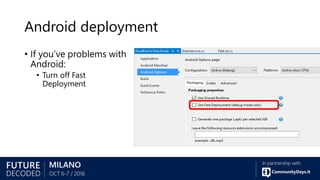
Android deployment
• If you’ve problems with
Android:
• Turn off Fast
Deployment
Android emulator configuration
• Enable x-machine CPU support in Hyper-V
https://github.com/rgregg/onedr
ive-markdown-editor-sample
OneDrive
File Pickers
OneDrive File pickers
• Value proposition
• Save and open files to and from OneDrive with only a few lines of code
• Quickly integrate your app with OneDrive
• Authentication is handled by picker
• Capabilities
• Short-lived URL to download contents of the file
• Long-lived sharable link to view or edit a file
• Open and save files across OneDrive for Business, OneDrive Consumer and
SharePoint using the same code
• Simplest and fastest way to integrate with OneDrive
• Available on iOS, Android, .NET and Javascript
Office
Platform
WHAT CAN I BUILD?
Make your solution a
native part of Office
on every platform
Build smarter apps
by connecting
to Office services
Engage users
through conversations
Questions?
@_geniodelmale

Xamarin microsoft graph

  • 1.
    Microsoft Graph API andXamarin Lorenzo Barbieri Cloud Solution Architect Microsoft Western Europe @_geniodelmale
  • 2.
    The opportuny 1.2B Office users 300% growthin share using 3rd-party apps 85% of Fortune 500 has MS Cloud services 50K+ new O365 small businesses per month USERS 4T+ emails sent with O365 per month 3Bminutes of Skype calls daily 1B+ meetings created per month DATA Microsoft Graph API calls 420% monthly growth INTELLIGENCE 4 trillion data nodes
  • 3.
    Shift in solutionmodel CLOUD MODELLEGACY MODEL .NET SHAREPOINT SERVER Add in USER’S MACHINE Add in Spreadsheet SVS Document SVS Files SVS Presentation SVS Mail SVS Notes SVS 3rd Party Data SVS Communication SVS CLOUD SOLUTION (running on any cloud platform) Calendar SVS
  • 4.
    WHAT CAN IBUILD? Office Platform ADD-INS AND WEB PARTS: Make your solution a native part of the modern Office WEB AND DEVICE APPS: Build smarter apps by connecting to Office services VOICE, VIDEO, CONNECTORS, AND BOTS: Create the next generation of productivity solutions
  • 5.
  • 6.
    Microsoft Graph User FilesConversations People & Groups Events COLLEAGUES MESSAGES EVENTS FILES EMAILS PEOPLE
  • 7.
    Intelligence in MicrosoftGraph USERS FILES MAIL CALENDAR TASKSGROUPS Microsoft Graph API (graph.microsoft.com) Microsoft Graph rich relationships and insights
  • 8.
    Rich relationships andinsights • Relationship • A relationship is a direct navigation from one object to another. • Rich relationship • A rich relationship has metadata, and can connect to one or more objects. It is exposed in OData as an entity. • Insight • An insight is an inferred rich relationship created by the Microsoft Graph intelligence. lastModifiedByUser Emailed 3 pm yesterday 2 colleagues modified TRENDING SHARED
  • 9.
    So, what isMicrosoft Graph? Single API for: 1.Accessing data /me, /users, /groups, /messages, /drive, …. 2.Traversing data /drive/items/<id>/lastmodifiedByUser 3.Accessing insights /insights/trending 4.Work/School and Personal https://graph.microsoft.com/
  • 10.
    State of theworld before Microsoft Graph • Many different APIs to access data • Separate auth stacks for work and personal Work and school Personal
  • 11.
    Diverse API stylesand endpoints https://graph.windows.net/contoso.com/users https://graph.windows.net/contoso.com/groups https://apis.live.net/v5.0/me https://contoso.sharepoint.com/_api/SP.UserProfiles.PeopleManager/GetMyProperties https://graph.microsoft.com/v1.0/me/photo https://outlook.office.com/api/v2.0/me/Messages https://outlook.office.com/api/v2.0/me/Events https://contoso-my.sharepoint.com/personal /yina_contoso_com/_api/v2.0/drive https://contoso.sharepoint.com/sites /designCouncil/_api/v2./drive https://api.onedrive.com/v1.0/drive https://contoso.sharepoint.com/_api/search/query?Querytext='*'&Prop erties='GraphQuery:actor(ME,action:1020,or(action:1020,action:1003 ,action:1001,action:1024,action:1005,action:1037,action:1039,action :1036)'&SelectProperties='Docid,Title
  • 12.
    Today’s world withMicrosoft Graph Microsoft Graph https://graph.microsoft.com Work and school Personal …
  • 13.
    Unified API style– single endpoint Operation Service endpoint GET my profile https://graph.microsoft.com/v1.0/me GET my files https://graph.microsoft.com/v1.0/me/drive/root/children GET my photo https://graph.microsoft.com/v1.0/me/photo/$value GET my mail https://graph.microsoft.com/v1.0/me/messages GET my calendar https://graph.microsoft.com/v1.0/me/calendar GET my manager https://graph.microsoft.com/v1.0/me/manager GET last user to modify file foo.txt https://graph.microsoft.com/v1.0/me/drive/root/children/foo.txt/lastModifiedByUser GET users in my organization https://graph.microsoft.com/v1.0/users GET group conversations https://graph.microsoft.com/v1.0/groups/<id>/conversations GET people related to me https://graph.microsoft.com/beta/me/people GET my tasks https://graph.microsoft.com/beta/me/tasks GET my notes https://graph.microsoft.com/beta/me/notes/notebooks GET files trending around me https://graph.microsoft.com/beta/me/insights/trending https://graph.microsoft.com
  • 14.
  • 15.
  • 16.
    What’s been GAover the last year? • Azure Active Directory • Outlook mail, calendar and contacts • Office 365 groups and conversations • OneDrive drives and files • SharePoint & LiveID profiles • WebHooks (callbacks) for Outlook and OneDrive data • Excel API • Extend Graph with your own LOB info for Outlook • FindMeetingTimes scheduling API
  • 17.
    What’s new inpreview? • SharePoint Sites and Lists* • Hybrid on-premise support for Outlook • @mentions social gestures • Simpler query syntax without $ • OneDrive large file upload • Azure AD • Administrative Units • Invitation Manager • Privileged Identity Management • Identity Protection • Application proxy • Coming soon • Delta queries for Outlook and Azure AD • Intune API* • Office 365 Reports
  • 18.
  • 19.
    Modern and easyto use Example resource path: https://graph.microsoft.com/v1.0/me/drive/items/{id}/workbook/worksheets
  • 20.
    Excel file locationand scopes • /v1.0/me/drive • /v1.0/me/groups/{id}/drive • /beta/sharePoint/sites/{site-id}/drives/{id}
  • 21.
    Features • Rich setof features o Read/write to Excel objects - worksheets, tables, range, charts, named items o Get chart as image o Sort and filter data o Call large set of worksheet functions o Perform calculation o Supports analysis mode (non persistent API mode) o Format table, chart, range. • New features available through /beta endpoint o Pivot table refresh o Filtered range view (visible view) o New range functions (column/row before & after) GA version: https://graph.microsoft.com/v1.0/ Beta version: https://graph.microsoft.com/beta/
  • 22.
    Upcoming features Named items– write operations Custom XML documents Data connection refresh Document properties Conditional formatting Copy to import worksheet Range as image Table – add multiple rows with single call Post your suggestions/questions: • https://officespdev.uservoice.com/ • Stackoverflow #microsoftgraph
  • 23.
  • 24.
  • 25.
    3. NOTIFY2. VALIDATE Webhookson the Microsoft Graph /subscriptions /notifications 1. CREATE Outlook/OneDrive Apps 1. CREATE
  • 26.
    Subscription API • Create,read, delete a subscription • Update a subscription to extend the expiry date • Synchronous part of subscription creation • Respond by echoing back the parameter • Use clientState to check validity { changeType: "created updated deleted", notificationUrl: "URL", resource: "string", expirationDateTime: "ISO Date", clientState: "string", id: "string" }
  • 27.
    An easier way: •Azure API Apps https://azure.microsoft.com/en- us/documentation/articles/connectors-create-api-office365- outlook/ • Microsoft Flow http://flow.microsoft.com
  • 28.
  • 30.
  • 31.
    Register your appto use the Microsoft Graph • Every app must (v1) • be registered in an Azure Active Directory tenant • declare in advance that it will access the Microsoft Graph • declare in advance all of the permission scopes it needs for the Microsoft Graph • Every app must (v2) • be registered in the Application Registration Portal (https://apps.dev.microsoft.com/) “Spend most of your time building the parts of your app that add value and differentiate it from the crowd.” – Application Registration Portal https://blogs.msdn.microsoft.com/italy/2016/04/19/azure-ad-single-sign-on-in-una-web-app-multi-tenant- con-openid-connect-e-adal/
  • 32.
  • 33.
    Microsoft Graph SDK •Target the /v1.0 branch • Decoupled for easy authentication integration • Active Directory Authentication Library (ADAL) – old - • Microsoft Authentication Library (MSAL) • … • Available on multiple platforms • Consistent primitives
  • 34.
    Consistent primitives // C# varuser = await graphServiceClient.Me.Request().GetAsync(); // Do something... // Java graphServiceClient.getMe().buildRequest().get(new ICallback<User>() { // Do something… }); // Obj-C [[[graphServiceClient me] request] getWithCompletion:^(MSGraphUser *user, NSError *error){ // Do something… }];
  • 35.
    Other useful info Codename“Viper” • https://github.com/microsoftgraph/MSGraph-SDK-Code- Generator Authenticate Mobile Apps using MSAL • https://blog.xamarin.com/authenticate-mobile-apps-using- microsoft-authentication-library/
  • 36.
  • 37.
    PCL Profile 7 •MSAL doesn’t support WP8 • When creating Xamarin Apps we’ve to change default PCL profile: • Default is 111 • Edit the Project file
  • 38.
    Android deployment • Ifyou’ve problems with Android: • Turn off Fast Deployment
  • 39.
    Android emulator configuration •Enable x-machine CPU support in Hyper-V
  • 40.
  • 41.
    OneDrive File pickers •Value proposition • Save and open files to and from OneDrive with only a few lines of code • Quickly integrate your app with OneDrive • Authentication is handled by picker • Capabilities • Short-lived URL to download contents of the file • Long-lived sharable link to view or edit a file • Open and save files across OneDrive for Business, OneDrive Consumer and SharePoint using the same code • Simplest and fastest way to integrate with OneDrive • Available on iOS, Android, .NET and Javascript
  • 42.
    Office Platform WHAT CAN IBUILD? Make your solution a native part of Office on every platform Build smarter apps by connecting to Office services Engage users through conversations
  • 43.