Power Apps – What can I
really do with it?
AQL Technologies, IL
“Sameer” Muzammil Mohammed
CIO, AQL Technologies
Microsoft Gold Partner
sm@aqltech.com
“Sameer” Muzammil Mohammed
• CIO  SharePoint Principal @ AQL Technologies
• 20+ years of IT Experience
• Implementing SharePoint since 2003
• Certified in several version of SharePoint
• sm@aqltech.com
• http://meetSameer.com/
• http://Linkedin.com/in/sameer-muz-mohammed
• Twitter : @sameerM2003
2AQLTECH.com, Microsoft Gold Partner, SM@aqltech.com
Today
Power Apps – What can I really do with it?
3AQLTECH.com, Microsoft Gold Partner, SM@aqltech.com
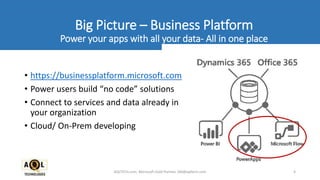
• https://businessplatform.microsoft.com
• Power users build “no code” solutions
• Connect to services and data already in
your organization
• Cloud/ On-Prem developing
4AQLTECH.com, Microsoft Gold Partner, SM@aqltech.com
Big Picture – Business Platform
Power your apps with all your data- All in one place
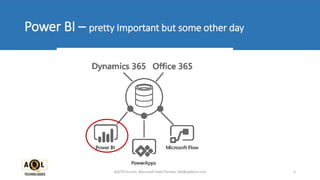
Power BI – pretty Important but some other day
5AQLTECH.com, Microsoft Gold Partner, SM@aqltech.com
Microsoft PowerApps
Build custom business mobile apps
6AQLTECH.com, Microsoft Gold Partner, SM@aqltech.com
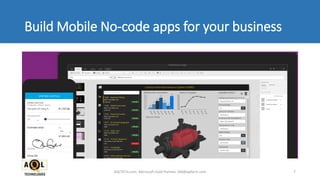
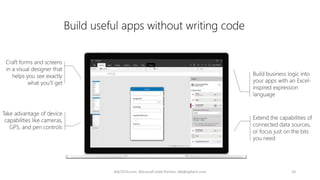
Build Mobile No-code apps for your business
AQLTECH.com, Microsoft Gold Partner, SM@aqltech.com 7
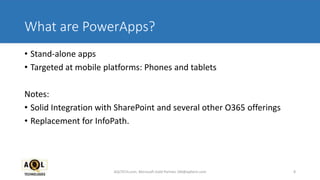
What are PowerApps?
• Stand-alone apps
• Targeted at mobile platforms: Phones and tablets
Notes:
• Solid Integration with SharePoint and several other O365 offerings
• Replacement for InfoPath.
8AQLTECH.com, Microsoft Gold Partner, SM@aqltech.com
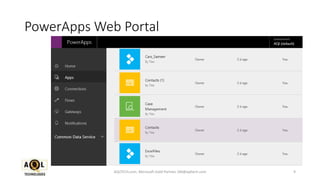
PowerApps Web Portal
9AQLTECH.com, Microsoft Gold Partner, SM@aqltech.com
10AQLTECH.com, Microsoft Gold Partner, SM@aqltech.com
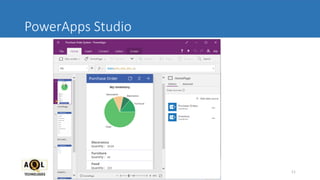
PowerApps Studio
11AQLTECH.com, Microsoft Gold Partner, SM@aqltech.com
PUBLISH TO RANGE OF DEVICES
• iOS Version 9.3 and above
• Android 5 and above
• Windows 10 Mobile
12AQLTECH.com, Microsoft Gold Partner, SM@aqltech.com
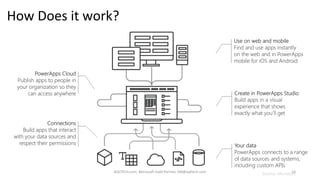
How Does it work?
Source: Microsoft13AQLTECH.com, Microsoft Gold Partner, SM@aqltech.com
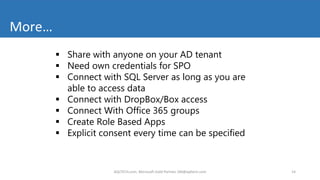
 Share with anyone on your AD tenant
 Need own credentials for SPO
 Connect with SQL Server as long as you are
able to access data
 Connect with DropBox/Box access
 Connect With Office 365 groups
 Create Role Based Apps
 Explicit consent every time can be specified
More…
14AQLTECH.com, Microsoft Gold Partner, SM@aqltech.com
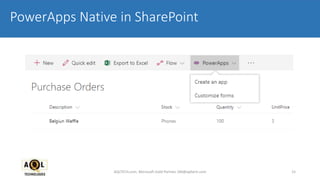
PowerApps Native in SharePoint
15AQLTECH.com, Microsoft Gold Partner, SM@aqltech.com
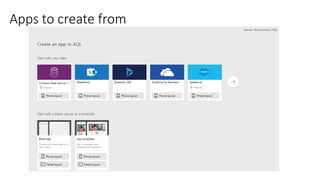
Apps to create from
Create these apps
now for SPO data in
PowerApps Studio
Demo
PowerApps Web Portal Walkthrough
17AQLTECH.com, Microsoft Gold Partner, SM@aqltech.com
Demo
PowerApps Studio Walkthrough
18AQLTECH.com, Microsoft Gold Partner, SM@aqltech.com
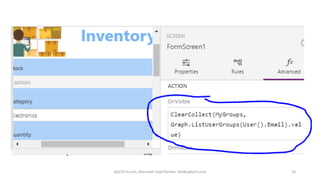
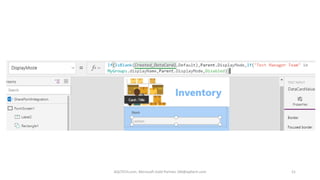
Role Based Form Using Office 365 Groups
Demo
Customizing SharePoint List form using Power Apps … InfoPath Style
19AQLTECH.com, Microsoft Gold Partner, SM@aqltech.com
AQLTECH.com, Microsoft Gold Partner, SM@aqltech.com 20
AQLTECH.com, Microsoft Gold Partner, SM@aqltech.com 21
Demo
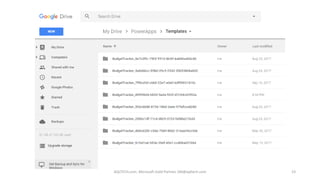
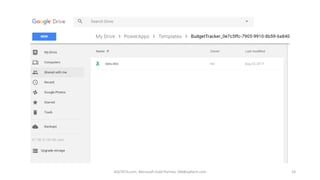
PowerApps Budget Management App Walkthrough
22AQLTECH.com, Microsoft Gold Partner, SM@aqltech.com
AQLTECH.com, Microsoft Gold Partner, SM@aqltech.com 23
AQLTECH.com, Microsoft Gold Partner, SM@aqltech.com 24
AQLTECH.com, Microsoft Gold Partner, SM@aqltech.com 25
Demo
https://www.youtube.com/watch?v=22HqqVp-I80
PowerApps - Creating a basic Purchase Order App
26AQLTECH.com, Microsoft Gold Partner, SM@aqltech.com
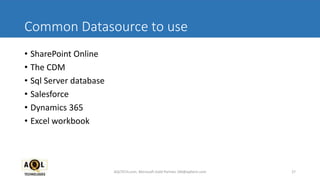
Common Datasource to use
• SharePoint Online
• The CDM
• Sql Server database
• Salesforce
• Dynamics 365
• Excel workbook
27AQLTECH.com, Microsoft Gold Partner, SM@aqltech.com
Sharing
• NOT public-facing
• Can be shared and accessed across the organization
• Can be shared with all, or specific users
28AQLTECH.com, Microsoft Gold Partner, SM@aqltech.com
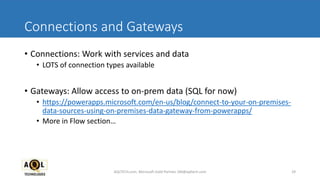
Connections and Gateways
• Connections: Work with services and data
• LOTS of connection types available
• Gateways: Allow access to on-prem data (SQL for now)
• https://powerapps.microsoft.com/en-us/blog/connect-to-your-on-premises-
data-sources-using-on-premises-data-gateway-from-powerapps/
• More in Flow section…
29AQLTECH.com, Microsoft Gold Partner, SM@aqltech.com
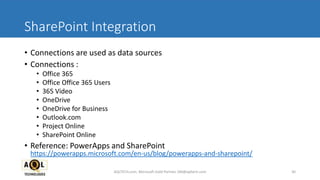
SharePoint Integration
• Connections are used as data sources
• Connections :
• Office 365
• Office Office 365 Users
• 365 Video
• OneDrive
• OneDrive for Business
• Outlook.com
• Project Online
• SharePoint Online
• Reference: PowerApps and SharePoint
https://powerapps.microsoft.com/en-us/blog/powerapps-and-sharepoint/
30AQLTECH.com, Microsoft Gold Partner, SM@aqltech.com
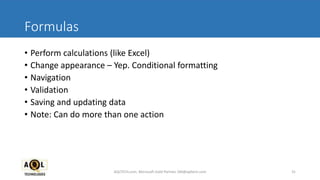
Formulas
• Perform calculations (like Excel)
• Change appearance – Yep. Conditional formatting
• Navigation
• Validation
• Saving and updating data
• Note: Can do more than one action
31AQLTECH.com, Microsoft Gold Partner, SM@aqltech.com
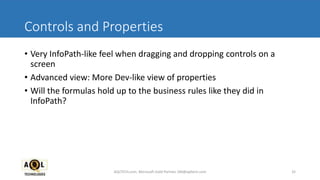
Controls and Properties
• Very InfoPath-like feel when dragging and dropping controls on a
screen
• Advanced view: More Dev-like view of properties
• Will the formulas hold up to the business rules like they did in
InfoPath?
32AQLTECH.com, Microsoft Gold Partner, SM@aqltech.com
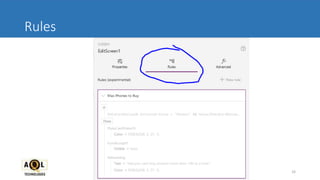
Rules
33AQLTECH.com, Microsoft Gold Partner, SM@aqltech.com
Rules Continued …
34AQLTECH.com, Microsoft Gold Partner, SM@aqltech.com
• Conditions
• Actions
Where to save the PowerApp code …
• Save to the cloud
• Save locally… Saves as a .msapp
35AQLTECH.com, Microsoft Gold Partner, SM@aqltech.com
PowerApp Vs InfoPath
• Form Layout like InfoPath NOW!
• Cannot share PowerApp with external users, it can only be used by
users in Office 365 environment
• PowerApps is currently only offered as software as a service (SaaS).
As of now, there have not been any announcement about offering an
On-Premise version.
• PowerApp doesn’t handle printing yet.
AQLTECH.com, Microsoft Gold Partner, SM@aqltech.com 36
MS Flow in PowerApps
• Interacting with controls in PowerApps can trigger a Flow
• Connections and Gateways can be shared between solutions
37AQLTECH.com, Microsoft Gold Partner, SM@aqltech.com
Pricing
PowerApp
AQLTECH.com, Microsoft Gold Partner, SM@aqltech.com 38
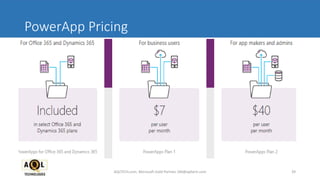
PowerApp Pricing
AQLTECH.com, Microsoft Gold Partner, SM@aqltech.com 39
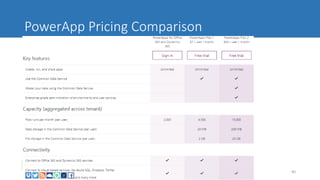
PowerApp Pricing Comparison
AQLTECH.com, Microsoft Gold Partner, SM@aqltech.com 40
Next Steps
And References!
41AQLTECH.com, Microsoft Gold Partner, SM@aqltech.com
Important Links – Power Apps
• Sign up for the preview
https://powerapps.microsoft.com
• Documentation, tutorials, reference content
https://powerapps.microsoft.com/en-us/tutorials
• PowerApps Community
http://aka.ms/PowerApps-community
• Pricing
https://powerapps.microsoft.com/en-us/pricing/
42AQLTECH.com, Microsoft Gold Partner, SM@aqltech.com
http://*.microsoft.com
• http://businessplatform.microsoft.com
• http://powerusers.microsoft.com
• http://powerapps.microsoft.com
• http://flow.microsoft.com
• http://powerbi.microsoft.com
43AQLTECH.com, Microsoft Gold Partner, SM@aqltech.com
Social
• @Power Apps - http://twitter.com/PowerApps
• PowerApps Blog - http://powerapps.microsoft.com/en-us/blog
44AQLTECH.com, Microsoft Gold Partner, SM@aqltech.com
Questions?
CIO  SharePoint Principal @ AQL
Technologies
45
SharePoint Principal @ AQL Technologies
• About AQL
Aqltech.com
• SharePoint Focused 10+ years of SharePoint Implementations
• 100’s of SharePoint Migrations
• 100’s Custom SharePoint application
• SharePoint Managed Services
AQLTECH.com, Microsoft Gold Partner, SM@aqltech.com
Address:
Ph Number:
Email:
Corporate Website:
Follow us:
847 233 1146
ReachIT@aqltech.com
www.aqltech.com
Thank You!
2604 E Dempster St, Park
Ridge, IL, 60053

Microsoft PowerApps- 'What can really I do with it?'

  • 1.
    Power Apps –What can I really do with it? AQL Technologies, IL “Sameer” Muzammil Mohammed CIO, AQL Technologies Microsoft Gold Partner sm@aqltech.com
  • 2.
    “Sameer” Muzammil Mohammed •CIO SharePoint Principal @ AQL Technologies • 20+ years of IT Experience • Implementing SharePoint since 2003 • Certified in several version of SharePoint • sm@aqltech.com • http://meetSameer.com/ • http://Linkedin.com/in/sameer-muz-mohammed • Twitter : @sameerM2003 2AQLTECH.com, Microsoft Gold Partner, SM@aqltech.com
  • 3.
    Today Power Apps –What can I really do with it? 3AQLTECH.com, Microsoft Gold Partner, SM@aqltech.com
  • 4.
    • https://businessplatform.microsoft.com • Powerusers build “no code” solutions • Connect to services and data already in your organization • Cloud/ On-Prem developing 4AQLTECH.com, Microsoft Gold Partner, SM@aqltech.com Big Picture – Business Platform Power your apps with all your data- All in one place
  • 5.
    Power BI –pretty Important but some other day 5AQLTECH.com, Microsoft Gold Partner, SM@aqltech.com
  • 6.
    Microsoft PowerApps Build custombusiness mobile apps 6AQLTECH.com, Microsoft Gold Partner, SM@aqltech.com
  • 7.
    Build Mobile No-codeapps for your business AQLTECH.com, Microsoft Gold Partner, SM@aqltech.com 7
  • 8.
    What are PowerApps? •Stand-alone apps • Targeted at mobile platforms: Phones and tablets Notes: • Solid Integration with SharePoint and several other O365 offerings • Replacement for InfoPath. 8AQLTECH.com, Microsoft Gold Partner, SM@aqltech.com
  • 9.
    PowerApps Web Portal 9AQLTECH.com,Microsoft Gold Partner, SM@aqltech.com
  • 10.
    10AQLTECH.com, Microsoft GoldPartner, SM@aqltech.com
  • 11.
    PowerApps Studio 11AQLTECH.com, MicrosoftGold Partner, SM@aqltech.com
  • 12.
    PUBLISH TO RANGEOF DEVICES • iOS Version 9.3 and above • Android 5 and above • Windows 10 Mobile 12AQLTECH.com, Microsoft Gold Partner, SM@aqltech.com
  • 13.
    How Does itwork? Source: Microsoft13AQLTECH.com, Microsoft Gold Partner, SM@aqltech.com
  • 14.
     Share withanyone on your AD tenant  Need own credentials for SPO  Connect with SQL Server as long as you are able to access data  Connect with DropBox/Box access  Connect With Office 365 groups  Create Role Based Apps  Explicit consent every time can be specified More… 14AQLTECH.com, Microsoft Gold Partner, SM@aqltech.com
  • 15.
    PowerApps Native inSharePoint 15AQLTECH.com, Microsoft Gold Partner, SM@aqltech.com
  • 16.
    Apps to createfrom Create these apps now for SPO data in PowerApps Studio
  • 17.
    Demo PowerApps Web PortalWalkthrough 17AQLTECH.com, Microsoft Gold Partner, SM@aqltech.com
  • 18.
    Demo PowerApps Studio Walkthrough 18AQLTECH.com,Microsoft Gold Partner, SM@aqltech.com
  • 19.
    Role Based FormUsing Office 365 Groups Demo Customizing SharePoint List form using Power Apps … InfoPath Style 19AQLTECH.com, Microsoft Gold Partner, SM@aqltech.com
  • 20.
    AQLTECH.com, Microsoft GoldPartner, SM@aqltech.com 20
  • 21.
    AQLTECH.com, Microsoft GoldPartner, SM@aqltech.com 21
  • 22.
    Demo PowerApps Budget ManagementApp Walkthrough 22AQLTECH.com, Microsoft Gold Partner, SM@aqltech.com
  • 23.
    AQLTECH.com, Microsoft GoldPartner, SM@aqltech.com 23
  • 24.
    AQLTECH.com, Microsoft GoldPartner, SM@aqltech.com 24
  • 25.
    AQLTECH.com, Microsoft GoldPartner, SM@aqltech.com 25
  • 26.
    Demo https://www.youtube.com/watch?v=22HqqVp-I80 PowerApps - Creatinga basic Purchase Order App 26AQLTECH.com, Microsoft Gold Partner, SM@aqltech.com
  • 27.
    Common Datasource touse • SharePoint Online • The CDM • Sql Server database • Salesforce • Dynamics 365 • Excel workbook 27AQLTECH.com, Microsoft Gold Partner, SM@aqltech.com
  • 28.
    Sharing • NOT public-facing •Can be shared and accessed across the organization • Can be shared with all, or specific users 28AQLTECH.com, Microsoft Gold Partner, SM@aqltech.com
  • 29.
    Connections and Gateways •Connections: Work with services and data • LOTS of connection types available • Gateways: Allow access to on-prem data (SQL for now) • https://powerapps.microsoft.com/en-us/blog/connect-to-your-on-premises- data-sources-using-on-premises-data-gateway-from-powerapps/ • More in Flow section… 29AQLTECH.com, Microsoft Gold Partner, SM@aqltech.com
  • 30.
    SharePoint Integration • Connectionsare used as data sources • Connections : • Office 365 • Office Office 365 Users • 365 Video • OneDrive • OneDrive for Business • Outlook.com • Project Online • SharePoint Online • Reference: PowerApps and SharePoint https://powerapps.microsoft.com/en-us/blog/powerapps-and-sharepoint/ 30AQLTECH.com, Microsoft Gold Partner, SM@aqltech.com
  • 31.
    Formulas • Perform calculations(like Excel) • Change appearance – Yep. Conditional formatting • Navigation • Validation • Saving and updating data • Note: Can do more than one action 31AQLTECH.com, Microsoft Gold Partner, SM@aqltech.com
  • 32.
    Controls and Properties •Very InfoPath-like feel when dragging and dropping controls on a screen • Advanced view: More Dev-like view of properties • Will the formulas hold up to the business rules like they did in InfoPath? 32AQLTECH.com, Microsoft Gold Partner, SM@aqltech.com
  • 33.
    Rules 33AQLTECH.com, Microsoft GoldPartner, SM@aqltech.com
  • 34.
    Rules Continued … 34AQLTECH.com,Microsoft Gold Partner, SM@aqltech.com • Conditions • Actions
  • 35.
    Where to savethe PowerApp code … • Save to the cloud • Save locally… Saves as a .msapp 35AQLTECH.com, Microsoft Gold Partner, SM@aqltech.com
  • 36.
    PowerApp Vs InfoPath •Form Layout like InfoPath NOW! • Cannot share PowerApp with external users, it can only be used by users in Office 365 environment • PowerApps is currently only offered as software as a service (SaaS). As of now, there have not been any announcement about offering an On-Premise version. • PowerApp doesn’t handle printing yet. AQLTECH.com, Microsoft Gold Partner, SM@aqltech.com 36
  • 37.
    MS Flow inPowerApps • Interacting with controls in PowerApps can trigger a Flow • Connections and Gateways can be shared between solutions 37AQLTECH.com, Microsoft Gold Partner, SM@aqltech.com
  • 38.
  • 39.
    PowerApp Pricing AQLTECH.com, MicrosoftGold Partner, SM@aqltech.com 39
  • 40.
    PowerApp Pricing Comparison AQLTECH.com,Microsoft Gold Partner, SM@aqltech.com 40
  • 41.
    Next Steps And References! 41AQLTECH.com,Microsoft Gold Partner, SM@aqltech.com
  • 42.
    Important Links –Power Apps • Sign up for the preview https://powerapps.microsoft.com • Documentation, tutorials, reference content https://powerapps.microsoft.com/en-us/tutorials • PowerApps Community http://aka.ms/PowerApps-community • Pricing https://powerapps.microsoft.com/en-us/pricing/ 42AQLTECH.com, Microsoft Gold Partner, SM@aqltech.com
  • 43.
    http://*.microsoft.com • http://businessplatform.microsoft.com • http://powerusers.microsoft.com •http://powerapps.microsoft.com • http://flow.microsoft.com • http://powerbi.microsoft.com 43AQLTECH.com, Microsoft Gold Partner, SM@aqltech.com
  • 44.
    Social • @Power Apps- http://twitter.com/PowerApps • PowerApps Blog - http://powerapps.microsoft.com/en-us/blog 44AQLTECH.com, Microsoft Gold Partner, SM@aqltech.com
  • 45.
    Questions? CIO SharePointPrincipal @ AQL Technologies 45 SharePoint Principal @ AQL Technologies • About AQL Aqltech.com • SharePoint Focused 10+ years of SharePoint Implementations • 100’s of SharePoint Migrations • 100’s Custom SharePoint application • SharePoint Managed Services AQLTECH.com, Microsoft Gold Partner, SM@aqltech.com
  • 46.
    Address: Ph Number: Email: Corporate Website: Followus: 847 233 1146 ReachIT@aqltech.com www.aqltech.com Thank You! 2604 E Dempster St, Park Ridge, IL, 60053