Conditional Statements & Loops
21BCA2T332:Visual Programming
SIMMI S
Assistant Professor
Department Of Computer Science(UG)
Kristu Jayanti College, Autonomous
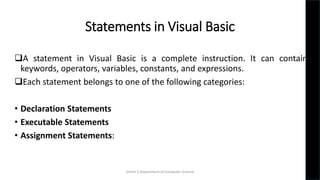
Statements in Visual Basic
A statement in Visual Basic is a complete instruction. It can contain
keywords, operators, variables, constants, and expressions.
Each statement belongs to one of the following categories:
• Declaration Statements
• Executable Statements
• Assignment Statements:
Simmi S,Department of Computer Science
Declaration statements
We use declaration statements to name and define procedures,
variables, properties, arrays, and constants.
Dim number As Integer
Simmi S,Department of Computer Science
Executable statements
An executable statement performs an action. It can call a procedure,
branch to another place in the code, loop through several statements,
or evaluate an expression.
If (a < 50)
Then
' if condition is true then print the following ‘
Console.WriteLine("a is less than 20")
End If
Simmi S,Department of Computer Science
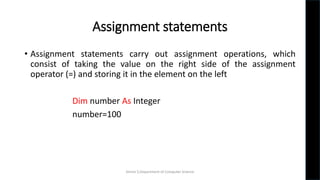
Assignment statements
• Assignment statements carry out assignment operations, which
consist of taking the value on the right side of the assignment
operator (=) and storing it in the element on the left
Dim number As Integer
number=100
Simmi S,Department of Computer Science
VISUAL BASIC CONDITIONAL STATEMENTS
 Conditional statements(Control Statements) in Visual Basic can be
used to take decisions based on certain conditions in your program.
We can define more than one condition to be evaluated by the
program with statements.
If the defined condition is true, the statement or block executes
according to the condition, and if the condition is false, another
statement is executed.
Simmi S,Department of Computer Science
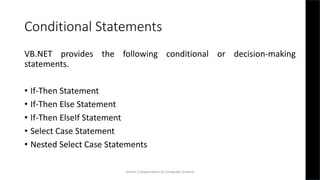
Conditional Statements
VB.NET provides the following conditional or decision-making
statements.
• If-Then Statement
• If-Then Else Statement
• If-Then ElseIf Statement
• Select Case Statement
• Nested Select Case Statements
Simmi S,Department of Computer Science
If-Then Statement
• The If-Then Statement is a control statement that defines one or
more conditions, and if the particular condition is satisfied, it
executes a piece of information or statements.
If condition Then
[Statement or block of Statement]
End If
Simmi S,Department of Computer Science
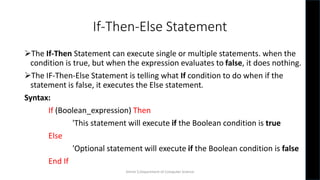
If-Then-Else Statement
The If-Then Statement can execute single or multiple statements. when the
condition is true, but when the expression evaluates to false, it does nothing.
The IF-Then-Else Statement is telling what If condition to do when if the
statement is false, it executes the Else statement.
Syntax:
If (Boolean_expression) Then
'This statement will execute if the Boolean condition is true
Else
'Optional statement will execute if the Boolean condition is false
End If
Simmi S,Department of Computer Science
If-Then-ElseIf statement
The If-Then-ElseIf Statement provides a choice to execute only one
condition or statement from multiple statements.
Execution starts from the top to bottom, and it checked for each If
condition.
 And if the condition is met, the block of If the statement is executed.
And if none of the conditions are true, the last block is executed
Simmi S,Department of Computer Science
If-Then-ElseIf statement
Syntax:
If (condition 1) Then
' Executes when condition 1 is true
ElseIf ( condition 2) Then
' Executes when condition 2 is true
ElseIf ( boolean_expression 3) Then
' Executes when the condition 3 is true
Else
' executes the default statement when none of the above conditions is true
End If
Simmi S,Department of Computer Science
If-Then Statement
Example:
Dim attendance As Integer
If attendance= 100 Then
Console.WriteLine(“100 % Attendance secured")
End If
Simmi S,Department of Computer Science
If-Then-Else Statement
Example
Dim a As integer=10
Dim b As Integer=20
If a > b Then
Console.WriteLine(" A is greater”)
Else
Console.WriteLine(" B is greater”)
End If
Simmi S,Department of Computer Science
If-Then-ElseIf statement
Example:
If mark = 90 Then
Console.WriteLine(" Mark is 90")
ElseIf mark < 50 Then
Console.WriteLine(" Below 50% only")
ElseIf mark<30 Then
Console.WriteLine(" Just Pass")
Else
'if none of the above condition is satisfied, print the following statement
Console.WriteLine(" Failed")
End If Simmi S,Department of Computer Science
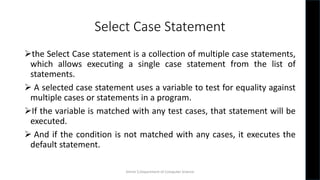
Select Case Statement
the Select Case statement is a collection of multiple case statements,
which allows executing a single case statement from the list of
statements.
 A selected case statement uses a variable to test for equality against
multiple cases or statements in a program.
If the variable is matched with any test cases, that statement will be
executed.
 And if the condition is not matched with any cases, it executes the
default statement.
Simmi S,Department of Computer Science
Select Case Statement
Syntax:
Select Case [variable or expression]
Case value1 'defines the item or value that you want to match.
//define a statement to execute
Case value2 'defines the item or value that you want to match.
// Define a statement to execute
Case Else
// Define the default statement if none of the conditions is true.
End Select
Simmi S,Department of Computer Science
Dim Days As String
Days = "Thurs"
Select Case Days
Case "Mon"
Console.WriteLine(" Today is Monday")
Case "Tue"
Console.WriteLine(" Today is Tuesday")
Case "Wed"
Console.WriteLine("Today is Wednesday")
Case "Thurs"
Console.WriteLine("Today is Thursday")
Case "Fri"
Console.WriteLine("Today is Friday")
Case "Sat"
Console.WriteLine("Today is Saturday")
Case "Sun"
Console.WriteLine("Today is Sunday")
Case Else
Console.WriteLine(" You have typed Something wrong")
End Select
Select Case Statement
Simmi S,Department of Computer Science
VB.NET Loop
• A Loop is used to repeat the same process multiple times until it
meets the specified condition in a program. By using a loop in a
program, a programmer can repeat any number of statements up to
the desired number of repetitions.
Advantages of VB.NET loop
• It provides code iteration functionality in a program.
• It executes the statement until the specified condition is true.
• It helps in reducing the size of the code.
• It reduces compile time.
Simmi S,Department of Computer Science
Types of Loops
There are five types of loops available in VB.NET:
• Do While Loop
• For Next Loop
• For Each Loop
• While End Loop
• With End Loop
Simmi S,Department of Computer Science
Do Loop
In VB.NET, Do While loop is used to execute blocks of statements in the
program, as long as the condition remains true
Do [ { While | Until } condition ]
[ statements ]
Loop
' -or-
Do
[ statements ]
Loop [ { While | Until } condition ]
Simmi S,Department of Computer Science
Do
[ Statements to be executed]
Loop While Boolean_expression
or
Do
[Statement to be executed]
Loop Until Boolean_expression
Simmi S,Department of Computer Science
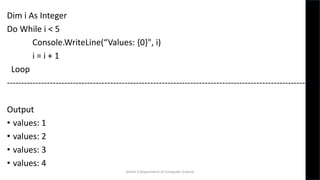
Dim i As Integer
Do While i < 5
Console.WriteLine(“Values: {0}", i)
i = i + 1
Loop
----------------------------------------------------------------------------------------------------------
Output
• values: 1
• values: 2
• values: 3
• values: 4
Simmi S,Department of Computer Science
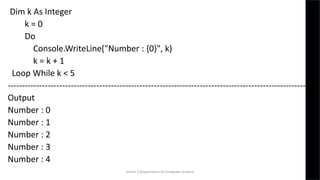
Dim k As Integer
k = 0
Do
Console.WriteLine("Number : {0}", k)
k = k + 1
Loop While k < 5
--------------------------------------------------------------------------------------------------------
Output
Number : 0
Number : 1
Number : 2
Number : 3
Number : 4
Simmi S,Department of Computer Science
For Next Loop
• A For Next loop is used to repeatedly execute a sequence of code or a
block of code until a given condition is satisfied. A For loop is useful in
such a case when we know how many times a block of code has to be
executed.
• Syntax
For variable_name As [ DataType ] = start To end [ Step step ]
[ Statements to be executed ]
Next
Simmi S,Department of Computer Science
For Next Loop
• For: It is the keyword that is present at the beginning of the definition.
• variable_name: It is a variable name, which is required in the For loop
Statement..
• [Data Type]: It represents the Data Type of the variable_name.
• start To end: The start and end are the two important parameters
representing the initial and final values of the variable_name..
• Step: A step parameter is used to determine by which the counter value of a
variable is increased or decreased after each iteration in a program. If the
counter value is not specified; It uses 1 as the default value.
• Statements: A statement can be a single statement or group of statements
that execute during the completion of each iteration in a loop.
• Next: In VB.NET a Next is a keyword that represents the end of the For loop's
Simmi S,Department of Computer Science
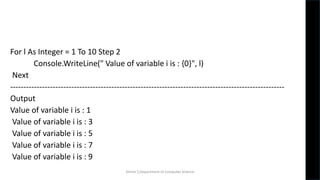
For l As Integer = 1 To 10 Step 2
Console.WriteLine(" Value of variable i is : {0}", l)
Next
-------------------------------------------------------------------------------------------------------
Output
Value of variable i is : 1
Value of variable i is : 3
Value of variable i is : 5
Value of variable i is : 7
Value of variable i is : 9
Simmi S,Department of Computer Science
For Each Loop
In the VB.NET, For Each loop is used to iterate block of statements in an array
or collection objects. Using For Each loop, we can easily work with collection
objects such as lists, arrays, etc., to execute each element of an array or in a
collection.
For Each var_name As [ DataType ] In Collection_Object
[ Statements to be executed]
Next
Simmi S,Department of Computer Science
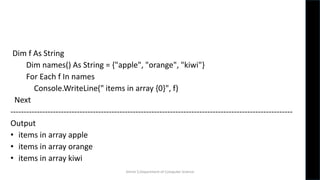
Dim f As String
Dim names() As String = {"apple", "orange", "kiwi"}
For Each f In names
Console.WriteLine(" items in array {0}", f)
Next
----------------------------------------------------------------------------------------------------------
Output
• items in array apple
• items in array orange
• items in array kiwi
Simmi S,Department of Computer Science
For Each a In An_array
Console.WriteLine(" Value of a is {0}", a)
Next
--------------------------------------------------------------------------------------------
Output
• Value of a is 1
• Value of a is 2
• Value of a is 3
• Value of a is 4
• Value of a is 5
Simmi S,Department of Computer Science
THANK YOU
Simmi S,Department of Computer Science

Conditional Statements & Loops

  • 1.
    Conditional Statements &Loops 21BCA2T332:Visual Programming SIMMI S Assistant Professor Department Of Computer Science(UG) Kristu Jayanti College, Autonomous
  • 2.
    Statements in VisualBasic A statement in Visual Basic is a complete instruction. It can contain keywords, operators, variables, constants, and expressions. Each statement belongs to one of the following categories: • Declaration Statements • Executable Statements • Assignment Statements: Simmi S,Department of Computer Science
  • 3.
    Declaration statements We usedeclaration statements to name and define procedures, variables, properties, arrays, and constants. Dim number As Integer Simmi S,Department of Computer Science
  • 4.
    Executable statements An executablestatement performs an action. It can call a procedure, branch to another place in the code, loop through several statements, or evaluate an expression. If (a < 50) Then ' if condition is true then print the following ‘ Console.WriteLine("a is less than 20") End If Simmi S,Department of Computer Science
  • 5.
    Assignment statements • Assignmentstatements carry out assignment operations, which consist of taking the value on the right side of the assignment operator (=) and storing it in the element on the left Dim number As Integer number=100 Simmi S,Department of Computer Science
  • 6.
    VISUAL BASIC CONDITIONALSTATEMENTS  Conditional statements(Control Statements) in Visual Basic can be used to take decisions based on certain conditions in your program. We can define more than one condition to be evaluated by the program with statements. If the defined condition is true, the statement or block executes according to the condition, and if the condition is false, another statement is executed. Simmi S,Department of Computer Science
  • 7.
    Conditional Statements VB.NET providesthe following conditional or decision-making statements. • If-Then Statement • If-Then Else Statement • If-Then ElseIf Statement • Select Case Statement • Nested Select Case Statements Simmi S,Department of Computer Science
  • 8.
    If-Then Statement • TheIf-Then Statement is a control statement that defines one or more conditions, and if the particular condition is satisfied, it executes a piece of information or statements. If condition Then [Statement or block of Statement] End If Simmi S,Department of Computer Science
  • 9.
    If-Then-Else Statement The If-ThenStatement can execute single or multiple statements. when the condition is true, but when the expression evaluates to false, it does nothing. The IF-Then-Else Statement is telling what If condition to do when if the statement is false, it executes the Else statement. Syntax: If (Boolean_expression) Then 'This statement will execute if the Boolean condition is true Else 'Optional statement will execute if the Boolean condition is false End If Simmi S,Department of Computer Science
  • 10.
    If-Then-ElseIf statement The If-Then-ElseIfStatement provides a choice to execute only one condition or statement from multiple statements. Execution starts from the top to bottom, and it checked for each If condition.  And if the condition is met, the block of If the statement is executed. And if none of the conditions are true, the last block is executed Simmi S,Department of Computer Science
  • 11.
    If-Then-ElseIf statement Syntax: If (condition1) Then ' Executes when condition 1 is true ElseIf ( condition 2) Then ' Executes when condition 2 is true ElseIf ( boolean_expression 3) Then ' Executes when the condition 3 is true Else ' executes the default statement when none of the above conditions is true End If Simmi S,Department of Computer Science
  • 12.
    If-Then Statement Example: Dim attendanceAs Integer If attendance= 100 Then Console.WriteLine(“100 % Attendance secured") End If Simmi S,Department of Computer Science
  • 13.
    If-Then-Else Statement Example Dim aAs integer=10 Dim b As Integer=20 If a > b Then Console.WriteLine(" A is greater”) Else Console.WriteLine(" B is greater”) End If Simmi S,Department of Computer Science
  • 14.
    If-Then-ElseIf statement Example: If mark= 90 Then Console.WriteLine(" Mark is 90") ElseIf mark < 50 Then Console.WriteLine(" Below 50% only") ElseIf mark<30 Then Console.WriteLine(" Just Pass") Else 'if none of the above condition is satisfied, print the following statement Console.WriteLine(" Failed") End If Simmi S,Department of Computer Science
  • 15.
    Select Case Statement theSelect Case statement is a collection of multiple case statements, which allows executing a single case statement from the list of statements.  A selected case statement uses a variable to test for equality against multiple cases or statements in a program. If the variable is matched with any test cases, that statement will be executed.  And if the condition is not matched with any cases, it executes the default statement. Simmi S,Department of Computer Science
  • 16.
    Select Case Statement Syntax: SelectCase [variable or expression] Case value1 'defines the item or value that you want to match. //define a statement to execute Case value2 'defines the item or value that you want to match. // Define a statement to execute Case Else // Define the default statement if none of the conditions is true. End Select Simmi S,Department of Computer Science
  • 17.
    Dim Days AsString Days = "Thurs" Select Case Days Case "Mon" Console.WriteLine(" Today is Monday") Case "Tue" Console.WriteLine(" Today is Tuesday") Case "Wed" Console.WriteLine("Today is Wednesday") Case "Thurs" Console.WriteLine("Today is Thursday") Case "Fri" Console.WriteLine("Today is Friday") Case "Sat" Console.WriteLine("Today is Saturday") Case "Sun" Console.WriteLine("Today is Sunday") Case Else Console.WriteLine(" You have typed Something wrong") End Select Select Case Statement Simmi S,Department of Computer Science
  • 18.
    VB.NET Loop • ALoop is used to repeat the same process multiple times until it meets the specified condition in a program. By using a loop in a program, a programmer can repeat any number of statements up to the desired number of repetitions. Advantages of VB.NET loop • It provides code iteration functionality in a program. • It executes the statement until the specified condition is true. • It helps in reducing the size of the code. • It reduces compile time. Simmi S,Department of Computer Science
  • 19.
    Types of Loops Thereare five types of loops available in VB.NET: • Do While Loop • For Next Loop • For Each Loop • While End Loop • With End Loop Simmi S,Department of Computer Science
  • 20.
    Do Loop In VB.NET,Do While loop is used to execute blocks of statements in the program, as long as the condition remains true Do [ { While | Until } condition ] [ statements ] Loop ' -or- Do [ statements ] Loop [ { While | Until } condition ] Simmi S,Department of Computer Science
  • 21.
    Do [ Statements tobe executed] Loop While Boolean_expression or Do [Statement to be executed] Loop Until Boolean_expression Simmi S,Department of Computer Science
  • 22.
    Dim i AsInteger Do While i < 5 Console.WriteLine(“Values: {0}", i) i = i + 1 Loop ---------------------------------------------------------------------------------------------------------- Output • values: 1 • values: 2 • values: 3 • values: 4 Simmi S,Department of Computer Science
  • 23.
    Dim k AsInteger k = 0 Do Console.WriteLine("Number : {0}", k) k = k + 1 Loop While k < 5 -------------------------------------------------------------------------------------------------------- Output Number : 0 Number : 1 Number : 2 Number : 3 Number : 4 Simmi S,Department of Computer Science
  • 24.
    For Next Loop •A For Next loop is used to repeatedly execute a sequence of code or a block of code until a given condition is satisfied. A For loop is useful in such a case when we know how many times a block of code has to be executed. • Syntax For variable_name As [ DataType ] = start To end [ Step step ] [ Statements to be executed ] Next Simmi S,Department of Computer Science
  • 25.
    For Next Loop •For: It is the keyword that is present at the beginning of the definition. • variable_name: It is a variable name, which is required in the For loop Statement.. • [Data Type]: It represents the Data Type of the variable_name. • start To end: The start and end are the two important parameters representing the initial and final values of the variable_name.. • Step: A step parameter is used to determine by which the counter value of a variable is increased or decreased after each iteration in a program. If the counter value is not specified; It uses 1 as the default value. • Statements: A statement can be a single statement or group of statements that execute during the completion of each iteration in a loop. • Next: In VB.NET a Next is a keyword that represents the end of the For loop's Simmi S,Department of Computer Science
  • 26.
    For l AsInteger = 1 To 10 Step 2 Console.WriteLine(" Value of variable i is : {0}", l) Next ------------------------------------------------------------------------------------------------------- Output Value of variable i is : 1 Value of variable i is : 3 Value of variable i is : 5 Value of variable i is : 7 Value of variable i is : 9 Simmi S,Department of Computer Science
  • 27.
    For Each Loop Inthe VB.NET, For Each loop is used to iterate block of statements in an array or collection objects. Using For Each loop, we can easily work with collection objects such as lists, arrays, etc., to execute each element of an array or in a collection. For Each var_name As [ DataType ] In Collection_Object [ Statements to be executed] Next Simmi S,Department of Computer Science
  • 28.
    Dim f AsString Dim names() As String = {"apple", "orange", "kiwi"} For Each f In names Console.WriteLine(" items in array {0}", f) Next ---------------------------------------------------------------------------------------------------------- Output • items in array apple • items in array orange • items in array kiwi Simmi S,Department of Computer Science
  • 29.
    For Each aIn An_array Console.WriteLine(" Value of a is {0}", a) Next -------------------------------------------------------------------------------------------- Output • Value of a is 1 • Value of a is 2 • Value of a is 3 • Value of a is 4 • Value of a is 5 Simmi S,Department of Computer Science
  • 30.
    THANK YOU Simmi S,Departmentof Computer Science