VISUAL BASIC
Decision Making Statements

                             By Pragya Ratan Sagar
1


Introduction
All comparison operators produce true or false results. In other
words, the comparison is either true or the comparison is false. The
mathematical operators produce numeric values, whereas the
comparison operators produce only true or false values. The rest of
the program can use the true or false comparison operator result to
make decisions. Comparison operators are operators that compare
data values against each other and produce true or false results.
2


Decision Making Statements
Decision Making Statements are of Two types:

 The IF Statement
If performs one of two possible code actions, depending on the
result of the comparison.

 Select Case statement
Select case mainly used for multiple conditional statements or
If we have a lot of conditional statements then we use Select
Case Statement
3


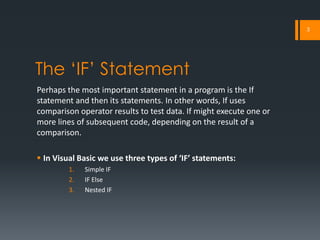
The ‘IF’ Statement
Perhaps the most important statement in a program is the If
statement and then its statements. In other words, If uses
comparison operator results to test data. If might execute one or
more lines of subsequent code, depending on the result of a
comparison.

 In Visual Basic we use three types of ‘IF’ statements:
         1.   Simple IF
         2.   IF Else
         3.   Nested IF
4

Syntax of ‘IF’ statement in
visual basic
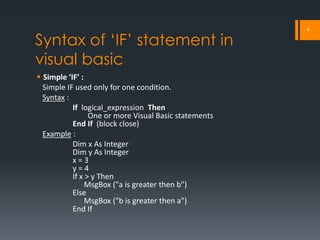
 Simple ‘IF’ :
  Simple IF used only for one condition.
  Syntax :
           If logical_expression Then
                 One or more Visual Basic statements
           End If (block close)
  Example :
           Dim x As Integer
           Dim y As Integer
           x=3
           y=4
           If x > y Then
                MsgBox ("a is greater then b")
           Else
                MsgBox ("b is greater then a")
           End If
5


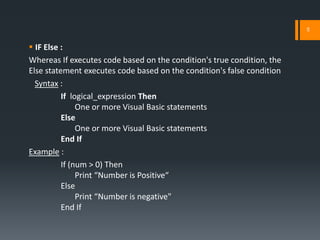
 IF Else :
Whereas If executes code based on the condition's true condition, the
Else statement executes code based on the condition's false condition
  Syntax :
          If logical_expression Then
               One or more Visual Basic statements
          Else
               One or more Visual Basic statements
          End If
Example :
          If (num > 0) Then
               Print “Number is Positive“
          Else
               Print “Number is negative"
          End If
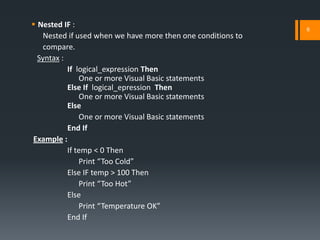
 Nested IF :                                                 6
    Nested if used when we have more then one conditions to
    compare.
  Syntax :
           If logical_expression Then
               One or more Visual Basic statements
           Else If logical_epression Then
               One or more Visual Basic statements
           Else
               One or more Visual Basic statements
           End If
Example :
           If temp < 0 Then
               Print “Too Cold”
           Else IF temp > 100 Then
               Print “Too Hot”
           Else
               Print “Temperature OK”
           End If
7


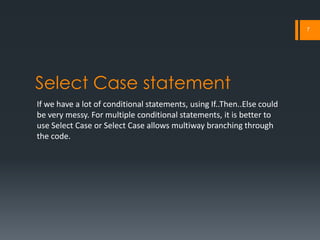
Select Case statement
If we have a lot of conditional statements, using If..Then..Else could
be very messy. For multiple conditional statements, it is better to
use Select Case or Select Case allows multiway branching through
the code.
8


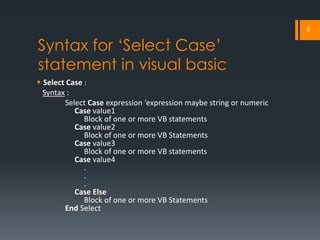
Syntax for ‘Select Case’
statement in visual basic
 Select Case :
  Syntax :
        Select Case expression ‘expression maybe string or numeric
           Case value1
              Block of one or more VB statements
           Case value2
              Block of one or more VB Statements
           Case value3
              Block of one or more VB statements
           Case value4
              .
              .
              .
           Case Else
              Block of one or more VB Statements
        End Select
9


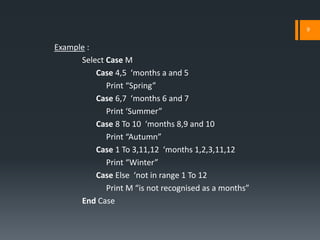
Example :
      Select Case M
          Case 4,5 ‘months a and 5
             Print “Spring”
          Case 6,7 ‘months 6 and 7
             Print ‘Summer”
          Case 8 To 10 ‘months 8,9 and 10
             Print “Autumn”
          Case 1 To 3,11,12 ‘months 1,2,3,11,12
             Print “Winter”
          Case Else ‘not in range 1 To 12
             Print M “is not recognised as a months”
      End Case
VISUAL BASIC
Decision Making Statements
             By
      Pragya Ratan Sagar

Vb decision making statements

  • 1.
    VISUAL BASIC Decision MakingStatements By Pragya Ratan Sagar
  • 2.
    1 Introduction All comparison operatorsproduce true or false results. In other words, the comparison is either true or the comparison is false. The mathematical operators produce numeric values, whereas the comparison operators produce only true or false values. The rest of the program can use the true or false comparison operator result to make decisions. Comparison operators are operators that compare data values against each other and produce true or false results.
  • 3.
    2 Decision Making Statements DecisionMaking Statements are of Two types:  The IF Statement If performs one of two possible code actions, depending on the result of the comparison.  Select Case statement Select case mainly used for multiple conditional statements or If we have a lot of conditional statements then we use Select Case Statement
  • 4.
    3 The ‘IF’ Statement Perhapsthe most important statement in a program is the If statement and then its statements. In other words, If uses comparison operator results to test data. If might execute one or more lines of subsequent code, depending on the result of a comparison.  In Visual Basic we use three types of ‘IF’ statements: 1. Simple IF 2. IF Else 3. Nested IF
  • 5.
    4 Syntax of ‘IF’statement in visual basic  Simple ‘IF’ : Simple IF used only for one condition. Syntax : If logical_expression Then One or more Visual Basic statements End If (block close) Example : Dim x As Integer Dim y As Integer x=3 y=4 If x > y Then MsgBox ("a is greater then b") Else MsgBox ("b is greater then a") End If
  • 6.
    5  IF Else: Whereas If executes code based on the condition's true condition, the Else statement executes code based on the condition's false condition Syntax : If logical_expression Then One or more Visual Basic statements Else One or more Visual Basic statements End If Example : If (num > 0) Then Print “Number is Positive“ Else Print “Number is negative" End If
  • 7.
     Nested IF: 6 Nested if used when we have more then one conditions to compare. Syntax : If logical_expression Then One or more Visual Basic statements Else If logical_epression Then One or more Visual Basic statements Else One or more Visual Basic statements End If Example : If temp < 0 Then Print “Too Cold” Else IF temp > 100 Then Print “Too Hot” Else Print “Temperature OK” End If
  • 8.
    7 Select Case statement Ifwe have a lot of conditional statements, using If..Then..Else could be very messy. For multiple conditional statements, it is better to use Select Case or Select Case allows multiway branching through the code.
  • 9.
    8 Syntax for ‘SelectCase’ statement in visual basic  Select Case : Syntax : Select Case expression ‘expression maybe string or numeric Case value1 Block of one or more VB statements Case value2 Block of one or more VB Statements Case value3 Block of one or more VB statements Case value4 . . . Case Else Block of one or more VB Statements End Select
  • 10.
    9 Example : Select Case M Case 4,5 ‘months a and 5 Print “Spring” Case 6,7 ‘months 6 and 7 Print ‘Summer” Case 8 To 10 ‘months 8,9 and 10 Print “Autumn” Case 1 To 3,11,12 ‘months 1,2,3,11,12 Print “Winter” Case Else ‘not in range 1 To 12 Print M “is not recognised as a months” End Case
  • 11.
    VISUAL BASIC Decision MakingStatements By Pragya Ratan Sagar