Program Preparation
• Problem Identification stage.
a) Defining the problem.
b) Analyzing the problem.
• Planning stage.
a) Developing the algorithm.
b) Flow charting.
c) Writing Pseudo code.
Cont..
 Coding and Testing stage.
a) Writing the program.
b) Testing and Debugging the program.
c) Running the program.
• Implementing and Documenting stage.
a) Implementing the program.
b) Documenting the program.
Developing the Algorithm
 Algorithm is a step-by-step procedure developed to
solve a problem before writing an actual program.
 Algorithm is a complete procedure or plan that
describes the logic of a program.
Flow Charting
 The pictorial form is referred as a flow chart, which is a
pictorial representation of an algorithm.
 The written form of the algorithm (not in computer
language) is called pseudo code. Pseudo code
expresses the basic logic structure of an algorithm in a
systematic and clear way.
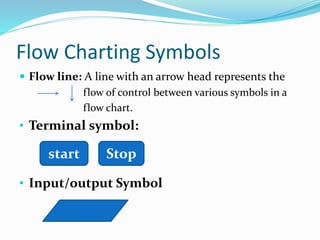
Flow Charting Symbols
 Flow line: A line with an arrow head represents the
flow of control between various symbols in a
flow chart.
• Terminal symbol:
• Input/output Symbol
start Stop
Cont..
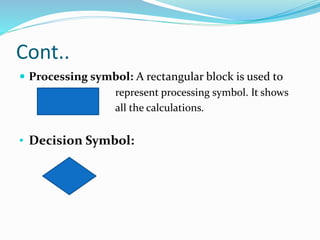
 Processing symbol: A rectangular block is used to
represent processing symbol. It shows
all the calculations.
• Decision Symbol:
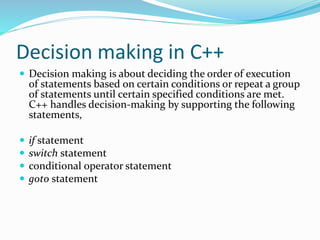
Decision making in C++
 Decision making is about deciding the order of execution
of statements based on certain conditions or repeat a group
of statements until certain specified conditions are met.
C++ handles decision-making by supporting the following
statements,
 if statement
 switch statement
 conditional operator statement
 goto statement
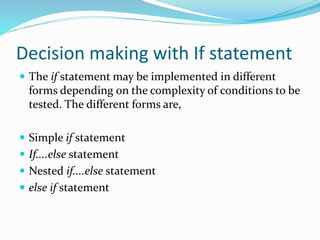
Decision making with If statement
 The if statement may be implemented in different
forms depending on the complexity of conditions to be
tested. The different forms are,
 Simple if statement
 If....else statement
 Nested if....else statement
 else if statement
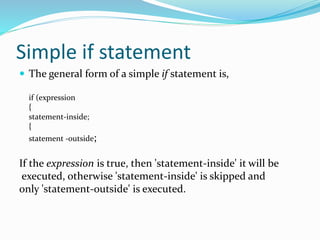
Simple if statement
 The general form of a simple if statement is,
if (expression
{
statement-inside;
{
statement -outside;
If the expression is true, then 'statement-inside' it will be
executed, otherwise 'statement-inside' is skipped and
only 'statement-outside' is executed.
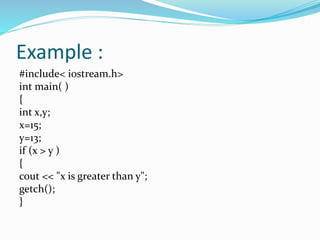
Example :
#include< iostream.h>
int main( )
{
int x,y;
x=15;
y=13;
if (x > y )
{
cout << "x is greater than y";
getch();
}
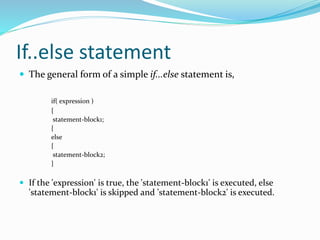
If..else statement
 The general form of a simple if...else statement is,
if( expression )
{
statement-block1;
{
else
{
statement-block2;
}
 If the 'expression' is true, the 'statement-block1' is executed, else
'statement-block1' is skipped and 'statement-block2' is executed.
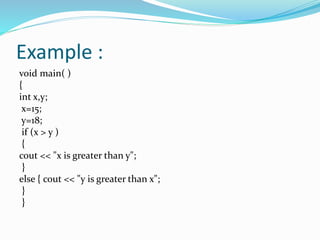
Example :
void main( )
{
int x,y;
x=15;
y=18;
if (x > y )
{
cout << "x is greater than y";
}
else { cout << "y is greater than x";
}
}
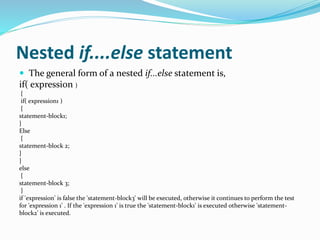
Nested if....else statement
 The general form of a nested if...else statement is,
if( expression )
{
if( expression1 )
{
statement-block1;
}
Else
{
statement-block 2;
}
}
else
{
statement-block 3;
}
if 'expression' is false the 'statement-block3' will be executed, otherwise it continues to perform the test
for 'expression 1' . If the 'expression 1' is true the 'statement-block1' is executed otherwise 'statement-
block2' is executed.
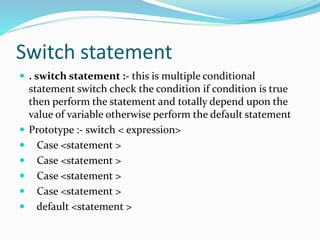
Switch statement
 . switch statement :- this is multiple conditional
statement switch check the condition if condition is true
then perform the statement and totally depend upon the
value of variable otherwise perform the default statement
 Prototype :- switch < expression>
 Case <statement >
 Case <statement >
 Case <statement >
 Case <statement >
 default <statement >
OPERATORS USE IN C++
PROGRAMMING
 There are many operators used in c language
Arithmetic or Mathematical Operators
Relational Operators
Logical Operators
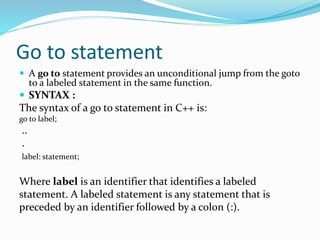
Go to statement
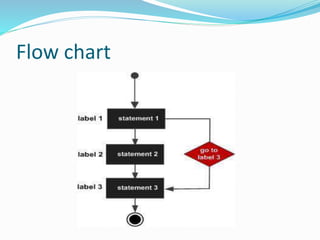
 A go to statement provides an unconditional jump from the goto
to a labeled statement in the same function.
 SYNTAX :
The syntax of a go to statement in C++ is:
go to label;
..
.
label: statement;
Where label is an identifier that identifies a labeled
statement. A labeled statement is any statement that is
preceded by an identifier followed by a colon (:).
Flow chart
Looping in C++
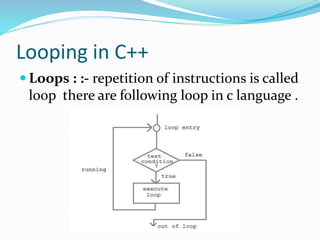
 Loops : :- repetition of instructions is called
loop there are following loop in c language .
How it works
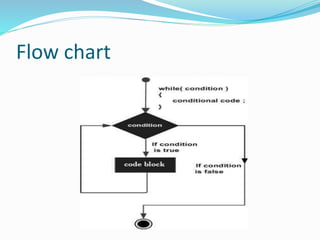
 A sequence of statement is executed until a specified
condition is true. This sequence of statement to be
executed is kept inside the curly braces { } known as
loop body. After every execution of loop body,
condition is checked, and if it is found to be true the
loop body is executed again. When condition check
comes out to be false, the loop body will not be
executed.
There are three types of loop in
C++
1. while loop
2. for loop
3. do-while loop
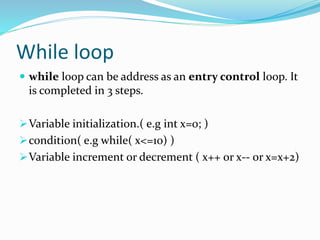
While loop
 while loop can be address as an entry control loop. It
is completed in 3 steps.
Variable initialization.( e.g int x=0; )
condition( e.g while( x<=10) )
Variable increment or decrement ( x++ or x-- or x=x+2)
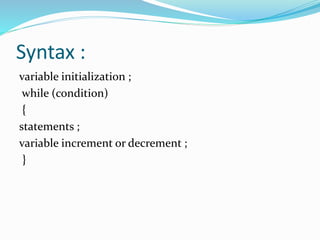
Syntax :
variable initialization ;
while (condition)
{
statements ;
variable increment or decrement ;
}
Flow chart
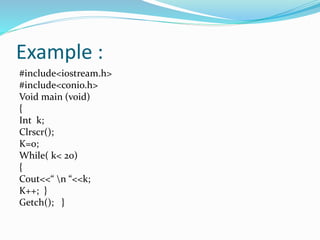
Example :
#include<iostream.h>
#include<conio.h>
Void main (void)
{
Int k;
Clrscr();
K=0;
While( k< 20)
{
Cout<<“ n “<<k;
K++; }
Getch(); }
For loop
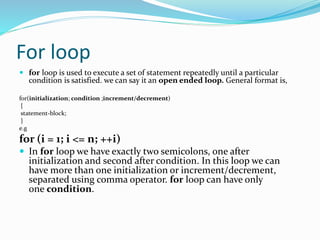
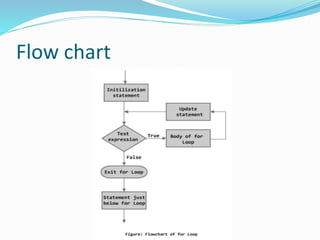
 for loop is used to execute a set of statement repeatedly until a particular
condition is satisfied. we can say it an open ended loop. General format is,
for(initialization; condition ;increment/decrement)
{
statement-block;
}
e.g
for (i = 1; i <= n; ++i)
 In for loop we have exactly two semicolons, one after
initialization and second after condition. In this loop we can
have more than one initialization or increment/decrement,
separated using comma operator. for loop can have only
one condition.
Flow chart
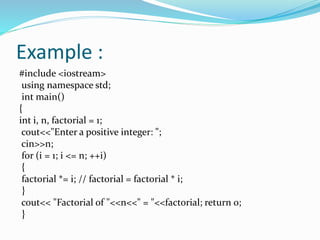
Example :
#include <iostream>
using namespace std;
int main()
{
int i, n, factorial = 1;
cout<<"Enter a positive integer: ";
cin>>n;
for (i = 1; i <= n; ++i)
{
factorial *= i; // factorial = factorial * i;
}
cout<< "Factorial of "<<n<<" = "<<factorial; return 0;
}
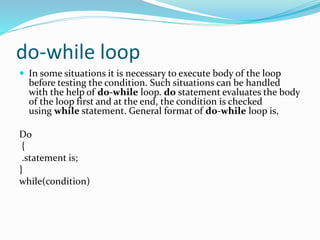
do-while loop
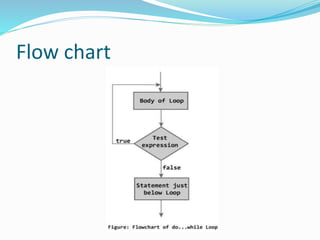
 In some situations it is necessary to execute body of the loop
before testing the condition. Such situations can be handled
with the help of do-while loop. do statement evaluates the body
of the loop first and at the end, the condition is checked
using while statement. General format of do-while loop is,
Do
{
.statement is;
}
while(condition)
Flow chart
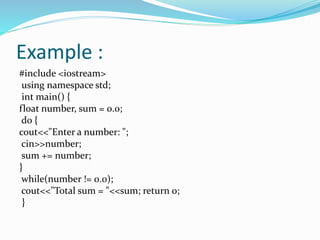
Example :
#include <iostream>
using namespace std;
int main() {
float number, sum = 0.0;
do {
cout<<"Enter a number: ";
cin>>number;
sum += number;
}
while(number != 0.0);
cout<<"Total sum = "<<sum; return 0;
}
C++ decision making
C++ decision making

C++ decision making

  • 4.
    Program Preparation • ProblemIdentification stage. a) Defining the problem. b) Analyzing the problem. • Planning stage. a) Developing the algorithm. b) Flow charting. c) Writing Pseudo code.
  • 5.
    Cont..  Coding andTesting stage. a) Writing the program. b) Testing and Debugging the program. c) Running the program. • Implementing and Documenting stage. a) Implementing the program. b) Documenting the program.
  • 6.
    Developing the Algorithm Algorithm is a step-by-step procedure developed to solve a problem before writing an actual program.  Algorithm is a complete procedure or plan that describes the logic of a program.
  • 7.
    Flow Charting  Thepictorial form is referred as a flow chart, which is a pictorial representation of an algorithm.  The written form of the algorithm (not in computer language) is called pseudo code. Pseudo code expresses the basic logic structure of an algorithm in a systematic and clear way.
  • 8.
    Flow Charting Symbols Flow line: A line with an arrow head represents the flow of control between various symbols in a flow chart. • Terminal symbol: • Input/output Symbol start Stop
  • 9.
    Cont..  Processing symbol:A rectangular block is used to represent processing symbol. It shows all the calculations. • Decision Symbol:
  • 10.
    Decision making inC++  Decision making is about deciding the order of execution of statements based on certain conditions or repeat a group of statements until certain specified conditions are met. C++ handles decision-making by supporting the following statements,  if statement  switch statement  conditional operator statement  goto statement
  • 11.
    Decision making withIf statement  The if statement may be implemented in different forms depending on the complexity of conditions to be tested. The different forms are,  Simple if statement  If....else statement  Nested if....else statement  else if statement
  • 12.
    Simple if statement The general form of a simple if statement is, if (expression { statement-inside; { statement -outside; If the expression is true, then 'statement-inside' it will be executed, otherwise 'statement-inside' is skipped and only 'statement-outside' is executed.
  • 13.
    Example : #include< iostream.h> intmain( ) { int x,y; x=15; y=13; if (x > y ) { cout << "x is greater than y"; getch(); }
  • 14.
    If..else statement  Thegeneral form of a simple if...else statement is, if( expression ) { statement-block1; { else { statement-block2; }  If the 'expression' is true, the 'statement-block1' is executed, else 'statement-block1' is skipped and 'statement-block2' is executed.
  • 15.
    Example : void main() { int x,y; x=15; y=18; if (x > y ) { cout << "x is greater than y"; } else { cout << "y is greater than x"; } }
  • 16.
    Nested if....else statement The general form of a nested if...else statement is, if( expression ) { if( expression1 ) { statement-block1; } Else { statement-block 2; } } else { statement-block 3; } if 'expression' is false the 'statement-block3' will be executed, otherwise it continues to perform the test for 'expression 1' . If the 'expression 1' is true the 'statement-block1' is executed otherwise 'statement- block2' is executed.
  • 17.
    Switch statement  .switch statement :- this is multiple conditional statement switch check the condition if condition is true then perform the statement and totally depend upon the value of variable otherwise perform the default statement  Prototype :- switch < expression>  Case <statement >  Case <statement >  Case <statement >  Case <statement >  default <statement >
  • 18.
    OPERATORS USE INC++ PROGRAMMING  There are many operators used in c language Arithmetic or Mathematical Operators Relational Operators Logical Operators
  • 19.
    Go to statement A go to statement provides an unconditional jump from the goto to a labeled statement in the same function.  SYNTAX : The syntax of a go to statement in C++ is: go to label; .. . label: statement; Where label is an identifier that identifies a labeled statement. A labeled statement is any statement that is preceded by an identifier followed by a colon (:).
  • 20.
  • 21.
    Looping in C++ Loops : :- repetition of instructions is called loop there are following loop in c language .
  • 22.
    How it works A sequence of statement is executed until a specified condition is true. This sequence of statement to be executed is kept inside the curly braces { } known as loop body. After every execution of loop body, condition is checked, and if it is found to be true the loop body is executed again. When condition check comes out to be false, the loop body will not be executed.
  • 23.
    There are threetypes of loop in C++ 1. while loop 2. for loop 3. do-while loop
  • 24.
    While loop  whileloop can be address as an entry control loop. It is completed in 3 steps. Variable initialization.( e.g int x=0; ) condition( e.g while( x<=10) ) Variable increment or decrement ( x++ or x-- or x=x+2)
  • 25.
    Syntax : variable initialization; while (condition) { statements ; variable increment or decrement ; }
  • 26.
  • 27.
    Example : #include<iostream.h> #include<conio.h> Void main(void) { Int k; Clrscr(); K=0; While( k< 20) { Cout<<“ n “<<k; K++; } Getch(); }
  • 28.
    For loop  forloop is used to execute a set of statement repeatedly until a particular condition is satisfied. we can say it an open ended loop. General format is, for(initialization; condition ;increment/decrement) { statement-block; } e.g for (i = 1; i <= n; ++i)  In for loop we have exactly two semicolons, one after initialization and second after condition. In this loop we can have more than one initialization or increment/decrement, separated using comma operator. for loop can have only one condition.
  • 29.
  • 30.
    Example : #include <iostream> usingnamespace std; int main() { int i, n, factorial = 1; cout<<"Enter a positive integer: "; cin>>n; for (i = 1; i <= n; ++i) { factorial *= i; // factorial = factorial * i; } cout<< "Factorial of "<<n<<" = "<<factorial; return 0; }
  • 31.
    do-while loop  Insome situations it is necessary to execute body of the loop before testing the condition. Such situations can be handled with the help of do-while loop. do statement evaluates the body of the loop first and at the end, the condition is checked using while statement. General format of do-while loop is, Do { .statement is; } while(condition)
  • 32.
  • 33.
    Example : #include <iostream> usingnamespace std; int main() { float number, sum = 0.0; do { cout<<"Enter a number: "; cin>>number; sum += number; } while(number != 0.0); cout<<"Total sum = "<<sum; return 0; }

Editor's Notes

  • #6 The key to good programming is Planning.By spending more time in the planning phase,it is normally possible to save time in writing,testing and implementing a program.In many cases better planning can reduce total programming time and cost.
  • #14 Output : x is greater than y Output : x is greater than y Output : x is greater than y Output : x is greater than y
  • #16 Output: y is greater than x
  • #31 Output :Enter a positive integer: 5 Factorial of 5 = 120
  • #34 Output :Enter a number: 4.5 Enter a number: 2.34 Enter a number: 5.63 Enter a number: 6.34 Enter a number: 4.53 Enter a number: 5 Enter a number: 0 Total sum = 28.34