   Universal Design for Learning (UDL) ―is a set
    of principles for curriculum development
    that give all individuals equal opportunities
    to learn‖ (Rose & Meyer, 2002).

   ―UDL provides a blueprint for creating
    instructional goals, methods, materials, and
    assessments that work for everyone—not a
    single, one-size-fits-all solution but rather
    flexible approaches that can be
    customized and adjusted for individual
    needs (Rose & Meyer, 2002).
   UDL was designed to
    ―anticipate the needs of
    individuals with disabilities
    and accommodate these
    needs from the onset‖
    (Hall, Strangman, &
    Meyer, 2003).

   Example: A curb, with a
    ramp, serve for those in
    wheelchairs, however they
    also benefit those with
    strollers, young
    children, bicyclists, runners,
    and even a walker. ―And
    so, the process of designing
    for individuals with
    disabilities has led to
    improved usability for
Handle bars in bathrooms

Alternative to Stairs                              Automatic Doors
Retrieved from http://www.classroom-aid.com/blog/bid/64103/Digital-Learning-should-be-Personalized-Learning
http://www.youtube.com/watch?v=pGLTJw0GSx
  k&feature=player_embedded

National Center on UDL Director David Rose
 explains how UDL helps meet the most pressing
 issues facing educators today. Drawing on
 brain research and the latest learning
 sciences, Dr. Rose describes the three UDL
 principles and what they mean for classroom
 practice.
Digital Books


                Interactive
                Whiteboards


        Colored Overlays
        to highlight text


 Computers
Text-to-speech
                                Software (Kurzweil)


Concept maps
(Inspiration or Kidspiration)


                         Cooperative Learning
                         Groups
Games


                Working with Peers


Songs
Technology plays an important role when
  developing and executing UDL.
  Technology individualizes teaching
  methods and allows teachers to
  accommodate diverse learners. The
  technology can be separated into two
  categories, assistive/ adaptive
  technology and supportive technology
  (Bray, Brown, & Green, 2004).
 Hearing Aids
 Visual Aids (Screen magnifiers, Braille
  note-taking devices)
 Voice-recognition software
 Adapted learning tools, such as a
  modified keyboard
 Translation Software (text-to-
  speech, language translation)
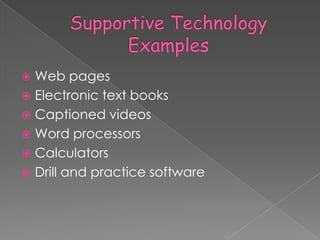
 Web pages
 Electronic text books
 Captioned videos
 Word processors
 Calculators
 Drill and practice software
Lakelands Park Middle School is part of a pilot
  project ―to develop models for school-level
  implementation of Universal Design for
  Learning funded through the American
  Recovery and Reinvestment Act (AARA)‖
  (MCPS, 2012).

Click below to view video examples of UDL
  practices in the middle school classroom.

http://www.montgomeryschoolsmd.org/depa
  rtments/hiat/udl/video/list.shtm
By implementing UDL within our own walls, we are able
   to adapt lessons, instruction, and assessments to
   meet the needs of all learners. Although special
   education students and English Language Learners
   would greatly benefit from UDL, as would our
   accelerated students and average students.
   Students would have more choice and interactions
   within their own learning. ―Each learning experience
   would directly effect the three learning
   networks, increasing understanding of how students
   learn, and how they prefer to learn, the use of
   multiple strategies to solve problems, demonstrate
   knowledge, or accomplish goals, as well as
   motivation in the classroom as a result of choices in
   student learning‖ (Universal-Design-4-Learning, 2012).
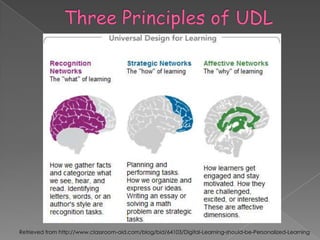
Within the large network of the brain are many smaller networks.
   Three primary networks are recognition, strategic, and affective
   networks.

Recognition Network: ―are specialized to sense and assign
   meaning to pattern we see; they enable us to identify and
   understand information, ideas, and concepts‖ (Rose &
   Meyer, 2002).

Strategic Network: ―are specialized to generate and oversee
    mental and motor patters. They enable us to plan, execute and
    monitor actions and skills‖ (Rose & Meyer, 2002).

Affective Network: ―are specialized to evaluate patterns and assign
   them emotional significance they enable us to engage with
   tasks and learning and with the world around us‖ (Rose &
   Meyer, 2002).
   An example CAST uses is an activity
    many of us have participated in
    multiple times, signing a birthday card.
    The recognition network allows us to
    identify a birthday card, pen, our
    hands to write and our signature. The
    strategic network sets the goal of
    signing the birthday card, forms a plan
    of picking up the pen and moving it to
    create a signature, and make
    corrections, such as making letters
    smaller to fit the words in a certain
    space. Finally, affective networks
    connect our feelings to our
    friend, motivates us to sign and stay on
    task. (Rose & Meyer, 2002).
Network-Appropriate Teaching Methods
   In order to
    accommodate       To support diverse recognition networks:
    all diverse       • Provide multiple examples
    learners, we      • Highlight critical features
    must use a        • Provide multiple media and formats
                      • Support background context
    variety of
    teaching          To support diverse strategic networks:
    strategies for    • Provide flexible models of skilled performance
    each of the       • Provide opportunities to practice with supports
    brain networks.   • Offer flexible opportunities for demonstrating skill

                      To support diverse affective networks:
                      • Offer choices of content and tools
                      • Offer adjustable levels of challenge
                      • Offer choices of rewards
                      • Offer choices of learning context (Rose &
   Image Collector: ―This Image Finder and
    Image Describer tutorials teach you how to
    find images and create educationally
    meaningful text descriptions to make
    images accessible and useful to all of your
    students. The Image Collector tool helps
    you find, describe and save images to use
    in your classroom‖ (Rose & Meyer, 2002).
    › This can be extremely helpful within my own
      classroom due to the diverse needs. Many of
      my students are special education students and
      English as a second language students.
      Therefore, by incorporating images and pictures
      to lessons, the students are able to make further
      connections and understandings.
   TES Journal: ―…Online journal to record your
    ideas, insights, reflections and thoughts‖ (Rose and
    Meyer, 2002).

    › It is important for every educator to reflect on how the
      lesson went. It is important to acknowledge what went
      well and what adjustments need to be made.
      Reflection allows us to be better educators. When we
      reflect, we make adjustments to ensure all students are
      able to be successful. By using this journal, we are able
      to reflect, and review our reflections because they are
      kept online. Also, we are able to record any ideas or
      insights we may have. Often times we think of
      something and do not record the thought, then
      forgetting our ideas. By using this journal, we are able to
      record our thoughts and have them in one area. We
      are then able to implement these newly thought ideas
      within our lessons and ultimately reflect on how the
   UDL Goal Setter: ―The UDL Goal Setter helps
    you define clear goals for your class that
    represent the core instructional purpose of
    the learning activity and support multiple
    pathways for achieving the goal‖ (Rose &
    Meyer, 2002).
    › Goals are very important to set as an educator.
      Not only is it important for you to know your
      goals, but also the students. Everyone within the
      lesson should know the desired outcome of the
      lesson. Also, as you set the goals, it is important
      to refer back to the goals throughout the lesson.
      As everyone is made aware of the overall
      goal, a self-check can be done to monitor
      progress.
   Bray, M., Brown, A., & Green, T. (2004). Technology and the diverse learner: A guide to
    classroom practice. Thousand Oaks, CA: Corwin Press.

   CAST, Inc. (2002–2011). Teaching every student: Tools and activities. Retrieved from
    http://www.cast.org/teachingeverystudent/tools/

   Hall, T., Strangman, N., & Meyer, A. (2003). Differentiated instruction and implications for
    UDL implementation. Wakefield, MA: National Center on Accessing the General
    Curriculum. Retrieved March 25, 2012 from
    http://aim.cast.org/learn/historyarchive/backgroundpapers/differentiated_instruction_u
    dl

   MCPS. (2012). Video examples of UDL Practices in the middle school classroom.
    Retrieved March 25, 2012, from
    http://www.montgomeryschoolsmd.org/departments/hiat/udl/video/list.shtm

   Rose, D. (2010). UDL: Principles and practice. UDL Center. Retrieved on
    March, 25, 2012. Retrieved from
    http://www.youtube.com/watch?v=pGLTJw0GSxk&feature=player_embedded

   Rose, D., & Meyer, A. (2002). Teaching every student in the digital age: Universal design
    for learning. Retrieved from http://www.cast.org/teachingeverystudent/ideas/tes/

   Universal-Design-4-Learning. 2012. Impact of UDL. Retrieved March 25, 2012. Retrieved
    from http://universal-design-4-learning.wikispaces.com/Impact+of+UDL

App4 martinl

  • 3.
    Universal Design for Learning (UDL) ―is a set of principles for curriculum development that give all individuals equal opportunities to learn‖ (Rose & Meyer, 2002).  ―UDL provides a blueprint for creating instructional goals, methods, materials, and assessments that work for everyone—not a single, one-size-fits-all solution but rather flexible approaches that can be customized and adjusted for individual needs (Rose & Meyer, 2002).
  • 4.
    UDL was designed to ―anticipate the needs of individuals with disabilities and accommodate these needs from the onset‖ (Hall, Strangman, & Meyer, 2003).  Example: A curb, with a ramp, serve for those in wheelchairs, however they also benefit those with strollers, young children, bicyclists, runners, and even a walker. ―And so, the process of designing for individuals with disabilities has led to improved usability for
  • 5.
    Handle bars inbathrooms Alternative to Stairs Automatic Doors
  • 6.
  • 7.
    http://www.youtube.com/watch?v=pGLTJw0GSx k&feature=player_embedded NationalCenter on UDL Director David Rose explains how UDL helps meet the most pressing issues facing educators today. Drawing on brain research and the latest learning sciences, Dr. Rose describes the three UDL principles and what they mean for classroom practice.
  • 8.
    Digital Books Interactive Whiteboards Colored Overlays to highlight text Computers
  • 9.
    Text-to-speech Software (Kurzweil) Concept maps (Inspiration or Kidspiration) Cooperative Learning Groups
  • 10.
    Games Working with Peers Songs
  • 11.
    Technology plays animportant role when developing and executing UDL. Technology individualizes teaching methods and allows teachers to accommodate diverse learners. The technology can be separated into two categories, assistive/ adaptive technology and supportive technology (Bray, Brown, & Green, 2004).
  • 12.
     Hearing Aids Visual Aids (Screen magnifiers, Braille note-taking devices)  Voice-recognition software  Adapted learning tools, such as a modified keyboard  Translation Software (text-to- speech, language translation)
  • 13.
     Web pages Electronic text books  Captioned videos  Word processors  Calculators  Drill and practice software
  • 14.
    Lakelands Park MiddleSchool is part of a pilot project ―to develop models for school-level implementation of Universal Design for Learning funded through the American Recovery and Reinvestment Act (AARA)‖ (MCPS, 2012). Click below to view video examples of UDL practices in the middle school classroom. http://www.montgomeryschoolsmd.org/depa rtments/hiat/udl/video/list.shtm
  • 15.
    By implementing UDLwithin our own walls, we are able to adapt lessons, instruction, and assessments to meet the needs of all learners. Although special education students and English Language Learners would greatly benefit from UDL, as would our accelerated students and average students. Students would have more choice and interactions within their own learning. ―Each learning experience would directly effect the three learning networks, increasing understanding of how students learn, and how they prefer to learn, the use of multiple strategies to solve problems, demonstrate knowledge, or accomplish goals, as well as motivation in the classroom as a result of choices in student learning‖ (Universal-Design-4-Learning, 2012).
  • 16.
    Within the largenetwork of the brain are many smaller networks. Three primary networks are recognition, strategic, and affective networks. Recognition Network: ―are specialized to sense and assign meaning to pattern we see; they enable us to identify and understand information, ideas, and concepts‖ (Rose & Meyer, 2002). Strategic Network: ―are specialized to generate and oversee mental and motor patters. They enable us to plan, execute and monitor actions and skills‖ (Rose & Meyer, 2002). Affective Network: ―are specialized to evaluate patterns and assign them emotional significance they enable us to engage with tasks and learning and with the world around us‖ (Rose & Meyer, 2002).
  • 17.
    An example CAST uses is an activity many of us have participated in multiple times, signing a birthday card. The recognition network allows us to identify a birthday card, pen, our hands to write and our signature. The strategic network sets the goal of signing the birthday card, forms a plan of picking up the pen and moving it to create a signature, and make corrections, such as making letters smaller to fit the words in a certain space. Finally, affective networks connect our feelings to our friend, motivates us to sign and stay on task. (Rose & Meyer, 2002).
  • 18.
    Network-Appropriate Teaching Methods  In order to accommodate To support diverse recognition networks: all diverse • Provide multiple examples learners, we • Highlight critical features must use a • Provide multiple media and formats • Support background context variety of teaching To support diverse strategic networks: strategies for • Provide flexible models of skilled performance each of the • Provide opportunities to practice with supports brain networks. • Offer flexible opportunities for demonstrating skill To support diverse affective networks: • Offer choices of content and tools • Offer adjustable levels of challenge • Offer choices of rewards • Offer choices of learning context (Rose &
  • 19.
    Image Collector: ―This Image Finder and Image Describer tutorials teach you how to find images and create educationally meaningful text descriptions to make images accessible and useful to all of your students. The Image Collector tool helps you find, describe and save images to use in your classroom‖ (Rose & Meyer, 2002). › This can be extremely helpful within my own classroom due to the diverse needs. Many of my students are special education students and English as a second language students. Therefore, by incorporating images and pictures to lessons, the students are able to make further connections and understandings.
  • 20.
    TES Journal: ―…Online journal to record your ideas, insights, reflections and thoughts‖ (Rose and Meyer, 2002). › It is important for every educator to reflect on how the lesson went. It is important to acknowledge what went well and what adjustments need to be made. Reflection allows us to be better educators. When we reflect, we make adjustments to ensure all students are able to be successful. By using this journal, we are able to reflect, and review our reflections because they are kept online. Also, we are able to record any ideas or insights we may have. Often times we think of something and do not record the thought, then forgetting our ideas. By using this journal, we are able to record our thoughts and have them in one area. We are then able to implement these newly thought ideas within our lessons and ultimately reflect on how the
  • 21.
    UDL Goal Setter: ―The UDL Goal Setter helps you define clear goals for your class that represent the core instructional purpose of the learning activity and support multiple pathways for achieving the goal‖ (Rose & Meyer, 2002). › Goals are very important to set as an educator. Not only is it important for you to know your goals, but also the students. Everyone within the lesson should know the desired outcome of the lesson. Also, as you set the goals, it is important to refer back to the goals throughout the lesson. As everyone is made aware of the overall goal, a self-check can be done to monitor progress.
  • 22.
    Bray, M., Brown, A., & Green, T. (2004). Technology and the diverse learner: A guide to classroom practice. Thousand Oaks, CA: Corwin Press.  CAST, Inc. (2002–2011). Teaching every student: Tools and activities. Retrieved from http://www.cast.org/teachingeverystudent/tools/  Hall, T., Strangman, N., & Meyer, A. (2003). Differentiated instruction and implications for UDL implementation. Wakefield, MA: National Center on Accessing the General Curriculum. Retrieved March 25, 2012 from http://aim.cast.org/learn/historyarchive/backgroundpapers/differentiated_instruction_u dl  MCPS. (2012). Video examples of UDL Practices in the middle school classroom. Retrieved March 25, 2012, from http://www.montgomeryschoolsmd.org/departments/hiat/udl/video/list.shtm  Rose, D. (2010). UDL: Principles and practice. UDL Center. Retrieved on March, 25, 2012. Retrieved from http://www.youtube.com/watch?v=pGLTJw0GSxk&feature=player_embedded  Rose, D., & Meyer, A. (2002). Teaching every student in the digital age: Universal design for learning. Retrieved from http://www.cast.org/teachingeverystudent/ideas/tes/  Universal-Design-4-Learning. 2012. Impact of UDL. Retrieved March 25, 2012. Retrieved from http://universal-design-4-learning.wikispaces.com/Impact+of+UDL