Universal Design
  for Learning
Meeting the Diverse Needs of All Learners


            By: HanNa Chung
Inspiration for UDL


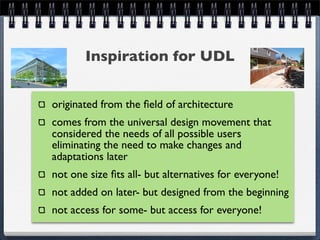
originated from the field of architecture
comes from the universal design movement that
considered the needs of all possible users
eliminating the need to make changes and
adaptations later
not one size fits all- but alternatives for everyone!
not added on later- but designed from the beginning
not access for some- but access for everyone!
Examples of Universal Design
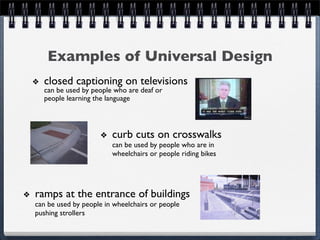
  closed captioning on televisions
  can be used by people who are deaf or
  people learning the language


                        curb cuts on crosswalks
                        can be used by people who are in
                        wheelchairs or people riding bikes


ramps at the entrance of buildings
can be used by people in wheelchairs or people
pushing strollers
What is
Universal Design for Learning (UDL)?

   a set of principles for
   curriculum
   development that give     provides ways for
   all students an           creating instructional
   opportunity to learn      goals, methods,
                             materials, and
   a flexible approach that   assessments that work
   can be customized and     for everyone
   adjusted for individual
   learning needs
UDL provides students and teachers
   with multiple options for...

    presenting the
    instructional material   maintaining high
    overcoming barriers      achievement
    to learning              standards

    maximizing               student engagement
    information retention
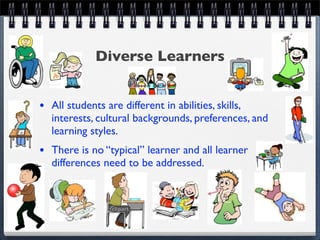
Diverse Learners


• All students are different in abilities, skills,
   interests, cultural backgrounds, preferences, and
   learning styles.
• There is no “typical” learner and all learner
   differences need to be addressed.
UDL Impact on Student Learning

maintains high achievement expectations for all students
provides flexibility for students in the ways information is
presented, in the ways students demonstrate knowledge
and skills, and in the ways students are engaged
higher motivation and engagement
reduces barriers in instruction
provides appropriate accommodations, supports, and
challenges
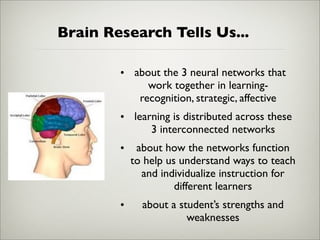
Brain Research Tells Us...

        • about the 3 neural networks that
             work together in learning-
           recognition, strategic, affective
        • learning is distributed across these
              3 interconnected networks
        •    about how the networks function
            to help us understand ways to teach
              and individualize instruction for
                      different learners
        •     about a student’s strengths and
                        weaknesses
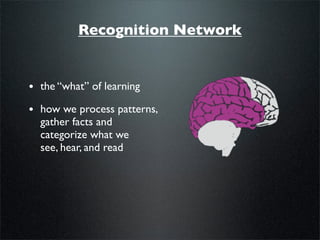
Recognition Network


• the “what” of learning
• how we process patterns,
  gather facts and
  categorize what we
  see, hear, and read
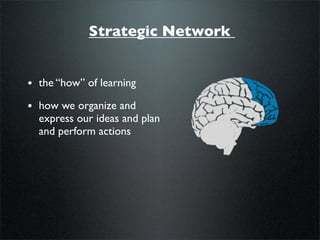
Strategic Network


• the “how” of learning
• how we organize and
  express our ideas and plan
  and perform actions
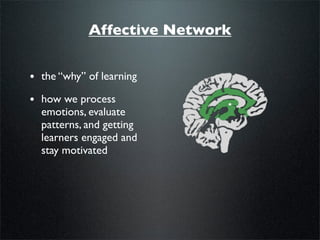
Affective Network


• the “why” of learning
• how we process
  emotions, evaluate
  patterns, and getting
  learners engaged and
  stay motivated
Three Principles of UDL


• Principle 1:
       providing multiple means of representation


• Principle II:
       offering multiple means of expression


• Principle III:
       providing multiple means of engagement
Principle 1

    present information and content in different ways

Guidelines:

  • provide options for perception
     ~ offer alternatives for visual and auditory information and customize the display
     of information


  • provide options for language, expression, and symbols
     ~ support decoding text, mathematical notations and symbols, clarify syntax and
     structure


  • provide options for comprehension
     ~ activate or supply background knowledge, highlight patterns, critical features, big
     ideas, and relationships
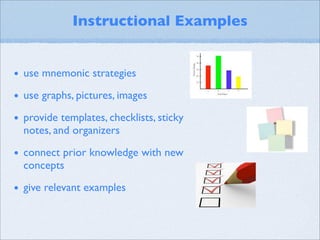
Instructional Examples


• use mnemonic strategies
• use graphs, pictures, images
• provide templates, checklists, sticky
  notes, and organizers

• connect prior knowledge with new
  concepts

• give relevant examples
Principle II

             differentiate the ways that students can
                     express what they know

Guidelines:
  • provide options for physical action
     ~ vary the methods of response and navigation


  • provide options for expression and communication
     ~ use multiple media for communication and tools for construction and composition


  • provide options for executive function
     ~ guide appropriate goal setting, support planning, and strategy development
Instructional Examples


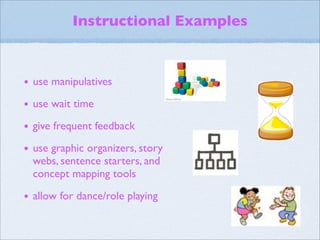
• use manipulatives
• use wait time
• give frequent feedback
• use graphic organizers, story
  webs, sentence starters, and
  concept mapping tools

• allow for dance/role playing
Principle III

      stimulate interest and motivation for learning


Guidelines:

  • provide options for recruiting interest
     ~ optimize individual choice and minimize distractions


  • provide options for sustaining effort and persistence
     ~ foster collaboration and communication


  • provide options for self-regulation
     ~ develop self-assessment and reflection
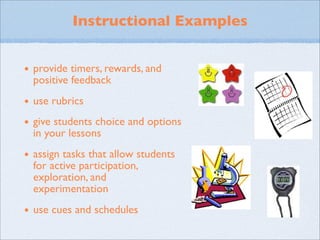
Instructional Examples


• provide timers, rewards, and
  positive feedback

• use rubrics
• give students choice and options
  in your lessons

• assign tasks that allow students
  for active participation,
  exploration, and
  experimentation

• use cues and schedules
Role of Technology in UDL

allows flexibility and variety in presenting content
assistive technology
improved learning access
can help to overcome barriers in the curriculum
provide students with more options
maximizes learning opportunities
Examples of Technology
AIM Explorer- free simulation digital texts
Signed Stories- free library of digital books for deaf
and hearing impaired
You’ve Got Braille- free informational website for
students to learn about different aspects of braille
Cue Card- free flash card program for students to
make with text, image, and sound
More resources at: UDL Center Examples
More Technology

Text-to-Speech    Blogs
Software
                  Wikis
Word-Processing
                  Online Chats
Software
                  Social Media
Spell Checkers
                  Networks
Podcasts
                  Interactive Web
Voice Threads     Activities
CAST Tool #1

UDL Book Builder
- educators can make their own digital books for
use during reading literacy learning

http://bookbuilder.cast.org

particularly useful with ELL students who cannot
speak English or early readers
CAST Tool #2
Strategy Tutor
- a free online tool to help students and teachers
doing research on the Internet
http://www.cast.org/learningtools/strategy_tutor/
index.html

useful when conducting research projects in
Science and Social Studies to help gather
information efficiently and understand it and
teaching the process of researching
CAST Tool #3

UDL Editions
- text that are presented in an online interface
that provides individualized reading support
http://www.cast.org/learningtools/udl_editions/
index.html

useful for students who need reading literacy
support and enrichment, includes translations,
text-to-speech, and text help options
Resources:
 http://www.cast.org/research/index.html

 http://www.cast.org/udl/index.html

 http://www.udlcenter.org/aboutudl/udlguidelines/principle1

 http://www.udlcenter.org/aboutudl/udlguidelines/principle2

 http://www.udlcenter.org/aboutudl/udlguidelines/principle3

 http://www.udlcenter.org/implementation/examples

 http://bookbuilder.cast.org/

 http://udleditions.cast.org/

 http://cst.cast.org/cst/auth-login

 http://www1.pgcps.org/UDL/index.aspx?id=129130

 images found on Google Images Website
Additional Resources
The Access Center
http://www.k8accesscenter.org/training_resources/UniversalDesign.asp
Article on UDL
http://www.greatschools.org/special-education/assistive-technology/universal-design-for-
learning-improved-access-for-all.gs?content=785&page=all
Case Stories and Lesson

http://www.cast.org/teachingeverystudent/toolkits/tk_lessons.cfm?tk_id=21

Partner for Learning

http://performancepyramid.muohio.edu/pil.html

Videos on UDL

http://lessonbuilder.cast.org/window.php?src=videos
Council for Exceptional Children
http://www.cec.sped.org/AM/Template.cfm?Section=Search&template=/CM/
UDL Presentation- APP4ChungH

UDL Presentation- APP4ChungH

  • 1.
    Universal Design for Learning Meeting the Diverse Needs of All Learners By: HanNa Chung
  • 2.
    Inspiration for UDL originatedfrom the field of architecture comes from the universal design movement that considered the needs of all possible users eliminating the need to make changes and adaptations later not one size fits all- but alternatives for everyone! not added on later- but designed from the beginning not access for some- but access for everyone!
  • 3.
    Examples of UniversalDesign closed captioning on televisions can be used by people who are deaf or people learning the language curb cuts on crosswalks can be used by people who are in wheelchairs or people riding bikes ramps at the entrance of buildings can be used by people in wheelchairs or people pushing strollers
  • 4.
    What is Universal Designfor Learning (UDL)? a set of principles for curriculum development that give provides ways for all students an creating instructional opportunity to learn goals, methods, materials, and a flexible approach that assessments that work can be customized and for everyone adjusted for individual learning needs
  • 5.
    UDL provides studentsand teachers with multiple options for... presenting the instructional material maintaining high overcoming barriers achievement to learning standards maximizing student engagement information retention
  • 6.
    Diverse Learners • Allstudents are different in abilities, skills, interests, cultural backgrounds, preferences, and learning styles. • There is no “typical” learner and all learner differences need to be addressed.
  • 7.
    UDL Impact onStudent Learning maintains high achievement expectations for all students provides flexibility for students in the ways information is presented, in the ways students demonstrate knowledge and skills, and in the ways students are engaged higher motivation and engagement reduces barriers in instruction provides appropriate accommodations, supports, and challenges
  • 8.
    Brain Research TellsUs... • about the 3 neural networks that work together in learning- recognition, strategic, affective • learning is distributed across these 3 interconnected networks • about how the networks function to help us understand ways to teach and individualize instruction for different learners • about a student’s strengths and weaknesses
  • 9.
    Recognition Network • the“what” of learning • how we process patterns, gather facts and categorize what we see, hear, and read
  • 10.
    Strategic Network • the“how” of learning • how we organize and express our ideas and plan and perform actions
  • 11.
    Affective Network • the“why” of learning • how we process emotions, evaluate patterns, and getting learners engaged and stay motivated
  • 12.
    Three Principles ofUDL • Principle 1: providing multiple means of representation • Principle II: offering multiple means of expression • Principle III: providing multiple means of engagement
  • 13.
    Principle 1 present information and content in different ways Guidelines: • provide options for perception ~ offer alternatives for visual and auditory information and customize the display of information • provide options for language, expression, and symbols ~ support decoding text, mathematical notations and symbols, clarify syntax and structure • provide options for comprehension ~ activate or supply background knowledge, highlight patterns, critical features, big ideas, and relationships
  • 14.
    Instructional Examples • usemnemonic strategies • use graphs, pictures, images • provide templates, checklists, sticky notes, and organizers • connect prior knowledge with new concepts • give relevant examples
  • 15.
    Principle II differentiate the ways that students can express what they know Guidelines: • provide options for physical action ~ vary the methods of response and navigation • provide options for expression and communication ~ use multiple media for communication and tools for construction and composition • provide options for executive function ~ guide appropriate goal setting, support planning, and strategy development
  • 16.
    Instructional Examples • usemanipulatives • use wait time • give frequent feedback • use graphic organizers, story webs, sentence starters, and concept mapping tools • allow for dance/role playing
  • 17.
    Principle III stimulate interest and motivation for learning Guidelines: • provide options for recruiting interest ~ optimize individual choice and minimize distractions • provide options for sustaining effort and persistence ~ foster collaboration and communication • provide options for self-regulation ~ develop self-assessment and reflection
  • 18.
    Instructional Examples • providetimers, rewards, and positive feedback • use rubrics • give students choice and options in your lessons • assign tasks that allow students for active participation, exploration, and experimentation • use cues and schedules
  • 19.
    Role of Technologyin UDL allows flexibility and variety in presenting content assistive technology improved learning access can help to overcome barriers in the curriculum provide students with more options maximizes learning opportunities
  • 20.
    Examples of Technology AIMExplorer- free simulation digital texts Signed Stories- free library of digital books for deaf and hearing impaired You’ve Got Braille- free informational website for students to learn about different aspects of braille Cue Card- free flash card program for students to make with text, image, and sound More resources at: UDL Center Examples
  • 21.
    More Technology Text-to-Speech Blogs Software Wikis Word-Processing Online Chats Software Social Media Spell Checkers Networks Podcasts Interactive Web Voice Threads Activities
  • 22.
    CAST Tool #1 UDLBook Builder - educators can make their own digital books for use during reading literacy learning http://bookbuilder.cast.org particularly useful with ELL students who cannot speak English or early readers
  • 23.
    CAST Tool #2 StrategyTutor - a free online tool to help students and teachers doing research on the Internet http://www.cast.org/learningtools/strategy_tutor/ index.html useful when conducting research projects in Science and Social Studies to help gather information efficiently and understand it and teaching the process of researching
  • 24.
    CAST Tool #3 UDLEditions - text that are presented in an online interface that provides individualized reading support http://www.cast.org/learningtools/udl_editions/ index.html useful for students who need reading literacy support and enrichment, includes translations, text-to-speech, and text help options
  • 25.
    Resources: http://www.cast.org/research/index.html http://www.cast.org/udl/index.html http://www.udlcenter.org/aboutudl/udlguidelines/principle1 http://www.udlcenter.org/aboutudl/udlguidelines/principle2 http://www.udlcenter.org/aboutudl/udlguidelines/principle3 http://www.udlcenter.org/implementation/examples http://bookbuilder.cast.org/ http://udleditions.cast.org/ http://cst.cast.org/cst/auth-login http://www1.pgcps.org/UDL/index.aspx?id=129130 images found on Google Images Website
  • 26.
    Additional Resources The AccessCenter http://www.k8accesscenter.org/training_resources/UniversalDesign.asp Article on UDL http://www.greatschools.org/special-education/assistive-technology/universal-design-for- learning-improved-access-for-all.gs?content=785&page=all Case Stories and Lesson http://www.cast.org/teachingeverystudent/toolkits/tk_lessons.cfm?tk_id=21 Partner for Learning http://performancepyramid.muohio.edu/pil.html Videos on UDL http://lessonbuilder.cast.org/window.php?src=videos Council for Exceptional Children http://www.cec.sped.org/AM/Template.cfm?Section=Search&template=/CM/