23. SQL and Database.pptx this ppt file is important for class 12
2.
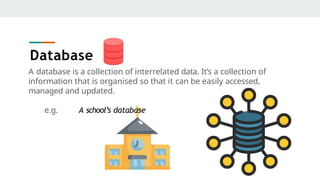
A database isa collection of interrelated data. It’s a collection of
information that is organised so that it can be easily accessed,
managed and updated.
e.g. A school’s database
Database
3.
Advantages of Database
●Reduces redundancy.
● Controls data
inconsistency.
● Facilitates data sharing.
● Ensures data security
● Integrity can be
maintained.
4.
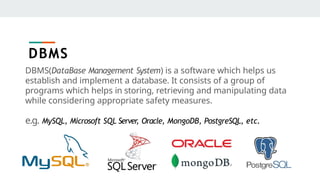
DBMS(DataBase Management System)is a software which helps us
establish and implement a database. It consists of a group of
programs which helps in storing, retrieving and manipulating data
while considering appropriate safety measures.
e.g. MySQL, Microsoft SQL Server
, Oracle, MongoDB, PostgreSQL, etc.
DBMS
5.
Relational Data Model
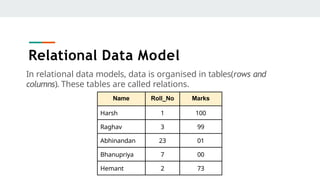
Inrelational data models, data is organised in tables(rows and
columns). These tables are called relations.
Name Roll_No Marks
Harsh 1 100
Raghav 3 99
Abhinandan 23 01
Bhanupriya 7 00
Hemant 2 73
6.
Terminologies
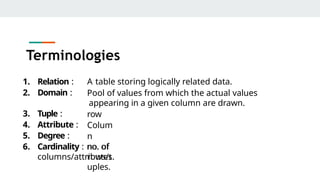
1. Relation :
2.Domain :
A table storing logically related data.
Pool of values from which the actual values
appearing in a given column are drawn.
row
Colum
n
no. of
rows/t
uples.
3. Tuple :
4. Attribute :
5. Degree :
6. Cardinality : no. of
columns/attributes.
7.
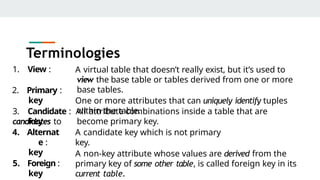
1. View :
2.Primary :
key
A virtual table that doesn’t really exist, but it’s used to
view the base table or tables derived from one or more
base tables.
One or more attributes that can uniquely identify tuples
within the table.
3. Candidate : All attribute combinations inside a table that are
candidates to become primary key.
A candidate key which is not primary
key.
key
4. Alternat
e :
key
5. Foreign :
key
A non-key attribute whose values are derived from the
primary key of some other table, is called foreign key in its
current table.
Terminologies
8.
SQL(Structured Query Language)is a database language that is recognised by
nearly all RDBMSs(Relational DataBase Management System).
It contains set of commands that enables us to create and operate on
relational databases.
Why we use SQL?
SQL is fast, very high level, platform independent, standardized, portable language
which requires almost no coding skills.
SQL
9.
DDL Commands
DDL orData Definition Language
It contains set of commands that allows us to perform tasks related to data
definition. It specifies the storage structure and access methods for database
system.
DDL consists of :
● Creating, altering & dropping.
● Granting, revoking privileges and roles.
● Maintenance commands.
10.
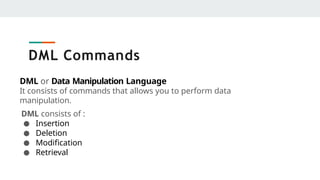
DML Commands
DML orData Manipulation Language
It consists of commands that allows you to perform data
manipulation.
DML consists of :
● Insertion
● Deletion
● Modification
● Retrieval
11.
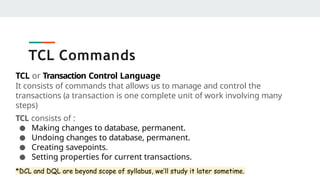
TCL Commands
TCL orTransaction Control Language
It consists of commands that allows us to manage and control the
transactions (a transaction is one complete unit of work involving many
steps)
TCL consists of :
● Making changes to database, permanent.
● Undoing changes to database, permanent.
● Creating savepoints.
● Setting properties for current transactions.
*DCL and DQL are beyond scope of syllabus, we’ll study it later sometime.
12.
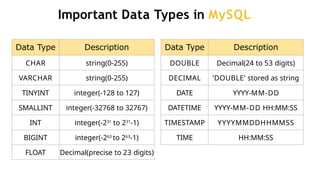
Important Data Typesin MySQL
Data Type Description
CHAR string(0-255)
VARCHAR string(0-255)
TINYINT integer(-128 to 127)
SMALLINT integer(-32768 to 32767)
INT integer(-231
to 231
-1)
BIGINT integer(-263
to 263
-1)
FLOAT Decimal(precise to 23 digits)
Data Type Description
DOUBLE Decimal(24 to 53 digits)
DECIMAL ‘DOUBLE’ stored as string
DATE YYYY-MM-DD
DATETIME YYYY-MM-DD HH:MM:SS
TIMESTAMP YYYYMMDDHHMMSS
TIME HH:MM:SS
13.
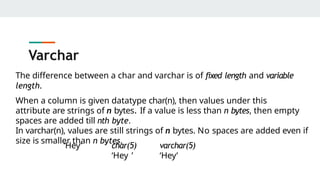
Varchar
The difference betweena char and varchar is of fixed length and variable
length.
When a column is given datatype char(n), then values under this
attribute are strings of n bytes. If a value is less than n bytes, then empty
spaces are added till nth byte.
In varchar(n), values are still strings of n bytes. No spaces are added even if
size is smaller than n bytes.
‘Hey’ char(5)
‘Hey ’
varchar(5)
‘Hey’
14.
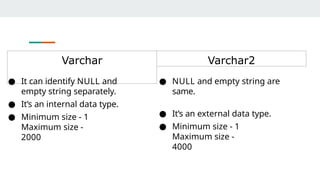
Varchar Varchar2
● Itcan identify NULL and
empty string separately.
● It’s an internal data type.
● Minimum size - 1
Maximum size -
2000
● NULL and empty string are
same.
● It’s an external data type.
● Minimum size - 1
Maximum size -
4000
15.
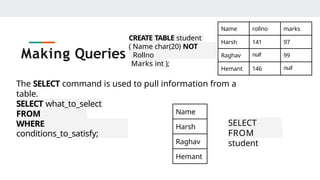
Creating table
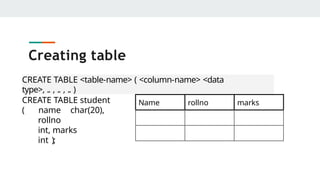
CREATE TABLE<table-name> ( <column-name> <data
type>, .. , .. , .. )
CREATE TABLE student
( name char(20),
rollno
int, marks
int );
Name rollno marks
16.
Inserting data intotable
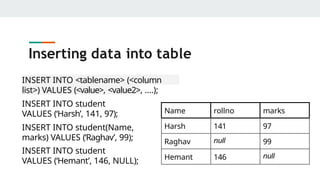
INSERT INTO <tablename> (<column
list>) VALUES (<value>, <value2>, ....);
INSERT INTO student
VALUES (‘Harsh’, 141, 97);
INSERT INTO student(Name,
marks) VALUES (‘Raghav’, 99);
INSERT INTO student
VALUES (‘Hemant’, 146, NULL);
Name rollno marks
Harsh 141 97
Raghav null 99
Hemant 146 null
17.
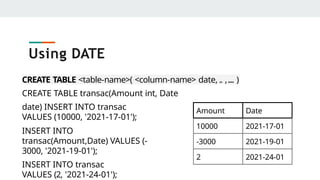
CREATE TABLE <table-name>(<column-name> date, .. ,.... )
CREATE TABLE transac(Amount int, Date
date) INSERT INTO transac
VALUES (10000, '2021-17-01');
INSERT INTO
transac(Amount,Date) VALUES (-
3000, '2021-19-01');
INSERT INTO transac
VALUES (2, '2021-24-01');
Using DATE
Amount Date
10000 2021-17-01
-3000 2021-19-01
2 2021-24-01
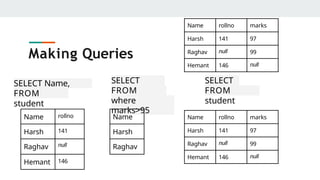
SELECT Name,
rollno
FROM
student
Making Queries
Namerollno marks
Harsh 141 97
Raghav null 99
Hemant 146 null
Name rollno
Harsh 141
Raghav null
Hemant 146
SELECT
Name
FROM
student
where
marks>95
Name
Harsh
Raghav
SELECT
*
FROM
student
Name rollno marks
Harsh 141 97
Raghav null 99
Hemant 146 null
20.
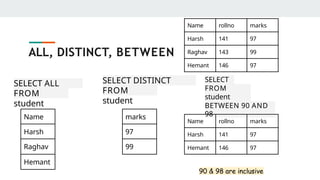
SELECT ALL
Name
FROM
student
ALL, DISTINCT,BETWEEN
Name rollno marks
Harsh 141 97
Raghav 143 99
Hemant 146 97
Name
Harsh
Raghav
Hemant
SELECT DISTINCT
marks
FROM
student
marks
97
99
SELECT
*
FROM
student
WHERE
marks
BETWEEN 90 AND
98
Name rollno marks
Harsh 141 97
Hemant 146 97
90 & 98 are inclusive
21.
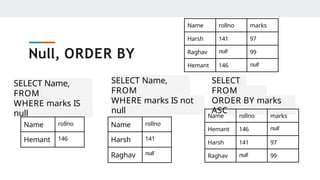
SELECT Name,
rollno
FROM
student
WHERE marksIS
null
Null, ORDER BY
Name rollno marks
Harsh 141 97
Raghav null 99
Hemant 146 null
Name rollno
Hemant 146
SELECT Name,
rollno
FROM
student
WHERE marks IS not
null
SELECT
*
FROM
student
ORDER BY marks
ASC
Name rollno marks
Hemant 146 null
Harsh 141 97
Raghav null 99
Name rollno
Harsh 141
Raghav null
22.
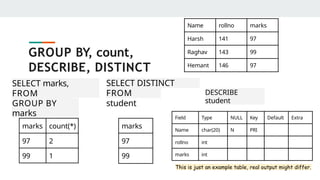
SELECT marks,
count(*)
FROM
student
GROUP BY
marks
GROUPBY, count,
DESCRIBE, DISTINCT
Name rollno marks
Harsh 141 97
Raghav 143 99
Hemant 146 97
marks count(*)
97 2
99 1
SELECT DISTINCT
marks
FROM
student
marks
97
99
DESCRIBE
student
Field Type NULL Key Default Extra
Name char(20) N PRI
rollno int
marks int
This is just an example table, real output might differ.
23.
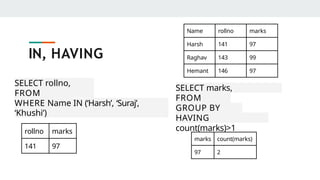
SELECT rollno,
marks
FROM
student
WHERE NameIN (‘Harsh’, ‘Suraj’,
‘Khushi’)
IN, HAVING
rollno marks
141 97
SELECT marks,
count(marks)
FROM
student
GROUP BY
marks
HAVING
count(marks)>1
marks count(marks)
97 2
Name rollno marks
Harsh 141 97
Raghav 143 99
Hemant 146 97
24.
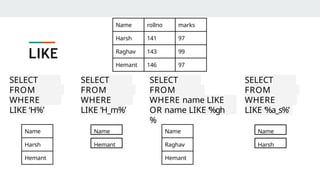
SELECT
name
FROM
student
WHERE
name
LIKE ‘H%’
LIKE
Name rollnomarks
Harsh 141 97
Raghav 143 99
Hemant 146 97
SELECT
name
FROM
student
WHERE
name
LIKE ‘H_m%’
Name
Harsh
Hemant
Name
Hemant
SELECT
name
FROM
student
WHERE name LIKE
‘%t’
OR name LIKE ‘%gh
%
SELECT
name
FROM
student
WHERE
name
LIKE ‘%a_s%’
Name
Raghav
Hemant
Name
Harsh
25.
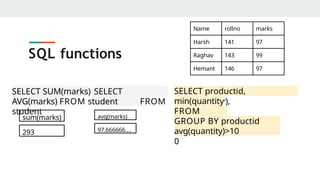
SQL functions
sum(marks)
293
SELECT SUM(marks)SELECT
AVG(marks) FROM student FROM
student
avg(marks)
97.666666….
Name rollno marks
Harsh 141 97
Raghav 143 99
Hemant 146 97
SELECT productid,
max(quantity),
min(quantity
)
FROM
Orders
GROUP BY productid
having
avg(quantity)>10
0
26.
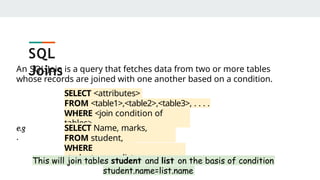
An SQL Joinis a query that fetches data from two or more tables
whose records are joined with one another based on a condition.
SELECT <attributes>
FROM <table1>,<table2>,<table3>, . . . .
WHERE <join condition of
tables>
e.g
.
SELECT Name, marks,
AdmNo
FROM student,
list
WHERE
student.name=list.name
This will join tables student and list on the basis of condition
student.name=list.name
SQL
Joins
27.
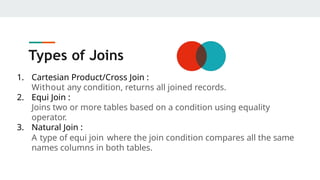
Types of Joins
1.Cartesian Product/Cross Join :
Without any condition, returns all joined records.
2. Equi Join :
Joins two or more tables based on a condition using equality
operator.
3. Natural Join :
A type of equi join where the join condition compares all the same
names columns in both tables.
28.
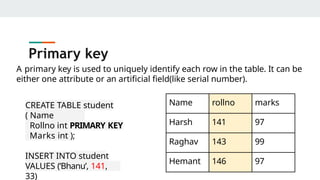
Primary key
A primarykey is used to uniquely identify each row in the table. It can be
either one attribute or an artificial field(like serial number).
Name rollno marks
Harsh 141 97
Raghav 143 99
Hemant 146 97
CREATE TABLE student
( Name
char(20)
Rollno int PRIMARY KEY
Marks int );
INSERT INTO student
VALUES (‘Bhanu’, 141,
33)
29.
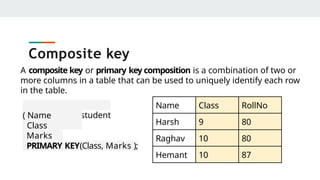
Composite key
Name ClassRollNo
Harsh 9 80
Raghav 10 80
Hemant 10 87
A composite key or primary key composition is a combination of two or
more columns in a table that can be used to uniquely identify each row
in the table.
CREATE TABLE student
( Name
char(20)
Class
int
Marks
int
PRIMARY KEY(Class, Marks );
30.
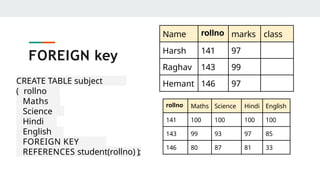
FOREIGN key
Name rollnomarks class
Harsh 141 97
Raghav 143 99
Hemant 146 97
rollno Maths Science Hindi English
141 100 100 100 100
143 99 93 97 85
146 80 87 81 33
CREATE TABLE subject
marks
( rollno
int,
Maths
int,
Science
int,
Hindi
int,
English
int,
FOREIGN KEY
(rollno)
REFERENCES student(rollno) );
31.
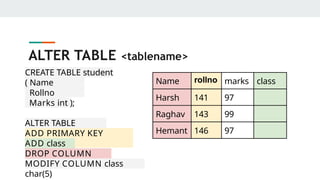
ALTER TABLE <tablename>
Namerollno marks class
Harsh 141 97
Raghav 143 99
Hemant 146 97
CREATE TABLE student
( Name
char(20)
Rollno
int
Marks int );
ALTER TABLE
student
ADD PRIMARY KEY
(Rollno);
ADD class
int
DROP COLUMN
Name
MODIFY COLUMN class
char(5)