+
Dr. Ramadan Babers
Faculty of Science - Helwan University
Fall-2018
D B
+
Introduction
2
Unit01 Outlines
3
Unit01 Outlines
4
Unit01 Outlines
5
Unit01 Outlines
6
Unit01 Outlines
7
Unit01 Outlines
8
Unit01 Outlines
9
+ Database Systems
Basic Concepts
10
Unit01 Outlines
 Types of Databases and Database Applications
 Basic Definitions
 Typical DBMS Functionality
 Examples of a Database
 Main Characteristics of the Database Approach
 Database Users
 Advantages of Using the Database Approach
11
Introduction
12
Introduction
13
Examples of Database Applications
• Purchases from the supermarket
• Purchases using your credit card
• Booking a holiday at the travel agents
• Using the local library
• Taking out insurance
• Studying at university
14
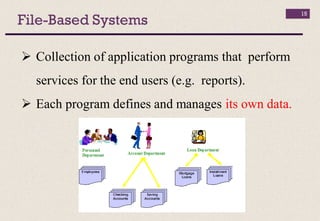
File-Based Systems
 Collection of application programs that perform
services for the end users (e.g. reports).
 Each program defines and manages its own data.
15
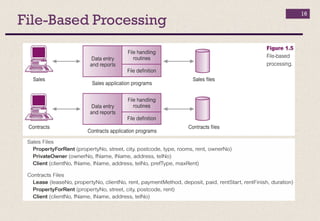
File-Based Processing
16
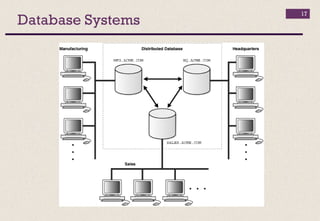
Database Systems
17
Definitions
18
 Data: known facts that can be recorded
 Database: a collection of data
 represents some aspect of the real world
 logically coherent collection (not a random collection)
 designed, built & populated for a specific purpose
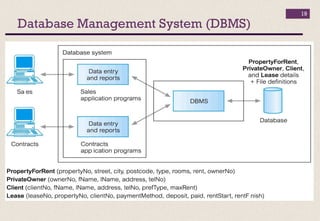
 Database Management System: the software
that manages the data
Database Management System (DBMS)
19
Advantages of DBMSs
20
 Control of data redundancy
 Data consistency
 More information from the same amount of data
 Sharing of data
 Improved data integrity
 Improved security
 Enforcement of standards
Advantages of DBMSs
21
 Improved data accessibility and responsiveness
 Increased productivity
 Improved maintenance through data
independence
 Increased concurrency
 Improved backup and recovery services
Disadvantages of DBMSs
22
 Complexity
 Size
 Cost of DBMS
 Additional hardware costs
 Cost of conversion
 Higher impact of a failure
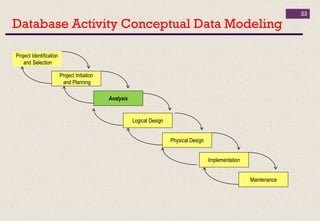
Database Activity Conceptual Data Modeling
23
Project Identification
and Selection
Project Initiation
and Planning
Analysis
Physical Design
Implementation
Maintenance
Logical Design
+
DBMS Architecture
24
Architecture
25
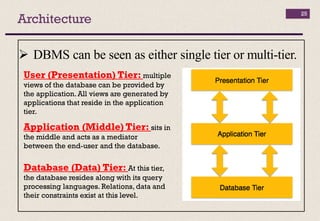
 DBMS can be seen as either single tier or multi-tier.
Database (Data) Tier: At this tier,
the database resides along with its query
processing languages. Relations, data and
their constraints exist at this level.
Application (Middle) Tier: sits in
the middle and acts as a mediator
between the end-user and the database.
User (Presentation) Tier: multiple
views of the database can be provided by
the application.All views are generated by
applications that reside in the application
tier.
Data Models
26
 Data models
 Define how the logical structure of a database is modeled.
 Are fundamental entities to introduce abstraction in a
DBMS.
 Define how data is connected to each other
(Relationships) and how they are processed and stored
inside the system.
The first data model could be flat data-models, where all the
data used are to be kept in the same plane and contain lots of
duplication and update anomalies.
Entity-Relationship Model (ER Model)
27
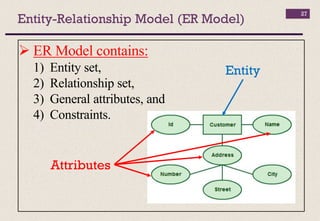
 ER Model contains:
1) Entity set,
2) Relationship set,
3) General attributes, and
4) Constraints.
Entity
Attributes
Entity-Relationship Model (ER Model)
28
1) Entity
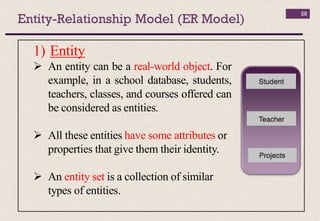
 An entity can be a real-world object. For
example, in a school database, students,
teachers, classes, and courses offered can
be considered as entities.
 All these entities have some attributes or
properties that give them their identity.
 An entity set is a collection of similar
types of entities.
Entity-Relationship Model (ER Model)
29
2) Attribute
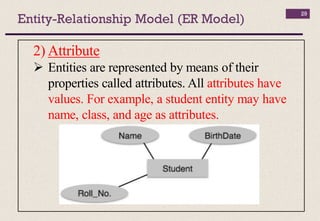
 Entities are represented by means of their
properties called attributes. All attributes have
values. For example, a student entity may have
name, class, and age as attributes.
Entity-Relationship Model (ER Model)
30
 There exists a domain or range of values that can
be assigned to attributes. For example, a student's
name cannot be a numeric value. It has to be
alphabetic. A student's age cannot be negative, etc.
Entity-Relationship Model (ER Model)
31
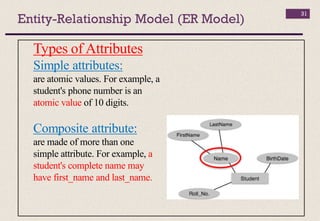
Types of Attributes
Simple attributes:
are atomic values. For example, a
student's phone number is an
atomic value of 10 digits.
Composite attribute:
are made of more than one
simple attribute. For example, a
student's complete name may
have first_name and last_name.
Entity-Relationship Model (ER Model)
32
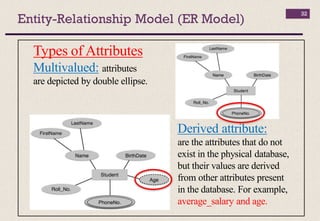
Types of Attributes
Multivalued: attributes
are depicted by double ellipse.
Derived attribute:
are the attributes that do not
exist in the physical database,
but their values are derived
from other attributes present
in the database. For example,
average_salary and age.
Entity-Relationship Model (ER Model)
33
Entity-Set and Keys
Key is an attribute or collection of attributes that uniquely
identifies an entity among entity set.
For example, the ID_number of a student makes him/her
identifiable among students.
Keys Types
 Super Key: A set of attributes (one or more) that collectively
identifies an entity in an entity set.
 Candidate Key: A minimal super key is called a candidate key.
An entity set may have more than one candidate key.
 Primary Key: A primary key is one of the candidate keys
chosen by the database designer to uniquely identify the entity set.
Entity-Relationship Model (ER Model)
34
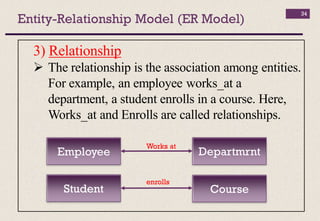
3) Relationship
 The relationship is the association among entities.
For example, an employee works_at a
department, a student enrolls in a course. Here,
Works_at and Enrolls are called relationships.
Employee Departmrnt
Student Course
Works at
enrolls
Entity-Relationship Model (ER Model)
35
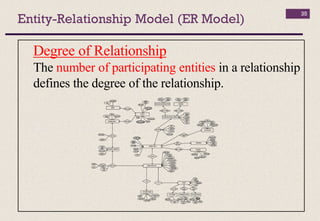
Degree of Relationship
The number of participating entities in a relationship
defines the degree of the relationship.
Entity-Relationship Model (ER Model)
36
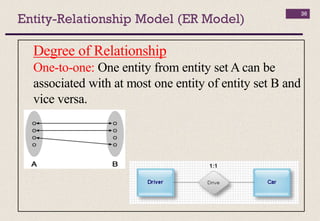
Degree of Relationship
One-to-one: One entity from entity set A can be
associated with at most one entity of entity set B and
vice versa.
Entity-Relationship Model (ER Model)
37
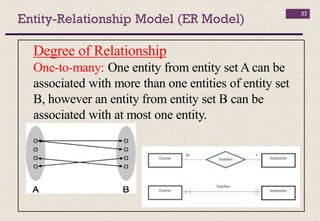
Degree of Relationship
One-to-many: One entity from entity set A can be
associated with more than one entities of entity set
B, however an entity from entity set B can be
associated with at most one entity.
Entity-Relationship Model (ER Model)
38
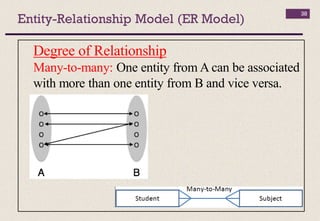
Degree of Relationship
Many-to-many: One entity from A can be associated
with more than one entity from B and vice versa.

Db lec 01

  • 1.
    + Dr. Ramadan Babers Facultyof Science - Helwan University Fall-2018 D B
  • 2.
  • 3.
  • 4.
  • 5.
  • 6.
  • 7.
  • 8.
  • 9.
  • 10.
  • 11.
    Unit01 Outlines  Typesof Databases and Database Applications  Basic Definitions  Typical DBMS Functionality  Examples of a Database  Main Characteristics of the Database Approach  Database Users  Advantages of Using the Database Approach 11
  • 12.
  • 13.
  • 14.
    Examples of DatabaseApplications • Purchases from the supermarket • Purchases using your credit card • Booking a holiday at the travel agents • Using the local library • Taking out insurance • Studying at university 14
  • 15.
    File-Based Systems  Collectionof application programs that perform services for the end users (e.g. reports).  Each program defines and manages its own data. 15
  • 16.
  • 17.
  • 18.
    Definitions 18  Data: knownfacts that can be recorded  Database: a collection of data  represents some aspect of the real world  logically coherent collection (not a random collection)  designed, built & populated for a specific purpose  Database Management System: the software that manages the data
  • 19.
  • 20.
    Advantages of DBMSs 20 Control of data redundancy  Data consistency  More information from the same amount of data  Sharing of data  Improved data integrity  Improved security  Enforcement of standards
  • 21.
    Advantages of DBMSs 21 Improved data accessibility and responsiveness  Increased productivity  Improved maintenance through data independence  Increased concurrency  Improved backup and recovery services
  • 22.
    Disadvantages of DBMSs 22 Complexity  Size  Cost of DBMS  Additional hardware costs  Cost of conversion  Higher impact of a failure
  • 23.
    Database Activity ConceptualData Modeling 23 Project Identification and Selection Project Initiation and Planning Analysis Physical Design Implementation Maintenance Logical Design
  • 24.
  • 25.
    Architecture 25  DBMS canbe seen as either single tier or multi-tier. Database (Data) Tier: At this tier, the database resides along with its query processing languages. Relations, data and their constraints exist at this level. Application (Middle) Tier: sits in the middle and acts as a mediator between the end-user and the database. User (Presentation) Tier: multiple views of the database can be provided by the application.All views are generated by applications that reside in the application tier.
  • 26.
    Data Models 26  Datamodels  Define how the logical structure of a database is modeled.  Are fundamental entities to introduce abstraction in a DBMS.  Define how data is connected to each other (Relationships) and how they are processed and stored inside the system. The first data model could be flat data-models, where all the data used are to be kept in the same plane and contain lots of duplication and update anomalies.
  • 27.
    Entity-Relationship Model (ERModel) 27  ER Model contains: 1) Entity set, 2) Relationship set, 3) General attributes, and 4) Constraints. Entity Attributes
  • 28.
    Entity-Relationship Model (ERModel) 28 1) Entity  An entity can be a real-world object. For example, in a school database, students, teachers, classes, and courses offered can be considered as entities.  All these entities have some attributes or properties that give them their identity.  An entity set is a collection of similar types of entities.
  • 29.
    Entity-Relationship Model (ERModel) 29 2) Attribute  Entities are represented by means of their properties called attributes. All attributes have values. For example, a student entity may have name, class, and age as attributes.
  • 30.
    Entity-Relationship Model (ERModel) 30  There exists a domain or range of values that can be assigned to attributes. For example, a student's name cannot be a numeric value. It has to be alphabetic. A student's age cannot be negative, etc.
  • 31.
    Entity-Relationship Model (ERModel) 31 Types of Attributes Simple attributes: are atomic values. For example, a student's phone number is an atomic value of 10 digits. Composite attribute: are made of more than one simple attribute. For example, a student's complete name may have first_name and last_name.
  • 32.
    Entity-Relationship Model (ERModel) 32 Types of Attributes Multivalued: attributes are depicted by double ellipse. Derived attribute: are the attributes that do not exist in the physical database, but their values are derived from other attributes present in the database. For example, average_salary and age.
  • 33.
    Entity-Relationship Model (ERModel) 33 Entity-Set and Keys Key is an attribute or collection of attributes that uniquely identifies an entity among entity set. For example, the ID_number of a student makes him/her identifiable among students. Keys Types  Super Key: A set of attributes (one or more) that collectively identifies an entity in an entity set.  Candidate Key: A minimal super key is called a candidate key. An entity set may have more than one candidate key.  Primary Key: A primary key is one of the candidate keys chosen by the database designer to uniquely identify the entity set.
  • 34.
    Entity-Relationship Model (ERModel) 34 3) Relationship  The relationship is the association among entities. For example, an employee works_at a department, a student enrolls in a course. Here, Works_at and Enrolls are called relationships. Employee Departmrnt Student Course Works at enrolls
  • 35.
    Entity-Relationship Model (ERModel) 35 Degree of Relationship The number of participating entities in a relationship defines the degree of the relationship.
  • 36.
    Entity-Relationship Model (ERModel) 36 Degree of Relationship One-to-one: One entity from entity set A can be associated with at most one entity of entity set B and vice versa.
  • 37.
    Entity-Relationship Model (ERModel) 37 Degree of Relationship One-to-many: One entity from entity set A can be associated with more than one entities of entity set B, however an entity from entity set B can be associated with at most one entity.
  • 38.
    Entity-Relationship Model (ERModel) 38 Degree of Relationship Many-to-many: One entity from A can be associated with more than one entity from B and vice versa.