Something about Android

             Leo.liang@gmail.com
                        2009-12
Overview


Cool Application


Internal


Application development


Others
What’s Android

   Android is a software stack for mobile devices that
    includes an operating system, middleware and key
    applications
History

   2003, Startup Android Inc.
   Aug 2005, Google Buys Android
   Nov 2007, Open Handset Alliance
   Nov 2007, First SDK
   Apr 2008, ADC
   Oct 2008, First device: T-Mobile G1
   Oct 2008, Open source
Roadmap


HTC          HTC       HTC    HTC      Motorola   SonyEricsson
Dream (G1)   Magic     Hero   Tattoo   Droid      Xepria X10


 1.0   1.1   1.5              1.6      2.0        2.1
             Cupcake          Donut    Eclair     Flan
Typical Hardware Spec

   Touch screen (480x320, QVGA, WVGA)
   Video/still camera
   GPS
   Accelerometer
   Magnetometer

Enable the User Experience
Overview


Cool Application


Internal


Application development


Others
Cool Application
Location Based

   Map + GPS + POI


                 Place Directory   Google Maps
Cool Application
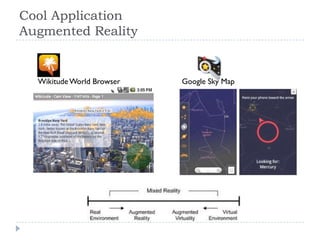
Augmented Reality


  Wikitude World Browser   Google Sky Map
Cool Application
Augmented Reality
Cool Application
Audio & Image Search
Cool Application
Use Pictures to Search the Web
Overview


Cool Application


Internal


Application development


Others
DNA of Android

   Built on the Linux kernel
   Uses the Dalvik virtual machine
   Core and 3rd party applications have equal access
Process

   One Linux process per application
   Application runs in Dalvik VM
   Application head limit: 16MB
                                  Dalvik VM            Dalvik VM
   Auto GC
                                    Application A        Application B
   Multi-thread supported

                                       Linux process     Linux process
Process Lifecycle
           Android is a multitasking system
           But you can only start an application, can’t stop an
            application
           System will automatically kill processes to conserve
            memory on necessary
           Activity can save state on destroy and restore state
            on restart to keep seamless user experience
         Where is
         the close
          button?


                           Last activated applications
                 Some of them might have been killed
Memory
SD card


                                    ext2 / ext3
                   Swap                                                FAT / FAT32
                                     (app2sd)


                                                             GPU                     Baseband
RAM


                          Linux memory
                                                             used                      used
Flash Memory


                                    File System                             Apps       OTA upgrade
                       Recovery
               SPL
                        Image          /dev       /system           /data          /cache        …


               SPL: secondary program loader (boot loader)
Custom ROM


      JesusFreke’s ROM


Haykuro Rogers ROM (神童)


                          Chinese: GeesunMod
Root

   Linux OS root user privilege
   Why to root?
       Full control over your system
       Ability to alter system files.
       Run special apps that need more control over the system
       App2sd
       ……
   How to root?
Overview


Cool Application


Internal


Application development


Others
Development Environment

   SDK = libraries + tools + emulator + doc
       SDK add-on: Google Maps API
   Development Environment
       Eclipse + ADT plugin
       Tools + Ant
Build Process & Artifacts
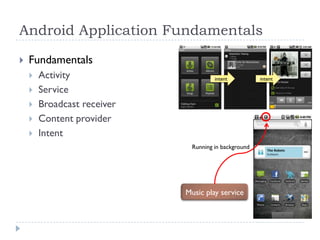
Android Application Fundamentals

   Fundamentals
       Activity                      intent          intent

       Service
       Broadcast receiver
       Content provider
       Intent
                              Running in background


                             Music play service
Activities & Tasks

   Task: a stack of activities
   A task can contain
    activities from different
    applications


   Back button navigates         Task   Task
    backward in the stack
   All the activities in a
    task move together as a
    unit
User Interface

   View & ViewGroup
   XML layout file
   Create object in code
API

   Android Specified
       System
       UI
       SQLite
   JDK
   HttpClient
   JSON
   XML
   Add-on
       Google Map API
Publish Your Application
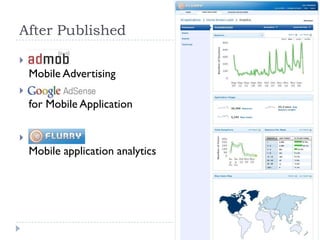
After Published


    Mobile Advertising

    for Mobile Application

   Flurry.com
    Mobile application analytics
Overview


Cool Application


Internal


Application development


Others
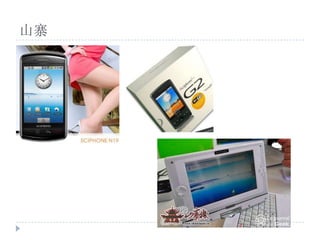
山寨
Vendor Customization


                                                    Motorola Blur

 HTC Sense
                       SonyEricsson Rachael
        Other bundle                                Applications
        applications                          (Gmail, Calendar, Market etc)
                           Replace UI
                              Applications
                                                                     Google Account
                               Android
                             (Open Source)
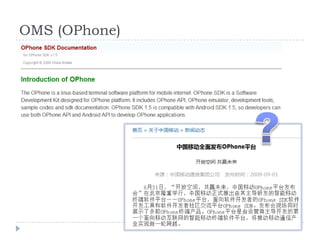
OMS (OPhone)
OMS (OPhone)


                                        Applications
   JIL Widget                     (Gmail, Calendar, Market etc)
                Replace UI
                   Applications
                                                       Google Account
                    Android                       Applications
                  (Open Source)
GFW

   Android mobile is Internet mobile
       Google services
       Application as front-end, web service back-end
       Cloud computing


   DNS pollution:
    android.clients.google.com

   VPN support in Android
Android

Android