SQL Server Extended Events

    What, Why, How, Who?
Stuart Moore
• Started with SQL Server 7 in 1998, 15 years later still working
  with it, but newer versions as well.
• Worked as DBA and Developer in that period.
• Also work with Oracle, MySQL and Linux

• In spare time I’m most likely to be found studying a
  Mathematics degree with the OU, or sat on a bike saddle
  somewhere remote.

• Email: stuart.moore@leaf-node.co.uk
• Twitter: @napalmgram
What we’ve had
• SQL Trace – Server side tracing mechanism
• SQL Profiler – Client side tool to use SQL Trace
What was wrong with that?
• Performance hit
  – All event data captured, and then filtered
  – Especially bad if run through Profiler
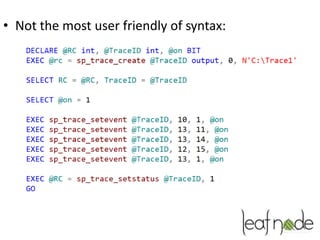
• Not the most user friendly of syntax:
So, Extended Events
• Introduced in SQL Server 2008.
• ‘Extended’ in SQL Server 2008R2
  – Unofficial GUI from Codeplex
• And again in SQL Server 2012
  – Now includes all SQL Trace functionality
  – Official GUI tool in SSMS
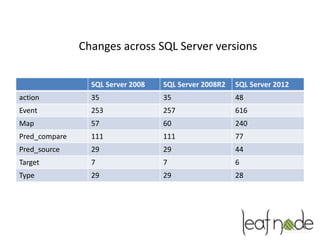
Changes across SQL Server versions

                 SQL Server 2008   SQL Server 2008R2   SQL Server 2012
action           35                35                  48
Event            253               257                 616
Map              57                60                  240
Pred_compare     111               111                 77
Pred_source      29                29                  44
Target           7                 7                   6
Type             29                29                  28
• Extendable
  – New packages can be loaded, for instance for
    Microsoft Support calls
• Better performance
  – Filtering done as early as possible to avoid
    overheads
  – You already have a session running and probably
    not noticed:
     • System_health
• Sessions can be told to ‘lose’ events if
  performance degraded:
  – Allow_single_event_loss (Default)
  – Allow_multiple_event_loss
  – No_event_loss
• Can persist server restarts
Basic Example
• Demo
Packages
• All events, actions, types, etc belong to a
  Package.
• Registered packages can be seen in
  – sys.dm_xe_packages
• SQL 2012 ships with 8 packages. Others can be
  installed, usually by MS support for debugging
  faults
• Packages loaded by corresponding module during
  startup.
• All events, objects, targets, etc are owned by a
  package
• But, all can be used interchangably
  – Ie; a sqlos event can capture sqlserver actions and
    record in a package0 target
• Anything marked ‘private’ is system access only:
  – SecAudit being the prime example
Sessions
• All defined event sessions recorded in
   – sys.server_event_sessions


• If session is running, it’s recorded in
   – Sys.dm_xe_sessions
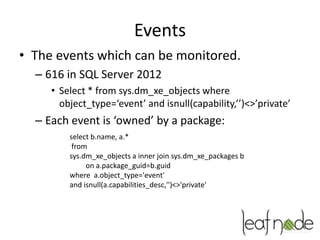
Events
• The events which can be monitored.
  – 616 in SQL Server 2012
     • Select * from sys.dm_xe_objects where
       object_type=‘event’ and isnull(capability,’’)<>’private’
  – Each event is ‘owned’ by a package:
         select b.name, a.*
          from
         sys.dm_xe_objects a inner join sys.dm_xe_packages b
              on a.package_guid=b.guid
         where a.object_type='event'
         and isnull(a.capabilities_desc,'')<>'private'
• A session can capture more than one event:
           Create event session ex1 on server
           add event sqlserver.sql_statement_starting
           add event sqlserver.sql_statement_completed
           add target ring_buffer
‘Payload’
• Each event ‘drops’ a payload to the ‘target’:

    select b.name, a.name, a.type_name, a.description, a.column_type,
    a.column_value
    From sys.dm_xe_object_columns a join sys.dm_xe_objects b
    on a.object_package_guid=b.package_guid
    and a.object_name=b.name
    and isnull(b.capability,’’)<>’private’
• 3 column_type values:
  – readonly – internal value
  – data – values returned by default
  – Customizable – these can be changed, options
    described in the description field, and default
    value in the column_value field.
Actions
• Actions are extra data/payload that can be
  collected when an event fires:
    select b.name, b.description, a.* from
    sys.dm_xe_objects a
    join sys.dm_xe_packages b on a.package_guid=b.guid
    where a.object_type='action'
    and isnull(a.capabilities_desc,'')<>'private';
Predicates
• Used to filter the events captured:
 select b.name, a.*
 From sys.dm_xe_objects a
 join sys.dm_xe_packages b on a.package_guid=b.guid
 where a.object_type='pred_source'
 and isnull(a.capabilities_desc,'')<>'private';
Maps
• Means of mapping names to values for
  predicates
  – For example Wait types to an ID
     select b.name, a.name, a.map_key, a.map_value, b.description
      from sys.dm_xe_map_values a
     inner join sys.dm_xe_objects b on
     a.object_package_guid=b.package_guid and a.name=b.name
     order by b.name, a.map_key
Targets
• Where the data ends up.
  – A number of different types, main differences:
     •   Synchronous
     •   Asynchronous
     •   Memory resident
     •   Persisted storage (disk)
• Etw_classic_sync_target
   – Used for ETW, useful for devs for tracing through large
     systems but out of scope here
• Histogram & event_counter
   – Memory resident tally targets. Histogram used to group
     data asynchronosyly, counter is a synchronous counter
• Pair_matching
   – Memory resident and asynchronous. Used to pair up
     events, eg; beginning and end of transaction
• Event_file
   – Disk based asynchronous target, for bulk or long term
     retention
• Ring_Buffer
   – Memory based asynchronous FIFO target.
Examples
•   1 – Deadlocks
•   2 – Possible parameter sniffing
•   3 – Capture Data file growth
•   4 – Statement counting
•   5 – Perfmon stats via GUI
All Good?
• Not quite:
  – Can still drag performance down,
  – Viewing results in GUI still a resource hog


• But it’s the way forward
References
• Jonathan Kehayias:
  – on the load impact of Extended Event sessions:
     • http://bit.ly/XLeMWF
  – 31 days of Xevents:
     • http://bit.ly/153GfZU
• MSDN
  – Overview
     • http://bit.ly/13eCnCx
  – Dynamic Management View
     • http://bit.ly/WWg4T1

SQL Server Extended Events

  • 1.
    SQL Server ExtendedEvents What, Why, How, Who?
  • 2.
    Stuart Moore • Startedwith SQL Server 7 in 1998, 15 years later still working with it, but newer versions as well. • Worked as DBA and Developer in that period. • Also work with Oracle, MySQL and Linux • In spare time I’m most likely to be found studying a Mathematics degree with the OU, or sat on a bike saddle somewhere remote. • Email: stuart.moore@leaf-node.co.uk • Twitter: @napalmgram
  • 3.
    What we’ve had •SQL Trace – Server side tracing mechanism • SQL Profiler – Client side tool to use SQL Trace
  • 4.
    What was wrongwith that? • Performance hit – All event data captured, and then filtered – Especially bad if run through Profiler
  • 5.
    • Not themost user friendly of syntax:
  • 6.
    So, Extended Events •Introduced in SQL Server 2008. • ‘Extended’ in SQL Server 2008R2 – Unofficial GUI from Codeplex • And again in SQL Server 2012 – Now includes all SQL Trace functionality – Official GUI tool in SSMS
  • 7.
    Changes across SQLServer versions SQL Server 2008 SQL Server 2008R2 SQL Server 2012 action 35 35 48 Event 253 257 616 Map 57 60 240 Pred_compare 111 111 77 Pred_source 29 29 44 Target 7 7 6 Type 29 29 28
  • 8.
    • Extendable – New packages can be loaded, for instance for Microsoft Support calls • Better performance – Filtering done as early as possible to avoid overheads – You already have a session running and probably not noticed: • System_health
  • 9.
    • Sessions canbe told to ‘lose’ events if performance degraded: – Allow_single_event_loss (Default) – Allow_multiple_event_loss – No_event_loss • Can persist server restarts
  • 10.
  • 11.
    Packages • All events,actions, types, etc belong to a Package. • Registered packages can be seen in – sys.dm_xe_packages • SQL 2012 ships with 8 packages. Others can be installed, usually by MS support for debugging faults
  • 12.
    • Packages loadedby corresponding module during startup. • All events, objects, targets, etc are owned by a package • But, all can be used interchangably – Ie; a sqlos event can capture sqlserver actions and record in a package0 target • Anything marked ‘private’ is system access only: – SecAudit being the prime example
  • 13.
    Sessions • All definedevent sessions recorded in – sys.server_event_sessions • If session is running, it’s recorded in – Sys.dm_xe_sessions
  • 14.
    Events • The eventswhich can be monitored. – 616 in SQL Server 2012 • Select * from sys.dm_xe_objects where object_type=‘event’ and isnull(capability,’’)<>’private’ – Each event is ‘owned’ by a package: select b.name, a.* from sys.dm_xe_objects a inner join sys.dm_xe_packages b on a.package_guid=b.guid where a.object_type='event' and isnull(a.capabilities_desc,'')<>'private'
  • 15.
    • A sessioncan capture more than one event: Create event session ex1 on server add event sqlserver.sql_statement_starting add event sqlserver.sql_statement_completed add target ring_buffer
  • 16.
    ‘Payload’ • Each event‘drops’ a payload to the ‘target’: select b.name, a.name, a.type_name, a.description, a.column_type, a.column_value From sys.dm_xe_object_columns a join sys.dm_xe_objects b on a.object_package_guid=b.package_guid and a.object_name=b.name and isnull(b.capability,’’)<>’private’
  • 17.
    • 3 column_typevalues: – readonly – internal value – data – values returned by default – Customizable – these can be changed, options described in the description field, and default value in the column_value field.
  • 18.
    Actions • Actions areextra data/payload that can be collected when an event fires: select b.name, b.description, a.* from sys.dm_xe_objects a join sys.dm_xe_packages b on a.package_guid=b.guid where a.object_type='action' and isnull(a.capabilities_desc,'')<>'private';
  • 19.
    Predicates • Used tofilter the events captured: select b.name, a.* From sys.dm_xe_objects a join sys.dm_xe_packages b on a.package_guid=b.guid where a.object_type='pred_source' and isnull(a.capabilities_desc,'')<>'private';
  • 20.
    Maps • Means ofmapping names to values for predicates – For example Wait types to an ID select b.name, a.name, a.map_key, a.map_value, b.description from sys.dm_xe_map_values a inner join sys.dm_xe_objects b on a.object_package_guid=b.package_guid and a.name=b.name order by b.name, a.map_key
  • 21.
    Targets • Where thedata ends up. – A number of different types, main differences: • Synchronous • Asynchronous • Memory resident • Persisted storage (disk)
  • 22.
    • Etw_classic_sync_target – Used for ETW, useful for devs for tracing through large systems but out of scope here • Histogram & event_counter – Memory resident tally targets. Histogram used to group data asynchronosyly, counter is a synchronous counter • Pair_matching – Memory resident and asynchronous. Used to pair up events, eg; beginning and end of transaction • Event_file – Disk based asynchronous target, for bulk or long term retention • Ring_Buffer – Memory based asynchronous FIFO target.
  • 23.
    Examples • 1 – Deadlocks • 2 – Possible parameter sniffing • 3 – Capture Data file growth • 4 – Statement counting • 5 – Perfmon stats via GUI
  • 24.
    All Good? • Notquite: – Can still drag performance down, – Viewing results in GUI still a resource hog • But it’s the way forward
  • 25.
    References • Jonathan Kehayias: – on the load impact of Extended Event sessions: • http://bit.ly/XLeMWF – 31 days of Xevents: • http://bit.ly/153GfZU • MSDN – Overview • http://bit.ly/13eCnCx – Dynamic Management View • http://bit.ly/WWg4T1