Database Management
System (DBMS)
Gevita Chinnaiah
 DBMS stands or Database Management System.
 DBMS = Database + Management System.
 Database is a collection of data and Management
System is a set of programs to store and retrieve those
data.
 Advantages over traditional file-based systems
 Data Independence
 Data Consistency and Integrity
 Data Security
 Data Concurrency
 Data Recovery and Backup
 Data Scalability
Introduction to DBMS
 DBMS is a software that is used to manage the
data.
◦ MySQL
◦ IBM Db2
◦ Oracle
◦ PostgreSQL
 DBMS provides an interface to the user so that
the operations on database can be performed
using the interface and secure the data
 DBMS also secures the data from unauthorised
access as well as corrupt data insertions.
What is DBMS?
 Data Definition - Creation of table, table
schema creation, removal of table definition
 Data Modification - allows users to insert,
update and delete the data from the tables.
 Data Retrieval - allows users to fetch data
from the database
 User administration - allows user
management such as organizing users in
different groups with different access levels
Operations of the database
 Storage of data - the data is stored in such a
way that it acquires lot less space as the
redundant data (duplicate data) has been
removed before storage
 Retrieval of data - Along with storing the data
in an optimized and systematic manner, it is
also important that we retrieve the data
quickly when needed
What is the need of DBMS?
 Manage the Data
 Data Organization
 Data Storage
 Data Retrieval
 Data Integrity
 Data Security
 Data Sharing and Collaboration
 Data Consistency
 Data Scalability
Purpose of Database Systems
 Telecom
 Industry
 Banking System
 Sales
 Airlines
 Education sector
 Online shopping .etc
DBMS applications
 No redundant data
 Data Consistency and Integrity
 Data Security
 Privacy
 Easy access to data
 Easy recovery
 Flexible
Advantage of DBMS
 Cost is high
 Complexity
 Performance
Disadvantages of DBMS
 SQL (Structured Query Language)
DBMS languages
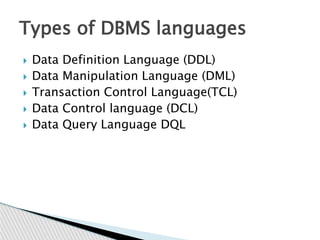
 Data Definition Language (DDL)
 Data Manipulation Language (DML)
 Transaction Control Language(TCL)
 Data Control language (DCL)
 Data Query Language DQL
Types of DBMS languages
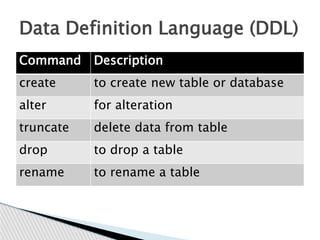
Command Description
create to create new table or database
alter for alteration
truncate delete data from table
drop to drop a table
rename to rename a table
Data Definition Language (DDL)
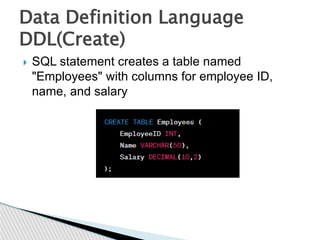
 SQL statement creates a table named
"Employees" with columns for employee ID,
name, and salary
Data Definition Language
DDL(Create)
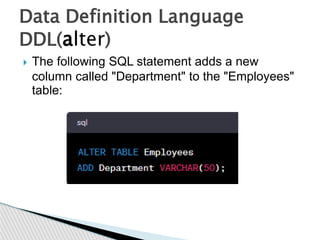
 The following SQL statement adds a new
column called "Department" to the "Employees"
table:
Data Definition Language
DDL(alter)
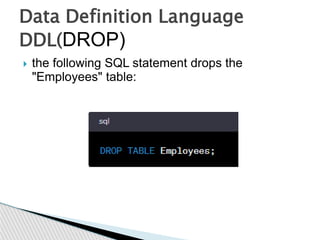
 the following SQL statement drops the
"Employees" table:
Data Definition Language
DDL(DROP)
 It is a faster alternative to the DELETE
statement for removing all records from a table.
Here's an example:
Data Definition Language
DDL(TRUNCATE)
 It is a faster alternative to the DELETE
statement for removing all records from a table.
Here's an example:
Data Definition Language
DDL(COMMENT)
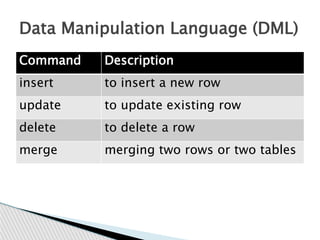
Command Description
insert to insert a new row
update to update existing row
delete to delete a row
merge merging two rows or two tables
Data Manipulation Language (DML)
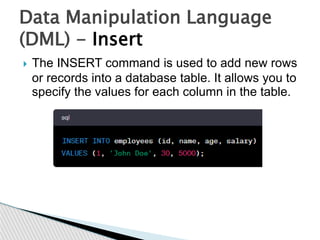
 The INSERT command is used to add new rows
or records into a database table. It allows you to
specify the values for each column in the table.
Data Manipulation Language
(DML) - Insert
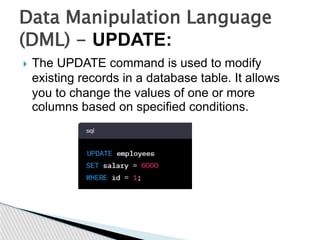
 The UPDATE command is used to modify
existing records in a database table. It allows
you to change the values of one or more
columns based on specified conditions.
Data Manipulation Language
(DML) - UPDATE:
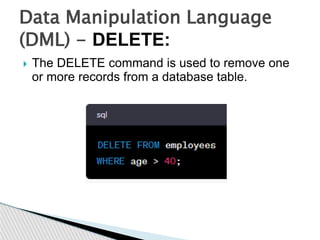
 The DELETE command is used to remove one
or more records from a database table.
Data Manipulation Language
(DML) - DELETE:
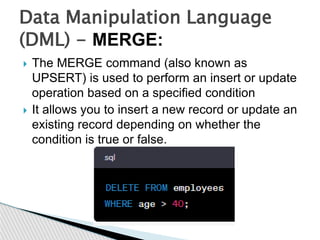
 The MERGE command (also known as
UPSERT) is used to perform an insert or update
operation based on a specified condition
 It allows you to insert a new record or update an
existing record depending on whether the
condition is true or false.
Data Manipulation Language
(DML) - MERGE:
Command Description
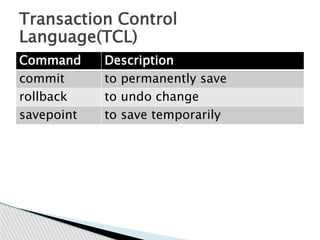
commit to permanently save
rollback to undo change
savepoint to save temporarily
Transaction Control
Language(TCL)
 The COMMIT command is used to permanently
save the changes made during a transaction. It
marks the successful completion of a transaction
and makes all the changes made within that
transaction permanent.
Transaction Control
Language(TCL) COMMIT
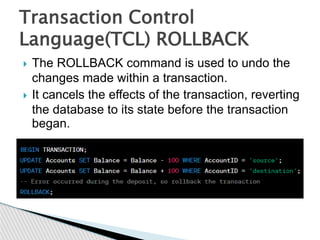
 The ROLLBACK command is used to undo the
changes made within a transaction.
 It cancels the effects of the transaction, reverting
the database to its state before the transaction
began.
Transaction Control
Language(TCL) ROLLBACK
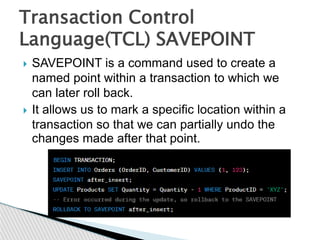
 SAVEPOINT is a command used to create a
named point within a transaction to which we
can later roll back.
 It allows us to mark a specific location within a
transaction so that we can partially undo the
changes made after that point.
Transaction Control
Language(TCL) SAVEPOINT
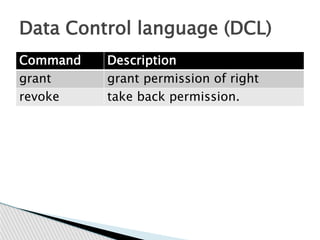
Command Description
grant grant permission of right
revoke take back permission.
Data Control language (DCL)
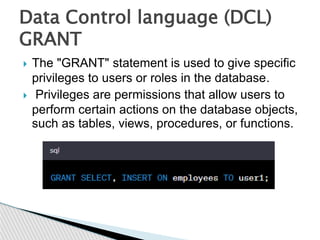
 The "GRANT" statement is used to give specific
privileges to users or roles in the database.
 Privileges are permissions that allow users to
perform certain actions on the database objects,
such as tables, views, procedures, or functions.
Data Control language (DCL)
GRANT
 The "REVOKE" statement is used to take away
or revoke privileges that have been previously
granted to users or roles in the database.
 It is the opposite of the GRANT statement and is
used to ensure that users have only the
necessary privileges to perform their tasks.
Data Control language (DCL)
REVOKE
Command Description
select retrieve records from one or
more table
DQL: Data Query Language
 DQL allows users to specify what data they want
to retrieve from the database based on certain
criteria or conditions.
 The database has a table named "employees"
with columns such as "employee_id,"
"first_name," "last_name," and "salary.“
SELECT first_name, last_name FROM
employees;
DQL: Data Query Language
select
 if you only want to retrieve the names of
employees who have a salary greater than 5000
SELECT first_name, last_name FROM employees
WHERE salary > 5000;
DQL: Data Query Language
select (cont.)
Time for practices our Database
skills
THANK YOU

Database Management System (DBMS).pptx

  • 1.
  • 2.
     DBMS standsor Database Management System.  DBMS = Database + Management System.  Database is a collection of data and Management System is a set of programs to store and retrieve those data.  Advantages over traditional file-based systems  Data Independence  Data Consistency and Integrity  Data Security  Data Concurrency  Data Recovery and Backup  Data Scalability Introduction to DBMS
  • 3.
     DBMS isa software that is used to manage the data. ◦ MySQL ◦ IBM Db2 ◦ Oracle ◦ PostgreSQL  DBMS provides an interface to the user so that the operations on database can be performed using the interface and secure the data  DBMS also secures the data from unauthorised access as well as corrupt data insertions. What is DBMS?
  • 4.
     Data Definition- Creation of table, table schema creation, removal of table definition  Data Modification - allows users to insert, update and delete the data from the tables.  Data Retrieval - allows users to fetch data from the database  User administration - allows user management such as organizing users in different groups with different access levels Operations of the database
  • 5.
     Storage ofdata - the data is stored in such a way that it acquires lot less space as the redundant data (duplicate data) has been removed before storage  Retrieval of data - Along with storing the data in an optimized and systematic manner, it is also important that we retrieve the data quickly when needed What is the need of DBMS?
  • 6.
     Manage theData  Data Organization  Data Storage  Data Retrieval  Data Integrity  Data Security  Data Sharing and Collaboration  Data Consistency  Data Scalability Purpose of Database Systems
  • 7.
     Telecom  Industry Banking System  Sales  Airlines  Education sector  Online shopping .etc DBMS applications
  • 8.
     No redundantdata  Data Consistency and Integrity  Data Security  Privacy  Easy access to data  Easy recovery  Flexible Advantage of DBMS
  • 9.
     Cost ishigh  Complexity  Performance Disadvantages of DBMS
  • 10.
     SQL (StructuredQuery Language) DBMS languages
  • 11.
     Data DefinitionLanguage (DDL)  Data Manipulation Language (DML)  Transaction Control Language(TCL)  Data Control language (DCL)  Data Query Language DQL Types of DBMS languages
  • 12.
    Command Description create tocreate new table or database alter for alteration truncate delete data from table drop to drop a table rename to rename a table Data Definition Language (DDL)
  • 13.
     SQL statementcreates a table named "Employees" with columns for employee ID, name, and salary Data Definition Language DDL(Create)
  • 14.
     The followingSQL statement adds a new column called "Department" to the "Employees" table: Data Definition Language DDL(alter)
  • 15.
     the followingSQL statement drops the "Employees" table: Data Definition Language DDL(DROP)
  • 16.
     It isa faster alternative to the DELETE statement for removing all records from a table. Here's an example: Data Definition Language DDL(TRUNCATE)
  • 17.
     It isa faster alternative to the DELETE statement for removing all records from a table. Here's an example: Data Definition Language DDL(COMMENT)
  • 18.
    Command Description insert toinsert a new row update to update existing row delete to delete a row merge merging two rows or two tables Data Manipulation Language (DML)
  • 19.
     The INSERTcommand is used to add new rows or records into a database table. It allows you to specify the values for each column in the table. Data Manipulation Language (DML) - Insert
  • 20.
     The UPDATEcommand is used to modify existing records in a database table. It allows you to change the values of one or more columns based on specified conditions. Data Manipulation Language (DML) - UPDATE:
  • 21.
     The DELETEcommand is used to remove one or more records from a database table. Data Manipulation Language (DML) - DELETE:
  • 22.
     The MERGEcommand (also known as UPSERT) is used to perform an insert or update operation based on a specified condition  It allows you to insert a new record or update an existing record depending on whether the condition is true or false. Data Manipulation Language (DML) - MERGE:
  • 23.
    Command Description commit topermanently save rollback to undo change savepoint to save temporarily Transaction Control Language(TCL)
  • 24.
     The COMMITcommand is used to permanently save the changes made during a transaction. It marks the successful completion of a transaction and makes all the changes made within that transaction permanent. Transaction Control Language(TCL) COMMIT
  • 25.
     The ROLLBACKcommand is used to undo the changes made within a transaction.  It cancels the effects of the transaction, reverting the database to its state before the transaction began. Transaction Control Language(TCL) ROLLBACK
  • 26.
     SAVEPOINT isa command used to create a named point within a transaction to which we can later roll back.  It allows us to mark a specific location within a transaction so that we can partially undo the changes made after that point. Transaction Control Language(TCL) SAVEPOINT
  • 27.
    Command Description grant grantpermission of right revoke take back permission. Data Control language (DCL)
  • 28.
     The "GRANT"statement is used to give specific privileges to users or roles in the database.  Privileges are permissions that allow users to perform certain actions on the database objects, such as tables, views, procedures, or functions. Data Control language (DCL) GRANT
  • 29.
     The "REVOKE"statement is used to take away or revoke privileges that have been previously granted to users or roles in the database.  It is the opposite of the GRANT statement and is used to ensure that users have only the necessary privileges to perform their tasks. Data Control language (DCL) REVOKE
  • 30.
    Command Description select retrieverecords from one or more table DQL: Data Query Language
  • 31.
     DQL allowsusers to specify what data they want to retrieve from the database based on certain criteria or conditions.  The database has a table named "employees" with columns such as "employee_id," "first_name," "last_name," and "salary.“ SELECT first_name, last_name FROM employees; DQL: Data Query Language select
  • 32.
     if youonly want to retrieve the names of employees who have a salary greater than 5000 SELECT first_name, last_name FROM employees WHERE salary > 5000; DQL: Data Query Language select (cont.)
  • 33.
    Time for practicesour Database skills
  • 34.