Lecture 1
Introduction to
React Native
PR EPAR ED BY: GEVITA
Course Overview:
∙ This course is designed to provide students with an introduction to React
Native, a popular framework for building mobile applications for both iOS and
Android platforms. Students will learn how to build, test, and deploy mobile
applications using React Native, as well as how to use popular libraries.
Pre-requisites
∙ Basic knowledge of JavaScript
∙ Familiarity with React
What is React Native?
∙ React Native is an open-source framework for building Android and iOS
applications.
∙ React Native is a library built with the same API as React. It uses the same
declarative UI paradigm but renders directly to native components. You can
write your app once in React and run it on multiple native platforms, like
Android and iOS.
∙ While “native” is part of the name, it’s not pure native app development: Expo
and React Native still use JavaScript to run your app. Instead of rendering
this JavaScript with a web engine, they use the actual native components
from the platform.
Expo and React Native
∙ Expo is a platform to make universal React apps that helps you develop,
build, deploy, and quickly iterate on mobile apps. It provides a range of
tooling to make development with React Native even easier.
∙ Although Expo isn’t required to create React Native apps, it helps
developers by removing the need for basic native knowledge.
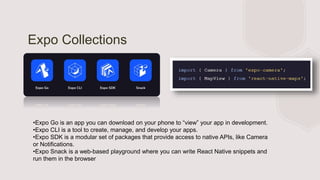
Expo Collections
•Expo Go is an app you can download on your phone to “view” your app in development.
•Expo CLI is a tool to create, manage, and develop your apps.
•Expo SDK is a modular set of packages that provide access to native APIs, like Camera
or Notifications.
•Expo Snack is a web-based playground where you can write React Native snippets and
run them in the browser
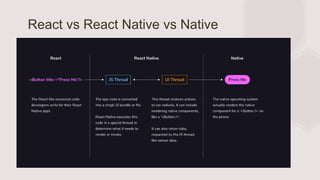
React vs React Native vs Native
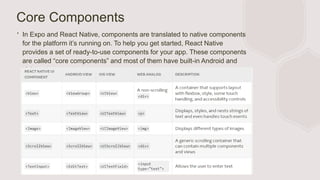
Core Components
∙ In Expo and React Native, components are translated to native components
for the platform it’s running on. To help you get started, React Native
provides a set of ready-to-use components for your app. These components
are called “core components” and most of them have built-in Android and
iOS implementations.
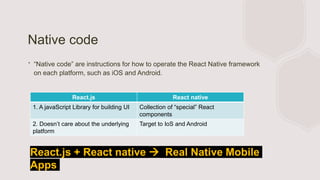
Native code
∙ “Native code” are instructions for how to operate the React Native framework
on each platform, such as iOS and Android.
React.js React native
1. A javaScript Library for building UI Collection of “special” React
components
2. Doesn’t care about the underlying
platform
Target to IoS and Android
React.js + React native  Real Native Mobile
Apps
Entry Point
∙ In React Native, the entry point is the main JavaScript file that is responsible for initializing the
application. The entry point typically has a specific file name, such as index.js or App.js, and it is
the first file that is executed when the application is launched.
∙ The entry point is responsible for rendering the root component of the application, which is
typically the App component. This component is responsible for rendering the entire application's
UI and handling the application's lifecycle events.
∙ In addition to initializing the application, the entry point is also responsible for setting up any
required configuration or libraries that the application needs to run. This includes things like
setting up Redux, setting up a navigation library, or configuring any other dependencies that the
application requires.
∙ Overall, the entry point is a critical part of a React Native application, as it sets the foundation for
the entire application's structure and behavior.
React Fundamentals
∙ React Native runs on React, a popular open-source library for building user
interfaces with JavaScript. To make the most of React Native, it helps to
understand React itself. This section can get you started or can serve as a
refresher course.
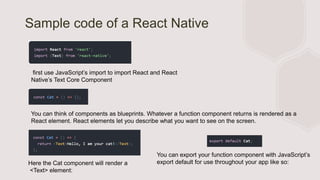
Sample code of a React Native
first use JavaScript’s import to import React and React
Native’s Text Core Component
You can think of components as blueprints. Whatever a function component returns is rendered as a
React element. React elements let you describe what you want to see on the screen.
Here the Cat component will render a
<Text> element:
You can export your function component with JavaScript’s
export default for use throughout your app like so:
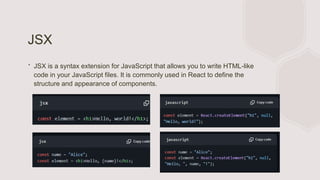
JSX
∙ JSX is a syntax extension for JavaScript that allows you to write HTML-like
code in your JavaScript files. It is commonly used in React to define the
structure and appearance of components.
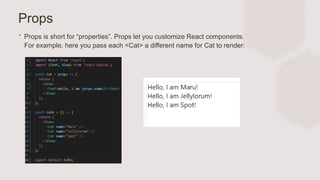
Props
∙ Props is short for “properties”. Props let you customize React components.
For example, here you pass each <Cat> a different name for Cat to render:
Image component
State
While you can think of props as arguments
you use to configure how components render,
state is like a component’s personal data
storage. State is useful for handling data that
changes over time or that comes from user
interaction. State gives your components
memory!
After
buttons are
pressed
Setting up the development
environment
∙ Download Node.js
∙ Download ExpoGo (iOS or Android)
∙ Download Visual Studio Code
∙ 1. Select folder
∙ 2. Check node.js version  node -v
∙ 3. Check the node package manager  npm -v
∙ 4. npm install -g expo-cli// add sudo if you’re MacOS]
∙ 5. npx create-expo-app HelloApp
when appear >npm install (Wait to install, if long time no respond, try press enter 1 time)
∙ 6. cd HelloApp (go to the HelloApp Directory)
∙ 7. npx expo start
∙ 8. Make sure connect mobile phone with your PC the same Wifi -- if fail, CTRL+C, go back to step 5
∙ 9. iOS (Scan QR code through camera), Android (Scan using Expo Go App scanner)
(will create a project folder)
Sample QR code generated
from the Visual Studio Code
Terminal
Installation for web view
∙ npx expo install react-native-web@~0.18.10 react-dom@18.2.0 @expo/webpack-
config@^18.0.1
∙ (Press w will open you a web view)
Lecture 1 Introduction to React Native.pptx

Lecture 1 Introduction to React Native.pptx

  • 1.
    Lecture 1 Introduction to ReactNative PR EPAR ED BY: GEVITA
  • 2.
    Course Overview: ∙ Thiscourse is designed to provide students with an introduction to React Native, a popular framework for building mobile applications for both iOS and Android platforms. Students will learn how to build, test, and deploy mobile applications using React Native, as well as how to use popular libraries.
  • 3.
    Pre-requisites ∙ Basic knowledgeof JavaScript ∙ Familiarity with React
  • 4.
    What is ReactNative? ∙ React Native is an open-source framework for building Android and iOS applications. ∙ React Native is a library built with the same API as React. It uses the same declarative UI paradigm but renders directly to native components. You can write your app once in React and run it on multiple native platforms, like Android and iOS. ∙ While “native” is part of the name, it’s not pure native app development: Expo and React Native still use JavaScript to run your app. Instead of rendering this JavaScript with a web engine, they use the actual native components from the platform.
  • 5.
    Expo and ReactNative ∙ Expo is a platform to make universal React apps that helps you develop, build, deploy, and quickly iterate on mobile apps. It provides a range of tooling to make development with React Native even easier. ∙ Although Expo isn’t required to create React Native apps, it helps developers by removing the need for basic native knowledge.
  • 6.
    Expo Collections •Expo Gois an app you can download on your phone to “view” your app in development. •Expo CLI is a tool to create, manage, and develop your apps. •Expo SDK is a modular set of packages that provide access to native APIs, like Camera or Notifications. •Expo Snack is a web-based playground where you can write React Native snippets and run them in the browser
  • 7.
    React vs ReactNative vs Native
  • 8.
    Core Components ∙ InExpo and React Native, components are translated to native components for the platform it’s running on. To help you get started, React Native provides a set of ready-to-use components for your app. These components are called “core components” and most of them have built-in Android and iOS implementations.
  • 9.
    Native code ∙ “Nativecode” are instructions for how to operate the React Native framework on each platform, such as iOS and Android. React.js React native 1. A javaScript Library for building UI Collection of “special” React components 2. Doesn’t care about the underlying platform Target to IoS and Android React.js + React native  Real Native Mobile Apps
  • 10.
    Entry Point ∙ InReact Native, the entry point is the main JavaScript file that is responsible for initializing the application. The entry point typically has a specific file name, such as index.js or App.js, and it is the first file that is executed when the application is launched. ∙ The entry point is responsible for rendering the root component of the application, which is typically the App component. This component is responsible for rendering the entire application's UI and handling the application's lifecycle events. ∙ In addition to initializing the application, the entry point is also responsible for setting up any required configuration or libraries that the application needs to run. This includes things like setting up Redux, setting up a navigation library, or configuring any other dependencies that the application requires. ∙ Overall, the entry point is a critical part of a React Native application, as it sets the foundation for the entire application's structure and behavior.
  • 11.
    React Fundamentals ∙ ReactNative runs on React, a popular open-source library for building user interfaces with JavaScript. To make the most of React Native, it helps to understand React itself. This section can get you started or can serve as a refresher course.
  • 12.
    Sample code ofa React Native first use JavaScript’s import to import React and React Native’s Text Core Component You can think of components as blueprints. Whatever a function component returns is rendered as a React element. React elements let you describe what you want to see on the screen. Here the Cat component will render a <Text> element: You can export your function component with JavaScript’s export default for use throughout your app like so:
  • 13.
    JSX ∙ JSX isa syntax extension for JavaScript that allows you to write HTML-like code in your JavaScript files. It is commonly used in React to define the structure and appearance of components.
  • 14.
    Props ∙ Props isshort for “properties”. Props let you customize React components. For example, here you pass each <Cat> a different name for Cat to render:
  • 15.
  • 16.
    State While you canthink of props as arguments you use to configure how components render, state is like a component’s personal data storage. State is useful for handling data that changes over time or that comes from user interaction. State gives your components memory! After buttons are pressed
  • 17.
    Setting up thedevelopment environment ∙ Download Node.js ∙ Download ExpoGo (iOS or Android) ∙ Download Visual Studio Code ∙ 1. Select folder ∙ 2. Check node.js version  node -v ∙ 3. Check the node package manager  npm -v ∙ 4. npm install -g expo-cli// add sudo if you’re MacOS] ∙ 5. npx create-expo-app HelloApp when appear >npm install (Wait to install, if long time no respond, try press enter 1 time) ∙ 6. cd HelloApp (go to the HelloApp Directory) ∙ 7. npx expo start ∙ 8. Make sure connect mobile phone with your PC the same Wifi -- if fail, CTRL+C, go back to step 5 ∙ 9. iOS (Scan QR code through camera), Android (Scan using Expo Go App scanner) (will create a project folder)
  • 18.
    Sample QR codegenerated from the Visual Studio Code Terminal
  • 19.
    Installation for webview ∙ npx expo install react-native-web@~0.18.10 react-dom@18.2.0 @expo/webpack- config@^18.0.1 ∙ (Press w will open you a web view)