SQL
What is SQL?
SQL stands for Structured Query Language. It is
used for storing and managing data in Relational
Database Management System (RDBMS).
It is a standard language for Relational Database
System. It enables a user to create, read, update
and delete relational databases and tables.
What is Advantages of SQL?
• High speed
• No coding needed
• Well defined standards
• Portability
• Interactive language
• Multiple data view
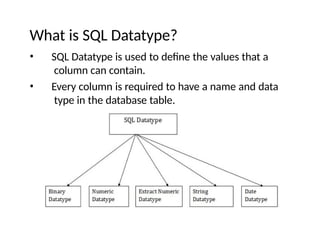
What is SQL Datatype?
• SQL Datatype is used to define the values that a
column can contain.
• Every column is required to have a name and data
type in the database table.
SQL Commands
• SQL commands are instructions. It is
used to communicate with the
database. It is also used to perform
specific tasks, functions, and queries
of data.
• SQL can perform various tasks like
create a table, add data to tables,
drop the table, modify the table, set
permission for users.
Types of SQL Commands
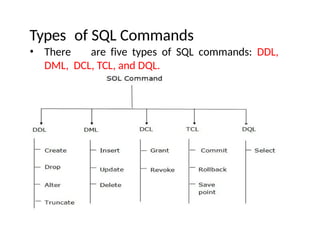
• There are five types of SQL commands: DDL,
DML, DCL, TCL, and DQL.
Data Definition Language (DDL)
• DDL changes the structure of the table like creating a table, deleting
a table, altering a table, etc.
• All the command of DDL are auto-committed that means it
permanently save all the changes in the database.
• Here are some commands that come under DDL:
• CREATE
• ALTER
• DROP
• TRUNCATE
Data Definition Language (DDL)- CREATE
CREATE It is used to create a new table in the database.
Syntax:
CREATE TABLE TABLE_NAME (COLUMN_NAME DATATYPES[,....]);
Example:
CREATE TABLE EMPLOYEE(Name VARCHAR2(20), Email VARCHA
R2(100), DOB DATE);
Data Definition Language (DDL)- Drop
Drop: It is used to delete both the structure and record
stored in the table.
Syntax:
DROP TABLE ;
Example:
DROP TABLE EMPLOYEE;
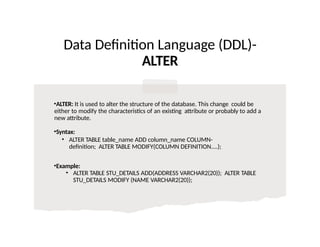
Data Definition Language (DDL)-
ALTER
•ALTER: It is used to alter the structure of the database. This change could be
either to modify the characteristics of an existing attribute or probably to add a
new attribute.
•Syntax:
• ALTER TABLE table_name ADD column_name COLUMN-
definition; ALTER TABLE MODIFY(COLUMN DEFINITION....);
•Example:
• ALTER TABLE STU_DETAILS ADD(ADDRESS VARCHAR2(20)); ALTER TABLE
STU_DETAILS MODIFY (NAME VARCHAR2(20));
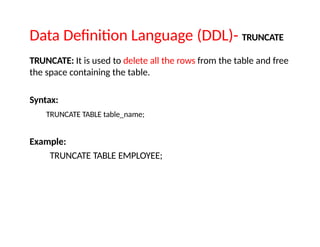
Data Definition Language (DDL)- TRUNCATE
TRUNCATE: It is used to delete all the rows from the table and free
the space containing the table.
Syntax:
TRUNCATE TABLE table_name;
Example:
TRUNCATE TABLE EMPLOYEE;
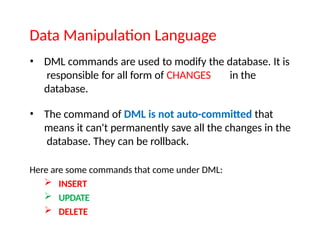
Data Manipulation Language
• DML commands are used to modify the database. It is
responsible for all form of CHANGES in the
database.
• The command of DML is not auto-committed that
means it can't permanently save all the changes in the
database. They can be rollback.
Here are some commands that come under DML:
 INSERT
 UPDATE
 DELETE
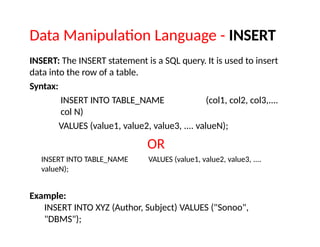
Data Manipulation Language - INSERT
INSERT: The INSERT statement is a SQL query. It is used to insert
data into the row of a table.
Syntax:
INSERT INTO TABLE_NAME (col1, col2, col3,....
col N)
VALUES (value1, value2, value3, .... valueN);
OR
INSERT INTO TABLE_NAME VALUES (value1, value2, value3, ....
valueN);
Example:
INSERT INTO XYZ (Author, Subject) VALUES ("Sonoo",
"DBMS");
Data Manipulation Language - UPDATE
Update: This command is used to update or modify the value of a
column in the table.
Syntax:
UPDATE table_name SET [column_name1= value1,...column_n
ameN = valueN] [WHERE CONDITION]
Example:
UPDATE students
SET User_Name = 'Sonoo'
WHERE Student_Id = '3'
Data Control Language
DCL commands are used to GRANT and TAKE BACK
authority from any database user.
Here are some commands that come under DCL:
Grant
Revoke
Data Control Language - Grant
GRANT: It is used to give user access privileges to a database.
Example:
GRANT SELECT, UPDATE ON MY_TABLE TO SOME_USER, ANOT
HER_USER;
REVOKE: It is used to take back permissions from the user.
Example:
REVOKE SELECT, UPDATE ON MY_TABLE FROM USER1, USER2;
Transaction Control Language
TCL commands can only use with DML commands like
INSERT, DELETE and UPDATE only.
These operations are automatically committed in the
database that's why they cannot be used while creating
tables or dropping them.
Here are some commands that come under TCL:
 COMMIT
 ROLLBACK
 SAVEPOINT
Transaction Control Language - COMMIT
Commit: Commit command is used to save all the transactions to
the database.
Syntex:
COMMIT;
Example:
DELETE FROM CUSTOMERS
WHERE AGE = 25;
COMMIT;
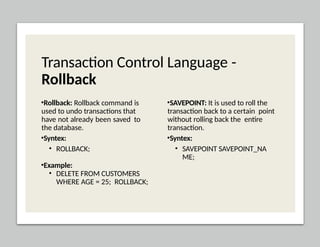
Transaction Control Language -
Rollback
•Rollback: Rollback command is
used to undo transactions that
have not already been saved to
the database.
•Syntex:
• ROLLBACK;
•Example:
• DELETE FROM CUSTOMERS
WHERE AGE = 25; ROLLBACK;
•SAVEPOINT: It is used to roll the
transaction back to a certain point
without rolling back the entire
transaction.
•Syntex:
• SAVEPOINT SAVEPOINT_NA
ME;
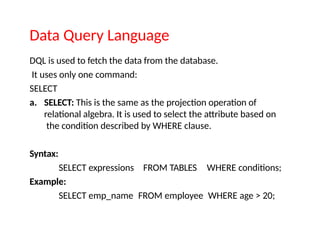
Data Query Language
DQL is used to fetch the data from the database.
It uses only one command:
SELECT
a. SELECT: This is the same as the projection operation of
relational algebra. It is used to select the attribute based on
the condition described by WHERE clause.
Syntax:
SELECT expressions
Example:
FROM TABLES WHERE conditions;
SELECT emp_name FROM employee WHERE age > 20;
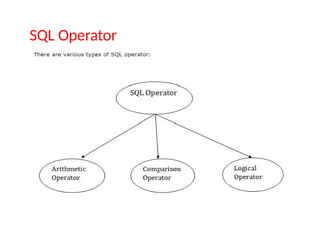
SQL Operator
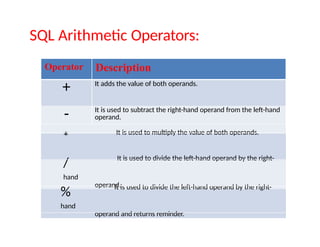
SQL Arithmetic Operators:
Operator Description
+ It adds the value of both operands.
- It is used to subtract the right-hand operand from the left-hand
operand.
* It is used to multiply the value of both operands.
/ It is used to divide the left-hand operand by the right-
hand
operand.
% It is used to divide the left-hand operand by the right-
hand
operand and returns reminder.
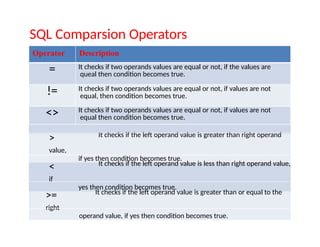
SQL Comparsion Operators
Operator Description
= It checks if two operands values are equal or not, if the values are
queal then condition becomes true.
!= It checks if two operands values are equal or not, if values are not
equal, then condition becomes true.
<> It checks if two operands values are equal or not, if values are not
equal then condition becomes true.
> It checks if the left operand value is greater than right operand
value,
if yes then condition becomes true.
< It checks if the left operand value is less than right operand value,
if
yes then condition becomes true.
>= It checks if the left operand value is greater than or equal to the
right
operand value, if yes then condition becomes true.
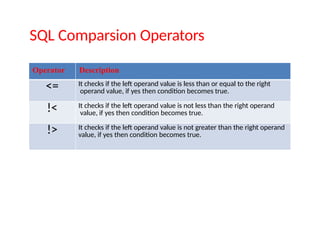
SQL Comparsion Operators
Operator Description
<= It checks if the left operand value is less than or equal to the right
operand value, if yes then condition becomes true.
!< It checks if the left operand value is not less than the right operand
value, if yes then condition becomes true.
!> It checks if the left operand value is not greater than the right operand
value, if yes then condition becomes true.
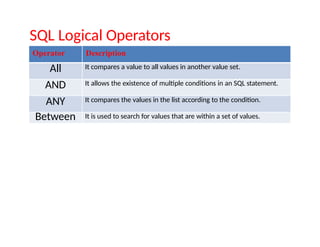
SQL Logical Operators
Operator Description
All It compares a value to all values in another value set.
AND It allows the existence of multiple conditions in an SQL statement.
ANY It compares the values in the list according to the condition.
Between It is used to search for values that are within a set of values.
IN It compares a value to that specified list value.
NOT It reverses the meaning of any logical operator.
OR It combines multiple conditions in SQL statements.
EXIST It is used to search for the presence of a row in a specified table.
LIKE It compares a value to similar values using wildcard operator.
Thank you

SQLBasic to advance for the beggineers.pptx

  • 1.
  • 2.
    What is SQL? SQLstands for Structured Query Language. It is used for storing and managing data in Relational Database Management System (RDBMS). It is a standard language for Relational Database System. It enables a user to create, read, update and delete relational databases and tables.
  • 3.
    What is Advantagesof SQL? • High speed • No coding needed • Well defined standards • Portability • Interactive language • Multiple data view
  • 4.
    What is SQLDatatype? • SQL Datatype is used to define the values that a column can contain. • Every column is required to have a name and data type in the database table.
  • 5.
    SQL Commands • SQLcommands are instructions. It is used to communicate with the database. It is also used to perform specific tasks, functions, and queries of data. • SQL can perform various tasks like create a table, add data to tables, drop the table, modify the table, set permission for users.
  • 6.
    Types of SQLCommands • There are five types of SQL commands: DDL, DML, DCL, TCL, and DQL.
  • 7.
    Data Definition Language(DDL) • DDL changes the structure of the table like creating a table, deleting a table, altering a table, etc. • All the command of DDL are auto-committed that means it permanently save all the changes in the database. • Here are some commands that come under DDL: • CREATE • ALTER • DROP • TRUNCATE
  • 8.
    Data Definition Language(DDL)- CREATE CREATE It is used to create a new table in the database. Syntax: CREATE TABLE TABLE_NAME (COLUMN_NAME DATATYPES[,....]); Example: CREATE TABLE EMPLOYEE(Name VARCHAR2(20), Email VARCHA R2(100), DOB DATE);
  • 9.
    Data Definition Language(DDL)- Drop Drop: It is used to delete both the structure and record stored in the table. Syntax: DROP TABLE ; Example: DROP TABLE EMPLOYEE;
  • 10.
    Data Definition Language(DDL)- ALTER •ALTER: It is used to alter the structure of the database. This change could be either to modify the characteristics of an existing attribute or probably to add a new attribute. •Syntax: • ALTER TABLE table_name ADD column_name COLUMN- definition; ALTER TABLE MODIFY(COLUMN DEFINITION....); •Example: • ALTER TABLE STU_DETAILS ADD(ADDRESS VARCHAR2(20)); ALTER TABLE STU_DETAILS MODIFY (NAME VARCHAR2(20));
  • 11.
    Data Definition Language(DDL)- TRUNCATE TRUNCATE: It is used to delete all the rows from the table and free the space containing the table. Syntax: TRUNCATE TABLE table_name; Example: TRUNCATE TABLE EMPLOYEE;
  • 12.
    Data Manipulation Language •DML commands are used to modify the database. It is responsible for all form of CHANGES in the database. • The command of DML is not auto-committed that means it can't permanently save all the changes in the database. They can be rollback. Here are some commands that come under DML:  INSERT  UPDATE  DELETE
  • 13.
    Data Manipulation Language- INSERT INSERT: The INSERT statement is a SQL query. It is used to insert data into the row of a table. Syntax: INSERT INTO TABLE_NAME (col1, col2, col3,.... col N) VALUES (value1, value2, value3, .... valueN); OR INSERT INTO TABLE_NAME VALUES (value1, value2, value3, .... valueN); Example: INSERT INTO XYZ (Author, Subject) VALUES ("Sonoo", "DBMS");
  • 14.
    Data Manipulation Language- UPDATE Update: This command is used to update or modify the value of a column in the table. Syntax: UPDATE table_name SET [column_name1= value1,...column_n ameN = valueN] [WHERE CONDITION] Example: UPDATE students SET User_Name = 'Sonoo' WHERE Student_Id = '3'
  • 15.
    Data Control Language DCLcommands are used to GRANT and TAKE BACK authority from any database user. Here are some commands that come under DCL: Grant Revoke
  • 16.
    Data Control Language- Grant GRANT: It is used to give user access privileges to a database. Example: GRANT SELECT, UPDATE ON MY_TABLE TO SOME_USER, ANOT HER_USER; REVOKE: It is used to take back permissions from the user. Example: REVOKE SELECT, UPDATE ON MY_TABLE FROM USER1, USER2;
  • 17.
    Transaction Control Language TCLcommands can only use with DML commands like INSERT, DELETE and UPDATE only. These operations are automatically committed in the database that's why they cannot be used while creating tables or dropping them. Here are some commands that come under TCL:  COMMIT  ROLLBACK  SAVEPOINT
  • 18.
    Transaction Control Language- COMMIT Commit: Commit command is used to save all the transactions to the database. Syntex: COMMIT; Example: DELETE FROM CUSTOMERS WHERE AGE = 25; COMMIT;
  • 19.
    Transaction Control Language- Rollback •Rollback: Rollback command is used to undo transactions that have not already been saved to the database. •Syntex: • ROLLBACK; •Example: • DELETE FROM CUSTOMERS WHERE AGE = 25; ROLLBACK; •SAVEPOINT: It is used to roll the transaction back to a certain point without rolling back the entire transaction. •Syntex: • SAVEPOINT SAVEPOINT_NA ME;
  • 20.
    Data Query Language DQLis used to fetch the data from the database. It uses only one command: SELECT a. SELECT: This is the same as the projection operation of relational algebra. It is used to select the attribute based on the condition described by WHERE clause. Syntax: SELECT expressions Example: FROM TABLES WHERE conditions; SELECT emp_name FROM employee WHERE age > 20;
  • 21.
  • 22.
    SQL Arithmetic Operators: OperatorDescription + It adds the value of both operands. - It is used to subtract the right-hand operand from the left-hand operand. * It is used to multiply the value of both operands. / It is used to divide the left-hand operand by the right- hand operand. % It is used to divide the left-hand operand by the right- hand operand and returns reminder.
  • 23.
    SQL Comparsion Operators OperatorDescription = It checks if two operands values are equal or not, if the values are queal then condition becomes true. != It checks if two operands values are equal or not, if values are not equal, then condition becomes true. <> It checks if two operands values are equal or not, if values are not equal then condition becomes true. > It checks if the left operand value is greater than right operand value, if yes then condition becomes true. < It checks if the left operand value is less than right operand value, if yes then condition becomes true. >= It checks if the left operand value is greater than or equal to the right operand value, if yes then condition becomes true.
  • 24.
    SQL Comparsion Operators OperatorDescription <= It checks if the left operand value is less than or equal to the right operand value, if yes then condition becomes true. !< It checks if the left operand value is not less than the right operand value, if yes then condition becomes true. !> It checks if the left operand value is not greater than the right operand value, if yes then condition becomes true.
  • 25.
    SQL Logical Operators OperatorDescription All It compares a value to all values in another value set. AND It allows the existence of multiple conditions in an SQL statement. ANY It compares the values in the list according to the condition. Between It is used to search for values that are within a set of values. IN It compares a value to that specified list value. NOT It reverses the meaning of any logical operator. OR It combines multiple conditions in SQL statements. EXIST It is used to search for the presence of a row in a specified table. LIKE It compares a value to similar values using wildcard operator.
  • 27.