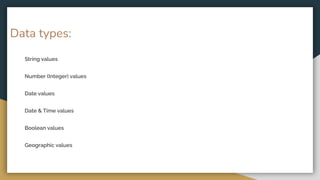
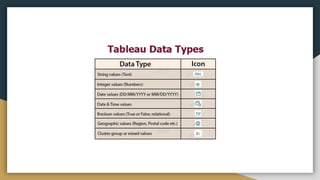
String values
Number (Integer) values
Date values
Date & Time values
Boolean values
Geographic values
Data types:
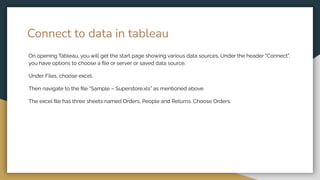
Connect to data in tableau
On opening Tableau, you will get the start page showing various data sources. Under the header “Connect”,
you have options to choose a file or server or saved data source.
Under Files, choose excel.
Then navigate to the file “Sample – Superstore.xls” as mentioned above.
The excel file has three sheets named Orders, People and Returns. Choose Orders.
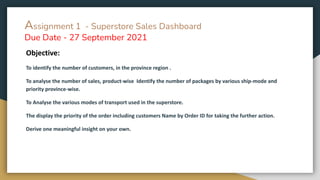
Assignment 1 - Superstore Sales Dashboard
Due Date - 27 September 2021
Objective:
To identify the number of customers, in the province region .
To analyse the number of sales, product-wise Identify the number of packages by various ship-mode and
priority province-wise.
To Analyse the various modes of transport used in the superstore.
The display the priority of the order including customers Name by Order ID for taking the further action.
Derive one meaningful insight on your own.
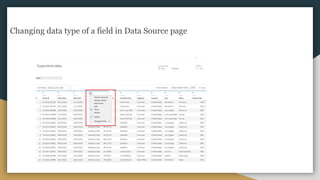
Changing data type of a field in Data Source page
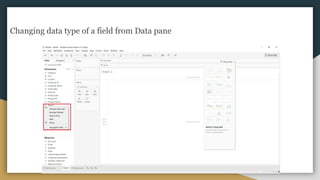
Changing data type of a field from Data pane
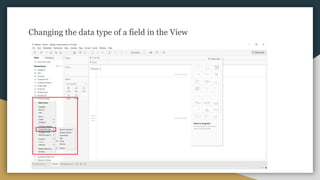
Changing the data type of a field in the View
Dimensions and Measures, Blue and Green
● Dimensions contain qualitative values (such as names, dates, or geographical data). You can use
dimensions to categorize, segment, and reveal the details in your data. Dimensions affect the level of
detail in the view.
● Measures contain numeric, quantitative values that you can measure. Measures can be aggregated.
When you drag a measure into the view, Tableau applies an aggregation to that measure (by
default).
● data.world
● Data is Plural
● UN Data
● Data.gov
● Kaggle
● NOAA
● Reddit
● World Fact Book
● UN Environmental Data Explorer
● World Health Organization
● Pitney Bowes
Portals For Data:
Visual Design Basics
Visual design aims to improve a design’s/product’s aesthetic appeal and usability with suitable
images, typography, space, layout and color. Visual design is about more than aesthetics. Designers
place elements carefully to create interfaces that optimize user experience and drive conversion.
Actually, you use visual design to create and organize elements to
A) lead the user’s eye to an item’s functionality, and
B) make the aesthetics consistent.
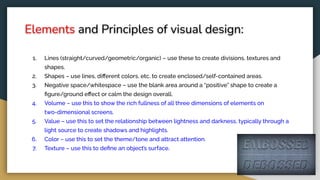
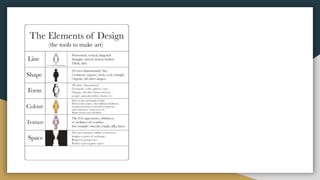
Elements and Principles of visual design:
1. Lines (straight/curved/geometric/organic) – use these to create divisions, textures and
shapes.
2. Shapes – use lines, different colors, etc. to create enclosed/self-contained areas.
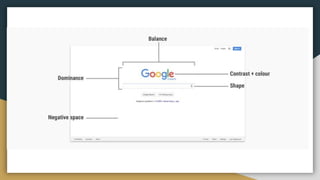
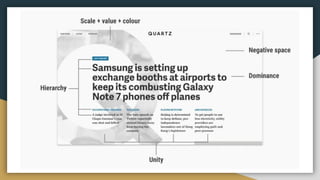
3. Negative space/whitespace – use the blank area around a “positive” shape to create a
figure/ground effect or calm the design overall.
4. Volume – use this to show the rich fullness of all three dimensions of elements on
two-dimensional screens.
5. Value – use this to set the relationship between lightness and darkness, typically through a
light source to create shadows and highlights.
6. Color – use this to set the theme/tone and attract attention.
7. Texture – use this to define an object’s surface.
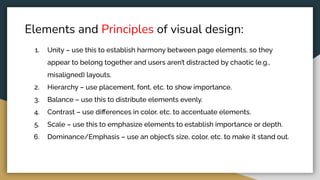
Elements and Principles of visual design:
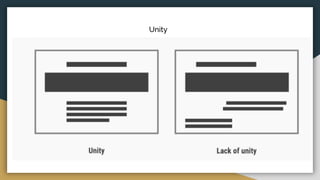
1. Unity – use this to establish harmony between page elements, so they
appear to belong together and users aren’t distracted by chaotic (e.g.,
misaligned) layouts.
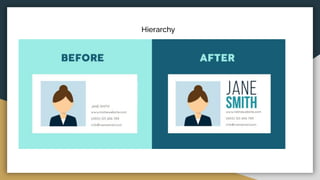
2. Hierarchy – use placement, font, etc. to show importance.
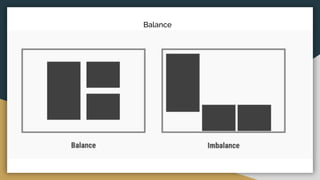
3. Balance – use this to distribute elements evenly.
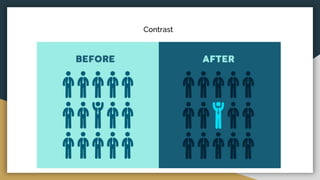
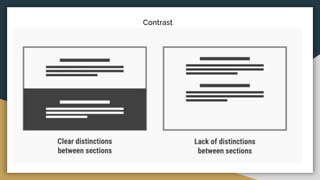
4. Contrast – use differences in color, etc. to accentuate elements.
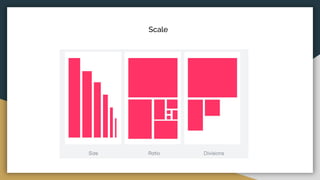
5. Scale – use this to emphasize elements to establish importance or depth.
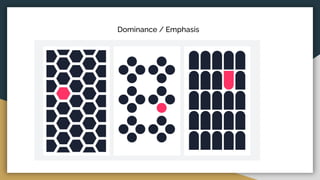
6. Dominance/Emphasis – use an object’s size, color, etc. to make it stand out.
Unity
Hierarchy
Balance
Contrast
Contrast
Scale
Dominance / Emphasis
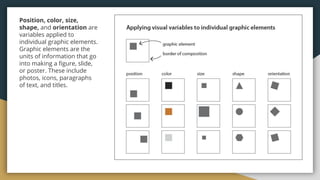
Position, color, size,
shape, and orientation are
variables applied to
individual graphic elements.
Graphic elements are the
units of information that go
into making a figure, slide,
or poster. These include
photos, icons, paragraphs
of text, and titles.
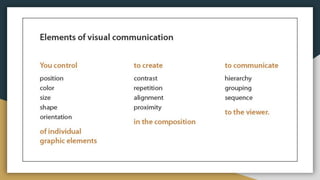
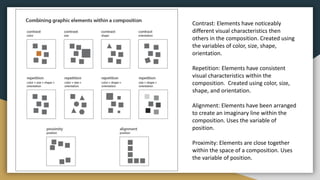
Contrast: Elements have noticeably
different visual characteristics then
others in the composition. Created using
the variables of color, size, shape,
orientation.
Repetition: Elements have consistent
visual characteristics within the
composition. Created using color, size,
shape, and orientation.
Alignment: Elements have been arranged
to create an imaginary line within the
composition. Uses the variable of
position.
Proximity: Elements are close together
within the space of a composition. Uses
the variable of position.
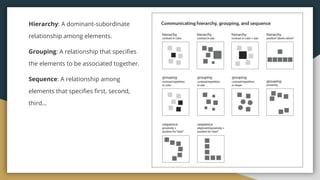
Hierarchy: A dominant-subordinate
relationship among elements.
Grouping: A relationship that specifies
the elements to be associated together.
Sequence: A relationship among
elements that specifies first, second,
third…
Data visualization   data sources   data types- visual design

Data visualization data sources data types- visual design

  • 2.
    String values Number (Integer)values Date values Date & Time values Boolean values Geographic values Data types:
  • 3.
    Connect to datain tableau On opening Tableau, you will get the start page showing various data sources. Under the header “Connect”, you have options to choose a file or server or saved data source. Under Files, choose excel. Then navigate to the file “Sample – Superstore.xls” as mentioned above. The excel file has three sheets named Orders, People and Returns. Choose Orders.
  • 5.
    Assignment 1 -Superstore Sales Dashboard Due Date - 27 September 2021 Objective: To identify the number of customers, in the province region . To analyse the number of sales, product-wise Identify the number of packages by various ship-mode and priority province-wise. To Analyse the various modes of transport used in the superstore. The display the priority of the order including customers Name by Order ID for taking the further action. Derive one meaningful insight on your own.
  • 6.
    Changing data typeof a field in Data Source page
  • 7.
    Changing data typeof a field from Data pane
  • 8.
    Changing the datatype of a field in the View
  • 9.
    Dimensions and Measures,Blue and Green ● Dimensions contain qualitative values (such as names, dates, or geographical data). You can use dimensions to categorize, segment, and reveal the details in your data. Dimensions affect the level of detail in the view. ● Measures contain numeric, quantitative values that you can measure. Measures can be aggregated. When you drag a measure into the view, Tableau applies an aggregation to that measure (by default).
  • 10.
    ● data.world ● Datais Plural ● UN Data ● Data.gov ● Kaggle ● NOAA ● Reddit ● World Fact Book ● UN Environmental Data Explorer ● World Health Organization ● Pitney Bowes Portals For Data:
  • 11.
    Visual Design Basics Visualdesign aims to improve a design’s/product’s aesthetic appeal and usability with suitable images, typography, space, layout and color. Visual design is about more than aesthetics. Designers place elements carefully to create interfaces that optimize user experience and drive conversion. Actually, you use visual design to create and organize elements to A) lead the user’s eye to an item’s functionality, and B) make the aesthetics consistent.
  • 12.
    Elements and Principlesof visual design: 1. Lines (straight/curved/geometric/organic) – use these to create divisions, textures and shapes. 2. Shapes – use lines, different colors, etc. to create enclosed/self-contained areas. 3. Negative space/whitespace – use the blank area around a “positive” shape to create a figure/ground effect or calm the design overall. 4. Volume – use this to show the rich fullness of all three dimensions of elements on two-dimensional screens. 5. Value – use this to set the relationship between lightness and darkness, typically through a light source to create shadows and highlights. 6. Color – use this to set the theme/tone and attract attention. 7. Texture – use this to define an object’s surface.
  • 14.
    Elements and Principlesof visual design: 1. Unity – use this to establish harmony between page elements, so they appear to belong together and users aren’t distracted by chaotic (e.g., misaligned) layouts. 2. Hierarchy – use placement, font, etc. to show importance. 3. Balance – use this to distribute elements evenly. 4. Contrast – use differences in color, etc. to accentuate elements. 5. Scale – use this to emphasize elements to establish importance or depth. 6. Dominance/Emphasis – use an object’s size, color, etc. to make it stand out.
  • 15.
  • 16.
  • 17.
  • 18.
  • 19.
  • 20.
  • 21.
  • 23.
    Position, color, size, shape,and orientation are variables applied to individual graphic elements. Graphic elements are the units of information that go into making a figure, slide, or poster. These include photos, icons, paragraphs of text, and titles.
  • 24.
    Contrast: Elements havenoticeably different visual characteristics then others in the composition. Created using the variables of color, size, shape, orientation. Repetition: Elements have consistent visual characteristics within the composition. Created using color, size, shape, and orientation. Alignment: Elements have been arranged to create an imaginary line within the composition. Uses the variable of position. Proximity: Elements are close together within the space of a composition. Uses the variable of position.
  • 25.
    Hierarchy: A dominant-subordinate relationshipamong elements. Grouping: A relationship that specifies the elements to be associated together. Sequence: A relationship among elements that specifies first, second, third…