Data Recovery
PRESENTED BY :
ABHINAV PARIHAR
1219213005
Overview
 What is Data Recovery?
 How can it be used?
 Techniques
 Recovery Methods
 Secure Deletion
 What can you do?
What is data recovery?
 Retrieving deleted/inaccessible data from electronic
storage media (hard drives, removable media,
optical devices, etc...) is called as Data recovery.
 Typical causes of loss include:
 Electro-mechanical Failure
 Natural Disaster
 Computer Virus
 Data Corruption
 Computer Crime
 Human Error
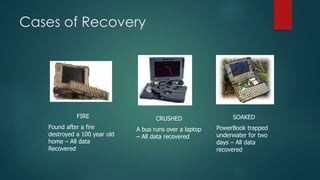
Cases of Recovery
FIRE
Found after a fire
destroyed a 100 year old
home – All data
Recovered
CRUSHED
A bus runs over a laptop
– All data recovered
SOAKED
PowerBook trapped
underwater for two
days – All data
recovered
What is Data Loss?
 Data has accidentally been erased or data control structures
have been overwritten.
 Data has been corrupted or made inaccessible.
 Data is unable to be accessed from a previous functioning
computer system or backup.
What Causes Data Loss?
 Sabotage(Destroy or Damage)
 Natural Disaster
 Hardware Error
 Virus Attack
 Human Error
 Intentional deletion
 Accidental overwriting of files
 Software Corruption
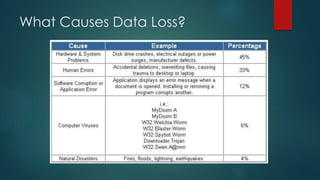
What Causes Data Loss?
Facts of Data Recovery
 The majority of data loss situations are recoverable.
 Computer storage systems may fail, but the data stored
on them is not always completely lost.
 There are occasions when damage to data is permanent
and complete data recovery is not possible. However,
some data is usually always recoverable.
 Data recovery professionals can recover data from
crashed hard drives, operating systems, storage devices,
servers, desktops, and laptops using various proprietary
data recovery tools and techniques.
Data Recovery Techniques
Use of software to recover
data
Use of machines to recover
data
Software Data Extraction
 Data extraction is the process of moving data
off of the imaged drive to another destination
location.
 Data extraction software scans sectors of the
hard drive and restructures the file system either
in memory or another hard drive.
 The software can be used to copy the
recoverable data to a destination location.
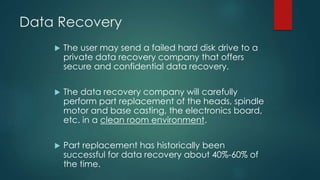
Data Recovery
 The user may send a failed hard disk drive to a
private data recovery company that offers
secure and confidential data recovery.
 The data recovery company will carefully
perform part replacement of the heads, spindle
motor and base casting, the electronics board,
etc. in a clean room environment.
 Part replacement has historically been
successful for data recovery about 40%-60% of
the time.
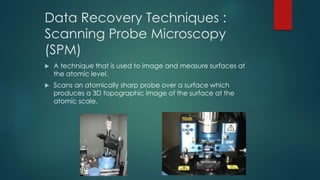
Data Recovery Techniques :
Scanning Probe Microscopy
(SPM)
 A technique that is used to image and measure surfaces at
the atomic level.
 Scans an atomically sharp probe over a surface which
produces a 3D topographic image of the surface at the
atomic scale.
Data Recovery Techniques
Magnetic Force
Microscopy (MFM)
 MFM (Magnetic Force Microscopy) is a new
technique which images the spatial variation of
magnetic forces on a sample surface.
 MFM is derived from scanning probe
microscopy (SPM) and uses a sharp magnetic
tip attached to a flexible cantilever for analysis.
 An image of the field at the surface is formed
by moving the tip across the surface and
measuring the force.
Magnetic Force Microscopy (MFM)
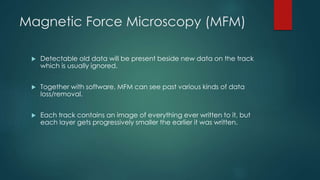
 Detectable old data will be present beside new data on the track
which is usually ignored.
 Together with software, MFM can see past various kinds of data
loss/removal.
 Each track contains an image of everything ever written to it, but
each layer gets progressively smaller the earlier it was written.
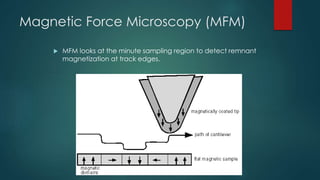
Magnetic Force Microscopy (MFM)
 MFM looks at the minute sampling region to detect remnant
magnetization at track edges.
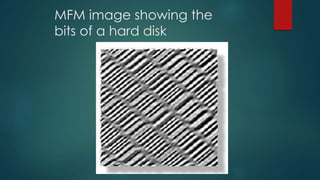
MFM image showing the
bits of a hard disk
Scanning Tunneling Microscopy
(STM)
 STM (Scanning Tunneling Microscopy) is a more
recent variation of MFM which uses a probe tip
typically made by plating nickel onto a pre-
patterned surface.
 The probe is scanned across the surface that is to
be analyzed. STM measures a weak electrical
current flowing between the tip and the sample.
The image is then generated in the same way as
MFM.
Summary
 Individuals or companies may experience data loss
at any time for many reasons.
 There are various steps that should be implemented
to help prevent data loss.
 Data loss can be very costly and very upsetting.
 There are several data recovery techniques that
have proven to be successful or partially successful
in recovering data.
 Utilizing qualified professional data recovery
specialists will aid in the degree of success of data
recovery.
QUESTIONS?

Data recovery

  • 1.
    Data Recovery PRESENTED BY: ABHINAV PARIHAR 1219213005
  • 2.
    Overview  What isData Recovery?  How can it be used?  Techniques  Recovery Methods  Secure Deletion  What can you do?
  • 3.
    What is datarecovery?  Retrieving deleted/inaccessible data from electronic storage media (hard drives, removable media, optical devices, etc...) is called as Data recovery.  Typical causes of loss include:  Electro-mechanical Failure  Natural Disaster  Computer Virus  Data Corruption  Computer Crime  Human Error
  • 4.
    Cases of Recovery FIRE Foundafter a fire destroyed a 100 year old home – All data Recovered CRUSHED A bus runs over a laptop – All data recovered SOAKED PowerBook trapped underwater for two days – All data recovered
  • 5.
    What is DataLoss?  Data has accidentally been erased or data control structures have been overwritten.  Data has been corrupted or made inaccessible.  Data is unable to be accessed from a previous functioning computer system or backup.
  • 6.
    What Causes DataLoss?  Sabotage(Destroy or Damage)  Natural Disaster  Hardware Error  Virus Attack  Human Error  Intentional deletion  Accidental overwriting of files  Software Corruption
  • 7.
  • 8.
    Facts of DataRecovery  The majority of data loss situations are recoverable.  Computer storage systems may fail, but the data stored on them is not always completely lost.  There are occasions when damage to data is permanent and complete data recovery is not possible. However, some data is usually always recoverable.  Data recovery professionals can recover data from crashed hard drives, operating systems, storage devices, servers, desktops, and laptops using various proprietary data recovery tools and techniques.
  • 9.
    Data Recovery Techniques Useof software to recover data Use of machines to recover data
  • 10.
    Software Data Extraction Data extraction is the process of moving data off of the imaged drive to another destination location.  Data extraction software scans sectors of the hard drive and restructures the file system either in memory or another hard drive.  The software can be used to copy the recoverable data to a destination location.
  • 11.
    Data Recovery  Theuser may send a failed hard disk drive to a private data recovery company that offers secure and confidential data recovery.  The data recovery company will carefully perform part replacement of the heads, spindle motor and base casting, the electronics board, etc. in a clean room environment.  Part replacement has historically been successful for data recovery about 40%-60% of the time.
  • 12.
    Data Recovery Techniques: Scanning Probe Microscopy (SPM)  A technique that is used to image and measure surfaces at the atomic level.  Scans an atomically sharp probe over a surface which produces a 3D topographic image of the surface at the atomic scale.
  • 13.
    Data Recovery Techniques MagneticForce Microscopy (MFM)  MFM (Magnetic Force Microscopy) is a new technique which images the spatial variation of magnetic forces on a sample surface.  MFM is derived from scanning probe microscopy (SPM) and uses a sharp magnetic tip attached to a flexible cantilever for analysis.  An image of the field at the surface is formed by moving the tip across the surface and measuring the force.
  • 14.
    Magnetic Force Microscopy(MFM)  Detectable old data will be present beside new data on the track which is usually ignored.  Together with software, MFM can see past various kinds of data loss/removal.  Each track contains an image of everything ever written to it, but each layer gets progressively smaller the earlier it was written.
  • 15.
    Magnetic Force Microscopy(MFM)  MFM looks at the minute sampling region to detect remnant magnetization at track edges.
  • 16.
    MFM image showingthe bits of a hard disk
  • 17.
    Scanning Tunneling Microscopy (STM) STM (Scanning Tunneling Microscopy) is a more recent variation of MFM which uses a probe tip typically made by plating nickel onto a pre- patterned surface.  The probe is scanned across the surface that is to be analyzed. STM measures a weak electrical current flowing between the tip and the sample. The image is then generated in the same way as MFM.
  • 18.
    Summary  Individuals orcompanies may experience data loss at any time for many reasons.  There are various steps that should be implemented to help prevent data loss.  Data loss can be very costly and very upsetting.  There are several data recovery techniques that have proven to be successful or partially successful in recovering data.  Utilizing qualified professional data recovery specialists will aid in the degree of success of data recovery.
  • 19.