1
Cloud-Based Data Processing
Data Centers
Jana Giceva
Datacenter Overview
2
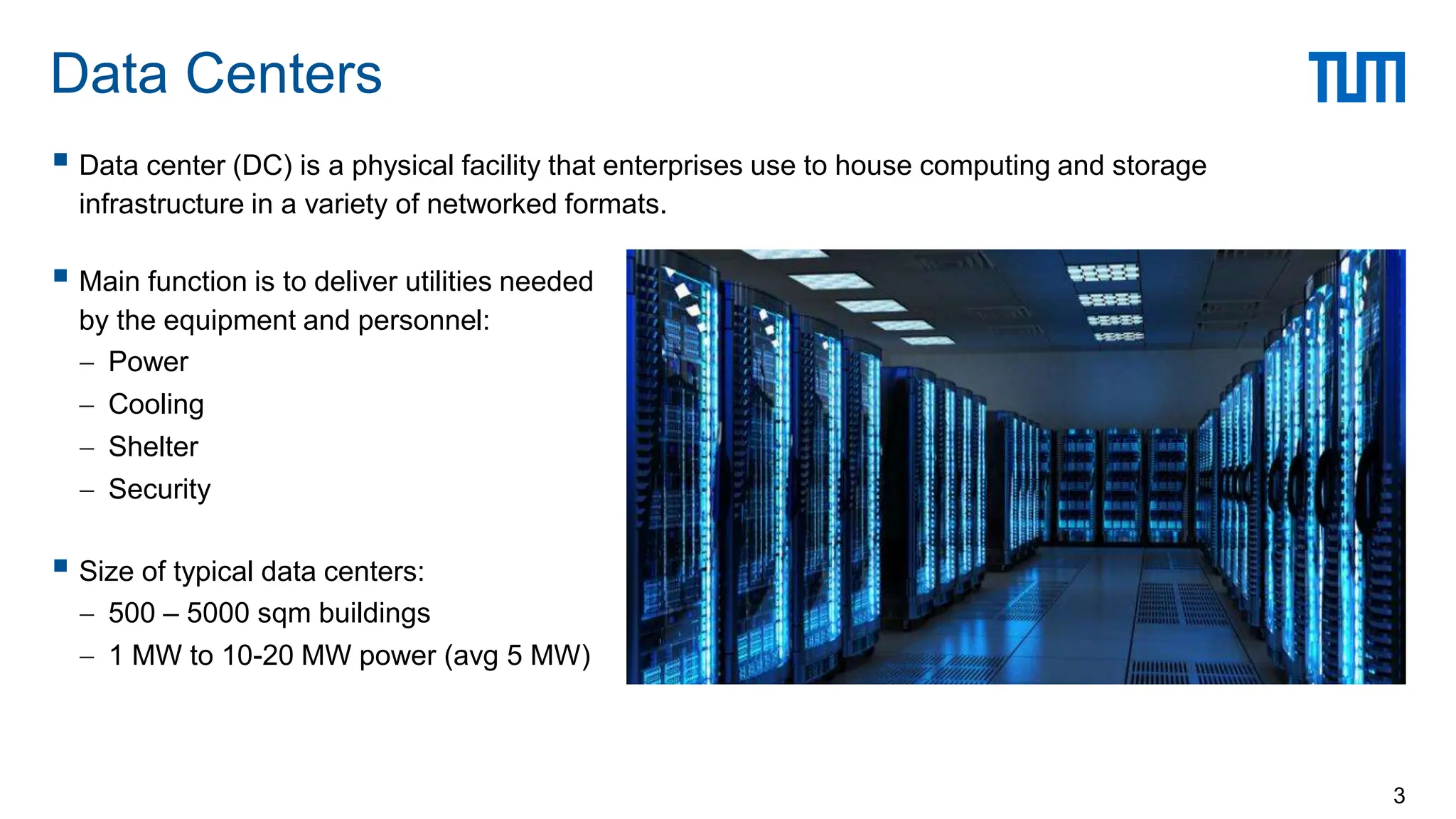
 Data center (DC) is a physical facility that enterprises use to house computing and storage
infrastructure in a variety of networked formats.
 Main function is to deliver utilities needed
by the equipment and personnel:
 Power
 Cooling
 Shelter
 Security
 Size of typical data centers:
 500 – 5000 sqm buildings
 1 MW to 10-20 MW power (avg 5 MW)
Data Centers
3
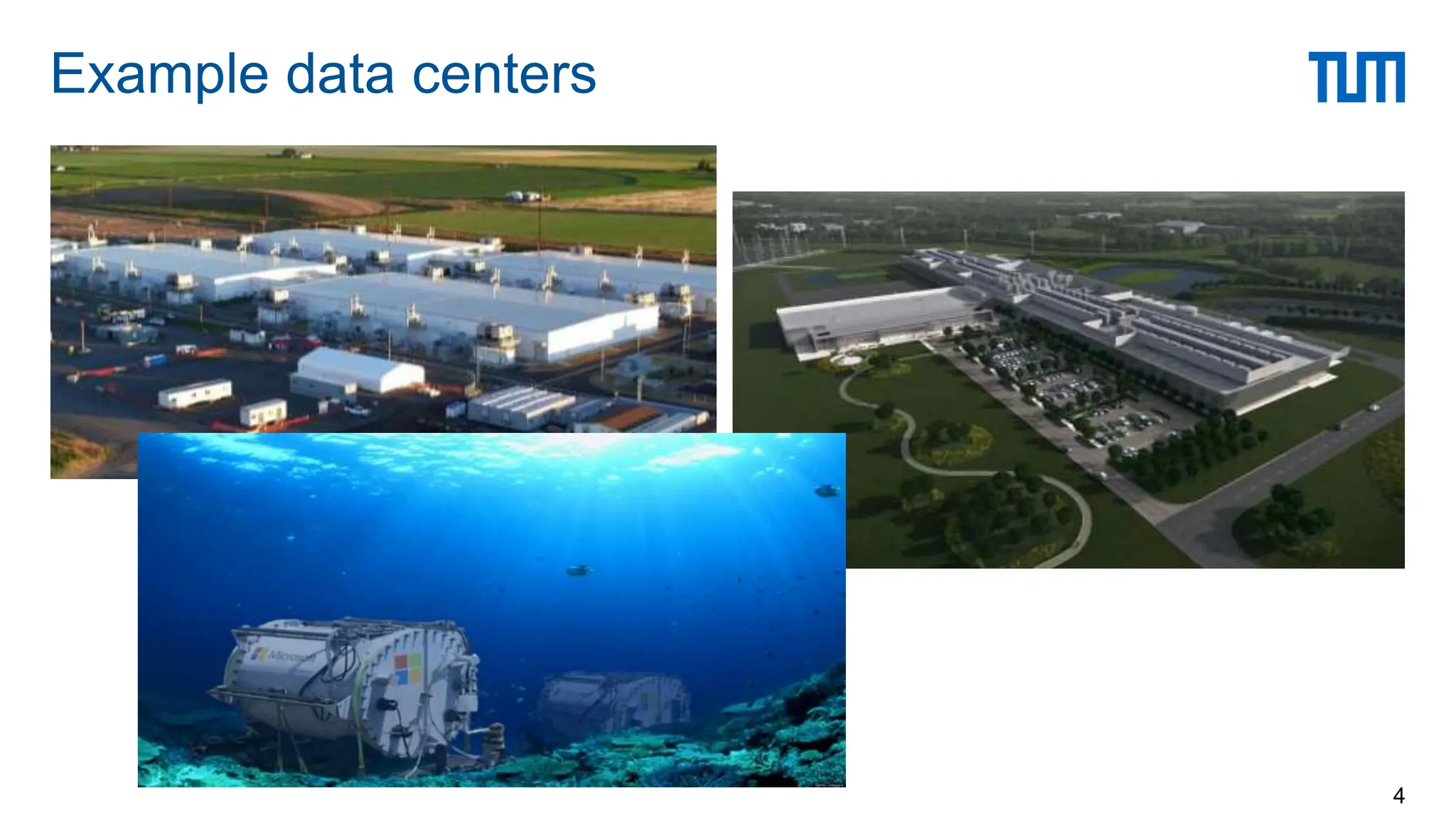
Example data centers
4
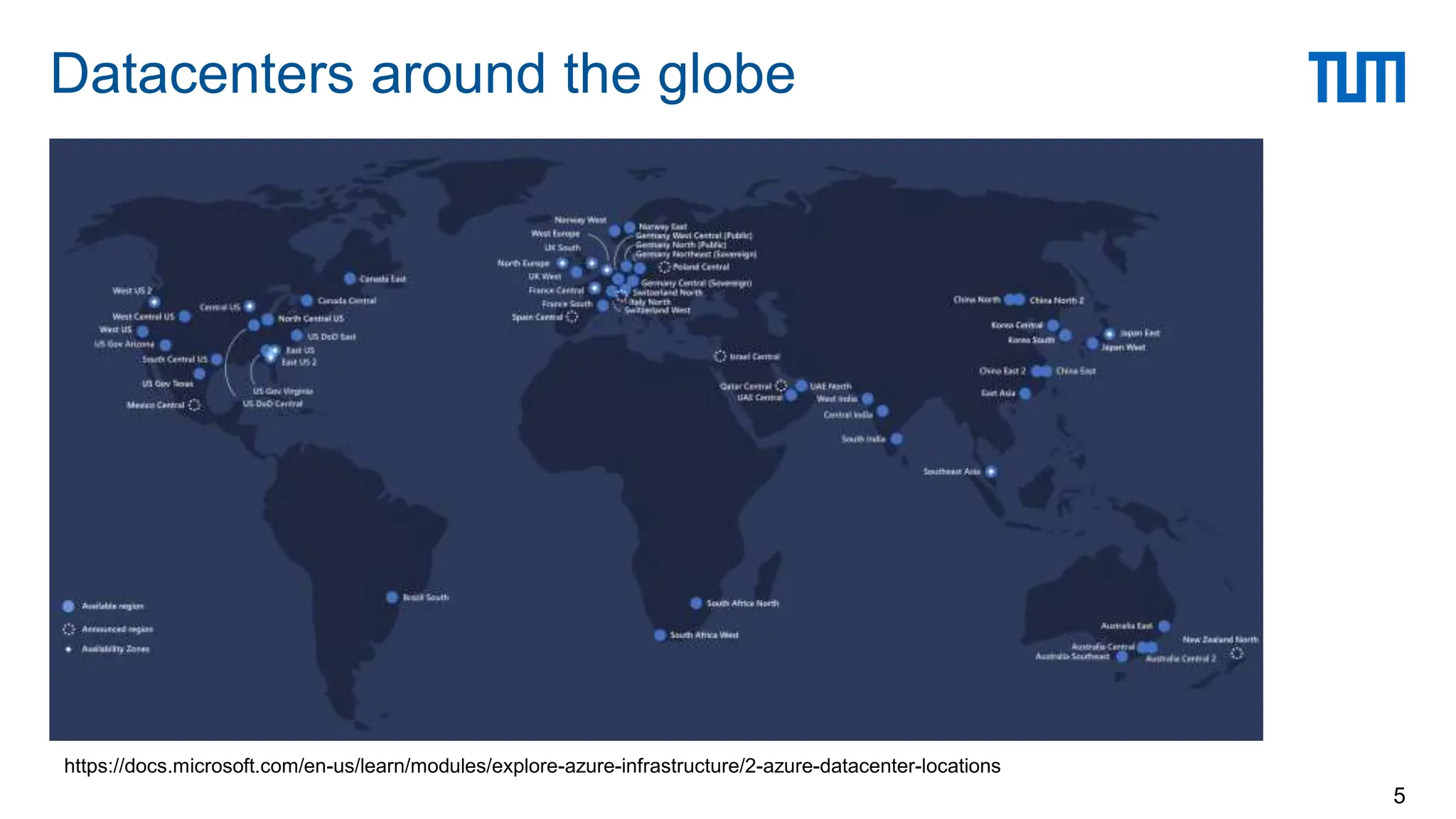
Datacenters around the globe
5
https://docs.microsoft.com/en-us/learn/modules/explore-azure-infrastructure/2-azure-datacenter-locations
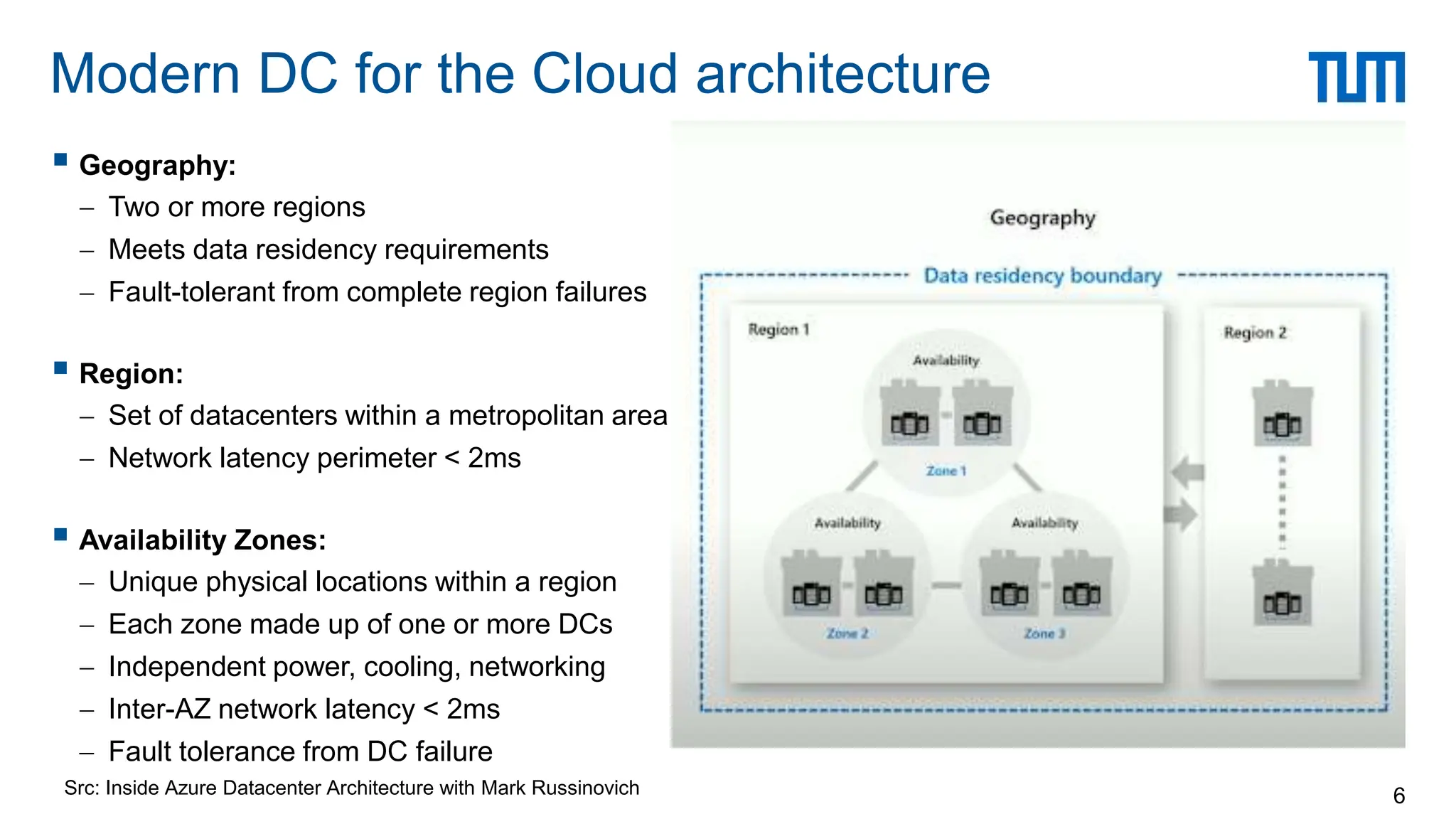
Modern DC for the Cloud architecture
6
 Geography:
 Two or more regions
 Meets data residency requirements
 Fault-tolerant from complete region failures
 Region:
 Set of datacenters within a metropolitan area
 Network latency perimeter < 2ms
 Availability Zones:
 Unique physical locations within a region
 Each zone made up of one or more DCs
 Independent power, cooling, networking
 Inter-AZ network latency < 2ms
 Fault tolerance from DC failure
Src: Inside Azure Datacenter Architecture with Mark Russinovich
 Traditional data centers
 Host a large number of relatively small- or medium-sized applications, each running on a dedicated
hardware infrastructure that is decoupled and protected from other systems in the same facility
 Usually for multiple organizational units or companies
 Modern data centers (a.k.a., Warehouse-scale computers)
 Usually belong to a single company to run a small number of large-scale applications
 Google, Facebook, Microsoft, Amazon, Alibaba, etc.
 Use a relatively homogeneous hardware and system software
 Share a common systems management layer
 Sizes can vary depending on needs
Data Centers
7
Datacenter Architecture
8
 Scale-up: high cost powerful CPUs, more cores, more memory
 Scale-out: adding more low cost, commodity servers
 Supercomputer vs. data center
 Scale
 Blue waters = 40K 8-core “servers”
 Microsoft Chicago Data centers = 50 containers = 100K 8-core servers
 Network architecture
 Supercomputers: InfiniBand, low-latency, high bandwidth protocols
 Data Centers: (mostly) Ethernet based networks
 Storage
 Supercomputers: separate data farm
 Data Centers: use disk on node + memory cache
Scale-up vs. scale-out
9
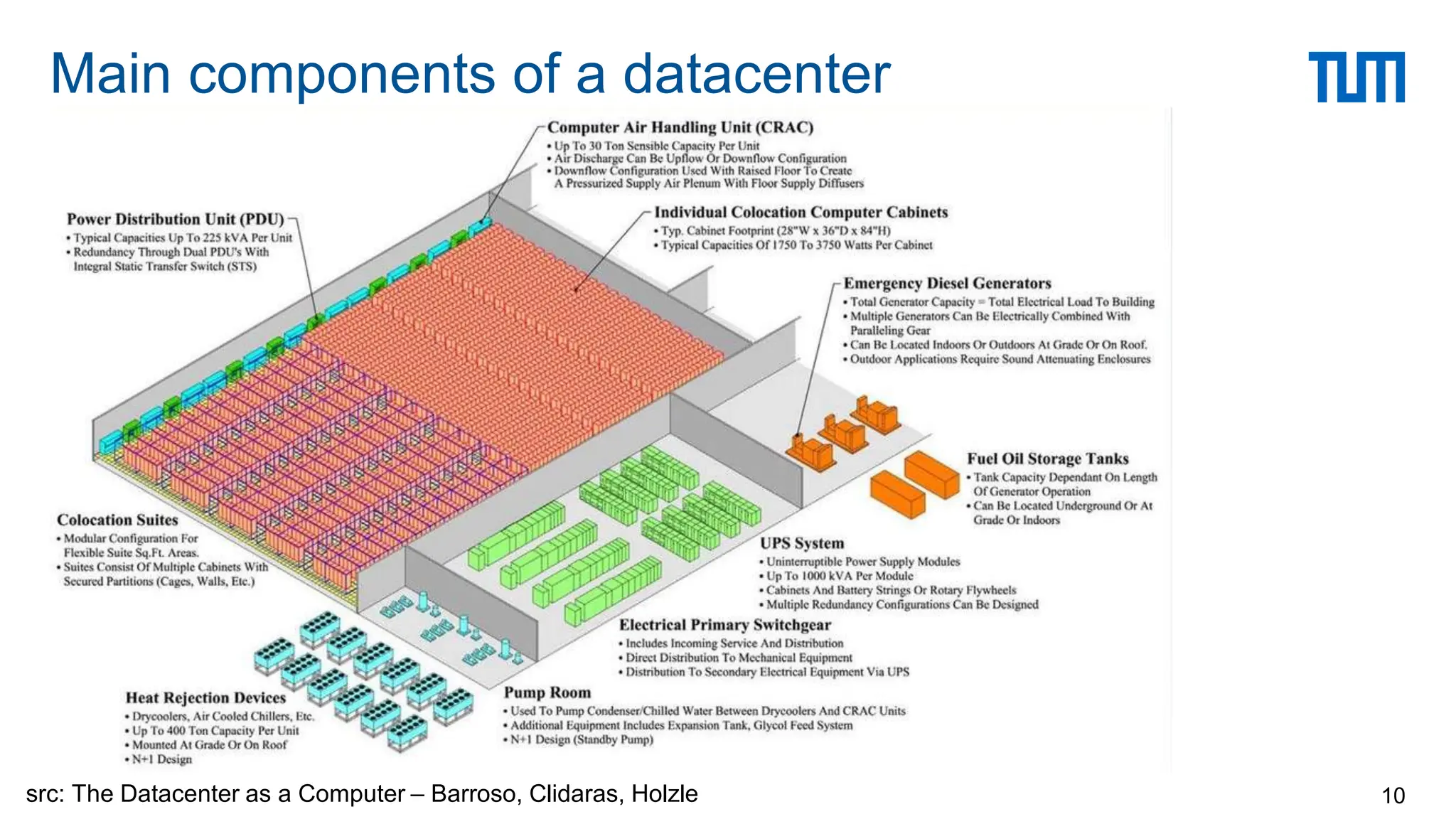
Main components of a datacenter
10
src: The Datacenter as a Computer – Barroso, Clidaras, Holzle
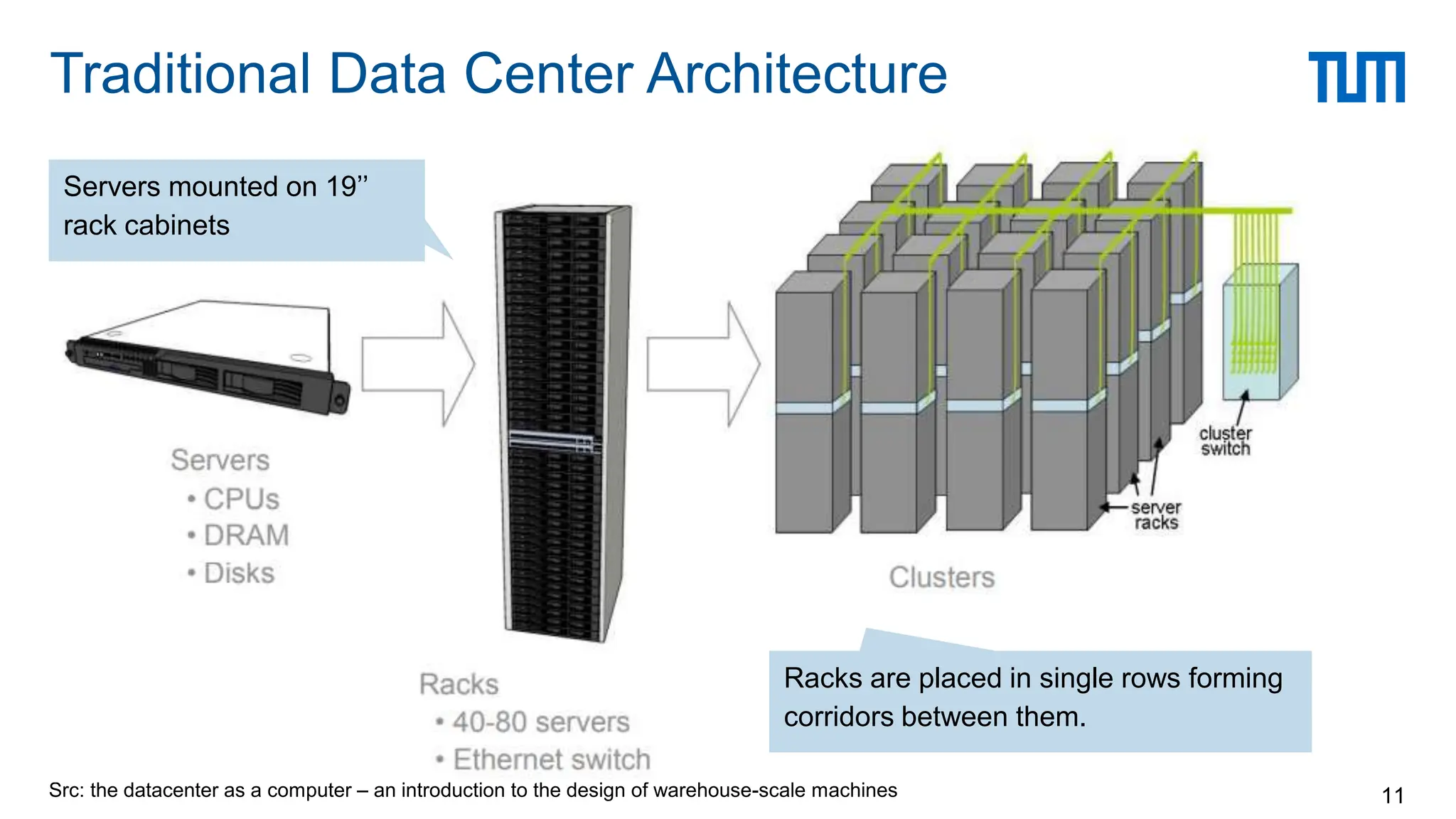
Src: the datacenter as a computer – an introduction to the design of warehouse-scale machines
Traditional Data Center Architecture
11
Servers mounted on 19’’
rack cabinets
Racks are placed in single rows forming
corridors between them.
Src:
the
datacenter
as
a
computer
–
an
introduction
to
the
design
of
warehouse-scale
machines
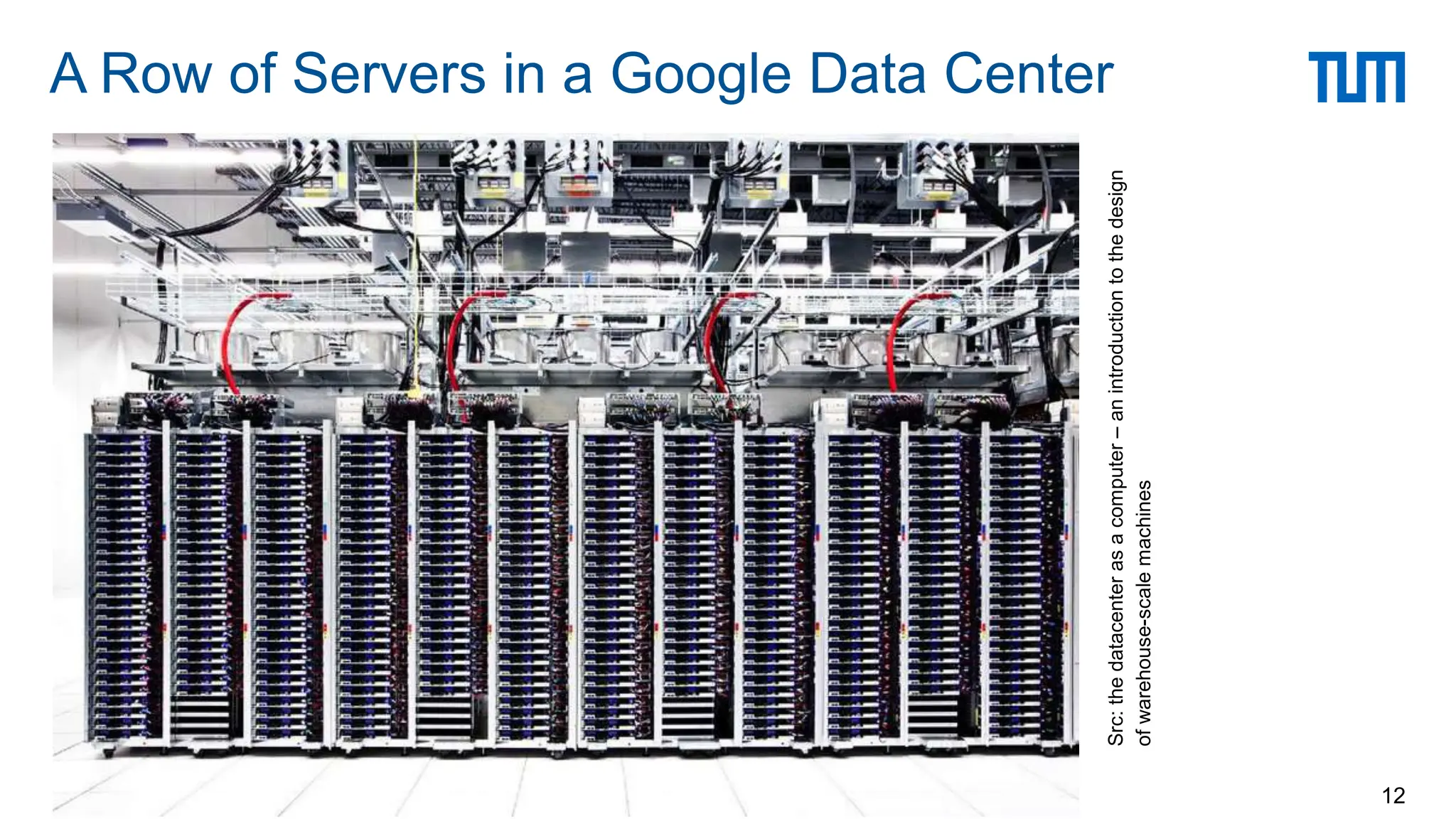
A Row of Servers in a Google Data Center
12
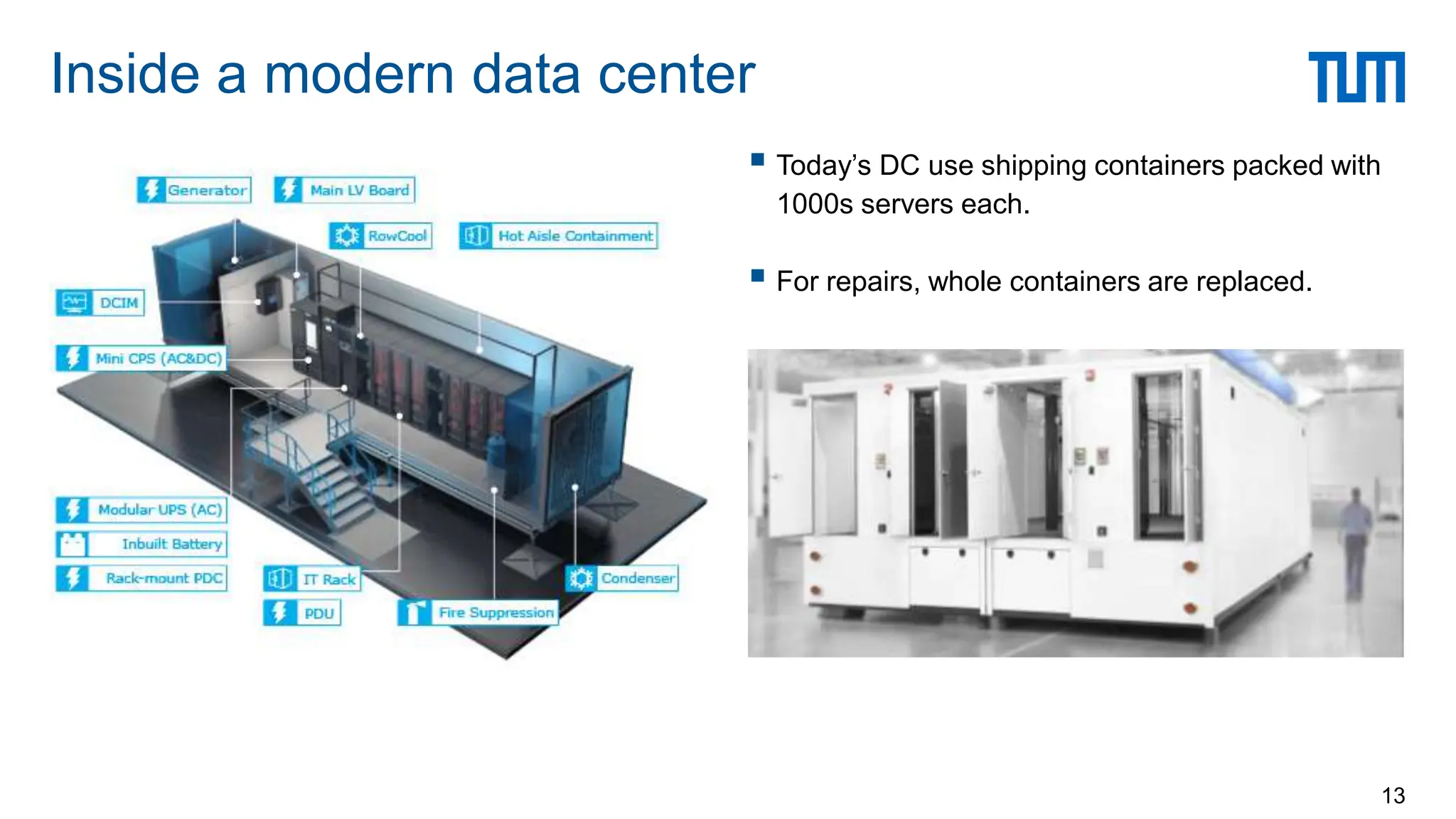
 Today’s DC use shipping containers packed with
1000s servers each.
 For repairs, whole containers are replaced.
Inside a modern data center
13
 DCs consume 3% of global electricity supply
(416.2 TWh > UK’s 300 TWh)
 DCs produce 2% of total greenhouse gas
emissions
 DCs produce as much CO2 as The Netherlands
or Argenti
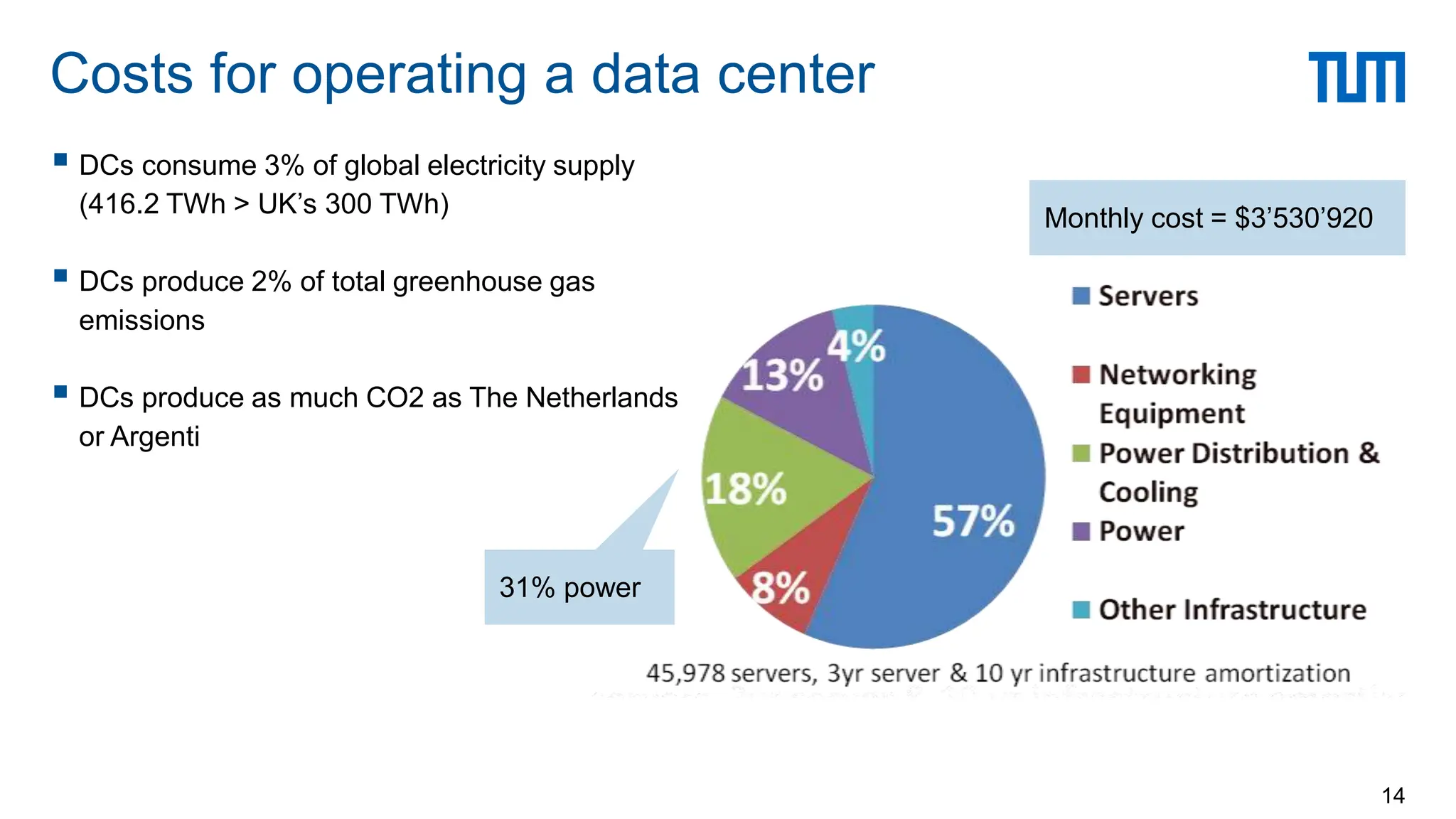
Costs for operating a data center
14
Monthly cost = $3’530’920
31% power
 PUE is the ratio of
 The total amount of energy used by a DC facility
 To the energy delivered to the computing equipment
 PUE is the inverse of data center infrastructure efficiency
 Total facility power = covers IT systems (servers, network, storage) +
other equipment (cooling, UPS, switch gear, generators, lights, fans, etc.)
Power Usage Effectiveness (PUE)
15
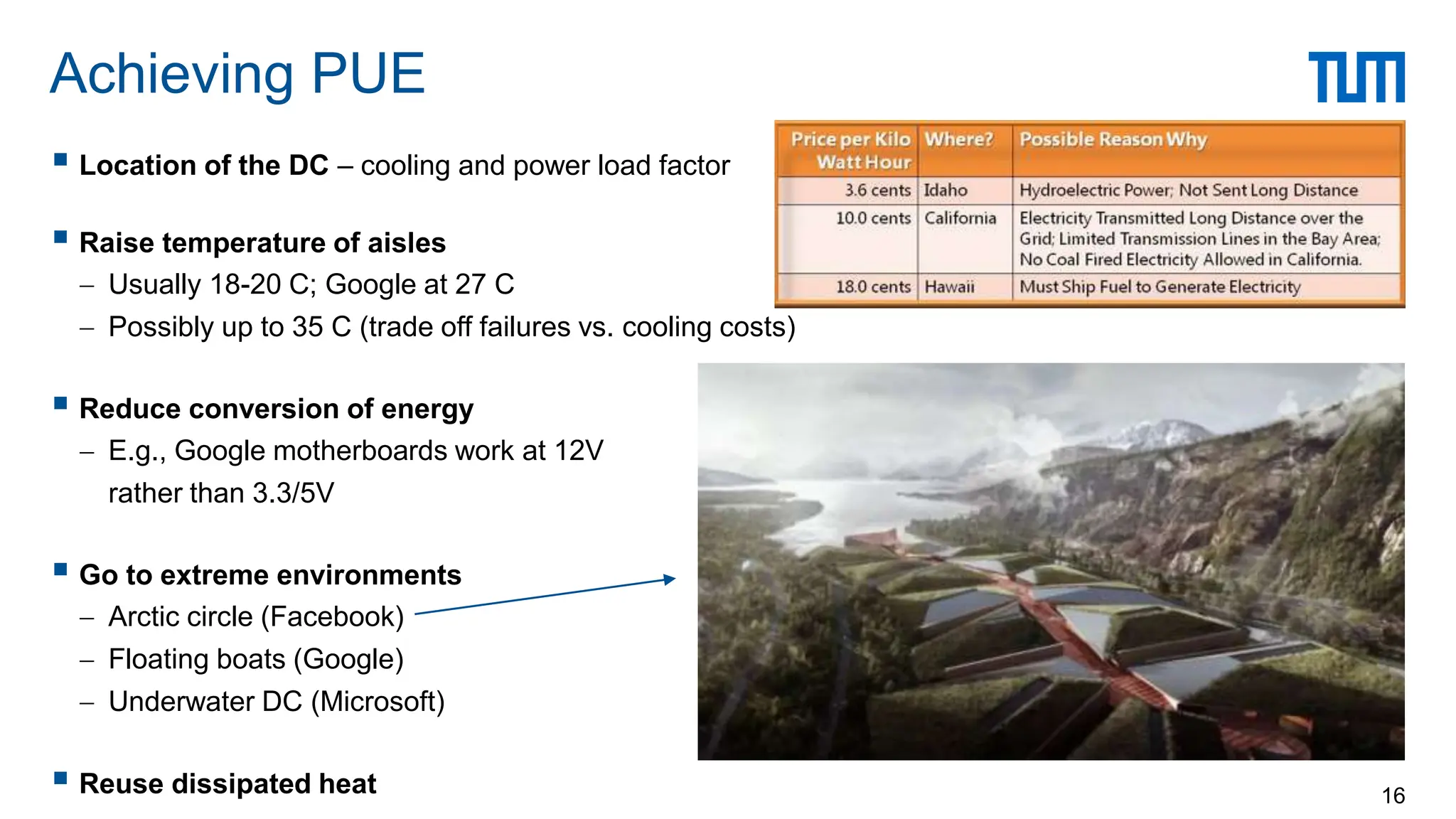
 Location of the DC – cooling and power load factor
 Raise temperature of aisles
 Usually 18-20 C; Google at 27 C
 Possibly up to 35 C (trade off failures vs. cooling costs)
 Reduce conversion of energy
 E.g., Google motherboards work at 12V
rather than 3.3/5V
 Go to extreme environments
 Arctic circle (Facebook)
 Floating boats (Google)
 Underwater DC (Microsoft)
 Reuse dissipated heat
Achieving PUE
16
 Case study: Microsoft
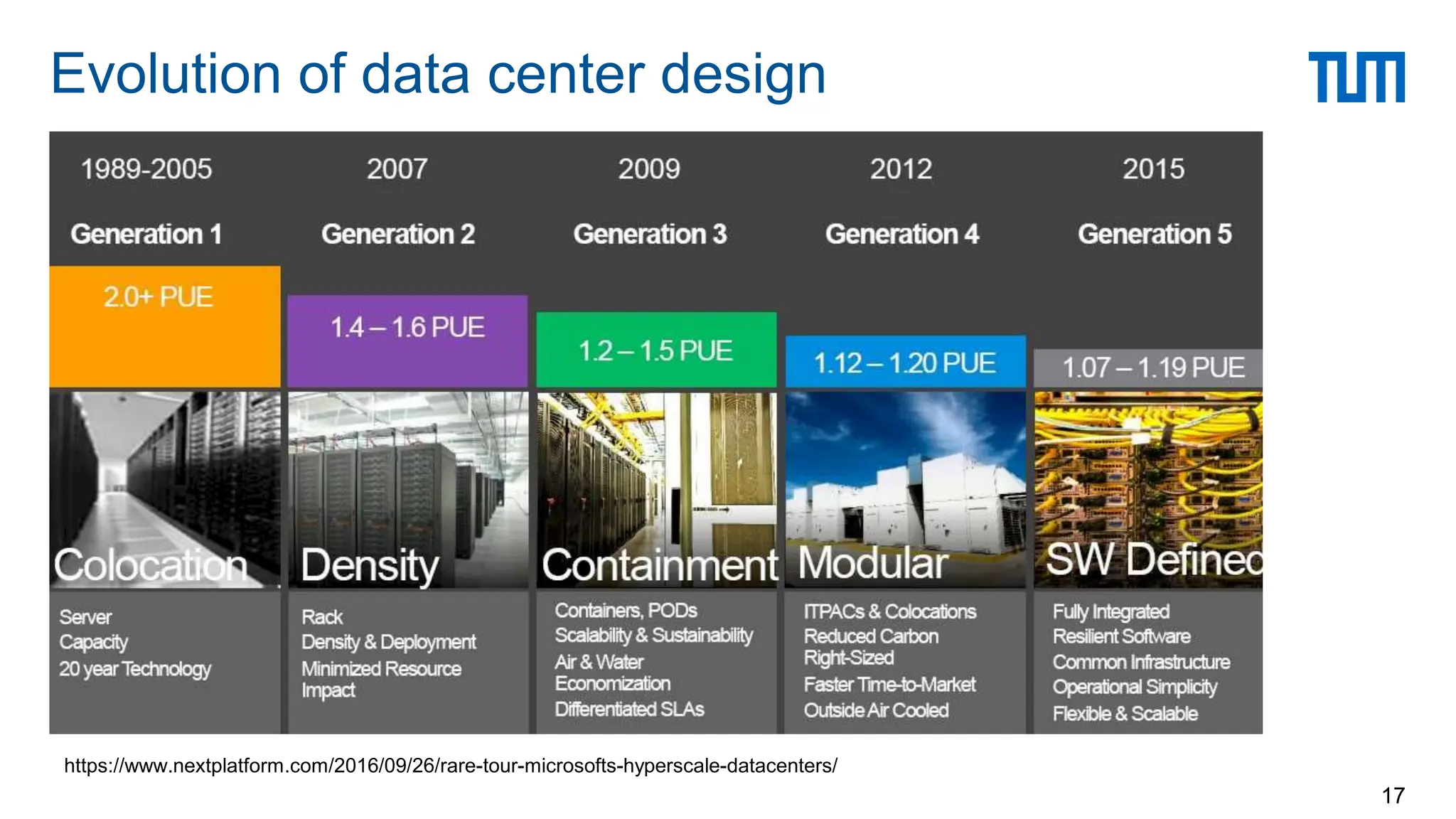
Evolution of data center design
17
https://www.nextplatform.com/2016/09/26/rare-tour-microsofts-hyperscale-datacenters/
Evolution of datacenter design
18
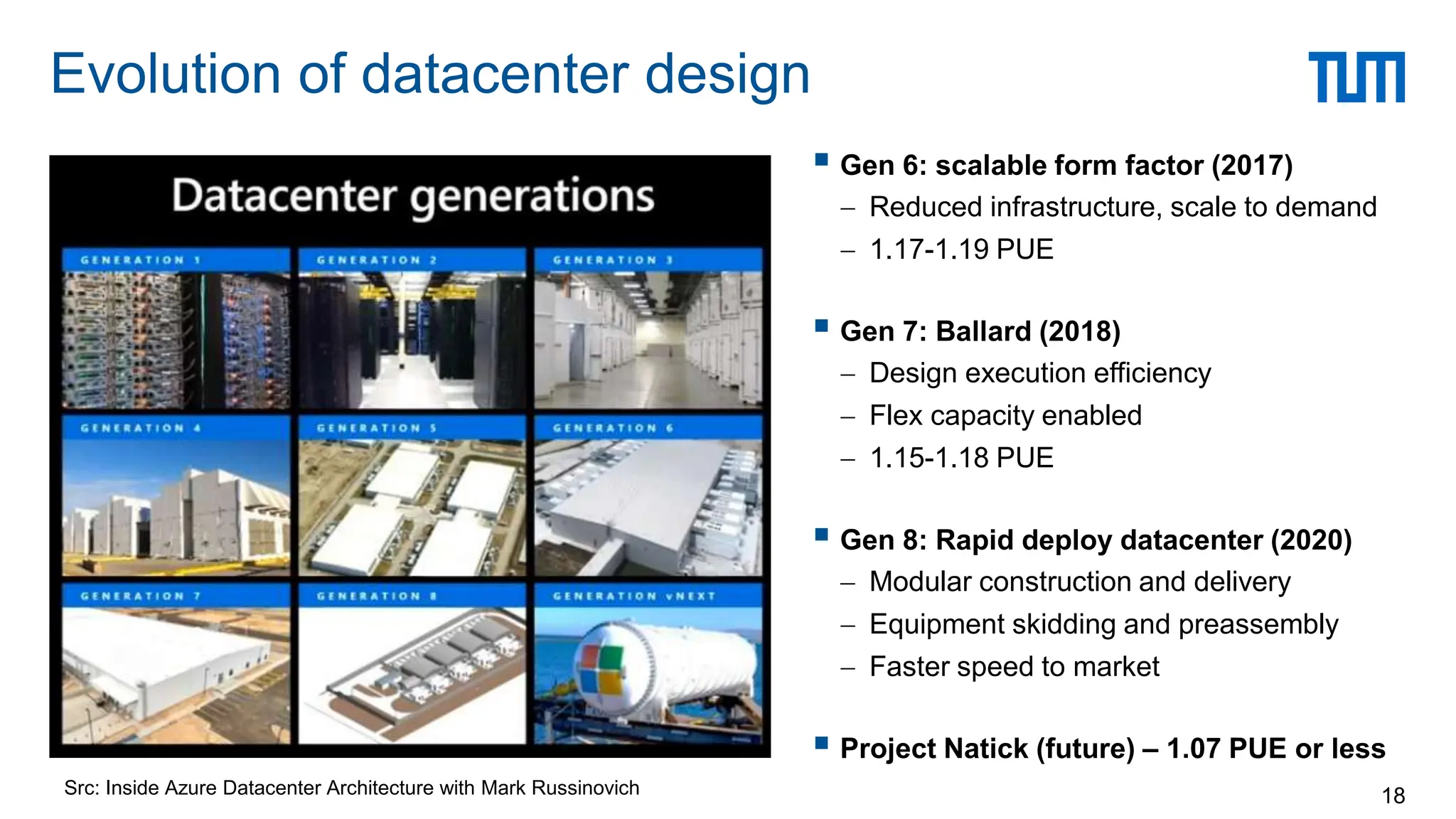
 Gen 6: scalable form factor (2017)
 Reduced infrastructure, scale to demand
 1.17-1.19 PUE
 Gen 7: Ballard (2018)
 Design execution efficiency
 Flex capacity enabled
 1.15-1.18 PUE
 Gen 8: Rapid deploy datacenter (2020)
 Modular construction and delivery
 Equipment skidding and preassembly
 Faster speed to market
 Project Natick (future) – 1.07 PUE or less
Src: Inside Azure Datacenter Architecture with Mark Russinovich
Datacenter Challenges
19
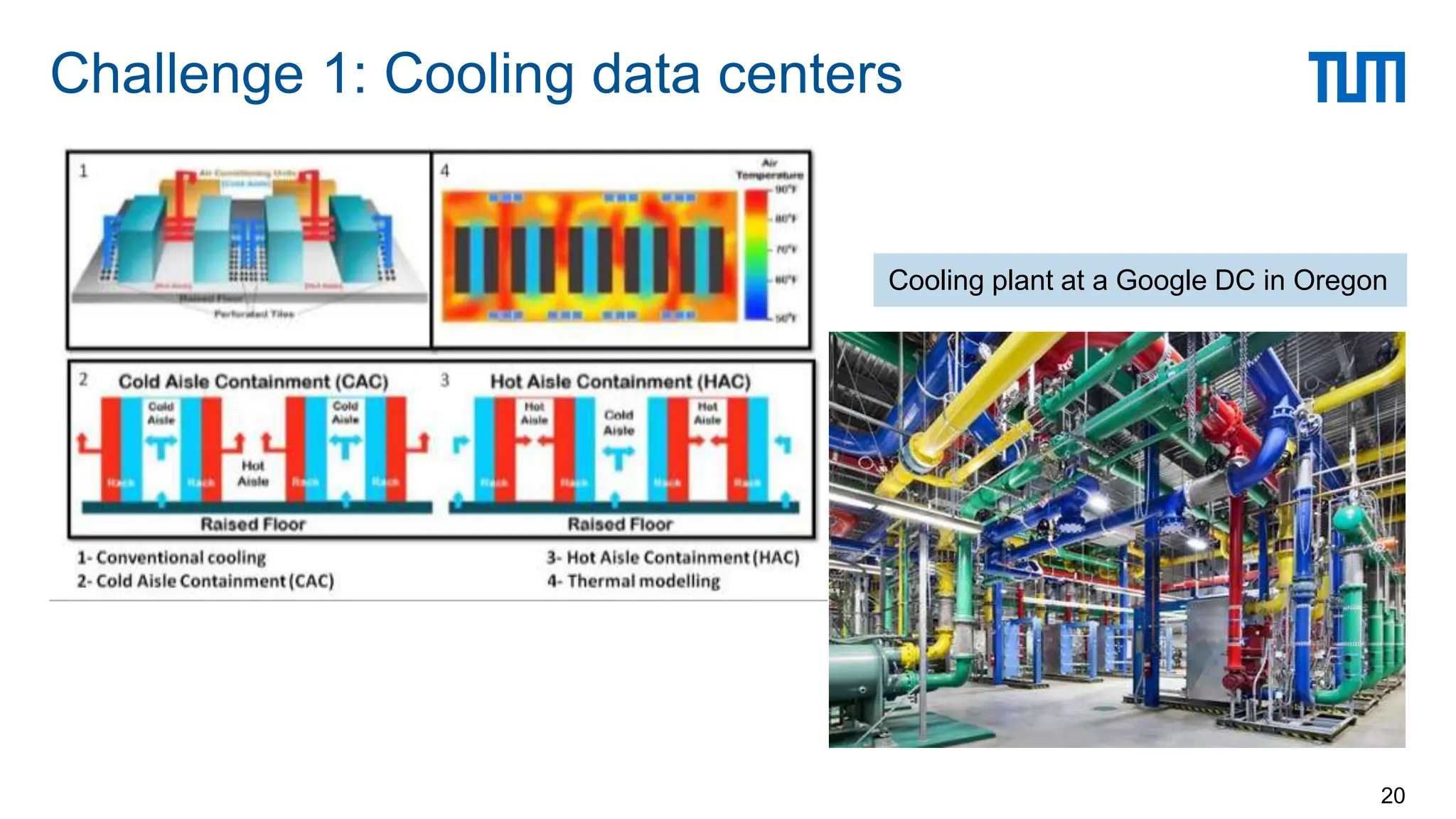
Challenge 1: Cooling data centers
20
Cooling plant at a Google DC in Oregon
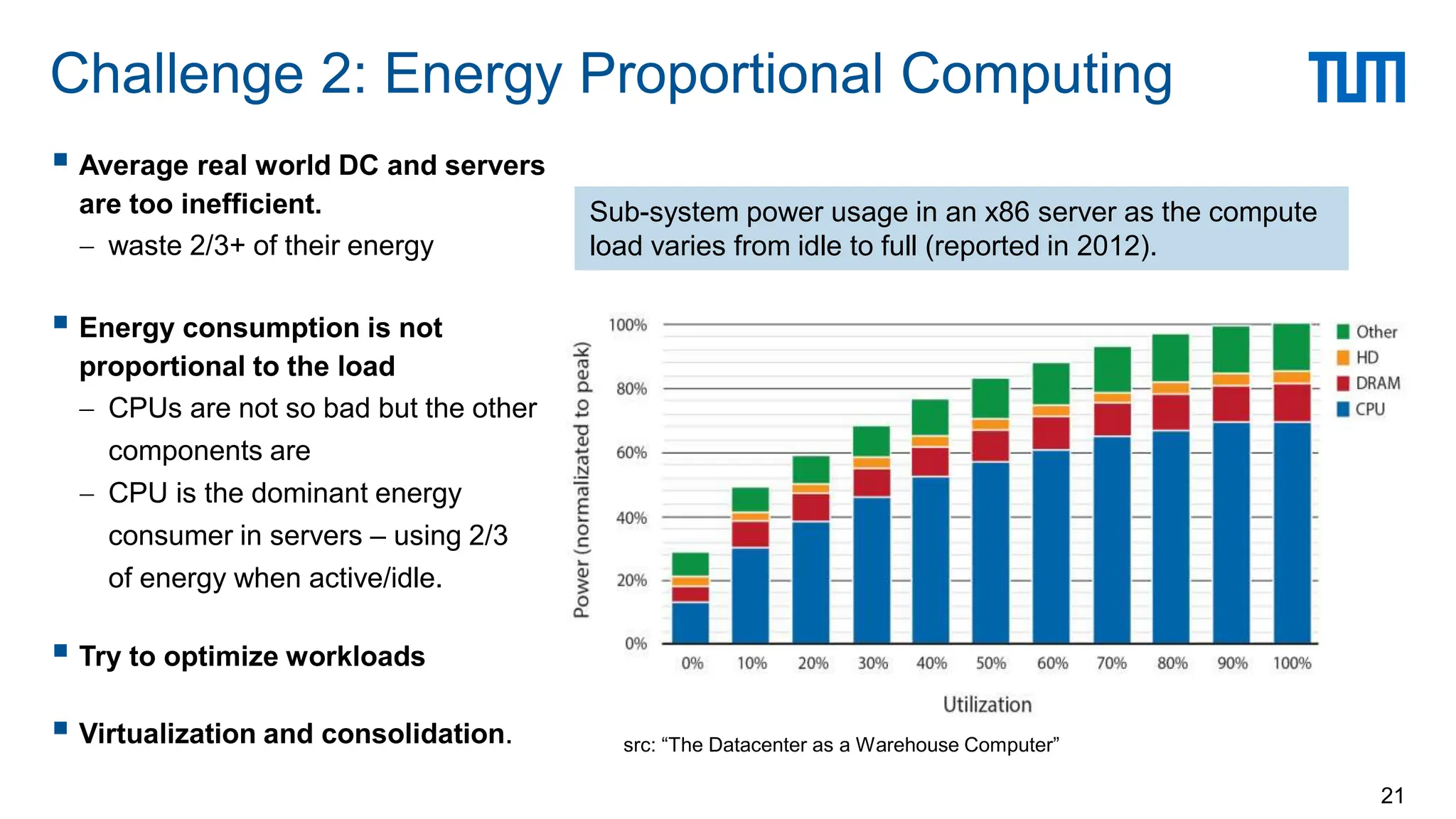
Challenge 2: Energy Proportional Computing
21
src: “The Datacenter as a Warehouse Computer”
Sub-system power usage in an x86 server as the compute
load varies from idle to full (reported in 2012).
 Average real world DC and servers
are too inefficient.
 waste 2/3+ of their energy
 Energy consumption is not
proportional to the load
 CPUs are not so bad but the other
components are
 CPU is the dominant energy
consumer in servers – using 2/3
of energy when active/idle.
 Try to optimize workloads
 Virtualization and consolidation.
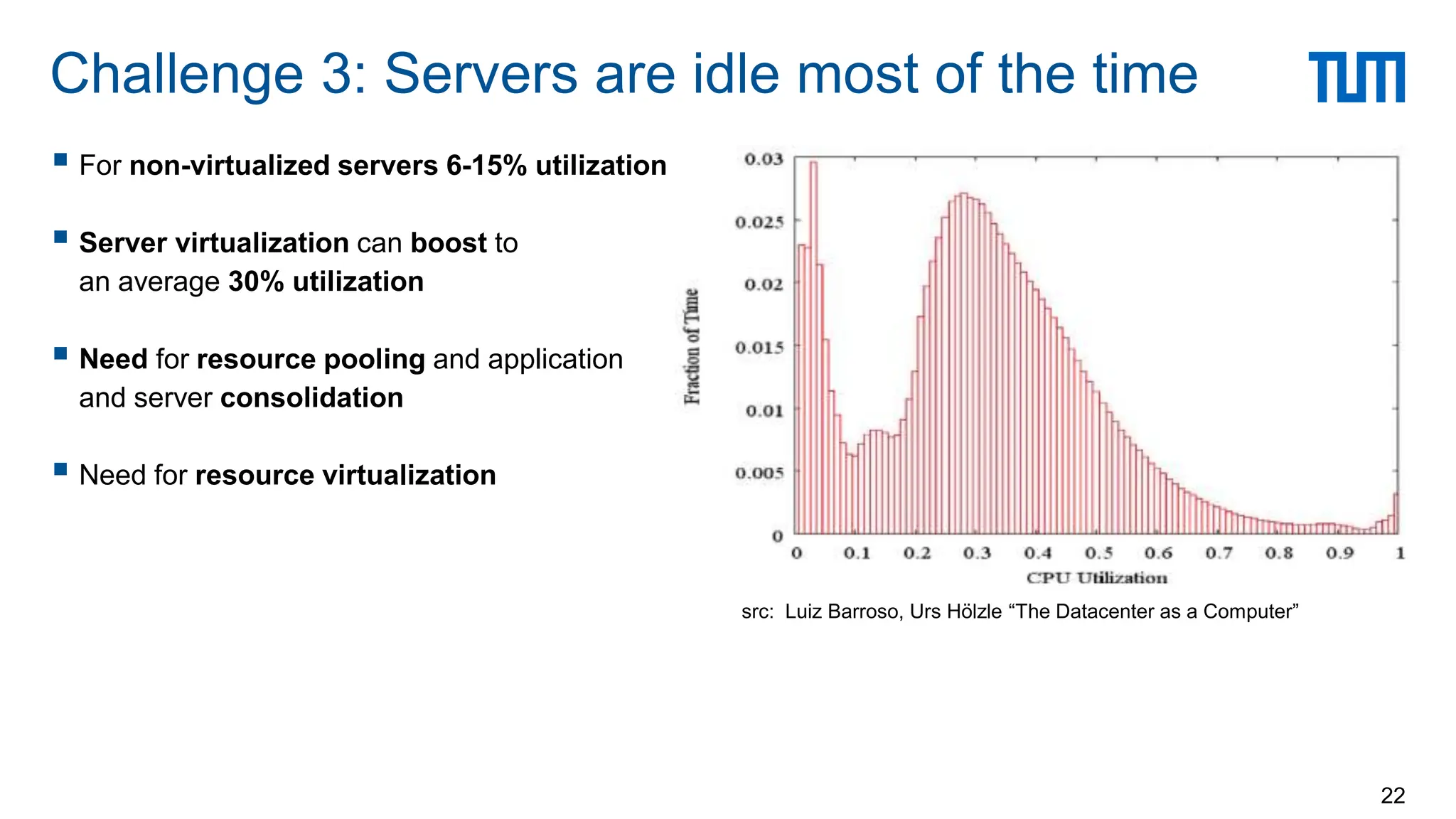
 For non-virtualized servers 6-15% utilization
 Server virtualization can boost to
an average 30% utilization
 Need for resource pooling and application
and server consolidation
 Need for resource virtualization
Challenge 3: Servers are idle most of the time
22
src: Luiz Barroso, Urs Hölzle “The Datacenter as a Computer”
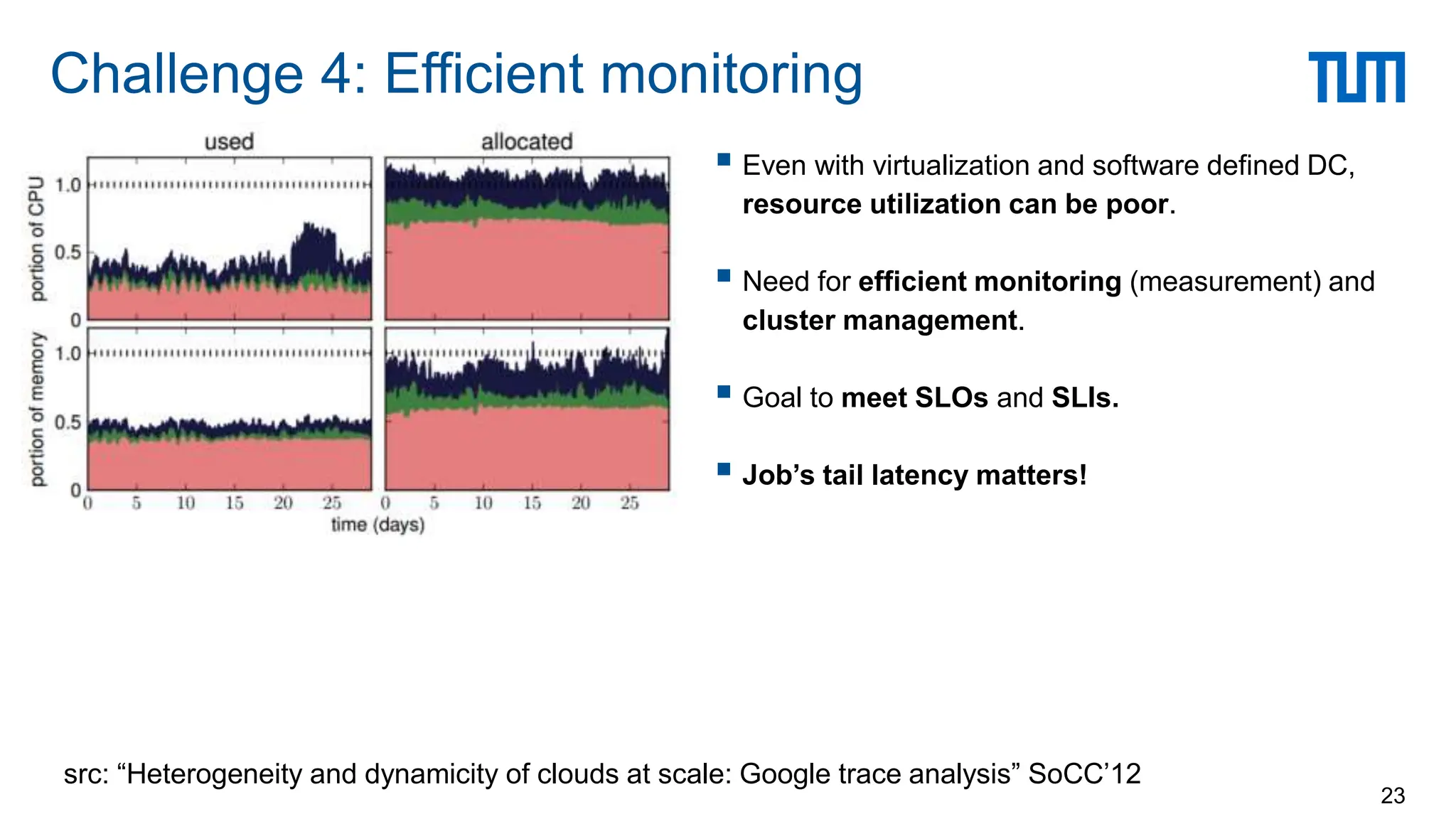
 Even with virtualization and software defined DC,
resource utilization can be poor.
 Need for efficient monitoring (measurement) and
cluster management.
 Goal to meet SLOs and SLIs.
 Job’s tail latency matters!
Challenge 4: Efficient monitoring
23
src: “Heterogeneity and dynamicity of clouds at scale: Google trace analysis” SoCC’12
 Hyper-scale system management software
 Treat the datacenter as a warehouse scale computer
 Software defined datacenters
 System software that allows DC operations to manage the entire DC infrastructure
 Compose a system using pooled resources of
compute, network, and storage based on workload requirement
 Dynamic resource allocation
 Virtualization is not enough to improve efficiency
 Need the ability to dynamically allocate CPU resources across servers and racks, allowing admins to
quickly migrate resources to address the shifting demand
 Drive 100-300% better utilization for virtualized WLs, and 200-600% for bare-metal WLs.
Improving resource utilization
24
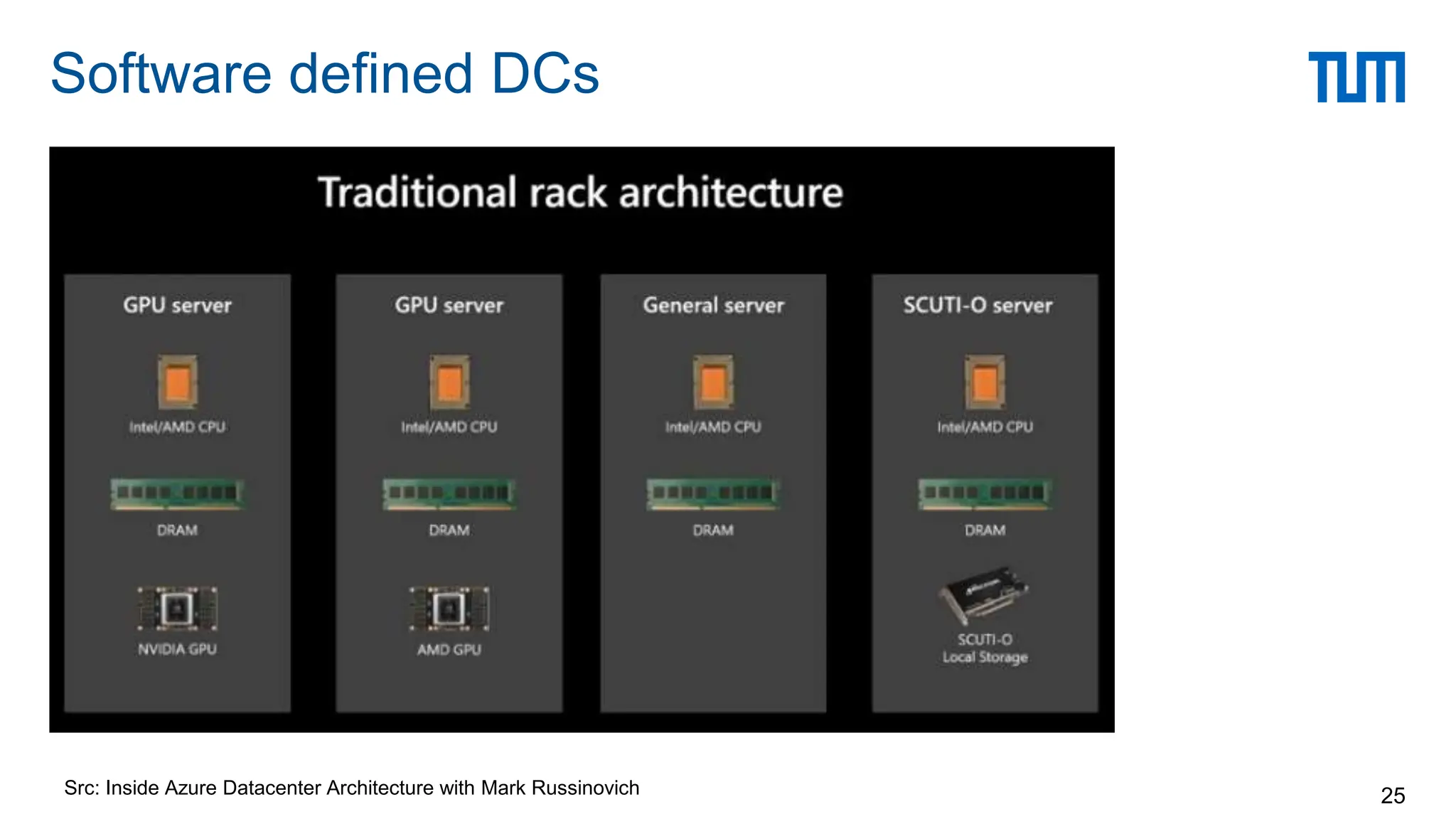
Software defined DCs
25
Src: Inside Azure Datacenter Architecture with Mark Russinovich
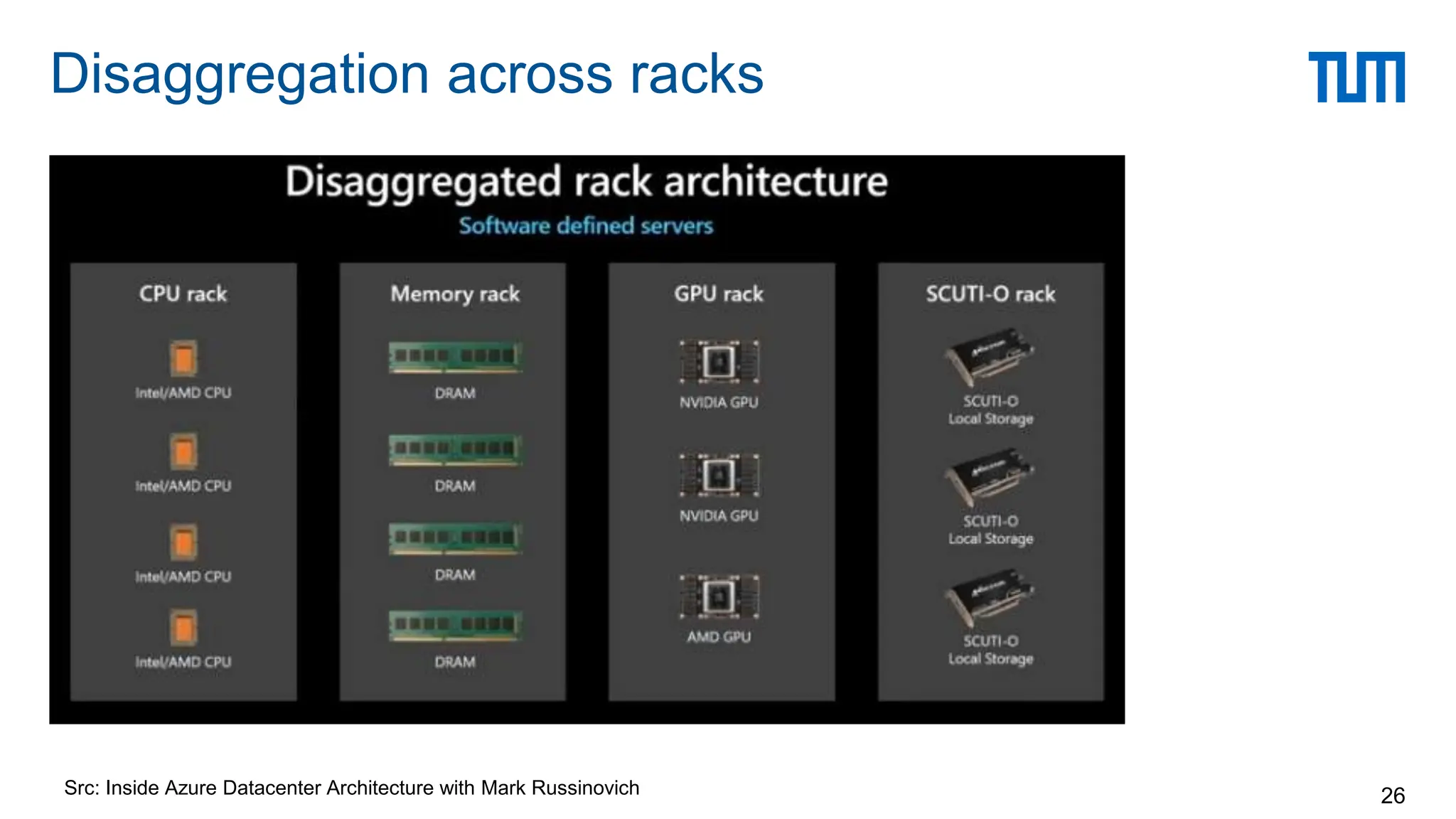
Disaggregation across racks
26
Src: Inside Azure Datacenter Architecture with Mark Russinovich
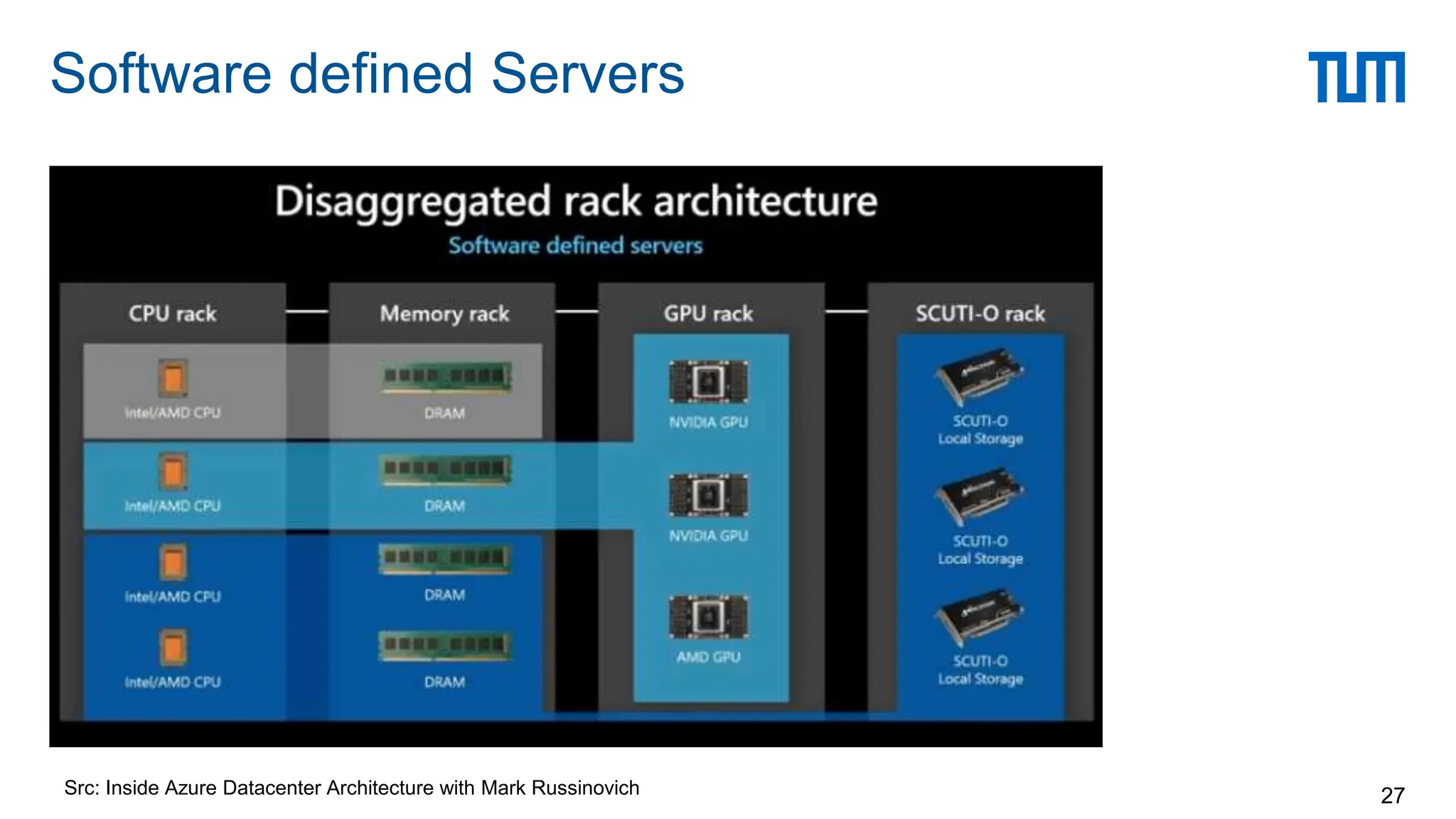
Software defined Servers
27
Src: Inside Azure Datacenter Architecture with Mark Russinovich
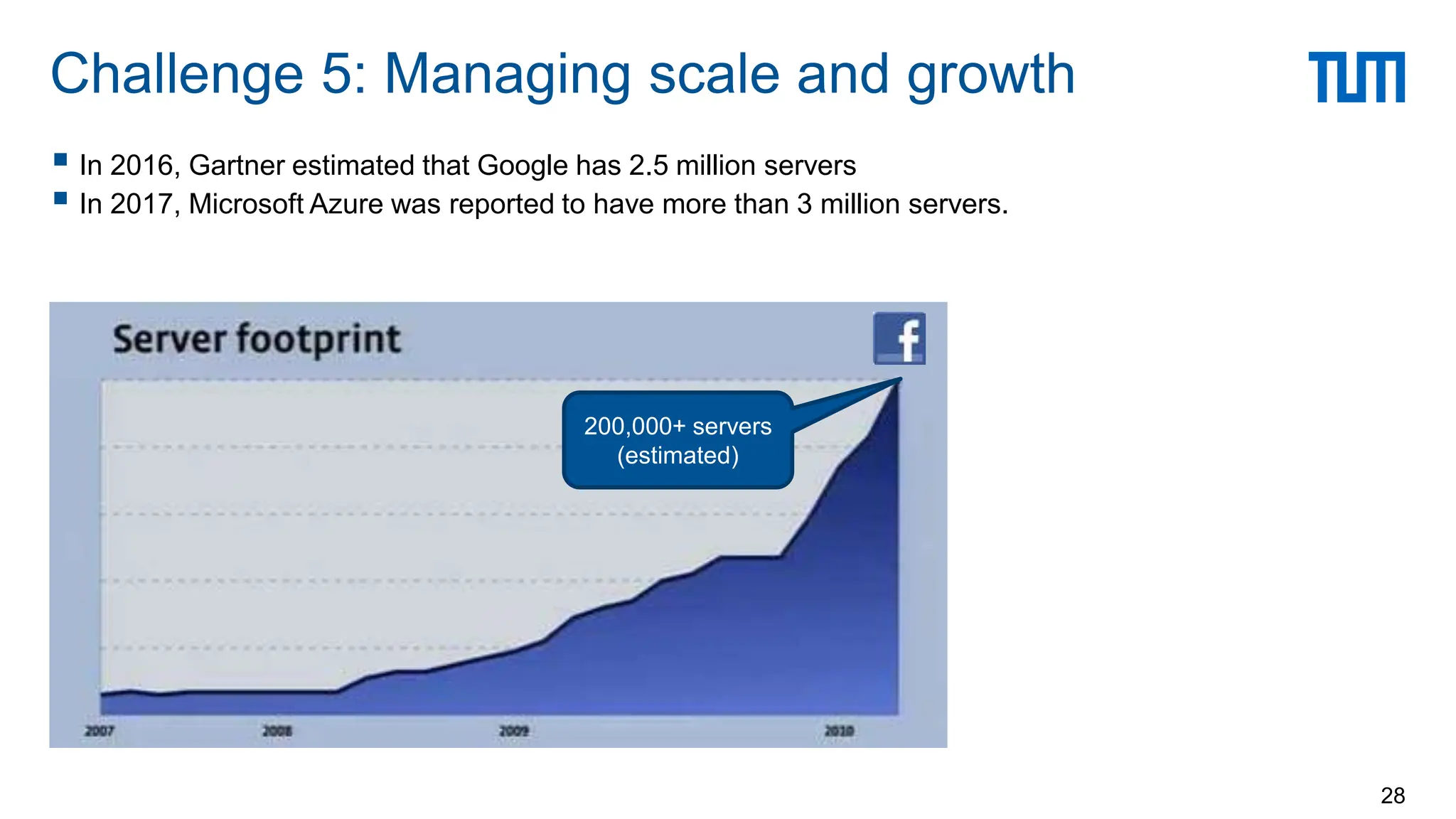
 In 2016, Gartner estimated that Google has 2.5 million servers
 In 2017, Microsoft Azure was reported to have more than 3 million servers.
Challenge 5: Managing scale and growth
28
200,000+ servers
(estimated)
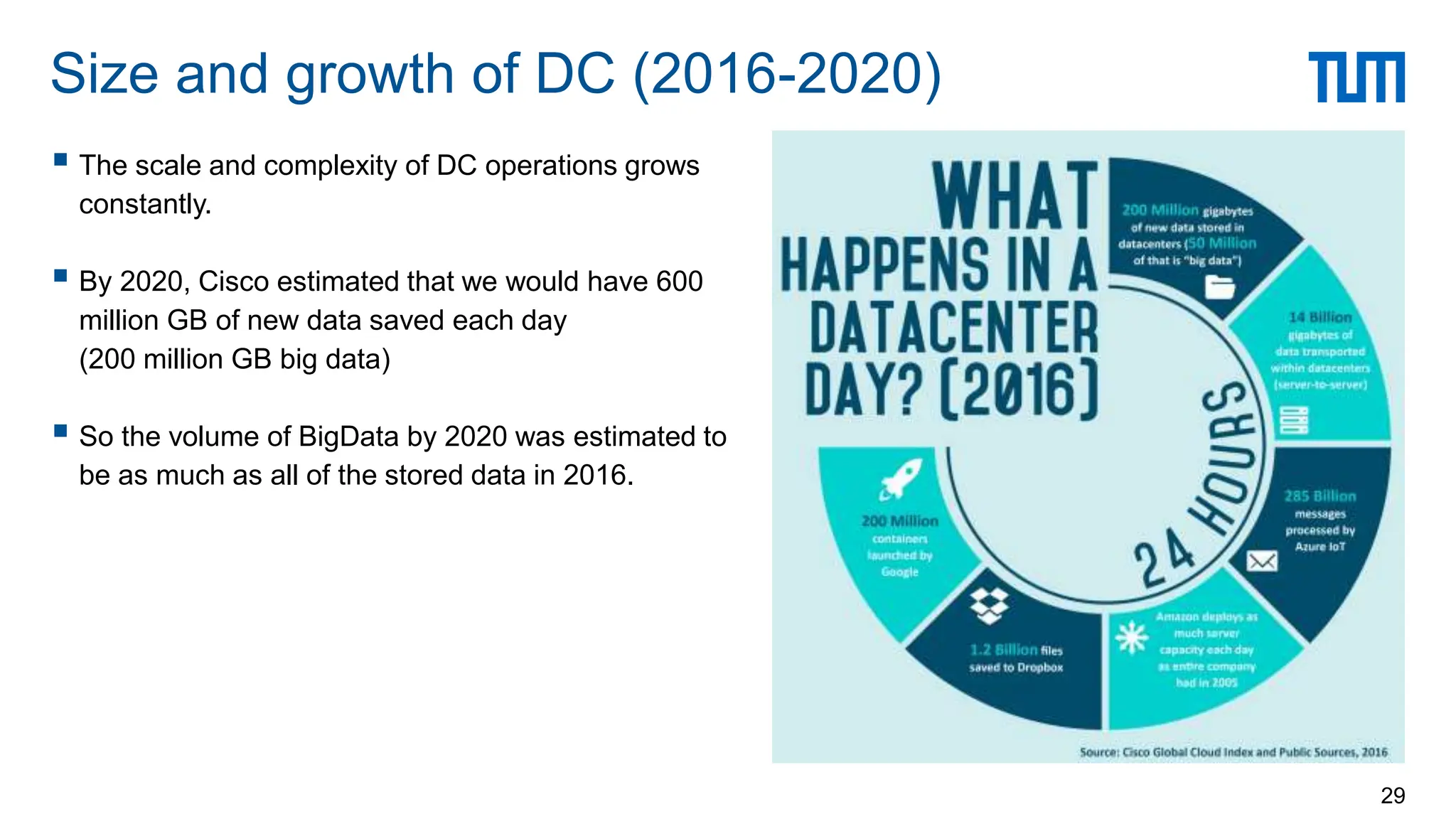
 The scale and complexity of DC operations grows
constantly.
 By 2020, Cisco estimated that we would have 600
million GB of new data saved each day
(200 million GB big data)
 So the volume of BigData by 2020 was estimated to
be as much as all of the stored data in 2016.
Size and growth of DC (2016-2020)
29
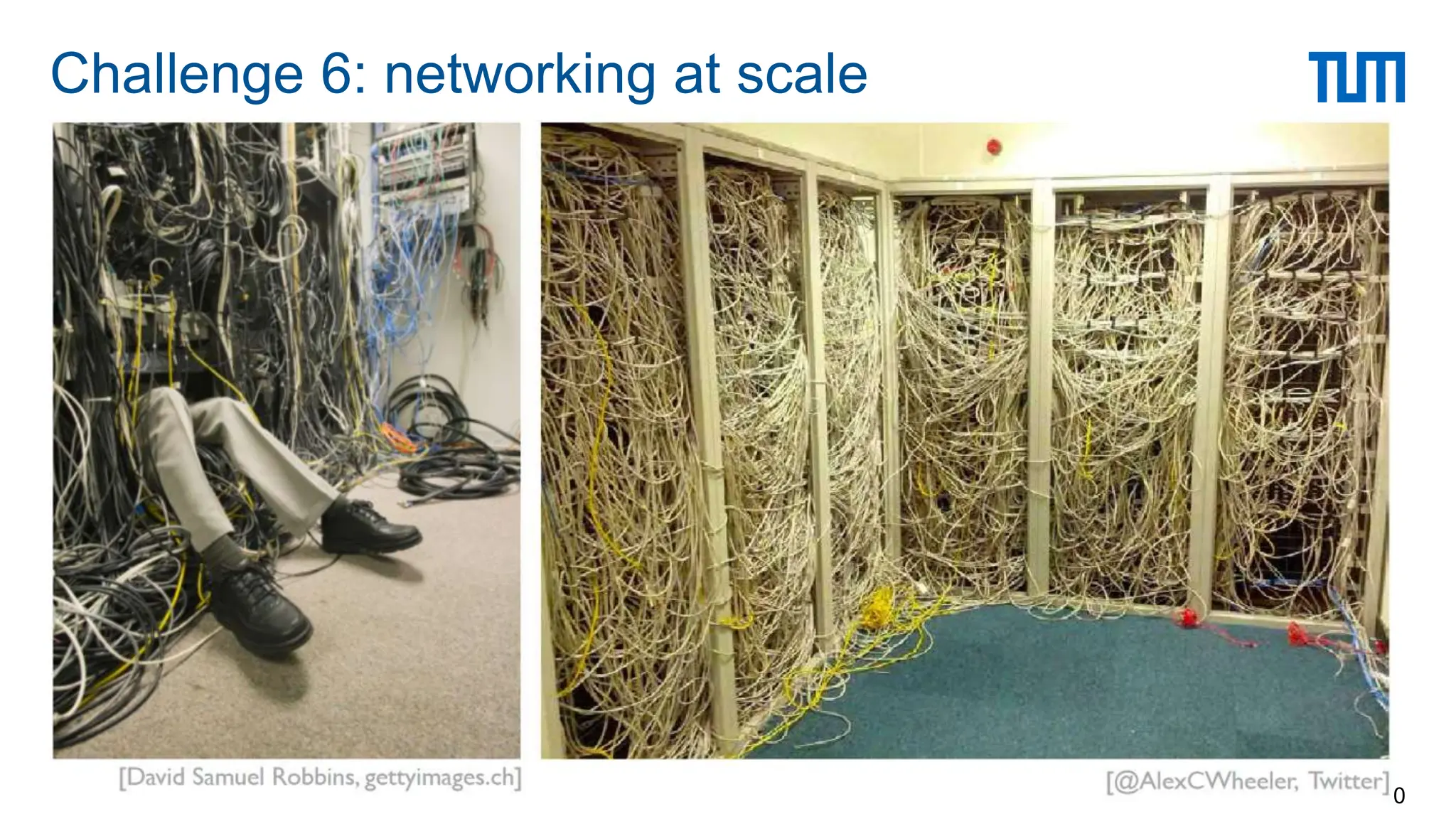
Challenge 6: networking at scale
30
 Building the right abstractions to work for a range of workload at hyper-scale.
Software Defined Networking (SDN)
 Within DC, 32 billion GBs will be transported in 2020
 src: Cisco’s report 2016-2020
 “Machine to machine” traffic is orders of magnitude larger than what goes out on the Internet
 Src: Jupiter Rising: A Decade of Clos Topologies and Centralized control in Google’s Datacenter
network (ACM SIGCOMM’15)
Challenge 6: networking at scale (cont.)
31
Cloud Computing Overview
32
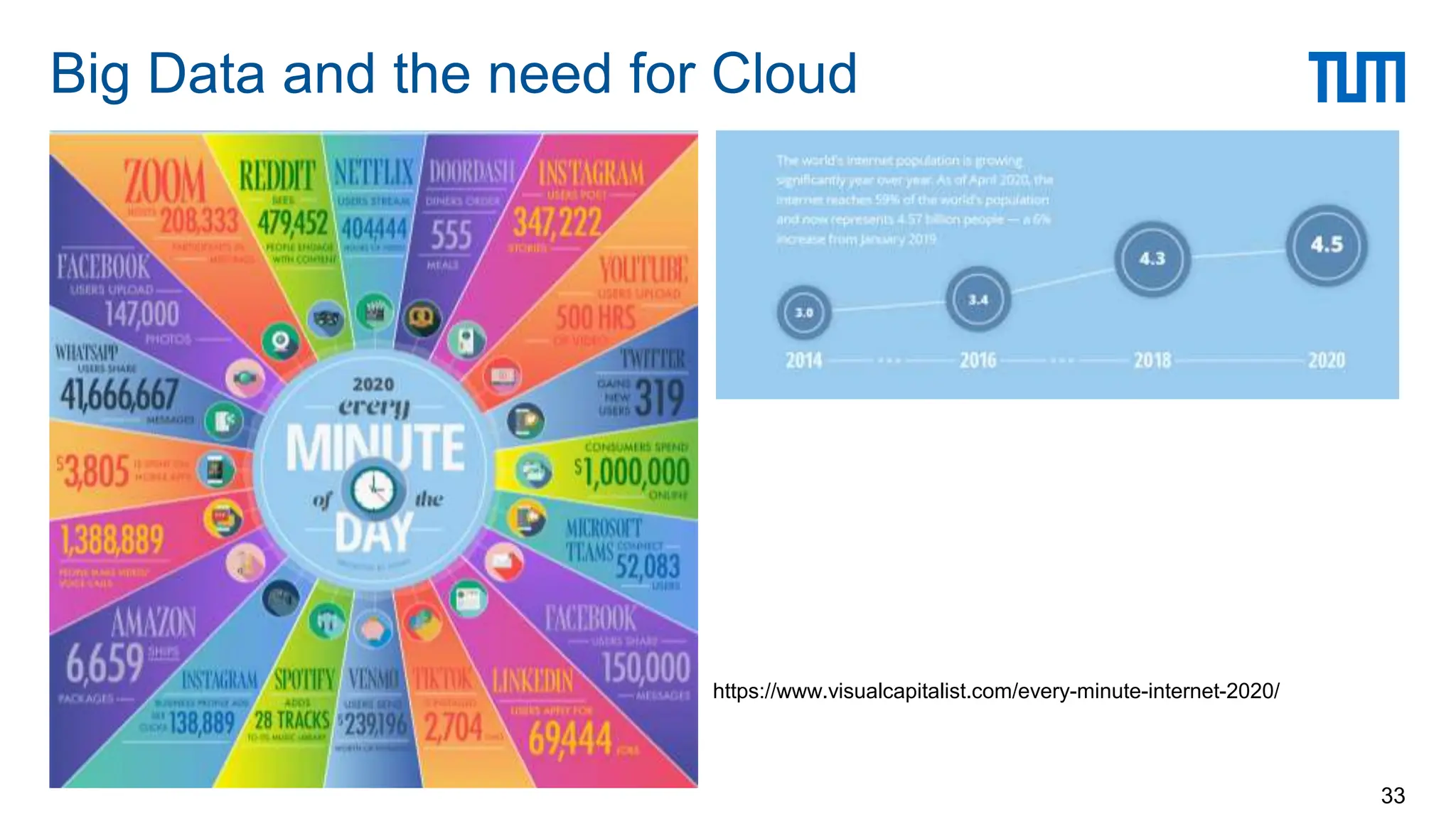
Big Data and the need for Cloud
33
https://www.visualcapitalist.com/every-minute-internet-2020/
Datacenter hardware and software that the vendors use to offer the computing resources and services.
 The cloud has a large pool of easily usable
virtualized computing resources, development
platforms, and various services and
applications.
 Cloud computing is the delivery of
computing as a service.
 The shared resources, software,
and data are provided by a provider
as a metered service over a network.
Cloud and Cloud computing
34
 Datacenters are vendors that rent servers or other computing resources (e.g., storage)
 Anyone (or company) with a “credit card” can rent
 Cloud resources owned and operated by a third-party (cloud provider).
 Fine-grained pricing model
 Rent resources by the hour or by I/O
 Pay as you go (pay for only what you use)
 Can vary capacity as needed
 No need to build you own IT infrastructure for peak loads
Cloud Computing
35
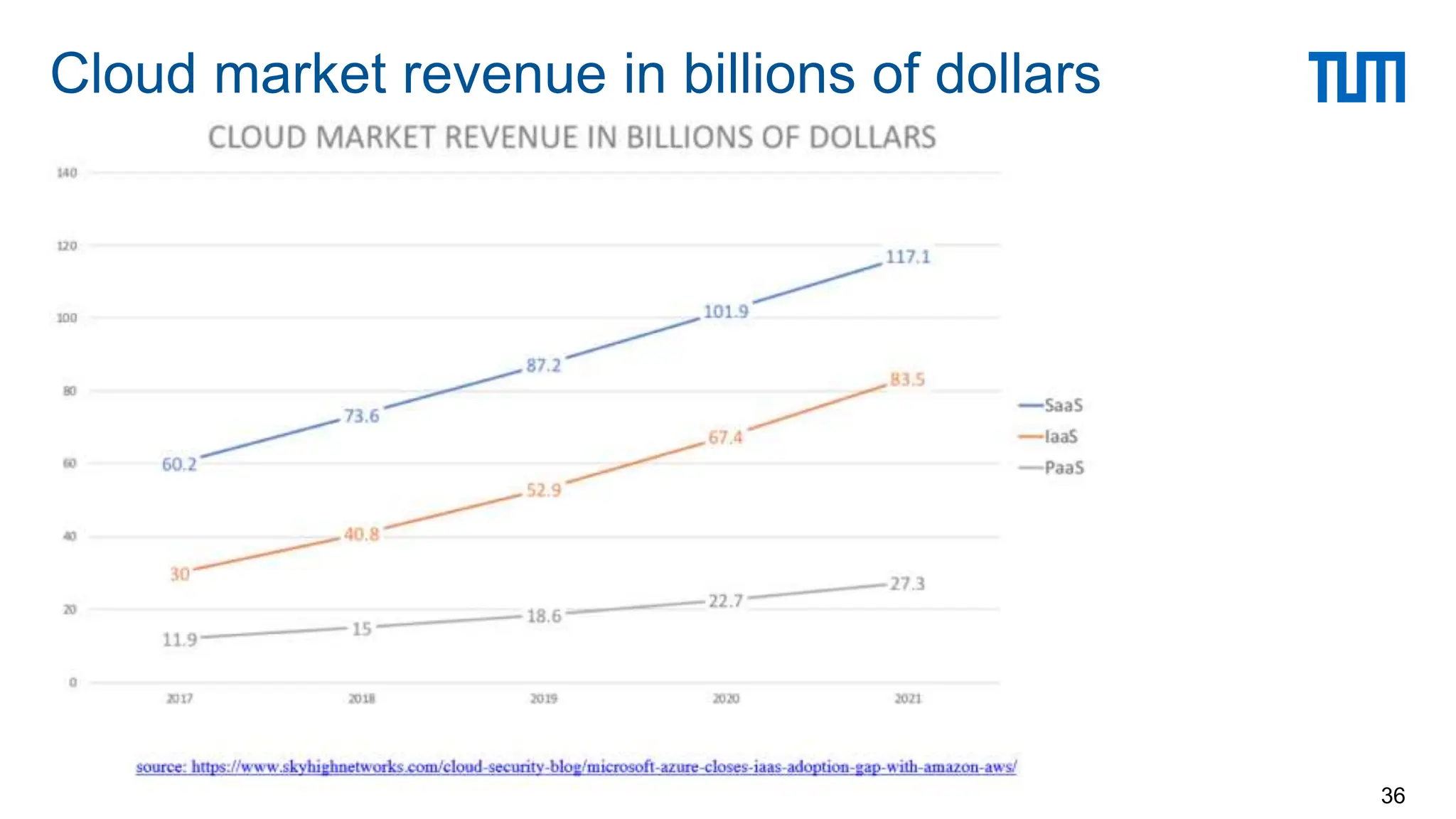
Cloud market revenue in billions of dollars
36
Application users
Cloud Users
 Software / websites that serve real users
 Netflix, Pinterest, Instagram, Spotify, AirBnb, Lyft, Slack, Expendia
 Data analytics, machine learning, and other data services
 Databricks, Snowflake, GE Healthcare
 Mobile and IoT backends
 Snapchat, Zynga (AWS → zCloud → AWS)
 Datacenter’s own software
 Google Drive/One Drive, search, etc.
Cloud Providers
 Companies with large DCs
 Amazon AWS, Microsoft Azure, Google Cloud Platform, Alibaba Cloud, …
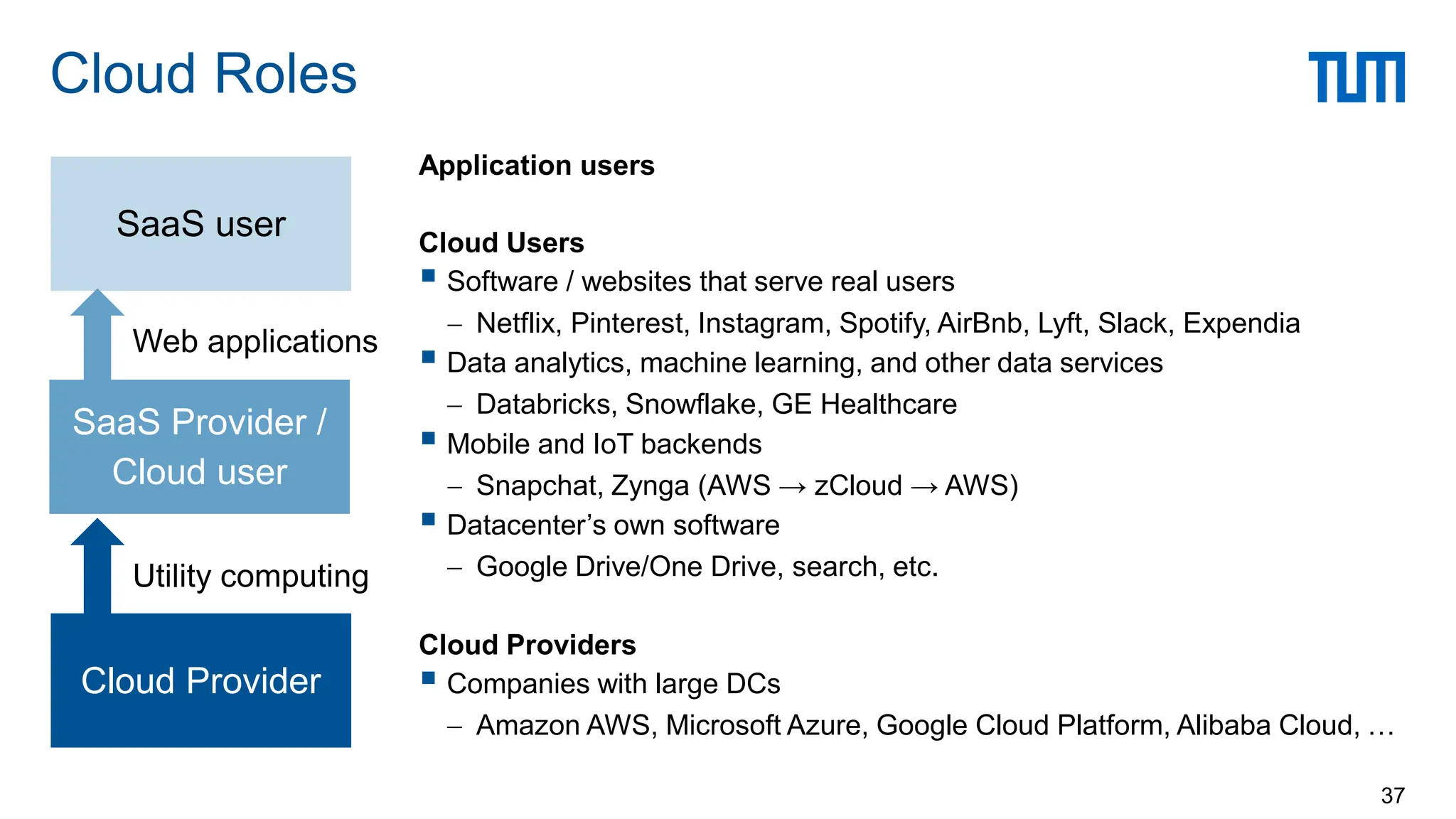
Cloud Roles
37
Cloud Provider
SaaS Provider /
Cloud user
SaaS user
Utility computing
Web applications
Public vs. Private
 Public: resources owned and operated by the one organization aka the cloud vendor
 Private: Resources used exclusively by a single business or organization
On-premise vs. Hosted:
 On-premise (on-prem): resources located locally (at a datacenter that the organization operates)
 Hosted: resources hosted and managed by a third-party provider
Private cloud can be both on-prem and hosted (virtual private cloud)
Types of Cloud Computing
38
Hybrid cloud
 Combines public and private clouds, allows data and applications to be shared between them.
 Better control over sensitive data and functionalities
 Cost effective, scales well and is more flexible
Multi-Cloud
 Use multiple clouds for an application / service
 Avoids data lock-in
 Avoids single point of failure
 But, need to deal with API differences and handle migration across clouds
Types of Cloud Computing (cont)
39
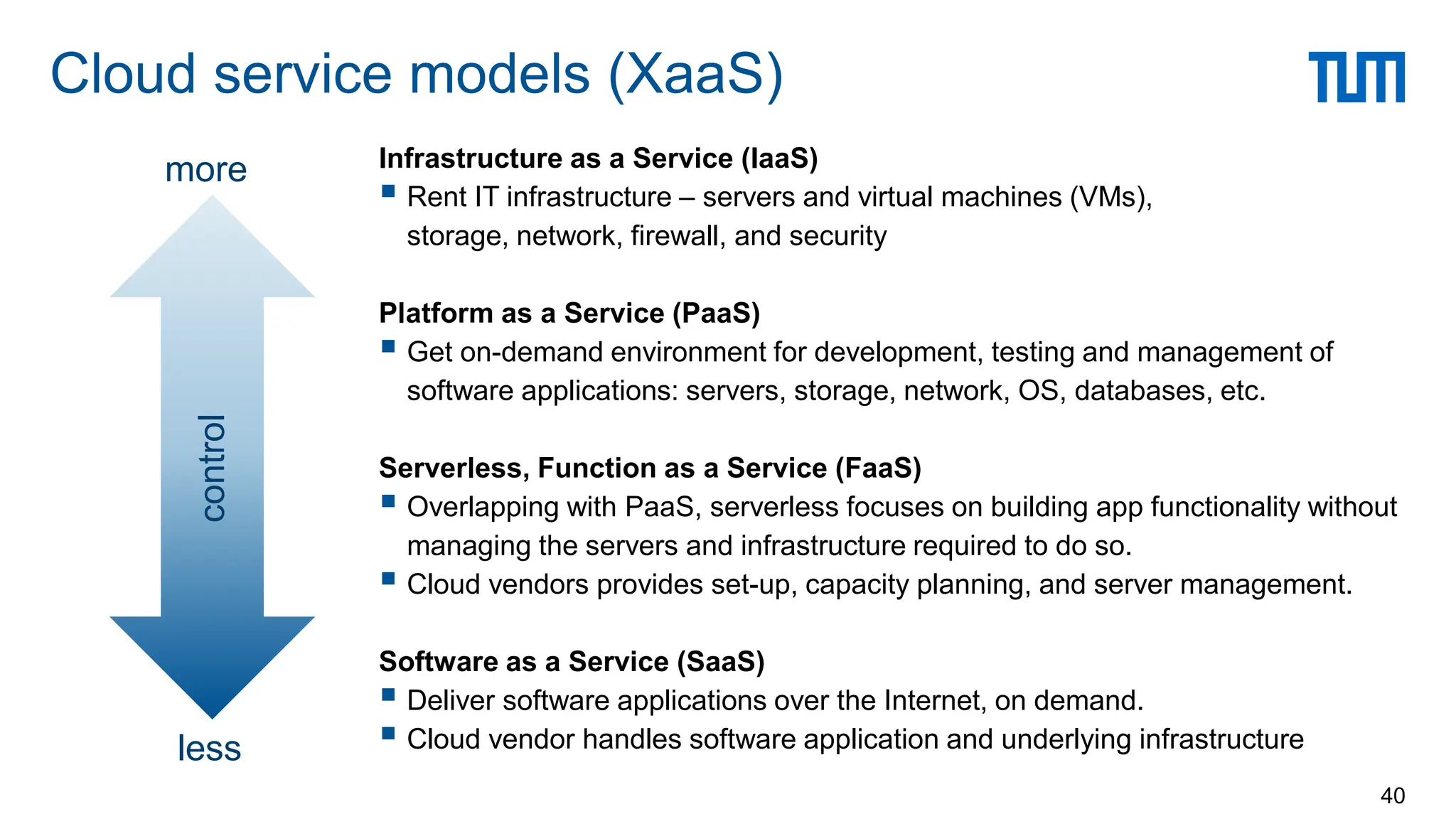
Infrastructure as a Service (IaaS)
 Rent IT infrastructure – servers and virtual machines (VMs),
storage, network, firewall, and security
Platform as a Service (PaaS)
 Get on-demand environment for development, testing and management of
software applications: servers, storage, network, OS, databases, etc.
Serverless, Function as a Service (FaaS)
 Overlapping with PaaS, serverless focuses on building app functionality without
managing the servers and infrastructure required to do so.
 Cloud vendors provides set-up, capacity planning, and server management.
Software as a Service (SaaS)
 Deliver software applications over the Internet, on demand.
 Cloud vendor handles software application and underlying infrastructure
Cloud service models (XaaS)
40
control
less
more
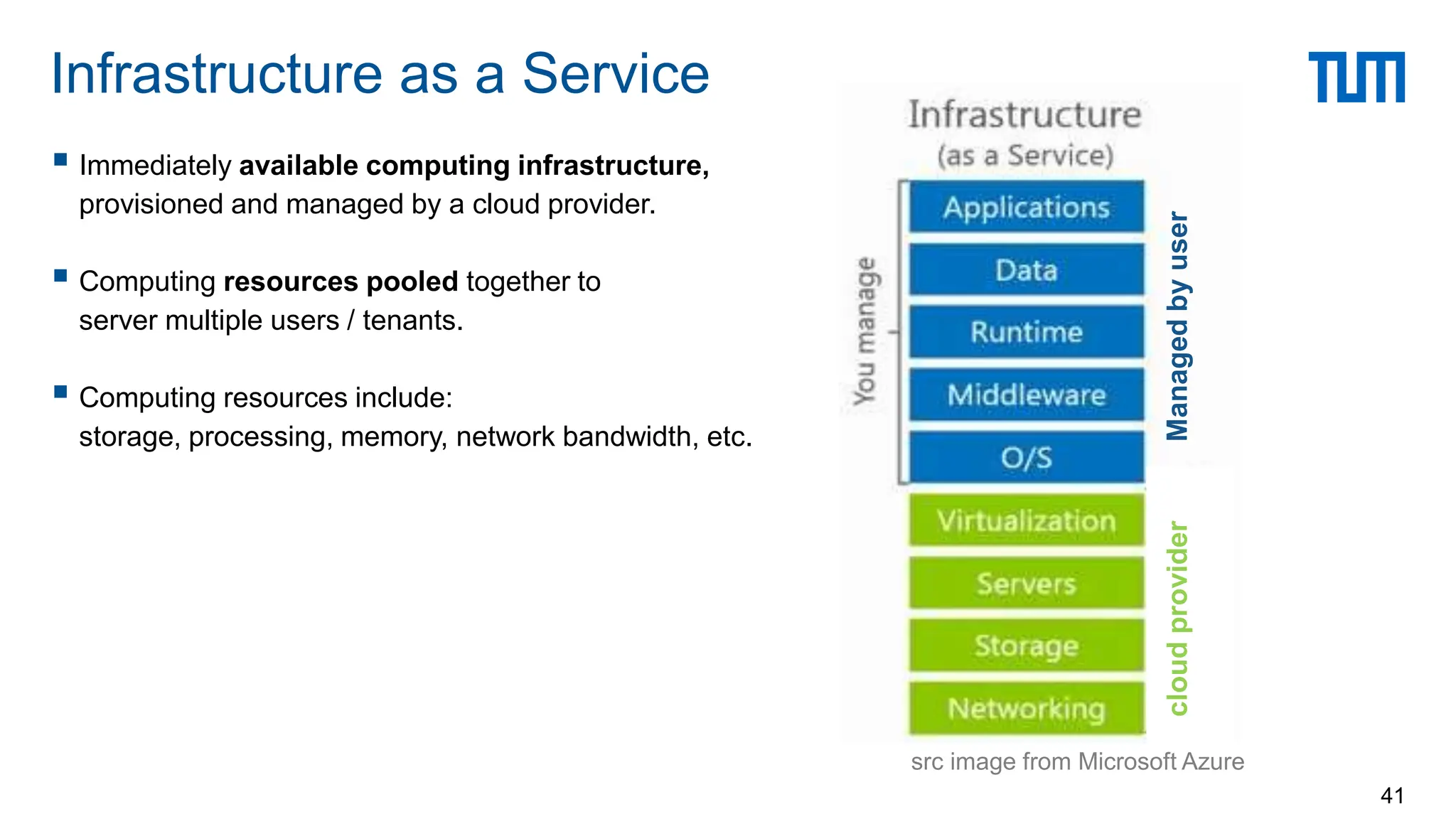
 Immediately available computing infrastructure,
provisioned and managed by a cloud provider.
 Computing resources pooled together to
server multiple users / tenants.
 Computing resources include:
storage, processing, memory, network bandwidth, etc.
Infrastructure as a Service
41
src image from Microsoft Azure
cloud
provider
Managed
by
user
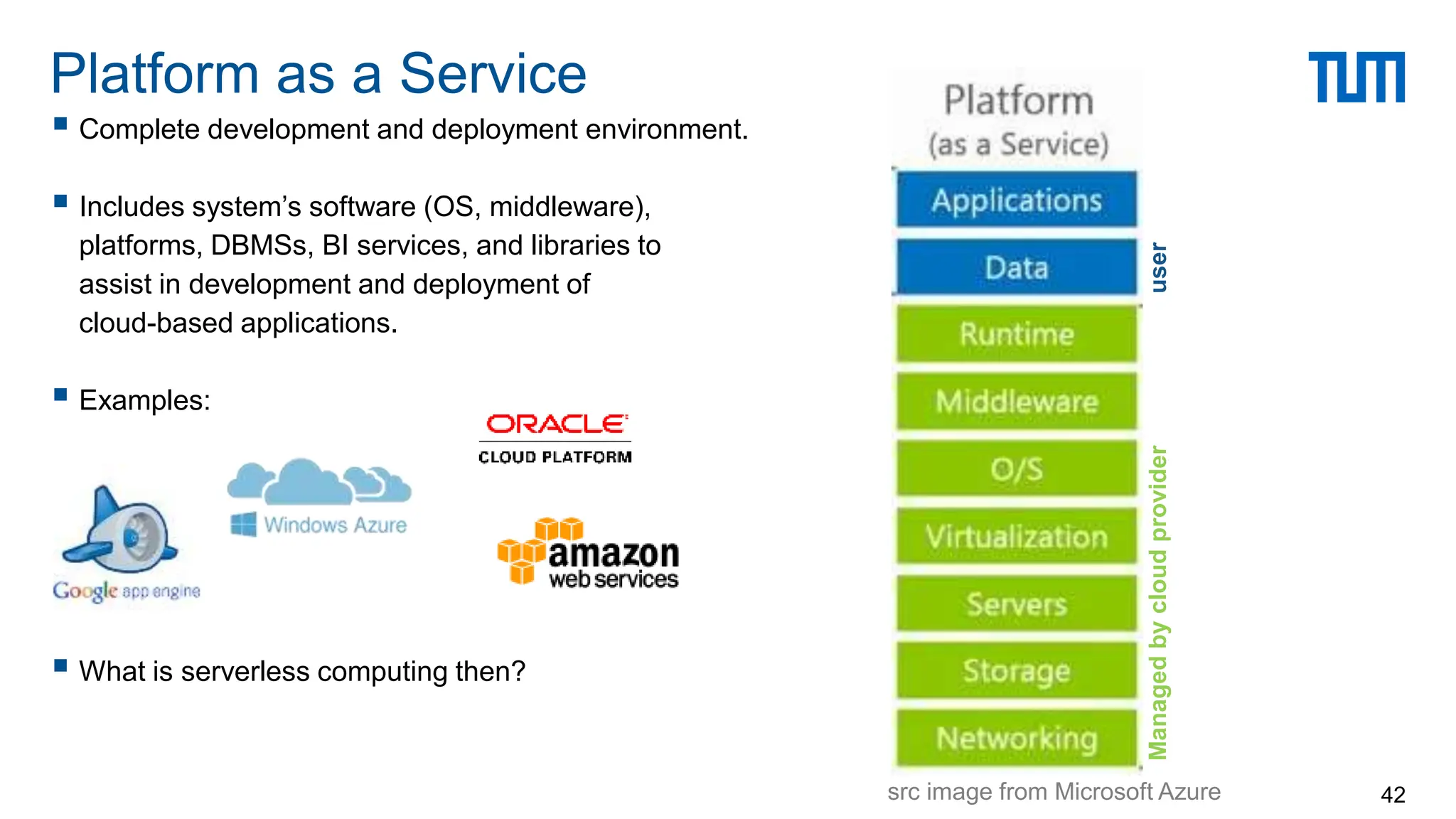
 Complete development and deployment environment.
 Includes system’s software (OS, middleware),
platforms, DBMSs, BI services, and libraries to
assist in development and deployment of
cloud-based applications.
 Examples:
 What is serverless computing then?
Platform as a Service
42
user
Managed
by
cloud
provider
src image from Microsoft Azure
Software as a Service
43
User’s benefits:
 Elimination of up-front commitment
 Speed – services are provided on demand
 Global scale and elasticity
 Productivity
 Performance and security
 Customizability
 Ability to pay for use of computing resources
on a short-term basis (as needed)
Cloud pros and cons
44
User’s concerns:
 Dependability on network and internet
connectivity
 Security and privacy
 Cost of migration
 Cost and risk of vendor lock-in
In addition to the cross references provided in the slides.
Some material based on:
 Lecture notes from “Scalable Systems for the Cloud” by Prof. Giceva at Imperial
 Lecture notes from “Modern Data Center Systems” by Prof. Zhang at UC San Diego
 Book “The Datacenter as a Computer – An Introduction to the Design of Warehouse-scale Machines” by
Luiz Andre Barroso, Jimmy Clidaras, Urs Holzle
 Talk “Inside Azure Datacenter Architecture” with Mark Russinovich (Azure CTO)
 Paper “Above the Clouds: A Berkeley View of Cloud Computing”
 Web-pages from Amazon AWS, Microsoft Azure and Google CDP
References
45

CENTRE FOR DATA CENTER WITH DIAGRAMS.ppt

  • 1.
  • 2.
  • 3.
     Data center(DC) is a physical facility that enterprises use to house computing and storage infrastructure in a variety of networked formats.  Main function is to deliver utilities needed by the equipment and personnel:  Power  Cooling  Shelter  Security  Size of typical data centers:  500 – 5000 sqm buildings  1 MW to 10-20 MW power (avg 5 MW) Data Centers 3
  • 4.
  • 5.
    Datacenters around theglobe 5 https://docs.microsoft.com/en-us/learn/modules/explore-azure-infrastructure/2-azure-datacenter-locations
  • 6.
    Modern DC forthe Cloud architecture 6  Geography:  Two or more regions  Meets data residency requirements  Fault-tolerant from complete region failures  Region:  Set of datacenters within a metropolitan area  Network latency perimeter < 2ms  Availability Zones:  Unique physical locations within a region  Each zone made up of one or more DCs  Independent power, cooling, networking  Inter-AZ network latency < 2ms  Fault tolerance from DC failure Src: Inside Azure Datacenter Architecture with Mark Russinovich
  • 7.
     Traditional datacenters  Host a large number of relatively small- or medium-sized applications, each running on a dedicated hardware infrastructure that is decoupled and protected from other systems in the same facility  Usually for multiple organizational units or companies  Modern data centers (a.k.a., Warehouse-scale computers)  Usually belong to a single company to run a small number of large-scale applications  Google, Facebook, Microsoft, Amazon, Alibaba, etc.  Use a relatively homogeneous hardware and system software  Share a common systems management layer  Sizes can vary depending on needs Data Centers 7
  • 8.
  • 9.
     Scale-up: highcost powerful CPUs, more cores, more memory  Scale-out: adding more low cost, commodity servers  Supercomputer vs. data center  Scale  Blue waters = 40K 8-core “servers”  Microsoft Chicago Data centers = 50 containers = 100K 8-core servers  Network architecture  Supercomputers: InfiniBand, low-latency, high bandwidth protocols  Data Centers: (mostly) Ethernet based networks  Storage  Supercomputers: separate data farm  Data Centers: use disk on node + memory cache Scale-up vs. scale-out 9
  • 10.
    Main components ofa datacenter 10 src: The Datacenter as a Computer – Barroso, Clidaras, Holzle
  • 11.
    Src: the datacenteras a computer – an introduction to the design of warehouse-scale machines Traditional Data Center Architecture 11 Servers mounted on 19’’ rack cabinets Racks are placed in single rows forming corridors between them.
  • 12.
  • 13.
     Today’s DCuse shipping containers packed with 1000s servers each.  For repairs, whole containers are replaced. Inside a modern data center 13
  • 14.
     DCs consume3% of global electricity supply (416.2 TWh > UK’s 300 TWh)  DCs produce 2% of total greenhouse gas emissions  DCs produce as much CO2 as The Netherlands or Argenti Costs for operating a data center 14 Monthly cost = $3’530’920 31% power
  • 15.
     PUE isthe ratio of  The total amount of energy used by a DC facility  To the energy delivered to the computing equipment  PUE is the inverse of data center infrastructure efficiency  Total facility power = covers IT systems (servers, network, storage) + other equipment (cooling, UPS, switch gear, generators, lights, fans, etc.) Power Usage Effectiveness (PUE) 15
  • 16.
     Location ofthe DC – cooling and power load factor  Raise temperature of aisles  Usually 18-20 C; Google at 27 C  Possibly up to 35 C (trade off failures vs. cooling costs)  Reduce conversion of energy  E.g., Google motherboards work at 12V rather than 3.3/5V  Go to extreme environments  Arctic circle (Facebook)  Floating boats (Google)  Underwater DC (Microsoft)  Reuse dissipated heat Achieving PUE 16
  • 17.
     Case study:Microsoft Evolution of data center design 17 https://www.nextplatform.com/2016/09/26/rare-tour-microsofts-hyperscale-datacenters/
  • 18.
    Evolution of datacenterdesign 18  Gen 6: scalable form factor (2017)  Reduced infrastructure, scale to demand  1.17-1.19 PUE  Gen 7: Ballard (2018)  Design execution efficiency  Flex capacity enabled  1.15-1.18 PUE  Gen 8: Rapid deploy datacenter (2020)  Modular construction and delivery  Equipment skidding and preassembly  Faster speed to market  Project Natick (future) – 1.07 PUE or less Src: Inside Azure Datacenter Architecture with Mark Russinovich
  • 19.
  • 20.
    Challenge 1: Coolingdata centers 20 Cooling plant at a Google DC in Oregon
  • 21.
    Challenge 2: EnergyProportional Computing 21 src: “The Datacenter as a Warehouse Computer” Sub-system power usage in an x86 server as the compute load varies from idle to full (reported in 2012).  Average real world DC and servers are too inefficient.  waste 2/3+ of their energy  Energy consumption is not proportional to the load  CPUs are not so bad but the other components are  CPU is the dominant energy consumer in servers – using 2/3 of energy when active/idle.  Try to optimize workloads  Virtualization and consolidation.
  • 22.
     For non-virtualizedservers 6-15% utilization  Server virtualization can boost to an average 30% utilization  Need for resource pooling and application and server consolidation  Need for resource virtualization Challenge 3: Servers are idle most of the time 22 src: Luiz Barroso, Urs Hölzle “The Datacenter as a Computer”
  • 23.
     Even withvirtualization and software defined DC, resource utilization can be poor.  Need for efficient monitoring (measurement) and cluster management.  Goal to meet SLOs and SLIs.  Job’s tail latency matters! Challenge 4: Efficient monitoring 23 src: “Heterogeneity and dynamicity of clouds at scale: Google trace analysis” SoCC’12
  • 24.
     Hyper-scale systemmanagement software  Treat the datacenter as a warehouse scale computer  Software defined datacenters  System software that allows DC operations to manage the entire DC infrastructure  Compose a system using pooled resources of compute, network, and storage based on workload requirement  Dynamic resource allocation  Virtualization is not enough to improve efficiency  Need the ability to dynamically allocate CPU resources across servers and racks, allowing admins to quickly migrate resources to address the shifting demand  Drive 100-300% better utilization for virtualized WLs, and 200-600% for bare-metal WLs. Improving resource utilization 24
  • 25.
    Software defined DCs 25 Src:Inside Azure Datacenter Architecture with Mark Russinovich
  • 26.
    Disaggregation across racks 26 Src:Inside Azure Datacenter Architecture with Mark Russinovich
  • 27.
    Software defined Servers 27 Src:Inside Azure Datacenter Architecture with Mark Russinovich
  • 28.
     In 2016,Gartner estimated that Google has 2.5 million servers  In 2017, Microsoft Azure was reported to have more than 3 million servers. Challenge 5: Managing scale and growth 28 200,000+ servers (estimated)
  • 29.
     The scaleand complexity of DC operations grows constantly.  By 2020, Cisco estimated that we would have 600 million GB of new data saved each day (200 million GB big data)  So the volume of BigData by 2020 was estimated to be as much as all of the stored data in 2016. Size and growth of DC (2016-2020) 29
  • 30.
  • 31.
     Building theright abstractions to work for a range of workload at hyper-scale. Software Defined Networking (SDN)  Within DC, 32 billion GBs will be transported in 2020  src: Cisco’s report 2016-2020  “Machine to machine” traffic is orders of magnitude larger than what goes out on the Internet  Src: Jupiter Rising: A Decade of Clos Topologies and Centralized control in Google’s Datacenter network (ACM SIGCOMM’15) Challenge 6: networking at scale (cont.) 31
  • 32.
  • 33.
    Big Data andthe need for Cloud 33 https://www.visualcapitalist.com/every-minute-internet-2020/
  • 34.
    Datacenter hardware andsoftware that the vendors use to offer the computing resources and services.  The cloud has a large pool of easily usable virtualized computing resources, development platforms, and various services and applications.  Cloud computing is the delivery of computing as a service.  The shared resources, software, and data are provided by a provider as a metered service over a network. Cloud and Cloud computing 34
  • 35.
     Datacenters arevendors that rent servers or other computing resources (e.g., storage)  Anyone (or company) with a “credit card” can rent  Cloud resources owned and operated by a third-party (cloud provider).  Fine-grained pricing model  Rent resources by the hour or by I/O  Pay as you go (pay for only what you use)  Can vary capacity as needed  No need to build you own IT infrastructure for peak loads Cloud Computing 35
  • 36.
    Cloud market revenuein billions of dollars 36
  • 37.
    Application users Cloud Users Software / websites that serve real users  Netflix, Pinterest, Instagram, Spotify, AirBnb, Lyft, Slack, Expendia  Data analytics, machine learning, and other data services  Databricks, Snowflake, GE Healthcare  Mobile and IoT backends  Snapchat, Zynga (AWS → zCloud → AWS)  Datacenter’s own software  Google Drive/One Drive, search, etc. Cloud Providers  Companies with large DCs  Amazon AWS, Microsoft Azure, Google Cloud Platform, Alibaba Cloud, … Cloud Roles 37 Cloud Provider SaaS Provider / Cloud user SaaS user Utility computing Web applications
  • 38.
    Public vs. Private Public: resources owned and operated by the one organization aka the cloud vendor  Private: Resources used exclusively by a single business or organization On-premise vs. Hosted:  On-premise (on-prem): resources located locally (at a datacenter that the organization operates)  Hosted: resources hosted and managed by a third-party provider Private cloud can be both on-prem and hosted (virtual private cloud) Types of Cloud Computing 38
  • 39.
    Hybrid cloud  Combinespublic and private clouds, allows data and applications to be shared between them.  Better control over sensitive data and functionalities  Cost effective, scales well and is more flexible Multi-Cloud  Use multiple clouds for an application / service  Avoids data lock-in  Avoids single point of failure  But, need to deal with API differences and handle migration across clouds Types of Cloud Computing (cont) 39
  • 40.
    Infrastructure as aService (IaaS)  Rent IT infrastructure – servers and virtual machines (VMs), storage, network, firewall, and security Platform as a Service (PaaS)  Get on-demand environment for development, testing and management of software applications: servers, storage, network, OS, databases, etc. Serverless, Function as a Service (FaaS)  Overlapping with PaaS, serverless focuses on building app functionality without managing the servers and infrastructure required to do so.  Cloud vendors provides set-up, capacity planning, and server management. Software as a Service (SaaS)  Deliver software applications over the Internet, on demand.  Cloud vendor handles software application and underlying infrastructure Cloud service models (XaaS) 40 control less more
  • 41.
     Immediately availablecomputing infrastructure, provisioned and managed by a cloud provider.  Computing resources pooled together to server multiple users / tenants.  Computing resources include: storage, processing, memory, network bandwidth, etc. Infrastructure as a Service 41 src image from Microsoft Azure cloud provider Managed by user
  • 42.
     Complete developmentand deployment environment.  Includes system’s software (OS, middleware), platforms, DBMSs, BI services, and libraries to assist in development and deployment of cloud-based applications.  Examples:  What is serverless computing then? Platform as a Service 42 user Managed by cloud provider src image from Microsoft Azure
  • 43.
    Software as aService 43
  • 44.
    User’s benefits:  Eliminationof up-front commitment  Speed – services are provided on demand  Global scale and elasticity  Productivity  Performance and security  Customizability  Ability to pay for use of computing resources on a short-term basis (as needed) Cloud pros and cons 44 User’s concerns:  Dependability on network and internet connectivity  Security and privacy  Cost of migration  Cost and risk of vendor lock-in
  • 45.
    In addition tothe cross references provided in the slides. Some material based on:  Lecture notes from “Scalable Systems for the Cloud” by Prof. Giceva at Imperial  Lecture notes from “Modern Data Center Systems” by Prof. Zhang at UC San Diego  Book “The Datacenter as a Computer – An Introduction to the Design of Warehouse-scale Machines” by Luiz Andre Barroso, Jimmy Clidaras, Urs Holzle  Talk “Inside Azure Datacenter Architecture” with Mark Russinovich (Azure CTO)  Paper “Above the Clouds: A Berkeley View of Cloud Computing”  Web-pages from Amazon AWS, Microsoft Azure and Google CDP References 45

Editor's Notes

  • #2 Hi everyone, welcome to the introductory lecture for Cloud-based data processing. My name is Jana Giceva, I will be the lecturer for this course. Unfortunately, due to the current situation we cannot meet in person and due to the internal departmental regulations, the lectures need to be pre-recorded so let me start by saying a few words about myself.
  • #3 Today’s lecture is still somewhat an introductory lecture as I do not intend to dive too deep into the internals of datacenters, but nevertheless you need to have a broad knowledge of what datacenters how, how they are built, how they have evolved over the years, where they are headed and in principle understand how that affects the way we reason about building both system software and applications that run in the cloud on such datacenter computers.
  • #4 These new large datacenters cannot be viewed simply as a collection of collocated servers. Large portion of hardware and software resources in these facilities must work in concert to efficiently deliver good levels of internet service performance.  Enterprises often treat a new datacenter as one massive warehouse scale computer. The computing platform required for such large scale services consists of 1000s of computing nodes, with their corresponding networking and storage sub-systems, power distribution ad conditioning equipment, and extensive cooling systems.
  • #6 Azure has more regions than any other cloud provider more than 60, 160k miles of fiber and undersea cables connections between the regions 1M+ miles of fiber cable per datacenter
  • #11 Power subsystem Uninterruptable power supplies (UPS) Ventilation and cooling systems Backup generators Cabling to connect to external network operators Routers, switches, security devices, storage systems, servers, application delivery controllers, and more. Reliability, efficiency, security, and constant evolution of a datacenter are typically a top priority.
  • #16 Industry standard
  • #18  To backstep a little bit, between 1989 and 2005, with the first generation of co-located datacenters that Microsoft paid for, the company bought generic servers from the big tier one suppliers and racked them and stacked them like every other enterprise company of the client/server and dot-com eras did. With these facilities, which had traditional raised floors used in datacenters for decades, the power usage effectiveness of the datacenter – a measure of efficiency that is the total power of the datacenter divided by the total power of the IT gear – was at best around 2.0 and in some cases as high as 3.0. So, that meant for every 1 megawatt of juice consumed by the IT gear doing actual work there was another 1 megawatt of electricity being consumed by the datacenter as voltages were stepped down for battery backup and the gear in the racks and water was chilled and air blown around the datacenter. Starting in 2007 with the Columbia 1 datacenter in Quincy and then adding on with the Columbia 2 facility in 2008, which together are the size of a dozen American football fields, Microsoft started using rack-dense system configurations. Each of the datacenters has five rooms with 18 rows of racked up gear. Each room is rated at 2.5 megawatts, and across those ten rooms with the networking and other gear thrown in, the whole thing draws 27.6 megawatts. With the compute density and improved cooling, Microsoft was able to get the PUE of its Generation 2 datacenters down to between 1.4 and 1.6, which means the power distribution and cooling were only adding 40 percent to 60 percent on top of the juice burned by the IT gear itself. This was a big improvement. With the Generation 3 datacenters that Microsoft rolled out in 2009, it took on the issue of containing the heat in the datacenter. In some cases with the Generation 3 datacenters the containment came literally from containers – in this case, shipping containers, and with some of the Microsoft locations (such as those used in its Chicago facilities), the containers were double stacked and packed with gear. (See here for more details on this.) Microsoft experimented with different designs to contain heat and drive down PUE, including hot aisle containment and air-side economization, which drove the PUE down as low as 1.2. “In Generation 4, we learned a few things,” said Bakken. “First, buy the datacenter as a box with a single part number. These integrated modules can either be deployed in a container-like structure, which we call an ITPAC, or a more conventional co-lo design. At the same time we moved away from chiller environments and into chiller-less environments that use outside air for cooling — also known as air-side economization — where it was appropriate. Thsi drove our PUE ratings down to the range of 1.12 to 1.2, below our previous designs and far below the industry.” This is something that is possible in a town like Quincy, where the temperature only rose above 85 degrees for 21 days in the past year. With the ITPACs, which were manufactured by two different vendors, Microsoft told them that it wanted containerized units of datacenter that would take 440 volt power in and have a plug for the network and run several thousands of servers in a pod. Microsoft did not care how they did it so long as it met the specs and could be rolled into the datacenter. As it turns out, the two vendors had very different designs, with one creating a pod that had a shared hot aisle in the center and two rows of gear on the outside and the other creating a pod that had separate hot and cold aisles. These pods were lifted into a datacenter with a crane and then the roof was put onto the building afterwards, and interestingly, the first day that they went in it snowed like crazy in Quincy and the snow blew in through the side walls and surrounded the pods. (Microsoft eventually put up baffle screens to keep the rain and the snow out but let the wind in.) Over the years, Microsoft has done a few tweaks and tunings with the Generation 4 datacenters, including getting rid of large-scale uninterriptible power supplies and putting small batteries inside servers instead. After realizing what a hassle it was to have a building with walls and a roof and that it took too long to get the ITPAC pods into the facility, Microsoft went all the way and got rid of the building. With one Generation 4 facility that was built in Quincy, the pods stand in the open air and the network and power are buried in the concrete pad they sit upon. And with a Generation 4 facility in Boydton, Virginia, Microsoft deployed adiabatic cooling, where air is blown over screens soaked with water in the walls of the datacenter to create cool air through evaporation of the water rather than using simple outside air cooling alone. (Facebook uses variations of this adiabatic cooling technology in its Forrest City, North Carolina facility.) he Generation 5 datacenters would use 48U (84-inch) tall racks. It looks like there are 20 racks to a row by our count, and at 84 inches that gives you four of the 12U Open Cloud Server enclosures per rack, and that works out to 96 server nodes per rack. The funny bit is that the machines on the left of this image look like the Open Cloud Server, but the ones on the right do not. They look like a different modular blade form factor, and perhaps Microsoft is cooking up a different Open Cloud Server to donate to the Open Compute Project? That looks like seven vertical nodes in a 4U enclosure to our eyes, which would yield a maximum of 84 sleds per node. (These don’t appear to be packed that densely and have other gear in the racks.) The first Generation 5 maintenance zone has been released to engineering to be populated by servers. The Generation 5 datacenters have lots of power, at 10.5 megawatts each, 42 megawatts for a maintenance zone, and 168 megawatts for the theater of four zones, which Microsoft could build some day but has not committed to do so as yet.
  • #19 Instead of generating the large hyper-scale 32MW/h datacenters, they moved to creating smaller units of datacenters that could be composed to create larger units, but also more agile when deploying elsewhere. In addition, that enabled them to become even more efficient. Gen 7, was deployed until last year, they simplified the design the electrical system, by intelligent monitoring and software throttling of power usage, etc.
  • #23 Traditional datacenters typically build dedicated infrastructures for each workload. Server virtualization has helped break down some of these silos, but in practice this technique can be applied only to a portion of enterprise workloads. Software defined datacenters provide the ability to rapidly match workloads with hardware components from a common pool of infrastructure components.
  • #34 There are many challenges: How do we store this data? How do we share it, analyse it, search it? But also transfer it Secure it Keep it running with high availability All of this is, unfortunately, not possible with traditional IT systems.
  • #42 Infrastructure as a service (IaaS) is an instant computing infrastructure, provisioned and managed over the Internet. Quickly scale up and down with demand, and only pay for what you use. IaaS helps to avoid the expense of buying and managing your own physical servers and other data centre infrastructure. Each resource is typically offered as a separate service component (which you would need to pay for only if you need it and use it). The cloud provider manages the infrastructure, while the user is responsible for purchasing, installing, configuring and managing their own software (operating systems, middleware, application, etc.). Common scenarios: Test and development Website hosting Storage, back-up and recovery. Web apps – infrastructure to support web apps including storage, web and application servers, and networking resources. Organisations can easily deploy web apps and scale the infrastructure up and down when the demand for the app is unpredictable. High-performance computing – doing computations that require enormous computing power from time to time will be more economical to do in a pay-as-you-go cloud setting. Not always the best performing though, why? Big data analysis – analyzing data to get valuable insights, trends, patterns often requires huge amount of processing power, which the IaaS can provide (again) economically. Advantages of IaaS: Eliminates capital expense and reduces ongoing costs. Similar for maintenance and IT management. Improves business continuity and disaster recovery (high availability, reliability, fault tolerance). Fast and on-demand get new resources. Respond more quickly to shifting business conditions – flexibility to easily scale up and down the resources to accommodate spikes in demand for your application. Potentially better security (depending on the SLA you’ve signed with the cloud vendor)
  • #43 PaaS allows you to avoid the expense and complexity of buying and managing software licenses. Common PaaS scenarios: Development framework Analytics or business intelligence. Additional services: workflow, directory, security and scheduling. Serverless computing is the abstraction of servers, infrastructure and operating systems. When you build serverless applications you do not need to provision and manage any servers, so you can take your mind off infrastructure concerns. Why serverless? Benefit from fully managed services – deploy code and it runs with high availability without you or your team having to be burdened with the management of the infrastructure. Serverless compute scales from nothing to tens of thousands of concurrent functions within seconds to match any workloads (without requiring you to scale configuration – it reacts to events and triggers in near-real time). You only pay for the time your code is running. Serverless computing is event-driven, and resources are allocated as soon as they are triggered by an event. You are only charged for the time and resources it takes to execute your code. Examples of serverless: Web application architecture. IoT back-end. IoT devices send messages to stream analytics, which then calls a cloud function to transform the message. SaaS integration. Azure for serverless applications. Compute – functions is an event-driven compute experience that allows you to execute your code, written in the programming language of your choice, without worrying about the servers. Benefits from scale on demand and never pay for idle capacity. Storage – durable, highly available, and massively scalable storage for developers of cloud applications. Databases Security and access control Cloud messaging Workflow orchestration API management Analytics – Azure stream analytics, Event hub Intelligence Etc.
  • #44 SaaS allows users to connect to and use cloud-based apps over the Internet. Common examples are email, calendaring and office tools. The cloud provider manages the hardware and software, and with the appropriate Service agreement, will ensure the availability and the security of the app And your data as well. Common SaaS scenarios: Personal use free services (web-based email, etc.) For organizational use you can ren (monthly/yearly subscription) apps such as email collaboration tools, sophisticated business applications such as CRM, ERP and document management applications. Advantages: only pay for what you use Free client software Access app data from everywhere Easy access to sophisticated applications without the outright cost for hosting and managing them.
  • #45 Cost – cloud computing eliminates the capital expense of buying hardware and software, and setting up and running on-site data centers – the racks of servers, the round-the-clock electricity for power and cooling, the IT experts for managing the infrastructure. Speed – most cloud computing services are provided as self-service and on demand, so even vast amounts of computing resources can be provisioned in minutes, typically with just a few mouse clicks away. Giving businesses a lot of flexibility and taking the pressure off capacity planning. Global scale and elasticity – the ability to scale elastically. In cloud speak, that means delivering the correct amount of IT resources – more or less computing power, storage, bandwidth – when it’s needed, and from the correct geographic location. Productivity – on-site data centers typically require a lot of “racking and stacking” – hardware setup, software patching, and other time consuming IT management chores. Cloud computing removes the need for many of these tasks, so IT teams can spend time on achieving more important business goals. Performance – regular upgrades to latest generation of fast and efficient computing hardware. Reduced network latency for applications and greater economies of scale. Security – many cloud providers offer a broad set of policies, technologies, and controls that strengthen your security posture overall, helping to protect your data, apps and infrastructure from potential threats.