
www.hanrickcurran.com.au
Data Analysis for Hanrick Curran
June 2016
2experience. new thinking
What can you learn …
 Basic data analysis requirements
 Using Excel™
 Using TeamMate™
 Audit implications
4experience. new thinkingexperience. new thinking 4
An understanding of the basics of performing
data analysis and computer assisted audit
techniques (“CAATs”) is a core part of any
auditors toolkit.
Basics
5experience. new thinking
Terminology
 Workbook – an excel file with multiple sheets
 Worksheet – an individual sheet in an excel file
 Row (record) – a row of data on a worksheet
 Column (field) – a column of data on a worksheet
 Table – a part of a worksheet containing data
 Array –
 Control totals – details of the file to be imported that
provide certainty that all data has been received / imported
6experience. new thinking
Audit benefits
 Data analysis adds to the evidence that we obtain
during our audit procedures by enabling us to look
at data for the entire population.
 This analysis provides additional evidence regarding
our audit that is supplemental to our detailed
substantive testing.
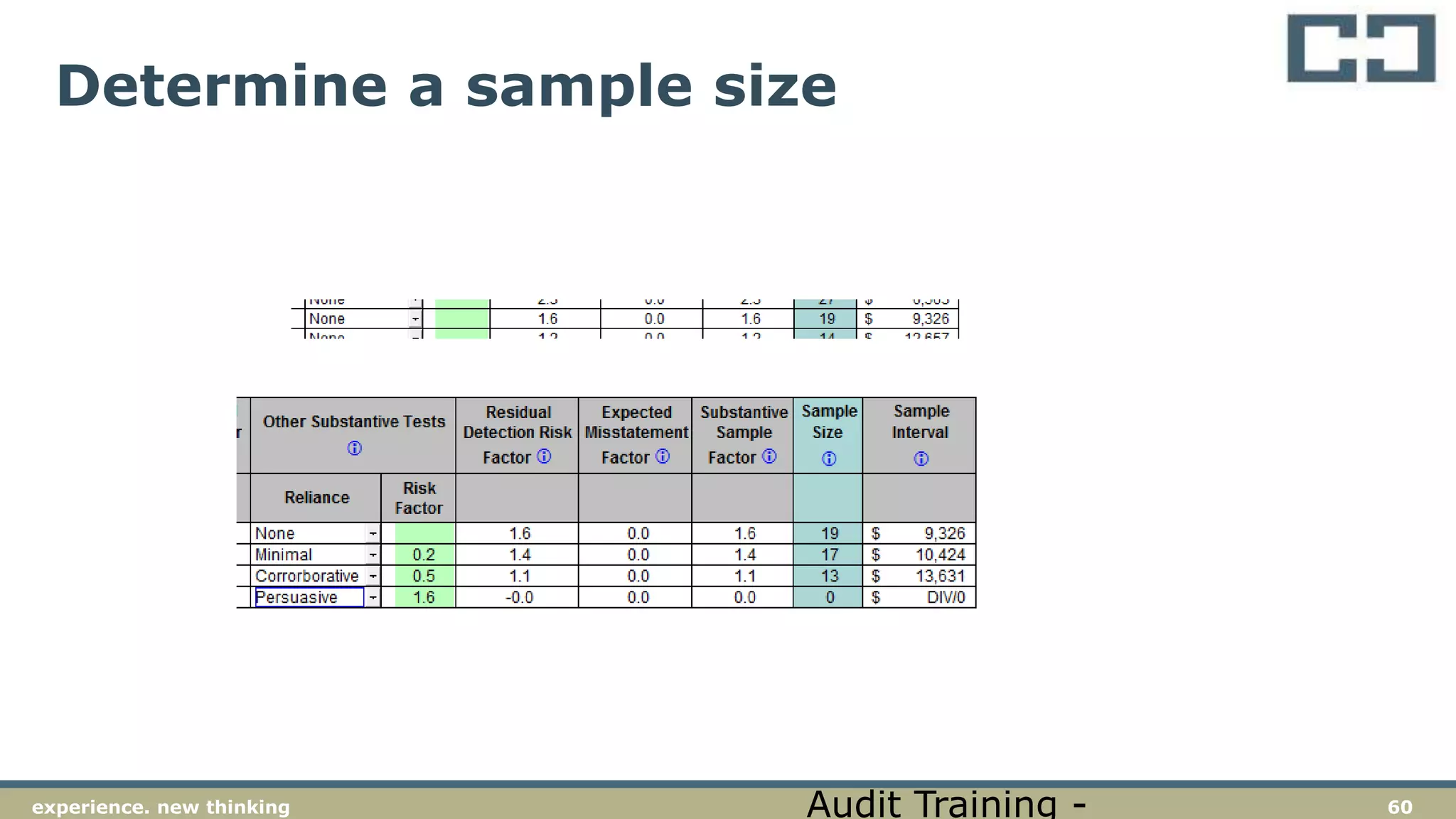
 Data analysis may provide anywhere from minimal
to persuasive evidence for the purpose of “Other
Substantive Tests”. Of course, this assessment
remains a matter of professional judgement.
7experience. new thinking
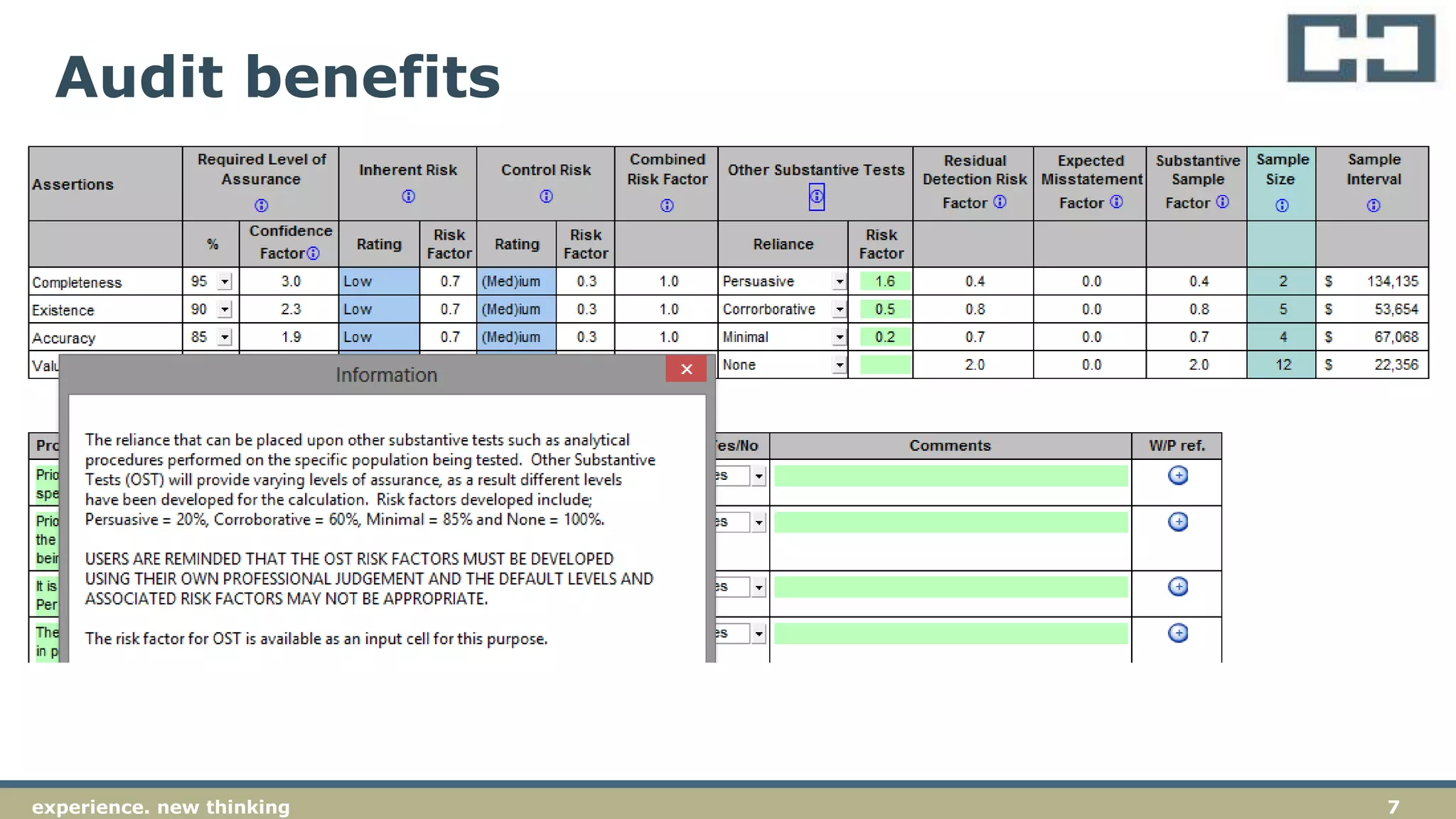
Audit benefits
8experience. new thinking
Getting data from the client
 Plan your request to the client
 Set out your needs clearly (email / letter)
 Allow plenty of time
 Include a diary reminder
9experience. new thinking
Control totals
 When requesting data from clients, have them
confirm control totals
 Control totals are usually details such as the
number of rows / records and the value of a
control field (e.g., total payments)
 Use the control total to confirm that all records
have been correctly imported and that the
value of transactions imported agrees with the
information provided by the client
10experience. new thinking
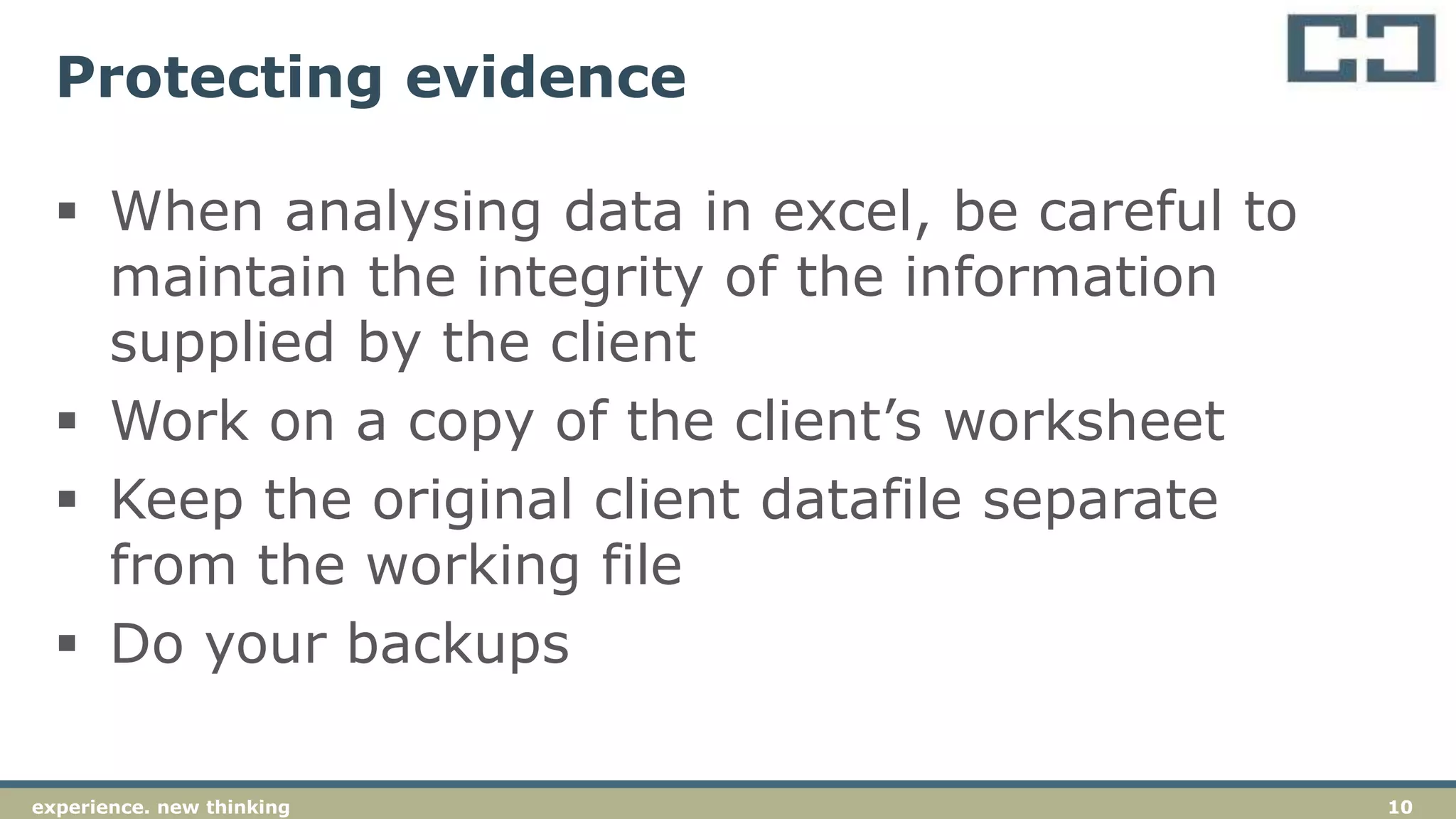
Protecting evidence
 When analysing data in excel, be careful to
maintain the integrity of the information
supplied by the client
 Work on a copy of the client’s worksheet
 Keep the original client datafile separate
from the working file
 Do your backups
11experience. new thinking
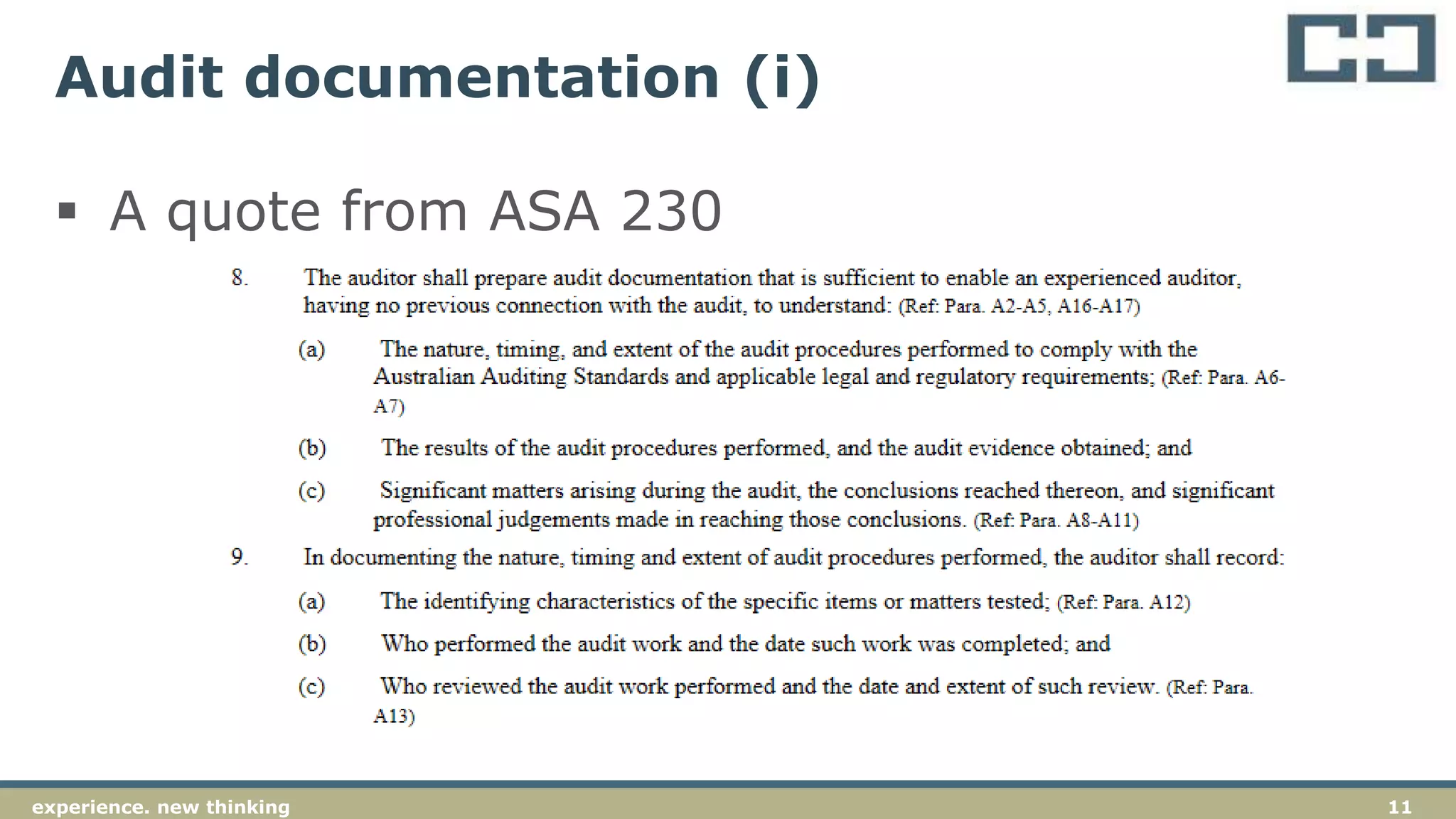
Audit documentation (i)
 A quote from ASA 230
12experience. new thinking
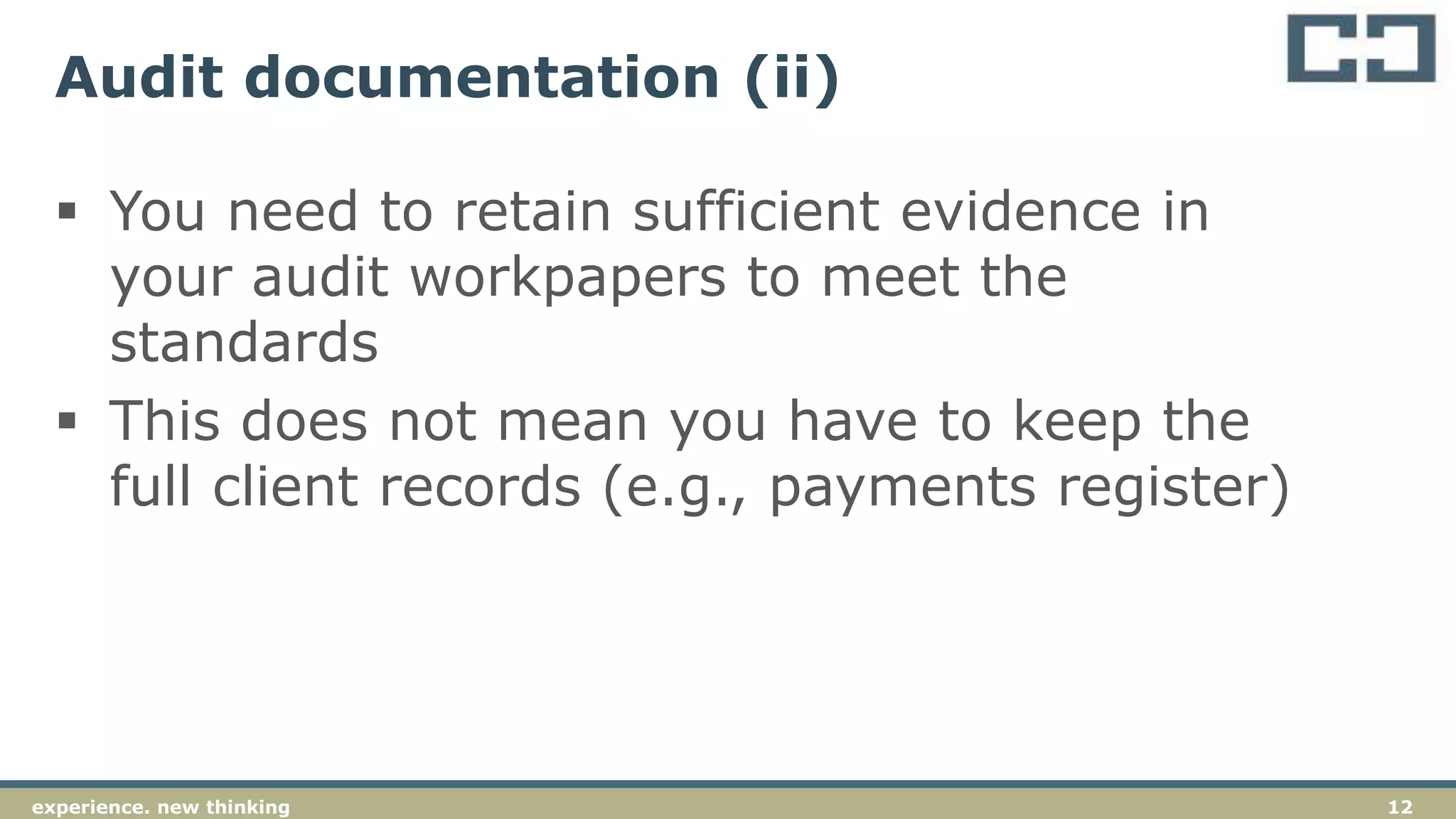
Audit documentation (ii)
 You need to retain sufficient evidence in
your audit workpapers to meet the
standards
 This does not mean you have to keep the
full client records (e.g., payments register)
13experience. new thinkingexperience. new thinking 13
Excel can be used for a large amount of basic
data analysis
Excel analysis
14experience. new thinking
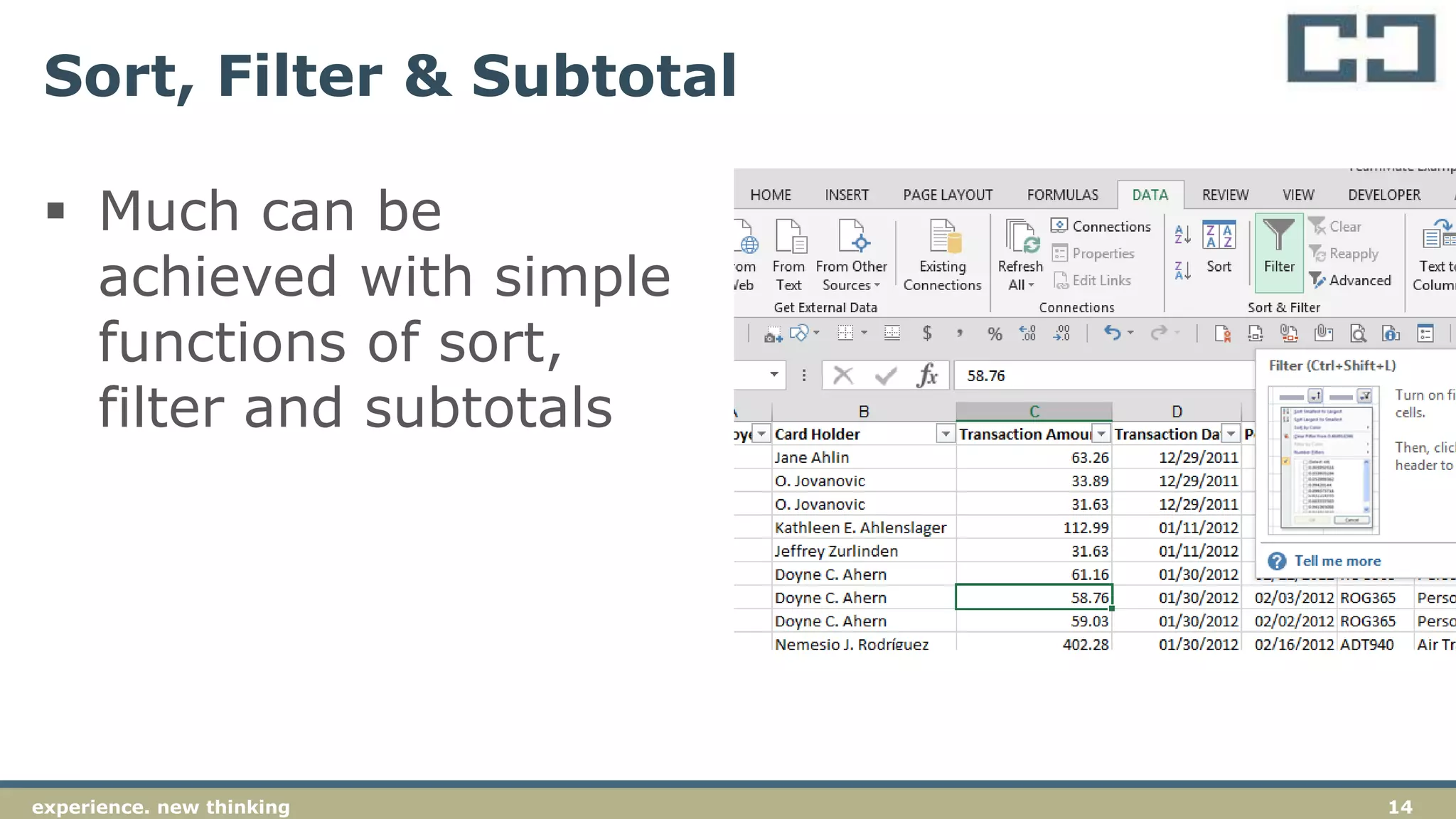
Sort, Filter & Subtotal
 Much can be
achieved with simple
functions of sort,
filter and subtotals
15experience. new thinking
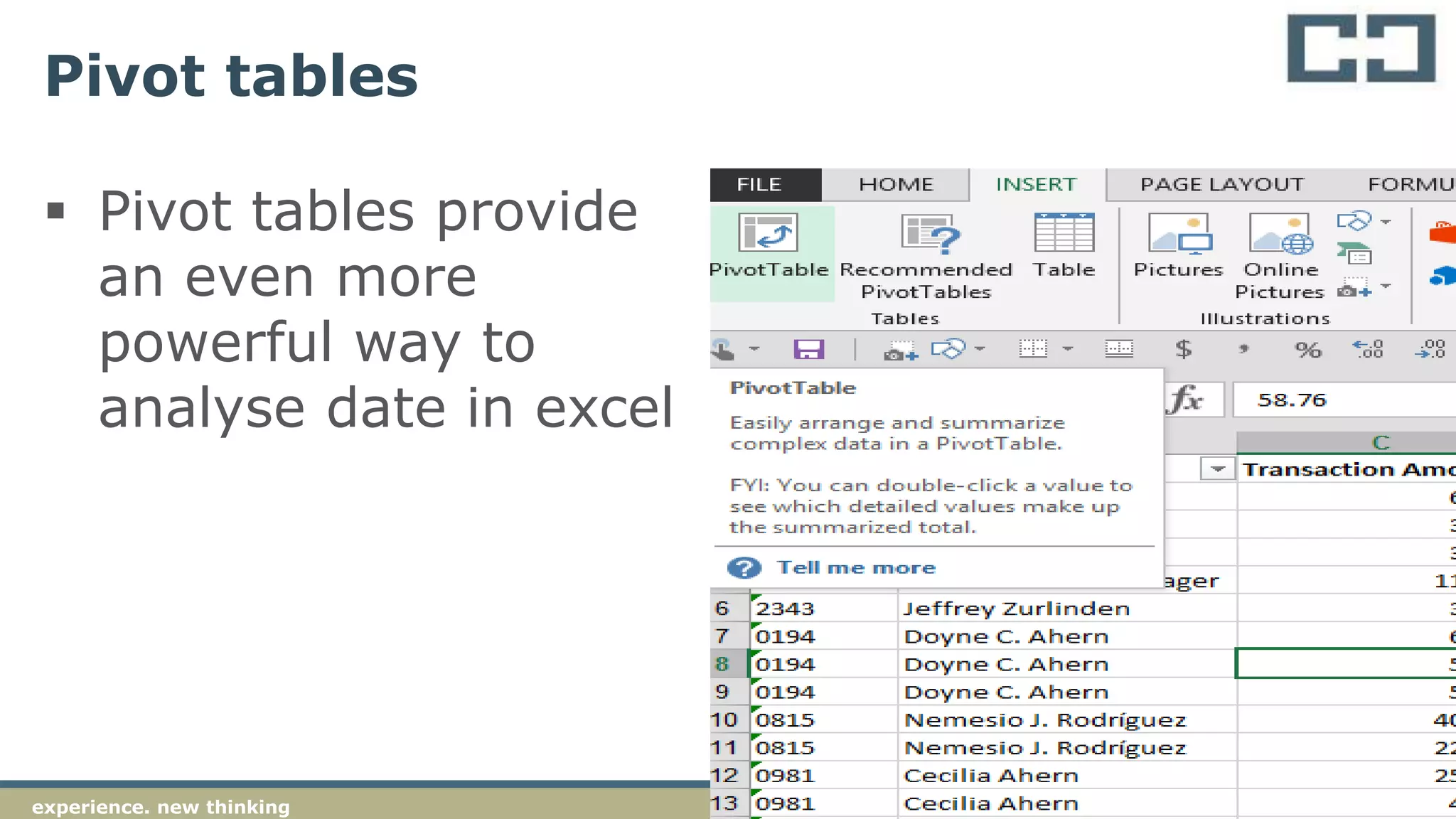
Pivot tables
 Pivot tables provide
an even more
powerful way to
analyse date in excel
16experience. new thinking
Vlookup – to join data tables
 Vlookup can be used to join data tables
 Key is to have a common data field (“key”)
that is in both tables
 Activity – vlookup on bank account
between payroll list and AP list
17experience. new thinking
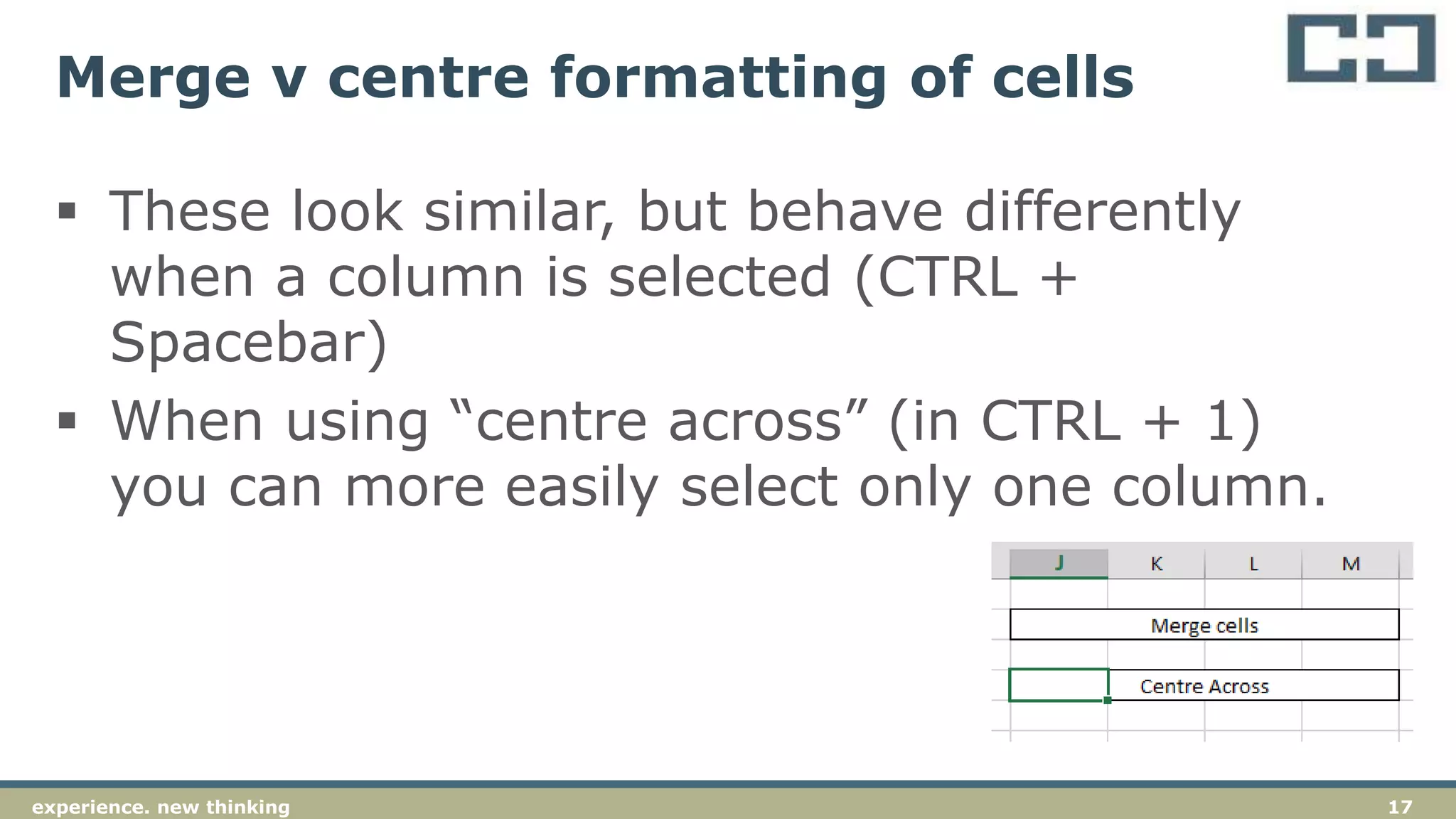
Merge v centre formatting of cells
 These look similar, but behave differently
when a column is selected (CTRL +
Spacebar)
 When using “centre across” (in CTRL + 1)
you can more easily select only one column.
18experience. new thinking
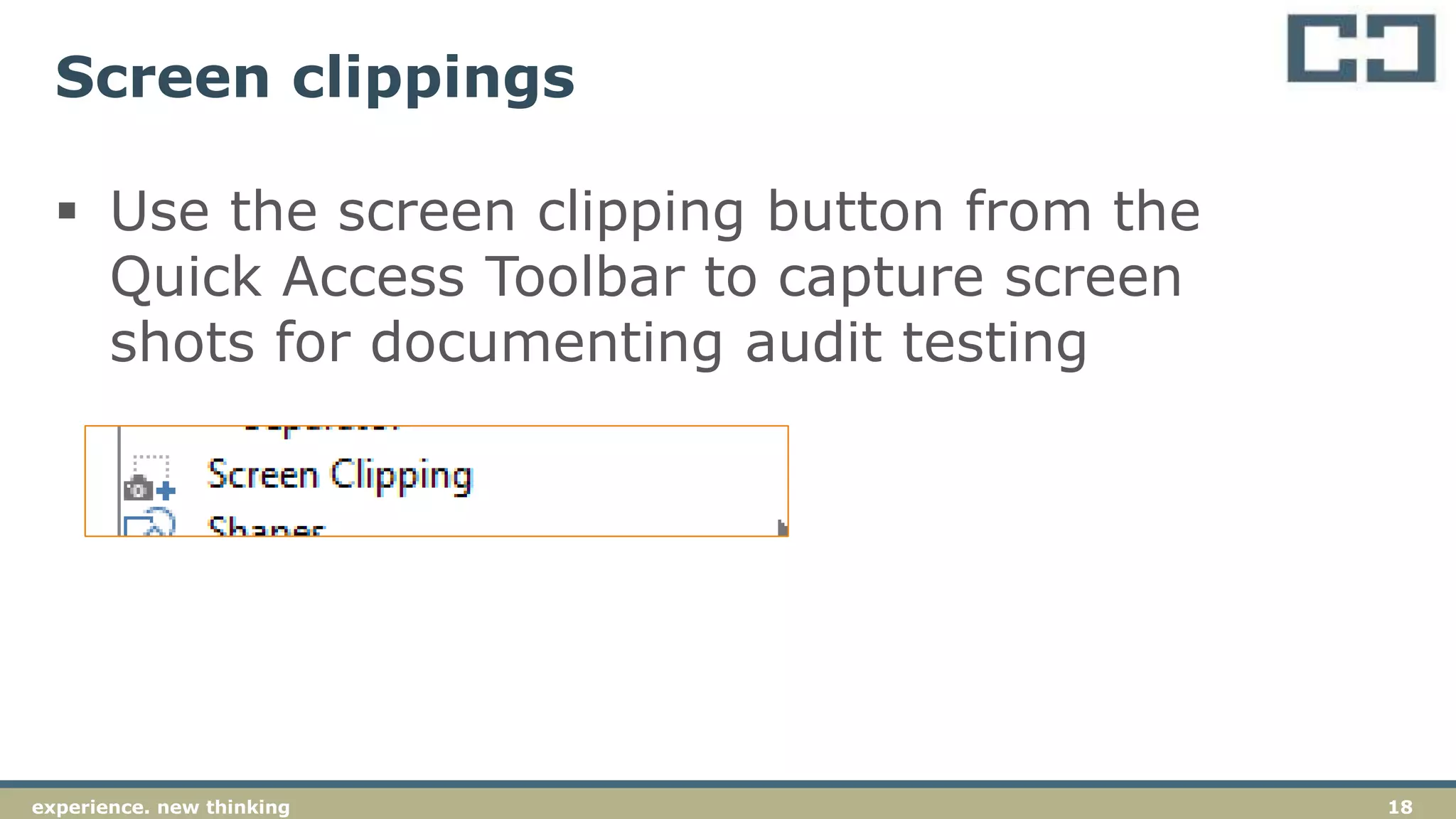
Screen clippings
 Use the screen clipping button from the
Quick Access Toolbar to capture screen
shots for documenting audit testing
19experience. new thinking
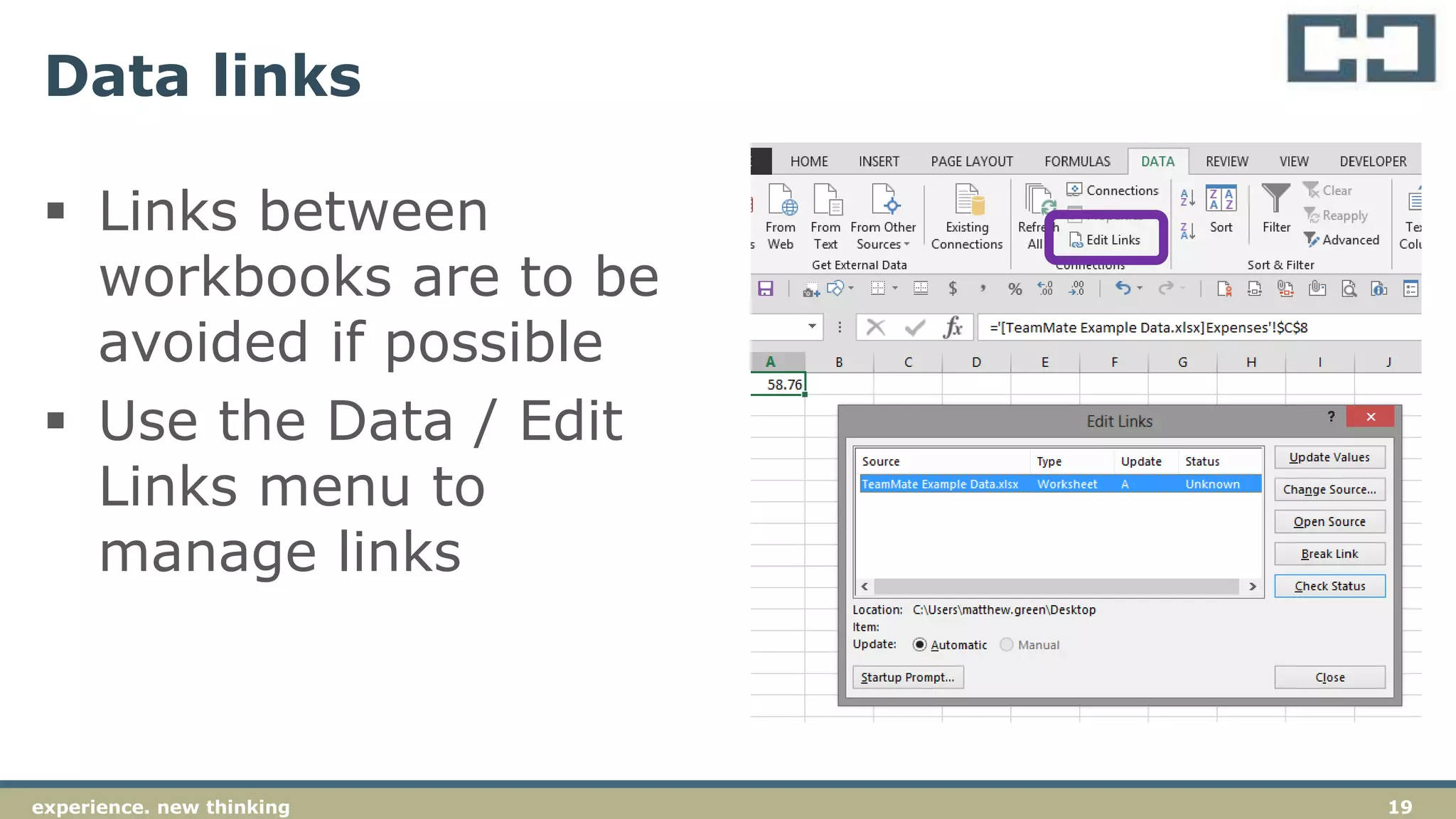
Data links
 Links between
workbooks are to be
avoided if possible
 Use the Data / Edit
Links menu to
manage links
20experience. new thinking
TB editing
 TB’s come in many formats, often with the
“-” or credit sign at the back of numbers.
 Activity– for TB(1) and TB(2), use the
functions to manipulate the data to
prepare a TB for importing to CaseWare
21experience. new thinking
TB editing - example
Steps to fix the TB
 Use TeamMate / ASAP-Utilities ? (see http://www.asap-utilities.com/)
 Sort the TB on the balance numbers
 In the next column over, copy the numbers into the new column,
leave the debit numbers alone
 For the credit numbers, include a formula “= - (main number)”
 On the main numbers, highlight the credit numbers and use CTRL + H
to access “find and replace”
 Find the minus sign (-) and replace with nothing
 For the new column of numbers (which should now add to zero), copy
the column and use paste values (ALT-H-V-V) paste the values into
the sheet
 Delete the column with the original numbers and import to CaseWare
TB module
22experience. new thinkingexperience. new thinking 22
TeamMate is the data analysis software that we
have selected for our auditors. This software
works as an add-in to Excel and should be used
as the basis for our data analysis during audit
assignments.
We have other tools available, which include
IDEA and Spreadsheet Detective.
TeamMate
23experience. new thinking
Append / join sheets
 Join sheets - Joins two sheets together, based
on a common matching column, e.g. common
bank test, inventory for NPV testing. (Activity)
 Append sheets - Joins multiple sheets that all
have the same column structure together. For
example, where you have separate reports for
each sales person, each warehouse, etc. that
you wish to combine into one report. (Activity)
24experience. new thinking
Manipulate fields
 An available tool inside TeamMate that can
be used for data manipulation
 Can be used for all sorts of different actions
and is well worth exploring
 Highlights :
 Normalize fields – tool to standardize fields
 Debit and credit columns – splits/ combines Dr and Cr columns
(example)
 Merge wrap and autofit – combines those functions from Excel into
one (example)
25experience. new thinking
Stratify
 Used to obtain information regarding the
characteristics of a data set
 Should be run on all files as a preliminary
activity with the objective of understanding
the nature of the population under
investigation
 Activity – stratify the expenses listing
26experience. new thinking
Extract (duplicates / gaps / sample)
 Can be used to extract relevant data from a population
(e.g., duplicates, gaps or samples)
 Gaps extraction - Identifies for gaps in a sequence of
numbers or partly numeric references, such as missing
invoices or journals.
 Duplicates extraction - Extracts duplicate records, based on
up to 3 fields you specify.
 Can be used to isolate specific transactions/records for
further investigation
 Activity – review the Payables for duplicates, extract gaps in
General journal listing
27experience. new thinking
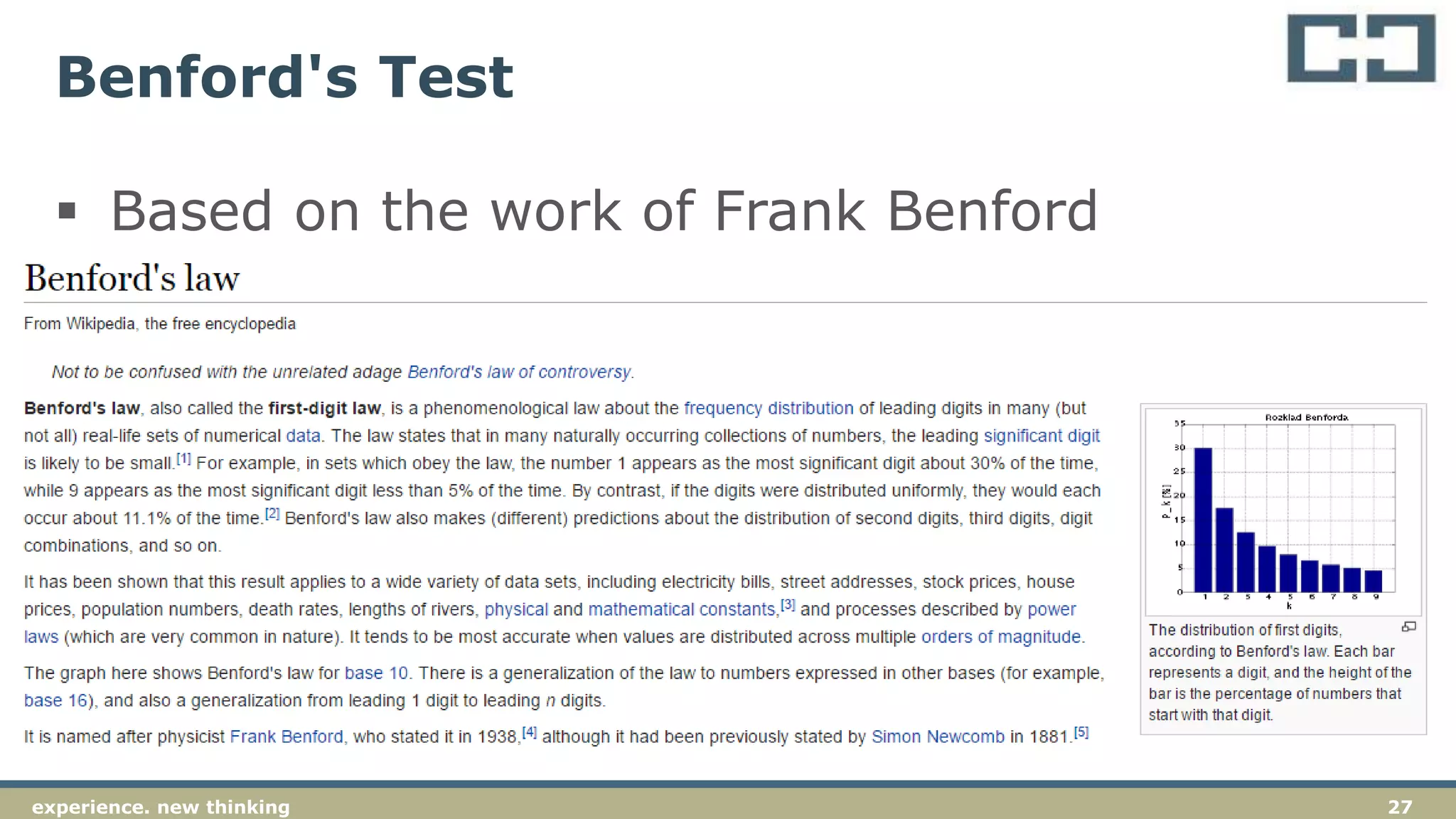
Benford's Test
 Based on the work of Frank Benford
28experience. new thinking
Benford's Test
 Benford’s test should be run on all data sets
to identify any anomalous transactions that
may warrant further investigation
 Activity – run Benford’s on the expenses
listing
29experience. new thinking
Outliers
 Used to extract records from a data set that
are at the edge of the normal distribution
 Can be used to extract records more than X
times the average or standard deviation
30experience. new thinking
Sampling
 Sampling is used to extract records for
further analysis as part of detailed
substantive testing
 Various types of sampling can be
undertaken (refer additional slides)
31experience. new thinking
Sampling - MUS
 Our preferred method for sample selection
is the use of a MUS (Monetary Unit
Sample).
 A MUS sample is preferred because of the
effectiveness of the audit testing that
results and the efficiency of the sample
selection (e.g., all ‘high value’ items will be
selected).
32experience. new thinking
Sampling MUS – activity
 Using materiality of $4,000 generate a
MUS sample for the expenditure file
33experience. new thinking
 Random sample - Extracts a number of randomly
sampled items from your population.
 Systematic sample - Extracts every ‘nth’ item from
the population.
 Stratified sample – Stratifies data and select a
random sample from each strata band
Other types of sampling
34experience. new thinking
 Activity on Revenue analytics
Year-on-year analytical review with
TeamMate
35experience. new thinking
If you want to explore more, visit video
demonstrations website:
http://www.topcaats.com/resources/demonst
rations/
36experience. new thinking
AUDIT EVIDENCE
Understanding the requirements of ASA 500
37experience. new thinking
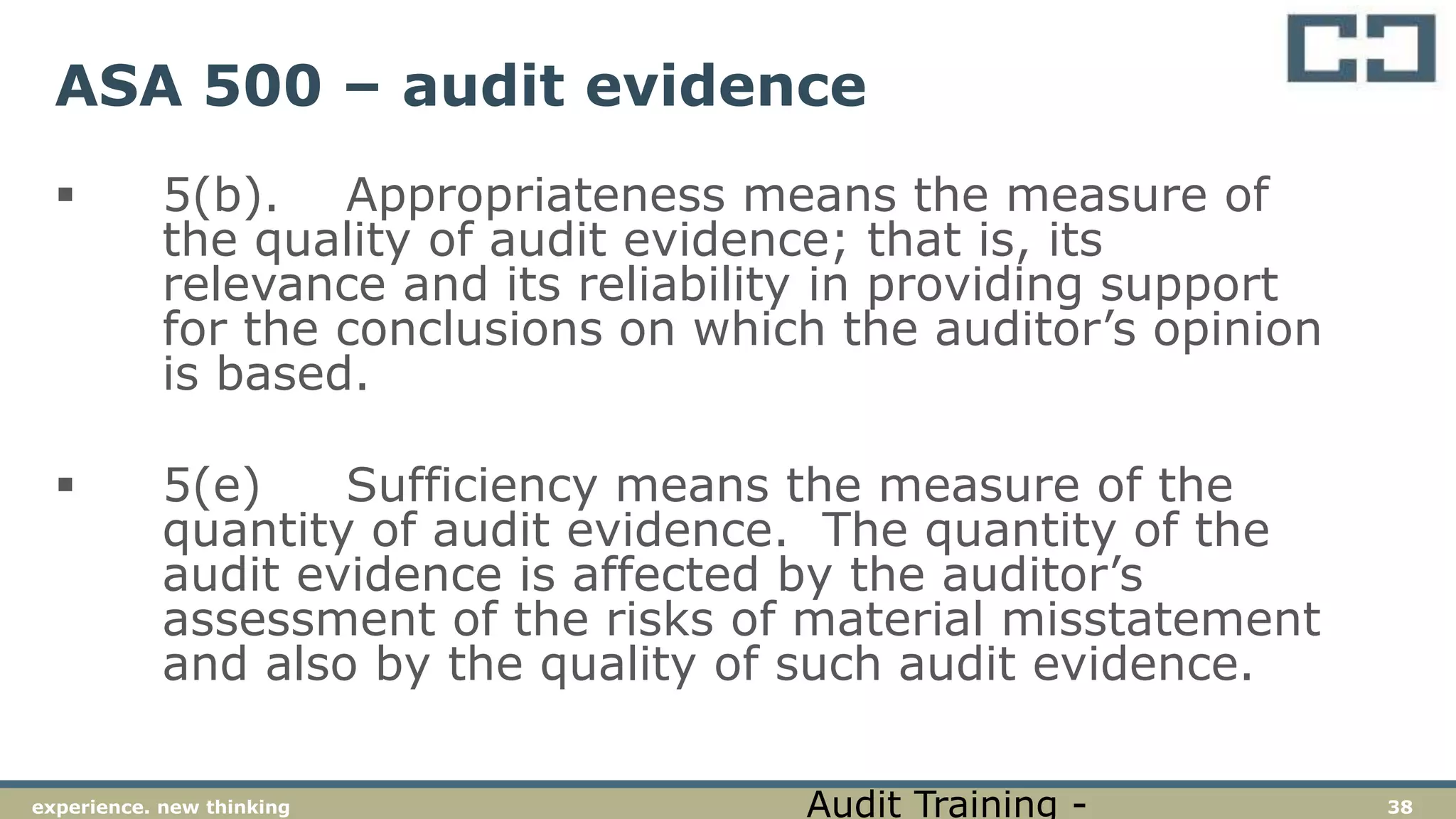
ASA 500 – audit evidence
 4. The objective of the auditor is to design
and perform audit procedures in such a way
as to enable the auditor to obtain sufficient
appropriate audit evidence to be able to
draw reasonable conclusions on which to
base the auditor’s opinion.
Audit Training -
38experience. new thinking
ASA 500 – audit evidence
 5(b). Appropriateness means the measure of
the quality of audit evidence; that is, its
relevance and its reliability in providing support
for the conclusions on which the auditor’s opinion
is based.
 5(e) Sufficiency means the measure of the
quantity of audit evidence. The quantity of the
audit evidence is affected by the auditor’s
assessment of the risks of material misstatement
and also by the quality of such audit evidence.
Audit Training -
39experience. new thinking
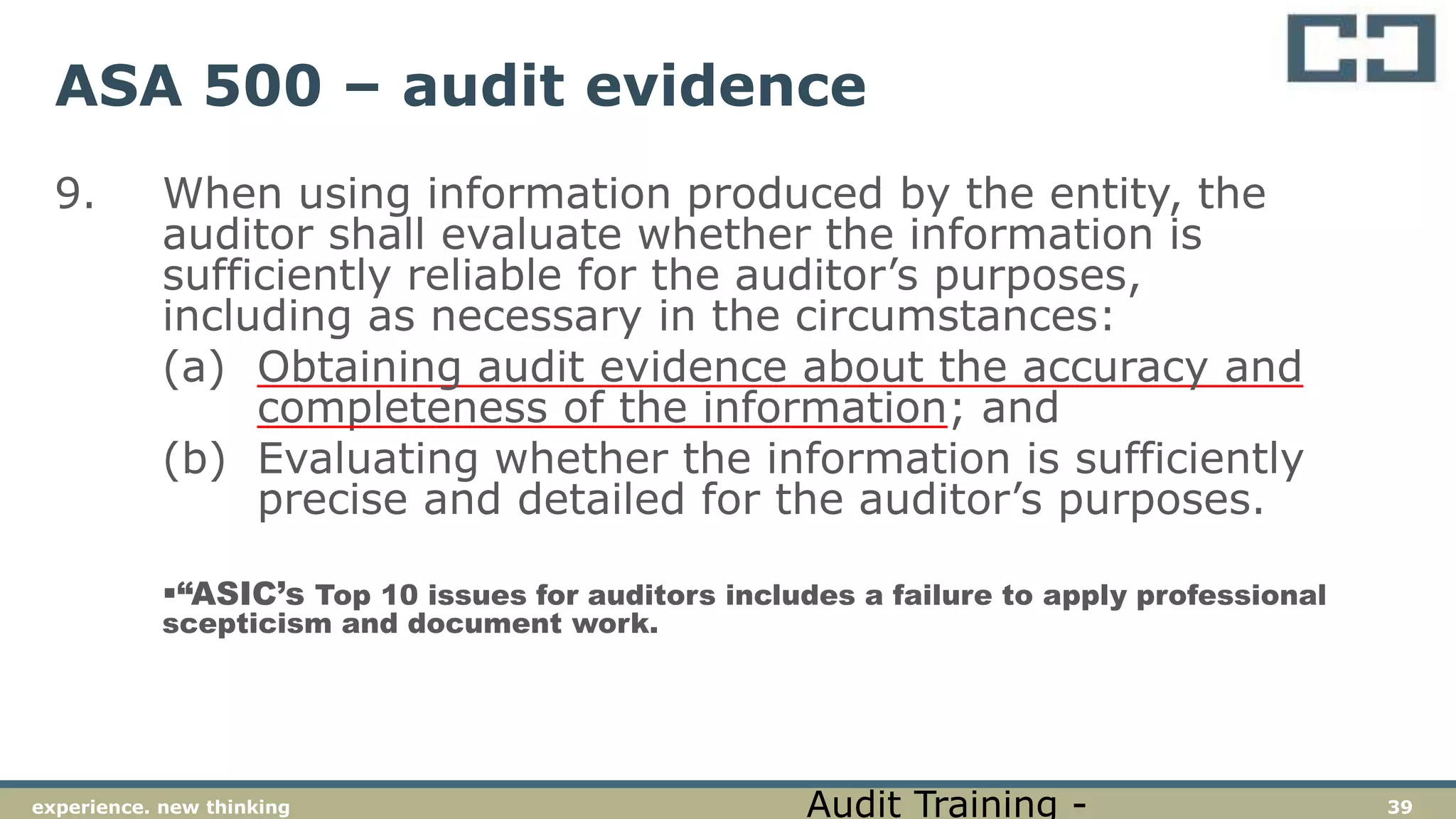
ASA 500 – audit evidence
9. When using information produced by the entity, the
auditor shall evaluate whether the information is
sufficiently reliable for the auditor’s purposes,
including as necessary in the circumstances:
(a) Obtaining audit evidence about the accuracy and
completeness of the information; and
(b) Evaluating whether the information is sufficiently
precise and detailed for the auditor’s purposes.
“ASIC’s Top 10 issues for auditors includes a failure to apply professional
scepticism and document work.
Audit Training -
40experience. new thinking
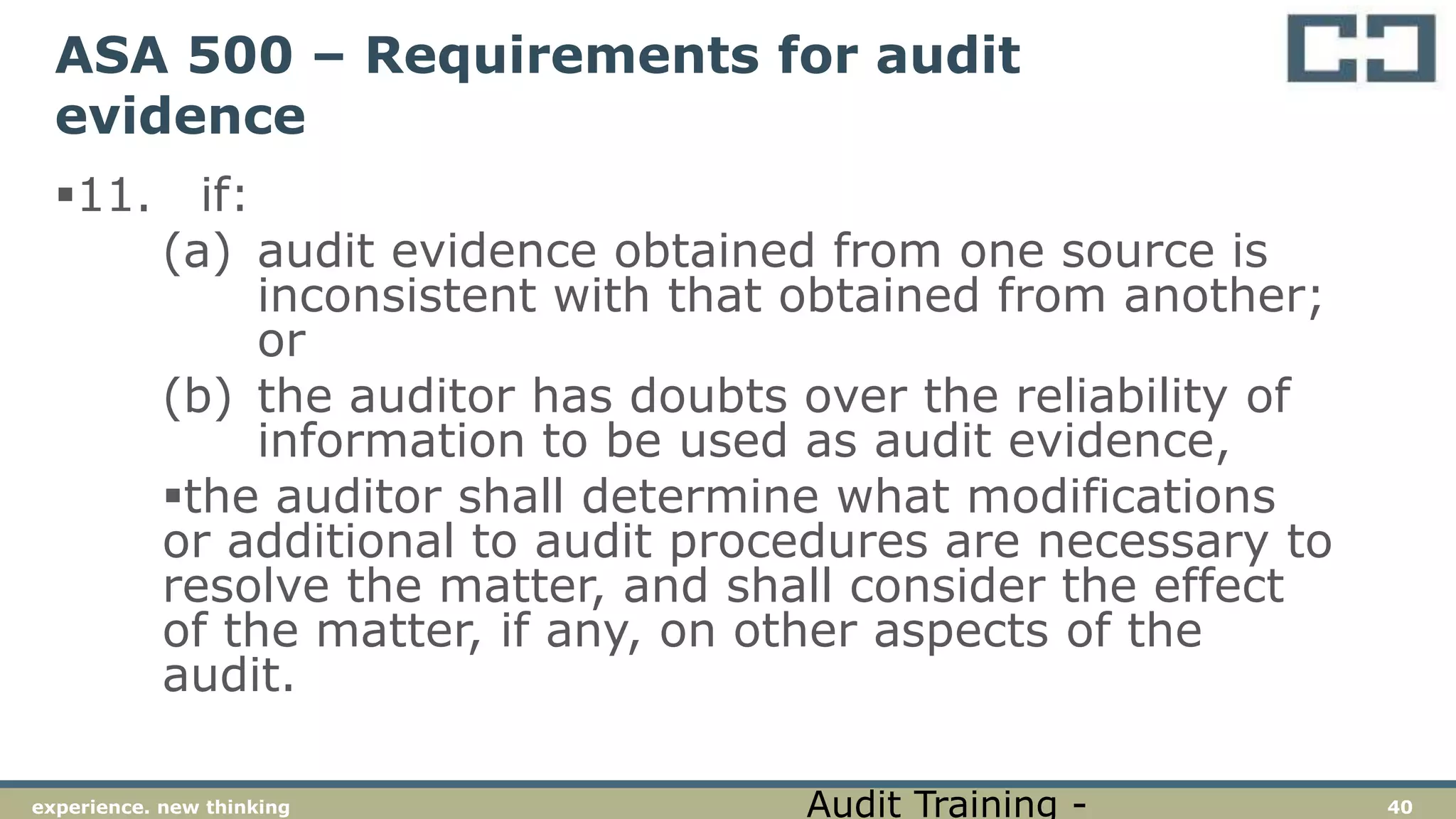
ASA 500 – Requirements for audit
evidence
11. if:
(a) audit evidence obtained from one source is
inconsistent with that obtained from another;
or
(b) the auditor has doubts over the reliability of
information to be used as audit evidence,
the auditor shall determine what modifications
or additional to audit procedures are necessary to
resolve the matter, and shall consider the effect
of the matter, if any, on other aspects of the
audit.
Audit Training -
41experience. new thinking
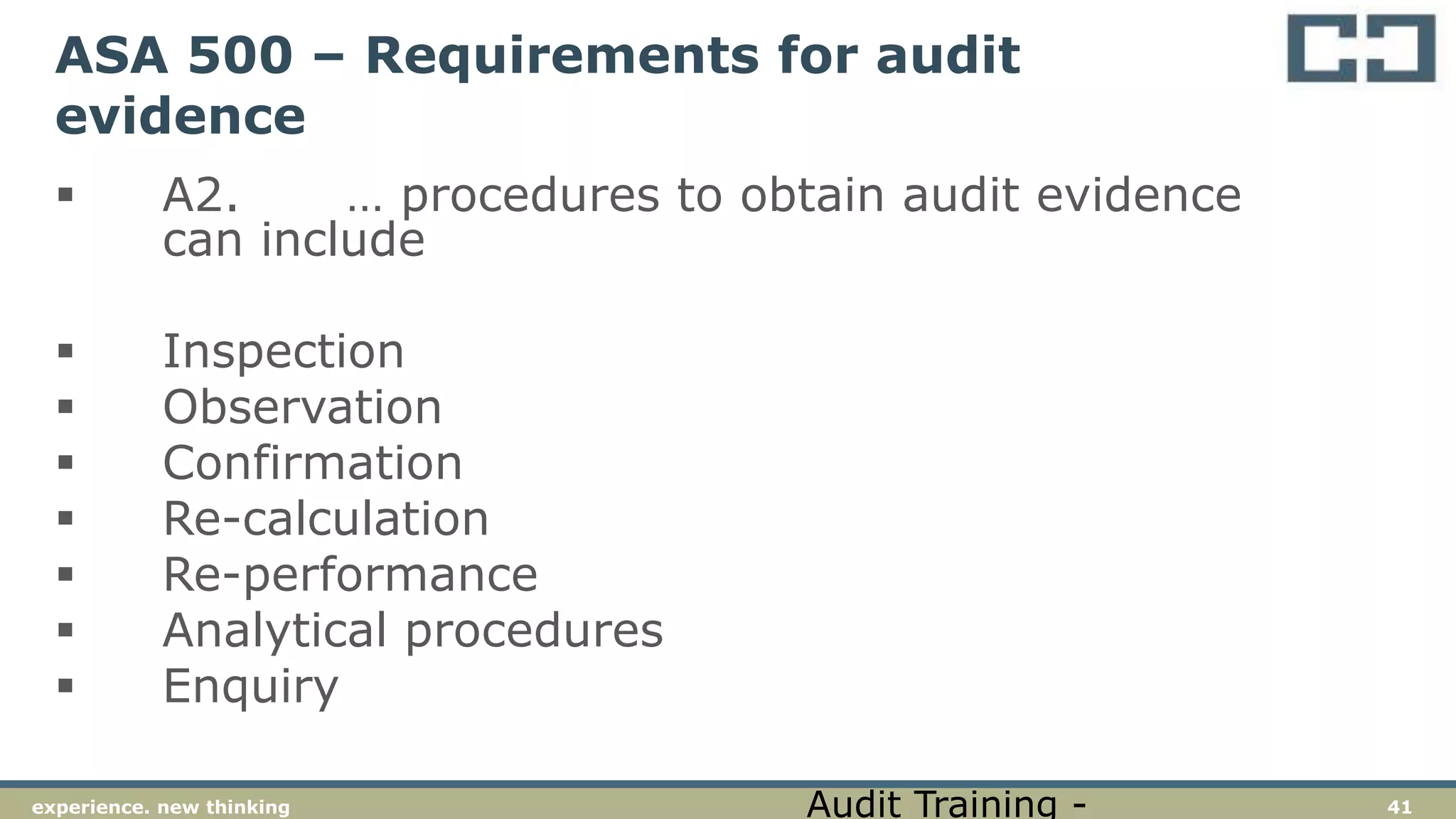
ASA 500 – Requirements for audit
evidence
 A2. … procedures to obtain audit evidence
can include
 Inspection
 Observation
 Confirmation
 Re-calculation
 Re-performance
 Analytical procedures
 Enquiry
Audit Training -
42experience. new thinking
ASA 500 – Requirements for audit
evidence
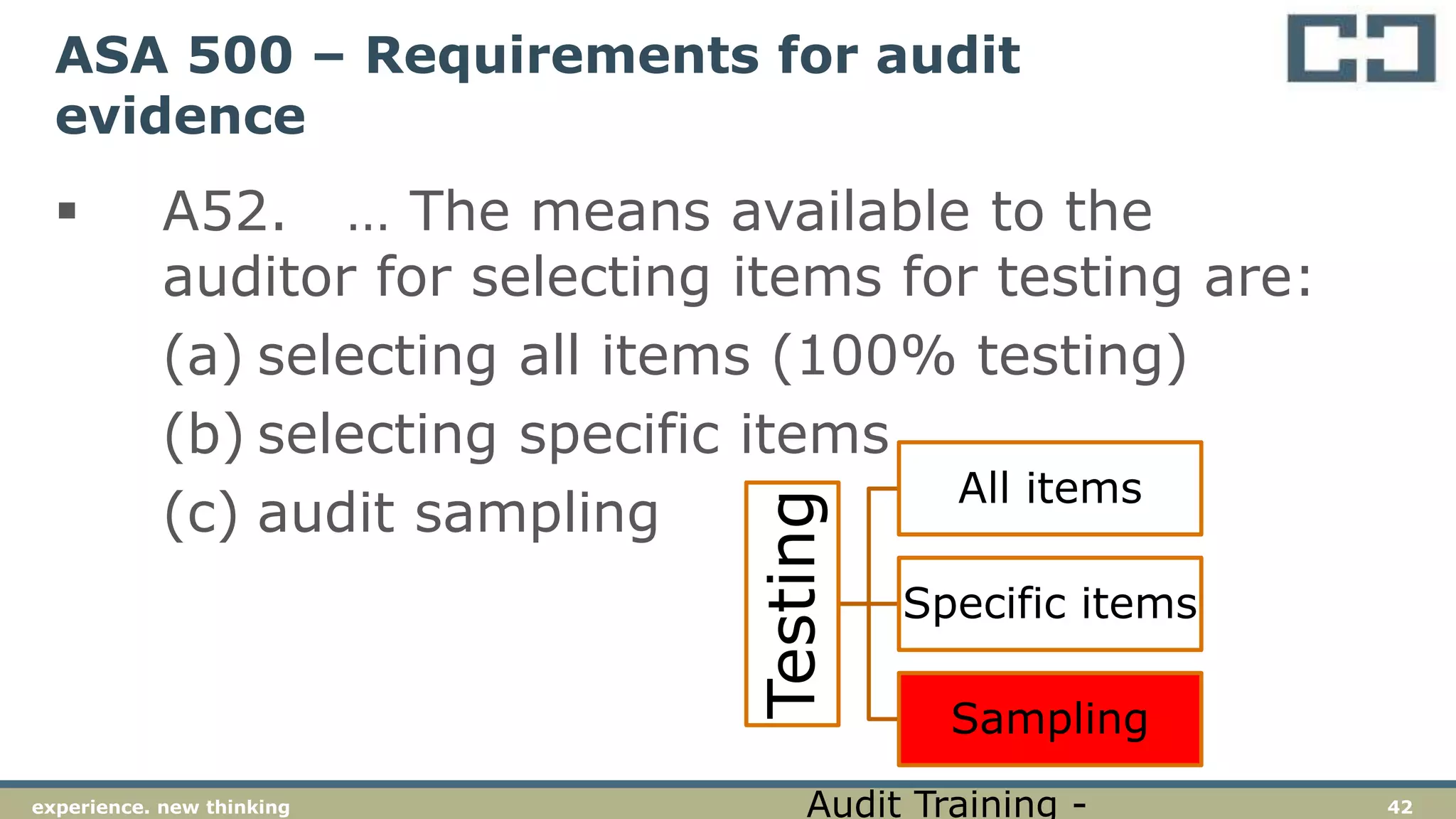
 A52. … The means available to the
auditor for selecting items for testing are:
(a) selecting all items (100% testing)
(b) selecting specific items
(c) audit sampling
Testing
All items
Specific items
Sampling
Audit Training -
43experience. new thinking
AUDIT SAMPLING
Understanding the requirements of ASA 530
44experience. new thinking
ASA 530 – Requirements for audit
sampling
 5(a). Audit sampling means the application of
audit procedures to less than 100% of items
within a population of audit relevance such that
all sampling units have a chance of selection in
order to provide the auditor with a reasonable
basis on which to draw conclusions about the
entire population.
 5(b) Population means the entire set of data
from which a sample is selected and about which
the auditor wishes to draw conclusions.
Audit Training -
45experience. new thinking
ASA 530 – Requirements for audit
sampling
 5(c). Sampling risk means the risk that the
auditor’s conclusions based on a sample may
be different from the conclusion if the entire
population were subjected to the same audit
procedure.
 5(d) Non-sampling risk means the risk that
the auditor reaches an erroneous conclusion
for any reason not related to sampling risk.
Audit Training -
46experience. new thinking
ASA 530 – Requirements for audit
sampling
 5(e). Anomaly means a misstatement or
deviation that is demonstrably not
representative of misstatements or
deviations in a population.

Audit Training -
47experience. new thinking
ASA 530 – Requirements for audit
sampling
 5(g). Statistical sampling means an
approach to sampling that has the following
characteristics:
(i)Random selection of sample items; and
(ii)The use of probability theory to evaluate
sample results, including measurement of
sampling risks.
A sampling approach that does not have
characteristics (i) and (ii) is considered non-
statistical sampling.
Audit Training -
48experience. new thinking
ASA 530 – Requirements for audit
sampling
 5(i). Tolerable misstatement means a
monetary amount set by the auditor in respect of
which the auditor seeks to obtain an appropriate
level of assurance that the monetary amount set
by the auditor is not exceeded by the actual
misstatement in the population.
“Typically this would be the amount
determined as materiality, specifically the
performance materiality, or a lower amount.
Audit Training -
49experience. new thinking
ASA 530 – Requirements for audit
sampling
12. The auditor shall investigate the nature and cause of any deviations or
misstatements identified, and evaluate their possible effect on the purpose of the
audit procedure and on other areas of the audit
13. In the extremely rare circumstances when the auditor considers a misstatement or
deviation discovered in a sample to be an anomaly, the auditor shall obtain a high
degree of certainty that such misstatement or deviation is not representative of the
population. The auditor shall obtain this degree of certainty by performing
additional audit procedures to obtain sufficient appropriate evidence that the
misstatement or deviation does not affect the remainder of the population.
Audit Training -
50experience. new thinking
Sample selection methods (ASA 530.App
4)
(a) Random selection (applied through random number generators or random number
tables)
Audit Training -
51experience. new thinking
Sample selection methods (ASA 530.App
4)
 (b) Systematic selection, in which the number of sampling units in the
population is divided by the sample size to give a sampling interval, for example 50,
and having determined a starting point within the first 50, each 50th sampling unit
thereafter is selected. Although the starting point may be determined haphazardly,
the sample is more likely to be truly random if it is determined by use of a
computerised random number generator or random number tables. When using
systematic selection, the auditor would need to determine that sampling units within
the population are not structured in such a way that the sampling interval
corresponds with a particular pattern in the population.
Audit Training -
52experience. new thinking
Sample selection methods (ASA 530.App
4)
(c) Monetary Unit Sampling is a type of value-weighted selection (as described in
Appendix 1) in which sample size, selection and evaluation results in a conclusion in
monetary amounts.
 “Also known as Dollar Unit Sampling (DUS) or Constant Monetary
Amount (CMA) sampling.
Audit Training -
53experience. new thinking
Sample selection methods (ASA 530.App
4)
 (d) Haphazard selection, in which the auditor selects the sample without
following a structured technique. Although no structured technique is used, the
auditor would nonetheless avoid any conscious bias or predictability (for example,
avoiding difficult to locate items, or always choosing or avoiding the first or last
entries on a page) and thus attempt to ensure that all items in the population have a
chance of selection. Haphazard selection is not appropriate when using statistical
sampling.
Audit Training -
54experience. new thinking
Sample selection methods (ASA 530.App
4)
 (e) Block selection involves selection of a block(s) of contiguous items
from within the population. Block selection cannot ordinarily be used in audit
sampling because most populations are structured such that items in a sequence can
be expected to have similar characteristics to each other, but different characteristics
from items elsewhere in the population. Although in some circumstances it may be
an appropriate audit procedure to examine a block of items, it would rarely be an
appropriate sample selection technique when the auditor intends to draw valid
inferences about the entire population based on the sample.
Audit Training -
55experience. new thinking
DETERMINING A SAMPLE SIZE
Using the ICAA Audit Manual
56experience. new thinking
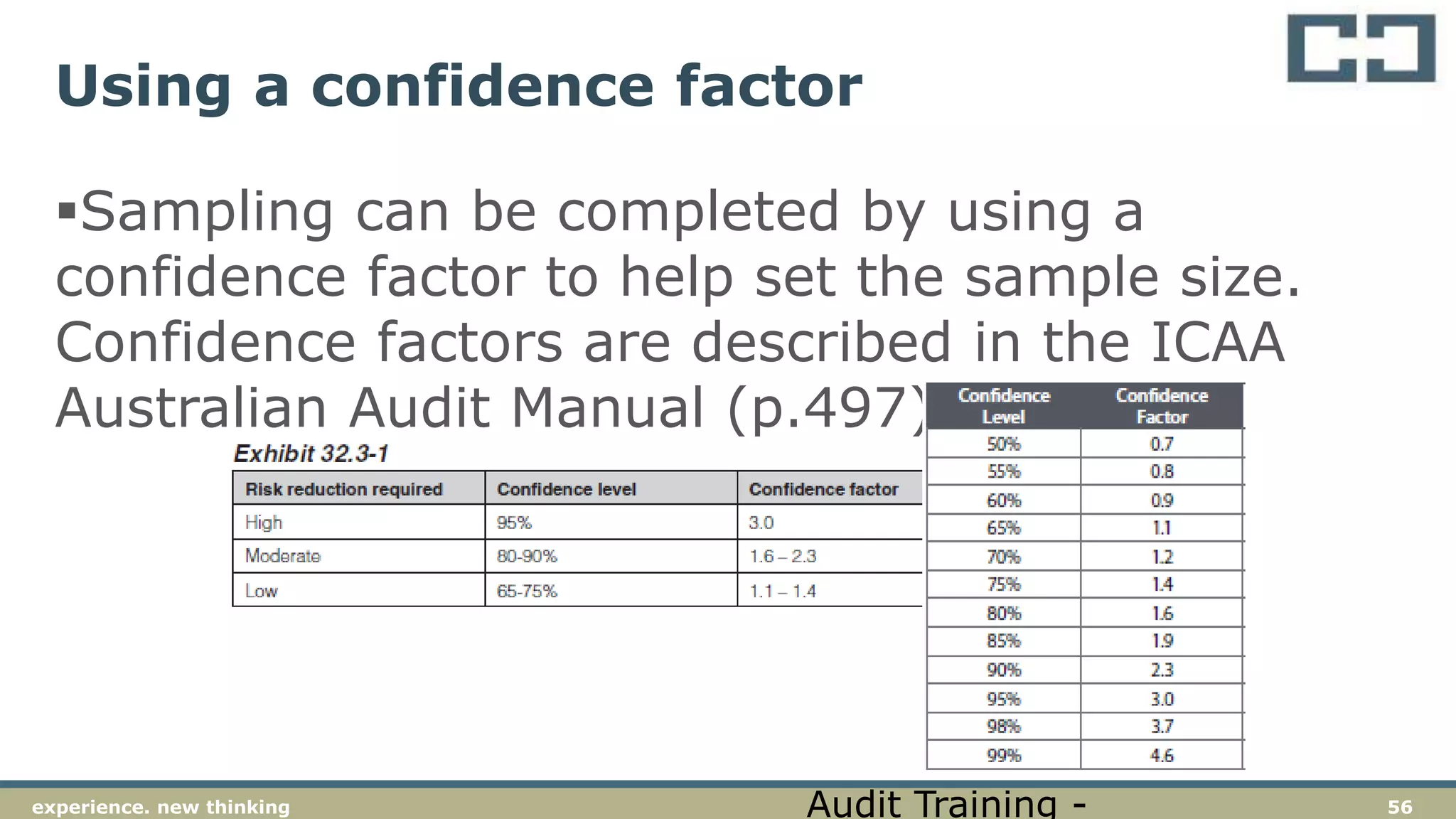
Using a confidence factor
Sampling can be completed by using a
confidence factor to help set the sample size.
Confidence factors are described in the ICAA
Australian Audit Manual (p.497)
Audit Training -
57experience. new thinking
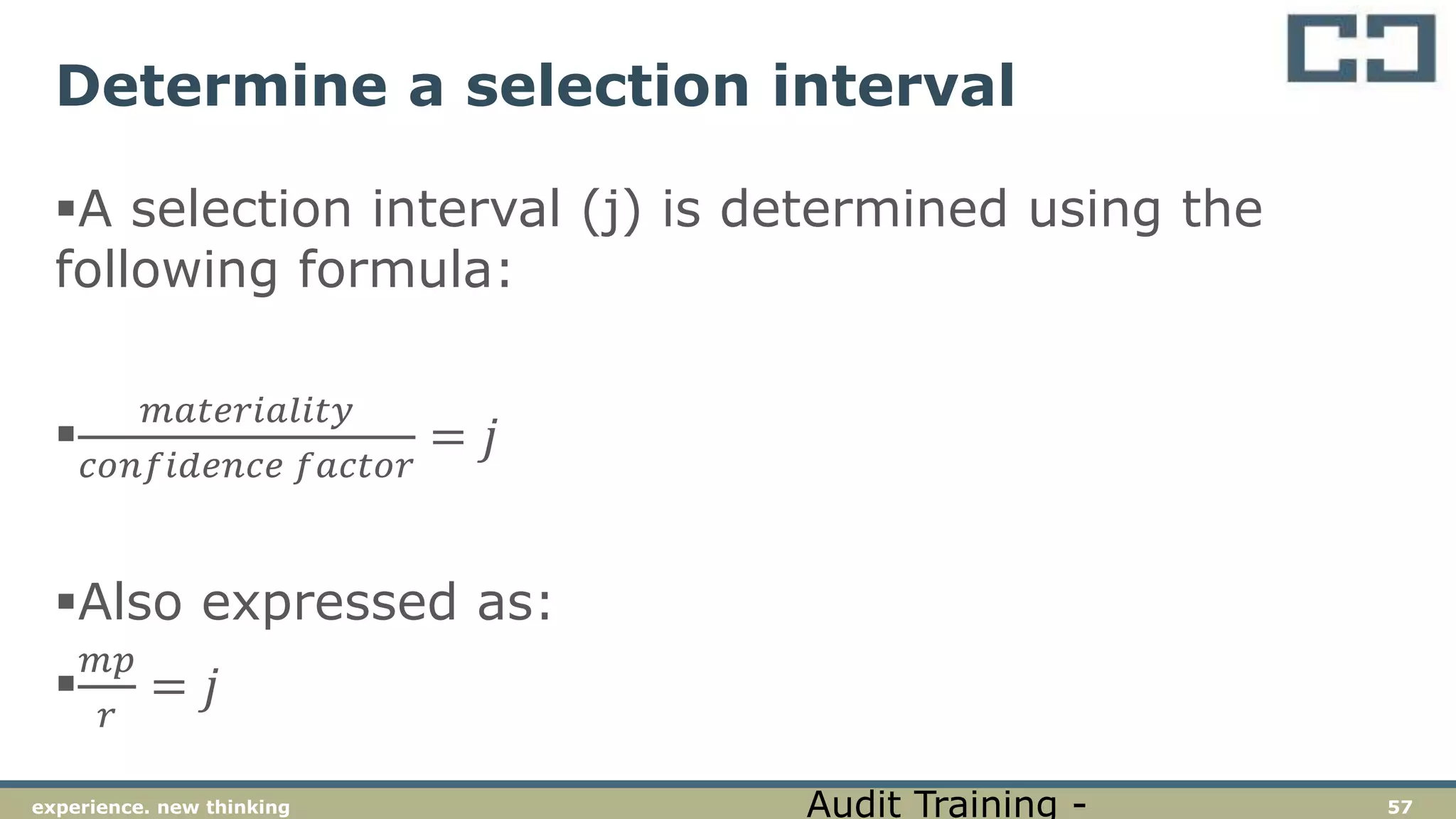
Determine a selection interval
A selection interval (j) is determined using the
following formula:

𝑚𝑎𝑡𝑒𝑟𝑖𝑎𝑙𝑖𝑡𝑦
𝑐𝑜𝑛𝑓𝑖𝑑𝑒𝑛𝑐𝑒 𝑓𝑎𝑐𝑡𝑜𝑟
= 𝑗
Also expressed as:

𝑚𝑝
𝑟
= 𝑗
Audit Training -
58experience. new thinking
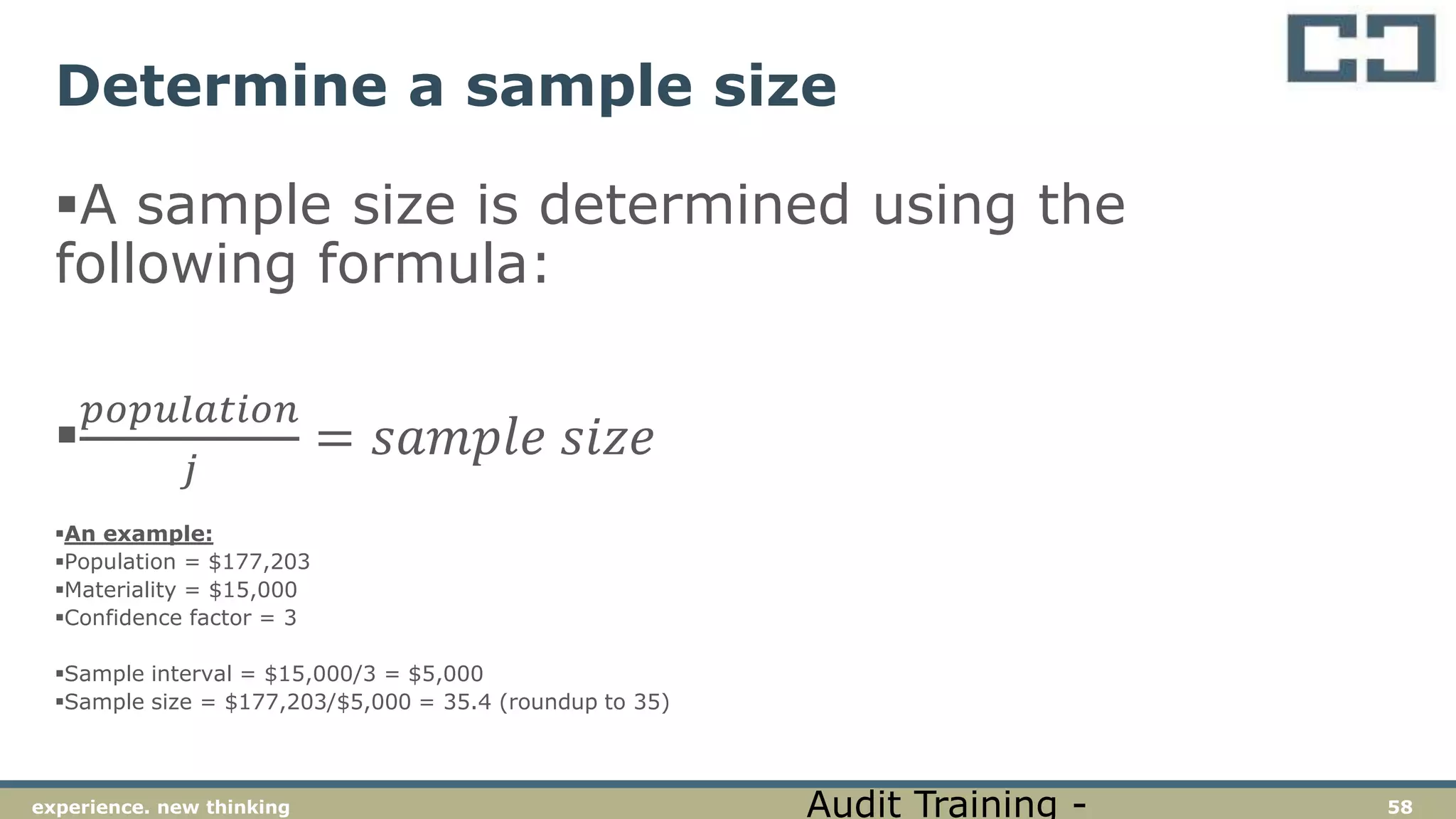
Determine a sample size
A sample size is determined using the
following formula:

𝑝𝑜𝑝𝑢𝑙𝑎𝑡𝑖𝑜𝑛
𝑗
= 𝑠𝑎𝑚𝑝𝑙𝑒 𝑠𝑖𝑧𝑒
An example:
Population = $177,203
Materiality = $15,000
Confidence factor = 3
Sample interval = $15,000/3 = $5,000
Sample size = $177,203/$5,000 = 35.4 (roundup to 35)
Audit Training -
59experience. new thinking
Determine a sample size
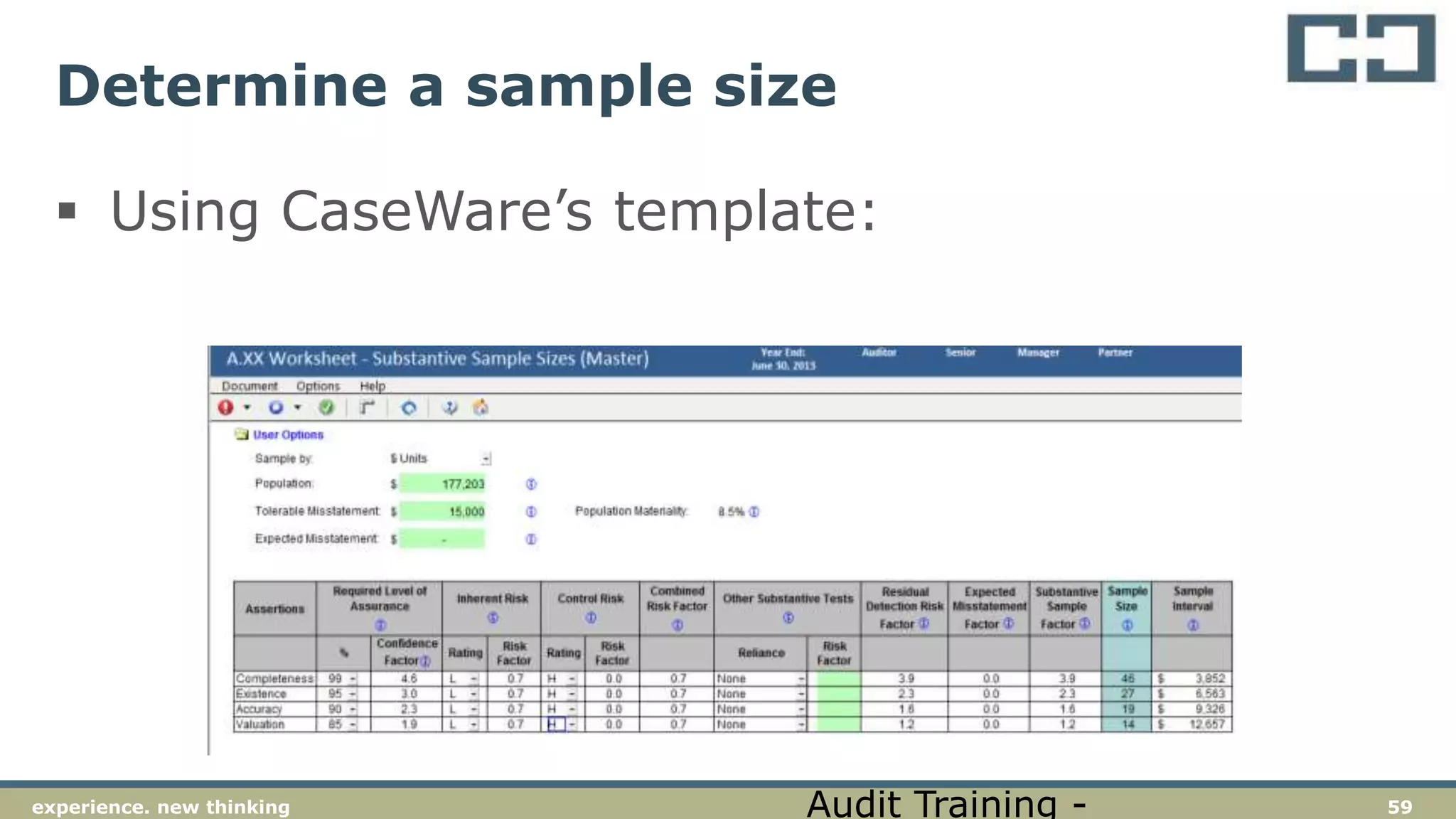
 Using CaseWare’s template:
Audit Training -
60experience. new thinking
Determine a sample size
Audit Training -
61experience. new thinking
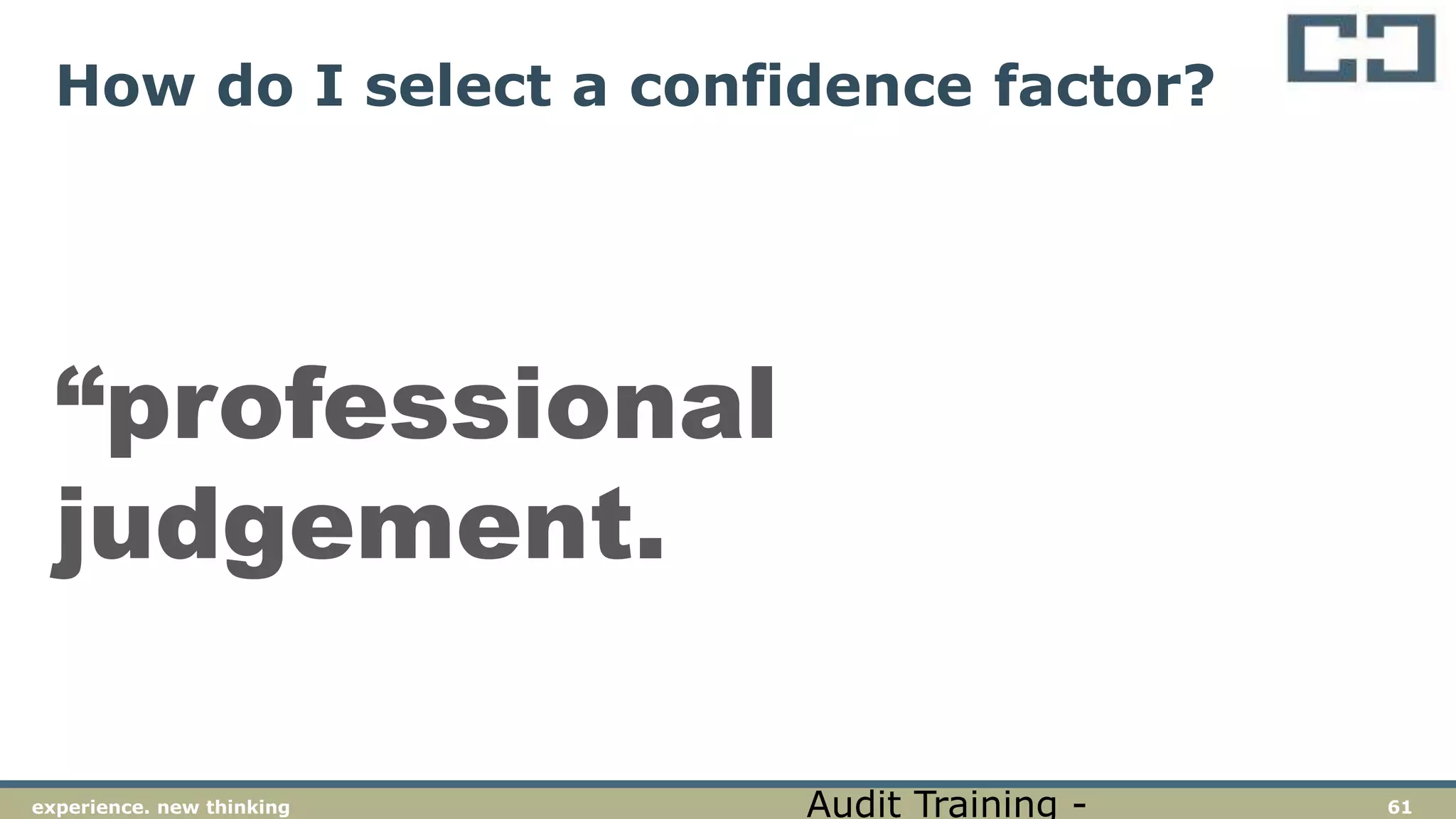
How do I select a confidence factor?
“professional
judgement.
Audit Training -
62experience. new thinking
Presenter details
Source: LinkedIn
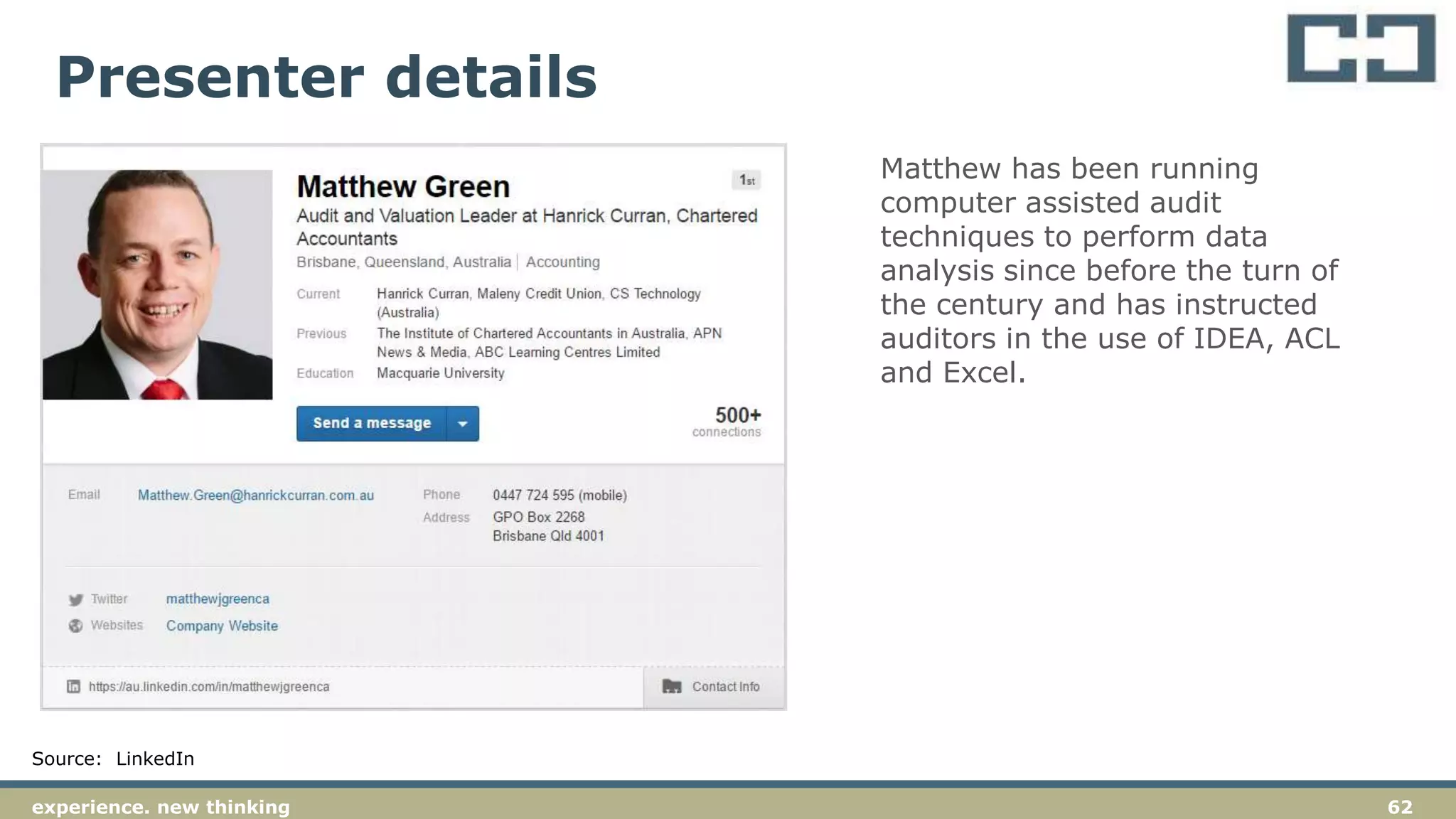
Matthew has been running
computer assisted audit
techniques to perform data
analysis since before the turn of
the century and has instructed
auditors in the use of IDEA, ACL
and Excel.
63experience. new thinking
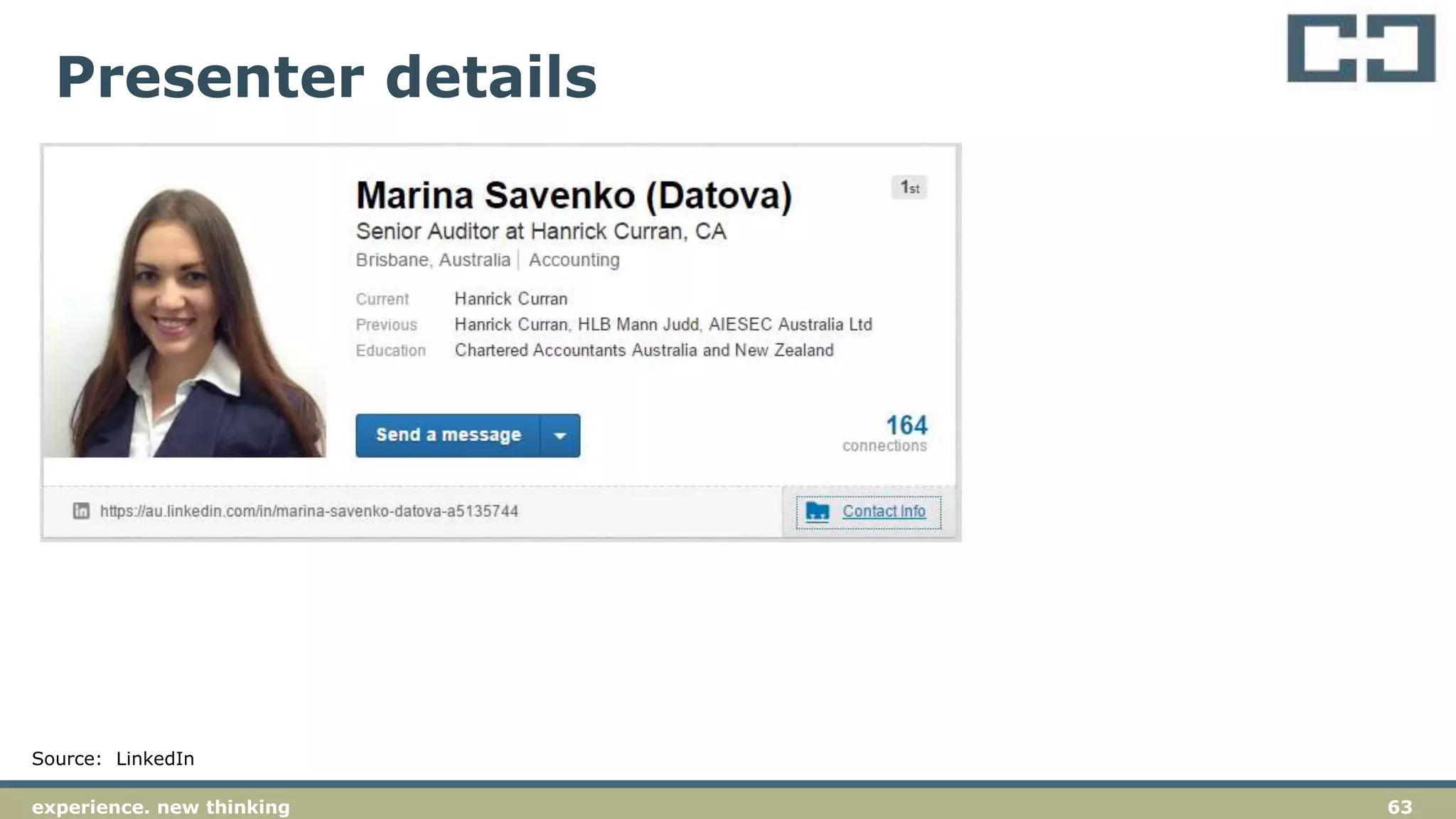
Presenter details
Source: LinkedIn
Thank you
www.hanrickcurran.com.au
Hanrick Curran
t. (07) 3218 3900
f. (07) 3218 3901
e. enquiries@hanrickcurran.com.au
Level 11
307 Queen Street
Brisbane Qld 4000
GPO Box 2268
Brisbane Qld 4001

Data Analysis for Audit Training (2016.06)

  • 1.
  • 2.
    2experience. new thinking Whatcan you learn …  Basic data analysis requirements  Using Excel™  Using TeamMate™  Audit implications
  • 3.
    4experience. new thinkingexperience.new thinking 4 An understanding of the basics of performing data analysis and computer assisted audit techniques (“CAATs”) is a core part of any auditors toolkit. Basics
  • 4.
    5experience. new thinking Terminology Workbook – an excel file with multiple sheets  Worksheet – an individual sheet in an excel file  Row (record) – a row of data on a worksheet  Column (field) – a column of data on a worksheet  Table – a part of a worksheet containing data  Array –  Control totals – details of the file to be imported that provide certainty that all data has been received / imported
  • 5.
    6experience. new thinking Auditbenefits  Data analysis adds to the evidence that we obtain during our audit procedures by enabling us to look at data for the entire population.  This analysis provides additional evidence regarding our audit that is supplemental to our detailed substantive testing.  Data analysis may provide anywhere from minimal to persuasive evidence for the purpose of “Other Substantive Tests”. Of course, this assessment remains a matter of professional judgement.
  • 6.
  • 7.
    8experience. new thinking Gettingdata from the client  Plan your request to the client  Set out your needs clearly (email / letter)  Allow plenty of time  Include a diary reminder
  • 8.
    9experience. new thinking Controltotals  When requesting data from clients, have them confirm control totals  Control totals are usually details such as the number of rows / records and the value of a control field (e.g., total payments)  Use the control total to confirm that all records have been correctly imported and that the value of transactions imported agrees with the information provided by the client
  • 9.
    10experience. new thinking Protectingevidence  When analysing data in excel, be careful to maintain the integrity of the information supplied by the client  Work on a copy of the client’s worksheet  Keep the original client datafile separate from the working file  Do your backups
  • 10.
    11experience. new thinking Auditdocumentation (i)  A quote from ASA 230
  • 11.
    12experience. new thinking Auditdocumentation (ii)  You need to retain sufficient evidence in your audit workpapers to meet the standards  This does not mean you have to keep the full client records (e.g., payments register)
  • 12.
    13experience. new thinkingexperience.new thinking 13 Excel can be used for a large amount of basic data analysis Excel analysis
  • 13.
    14experience. new thinking Sort,Filter & Subtotal  Much can be achieved with simple functions of sort, filter and subtotals
  • 14.
    15experience. new thinking Pivottables  Pivot tables provide an even more powerful way to analyse date in excel
  • 15.
    16experience. new thinking Vlookup– to join data tables  Vlookup can be used to join data tables  Key is to have a common data field (“key”) that is in both tables  Activity – vlookup on bank account between payroll list and AP list
  • 16.
    17experience. new thinking Mergev centre formatting of cells  These look similar, but behave differently when a column is selected (CTRL + Spacebar)  When using “centre across” (in CTRL + 1) you can more easily select only one column.
  • 17.
    18experience. new thinking Screenclippings  Use the screen clipping button from the Quick Access Toolbar to capture screen shots for documenting audit testing
  • 18.
    19experience. new thinking Datalinks  Links between workbooks are to be avoided if possible  Use the Data / Edit Links menu to manage links
  • 19.
    20experience. new thinking TBediting  TB’s come in many formats, often with the “-” or credit sign at the back of numbers.  Activity– for TB(1) and TB(2), use the functions to manipulate the data to prepare a TB for importing to CaseWare
  • 20.
    21experience. new thinking TBediting - example Steps to fix the TB  Use TeamMate / ASAP-Utilities ? (see http://www.asap-utilities.com/)  Sort the TB on the balance numbers  In the next column over, copy the numbers into the new column, leave the debit numbers alone  For the credit numbers, include a formula “= - (main number)”  On the main numbers, highlight the credit numbers and use CTRL + H to access “find and replace”  Find the minus sign (-) and replace with nothing  For the new column of numbers (which should now add to zero), copy the column and use paste values (ALT-H-V-V) paste the values into the sheet  Delete the column with the original numbers and import to CaseWare TB module
  • 21.
    22experience. new thinkingexperience.new thinking 22 TeamMate is the data analysis software that we have selected for our auditors. This software works as an add-in to Excel and should be used as the basis for our data analysis during audit assignments. We have other tools available, which include IDEA and Spreadsheet Detective. TeamMate
  • 22.
    23experience. new thinking Append/ join sheets  Join sheets - Joins two sheets together, based on a common matching column, e.g. common bank test, inventory for NPV testing. (Activity)  Append sheets - Joins multiple sheets that all have the same column structure together. For example, where you have separate reports for each sales person, each warehouse, etc. that you wish to combine into one report. (Activity)
  • 23.
    24experience. new thinking Manipulatefields  An available tool inside TeamMate that can be used for data manipulation  Can be used for all sorts of different actions and is well worth exploring  Highlights :  Normalize fields – tool to standardize fields  Debit and credit columns – splits/ combines Dr and Cr columns (example)  Merge wrap and autofit – combines those functions from Excel into one (example)
  • 24.
    25experience. new thinking Stratify Used to obtain information regarding the characteristics of a data set  Should be run on all files as a preliminary activity with the objective of understanding the nature of the population under investigation  Activity – stratify the expenses listing
  • 25.
    26experience. new thinking Extract(duplicates / gaps / sample)  Can be used to extract relevant data from a population (e.g., duplicates, gaps or samples)  Gaps extraction - Identifies for gaps in a sequence of numbers or partly numeric references, such as missing invoices or journals.  Duplicates extraction - Extracts duplicate records, based on up to 3 fields you specify.  Can be used to isolate specific transactions/records for further investigation  Activity – review the Payables for duplicates, extract gaps in General journal listing
  • 26.
    27experience. new thinking Benford'sTest  Based on the work of Frank Benford
  • 27.
    28experience. new thinking Benford'sTest  Benford’s test should be run on all data sets to identify any anomalous transactions that may warrant further investigation  Activity – run Benford’s on the expenses listing
  • 28.
    29experience. new thinking Outliers Used to extract records from a data set that are at the edge of the normal distribution  Can be used to extract records more than X times the average or standard deviation
  • 29.
    30experience. new thinking Sampling Sampling is used to extract records for further analysis as part of detailed substantive testing  Various types of sampling can be undertaken (refer additional slides)
  • 30.
    31experience. new thinking Sampling- MUS  Our preferred method for sample selection is the use of a MUS (Monetary Unit Sample).  A MUS sample is preferred because of the effectiveness of the audit testing that results and the efficiency of the sample selection (e.g., all ‘high value’ items will be selected).
  • 31.
    32experience. new thinking SamplingMUS – activity  Using materiality of $4,000 generate a MUS sample for the expenditure file
  • 32.
    33experience. new thinking Random sample - Extracts a number of randomly sampled items from your population.  Systematic sample - Extracts every ‘nth’ item from the population.  Stratified sample – Stratifies data and select a random sample from each strata band Other types of sampling
  • 33.
    34experience. new thinking Activity on Revenue analytics Year-on-year analytical review with TeamMate
  • 34.
    35experience. new thinking Ifyou want to explore more, visit video demonstrations website: http://www.topcaats.com/resources/demonst rations/
  • 35.
    36experience. new thinking AUDITEVIDENCE Understanding the requirements of ASA 500
  • 36.
    37experience. new thinking ASA500 – audit evidence  4. The objective of the auditor is to design and perform audit procedures in such a way as to enable the auditor to obtain sufficient appropriate audit evidence to be able to draw reasonable conclusions on which to base the auditor’s opinion. Audit Training -
  • 37.
    38experience. new thinking ASA500 – audit evidence  5(b). Appropriateness means the measure of the quality of audit evidence; that is, its relevance and its reliability in providing support for the conclusions on which the auditor’s opinion is based.  5(e) Sufficiency means the measure of the quantity of audit evidence. The quantity of the audit evidence is affected by the auditor’s assessment of the risks of material misstatement and also by the quality of such audit evidence. Audit Training -
  • 38.
    39experience. new thinking ASA500 – audit evidence 9. When using information produced by the entity, the auditor shall evaluate whether the information is sufficiently reliable for the auditor’s purposes, including as necessary in the circumstances: (a) Obtaining audit evidence about the accuracy and completeness of the information; and (b) Evaluating whether the information is sufficiently precise and detailed for the auditor’s purposes. “ASIC’s Top 10 issues for auditors includes a failure to apply professional scepticism and document work. Audit Training -
  • 39.
    40experience. new thinking ASA500 – Requirements for audit evidence 11. if: (a) audit evidence obtained from one source is inconsistent with that obtained from another; or (b) the auditor has doubts over the reliability of information to be used as audit evidence, the auditor shall determine what modifications or additional to audit procedures are necessary to resolve the matter, and shall consider the effect of the matter, if any, on other aspects of the audit. Audit Training -
  • 40.
    41experience. new thinking ASA500 – Requirements for audit evidence  A2. … procedures to obtain audit evidence can include  Inspection  Observation  Confirmation  Re-calculation  Re-performance  Analytical procedures  Enquiry Audit Training -
  • 41.
    42experience. new thinking ASA500 – Requirements for audit evidence  A52. … The means available to the auditor for selecting items for testing are: (a) selecting all items (100% testing) (b) selecting specific items (c) audit sampling Testing All items Specific items Sampling Audit Training -
  • 42.
    43experience. new thinking AUDITSAMPLING Understanding the requirements of ASA 530
  • 43.
    44experience. new thinking ASA530 – Requirements for audit sampling  5(a). Audit sampling means the application of audit procedures to less than 100% of items within a population of audit relevance such that all sampling units have a chance of selection in order to provide the auditor with a reasonable basis on which to draw conclusions about the entire population.  5(b) Population means the entire set of data from which a sample is selected and about which the auditor wishes to draw conclusions. Audit Training -
  • 44.
    45experience. new thinking ASA530 – Requirements for audit sampling  5(c). Sampling risk means the risk that the auditor’s conclusions based on a sample may be different from the conclusion if the entire population were subjected to the same audit procedure.  5(d) Non-sampling risk means the risk that the auditor reaches an erroneous conclusion for any reason not related to sampling risk. Audit Training -
  • 45.
    46experience. new thinking ASA530 – Requirements for audit sampling  5(e). Anomaly means a misstatement or deviation that is demonstrably not representative of misstatements or deviations in a population.  Audit Training -
  • 46.
    47experience. new thinking ASA530 – Requirements for audit sampling  5(g). Statistical sampling means an approach to sampling that has the following characteristics: (i)Random selection of sample items; and (ii)The use of probability theory to evaluate sample results, including measurement of sampling risks. A sampling approach that does not have characteristics (i) and (ii) is considered non- statistical sampling. Audit Training -
  • 47.
    48experience. new thinking ASA530 – Requirements for audit sampling  5(i). Tolerable misstatement means a monetary amount set by the auditor in respect of which the auditor seeks to obtain an appropriate level of assurance that the monetary amount set by the auditor is not exceeded by the actual misstatement in the population. “Typically this would be the amount determined as materiality, specifically the performance materiality, or a lower amount. Audit Training -
  • 48.
    49experience. new thinking ASA530 – Requirements for audit sampling 12. The auditor shall investigate the nature and cause of any deviations or misstatements identified, and evaluate their possible effect on the purpose of the audit procedure and on other areas of the audit 13. In the extremely rare circumstances when the auditor considers a misstatement or deviation discovered in a sample to be an anomaly, the auditor shall obtain a high degree of certainty that such misstatement or deviation is not representative of the population. The auditor shall obtain this degree of certainty by performing additional audit procedures to obtain sufficient appropriate evidence that the misstatement or deviation does not affect the remainder of the population. Audit Training -
  • 49.
    50experience. new thinking Sampleselection methods (ASA 530.App 4) (a) Random selection (applied through random number generators or random number tables) Audit Training -
  • 50.
    51experience. new thinking Sampleselection methods (ASA 530.App 4)  (b) Systematic selection, in which the number of sampling units in the population is divided by the sample size to give a sampling interval, for example 50, and having determined a starting point within the first 50, each 50th sampling unit thereafter is selected. Although the starting point may be determined haphazardly, the sample is more likely to be truly random if it is determined by use of a computerised random number generator or random number tables. When using systematic selection, the auditor would need to determine that sampling units within the population are not structured in such a way that the sampling interval corresponds with a particular pattern in the population. Audit Training -
  • 51.
    52experience. new thinking Sampleselection methods (ASA 530.App 4) (c) Monetary Unit Sampling is a type of value-weighted selection (as described in Appendix 1) in which sample size, selection and evaluation results in a conclusion in monetary amounts.  “Also known as Dollar Unit Sampling (DUS) or Constant Monetary Amount (CMA) sampling. Audit Training -
  • 52.
    53experience. new thinking Sampleselection methods (ASA 530.App 4)  (d) Haphazard selection, in which the auditor selects the sample without following a structured technique. Although no structured technique is used, the auditor would nonetheless avoid any conscious bias or predictability (for example, avoiding difficult to locate items, or always choosing or avoiding the first or last entries on a page) and thus attempt to ensure that all items in the population have a chance of selection. Haphazard selection is not appropriate when using statistical sampling. Audit Training -
  • 53.
    54experience. new thinking Sampleselection methods (ASA 530.App 4)  (e) Block selection involves selection of a block(s) of contiguous items from within the population. Block selection cannot ordinarily be used in audit sampling because most populations are structured such that items in a sequence can be expected to have similar characteristics to each other, but different characteristics from items elsewhere in the population. Although in some circumstances it may be an appropriate audit procedure to examine a block of items, it would rarely be an appropriate sample selection technique when the auditor intends to draw valid inferences about the entire population based on the sample. Audit Training -
  • 54.
    55experience. new thinking DETERMININGA SAMPLE SIZE Using the ICAA Audit Manual
  • 55.
    56experience. new thinking Usinga confidence factor Sampling can be completed by using a confidence factor to help set the sample size. Confidence factors are described in the ICAA Australian Audit Manual (p.497) Audit Training -
  • 56.
    57experience. new thinking Determinea selection interval A selection interval (j) is determined using the following formula:  𝑚𝑎𝑡𝑒𝑟𝑖𝑎𝑙𝑖𝑡𝑦 𝑐𝑜𝑛𝑓𝑖𝑑𝑒𝑛𝑐𝑒 𝑓𝑎𝑐𝑡𝑜𝑟 = 𝑗 Also expressed as:  𝑚𝑝 𝑟 = 𝑗 Audit Training -
  • 57.
    58experience. new thinking Determinea sample size A sample size is determined using the following formula:  𝑝𝑜𝑝𝑢𝑙𝑎𝑡𝑖𝑜𝑛 𝑗 = 𝑠𝑎𝑚𝑝𝑙𝑒 𝑠𝑖𝑧𝑒 An example: Population = $177,203 Materiality = $15,000 Confidence factor = 3 Sample interval = $15,000/3 = $5,000 Sample size = $177,203/$5,000 = 35.4 (roundup to 35) Audit Training -
  • 58.
    59experience. new thinking Determinea sample size  Using CaseWare’s template: Audit Training -
  • 59.
    60experience. new thinking Determinea sample size Audit Training -
  • 60.
    61experience. new thinking Howdo I select a confidence factor? “professional judgement. Audit Training -
  • 61.
    62experience. new thinking Presenterdetails Source: LinkedIn Matthew has been running computer assisted audit techniques to perform data analysis since before the turn of the century and has instructed auditors in the use of IDEA, ACL and Excel.
  • 62.
    63experience. new thinking Presenterdetails Source: LinkedIn
  • 63.
    Thank you www.hanrickcurran.com.au Hanrick Curran t.(07) 3218 3900 f. (07) 3218 3901 e. enquiries@hanrickcurran.com.au Level 11 307 Queen Street Brisbane Qld 4000 GPO Box 2268 Brisbane Qld 4001