DAILY EXPENSE TRACKER
PRESENTED BY SUMAIYA MARYAM. H
III - B.SC(COMPUTER SCIENCE)
UNDER THE GUIDANCE OF
T. NAGASIVAPARVATHI M.SC.,M.B.A.,M.PHIL.,
DEPARTMENT OF COMPUTER SCIENCE
DEEN COLLEGE OF ARTS AND SCIENCE
ABSTRACT
• This project is based on an expense and income tracking system. This project aims to Create an easy, faster and
smooth tracking system between the expense and the income. This project also offers some opportunities that
will help the user to sustain all financial Activities like digital automated diary. So, for the better expense
tracking system, we Developed our project that will help the users a lot. Most of the people cannot track their
Expenses and income one way they face a money crisis, in this case daily expense tracker Can help the people
to track income-expense day to day and making life tension free. This Project will save time and provide
responsible lifestyle. Our project explains about the daily expense Tracker. According to date wise, month wise,
year wise Expense. This project shows some ease in adding, editing and deleting the expense details. It also
provides a less time-consuming process for viewing, Adding, editing and processing expense of the users.
INTRODUCTION
• In today’s busy and expensive life, we are in a great rush to make money. But at the end of the day, we
broke off. As we are unknowingly spending money on little and unwanted things. So, we have come over
with the idea to track our earnings. Daily Expense Tracker (DET) aims to help everyone who are
planning to know their expenses and save from it. DET is a website in which user can add expenses on
daily basis and its table will get generated and at the end based on user expenses report will be generated.
User can select date range to calculate his/her expenses. This system is very much useful for House-Wife
to control their Income-expense from Day-to-Day to Yearly Basics. And to keep a watch on their
expense. In today’s fast-paced world, where every penny counts, it’s becoming increasingly vital to have
a clear understanding of our spending habits. The Daily Expense Tracker (DET) emerges as a beacon of
financial empowerment, providing individuals with a robust platform to meticulously monitor their
expenditures, thereby fostering a culture of mindful spending and prudent financial management.
MODULE DESCRIPTION
1. User Register.
2. User Login.
3. Expense
Add Expense
Manage Expense
4. Income.
Monthly Income
5. Expense Report
Date wise Report
Month wise Report
Year wise Report
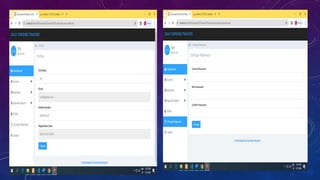
6. Profile
7. Change password
8. Logout
EXISTING SYSTEM
• Existing system does not use the smart concept which are used now a days. In existing, we need to
maintain the Excel sheets, CSV etc. files for the user daily and monthly expenses.
Disadvantages of Existing System
1. The existing system is not user friendly because data is not maintained efficiently.
2. This project will be an unpopulated data because it has some disadvantages by not alerting a person for
each and every Month.
3. But it can used to perform calculation on income and expenses to overcome this problem we propose the
new Project.
PROPOSED SYSTEM
• Introducing our revolutionary Online Daily Expenses Tracker in PHP, designed to address the
shortcomings of existing systems. With a user-friendly interface, this application streamlines expense and
income management, eliminating manual calculations.
Advantages of Proposed System
1. Financial Awareness: Daily expenses trackers promote a heightened awareness of your financial
activities by recording and categorizing every expense and income.
2. Improved Saving Habits: Tracking daily expenses encourages better saving habits as users can visualize
their surplus income and allocate it towards savings.
3. Expense Analysis: Detailed reports and visualizations help users analyze spending trends, identifying
areas where expenses can be optimized.
SOFTWARE DESCRIPTION
• HTML
• CSS
• JS
• PHP
• MySQL
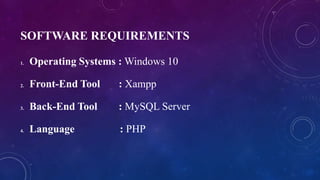
SOFTWARE REQUIREMENTS
1. Operating Systems : Windows 10
2. Front-End Tool : Xampp
3. Back-End Tool : MySQL Server
4. Language : PHP
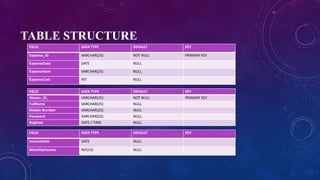
TABLE STRUCTURE
FIELD DATA TYPE DEFAULT KEY
Expense_ID VARCHAR(25) NOT NULL PRIMARY KEY
ExpenseDate DATE NULL
ExpenseItem VARCHAR(25) NULL
ExpenseCost INT NULL
FIELD DATA TYPE DEFAULT KEY
tbluser_ID_ VARCHAR(25) NOT NULL PRIMARY KEY
FullName VARCHAR(25) NULL
Mobile Number VARCHAR(25) NULL
Password VARCHAR(25) NULL
RegDate DATE / TIME NULL
FIELD DATA TYPE DEFAULT KEY
IncomeDate DATE NULL
MonthlyIncome INT(15) NULL
SOURCE CODE
• dbconnection.php
• <?php
• $con=mysqli_connect("localhost", "root", "", "detsdb");
• if(mysqli_connect_errno()){
• echo "Connection Fail".mysqli_connect_error();
• }
• ?>
• footer.php
• <div class="col-sm-12">
• <b><center><p><font color=”#30a5ff” size=”+”> © developed by Sumaiya Maryam</font><p></center></b>
• </div>
• header.php
• <?php
• session_start();
• error_reporting(0);
• include('includes/dbconnection.php');
• ?>
• <a class="navbar-brand" href="dashboard.php"><span>Daily Expense Tracker</span></a>
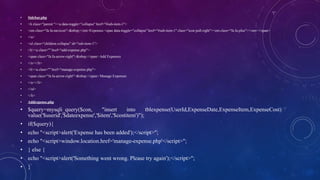
• Sidebar.php
• <li class="parent "><a data-toggle="collapse" href="#sub-item-1">
• <em class="fa fa-navicon">&nbsp;</em>Expenses <span data-toggle="collapse" href="#sub-item-1" class="icon pull-right"><em class="fa fa-plus"></em></span>
• </a>
• <ul class="children collapse" id="sub-item-1">
• <li><a class="" href="add-expense.php">
• <span class="fa fa-arrow-right">&nbsp;</span> Add Expenses
• </a></li>
• <li><a class="" href="manage-expense.php">
• <span class="fa fa-arrow-right">&nbsp;</span> Manage Expenses
• </a></li>
• </ul>
• </li>
• Addexpense.php
• $query=mysqli_query($con, "insert into tblexpense(UserId,ExpenseDate,ExpenseItem,ExpenseCost)
value('$userid','$dateexpense','$item','$costitem')");
• if($query){
• echo "<script>alert('Expense has been added');</script>";
• echo "<script>window.location.href='manage-expense.php'</script>";
• } else {
• echo "<script>alert('Something went wrong. Please try again');</script>";
• }
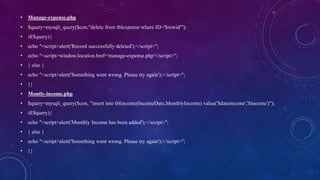
• Manage-expense.php
• $query=mysqli_query($con,"delete from tblexpense where ID='$rowid'");
• if($query){
• echo "<script>alert('Record successfully deleted');</script>";
• echo "<script>window.location.href='manage-expense.php'</script>";
• } else {
• echo "<script>alert('Something went wrong. Please try again');</script>";
• }}
• Montly-income.php
• $query=mysqli_query($con, "insert into tblincome(IncomeDate,MonthlyIncome) value('$dateincome','$income')");
• if($query){
• echo "<script>alert('Monthly Income has been added');</script>";
• } else {
• echo "<script>alert('Something went wrong. Please try again');</script>";
• }}
• Dashboard.php
• <title>Daily Expense Tracker - Dashboard</title>
• //Today Expense
• $userid=$_SESSION['detsuid'];
• $tdate=date('Y-m-d');
• $query=mysqli_query($con,"select sum(ExpenseCost) as todaysexpense from tblexpense where
(ExpenseDate)='$tdate' && (UserId='$userid');");
• $result=mysqli_fetch_array($query);
• $sum_today_expense=$result['todaysexpense'];
• ?>
• <h4>Today's Expense</h4>
• <div class="easypiechart" id="easypiechart-blue" data-percent="<?php echo $sum_today_expense;?>"
><span class="percent"><?php if($sum_today_expense==""){
• echo "0";
• } else {
• echo $sum_today_expense;
• }
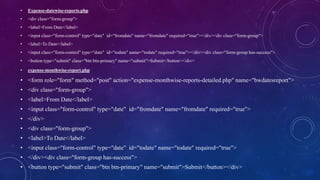
• Expense-datewise-reports.php
• <div class="form-group">
• <label>From Date</label>
• <input class="form-control" type="date" id="fromdate" name="fromdate" required="true"></div><div class="form-group">
• <label>To Date</label>
• <input class="form-control" type="date" id="todate" name="todate" required="true"></div><div class="form-group has-success">
• <button type="submit" class="btn btn-primary" name="submit">Submit</button></div>
• expense-monthwise-report.php
• <form role="form" method="post" action="expense-monthwise-reports-detailed.php" name="bwdatesreport">
• <div class="form-group">
• <label>From Date</label>
• <input class="form-control" type="date" id="fromdate" name="fromdate" required="true">
• </div>
• <div class="form-group">
• <label>To Date</label>
• <input class="form-control" type="date" id="todate" name="todate" required="true">
• </div><div class="form-group has-success">
• <button type="submit" class="btn btn-primary" name="submit">Submit</button></div>
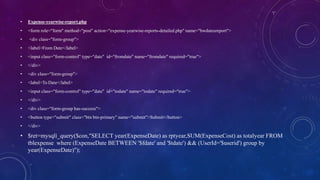
• Expense-yearwise-report.php
• <form role="form" method="post" action="expense-yearwise-reports-detailed.php" name="bwdatesreport">
• <div class="form-group">
• <label>From Date</label>
• <input class="form-control" type="date" id="fromdate" name="fromdate" required="true">
• </div>
• <div class="form-group">
• <label>To Date</label>
• <input class="form-control" type="date" id="todate" name="todate" required="true">
• </div>
• <div class="form-group has-success">
• <button type="submit" class="btn btn-primary" name="submit">Submit</button>
• </div>
• $ret=mysqli_query($con,"SELECT year(ExpenseDate) as rptyear,SUM(ExpenseCost) as totalyear FROM
tblexpense where (ExpenseDate BETWEEN '$fdate' and '$tdate') && (UserId='$userid') group by
year(ExpenseDate)");
• User-profile.php
• $userid=$_SESSION['detsuid'];
• $fullname=$_POST['fullname'];
• $mobno=$_POST['contactnumber'];
• $query=mysqli_query($con, "update tbluser set FullName ='$fullname', MobileNumber='$mobno' where
ID='$userid'");
• if ($query) {
• $msg="User profile has been updated.";
• }
• else
• {
• $msg="Something Went Wrong. Please try again.";
• }}
Register.php
• $fname=$_POST['name'];
• $mobno=$_POST['mobilenumber'];
• $email=$_POST['email'];
• $password=md5($_POST['password']);
• $ret=mysqli_query($con, "select Email from tbluser where Email='$email' ");
• $result=mysqli_fetch_array($ret);
• if($result>0){
• $msg="This email associated with another account";
• }
• else{
• $query=mysqli_query($con, "insert into tbluser(FullName, MobileNumber, Email, Password) value('$fname', $mobno', '$email',
'$password' )");
• if ($query) {
• $msg="You have successfully registered";
• }
• else
• {
• $msg="Something Went Wrong. Please try again";
• }}
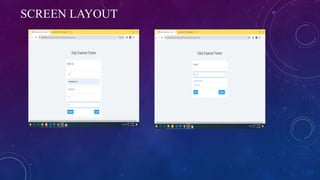
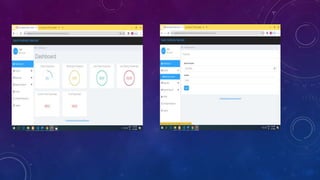
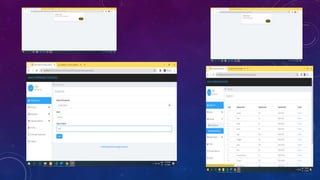
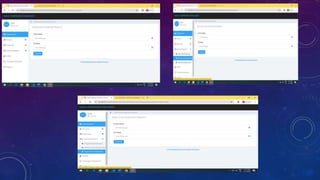
SCREEN LAYOUT
CONCLUSION
• Daily expense tracker is a refined system which allows user to efficiently manage his/her expenses
with ease. Tracking expenses daily can really help to us save lot of money. Once we start off by
tracking our expenses each day, we will be able to get a better idea where you are spending your
money, you stay in control and achieve your goals.
• After making this application we assure that this application will help its users to manage
the cost of their daily expenditure. It will guide them and make them aware about their
daily expenses. It will prove to be helpful for the people who are frustrated with their daily
budget management, irritated because of the amount of expenses and wish to manage
money and to preserve the record of their daily cost which may be useful to change their
way of spending money. In short, this application will help its users to overcome the
wastage of money.
FUTURE ENHANCEMENT
• A Daily Expense Tracker is a tool designed to help users manage their finances by tracking their daily spending and income. In
its current state, the tracker allows users to input their daily expenses, categorize them, and view their total Expenses for the
day, week, month, and year. Additionally, users can input their monthly to track their finances inflow.
• For future Enhancement, several features can be added to make the tracker more comprehensive and user-friendly.
1. User Profile: Allow users to create profile for personalized financial management.
2. Budgeting: Set and Track monthly or yearly Budgets for different categories.
3. Advanced Analytics: Provide Detailed insights into spending patterns and trends
4. Goal Setting: Set and Monitor progress towards financial goals.
5. Reminder System: Set Reminders for recurring Expenses and Income
REFERENCE
BOOK REFERENCE
1. “Complete Reference HTML”, T. A .Powell, 3rd Edition, Tata McGrawHill Publishing Company Limited, Indian Reprint 2002.
2. “MySQL: The Complete Reference”, VikramVaswani, 2nd Edition, Tata McGrawHill
Publishing Company Limited, Indian Reprint 2009.
3. “PHP: The Complete Reference”, Steven Holzner, 2nd Edition, Tata McGrawHill Publishing Company Limited, Indian Reprint 2009.
WEBSITE REFERENCE
1. https://www.tutorialspoint.com
2. https://www.phptutorial.net
3. https://www.w3schools.com
4. https://www.studocu.com
5. https://www.researchgate.net
6. https://www.academia.edu

Daily expenses tracker project ppt7.pptx

  • 1.
    DAILY EXPENSE TRACKER PRESENTEDBY SUMAIYA MARYAM. H III - B.SC(COMPUTER SCIENCE) UNDER THE GUIDANCE OF T. NAGASIVAPARVATHI M.SC.,M.B.A.,M.PHIL., DEPARTMENT OF COMPUTER SCIENCE DEEN COLLEGE OF ARTS AND SCIENCE
  • 2.
    ABSTRACT • This projectis based on an expense and income tracking system. This project aims to Create an easy, faster and smooth tracking system between the expense and the income. This project also offers some opportunities that will help the user to sustain all financial Activities like digital automated diary. So, for the better expense tracking system, we Developed our project that will help the users a lot. Most of the people cannot track their Expenses and income one way they face a money crisis, in this case daily expense tracker Can help the people to track income-expense day to day and making life tension free. This Project will save time and provide responsible lifestyle. Our project explains about the daily expense Tracker. According to date wise, month wise, year wise Expense. This project shows some ease in adding, editing and deleting the expense details. It also provides a less time-consuming process for viewing, Adding, editing and processing expense of the users.
  • 3.
    INTRODUCTION • In today’sbusy and expensive life, we are in a great rush to make money. But at the end of the day, we broke off. As we are unknowingly spending money on little and unwanted things. So, we have come over with the idea to track our earnings. Daily Expense Tracker (DET) aims to help everyone who are planning to know their expenses and save from it. DET is a website in which user can add expenses on daily basis and its table will get generated and at the end based on user expenses report will be generated. User can select date range to calculate his/her expenses. This system is very much useful for House-Wife to control their Income-expense from Day-to-Day to Yearly Basics. And to keep a watch on their expense. In today’s fast-paced world, where every penny counts, it’s becoming increasingly vital to have a clear understanding of our spending habits. The Daily Expense Tracker (DET) emerges as a beacon of financial empowerment, providing individuals with a robust platform to meticulously monitor their expenditures, thereby fostering a culture of mindful spending and prudent financial management.
  • 4.
    MODULE DESCRIPTION 1. UserRegister. 2. User Login. 3. Expense Add Expense Manage Expense 4. Income. Monthly Income 5. Expense Report Date wise Report Month wise Report Year wise Report 6. Profile 7. Change password 8. Logout
  • 5.
    EXISTING SYSTEM • Existingsystem does not use the smart concept which are used now a days. In existing, we need to maintain the Excel sheets, CSV etc. files for the user daily and monthly expenses. Disadvantages of Existing System 1. The existing system is not user friendly because data is not maintained efficiently. 2. This project will be an unpopulated data because it has some disadvantages by not alerting a person for each and every Month. 3. But it can used to perform calculation on income and expenses to overcome this problem we propose the new Project.
  • 6.
    PROPOSED SYSTEM • Introducingour revolutionary Online Daily Expenses Tracker in PHP, designed to address the shortcomings of existing systems. With a user-friendly interface, this application streamlines expense and income management, eliminating manual calculations. Advantages of Proposed System 1. Financial Awareness: Daily expenses trackers promote a heightened awareness of your financial activities by recording and categorizing every expense and income. 2. Improved Saving Habits: Tracking daily expenses encourages better saving habits as users can visualize their surplus income and allocate it towards savings. 3. Expense Analysis: Detailed reports and visualizations help users analyze spending trends, identifying areas where expenses can be optimized.
  • 7.
    SOFTWARE DESCRIPTION • HTML •CSS • JS • PHP • MySQL
  • 8.
    SOFTWARE REQUIREMENTS 1. OperatingSystems : Windows 10 2. Front-End Tool : Xampp 3. Back-End Tool : MySQL Server 4. Language : PHP
  • 9.
    TABLE STRUCTURE FIELD DATATYPE DEFAULT KEY Expense_ID VARCHAR(25) NOT NULL PRIMARY KEY ExpenseDate DATE NULL ExpenseItem VARCHAR(25) NULL ExpenseCost INT NULL FIELD DATA TYPE DEFAULT KEY tbluser_ID_ VARCHAR(25) NOT NULL PRIMARY KEY FullName VARCHAR(25) NULL Mobile Number VARCHAR(25) NULL Password VARCHAR(25) NULL RegDate DATE / TIME NULL FIELD DATA TYPE DEFAULT KEY IncomeDate DATE NULL MonthlyIncome INT(15) NULL
  • 10.
    SOURCE CODE • dbconnection.php •<?php • $con=mysqli_connect("localhost", "root", "", "detsdb"); • if(mysqli_connect_errno()){ • echo "Connection Fail".mysqli_connect_error(); • } • ?> • footer.php • <div class="col-sm-12"> • <b><center><p><font color=”#30a5ff” size=”+”> © developed by Sumaiya Maryam</font><p></center></b> • </div> • header.php • <?php • session_start(); • error_reporting(0); • include('includes/dbconnection.php'); • ?> • <a class="navbar-brand" href="dashboard.php"><span>Daily Expense Tracker</span></a>
  • 11.
    • Sidebar.php • <liclass="parent "><a data-toggle="collapse" href="#sub-item-1"> • <em class="fa fa-navicon">&nbsp;</em>Expenses <span data-toggle="collapse" href="#sub-item-1" class="icon pull-right"><em class="fa fa-plus"></em></span> • </a> • <ul class="children collapse" id="sub-item-1"> • <li><a class="" href="add-expense.php"> • <span class="fa fa-arrow-right">&nbsp;</span> Add Expenses • </a></li> • <li><a class="" href="manage-expense.php"> • <span class="fa fa-arrow-right">&nbsp;</span> Manage Expenses • </a></li> • </ul> • </li> • Addexpense.php • $query=mysqli_query($con, "insert into tblexpense(UserId,ExpenseDate,ExpenseItem,ExpenseCost) value('$userid','$dateexpense','$item','$costitem')"); • if($query){ • echo "<script>alert('Expense has been added');</script>"; • echo "<script>window.location.href='manage-expense.php'</script>"; • } else { • echo "<script>alert('Something went wrong. Please try again');</script>"; • }
  • 12.
    • Manage-expense.php • $query=mysqli_query($con,"deletefrom tblexpense where ID='$rowid'"); • if($query){ • echo "<script>alert('Record successfully deleted');</script>"; • echo "<script>window.location.href='manage-expense.php'</script>"; • } else { • echo "<script>alert('Something went wrong. Please try again');</script>"; • }} • Montly-income.php • $query=mysqli_query($con, "insert into tblincome(IncomeDate,MonthlyIncome) value('$dateincome','$income')"); • if($query){ • echo "<script>alert('Monthly Income has been added');</script>"; • } else { • echo "<script>alert('Something went wrong. Please try again');</script>"; • }}
  • 13.
    • Dashboard.php • <title>DailyExpense Tracker - Dashboard</title> • //Today Expense • $userid=$_SESSION['detsuid']; • $tdate=date('Y-m-d'); • $query=mysqli_query($con,"select sum(ExpenseCost) as todaysexpense from tblexpense where (ExpenseDate)='$tdate' && (UserId='$userid');"); • $result=mysqli_fetch_array($query); • $sum_today_expense=$result['todaysexpense']; • ?> • <h4>Today's Expense</h4> • <div class="easypiechart" id="easypiechart-blue" data-percent="<?php echo $sum_today_expense;?>" ><span class="percent"><?php if($sum_today_expense==""){ • echo "0"; • } else { • echo $sum_today_expense; • }
  • 14.
    • Expense-datewise-reports.php • <divclass="form-group"> • <label>From Date</label> • <input class="form-control" type="date" id="fromdate" name="fromdate" required="true"></div><div class="form-group"> • <label>To Date</label> • <input class="form-control" type="date" id="todate" name="todate" required="true"></div><div class="form-group has-success"> • <button type="submit" class="btn btn-primary" name="submit">Submit</button></div> • expense-monthwise-report.php • <form role="form" method="post" action="expense-monthwise-reports-detailed.php" name="bwdatesreport"> • <div class="form-group"> • <label>From Date</label> • <input class="form-control" type="date" id="fromdate" name="fromdate" required="true"> • </div> • <div class="form-group"> • <label>To Date</label> • <input class="form-control" type="date" id="todate" name="todate" required="true"> • </div><div class="form-group has-success"> • <button type="submit" class="btn btn-primary" name="submit">Submit</button></div>
  • 15.
    • Expense-yearwise-report.php • <formrole="form" method="post" action="expense-yearwise-reports-detailed.php" name="bwdatesreport"> • <div class="form-group"> • <label>From Date</label> • <input class="form-control" type="date" id="fromdate" name="fromdate" required="true"> • </div> • <div class="form-group"> • <label>To Date</label> • <input class="form-control" type="date" id="todate" name="todate" required="true"> • </div> • <div class="form-group has-success"> • <button type="submit" class="btn btn-primary" name="submit">Submit</button> • </div> • $ret=mysqli_query($con,"SELECT year(ExpenseDate) as rptyear,SUM(ExpenseCost) as totalyear FROM tblexpense where (ExpenseDate BETWEEN '$fdate' and '$tdate') && (UserId='$userid') group by year(ExpenseDate)");
  • 16.
    • User-profile.php • $userid=$_SESSION['detsuid']; •$fullname=$_POST['fullname']; • $mobno=$_POST['contactnumber']; • $query=mysqli_query($con, "update tbluser set FullName ='$fullname', MobileNumber='$mobno' where ID='$userid'"); • if ($query) { • $msg="User profile has been updated."; • } • else • { • $msg="Something Went Wrong. Please try again."; • }}
  • 17.
    Register.php • $fname=$_POST['name']; • $mobno=$_POST['mobilenumber']; •$email=$_POST['email']; • $password=md5($_POST['password']); • $ret=mysqli_query($con, "select Email from tbluser where Email='$email' "); • $result=mysqli_fetch_array($ret); • if($result>0){ • $msg="This email associated with another account"; • } • else{ • $query=mysqli_query($con, "insert into tbluser(FullName, MobileNumber, Email, Password) value('$fname', $mobno', '$email', '$password' )"); • if ($query) { • $msg="You have successfully registered"; • } • else • { • $msg="Something Went Wrong. Please try again"; • }}
  • 18.
  • 23.
    CONCLUSION • Daily expensetracker is a refined system which allows user to efficiently manage his/her expenses with ease. Tracking expenses daily can really help to us save lot of money. Once we start off by tracking our expenses each day, we will be able to get a better idea where you are spending your money, you stay in control and achieve your goals. • After making this application we assure that this application will help its users to manage the cost of their daily expenditure. It will guide them and make them aware about their daily expenses. It will prove to be helpful for the people who are frustrated with their daily budget management, irritated because of the amount of expenses and wish to manage money and to preserve the record of their daily cost which may be useful to change their way of spending money. In short, this application will help its users to overcome the wastage of money.
  • 24.
    FUTURE ENHANCEMENT • ADaily Expense Tracker is a tool designed to help users manage their finances by tracking their daily spending and income. In its current state, the tracker allows users to input their daily expenses, categorize them, and view their total Expenses for the day, week, month, and year. Additionally, users can input their monthly to track their finances inflow. • For future Enhancement, several features can be added to make the tracker more comprehensive and user-friendly. 1. User Profile: Allow users to create profile for personalized financial management. 2. Budgeting: Set and Track monthly or yearly Budgets for different categories. 3. Advanced Analytics: Provide Detailed insights into spending patterns and trends 4. Goal Setting: Set and Monitor progress towards financial goals. 5. Reminder System: Set Reminders for recurring Expenses and Income
  • 25.
    REFERENCE BOOK REFERENCE 1. “CompleteReference HTML”, T. A .Powell, 3rd Edition, Tata McGrawHill Publishing Company Limited, Indian Reprint 2002. 2. “MySQL: The Complete Reference”, VikramVaswani, 2nd Edition, Tata McGrawHill Publishing Company Limited, Indian Reprint 2009. 3. “PHP: The Complete Reference”, Steven Holzner, 2nd Edition, Tata McGrawHill Publishing Company Limited, Indian Reprint 2009. WEBSITE REFERENCE 1. https://www.tutorialspoint.com 2. https://www.phptutorial.net 3. https://www.w3schools.com 4. https://www.studocu.com 5. https://www.researchgate.net 6. https://www.academia.edu