GROCERY MANAGEMENT SYSTEM
MINI PROJECT – 2nd review on, 3rd Sep - 2016
BY:
B.PUJITHA (13M61A0504)
UNDER THE GUIDENCE OF
Mr.Srihari .G
M.Tech
Assistant professor, Dept. of CSE.
SWARNA BHARATHI INSTITUTE OF SCIENCES AND TEHNOLOGY(SBIT)
KHAMMAM,507002
CONTENT1.INTRODUCTION
2.ABSTRACT
3.LITERATURE REVIEW
4.EXISTING&PROPOSED SYSTEM
5.SOFTWARE EXPLORES
5.1 SOFTWARE REQUIREMENTS
5.2 HARDWARE REQUIREMENTS
6.SYSTEM ARCHITURE
7.MODULES
7.1 Employee Module
7.2 Administrator Module
7.3 User Module
7.4 Payment option Module
8.DATAFLOW DIAGRAM
9.UML DIAGRAM
9.1 use case diagram
9.2 class diagram
9.3 activity diagram
9.4 sequence diagram
9.5 collaboration diagram
contd..
9.6 state chart diagram
9.7 component diagram
9.8 deployment diagram
10.TABLES
11.SCREENSHOTS
12.REPORT GENERATION
13.TEST CASES
14.CONCLUSION
15.REFERENCE
INTRODUCTION
 A grocery store is a retail store that primarily sells food. A grocer is a bulk seller
of food.
 As pollution around the world has increased buying food on the road side is not
advisable.
 Whether in charge of a small individually owned grocery store or one that is part
of larger chain maintaining a grocery store successfully involves considerable
responsibility.
ABSTRACT
 "Health is wealth”. As the saying goes from our ancient times. Eat healthy and
stay healthy as of now a days its very difficult to have healthy food.
 Grocery store managers must ensure that the store runs smoothly that items are
priced comparatively and that customers are satisfied.
 people are unable to find time to household works like buying grocery. So by this
platform we provide grocery .
 This is an Internet based application that can be accessed throughout the web.
 This system can be used to search for all grocery and fresh vegetables which are
available in the market
LITERATURE REVIEW
 Grocery store managers must ensure that the store runs smoothly that items are priced
comparatively and that customers are satisfied.
 Previously it is developed by P.Riteesh which is super market management system.
 Drawbacks of super market management system is if we cancelled the ordered item the money is
not returned i.e they didn’t maintained cancelation option.
 In grocery management system we overcome the drawback and we create a option called wallet.
EXISTING SYSTEM:
 A grocery store is a retail store that primarily sells food. A grocer is a bulk seller of food.
 Grocery stores often offer non-perishable food that is packaged in cans, bottles and boxes,
with some also having fresh produce, butchers, delis, and bakeries.
 As pollution around the world has increased buying food on the road side is not advisable.
Whether in charge of a small individually owned grocery store or one that is part of larger
chain maintaining a grocery store successfully involves considerable responsibility.
 Grocery store managers must ensure that the store runs smoothly that items are priced
comparatively and that customers are satisfied.
PROPOSED SYSTEM:
 Understanding of key concepts involved in effective grocery store management is
imperative for any manager dedicated to the success of his store.
 Particularly if the manages the small grocery store inventory requires more than simply
keeping enough of every item in stock.
 This is a internet based application that is accessed through web This system can be used to
search for all grocery and fresh vegetables which are available in the market.
SYSTEM REQUIREMENTS:
HARDWARE REQUIREMENTS:
System : Pentium IV 2.4 GHz.
Hard Disk : 40 GB.
Ram : 512 MB.
contd..
SOFTWARE REQUIREMENTS:
Operating system : - Windows XP.
Coding Language: J2EE
Data Base : MYSQL
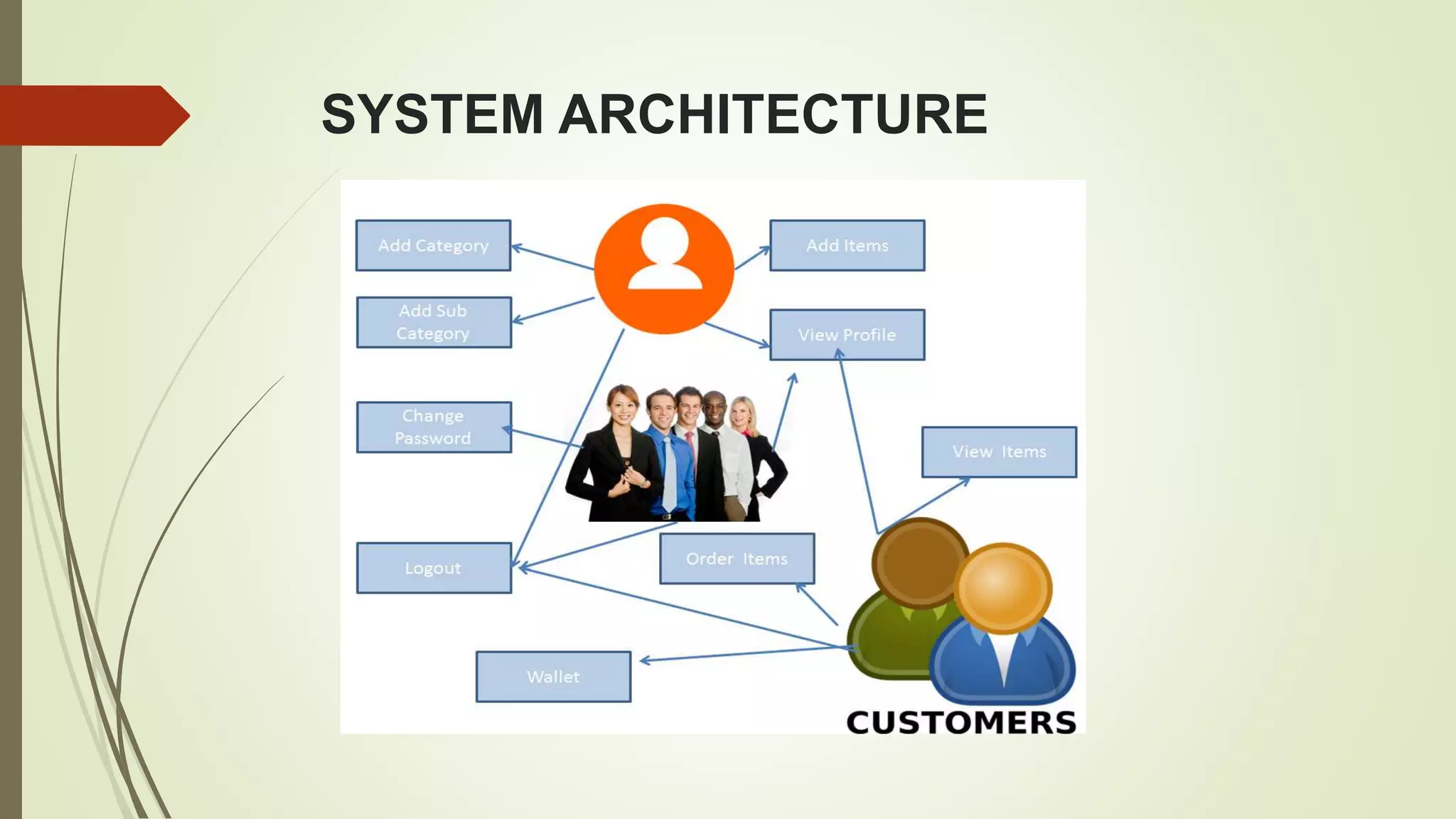
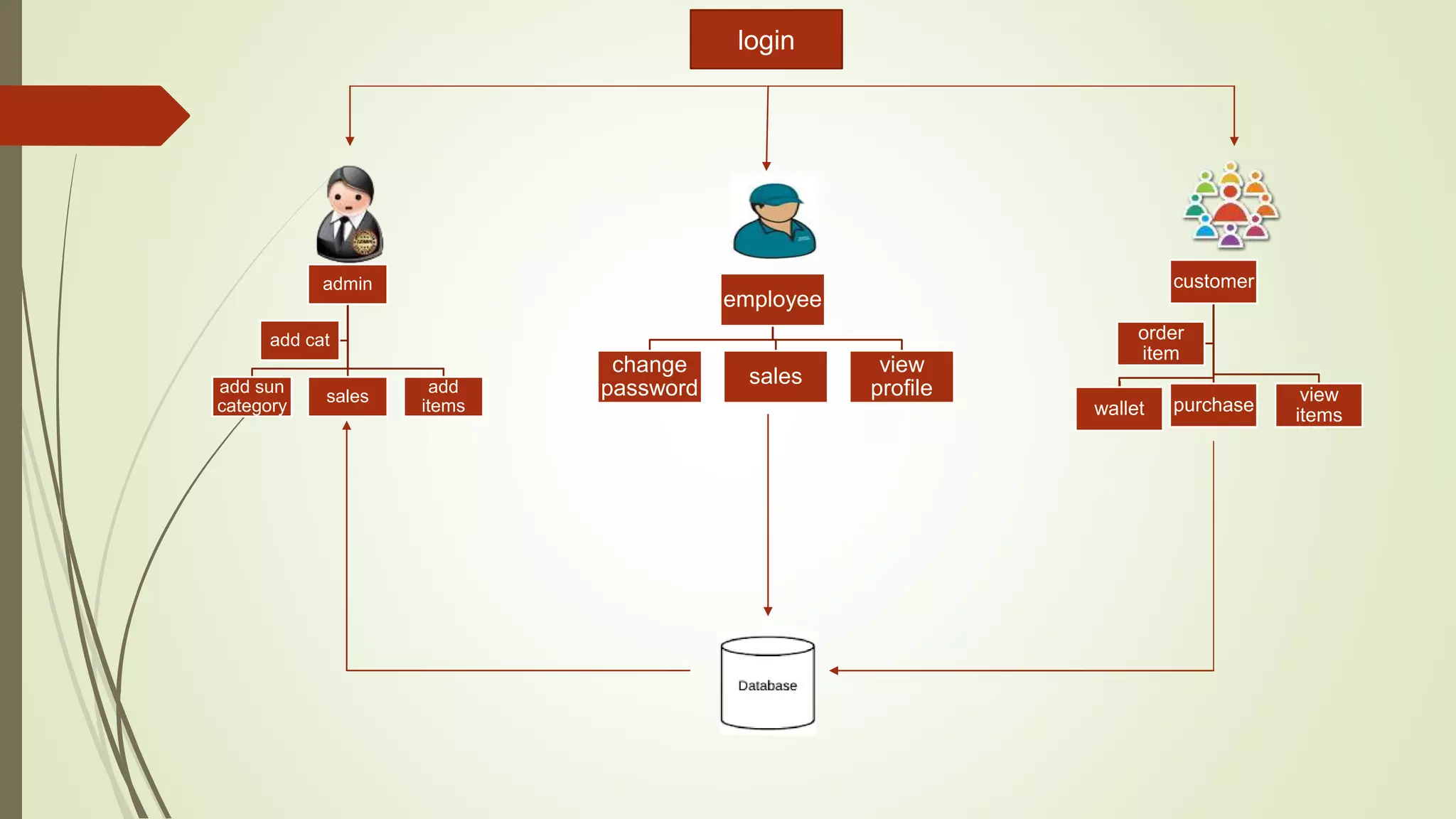
SYSTEM ARCHITECTURE
admin
add sun
category
sales
add
items
add cat
employee
change
password
sales
view
profile
customer
wallet purchase
view
items
order
item
login
MODULES
 Employee Module
 Administrator Module
 User Module
 Payment option Module
Contd..
MODULES DESCRIPTION
Employee Module:
 In this employee module the employee mainly receives the customers
requirement and have to process on customers request.
 He basically works on the available products and daily checks the stock
availability on time and informs the administrative in charge about the products
availability.
 He delivers the stock ordered by the customer with proper packing and in time
delivery.
Administrator Module:
 In this administration of whole company is to be maintained.
 The complaints and suggestions dropped by customers must be checked and
required steps are to be implemented.
 Supervision of employee and the requirement of business must be checked and
required steps to be taken.
USER MODULE
 The user must have the personal account and using his login details customer first
check the products availability and orders the required products.
 If the server is busy then customer has to retry once again and continue his
request.
 He can check on various products availability and choose the products required.
PAYMENT OPTION MODULE
 We have to ways of payment options
 Pay now
 Cash on delivery
 Customer can pay in two cases when he orders the stocks and after he receives
the stock. We provide credits and debit card facility i.e on line banking system. We
provide various bank payments.
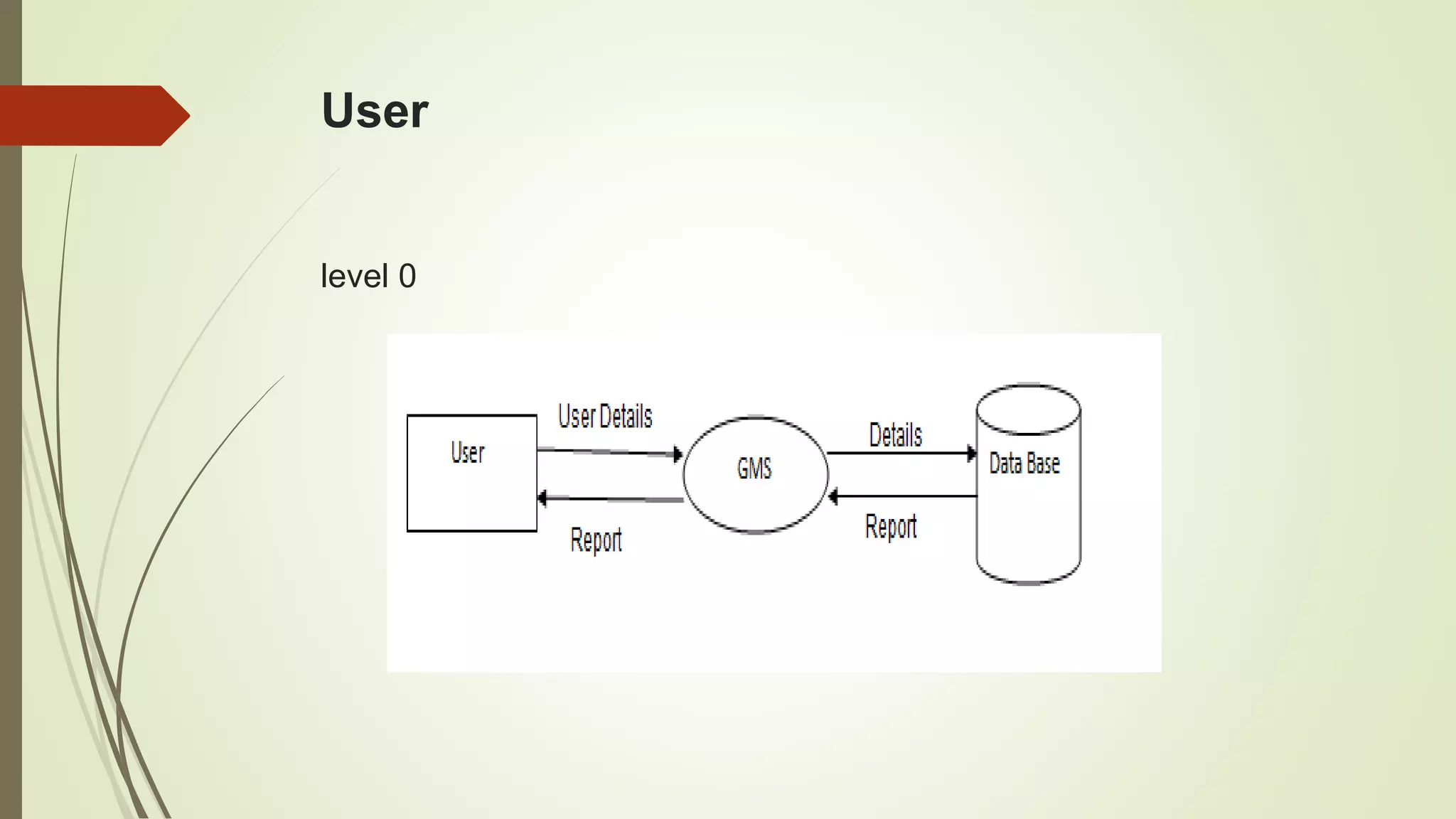
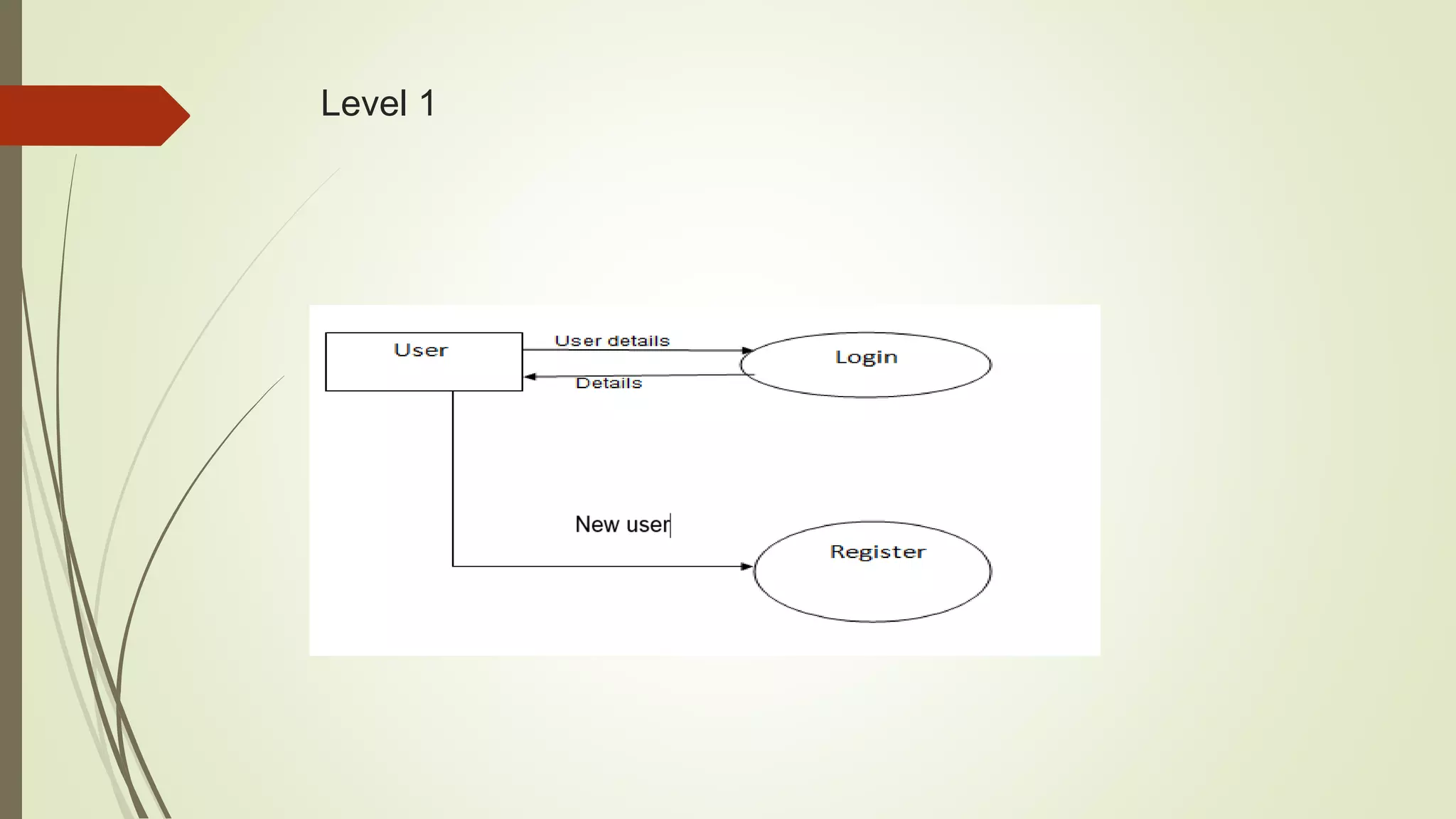
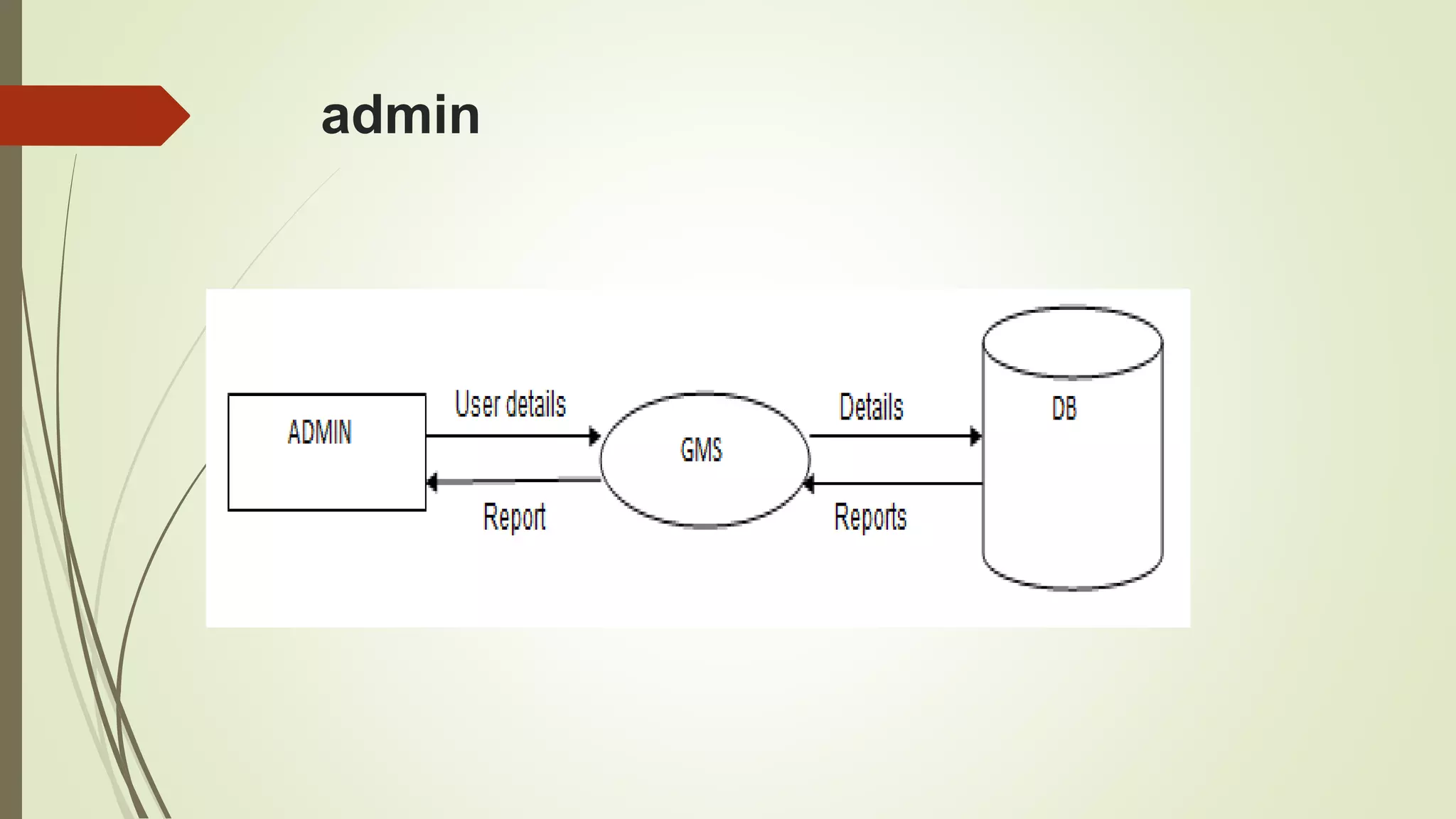
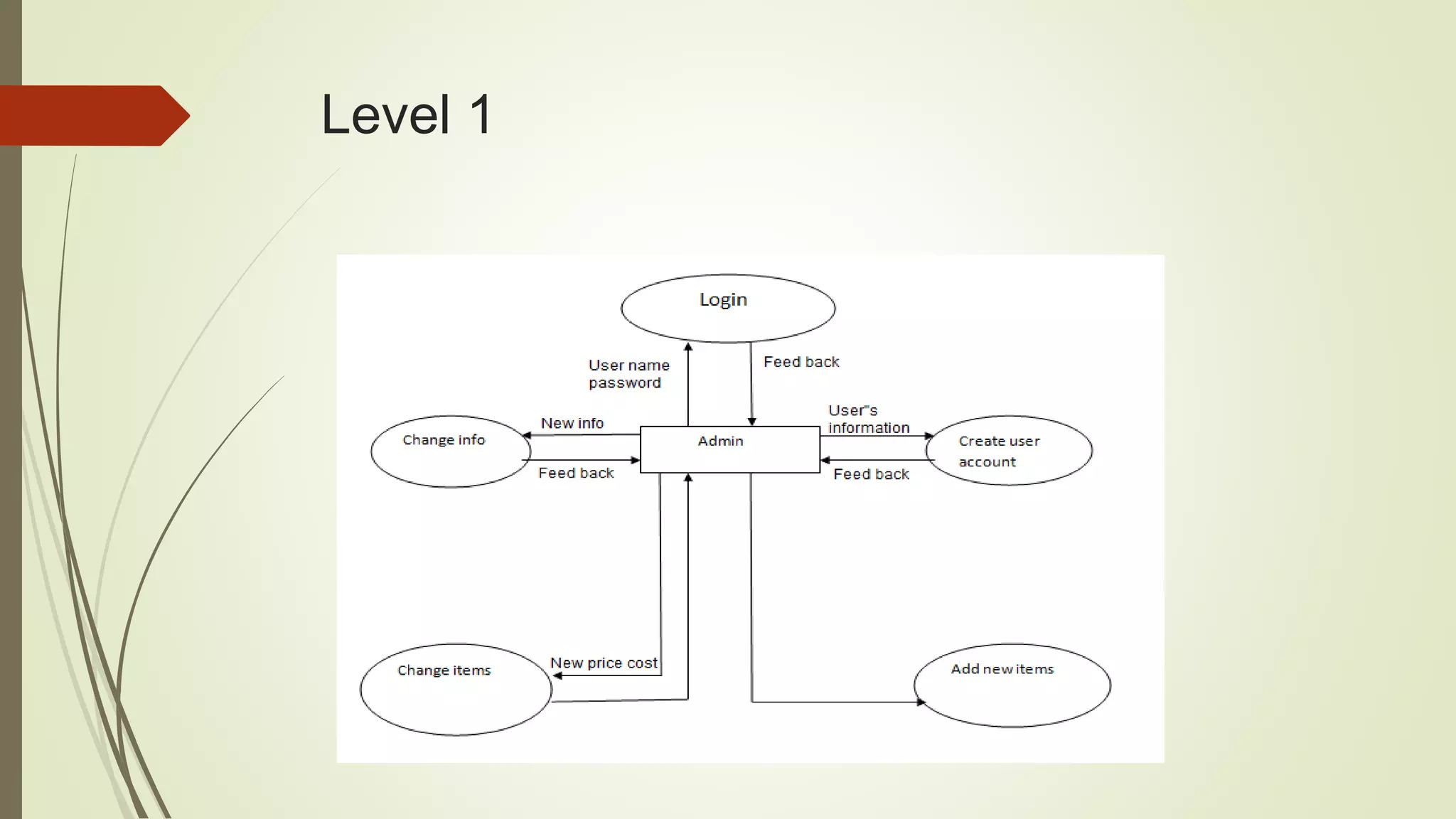
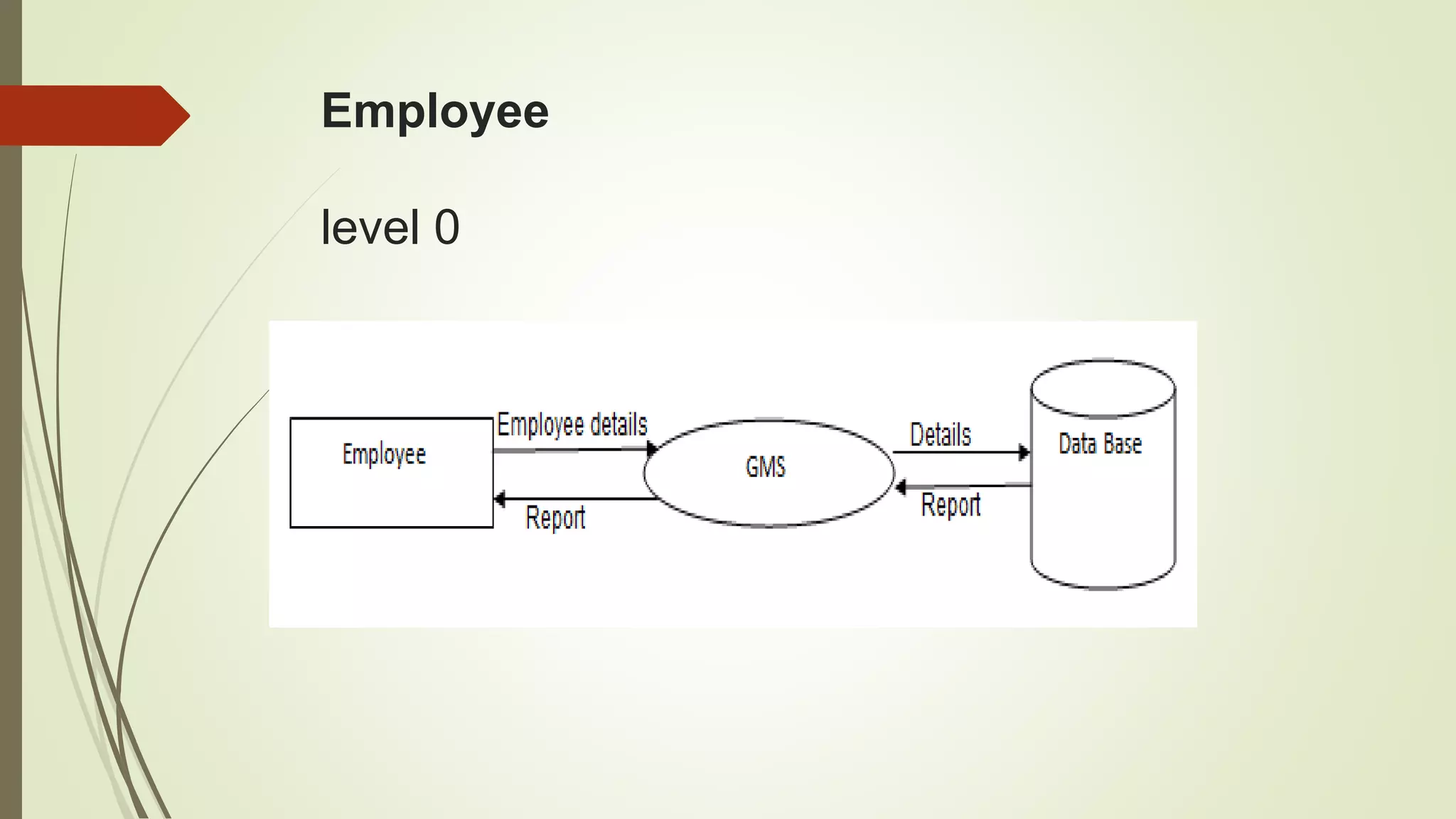
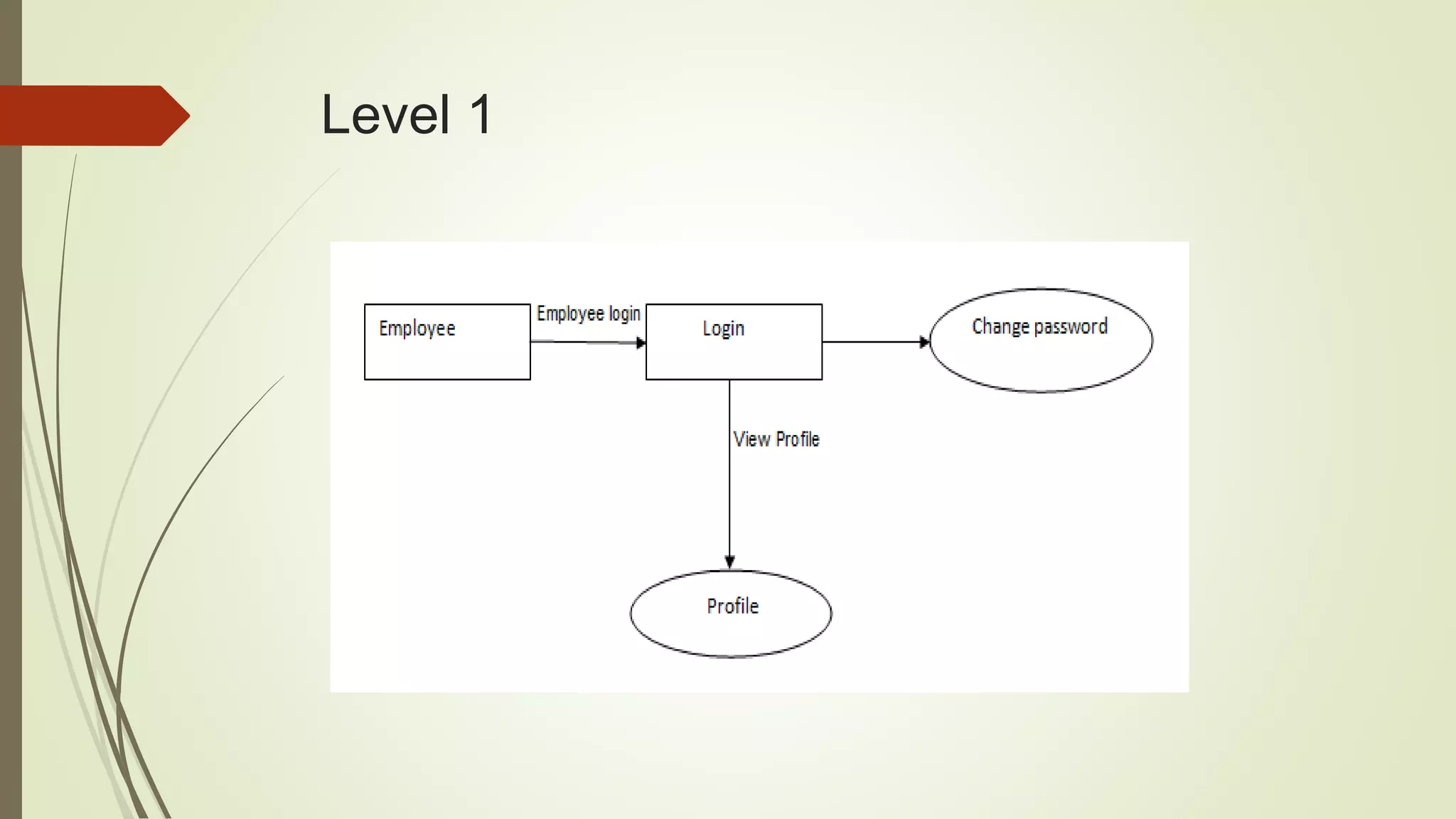
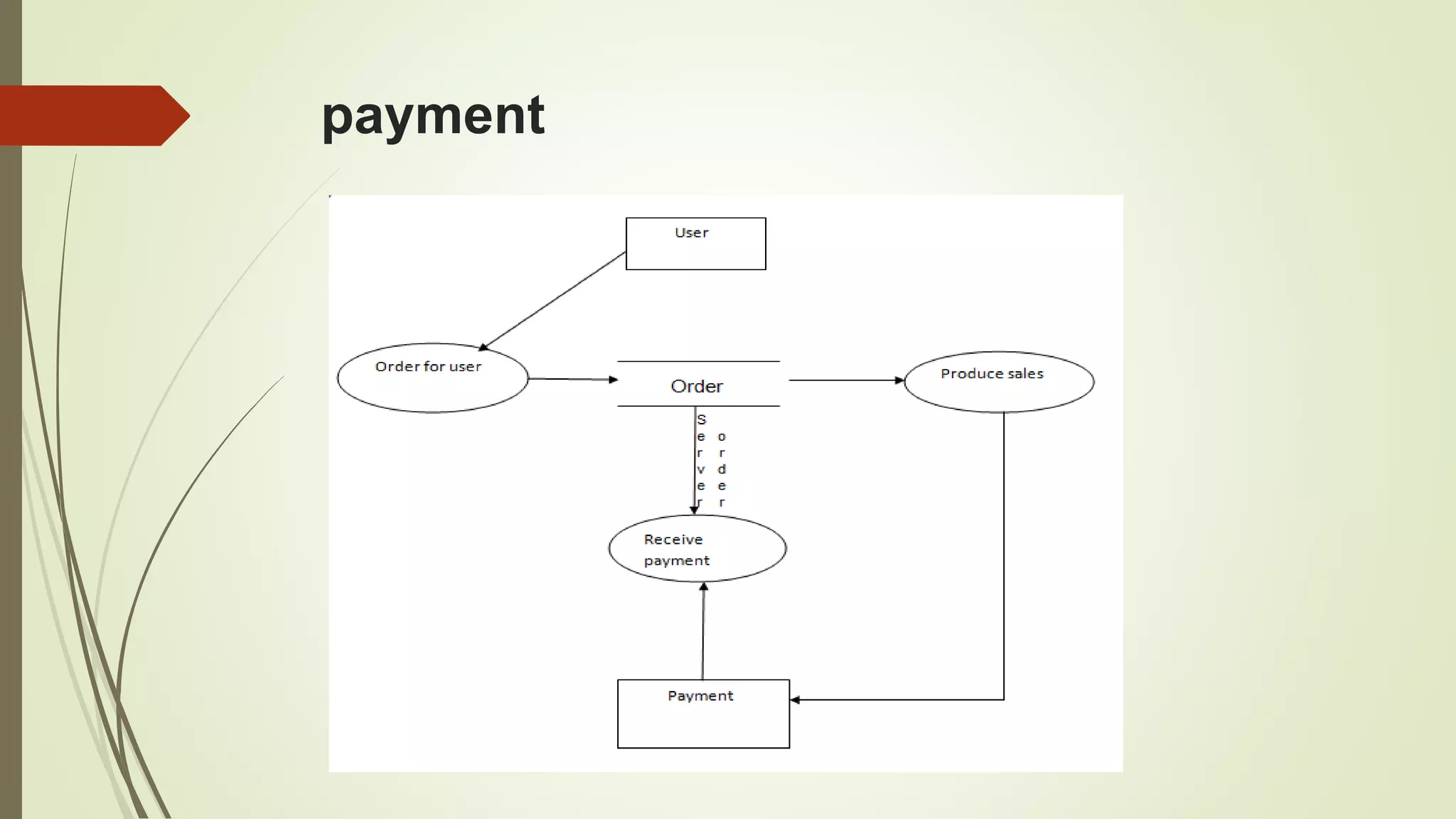
DATA FLOW DIAGRAM:
 It is a simple graphical formalism that can be used to represent a system in terms
of input data to the system, various processing carried out on this data, and the
output data is generated by this system
 The data flow diagram (DFD) is one of the most important modeling tools. It is
used to model the system components.
contd..
User
level 0
Level 1
admin
Level 1
Employee
level 0
Level 1
payment
2
USE CASE DIAGRAM:
 A use case diagram in the Unified Modeling Language (UML) is a type of
behavioral diagram defined by and created from a Use-case analysis.
 Its purpose is to present a graphical overview of the functionality provided by a
system in terms of actors, their goals (represented as use cases), and any
dependencies between those use cases.
 The main purpose of a use case diagram is to show what system functions are
performed for which actor. Roles of the actors in the system can be depicted.
contd..
Employee
Customer
Admin
Add category
Sub category
Add items
View Profile
View items
Order items
View profile
Change password
Log out
Wallet
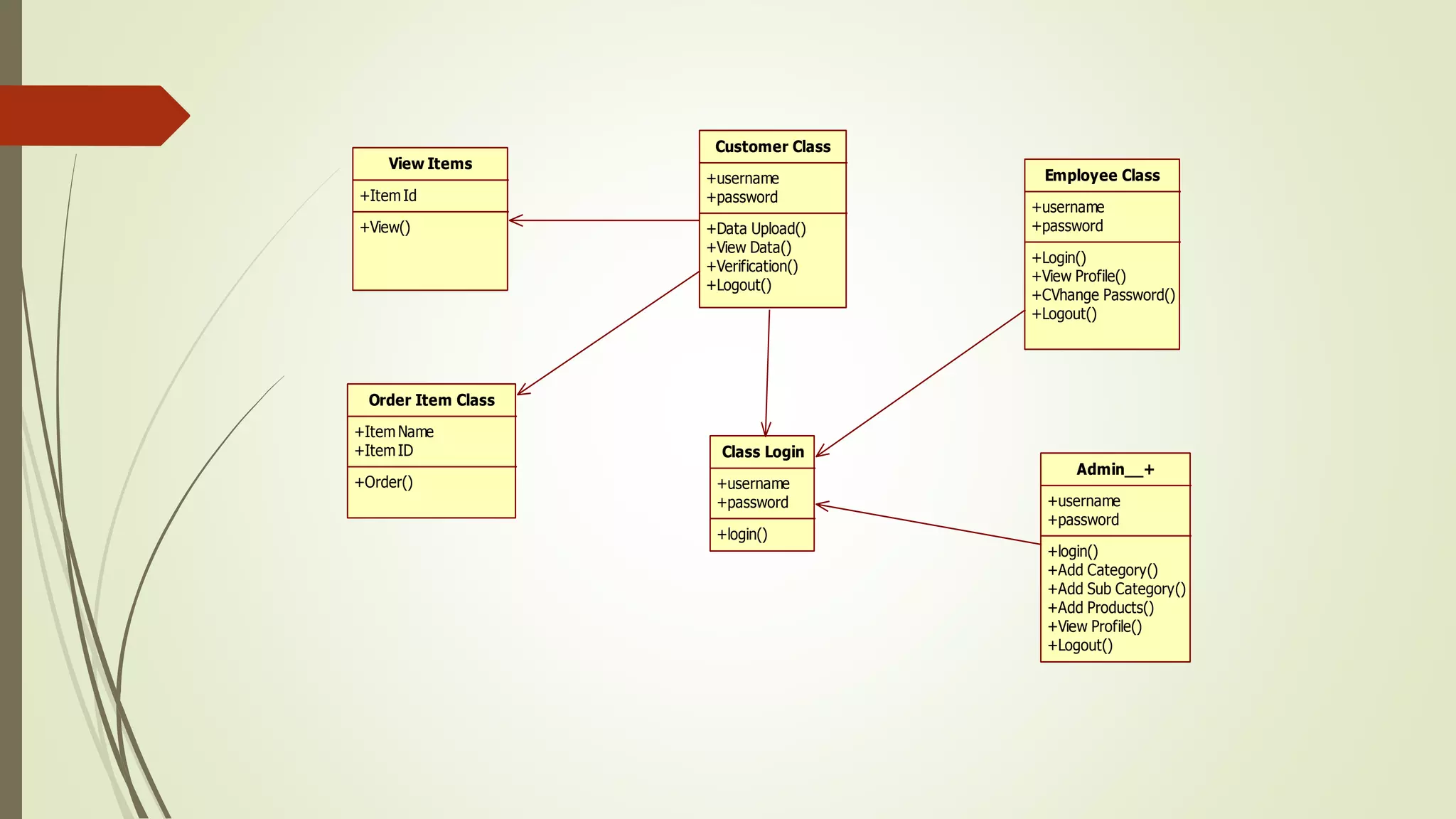
CLASS DIAGRAM:
 In software engineering, a class diagram in the Unified Modeling Language
(UML) is a type of static structure diagram that describes the structure of a system
by showing the system's classes, their attributes, operations (or methods), and the
relationships among the classes. It explains which class contains information.
contd..
Customer Class
+username
+password
+Data Upload()
+View Data()
+Verification()
+Logout()
Class Login
+username
+password
+login()
View Items
+ItemId
+View()
Order Item Class
+ItemName
+ItemID
+Order()
Admin__+
+username
+password
+login()
+Add Category()
+Add Sub Category()
+Add Products()
+View Profile()
+Logout()
Employee Class
+username
+password
+Login()
+View Profile()
+CVhange Password()
+Logout()
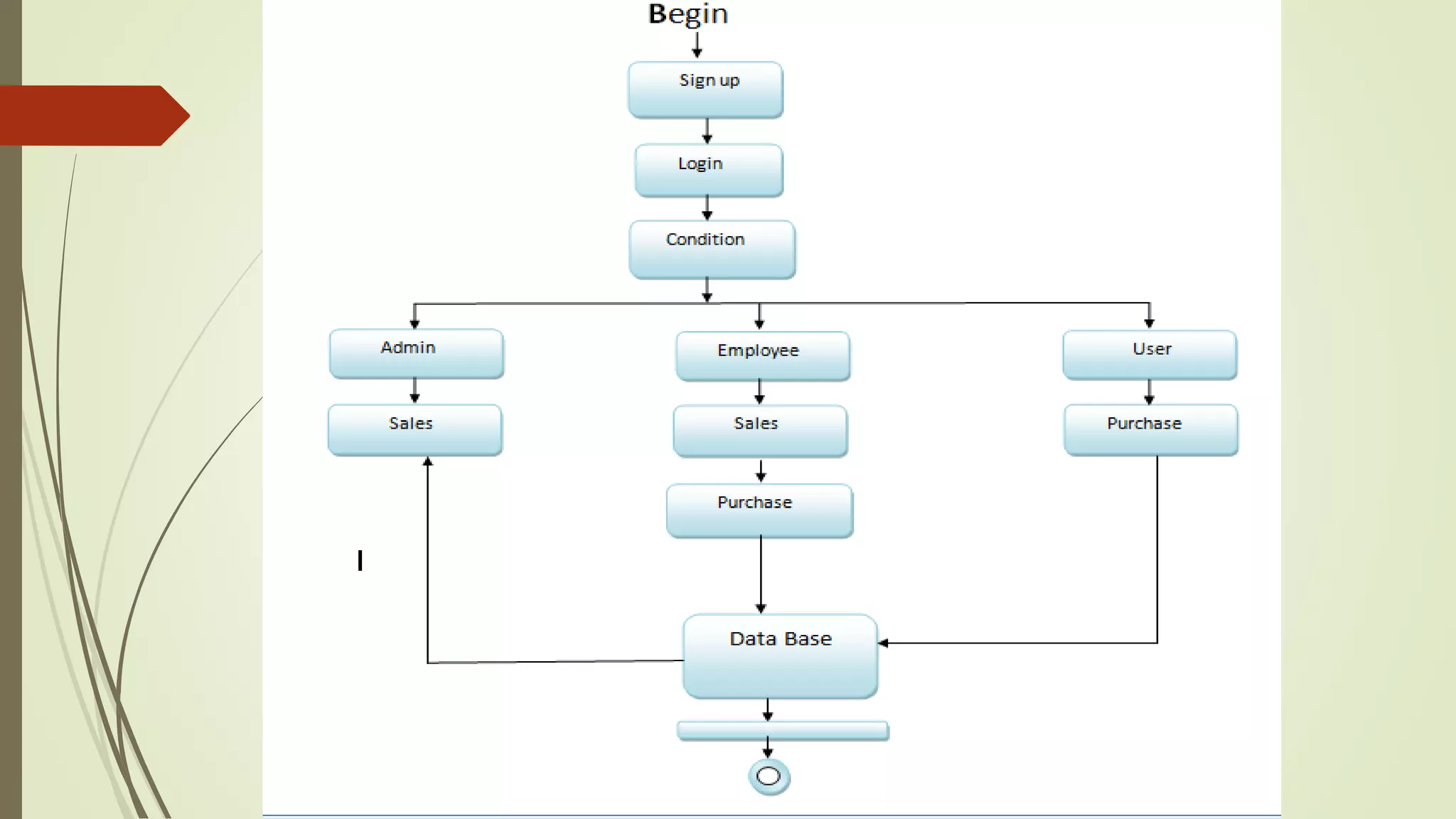
ACTIVITY DIAGRAM:
 Activity diagrams are graphical representations of workflows of stepwise activities and
actions with support for choice, iteration and concurrency.
 In the Unified Modeling Language, activity diagrams can be used to describe the business
and operational step-by-step workflows of components in a system.
 An activity diagram shows the overall flow of control.
contd..
admin
Add Category
Add Sub Category
Add Products
Admin
View Profile
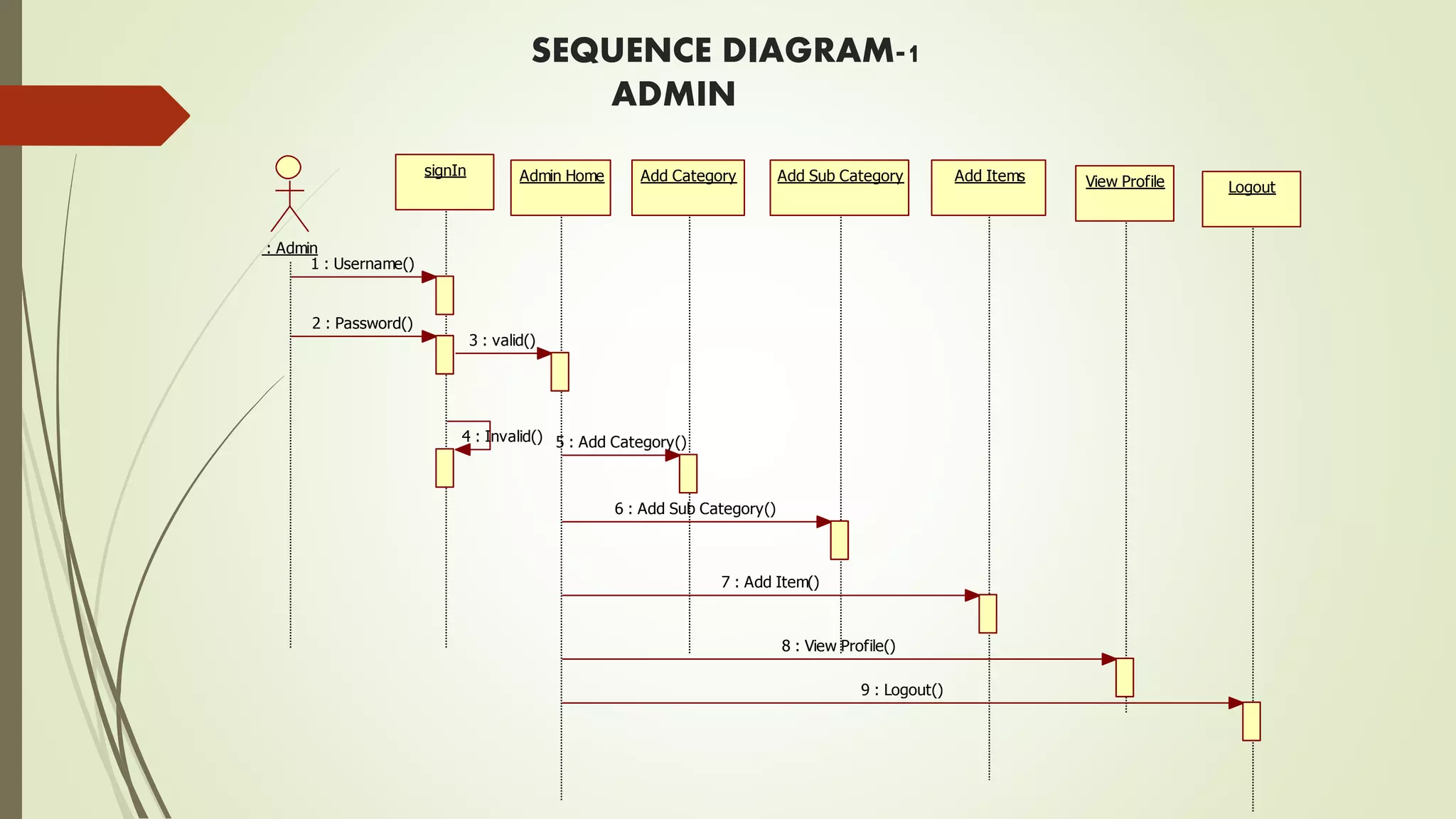
SEQUENCE DIAGRAM:
 A sequence diagram in Unified Modeling Language (UML) is a kind of interaction
diagram that shows how processes operate with one another and in what order.
 It is a construct of a Message Sequence Chart. Sequence diagrams are
sometimes called event diagrams, event scenarios, and timing diagrams.
contd..
SEQUENCE DIAGRAM-1
ADMIN
signIn Add Category Add Sub Category Add Items
Logout
Admin Home
: Admin
View Profile
1 : Username()
2 : Password()
3 : valid()
4 : Invalid() 5 : Add Category()
6 : Add Sub Category()
7 : Add Item()
8 : View Profile()
9 : Logout()
SEQUENCE DIAGRAM-2
EMPLOYEE
: Employee
Registration Login Employee Home View Profile Change Password Logout
Logout
1 : new User()
2 : username()
3 : invalid()
4 : password()
5 : valid()
6 : View Profile()
7 : Change Password()
8 : Logout()
9 : View Click Logs()
10 : Logout()
SEQUENCE DIAGRAM-3
CUSTOMER
sign in Customer Home View Profile LogoutOrder ItemsView Items
: Customer
Wallet Change Password
1 : Username()
2 : Password() 3 : valid()
4 : invalid()
5 : View Profile()
6 : View Items()
7 : Order Items()
8 : View Wallet()
9 : Change Password()
10 : logout()
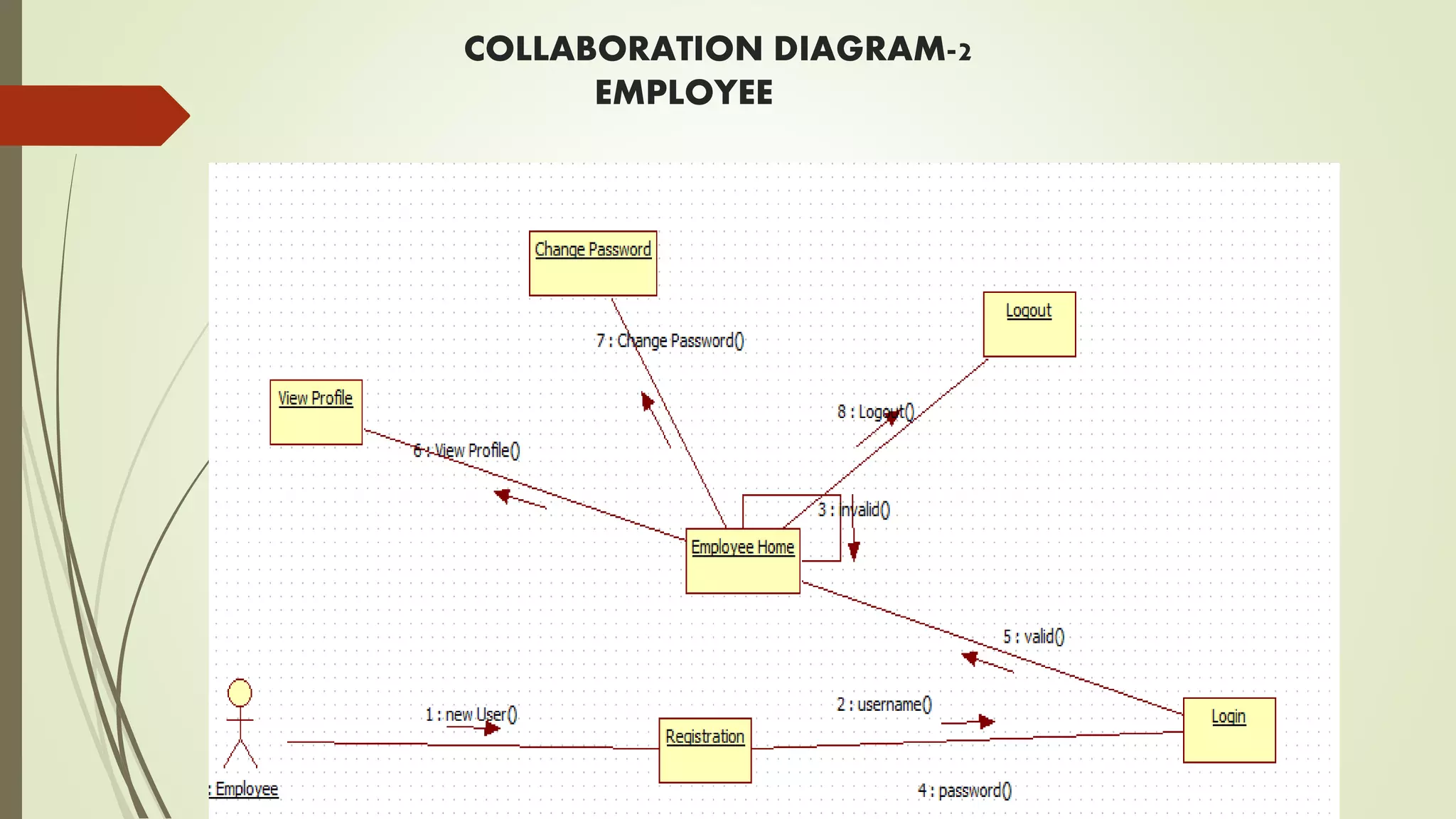
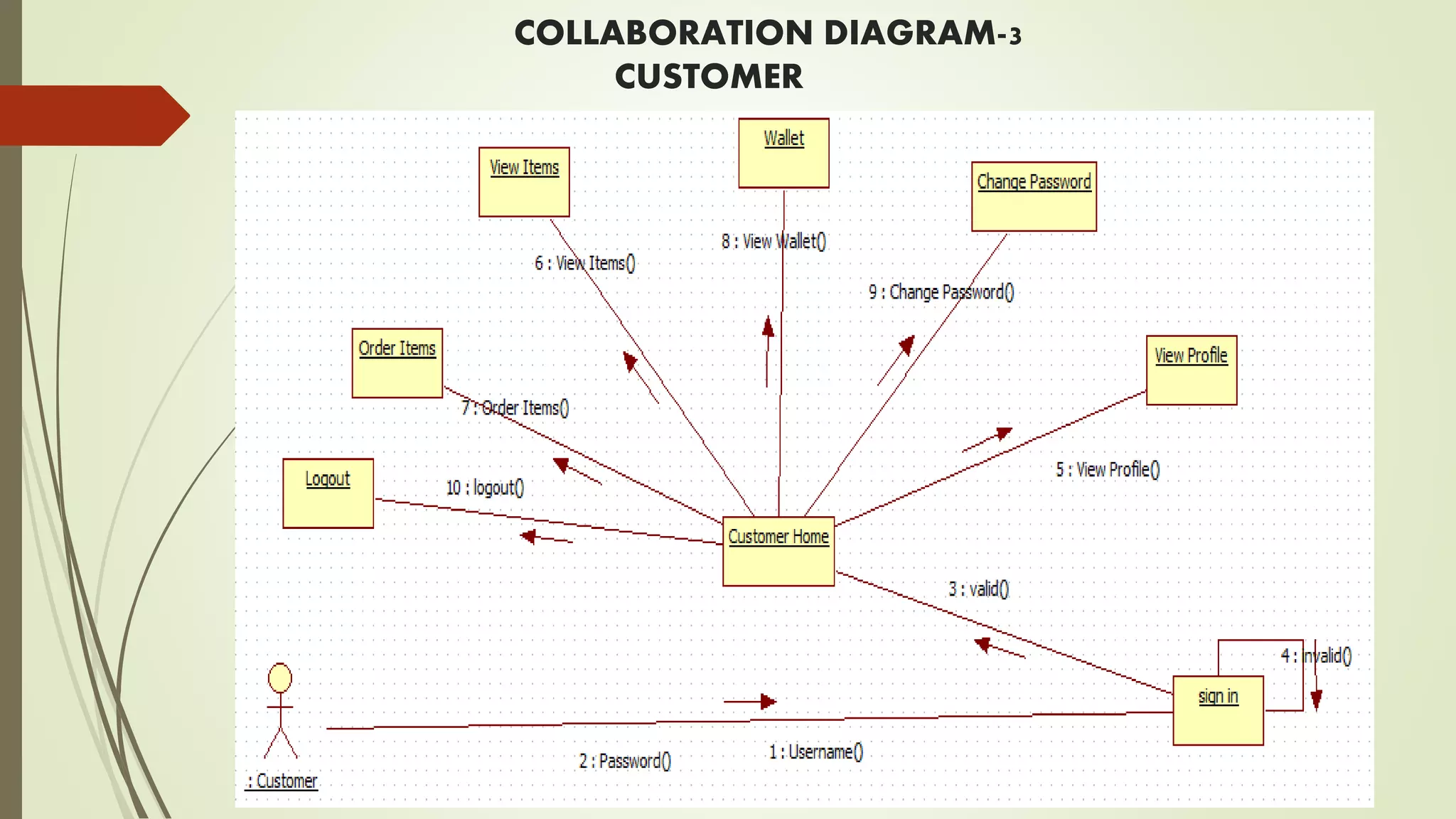
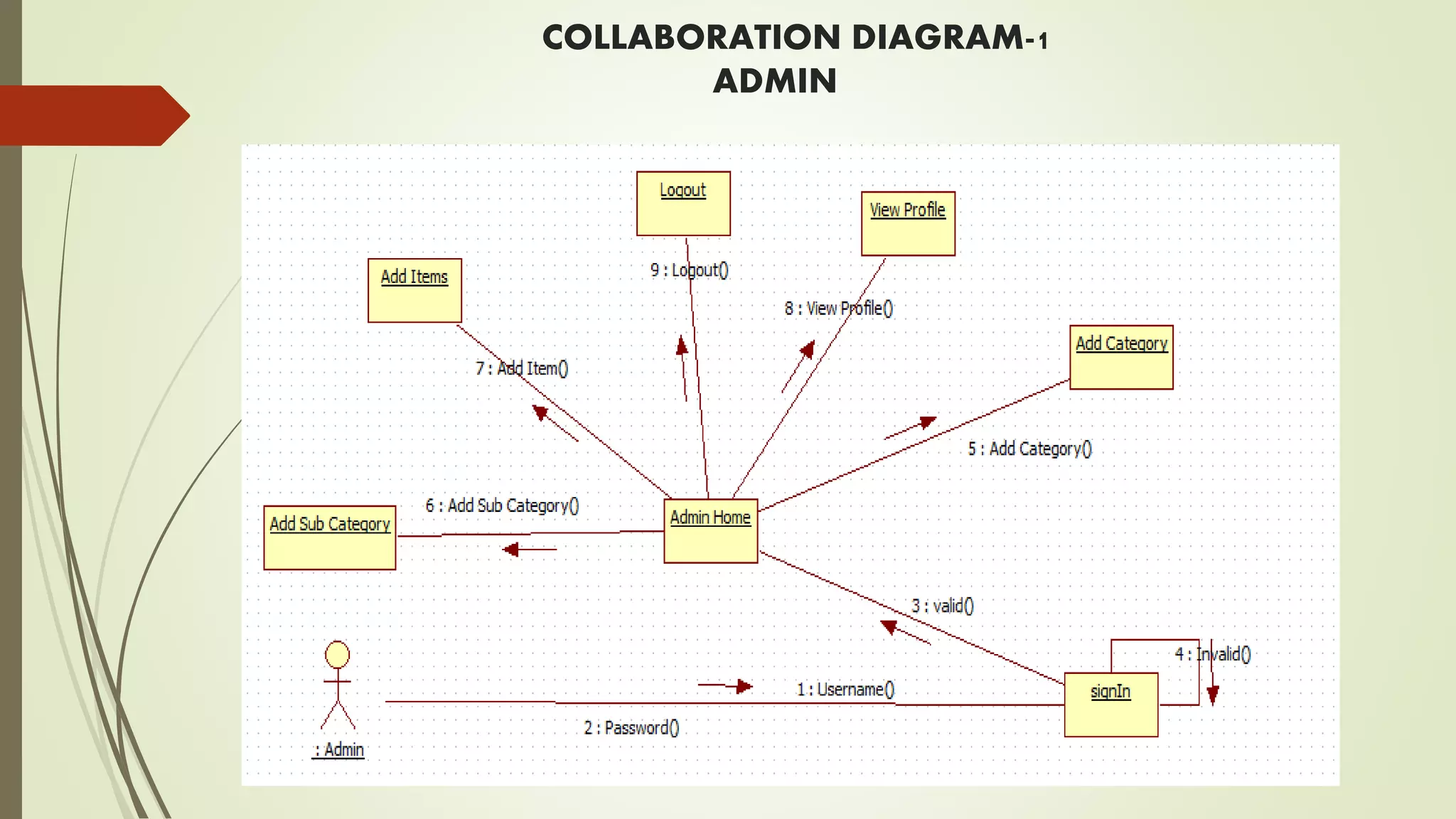
COLLABORATION DIAGRAM
 It is a type of interaction diagram that demonstrates transmission of message
between various objects participating in the interactions.
 These diagrams show the objects, links between them and message transmission
between them.
contd..
COLLABORATION DIAGRAM-1
ADMIN
COLLABORATION DIAGRAM-2
EMPLOYEE
COLLABORATION DIAGRAM-3
CUSTOMER
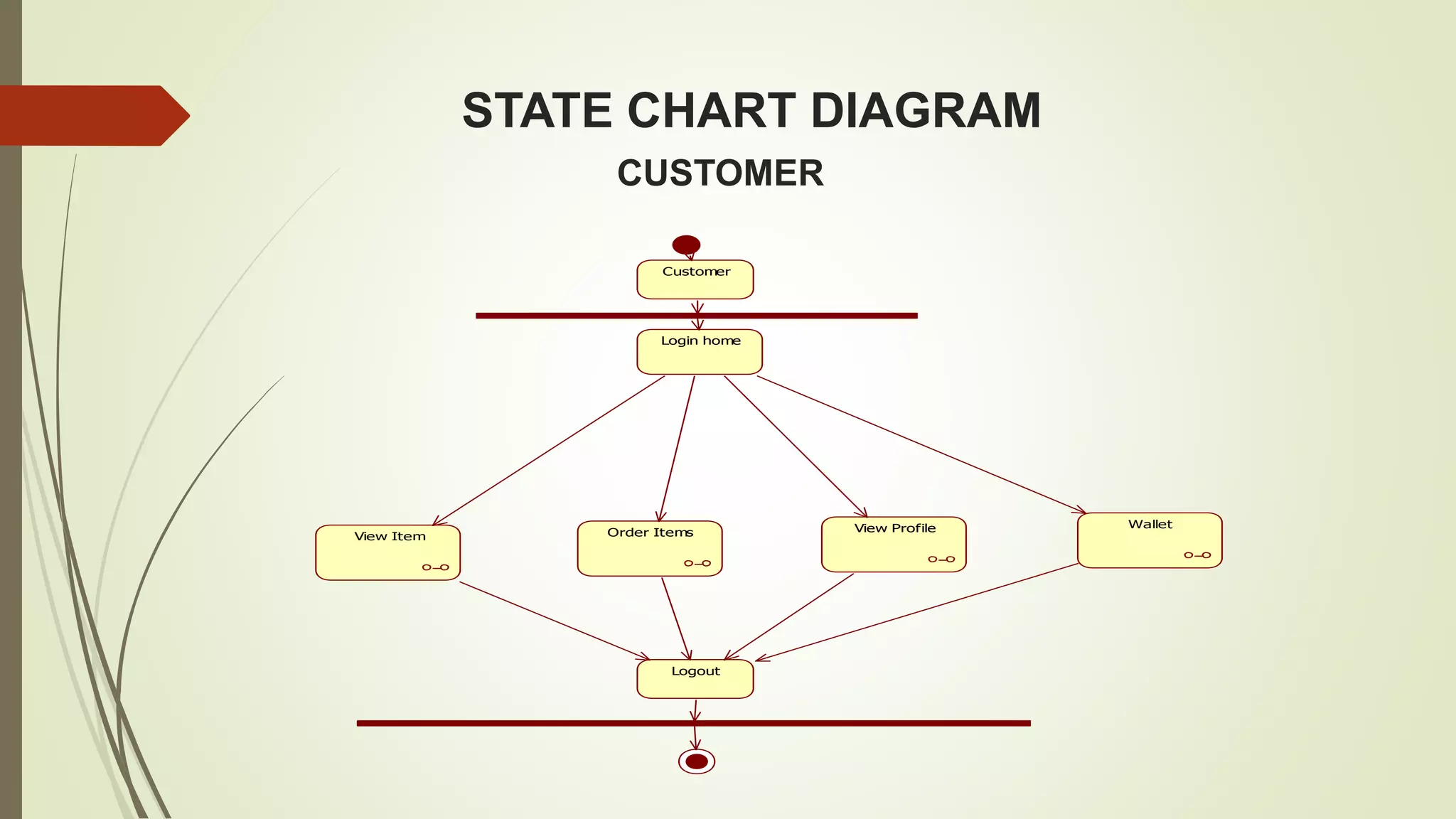
STATE CHART DIAGRAM
CUSTOMER
Login home
View Item
Wallet
Order Items
Logout
Customer
View Profile
EMPLOYEE
Employee
login home
View Profile Change Password
Logout
ADMIN
Admin
Login
Login Home
Add Category Sub Category
Logout
View Profile
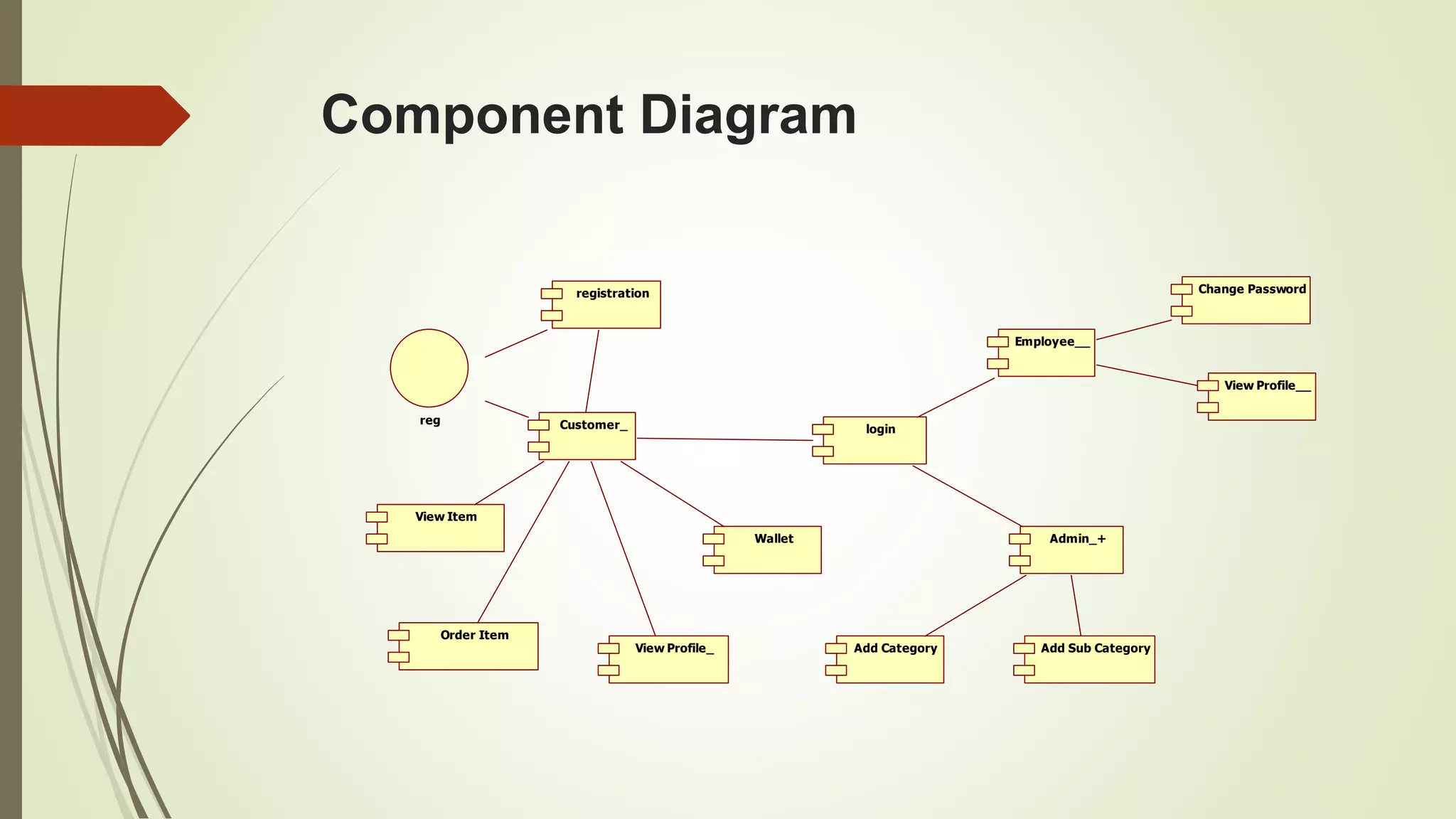
Component Diagram
Customer_
registration
login
reg
Admin_+
View Item
Add Category Add Sub Category
Order Item
View Profile_
Wallet
Employee__
Change Password
View Profile__
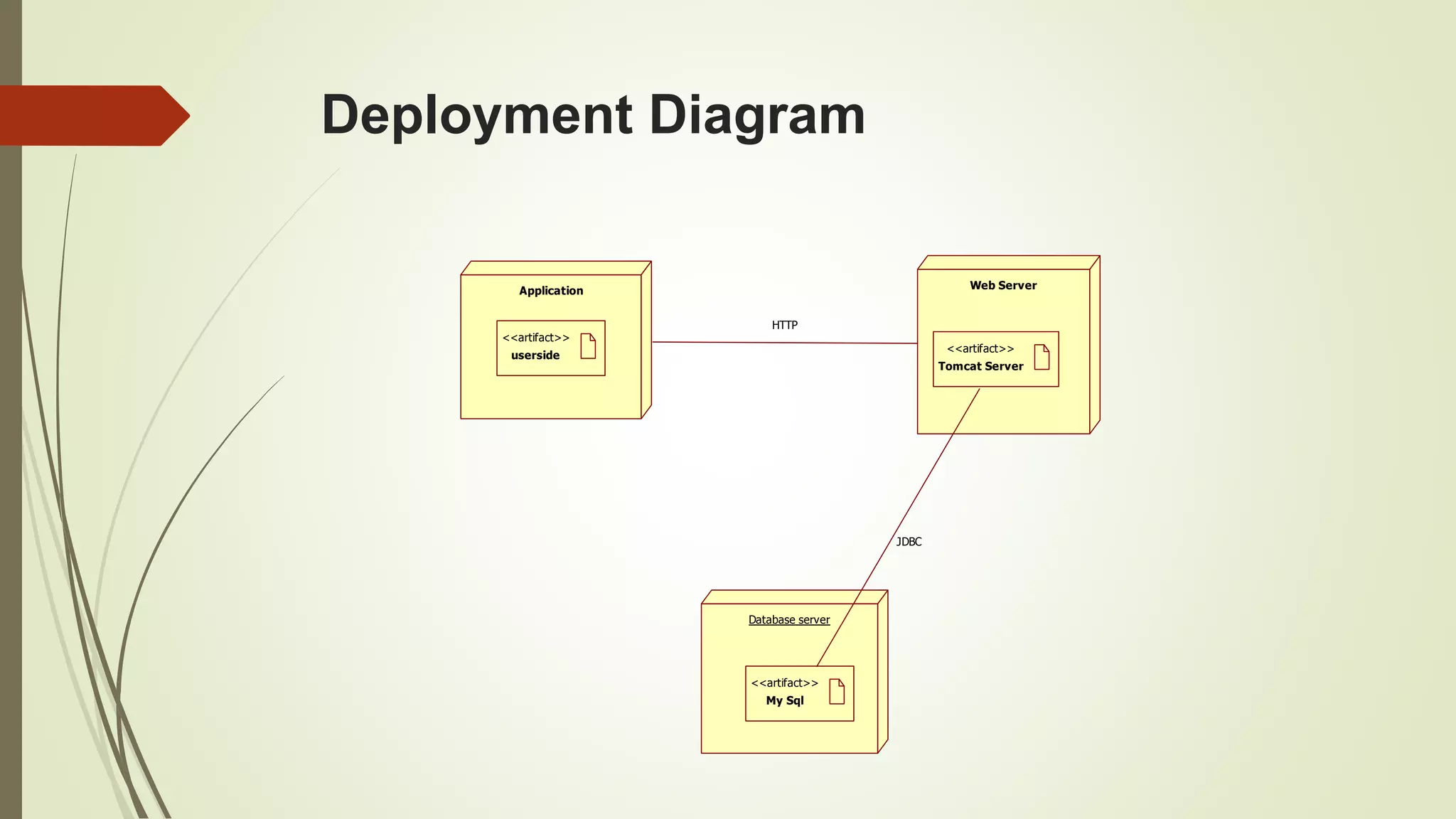
Deployment Diagram
Application Web Server
Tomcat Server
<<artifact>>
userside
<<artifact>>
Database server
My Sql
<<artifact>>
HTTP
JDBC
TABLES IN GROCERY
 Admin
 Card
 Category
 Customer
 Employee
 Item
 Item order
 Notification
 Status
 Subcategory
 Wallet
contd..
ADMIN
Field Type key description
uname Varchar(255)
Pass Varchar(255)
EMPLOYEE
Field Type Key description
employee_id Int(255) PRI auto_increment
uname Varchar(255)
pass Varchar(255)
Email Varchar(255) UNI
Gen Varchar(255)
Place Varchar(255)
Mob Varchar(255)
Status Varchar(255)
CUSTOMER
Field Type Key description
Customer_id Int(255) PRI Auto_increment
Uname Varchar(255)
Pass Varchar(255)
Email Varchar(255) UNI
Gen Varchar(255)
Place Varchar(255)
Mob Varchar(255)
CATEGORY
Field Type Key discription
Category_id Int(225) PRI Autoincrement
cname Varchar(225)
ITEM
Field Type Key description
Item_id Int(225) PRI Auto_increment
Iname Varchar(225)
qua Int(225)
mes Varchar(225)
cost Int(225)
pic Varchar(225)
subcat Int(225)
datee Varchar(225)
NOTIFICATION
Field Type Key discription
cid Int(225)
Eid Int(225)
Note Varchar(225)
Status Varchar(225)
datee Varchar(225)
SCREEN SHOTS
WELCOME PAGE
LOGIN PAGE
EMPLOYEE DETAILS
REPORT GENERATION
1
4
0
4.4
2 2
0
0.5
1
1.5
2
2.5
3
3.5
4
4.5
5
fruits vegitables
Weekly report
Series 1 Series 2 Series 3
TEST CASES
admin
Test case id Test case Expected output Exhibiting output result
1 No entry in
user name field
It will show an
error message
Please enter
username
Pass
2 Enter correct
username and
password
Admin must be
login
Admin page Pass
3 Adding grocery
items
Add to category
and sub category
New items added pass
user
Test case id Test case Expected output Exhibiting output result
1 Enter correct
username and
password
User must be login User page opened Pass
2 Phone number
field is empty
Alert message Enter your number Pass
3 Placed order Order conformation The information is in
conformed items
pass
employee
Test case id Test case Expected
output
Exhibiting
output
result
1 Enter correct
user name and
password
Employee login Employee login
page opened
Pass
2 Employee must
view order
Employee
process the
order
Order
successfully
accepted
pass
payment
Test case id Test case Expected output Exhibiting output result
1 Order place by
pay on pic up
Order must be
placed
Please make the
payment at the
time of pic up
Pass
2 If order placed
by card
payment enter
correct card no
and cvv no
Order must be
placed
Payment done pass
conclusion
 By implementing this grocery management system we are getting the more
flexibility for the users
 which can operate from the home itself by implementing the pay and pickup and
pay now options
REFERENCE
 www.goggle.com
 Hoovers (2008a), Industry Profile: Grocery Stores and Supermarkets, available at:
http://premium.hoovers.com.proxy1.cl.msu.edu:2047/subscribe/ind/fr/profile/basic.
xhtml?ID = 84 (accessed May 20).
grocery  management system

grocery management system

  • 1.
    GROCERY MANAGEMENT SYSTEM MINIPROJECT – 2nd review on, 3rd Sep - 2016 BY: B.PUJITHA (13M61A0504) UNDER THE GUIDENCE OF Mr.Srihari .G M.Tech Assistant professor, Dept. of CSE. SWARNA BHARATHI INSTITUTE OF SCIENCES AND TEHNOLOGY(SBIT) KHAMMAM,507002
  • 2.
    CONTENT1.INTRODUCTION 2.ABSTRACT 3.LITERATURE REVIEW 4.EXISTING&PROPOSED SYSTEM 5.SOFTWAREEXPLORES 5.1 SOFTWARE REQUIREMENTS 5.2 HARDWARE REQUIREMENTS 6.SYSTEM ARCHITURE 7.MODULES 7.1 Employee Module 7.2 Administrator Module 7.3 User Module 7.4 Payment option Module 8.DATAFLOW DIAGRAM 9.UML DIAGRAM 9.1 use case diagram 9.2 class diagram 9.3 activity diagram 9.4 sequence diagram 9.5 collaboration diagram contd..
  • 3.
    9.6 state chartdiagram 9.7 component diagram 9.8 deployment diagram 10.TABLES 11.SCREENSHOTS 12.REPORT GENERATION 13.TEST CASES 14.CONCLUSION 15.REFERENCE
  • 4.
    INTRODUCTION  A grocerystore is a retail store that primarily sells food. A grocer is a bulk seller of food.  As pollution around the world has increased buying food on the road side is not advisable.  Whether in charge of a small individually owned grocery store or one that is part of larger chain maintaining a grocery store successfully involves considerable responsibility.
  • 5.
    ABSTRACT  "Health iswealth”. As the saying goes from our ancient times. Eat healthy and stay healthy as of now a days its very difficult to have healthy food.  Grocery store managers must ensure that the store runs smoothly that items are priced comparatively and that customers are satisfied.  people are unable to find time to household works like buying grocery. So by this platform we provide grocery .  This is an Internet based application that can be accessed throughout the web.  This system can be used to search for all grocery and fresh vegetables which are available in the market
  • 6.
    LITERATURE REVIEW  Grocerystore managers must ensure that the store runs smoothly that items are priced comparatively and that customers are satisfied.  Previously it is developed by P.Riteesh which is super market management system.  Drawbacks of super market management system is if we cancelled the ordered item the money is not returned i.e they didn’t maintained cancelation option.  In grocery management system we overcome the drawback and we create a option called wallet.
  • 7.
    EXISTING SYSTEM:  Agrocery store is a retail store that primarily sells food. A grocer is a bulk seller of food.  Grocery stores often offer non-perishable food that is packaged in cans, bottles and boxes, with some also having fresh produce, butchers, delis, and bakeries.  As pollution around the world has increased buying food on the road side is not advisable. Whether in charge of a small individually owned grocery store or one that is part of larger chain maintaining a grocery store successfully involves considerable responsibility.  Grocery store managers must ensure that the store runs smoothly that items are priced comparatively and that customers are satisfied.
  • 8.
    PROPOSED SYSTEM:  Understandingof key concepts involved in effective grocery store management is imperative for any manager dedicated to the success of his store.  Particularly if the manages the small grocery store inventory requires more than simply keeping enough of every item in stock.  This is a internet based application that is accessed through web This system can be used to search for all grocery and fresh vegetables which are available in the market.
  • 9.
    SYSTEM REQUIREMENTS: HARDWARE REQUIREMENTS: System: Pentium IV 2.4 GHz. Hard Disk : 40 GB. Ram : 512 MB. contd..
  • 10.
    SOFTWARE REQUIREMENTS: Operating system: - Windows XP. Coding Language: J2EE Data Base : MYSQL
  • 11.
  • 12.
  • 13.
    MODULES  Employee Module Administrator Module  User Module  Payment option Module Contd..
  • 14.
    MODULES DESCRIPTION Employee Module: In this employee module the employee mainly receives the customers requirement and have to process on customers request.  He basically works on the available products and daily checks the stock availability on time and informs the administrative in charge about the products availability.  He delivers the stock ordered by the customer with proper packing and in time delivery.
  • 15.
    Administrator Module:  Inthis administration of whole company is to be maintained.  The complaints and suggestions dropped by customers must be checked and required steps are to be implemented.  Supervision of employee and the requirement of business must be checked and required steps to be taken.
  • 16.
    USER MODULE  Theuser must have the personal account and using his login details customer first check the products availability and orders the required products.  If the server is busy then customer has to retry once again and continue his request.  He can check on various products availability and choose the products required.
  • 17.
    PAYMENT OPTION MODULE We have to ways of payment options  Pay now  Cash on delivery  Customer can pay in two cases when he orders the stocks and after he receives the stock. We provide credits and debit card facility i.e on line banking system. We provide various bank payments.
  • 18.
    DATA FLOW DIAGRAM: It is a simple graphical formalism that can be used to represent a system in terms of input data to the system, various processing carried out on this data, and the output data is generated by this system  The data flow diagram (DFD) is one of the most important modeling tools. It is used to model the system components. contd..
  • 19.
  • 20.
  • 21.
  • 22.
  • 23.
  • 24.
  • 25.
  • 26.
  • 27.
    USE CASE DIAGRAM: A use case diagram in the Unified Modeling Language (UML) is a type of behavioral diagram defined by and created from a Use-case analysis.  Its purpose is to present a graphical overview of the functionality provided by a system in terms of actors, their goals (represented as use cases), and any dependencies between those use cases.  The main purpose of a use case diagram is to show what system functions are performed for which actor. Roles of the actors in the system can be depicted. contd..
  • 28.
    Employee Customer Admin Add category Sub category Additems View Profile View items Order items View profile Change password Log out Wallet
  • 29.
    CLASS DIAGRAM:  Insoftware engineering, a class diagram in the Unified Modeling Language (UML) is a type of static structure diagram that describes the structure of a system by showing the system's classes, their attributes, operations (or methods), and the relationships among the classes. It explains which class contains information. contd..
  • 30.
    Customer Class +username +password +Data Upload() +ViewData() +Verification() +Logout() Class Login +username +password +login() View Items +ItemId +View() Order Item Class +ItemName +ItemID +Order() Admin__+ +username +password +login() +Add Category() +Add Sub Category() +Add Products() +View Profile() +Logout() Employee Class +username +password +Login() +View Profile() +CVhange Password() +Logout()
  • 31.
    ACTIVITY DIAGRAM:  Activitydiagrams are graphical representations of workflows of stepwise activities and actions with support for choice, iteration and concurrency.  In the Unified Modeling Language, activity diagrams can be used to describe the business and operational step-by-step workflows of components in a system.  An activity diagram shows the overall flow of control. contd..
  • 33.
    admin Add Category Add SubCategory Add Products Admin View Profile
  • 34.
    SEQUENCE DIAGRAM:  Asequence diagram in Unified Modeling Language (UML) is a kind of interaction diagram that shows how processes operate with one another and in what order.  It is a construct of a Message Sequence Chart. Sequence diagrams are sometimes called event diagrams, event scenarios, and timing diagrams. contd..
  • 35.
    SEQUENCE DIAGRAM-1 ADMIN signIn AddCategory Add Sub Category Add Items Logout Admin Home : Admin View Profile 1 : Username() 2 : Password() 3 : valid() 4 : Invalid() 5 : Add Category() 6 : Add Sub Category() 7 : Add Item() 8 : View Profile() 9 : Logout()
  • 36.
    SEQUENCE DIAGRAM-2 EMPLOYEE : Employee RegistrationLogin Employee Home View Profile Change Password Logout Logout 1 : new User() 2 : username() 3 : invalid() 4 : password() 5 : valid() 6 : View Profile() 7 : Change Password() 8 : Logout() 9 : View Click Logs() 10 : Logout()
  • 37.
    SEQUENCE DIAGRAM-3 CUSTOMER sign inCustomer Home View Profile LogoutOrder ItemsView Items : Customer Wallet Change Password 1 : Username() 2 : Password() 3 : valid() 4 : invalid() 5 : View Profile() 6 : View Items() 7 : Order Items() 8 : View Wallet() 9 : Change Password() 10 : logout()
  • 38.
    COLLABORATION DIAGRAM  Itis a type of interaction diagram that demonstrates transmission of message between various objects participating in the interactions.  These diagrams show the objects, links between them and message transmission between them. contd..
  • 39.
  • 40.
  • 41.
  • 42.
    STATE CHART DIAGRAM CUSTOMER Loginhome View Item Wallet Order Items Logout Customer View Profile
  • 43.
  • 44.
    ADMIN Admin Login Login Home Add CategorySub Category Logout View Profile
  • 45.
    Component Diagram Customer_ registration login reg Admin_+ View Item AddCategory Add Sub Category Order Item View Profile_ Wallet Employee__ Change Password View Profile__
  • 46.
    Deployment Diagram Application WebServer Tomcat Server <<artifact>> userside <<artifact>> Database server My Sql <<artifact>> HTTP JDBC
  • 47.
    TABLES IN GROCERY Admin  Card  Category  Customer  Employee  Item  Item order  Notification  Status  Subcategory  Wallet contd..
  • 48.
    ADMIN Field Type keydescription uname Varchar(255) Pass Varchar(255)
  • 49.
    EMPLOYEE Field Type Keydescription employee_id Int(255) PRI auto_increment uname Varchar(255) pass Varchar(255) Email Varchar(255) UNI Gen Varchar(255) Place Varchar(255) Mob Varchar(255) Status Varchar(255)
  • 50.
    CUSTOMER Field Type Keydescription Customer_id Int(255) PRI Auto_increment Uname Varchar(255) Pass Varchar(255) Email Varchar(255) UNI Gen Varchar(255) Place Varchar(255) Mob Varchar(255)
  • 51.
    CATEGORY Field Type Keydiscription Category_id Int(225) PRI Autoincrement cname Varchar(225)
  • 52.
    ITEM Field Type Keydescription Item_id Int(225) PRI Auto_increment Iname Varchar(225) qua Int(225) mes Varchar(225) cost Int(225) pic Varchar(225) subcat Int(225) datee Varchar(225)
  • 53.
    NOTIFICATION Field Type Keydiscription cid Int(225) Eid Int(225) Note Varchar(225) Status Varchar(225) datee Varchar(225)
  • 54.
  • 55.
  • 58.
  • 70.
    REPORT GENERATION 1 4 0 4.4 2 2 0 0.5 1 1.5 2 2.5 3 3.5 4 4.5 5 fruitsvegitables Weekly report Series 1 Series 2 Series 3
  • 72.
    TEST CASES admin Test caseid Test case Expected output Exhibiting output result 1 No entry in user name field It will show an error message Please enter username Pass 2 Enter correct username and password Admin must be login Admin page Pass 3 Adding grocery items Add to category and sub category New items added pass
  • 73.
    user Test case idTest case Expected output Exhibiting output result 1 Enter correct username and password User must be login User page opened Pass 2 Phone number field is empty Alert message Enter your number Pass 3 Placed order Order conformation The information is in conformed items pass
  • 74.
    employee Test case idTest case Expected output Exhibiting output result 1 Enter correct user name and password Employee login Employee login page opened Pass 2 Employee must view order Employee process the order Order successfully accepted pass
  • 75.
    payment Test case idTest case Expected output Exhibiting output result 1 Order place by pay on pic up Order must be placed Please make the payment at the time of pic up Pass 2 If order placed by card payment enter correct card no and cvv no Order must be placed Payment done pass
  • 76.
    conclusion  By implementingthis grocery management system we are getting the more flexibility for the users  which can operate from the home itself by implementing the pay and pickup and pay now options
  • 77.
    REFERENCE  www.goggle.com  Hoovers(2008a), Industry Profile: Grocery Stores and Supermarkets, available at: http://premium.hoovers.com.proxy1.cl.msu.edu:2047/subscribe/ind/fr/profile/basic. xhtml?ID = 84 (accessed May 20).