Lotus Notes eDiscovery: Common Defensibility Pitfalls of Processing
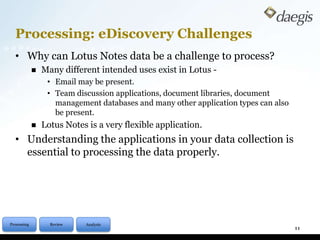
Processing: eDiscovery ChallengesDescription: Many eDiscovery applications do not handle Lotus Notes email natively. Unfortunately, conversion tools often times leave behind critical metadata that can strike at the heart of a matter. Real world examples of Notes conversions gone wrongMethods to guard your data during the conversion processBest practices when using technologies that handle Lotus Notes nativelyAlternative solution when conversion is not an optionPanelists Info: Matt Markham – Director of Solutions Engineering, DaegisKevin Savage – National Director of Operations, Daegis2
AgendaDomino / Lotus Notes platformHow to deal with the dataApplication classificationBest practicesQ&A3
Data Proliferation & Info Management	The Domino Platform keeps growing!Originally built as a generic internal messaging and application platformNow includes things like calendaring and thousands of purpose built and custom applicationsUseful data from a litigation standpoint now exists in places beyond emailApplication dataCalendar dataDocument librariesLegacy data is everywhere as Notes/Domino has been around since the early 1990’s4
Information Management & Lotus Notes	Lotus Notes EmailEmail is an application built on the Lotus Domino PlatformLotus Notes databases are being used as de facto filing cabinets because they can hold almost anythingUnlike other platforms, enormous Lotus Notes databases are not uncommon – much larger than other platforms5
How do you deal with data?	Spread data to other Notes databasesUsers often have “personal” archives on local or network drivesThis was often done to deal with poor performance on server mailbox	Employ quotas on server side mail filesKeeps storage costs lower on Domino serversKeeps performance better on Domino serversForces users to have “personal” archives on their own machines or network drives6
How do you deal with data?	Data policies and RetentionRecent versions of Domino/Notes allow:Data can be moved to archive databases automatically based on things like age and sizeData can be moved to external repositories automatically based on things like age and sizeData can also be deleted from databases (archive or otherwise) automatically based on things like ageThis still means lots of Domino databases everywhereCentralized archives are increasingly being employedEasier enforcement of retention and legal holdsCentralized search7
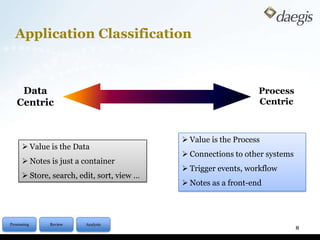
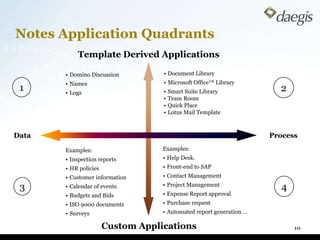
Application Classification8Data Centric Process Centric Value is the Process
Connections to other systems
Trigger events, workflow
Notes as a front-end
Value is the Data
Notes is just a container
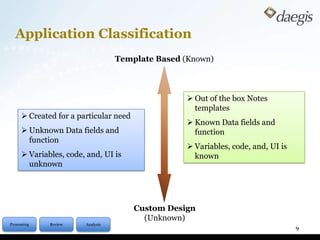
Store, search, edit, sort, view … Application Classification9Template Based (Known) Out of the box Notes templates
Known Data fields and function
Variables, code, and, UI is known
Created for a particular need

Native eDiscovery for Lotus Notes

  • 1.
    Lotus Notes eDiscovery:Common Defensibility Pitfalls of Processing
  • 2.
    Processing: eDiscovery ChallengesDescription:Many eDiscovery applications do not handle Lotus Notes email natively. Unfortunately, conversion tools often times leave behind critical metadata that can strike at the heart of a matter. Real world examples of Notes conversions gone wrongMethods to guard your data during the conversion processBest practices when using technologies that handle Lotus Notes nativelyAlternative solution when conversion is not an optionPanelists Info: Matt Markham – Director of Solutions Engineering, DaegisKevin Savage – National Director of Operations, Daegis2
  • 3.
    AgendaDomino / LotusNotes platformHow to deal with the dataApplication classificationBest practicesQ&A3
  • 4.
    Data Proliferation &Info Management The Domino Platform keeps growing!Originally built as a generic internal messaging and application platformNow includes things like calendaring and thousands of purpose built and custom applicationsUseful data from a litigation standpoint now exists in places beyond emailApplication dataCalendar dataDocument librariesLegacy data is everywhere as Notes/Domino has been around since the early 1990’s4
  • 5.
    Information Management &Lotus Notes Lotus Notes EmailEmail is an application built on the Lotus Domino PlatformLotus Notes databases are being used as de facto filing cabinets because they can hold almost anythingUnlike other platforms, enormous Lotus Notes databases are not uncommon – much larger than other platforms5
  • 6.
    How do youdeal with data? Spread data to other Notes databasesUsers often have “personal” archives on local or network drivesThis was often done to deal with poor performance on server mailbox Employ quotas on server side mail filesKeeps storage costs lower on Domino serversKeeps performance better on Domino serversForces users to have “personal” archives on their own machines or network drives6
  • 7.
    How do youdeal with data? Data policies and RetentionRecent versions of Domino/Notes allow:Data can be moved to archive databases automatically based on things like age and sizeData can be moved to external repositories automatically based on things like age and sizeData can also be deleted from databases (archive or otherwise) automatically based on things like ageThis still means lots of Domino databases everywhereCentralized archives are increasingly being employedEasier enforcement of retention and legal holdsCentralized search7
  • 8.
    Application Classification8Data CentricProcess Centric Value is the Process
  • 9.
  • 10.
  • 11.
    Notes as afront-end
  • 12.
  • 13.
    Notes is justa container
  • 14.
    Store, search, edit,sort, view … Application Classification9Template Based (Known) Out of the box Notes templates
  • 15.
    Known Data fieldsand function
  • 16.
  • 17.
    Created for aparticular need