Ken Matthews
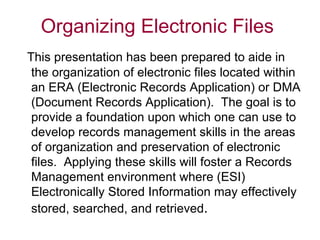
This presentation has been prepared to aide in the organization of electronic files located within an ERA (Electronic Records Application) or DMA (Document Records Application).  The goal is to provide a foundation upon which one can use to develop records management skills in the areas of organization and preservation of electronic files.  Applying these skills will foster a Records Management environment where (ESI) Electronically Stored Information may effectively stored, searched, and retrieved .
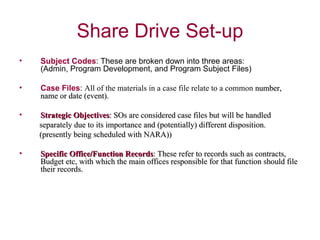
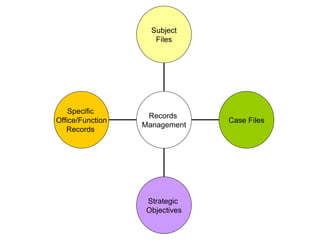
Subject Codes : These are broken down into three areas:  (Admin, Program Development, and Program Subject Files)  Case Files :  All of the materials in a case file relate to a common  number, name or date (event).  Strategic Objectives : SOs are considered case files but will be handled  separately due to its importance and (potentially) different disposition. (presently being scheduled with NARA)) Specific Office/Function Records : These refer to records such as contracts,  Budget etc, with which the main offices responsible for that function should file their records.
Specific  Office/Function Records  Strategic  Objectives Case Files Subject Files Records  Management
Subject files consist of general file materials of incoming originals and  outgoing record copies of letters, memoranda, telegrams, reports and  materials involving a wide variety of subjects. They bring together  documents relating to the same subject so that information can be  easily found. The subject categories chosen as filing guides reflect the organization, policies, programs, and functions of the  Agency.
The Subject Outlines are made up of subject file codes (e.g. EDU 12, PRC 4, ADM 8) with file classification captions such as Health Education, Administrative Management, etc., followed by a narrative description for each code and classification. Together, these comprise a system that provides offices with an effective method for filing and retrieving information. Each subject outline (i.e., ADM, AGR) has an alpha numeric file group code (i.e., ADM-1, ADM-2, AGR-1, AGR-2) which provides primary and secondary breakdowns for subject file materials. These codes are subdivided into secondary breakdowns for more precise identification of subject content. Individual offices may subdivide subject categories further into tertiary or third levels of breakdown.  Next, you will see a recommended structure of the Subject Files in your sharable drive where the numeric part of the subject codes was purposely omitted and it is left to your discretion to include (or not) these added breakdowns when setting up your files.
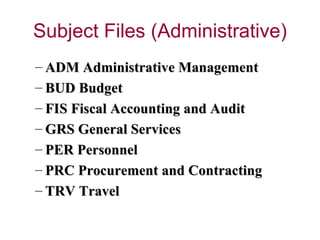
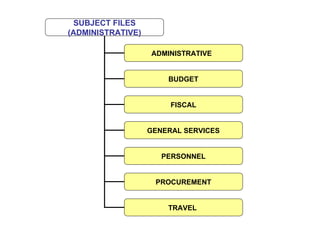
ADM Administrative Management  BUD Budget FIS Fiscal Accounting and Audit  GRS General Services  PER Personnel  PRC Procurement and Contracting  TRV Travel
SUBJECT FILES (ADMINISTRATIVE) ADMINISTRATIVE PROCUREMENT TRAVEL  PERSONNEL GENERAL SERVICES FISCAL BUDGET
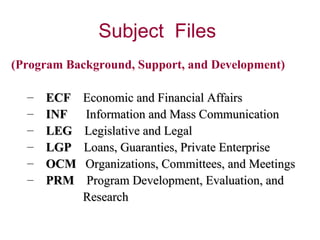
(Program Background, Support, and Development)   ECF  Economic and Financial Affairs  INF  Information and Mass Communication  LEG  Legislative and Legal  LGP  Loans, Guaranties, Private Enterprise   OCM  Organizations, Committees, and Meetings  PRM  Program Development, Evaluation, and  Research
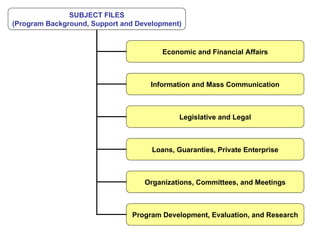
SUBJECT FILES (Program Background, Support and Development) Economic and Financial Affairs Information and Mass Communication Legislative and Legal Organizations, Committees, and Meetings Loans, Guaranties, Private Enterprise Program Development, Evaluation, and Research
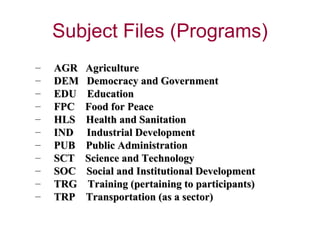
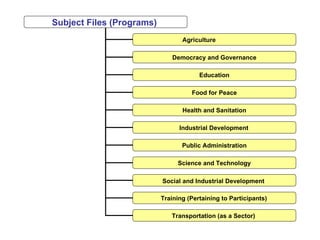
AGR  Agriculture  DEM  Democracy and Government EDU  Education  FPC  Food for Peace  HLS  Health and Sanitation  IND  Industrial Development  PUB  Public Administration  SCT  Science and Technology  SOC  Social and Institutional Development  TRG  Training (pertaining to participants)  TRP  Transportation (as a sector)
Subject Files (Programs)  Agriculture Democracy and Governance Education Industrial Development   Health and Sanitation Food for Peace Science and Technology Public Administration Transportation (as a Sector)  Training (Pertaining to Participants)   Social and Industrial Development
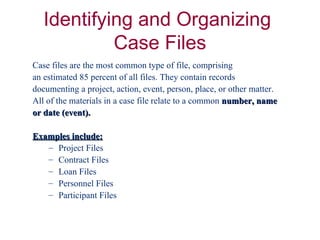
Case files are the most common type of file, comprising  an estimated 85 percent of all files. They contain records  documenting a project, action, event, person, place, or other matter.  All of the materials in a case file relate to a common   number, name  or date (event).  Examples include:   Project Files  Contract Files  Loan Files  Personnel Files  Participant Files
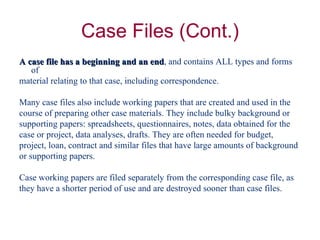
A case file has a beginning and an end , and contains ALL types and forms of  material relating to that case, including correspondence. Many case files also include working papers that are created and used in the  course of preparing other case materials. They include bulky background or  supporting papers: spreadsheets, questionnaires, notes, data obtained for the  case or project, data analyses, drafts. They are often needed for budget,  project, loan, contract and similar files that have large amounts of background  or supporting papers. Case working papers are filed separately from the corresponding case file, as  they have a shorter period of use and are destroyed sooner than case files.
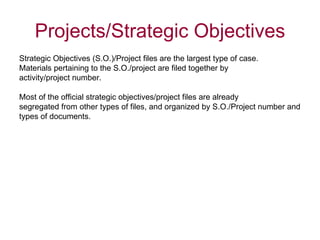
Strategic Objectives (S.O.)/Project files are the largest type of case.  Materials pertaining to the S.O./project are filed together by  activity/project number. Most of the official strategic objectives/project files are already  segregated from other types of files, and organized by S.O./Project number and  types of documents.
The final category includes records that are created or received by specific  functional offices (i.e., Procurement, Communications and Records, Budget,  etc.) For example, if you work in the Budget Office, you have specific records  that are created and preserved to document business transactions particular to  that office. Conversely, you might work in Procurement and when dealing with  your own budget documentation, you can file these records in your Subject  Files under the administrative subject code “Budget”.  The difference is related  to the disposition of the applicable files, the Budget Office might need to keep  their ‘budget” records for six years versus the Procurement Office keeping their  “ budget” records for two years.
At times, there will be situations where you might want or need to keep a  particular document in several of the options presented in this guidance. For example, a  document might need to be filed with the S.O. Team but your office wants to file another  copy using the specific office/function guidance plus a copy in the “admin” subject files area  for reference purposes. Well, this practice is quite acceptable and happens quite  often. All you must do is to comply with the particular disposition instructions, though  different,  for each category and it will be legal to destroy the records once retention is met for  each of the categories involved.  Offices might want to consider saving their files under different categories to ensure  proper documentation of their functional office, the Strategic Objectives, and other  administrative needs (i.e., reference, legal, and audit, etc).  A good practice when filing a document in different categories is to cross reference the files.  This means to enter a statement somewhere visible to all others (authorized to access  the document) mentioning where the other copies are filed (i.e., A copy of this  document has also been filed in the “Budget” Admin Subject Files and another with the S.O.  Team files, etc..).
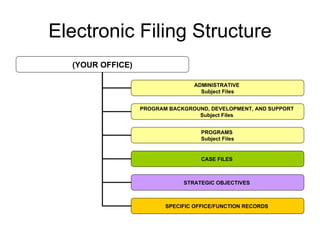
(YOUR OFFICE) ADMINISTRATIVE  Subject Files PROGRAM BACKGROUND, DEVELOPMENT, AND SUPPORT  Subject Files  PROGRAMS  Subject Files SPECIFIC OFFICE/FUNCTION RECORDS   STRATEGIC OBJECTIVES  CASE FILES
 

Recommended Electronic Filing Structure (Organization and Development)

  • 1.
  • 2.
    This presentation hasbeen prepared to aide in the organization of electronic files located within an ERA (Electronic Records Application) or DMA (Document Records Application). The goal is to provide a foundation upon which one can use to develop records management skills in the areas of organization and preservation of electronic files. Applying these skills will foster a Records Management environment where (ESI) Electronically Stored Information may effectively stored, searched, and retrieved .
  • 3.
    Subject Codes :These are broken down into three areas: (Admin, Program Development, and Program Subject Files) Case Files : All of the materials in a case file relate to a common number, name or date (event). Strategic Objectives : SOs are considered case files but will be handled separately due to its importance and (potentially) different disposition. (presently being scheduled with NARA)) Specific Office/Function Records : These refer to records such as contracts, Budget etc, with which the main offices responsible for that function should file their records.
  • 4.
    Specific Office/FunctionRecords Strategic Objectives Case Files Subject Files Records Management
  • 5.
    Subject files consistof general file materials of incoming originals and outgoing record copies of letters, memoranda, telegrams, reports and materials involving a wide variety of subjects. They bring together documents relating to the same subject so that information can be easily found. The subject categories chosen as filing guides reflect the organization, policies, programs, and functions of the Agency.
  • 6.
    The Subject Outlinesare made up of subject file codes (e.g. EDU 12, PRC 4, ADM 8) with file classification captions such as Health Education, Administrative Management, etc., followed by a narrative description for each code and classification. Together, these comprise a system that provides offices with an effective method for filing and retrieving information. Each subject outline (i.e., ADM, AGR) has an alpha numeric file group code (i.e., ADM-1, ADM-2, AGR-1, AGR-2) which provides primary and secondary breakdowns for subject file materials. These codes are subdivided into secondary breakdowns for more precise identification of subject content. Individual offices may subdivide subject categories further into tertiary or third levels of breakdown.  Next, you will see a recommended structure of the Subject Files in your sharable drive where the numeric part of the subject codes was purposely omitted and it is left to your discretion to include (or not) these added breakdowns when setting up your files.
  • 7.
    ADM Administrative Management BUD Budget FIS Fiscal Accounting and Audit GRS General Services PER Personnel PRC Procurement and Contracting TRV Travel
  • 8.
    SUBJECT FILES (ADMINISTRATIVE)ADMINISTRATIVE PROCUREMENT TRAVEL PERSONNEL GENERAL SERVICES FISCAL BUDGET
  • 9.
    (Program Background, Support,and Development) ECF Economic and Financial Affairs INF Information and Mass Communication LEG Legislative and Legal LGP Loans, Guaranties, Private Enterprise OCM Organizations, Committees, and Meetings PRM Program Development, Evaluation, and Research
  • 10.
    SUBJECT FILES (ProgramBackground, Support and Development) Economic and Financial Affairs Information and Mass Communication Legislative and Legal Organizations, Committees, and Meetings Loans, Guaranties, Private Enterprise Program Development, Evaluation, and Research
  • 11.
    AGR Agriculture DEM Democracy and Government EDU Education FPC Food for Peace HLS Health and Sanitation IND Industrial Development PUB Public Administration SCT Science and Technology SOC Social and Institutional Development TRG Training (pertaining to participants) TRP Transportation (as a sector)
  • 12.
    Subject Files (Programs) Agriculture Democracy and Governance Education Industrial Development Health and Sanitation Food for Peace Science and Technology Public Administration Transportation (as a Sector) Training (Pertaining to Participants) Social and Industrial Development
  • 13.
    Case files arethe most common type of file, comprising an estimated 85 percent of all files. They contain records documenting a project, action, event, person, place, or other matter. All of the materials in a case file relate to a common number, name or date (event). Examples include: Project Files Contract Files Loan Files Personnel Files Participant Files
  • 14.
    A case filehas a beginning and an end , and contains ALL types and forms of material relating to that case, including correspondence. Many case files also include working papers that are created and used in the course of preparing other case materials. They include bulky background or supporting papers: spreadsheets, questionnaires, notes, data obtained for the case or project, data analyses, drafts. They are often needed for budget, project, loan, contract and similar files that have large amounts of background or supporting papers. Case working papers are filed separately from the corresponding case file, as they have a shorter period of use and are destroyed sooner than case files.
  • 15.
    Strategic Objectives (S.O.)/Projectfiles are the largest type of case. Materials pertaining to the S.O./project are filed together by activity/project number. Most of the official strategic objectives/project files are already segregated from other types of files, and organized by S.O./Project number and types of documents.
  • 16.
    The final categoryincludes records that are created or received by specific functional offices (i.e., Procurement, Communications and Records, Budget, etc.) For example, if you work in the Budget Office, you have specific records that are created and preserved to document business transactions particular to that office. Conversely, you might work in Procurement and when dealing with your own budget documentation, you can file these records in your Subject Files under the administrative subject code “Budget”. The difference is related to the disposition of the applicable files, the Budget Office might need to keep their ‘budget” records for six years versus the Procurement Office keeping their “ budget” records for two years.
  • 17.
    At times, therewill be situations where you might want or need to keep a particular document in several of the options presented in this guidance. For example, a document might need to be filed with the S.O. Team but your office wants to file another copy using the specific office/function guidance plus a copy in the “admin” subject files area for reference purposes. Well, this practice is quite acceptable and happens quite often. All you must do is to comply with the particular disposition instructions, though different, for each category and it will be legal to destroy the records once retention is met for each of the categories involved. Offices might want to consider saving their files under different categories to ensure proper documentation of their functional office, the Strategic Objectives, and other administrative needs (i.e., reference, legal, and audit, etc). A good practice when filing a document in different categories is to cross reference the files. This means to enter a statement somewhere visible to all others (authorized to access the document) mentioning where the other copies are filed (i.e., A copy of this document has also been filed in the “Budget” Admin Subject Files and another with the S.O. Team files, etc..).
  • 18.
    (YOUR OFFICE) ADMINISTRATIVE Subject Files PROGRAM BACKGROUND, DEVELOPMENT, AND SUPPORT Subject Files PROGRAMS Subject Files SPECIFIC OFFICE/FUNCTION RECORDS STRATEGIC OBJECTIVES CASE FILES
  • 19.