
Class # Electronic Records Management Siri Berdahl, Electronic Records Analyst, Library of Virginia
What we’ll cover Electronic records responsibilities and challenges Storage media and database concerns Reformatting Metadata Email management Enterprise Content Management (ECM)
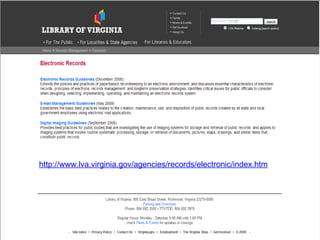
http://www.lva.virginia.gov/agencies/records/electronic/index.htm
What is a record? "Public record" or "record" means recorded information that documents a transaction or activity by or with any public officer, agency or employee of an agency.  Regardless of physical form or characteristic , the recorded information is a public record if it is produced, collected, received or retained in pursuance of law or in connection with the transaction of public business.  The medium upon which such information is recorded has no bearing on the determination of whether the recording is a public record.  Code of Virginia,  Title 42.1 Chapter 7 Virginia Public Records Act
What is an electronic record? An electronic record is a record created, generated, sent, communicated, received, or stored by electronic means. Formats Include : Storage Media Include : Word processing files Databases Spreadsheets PowerPoint presentations Email Scanned images Web sites Multimedia files Hard drives Diskettes CDs DVDs Magnetic Tape Network Servers
Electronic Records Responsibilities and  Challenges
Electronic Records Management Responsibilities to establish and maintain an active, continuing program for the  economical and efficient management  of the records of such agency . . .   It shall be the duty of any agency with public records to cooperate with the Librarian of Virginia . . .  ensuring that its public records are preserved, maintained, and accessible  throughout their lifecycle ,   including  converting  and  migrating  electronic records as often as necessary so that information is not lost due to hardware, software, or media  obsolescence  or  deterioration The Virginia Public Records Act, Code of Virginia, § 42.1-85
Electronic Records Challenges Cooperative effort between  records management staff management legal counsel information technology department Major advantage = major liability ease of copying and modification Media degradation and format obsolescence Controlling accumulation and duplication
Electronic Records Destruction Records containing “identifying information” must “…be destroyed within six months of the expiration of the records retention period.”  (COV § 42.1 -86.1) According to 17VAC15-120, electronic media containing Social Security numbers must be overwritten, degaussed or physically destroyed at the end of its retention period. Deletion  ≠ destruction!
Storage Media and  Database Management
Database Management Have ability to take files offline and store them (inactive table) Retrieve inactive files for the full duration of the retention period Identify records eligible for deletion or preservation Document what has been deleted or transferred
Storage Media Considerations Large enough to accommodate future growth Appropriate level of certainty for the recovery and security of data Non-rewritable media is best when concerned about record longevity or security
Audio/Video Media Storage
Reformatting
When reformatting, remember… It is legal to reformat records into digital form ( Code of Virginia  §8.01-391, Copies of Originals as Evidence)  Must have a quality control process in place  Need an indexing system No Certificate of Records Destruction (RM-3 Form) required for destruction of originals RM-3 Form  is  required when reformatted records   are destroyed
Reformatting Standards ANSI/AIIM MS44-1988 (R1993)   Recommended Practice for Quality Control of Image Scanners AIIM MS52-1991   Recommended Practice for the Requirements and Characteristics of Documents Intended for Optical Scanning
Digital Imaging Advantages Reduced need for physical storage space Multiple users and access levels  Shorter retrieval time for users or during discovery Ability to search using optical character recognition (OCR)
Digital Imaging Disadvantages Retention periods may be harder to implement Significant equipment costs Hardware and software upkeep Complex and time-consuming Image capture Quality control Metadata management
Metadata
Metadata   Data describing context, content, and structure of records and their management through time Data about data   Creator Contributor Date Modifications Document type
 
 
E-mail Management
 
E-mail is not always correspondence! Work Orders - Administrative Copies   Retain 3 years then destroy. Grant Records (Non-fiscal)   Retain in accordance with terms of grant or 5 years after termination, whichever is greater, then destroy in compliance with No. 8 on the schedule cover page. Grievance Records and Reports   Retain 3 years after closure then destroy in compliance with No. 8 on schedule cover page.
Non-records vs. records Non-Record Routine requests for information Security backup files Reference copies Record Responses requiring special compilation or research Correspondence concerning policy Implementation/management of programs
 
Record or Non-Record?
 
Acceptable E-Mail Storage Storing e-mails within an electronic mail system Creating folders that are stored outside of the mailbox but can be viewed using the e-mail client
Organizing your e-mail Organize e-mail in folders by records series or subject area and fiscal or calendar year. Establish agency- or division-wide filing structures. Archive manually and frequently.
Manual versus Auto-Archiving “ AutoArchiving” is an automatic process (if turned on within Outlook) that takes place at regular intervals Rather than using the “AutoArchiving” function, users should set aside time (every week or month, for example) to clean up mailboxes and manually organize emails according to retention schedules
Acceptable E-Mail Storage Storing, accessing, and managing e-mail messages and other electronic records using an Enterprise Content Management (ECM) system Printing e-mails along with any transmission and receipt data and maintaining them in a manual filing system
Discoverability and liability E-mail records are subject to the same accessibility requirements as other public records – they are exempt from access only if they fall within the exemptions provided under FOIA.
ECM
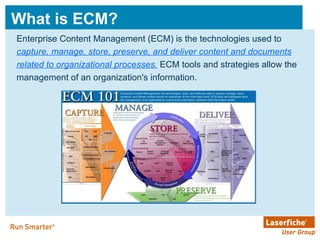
What is ECM? Enterprise Content Management (ECM) is the technologies used to capture, manage, store, preserve, and deliver content and documents related to organizational processes.  ECM tools and strategies allow the management of an organization's information.
ECM in the Commonwealth Governor Kaine’s “Paperless Government” initiative  Services available include business process management, e-mail archiving, e-forms,  records management , storage connectors, business activity monitors, Web site templates, redaction software and more ECM Center of Excellence
Questions? 800 E Broad St Richmond, VA 23219 Phone: 804-692-3600 Fax: 804-692-3603 http://www.lva.virginia.gov/agencies/records

LVA Electronic Records Management

  • 1.
    Class # ElectronicRecords Management Siri Berdahl, Electronic Records Analyst, Library of Virginia
  • 2.
    What we’ll coverElectronic records responsibilities and challenges Storage media and database concerns Reformatting Metadata Email management Enterprise Content Management (ECM)
  • 3.
  • 4.
    What is arecord? "Public record" or "record" means recorded information that documents a transaction or activity by or with any public officer, agency or employee of an agency. Regardless of physical form or characteristic , the recorded information is a public record if it is produced, collected, received or retained in pursuance of law or in connection with the transaction of public business. The medium upon which such information is recorded has no bearing on the determination of whether the recording is a public record. Code of Virginia, Title 42.1 Chapter 7 Virginia Public Records Act
  • 5.
    What is anelectronic record? An electronic record is a record created, generated, sent, communicated, received, or stored by electronic means. Formats Include : Storage Media Include : Word processing files Databases Spreadsheets PowerPoint presentations Email Scanned images Web sites Multimedia files Hard drives Diskettes CDs DVDs Magnetic Tape Network Servers
  • 6.
  • 7.
    Electronic Records ManagementResponsibilities to establish and maintain an active, continuing program for the economical and efficient management of the records of such agency . . . It shall be the duty of any agency with public records to cooperate with the Librarian of Virginia . . . ensuring that its public records are preserved, maintained, and accessible throughout their lifecycle , including converting and migrating electronic records as often as necessary so that information is not lost due to hardware, software, or media obsolescence or deterioration The Virginia Public Records Act, Code of Virginia, § 42.1-85
  • 8.
    Electronic Records ChallengesCooperative effort between records management staff management legal counsel information technology department Major advantage = major liability ease of copying and modification Media degradation and format obsolescence Controlling accumulation and duplication
  • 9.
    Electronic Records DestructionRecords containing “identifying information” must “…be destroyed within six months of the expiration of the records retention period.” (COV § 42.1 -86.1) According to 17VAC15-120, electronic media containing Social Security numbers must be overwritten, degaussed or physically destroyed at the end of its retention period. Deletion ≠ destruction!
  • 10.
    Storage Media and Database Management
  • 11.
    Database Management Haveability to take files offline and store them (inactive table) Retrieve inactive files for the full duration of the retention period Identify records eligible for deletion or preservation Document what has been deleted or transferred
  • 12.
    Storage Media ConsiderationsLarge enough to accommodate future growth Appropriate level of certainty for the recovery and security of data Non-rewritable media is best when concerned about record longevity or security
  • 13.
  • 14.
  • 15.
    When reformatting, remember…It is legal to reformat records into digital form ( Code of Virginia §8.01-391, Copies of Originals as Evidence) Must have a quality control process in place Need an indexing system No Certificate of Records Destruction (RM-3 Form) required for destruction of originals RM-3 Form is required when reformatted records are destroyed
  • 16.
    Reformatting Standards ANSI/AIIMMS44-1988 (R1993) Recommended Practice for Quality Control of Image Scanners AIIM MS52-1991 Recommended Practice for the Requirements and Characteristics of Documents Intended for Optical Scanning
  • 17.
    Digital Imaging AdvantagesReduced need for physical storage space Multiple users and access levels Shorter retrieval time for users or during discovery Ability to search using optical character recognition (OCR)
  • 18.
    Digital Imaging DisadvantagesRetention periods may be harder to implement Significant equipment costs Hardware and software upkeep Complex and time-consuming Image capture Quality control Metadata management
  • 19.
  • 20.
    Metadata Data describing context, content, and structure of records and their management through time Data about data Creator Contributor Date Modifications Document type
  • 21.
  • 22.
  • 23.
  • 24.
  • 25.
    E-mail is notalways correspondence! Work Orders - Administrative Copies Retain 3 years then destroy. Grant Records (Non-fiscal) Retain in accordance with terms of grant or 5 years after termination, whichever is greater, then destroy in compliance with No. 8 on the schedule cover page. Grievance Records and Reports Retain 3 years after closure then destroy in compliance with No. 8 on schedule cover page.
  • 26.
    Non-records vs. recordsNon-Record Routine requests for information Security backup files Reference copies Record Responses requiring special compilation or research Correspondence concerning policy Implementation/management of programs
  • 27.
  • 28.
  • 29.
  • 30.
  • 31.
    Acceptable E-Mail StorageStoring e-mails within an electronic mail system Creating folders that are stored outside of the mailbox but can be viewed using the e-mail client
  • 32.
    Organizing your e-mailOrganize e-mail in folders by records series or subject area and fiscal or calendar year. Establish agency- or division-wide filing structures. Archive manually and frequently.
  • 33.
    Manual versus Auto-Archiving“ AutoArchiving” is an automatic process (if turned on within Outlook) that takes place at regular intervals Rather than using the “AutoArchiving” function, users should set aside time (every week or month, for example) to clean up mailboxes and manually organize emails according to retention schedules
  • 34.
    Acceptable E-Mail StorageStoring, accessing, and managing e-mail messages and other electronic records using an Enterprise Content Management (ECM) system Printing e-mails along with any transmission and receipt data and maintaining them in a manual filing system
  • 35.
    Discoverability and liabilityE-mail records are subject to the same accessibility requirements as other public records – they are exempt from access only if they fall within the exemptions provided under FOIA.
  • 36.
  • 37.
    What is ECM?Enterprise Content Management (ECM) is the technologies used to capture, manage, store, preserve, and deliver content and documents related to organizational processes. ECM tools and strategies allow the management of an organization's information.
  • 38.
    ECM in theCommonwealth Governor Kaine’s “Paperless Government” initiative Services available include business process management, e-mail archiving, e-forms, records management , storage connectors, business activity monitors, Web site templates, redaction software and more ECM Center of Excellence
  • 39.
    Questions? 800 EBroad St Richmond, VA 23219 Phone: 804-692-3600 Fax: 804-692-3603 http://www.lva.virginia.gov/agencies/records

Editor's Notes

  • #5 Documents a transaction or activity Includes all mediums regardless of physical form or characteristic And is considered a public record if it is produced, collected, received or retained in pursuance of law or in connection with the transaction of public business
  • #6 Machine-readable versus human-readable; microfilm (though typically viewed using a machine) is technically human-readable
  • #8 Stress agency responsibility for conversion and migration
  • #10 Electronic shredder (like erasure) B. Electronic records. Agencies must establish procedures and processes to destroy social security numbers in public records that have reached the end of their retention period in electronic format and stored on information or recordkeeping systems. Agencies may maintain or destroy the physical media. 1. Files stored on a computer must not only be deleted but also overwritten using software that overwrites the files with meaningless data to totally obliterate the original data and to prevent the information from being reconstructed. 2. Back-up tapes must be overwritten to totally obliterate the original data. 3. If an agency plans to maintain the floppy disks, tapes or other magnetic storage devices, other than hard drives, with data containing social security numbers, the media must be: a. Overwritten using software that overwrites the files with meaningless data to totally obliterate the original data; or b. Exposed to a powerful magnetic field to disrupt the information. If a magnetic field is used, the data must be reviewed to ensure that the social security numbers are not retrievable. 4. CD-ROMs must be incinerated or physically broken, into several pieces, to be rendered unusable. 5. When disposing of computers that contain social security numbers, hard drives must be overwritten and inspected to insure no social security numbers remain. If data remains, the hard drive must be removed and disposed of separately by drilling to prevent it from being used again.
  • #13 Non-rewritable or WORM. Stress that agency/locality are responsible for migration/conversion.
  • #14 Digital storage media is not adequate for long-term or archival preservation of records. Migration will be necessary. The purpose of BWAV file format is the addition of metadata to facilitate the seamless exchange of sound data between different computer platforms and applications. It specifies the format of metadata , allowing audio processing elements to identify themselves, document their activities, and permit synchronization with other recordings. This metadata is stored as extension chunks in a standard digital audio WAV file.
  • #16 Digital image is legal for response to FOIA or a court subpoena May also reformat permanent records. Consult your Records Analyst before starting. If vital records, software application and indexing system must be included in offsite storage
  • #17 American National Standard for Information and Image Management Association of Information and Image Management
  • #19 Images are not human-readable without computer equipment Significant equipment costs, including hardware and software Hardware and software obsolescence Systems change every 18 months to 5 years Software changes every 2-3 years Different types of scanners required for various formats Complex and time-consuming Image capture Quality control Metadata management Retention periods are harder to implement Sorting those to be deleted from those to be saved Forget that these are records
  • #27 Draft is considered FOIA-able.
  • #31 The history of the project, the process, and those involved: OAG, Internal Auditor, VDOT, APA, VITA, LVA Just like we always tell folks in our workshops, electronic records management needs to be a team effort…so we got a team together to discuss how the Commonwealth should best manage its email. We had representatives from all interested parties – IT, Legal, RM It’s available on our Web site and there’s a link at the end of the presentation.
  • #32 We realized that different agencies have different budgets and different situations that they’re dealing with. We wanted to give people options along with the advantages and disadvantages of using each of these options for email storage. The four methods we came up with are really the only acceptable means of email storage according to the working group, but you’ll see that some options are better than others. Not recommended! Only suitable for routine correspondence with short retention periods. PST files on shared drives.
  • #33 Folders stored outside mailbox but viewed with e-mail client The default is ‘personal folders’
  • #34 Talk about definition of ‘archiving’
  • #35 A. Names and e-mail addresses of recipients, including names and addresses of all members of distribution lists B. Name and e-mail address of sender C. Time and date that the e-mail was sent D. Subject line that describes the content of the e-mail E. Text in the body of the e-mail F. Attachments, if applicable
  • #36 Requests from the public for e-mail records must be honored in the same manner as other public records. E-mail records must remain accessible during their entire retention period and should be maintained in such a manner as to permit easy access and timely retrieval.
  • #38 AIIM (Association of Information and Image Management), the international industry association focused on ECM, has provided this universal definition for ECM. ECM is the management of unstructured information, defined as data that is not stored in a database. In addition to images of paper documents, this includes “born digital” documents such as Word, Excel, and PDF files, emails, electronic forms, web content, media files, and legacy report data converted to images (ERM/COLD). 80% to 90% of an organization’s information is unstructured (per numerous industry sources). This content is what every agency relies upon to function and serve their mission. ECM is about delivering the right information to the right person at the right time . Why use ECM? Reduce operating costs Do more without hiring new people Reduce risk Manage FOIA requests better Share information (collaborate)
  • #39 In 2007, IBM FileNet P8 was selected as the Commonwealth standard for ECM software. Services available include business process management, e-mail archiving, e-forms, records management, storage connectors, business activity monitors, Web site templates, redaction software and more. This business process software achieves the objectives set out in Governor Kaine’s “Paperless Government” Initiative through improved digital capture, document storage and retrieval services as well as making it easier to telework. A Shared Services platform also allows smaller to medium-sized agencies that cannot justify their own ECM solution or larger agencies wishing to pilot ECM in a limited fashion to take advantage of this offering.