INTRODUCTION TO COMPUTER
SYSTEM
CSC 2313
LECTURE 1
Department of Maths and Computer-Science
Faculty of Natural andApplied Science
BY
UMAR DANJUMA MAIWADA
OBJECTIVES
 Learn the fundamental concept of a system in general and
the computer system in specific.
 Understand the System programming.
 Study the Hardware fundamentals.
 Understand the Software Concepts.
2
INTRODUCTION
 Computer has the capacity to solve complex,
arithmetic and scientific problems at very high speed.
 This information provided by the user to the
computer is data. The information in one form which
is presented to the computer is the input information
or input data.
 The set of instructions given to the computer to
perform various operations is called as the computer
program.
3
4
WHAT IS COMPUTER?
Computer can now be defined as a fast and
accurate data processing system that accepts data,
performs various operations on the data, has the
capability to store the data and produce the
results on the basis of detailed step by step
instructions given to it.
5
CLASSIFICATION OF COMPUTERS
Main categories of computers are
 Super computers
 Mainframe computers
 Microcomputers
 Notebook Computers
 Personal Digital Assistant (PDA)
6
SUPER COMPUTER
 They handle large database.
 They are the most powerful, most expensive, and the fastest.
 They process trillions of instructions per second.
 They have high level of computing performance.
 They are used for wide range of computationally intensive tasks
in various fields.
 They are used for weather forecasting.
7
MAINFRAME COMPUTER
 It process data simultaneously.
 They are used by large organization for critical application.
Such as census.
 They are used for large scale computing purpose that require
availability and security.
 They are associated with centralized computing.
 They are high speed computer capable of supporting numerous
users.
8
MICRO COMPUTERS
 They are connected to network of other computers.
 They are less expensive than the mainframe computers, their
prices vary depending on the capacity and features of the
computer.
 It has a microprocessor as its central processor.
 It has microprocessor, memory, and minimal i/o mounted on a
single circuit board.
 E.g smart phones, tablets.
9
NOTEBOOK COMPUTERS
 Like other computers, notebook computers are getting faster,
lighter, and more functional.
 It is smaller than a brief case that can easily be transported in
temporary space.
10
PERSONAL DIGITAL ASSISTANT (PDA)
 PDAs are used to track appointments and shipments as well as
names and addresses.
 They provide the user of the computer quick reference to
contact and other list.
 They are like smart phones but are used for marketing.
 PDA has a touch screen to enter data, a memory card slot for
data storage.
 PDA has a thumb keyboard for input.
 There are functions like: appointment calendar, to do list,
address book for contacts, calculator and a memo.
11
A COMPLETE COMPUTER SYSTEM CONSISTS OF FOUR
PARTS:
 Hardware
 Software
 Users
 Data
12
13
The terms hardware and software
•The Hardware:
The hardware is made up of the physical parts or devices of the computer
system like the electronic Integrated Circuits (ICs), magnetic storage
media and other mechanical devices like input devices, output devices etc.
All these various hardware are linked together to form an effective
functional unit.
•The Software:
The computer hardware itself is not capable of doing anything on its own.
It has to be given explicit instructions to perform the specific task. The
computer program is the one which controls the processing activities of
the computer. The computer thus functions according to the instructions
written in the program. Software mainly consists of these computer
programs, procedures and other documentation used in
the operation of a computer system.
COMPUTER ARCHITECTURE AND ORGANIZATION
 Architecture
 Refers to those attributes of a system visible to a programmer.
 The architecture of a CPU is actually its instruction set.
 The structure and design of a system.
 Organization
 control signals between different functional units.
 memory type .
 Legal entities with an explicit rules.
14
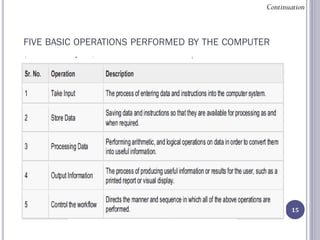
FIVE BASIC OPERATIONS PERFORMED BY THE COMPUTER
15
Continuation
INPUT
 Computes receive data from outside.
 To enter data.
 The keyboard on your PC is one of the most commonly used
input devices.
 The mouse.
16
Storage
17
• That Part of the computer that store data for long term
retrieval.
• Data that has been entered is stored somewhere in the
computer system.
• The computer will get the data / instructions from the
storage unit when it has to process it.
Processing
 It analyse input data available in its storage unit in order to get
some useful output.
 Taking data through a set of prescribed procedures.
18
OUTPUTTING
 Data sent out of the computer.
 After the computer has processed the inputted data it provides
useful information / result.
 Devices include: printer, speaker etc
19
CONTROL
20
 A control unit that controls the manner and sequence
of operations.
 input, storage, processing and outputting-in the
correct sequence
COMPUTER ORGANIZATION
21
PROCESSOR
Carries out instructions that come from either the user or the
software.
 A processor consists of three functional units:
 Arithmetic Logic Unit (ALU) --- performs arithmetic operations such
as addition and subtraction.
 Registers --- hold data that is being processed by the ALU.
 Control Unit (CU) --- fetches each instruction from the memory and
instructs theALU to process it.
 Processor speed is measured in.
 Megahertz (MHz) --- one million instruction cycles per second.
 Gigahertz (GHz) --- one billion instruction cycles per second.
22
A CPU PERFORMS FOUR GENERAL FUNCTIONS:
I. MATHEMATICAL OPERATION.
II. LOGICAL MANIPULATION.
III. DATA MANIPULATION.
IV. CONTROL OPERATION.
23
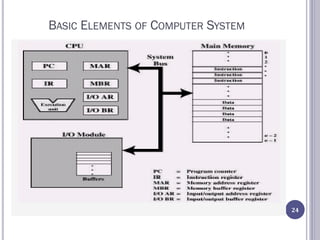
BASIC ELEMENTS OF COMPUTER SYSTEM
24
Processor
 Controls the operation of the computer and performs its data
processing functions.
 Central processing unit i.e one processor.
 There may be more than one processor working in parallel.
Main memory
 Stores data and programs that are been processed.
 .A program must be loaded into main memory before it can be executed.
 They are volatile.
 It must have an address and location.
I/O modules
System bus
 provides for communication among processors
25
26
 Memory Address register (MAR), specifies the address in
memory for the next read or write; and
 Memory Buffer Register (MBR), contains the data to be written
into memory, or which receives the data read from memory.
 I/O Address Register (I/OAR) specify a particular I/O device.
 I/O Buffer register (I/O BR) is used for the exchange of data
between an I/O module and the processor.
EXECUTION UNIT AND BUS INTERFACE UNIT
The processor is partitioned into two logical units i.e EU &
BIU
The role of the EU is to execute instruction, where as the
BIU delivers instructions and data to the EU.
The EU contains an:
 I. Arithmetic and Logic Unit (ALU).
 II. Control Unit (CU).
 III. Number of Registers.
27
THE MOST IMPORTANT FUNCTION OF THE BIU IS TO MANAGE
THE BUS CONTROL UNIT, SEGMENT REGISTERS, AND
INSTRUCTION QUEUE. THE BIU CONTROLS THE BUSES THAT
TRANSFER DATA TO THE EU, TO MEMORY, AND TO EXTERNAL
INPUT/OUTPUT DEVICES.
28
29
There are three sets of buses:
• Data Bus
• Address Bus
• Control Bus
30
I.The Data Bus:The data bus carries information to and from CPU.
The size of the bus represents the number of bits (or data volume)
that can be carried at any point in time.
Data lines are labelled with D prefix such as D0, D1……D15.The
size of the data is typically 8, 16, 32, or 64 bits. Larger data buses
are more preferable because they allow more data to transfer faster.
II.Address Bus: In order for the CPU to read or write data, it must
specify the precise location in system memory or I/O port.The
location is defined through use of address bus.The number of bits in
the address bus represents the number of physical location that the
CPU can access. For example, a CPU with 20 address lines can
address 220 bytes.A CPU with 24 address lines can address 224 bytes.
III. Control Bus: Contain control signals which are used to
synchronize and co-ordinate the operation of the CPU with other
devices in the computer.
31
Most control signals fall into the following;
• Reading or writing functions (to memory or I/ O location)
• Interrupt channels
• CPU test and reset
• Bus arbitration and control
• Direct memory access(DMA) control
• CPU status
• Parity check
REFERENCES
1. Introduction to Computer Systems: Don Fussell Spring 2011
2. UNIX Lecture Notes Chapter 1 Introduction to System Programming
3. X.Sun (IIT) CS550:Advanced OS Lecture 3 Page 2
32
QUESTIONS???
THANK YOU FOR YOUR ATTENTION
33

Csc 2313 (lecture 1)

  • 1.
    INTRODUCTION TO COMPUTER SYSTEM CSC2313 LECTURE 1 Department of Maths and Computer-Science Faculty of Natural andApplied Science BY UMAR DANJUMA MAIWADA
  • 2.
    OBJECTIVES  Learn thefundamental concept of a system in general and the computer system in specific.  Understand the System programming.  Study the Hardware fundamentals.  Understand the Software Concepts. 2
  • 3.
    INTRODUCTION  Computer hasthe capacity to solve complex, arithmetic and scientific problems at very high speed.  This information provided by the user to the computer is data. The information in one form which is presented to the computer is the input information or input data.  The set of instructions given to the computer to perform various operations is called as the computer program. 3
  • 4.
  • 5.
    WHAT IS COMPUTER? Computercan now be defined as a fast and accurate data processing system that accepts data, performs various operations on the data, has the capability to store the data and produce the results on the basis of detailed step by step instructions given to it. 5
  • 6.
    CLASSIFICATION OF COMPUTERS Maincategories of computers are  Super computers  Mainframe computers  Microcomputers  Notebook Computers  Personal Digital Assistant (PDA) 6
  • 7.
    SUPER COMPUTER  Theyhandle large database.  They are the most powerful, most expensive, and the fastest.  They process trillions of instructions per second.  They have high level of computing performance.  They are used for wide range of computationally intensive tasks in various fields.  They are used for weather forecasting. 7
  • 8.
    MAINFRAME COMPUTER  Itprocess data simultaneously.  They are used by large organization for critical application. Such as census.  They are used for large scale computing purpose that require availability and security.  They are associated with centralized computing.  They are high speed computer capable of supporting numerous users. 8
  • 9.
    MICRO COMPUTERS  Theyare connected to network of other computers.  They are less expensive than the mainframe computers, their prices vary depending on the capacity and features of the computer.  It has a microprocessor as its central processor.  It has microprocessor, memory, and minimal i/o mounted on a single circuit board.  E.g smart phones, tablets. 9
  • 10.
    NOTEBOOK COMPUTERS  Likeother computers, notebook computers are getting faster, lighter, and more functional.  It is smaller than a brief case that can easily be transported in temporary space. 10
  • 11.
    PERSONAL DIGITAL ASSISTANT(PDA)  PDAs are used to track appointments and shipments as well as names and addresses.  They provide the user of the computer quick reference to contact and other list.  They are like smart phones but are used for marketing.  PDA has a touch screen to enter data, a memory card slot for data storage.  PDA has a thumb keyboard for input.  There are functions like: appointment calendar, to do list, address book for contacts, calculator and a memo. 11
  • 12.
    A COMPLETE COMPUTERSYSTEM CONSISTS OF FOUR PARTS:  Hardware  Software  Users  Data 12
  • 13.
    13 The terms hardwareand software •The Hardware: The hardware is made up of the physical parts or devices of the computer system like the electronic Integrated Circuits (ICs), magnetic storage media and other mechanical devices like input devices, output devices etc. All these various hardware are linked together to form an effective functional unit. •The Software: The computer hardware itself is not capable of doing anything on its own. It has to be given explicit instructions to perform the specific task. The computer program is the one which controls the processing activities of the computer. The computer thus functions according to the instructions written in the program. Software mainly consists of these computer programs, procedures and other documentation used in the operation of a computer system.
  • 14.
    COMPUTER ARCHITECTURE ANDORGANIZATION  Architecture  Refers to those attributes of a system visible to a programmer.  The architecture of a CPU is actually its instruction set.  The structure and design of a system.  Organization  control signals between different functional units.  memory type .  Legal entities with an explicit rules. 14
  • 15.
    FIVE BASIC OPERATIONSPERFORMED BY THE COMPUTER 15 Continuation
  • 16.
    INPUT  Computes receivedata from outside.  To enter data.  The keyboard on your PC is one of the most commonly used input devices.  The mouse. 16
  • 17.
    Storage 17 • That Partof the computer that store data for long term retrieval. • Data that has been entered is stored somewhere in the computer system. • The computer will get the data / instructions from the storage unit when it has to process it.
  • 18.
    Processing  It analyseinput data available in its storage unit in order to get some useful output.  Taking data through a set of prescribed procedures. 18
  • 19.
    OUTPUTTING  Data sentout of the computer.  After the computer has processed the inputted data it provides useful information / result.  Devices include: printer, speaker etc 19
  • 20.
    CONTROL 20  A controlunit that controls the manner and sequence of operations.  input, storage, processing and outputting-in the correct sequence
  • 21.
  • 22.
    PROCESSOR Carries out instructionsthat come from either the user or the software.  A processor consists of three functional units:  Arithmetic Logic Unit (ALU) --- performs arithmetic operations such as addition and subtraction.  Registers --- hold data that is being processed by the ALU.  Control Unit (CU) --- fetches each instruction from the memory and instructs theALU to process it.  Processor speed is measured in.  Megahertz (MHz) --- one million instruction cycles per second.  Gigahertz (GHz) --- one billion instruction cycles per second. 22
  • 23.
    A CPU PERFORMSFOUR GENERAL FUNCTIONS: I. MATHEMATICAL OPERATION. II. LOGICAL MANIPULATION. III. DATA MANIPULATION. IV. CONTROL OPERATION. 23
  • 24.
    BASIC ELEMENTS OFCOMPUTER SYSTEM 24
  • 25.
    Processor  Controls theoperation of the computer and performs its data processing functions.  Central processing unit i.e one processor.  There may be more than one processor working in parallel. Main memory  Stores data and programs that are been processed.  .A program must be loaded into main memory before it can be executed.  They are volatile.  It must have an address and location. I/O modules System bus  provides for communication among processors 25
  • 26.
    26  Memory Addressregister (MAR), specifies the address in memory for the next read or write; and  Memory Buffer Register (MBR), contains the data to be written into memory, or which receives the data read from memory.  I/O Address Register (I/OAR) specify a particular I/O device.  I/O Buffer register (I/O BR) is used for the exchange of data between an I/O module and the processor.
  • 27.
    EXECUTION UNIT ANDBUS INTERFACE UNIT The processor is partitioned into two logical units i.e EU & BIU The role of the EU is to execute instruction, where as the BIU delivers instructions and data to the EU. The EU contains an:  I. Arithmetic and Logic Unit (ALU).  II. Control Unit (CU).  III. Number of Registers. 27
  • 28.
    THE MOST IMPORTANTFUNCTION OF THE BIU IS TO MANAGE THE BUS CONTROL UNIT, SEGMENT REGISTERS, AND INSTRUCTION QUEUE. THE BIU CONTROLS THE BUSES THAT TRANSFER DATA TO THE EU, TO MEMORY, AND TO EXTERNAL INPUT/OUTPUT DEVICES. 28
  • 29.
    29 There are threesets of buses: • Data Bus • Address Bus • Control Bus
  • 30.
    30 I.The Data Bus:Thedata bus carries information to and from CPU. The size of the bus represents the number of bits (or data volume) that can be carried at any point in time. Data lines are labelled with D prefix such as D0, D1……D15.The size of the data is typically 8, 16, 32, or 64 bits. Larger data buses are more preferable because they allow more data to transfer faster. II.Address Bus: In order for the CPU to read or write data, it must specify the precise location in system memory or I/O port.The location is defined through use of address bus.The number of bits in the address bus represents the number of physical location that the CPU can access. For example, a CPU with 20 address lines can address 220 bytes.A CPU with 24 address lines can address 224 bytes. III. Control Bus: Contain control signals which are used to synchronize and co-ordinate the operation of the CPU with other devices in the computer.
  • 31.
    31 Most control signalsfall into the following; • Reading or writing functions (to memory or I/ O location) • Interrupt channels • CPU test and reset • Bus arbitration and control • Direct memory access(DMA) control • CPU status • Parity check
  • 32.
    REFERENCES 1. Introduction toComputer Systems: Don Fussell Spring 2011 2. UNIX Lecture Notes Chapter 1 Introduction to System Programming 3. X.Sun (IIT) CS550:Advanced OS Lecture 3 Page 2 32
  • 33.
    QUESTIONS??? THANK YOU FORYOUR ATTENTION 33