Computer Fundamentals
Dr Dinesh Kumar P
Guiding Question
What principles underpin the operation of a computer, from low-level
hardware functionality to operating system interactions?
A1. Computer Fundamentals
★ A1.1 Computer hardware and operation
★ A1.2 Data representation and computer logic
★ A1.3 Operating systems and control systems
★ A1.4 Translation (HL only)
A1.1 Computer hardware and operation
★ A1.1.1 Describe the functions and interactions of the main CPU components.
★ A1.1.2 Describe the role of a GPU.
★ A1.1.3 Explain the differences between the CPU and the GPU. (HL only)
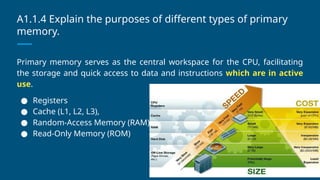
★ A1.1.4 Explain the purposes of different types of primary memory.
★ A1.1.5 Describe the fetch, decode and execute cycle.
★ A1.1.6 Describe the process of pipelining in multi-core architectures. (HL only)
★ A1.1.7 Describe internal and external types of secondary memory storage.
★ A1.1.8 Describe the concept of compression.
★ A1.1.9 Describe the different types of services in cloud computing.
Critical Idea #1
Computers are devices that
accept data as input and
produce data as output based
on some predetermined set of
rules.
Computers
What is a computer?
A Computer
A computer is any device that accepts input data, processes it, and produces a
desired output.
Analog Computers
Analog computers contain
components that are analogous to
real-world entities, resulting in output
in a continuous range of values.
The seismograph on the right
measures the movement of the earth
(the input) by producing a continuous
line (the output) as a scale
representation of this movement (the
data) by having a needle vibrate back
and forth (the process). Image: “Seismogram at Weston Observatory.JPG” courtesy Wikimedia Commons.
Digital Computers
Digital computers process input
and output as discrete
mathematical values (digits).
The abacus on the left allows
users to manipulate the beads
(the input) to produce an
arrangement of beads that
represent the result of a
mathematical calculation (the
output).
Image: “Abacus_2.jpg” courtesy Wikimedia Commons.
Computers
What is a computer?
Digital
Electronic
The Digital Electronic Computer
A computer is an electronic, programmable digital device that accepts input,
processes it, and produces a desired output.
processes electrical
signals as input/output
can be configured to
perform multiple functions
without changing system
hardware
processes discrete
mathematical values
General Purpose Computers
General purpose computers are consumer devices that allow for a large range of
user applications, including the use of a range of input peripherals and output
devices.
keyboards, mice/touchpads, microphones,
etc.
displays, speakers, printers, etc.
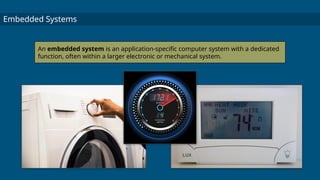
Embedded Systems
An embedded system is an application-specific computer system with a dedicated
function, often within a larger electronic or mechanical system.
Student Activity
Analog & Digital Computers
Computer Architecture
● CPU = Central Processing Unit
● ALU = Arithmetic Logic Unit
● CU = Control Unit
● Registers = small temporary storage spaces inside the CPU
INPUT
• Keyboard/
Concept
Keyboard
• Mouse/
Trackball/
Touchpad
• Scanner
• Joystick
• Light pen
• Microphone
• Sensors
• Digital camera
CPU
ALU
CU
Memory Unit
ROM
RAM
CACHE
CPU
ALU CU
MEMORY UNIT
ROM RAM CACHE
SECONDARY STORAGE
On-line storage
• Hard-disk drive(HDD)
• Solid-state drive(SSD)
Off-line storage
•DVD/CD
•Blue-ray disk
•USB memory stick
•Thumb drive/Pen drive
•Removable Hard drive
•Floppy Disk
•Magnetic Disk/Drum
OUTPUT
• Printers
• Monitors(CRT,LC
D, LED)
• Plotters
• Headset/ Speaker
• Projector
A1.1.1 Describe the functions and interactions of the main
CPU components.
❖ CPU- The key component of a computer system, which contains the
circuitry necessary to interpret and execute instructions for the
computer device. It plays a central role in coordinating data
movement within the system.
❖ The components inside of the CPU
➢ ALU(Execution) - Performs arithmetic and logical operations.It
is where the actual computation happens, such as addition,
subtraction, multiplication and division, as well as logical
operations including AND, OR, NOT and XOR.
➢ CU(Decoding) - It directs the operations of the processor. It is
responsible for the Fetch-decode-execute cycle. Its primary
function include decoding and interpreting instructions fetched
from memory and generating control signals to activate the
appropriate hardware units within the CPU.
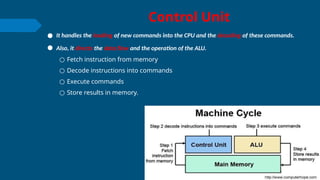
Control Unit
● It handles the loading of new commands into the CPU and the decoding of these commands.
● Also, it directs the data flow and the operation of the ALU.
○ Fetch instruction from memory
○ Decode instructions into commands
○ Execute commands
○ Store results in memory.
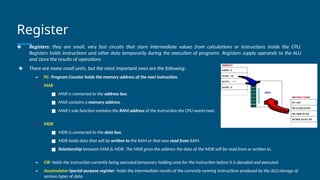
Register
❖ Registers: they are small, very fast circuits that store intermediate values from calculations or instructions inside the CPU.
Registers holds instructions and other data temporarily during the execution of programs. Registers supply operands to the ALU
and store the results of operations
❖ There are many small units, but the most important ones are the following:
➢ PC- Program Counter holds the memory address of the next instruction.
➢ MAR
■ MAR is connected to the address bus.
■ MAR contains a memory address.
■ MAR’s sole function contains the RAM address of the instruction the CPU wants next.
➢ MDR
■ MDR is connected to the data bus.
■ MDR holds data that will be written to the RAM or that was read from RAM.
■ Relationship between MAR & MDR: The MAR gives the address the data of the MDR will be read from or written to.
➢ CIR- holds the instruction currently being executed.temporary holding area for the instruction before it is decoded and executed.
➢ Accumulator-Special purpose register- holds the intermediate results of the currently running instructions produced by the ALU.storage of
various types of data.
BUS
● Bus = a set of wires that connect two components in a computer system
● A bus is a communication system that transfers data between components inside a computer, including
the CPU, memory, storage and peripherals. Buses have widths that are measured in bits. The bigger the
width of the bus, the more data it can transmit at one time.
○ Buses are parallel electrical wires with multiple connections. Modern computer buses use both parallel and bit serial
connections.
● Control Bus (Bi directional)
○ carries command/ control signals from the processor to other components. The control bus also carries
the clock's pulses. The control bus is unidirectional or bidirectional.
● Address Bus (Unidirectional-from CPU to RAM only)
○ carries memory addresses from the processor to other components such as primary storage and
input/output devices. The address bus is unidirectional.
● Data Bus (bi directional)
○ carries the data between the processor and other components. The data bus is bidirectional.
CORE- Types of CPU processor
● Multiple cores allow for
better performance in
parallel processing, but limit
the bandwidth of each core.
CORE- Single-core processor
● Possess one processing unit (core) integrated into a single circuit. This
core is the fundamental unit that reads and executes instructions from
processes. With a singular processing path, it handles one instruction at
a time, following a sequential execution model. This architecture was
standard in early CPUs, where task completion relied on the linear
processing of instructions. Its primary limitation is in executing parallel
processing demands. As computational tasks become more complex and
multitasking becomes essential, single-core processors face limitations
in performance, leading to potential bottlenecks in processing efficiency.
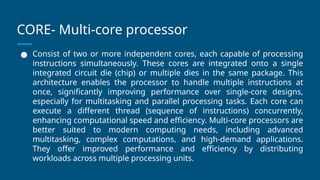
CORE- Multi-core processor
● Consist of two or more independent cores, each capable of processing
instructions simultaneously. These cores are integrated onto a single
integrated circuit die (chip) or multiple dies in the same package. This
architecture enables the processor to handle multiple instructions at
once, significantly improving performance over single-core designs,
especially for multitasking and parallel processing tasks. Each core can
execute a different thread (sequence of instructions) concurrently,
enhancing computational speed and efficiency. Multi-core processors are
better suited to modern computing needs, including advanced
multitasking, complex computations, and high-demand applications.
They offer improved performance and efficiency by distributing
workloads across multiple processing units.
CORE- Co-processor
● Specialized processors designed to supplement the main CPU,
offloading specific tasks to optimize performance. They can be
integrated into the CPU or exist as separate entities. By taking on
specific tasks, such as graphics rendering, mathematical calculations, or
data encryption, coprocessors free the main CPU to focus on general
processing tasks. This division of labour enhances the overall system
performance and efficiency. Common examples include graphics
processing units (GPUs) for rendering images and videos and data
signal processors (DSPs) for handling signal processing tasks.
A1.1.2 Describe the role of a GPU.
● A graphics processing unit (GPU) is a specialized electronic circuit containing
numerous processing cores. For example, the Nvidia GeForce RTX 4080 has 9728
cores.
● A GPU is designed to rapidly manipulate and alter memory, accelerating the
creation of images for output to a display device. Unlike central processing units
(CPUs), which handle a broad range of computations, GPUs possess a highly
parallel structure, ideal for complex graphical calculations.
● GPUs can be integrated (part of a CPU) or discrete (on a separate card).
● GPUs communicate with software using APls such as DirectX and OpenGL. As well
as processing graphics, GPUs are increasingly used for machine learning and other
computationally intensive workloads.
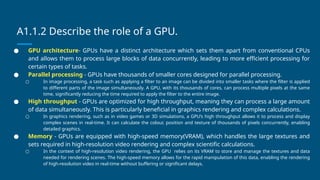
A1.1.2 Describe the role of a GPU.
● GPU architecture- GPUs have a distinct architecture which sets them apart from conventional CPUs
and allows them to process large blocks of data concurrently, leading to more efficient processing for
certain types of tasks.
● Parallel processing - GPUs have thousands of smaller cores designed for parallel processing.
○ In image processing, a task such as applying a filter to an image can be divided into smaller tasks where the filter is applied
to different parts of the image simultaneously. A GPU, with its thousands of cores, can process multiple pixels at the same
time, significantly reducing the time required to apply the filter to the entire image.
● High throughput - GPUs are optimized for high throughput, meaning they can process a large amount
of data simultaneously. This is particularly beneficial in graphics rendering and complex calculations.
○ In graphics rendering, such as in video games or 3D simulations, a GPU’s high throughput allows it to process and display
complex scenes in real-time. It can calculate the colour, position and texture of thousands of pixels concurrently, enabling
detailed graphics.
● Memory - GPUs are equipped with high-speed memory(VRAM), which handles the large textures and
sets required in high-resolution video rendering and complex scientific calculations.
○ In the context of high-resolution video rendering, the GPU relies on its VRAM to store and manage the textures and data
needed for rendering scenes. The high-speed memory allows for the rapid manipulation of this data, enabling the rendering
of high-resolution video in real-time without buffering or significant delays.
Applications that requires GPU
● GPUs are indispensable for rendering complex graphics in video games. They enable the rendering of
high-resolution textures, realistic lighting effects and smooth frame rates, enhancing the gaming
experience, providing higher frame rates, and off-loading rendering work from the CPU.
● AI and Machine learning - GPUs are increasingly used in Al and machine learning. Their ability to perform
parallel processing allows for faster processing of large data sets which is essential in training neural
networks. For example, neural networks, which are at the heart of many Al applications, require the
processing of large amounts of data during their training phase. These training processes involve
extensive matrix multiplications and other operations which can be parallelized effectively on a GPU.
● Scientific computing and large simulations - GPUs are used in various scientific fields for large
simulations and data analysis. Their parallel processing capabilities allow for quicker computations in areas
such as physics simulations, climate modelling and bioinformatics. For example, in bioinformatics, GPUs
play an important role in the processing and analysis of genetic information. One specific application is in
genome sequencing, where GPUs are used to align sequences and identify genetic variations quickly. This
process involves comparing a massive number of DNA sequences (millions of sequences) against reference
genomes to identify mutations and variations, a task that is highly parallelizable.
● Graphics design and video editing - In graphics design, especially in the creation of 3D models and
environments, GPUs enable designers to visualize their work in real-time. For example, when using
software such as Blender or Autodesk Maya, GPUs are utilized to render complex scenes, including lighting
effects, shadows and textures, in real-time.
● Blockchain and cryptocurrency mining - hashing algorithms.
A1.1.3 Explain the differences between the CPU and the
GPU. (HL only)
● Design philosophy
○ CPU architecture emphasizes flexibility and generalizability, enabling CPUs to efficiently process a wide variety
of instructions and data types. In addition, CPUs are designed for low latency. Flexibility, generalization, and
low latency translate to design choices where CPUs typically have a smaller number of cores compared to
GPUs, but each core is more powerful with features such as larger caches and complex logic units. This allows
CPUs to handle a wider variety of instructions efficiently. CPUs excel at predicting which instruction will be
needed next and fetching it in advance. This minimizes wasted time and keeps the core running smoothly.
CPUs are built to understand and execute a large set of instructions, making them ideal for running general-
purpose software such as web browsers, office applications, and even video games (though not for the
intensive graphics processing needed in some games).
○ The GPU is built for high throughput. It is optimized for tasks that can be decomposed into smaller,
independent pieces. GPUs have a large number of cores, each less powerful than a CPU core but designed for
simpler tasks. This allows GPUs to process a large amount of data simultaneously. GPUs are optimized for
single instruction, multiple data (SIMD) operations, where the same instruction is applied to many data
elements at once. GPUs are designed to move data efficiently between cores and memory, prioritizing high
bandwidth over complex logic components in each core.
A1.1.3 Explain the differences between the CPU and the
GPU. (HL only)
● Usage scenarios
○ Usage scenarios for CPUs include running operating systems and managing system
resources, executing general-purpose software tasks, decoding and handling user
input (mouse clicks, key presses), and multitasking between different applications.
○ Usage scenarios in GPUs include processing graphics and rendering images and
videos for gaming and video editing, accelerating scientific simulations and machine
learning algorithms, encoding and decoding video streams, and cryptocurrency
mining.
A1.1.3 Explain the differences between the CPU and the
GPU. (HL only)
● Core architecture
○ An element in the core architecture of a CPU is the instruction set architecture (ISA), which defines the
fundamental operations a CPU can perform. Each instruction in an ISA specifies a particular operation involving
arithmetic operations, data movement, logical operations, control flow changes, or system interactions. Unique
to a CPU are specific types of instructions such as system management instructions and complex branching
instructions.
○ GPUs also have an ISA. Each instruction in a GPU's ISA is designed towards handling extensive arithmetic
operations and data movement, and there is less emphasis on complex logical operations and control flow
changes compared to CPUs. This is because GPUs are optimized for throughput over task versatility. Unique to a
GPU's ISA are specific types of instructions optimized for graphics rendering and parallel data processing tasks,
such as the following.
○ SIMD instructions: Allow a single operation to be applied simultaneously to a large set of data, which is ideal for
the parallel nature of graphics processing and certain types of computational tasks in scientific computing and
deep learning.
○ Texture mapping and manipulation instructions: Essential for graphics processing, these instructions handle
tasks like pixel interpolation and texture fetching, which are important for rendering images and videos.
A1.1.3 Explain the differences between the CPU and the
GPU. (HL only)
● Processing power
○ Processing power refers to the ability of the device to perform computational tasks. It is a measure of how much
work a CPU or GPU can perform in a given amount of time, which directly impacts the performance of software
applications running on these processors. Different factors can influence the processing power of a CPU or GPU; for
example, the number of cores, clock speed, thermal management, and power delivery to the processor. CPUs are
designed with fewer, more powerful cores than GPUs. They feature higher clock speeds and advanced
technologies such as branch prediction and out-of-order execution, which optimize sequential task processing.
Multithreading capabilities and a high instructions per cycle (IPC) rate enable CPUs to efficiently manage multiple
tasks and complex computational instructions.
○ GPUs possess a large parallel architecture with hundreds to thousands of cores, enabling efficient handling of
large-scale parallel processing tasks. High memory bandwidth and specialized cores, such as tensor cores, enhance
their ability to process large blocks of data quickly and effectively. The SIMD capabilities allow GPUs to perform the
same operation on multiple data points at once, maximizing throughput for suitable tasks. While individual GPU
cores may operate at a lower clock speed and with simpler instructions compared to CPU cores, the sheer number
of these cores allows for a tremendous amount of parallel processing power. Remember, the “simple instructions” in
GPU cores are designed for parallel execution, making them specialized rather than inherently less powerful.
A1.1.3 Explain the differences between the CPU and the
GPU. (HL only)
● Memory access
○ Memory access in the context of computing hardware such as CPUs and GPUs refers to how these processors retrieve and
manipulate data stored in computer memory. Each type of processor handles memory access differently based on its
architectural design, which impacts its overall performance.
○ CPUs utilize a memory hierarchy to manage data access efficiently (for more on this, refer to A1.1.4). This hierarchy typically
includes several levels of caches (L1, L2, and sometimes L3). This hierarchy is optimized to minimize memory latency—the
delay from issuing a memory request to receiving the data. CPUs often operate in multi-core environments, necessitating
mechanisms such as cache coherence protocols. These protocols ensure that multiple CPU cores have a consistent view of
the data in the memory, preventing data conflicts and ensuring data integrity across the cores.
○ Modern GPUs often use a unified memory architecture, which allows them to access a large, shared pool of memory which
both the GPU and CPU can address. GPUs are designed with high bandwidth memory. These memory types are optimized
for the high-throughput requirements of GPU tasks, enabling fast data transfer rates that support the processing
capabilities of hundreds to thousands of parallel cores. Unlike CPUs, which are optimized for low-latency access, GPUs
prioritize memory throughput.
○ To summarize memory access, CPUs utilize low-latency memory because they need to rapidly switch between tasks,
retrieve data from memory, and execute operations based on that data with minimal delay. GPUs utilize high memory
throughput because they handle large volumes of data and need to feed hundreds to thousands of parallel cores
simultaneously.
A1.1.3 Explain the differences between the CPU and the
GPU. (HL only)
● Power efficiency
○ CPUs and GPUs use electrical power to perform computational tasks. Power efficiency is a significant aspect of processor
design and operation, especially in environments where energy consumption impacts cost, thermal management, and
system longevity.
○ For CPUs, power efficiency is often defined by how much computing work can be performed per watt. This ratio measures
the computational output relative to power consumption, providing a benchmark to compare the efficiency of different CPU
models. Higher performance per watt indicates a more power-efficient CPU.
○ Modern CPUs incorporate advanced power management technologies that adjust the power usage based on the workload.
Techniques such as dynamic voltage and frequency scaling (DVFS) allow CPUs to reduce power consumption when full
processing power is not needed. Another aspect of power efficiency is thermal design power (TDP). TDP is the maximum
amount of heat generated by a CPU that the cooling system in a computer is designed to dissipate under normal
conditions. Efficient CPUs manage to deliver more performance while staying within a lower TDP envelope.
○ GPUs, particularly those used in high-performance computing and gaming, also prioritize power efficiency, given their
potential for high power consumption. Since GPUs handle many tasks simultaneously, their power efficiency often benefits
from their ability to spread workload across many cores, reducing the power per task when compared with serial
processing. Like CPUs, many GPUs incorporate features that help reduce power usage when full graphical power is not
required, such as lowering clock speeds or powering down idle cores. GPUs are generally more power-efficient at parallel
processing tasks than CPUs.
A1.1.3 Explain the differences between the CPU and the
GPU. (HL only)
● CPUs and GPUs working together: Task division, data sharing, and
coordinating execution
○ CPUs and GPUs must collaborate effectively to optimize computing tasks.
Understanding how they work together is important.
○ CPUs are designed for general-purpose processing, and GPUs are designed for parallel
processing capability. General-purpose processing is executing a variety of instructions
with complex logic and decision-making. Parallel processing is performing the same
operation simultaneously on multiple pieces of data. You can think of this like the roles
in a professional kitchen: the head chef (CPU) ensures everything is in order. The
specialized cooks (GPU) handle the high-volume tasks.
A1.1.3 Explain the differences between the CPU and the
GPU. (HL only)
● Task division
○ When CPUs and GPUs work together, tasks are typically divided based on their nature
and requirements. Sequential and control-intensive tasks remain the domain of the
CPU, which manages the system, performs logic and control operations, and processes
tasks that require frequent decision-making. Some examples of tasks executed by a
CPU are OS management, network communication, and input/output handling.
○ Parallelizable data-intensive tasks are offloaded to the GPU, where hundreds or
thousands of smaller, independent tasks can be executed simultaneously. This includes
operations such as matrix multiplications in machine learning algorithms, pixel
processing in graphics rendering, and data analysis in scientific computations.
A1.1.3 Explain the differences between the CPU and the
GPU. (HL only)
● Data sharing
○ For CPUs and GPUs to work together effectively, they must share data. Initially, data is
stored in primary memory, accessible by the CPU. For the GPU to process this data, it
must be transferred to the GPU’s memory through the peripheral component
interconnect express (PCle) bus, which can be a bottleneck. Some architectures offer
unified memory, allowing both the CPU and GPU to access the same physical memory
space, simplifying data sharing and minimizing transfer overheads.
A1.1.3 Explain the differences between the CPU and the
GPU. (HL only)
● Data sharing
○ Coordinating the execution between CPUs and GPUs involves using programming languages such as CUDA (for
Nvidia GPUs) and OpenCL. These languages provide the necessary tools to manage how tasks are divided between
CPUs and GPUs, including memory management and task synchronization. This often involves synchronization
primitives like barriers or events. Modern systems can dynamically allocate tasks to CPUs and GPUs based on the
current workload and the nature of the tasks, optimizing for performance and energy efficiency.
○ A barrier is a synchronization mechanism used to ensure that multiple threads or processes reach a certain point
in execution before any are allowed to proceed. Think of it as a checkpoint in a race that all runners (threads) must
reach before the race can continue to the next segment. In parallel programming, barriers are used to implement
a point of synchronization where threads pause their execution until all participating threads have reached the
barrier point. Once the last thread arrives at the barrier, all threads are released to proceed with their subsequent
operations.
○ An event is a synchronization primitive that allows threads to wait for certain conditions to be met before
continuing their execution. Unlike barriers, which synchronize a group of threads at a predefined point, events are
more flexible and can be used to signal one or more waiting threads that a specific condition has occurred, such as
the completion of a task or the availability of required data.
A1.1.4 Explain the purposes of different types of primary
memory.
Primary memory serves as the central workspace for the CPU, facilitating
the storage and quick access to data and instructions which are in active
use.
● Registers
● Cache (L1, L2, L3),
● Random-Access Memory (RAM)
● Read-Only Memory (ROM)
A1.1.4 Explain the purposes of different types of primary
memory.
● Registers
○ The fastest and smallest type of memory, built directly into the CPU. They store data,
instructions and addresses the CPU is actively executing. This memory is volatile. The
fundamental unit of data handled by a CPU’s architecture is the “word size”, which describes
the size of a register. In general, registers hold 32 or 64 bits of data.
● Cache (L1, L2, L3)
○ High-speed memory residing on or close to the CPU. Caches bridge the speed gap between
registers and RAM, holding frequently used data and instructions for quick retrieval. This
memory is volatile.
■ L1 cache typically ranges from 32 KB to 256 KB per core, with data and instruction caches
separate in some architectures.
■ L2 cache typically ranges from 256 KB to 16 MB per core or shared across multiple cores.
■ L3 cache typically ranges from 2 MB to 32MB shared across all cores in a CPU.
A1.1.4 Explain the purposes of different types of primary
memory.
● Main memory (RAM)
○ The primary workspace of the computer. RAM temporarily stores the currently running operating system,
processes, and active data and instructions. This memory is volatile. RAM capacity is typically measured
in gigabytes (GB). In 2025, 16GB of RAM would be adequate for multitasking, light gaming, and content
creation, while 32+ GB would be ideal for power users, heavy gaming, video editing, and professional
applications. 32-bit operating systems generally have a limit of around 4GB of RAM, while 64-bit systems
can address a much larger amount of RAM. The authors are quite certain these memory baselines will
increase significantly in the future.
● Read-only memory (ROM)
○ A non-volatile memory that stores essential instructions and data for the computer to start up (for
example, the BIOS or firmware). Data in ROM is typically not modifiable during normal computer
operation, although it is modifiable via special processes. ROM's role is primarily for firmware storage
and it is not directly involved in the day-to-day memory access hierarchy involving registers, cache and
RAM. ltis better considered as a separate entity focused on system boot-up and low-level startup
operations.
RAM
❖ DRAM = Dynamic Random Access Memory
❖ Contains the data and instructions the computer has loaded since starting up and everything
the user has opened or loaded.
❖ Is volatile = loses its contents if the power is lost- use capacitor which produce leakage in
current.
❖ Has a special link to the CPU
❖ Memory is fast to access, but only holds data temporarily...
❑ Memory is used to hold
❑ Programs:- OS(controls the hardware) or Applications programs(word processing).
❑ Input data:- put into memory before processing.
❑ Working area:- to store the data that is currently being processed.
❑ Output data:-put into the part of the store ready to be output to the printer.
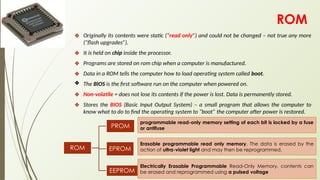
ROM
❖ Originally its contents were static (“read only”) and could not be changed – not true any more
(“flash upgrades”).
❖ It is held on chip inside the processor.
❖ Programs are stored on rom chip when a computer is manufactured.
❖ Data in a ROM tells the computer how to load operating system called boot.
❖ The BIOS is the first software run on the computer when powered on.
❖ Non-volatile = does not lose its contents if the power is lost. Data is permanently stored.
❖ Stores the BIOS (Basic Input Output System) – a small program that allows the computer to
know what to do to find the operating system to “boot” the computer after power is restored.
ROM
PROM
EPROM
EEPROM
Erasable programmable read only memory. The data is erased by the
action of ultra-violet light and may then be reprogrammed.
programmable read-only memory setting of each bit is locked by a fuse
or antifuse
Electrically Erasable Programmable Read-Only Memory. contents can
be erased and reprogrammed using a pulsed voltage
Differences between RAM and ROM
RAM ROM
What does it contain? Operating system, programs, data
which are currently being used
A program used to start the computer
called the ‘Boot program’ or BIOS
Can the content be
changed? (Is it volatile?)
Yes.
The contents of the RAM are changed
all the time while the computer is
running.
No.
The contents of ROM cannot normally
be changed.
How big is it? Typically 3-4 Gb. The larger the better
because this means that the computer
can run more programs at the same
time.
Typically 1-2Mb. Small because it only
needs to store boot program.
Cache memory.
❖ A type of small, high-speed memory inside the CPU
used to hold frequently used data, so that the CPU
needs to access the much slower RAM less
frequently.
❖ Uses transistor to store single bit of information
❖ Its called as SRAM.
❖ Cache memory increases the execution speed of the
computer
➢ CPU first look in cache for data
➢ If data is in cache(cache hit) send it to CPU and stop
➢ If data is not in cache(cache miss) fetch from RAM
➢ Send data from RAM, write it to the cache and send
it to the CPU.
A1.1.5 Describe the fetch, decode and execute cycle.
A1.1.6 Describe the process of pipelining in multi-core
architectures. (HL only)
Pipelining
● Pipelining A technique for improving the performance of computer processing by dividing
the execution of a process into multiple parts and allowing those parts to operate
simultaneously.
This can significantly improve the overall throughput of the system.
Non-pipelined laundry
● Wash: Put a load of clothes in the washing machine and wait for the cycle to finish.
● Dry: Transfer the wet clothes to the dryer and wait for them to dry.
● Fold: Take the dry clothes out and fold them.
In this scenario, each task must be fully completed before starting the next. If each task takes 30
minutes, completing a single load of laundry would take 1.5 hours.
A1.1.6 Describe the process of pipelining in multi-core
architectures. (HL only)
Pipelined laundry
1. Wash (Load A): Put the first load of clothes in the washing machine.
2. Dry(Load A): When Load A finishes washing, transfer it to the dryer.
3. Wash (Load B): While Load A is drying, start a second load of laundry in the washing
machine.
4. Fold (Load A): When Load A finishes drying, fold the clothes.
5. Dry (Load B): When Load B finishes washing, transfer it to the dryer.
6. Wash (Load C): While Load B is drying, start a third load of laundry in the washing machine.
7. Fold (Load B): When Load B finishes drying, fold the clothes.
Complete a load of laundry every 30 minutes instead of every 1.5 hours.
A1.1.7 Describe internal and external types of secondary
memory storage.
● Internal storage
○ HDD
○ SSD
○ Embedded MultiMedia Card(eMMC)
● External Storage
○ HDD
○ SSD
○ Memory Card
○ Network Attached Storage(NAS)
A1.1.8 Describe the concept of compression.
A1.1.9 Describe the different types of services in cloud
computing.
A1.2 Data representation and computer logic
★ A1.2.1 Describe the principal methods of representing data.
★ A1.2.2 Explain how binary is used to store data.
★ A1.2.3 Describe the purpose and use of logic gates.
★ A1.2.4 Construct and analyse truth tables.
★ A.1.2.5 Construct logic diagrams.
A1.3 Operating systems and control systems
★ A1.3.1 Describe the role of operating systems.
★ A1.3.2 Describe the functions of an operating system.
★ A1.3.3 Compare different approaches to scheduling.
★ A1.3.4 Evaluate the use of polling and interrupt handling.
★ A1.3.5 Explain the role of the operating system in managing
multitasking and resource allocation. (HL only)
★ A1.3.6 Describe the use of the control system components. (HL only)
★ A1.3.7 Explain the use of control systems in a range of real-world
applications. (HL only)
A1.4 Translation (HL only)
★ A1.4.1 Evaluate the translation processes of interpreters and compilers.

Computer Fundamentals and Cloud Services

  • 1.
  • 2.
    Guiding Question What principlesunderpin the operation of a computer, from low-level hardware functionality to operating system interactions?
  • 3.
    A1. Computer Fundamentals ★A1.1 Computer hardware and operation ★ A1.2 Data representation and computer logic ★ A1.3 Operating systems and control systems ★ A1.4 Translation (HL only)
  • 4.
    A1.1 Computer hardwareand operation ★ A1.1.1 Describe the functions and interactions of the main CPU components. ★ A1.1.2 Describe the role of a GPU. ★ A1.1.3 Explain the differences between the CPU and the GPU. (HL only) ★ A1.1.4 Explain the purposes of different types of primary memory. ★ A1.1.5 Describe the fetch, decode and execute cycle. ★ A1.1.6 Describe the process of pipelining in multi-core architectures. (HL only) ★ A1.1.7 Describe internal and external types of secondary memory storage. ★ A1.1.8 Describe the concept of compression. ★ A1.1.9 Describe the different types of services in cloud computing.
  • 5.
    Critical Idea #1 Computersare devices that accept data as input and produce data as output based on some predetermined set of rules.
  • 6.
  • 7.
    A Computer A computeris any device that accepts input data, processes it, and produces a desired output.
  • 8.
    Analog Computers Analog computerscontain components that are analogous to real-world entities, resulting in output in a continuous range of values. The seismograph on the right measures the movement of the earth (the input) by producing a continuous line (the output) as a scale representation of this movement (the data) by having a needle vibrate back and forth (the process). Image: “Seismogram at Weston Observatory.JPG” courtesy Wikimedia Commons.
  • 9.
    Digital Computers Digital computersprocess input and output as discrete mathematical values (digits). The abacus on the left allows users to manipulate the beads (the input) to produce an arrangement of beads that represent the result of a mathematical calculation (the output). Image: “Abacus_2.jpg” courtesy Wikimedia Commons.
  • 10.
    Computers What is acomputer? Digital Electronic
  • 11.
    The Digital ElectronicComputer A computer is an electronic, programmable digital device that accepts input, processes it, and produces a desired output. processes electrical signals as input/output can be configured to perform multiple functions without changing system hardware processes discrete mathematical values
  • 12.
    General Purpose Computers Generalpurpose computers are consumer devices that allow for a large range of user applications, including the use of a range of input peripherals and output devices. keyboards, mice/touchpads, microphones, etc. displays, speakers, printers, etc.
  • 13.
    Embedded Systems An embeddedsystem is an application-specific computer system with a dedicated function, often within a larger electronic or mechanical system.
  • 14.
    Student Activity Analog &Digital Computers
  • 15.
    Computer Architecture ● CPU= Central Processing Unit ● ALU = Arithmetic Logic Unit ● CU = Control Unit ● Registers = small temporary storage spaces inside the CPU INPUT • Keyboard/ Concept Keyboard • Mouse/ Trackball/ Touchpad • Scanner • Joystick • Light pen • Microphone • Sensors • Digital camera CPU ALU CU Memory Unit ROM RAM CACHE CPU ALU CU MEMORY UNIT ROM RAM CACHE SECONDARY STORAGE On-line storage • Hard-disk drive(HDD) • Solid-state drive(SSD) Off-line storage •DVD/CD •Blue-ray disk •USB memory stick •Thumb drive/Pen drive •Removable Hard drive •Floppy Disk •Magnetic Disk/Drum OUTPUT • Printers • Monitors(CRT,LC D, LED) • Plotters • Headset/ Speaker • Projector
  • 16.
    A1.1.1 Describe thefunctions and interactions of the main CPU components. ❖ CPU- The key component of a computer system, which contains the circuitry necessary to interpret and execute instructions for the computer device. It plays a central role in coordinating data movement within the system. ❖ The components inside of the CPU ➢ ALU(Execution) - Performs arithmetic and logical operations.It is where the actual computation happens, such as addition, subtraction, multiplication and division, as well as logical operations including AND, OR, NOT and XOR. ➢ CU(Decoding) - It directs the operations of the processor. It is responsible for the Fetch-decode-execute cycle. Its primary function include decoding and interpreting instructions fetched from memory and generating control signals to activate the appropriate hardware units within the CPU.
  • 17.
    Control Unit ● Ithandles the loading of new commands into the CPU and the decoding of these commands. ● Also, it directs the data flow and the operation of the ALU. ○ Fetch instruction from memory ○ Decode instructions into commands ○ Execute commands ○ Store results in memory.
  • 18.
    Register ❖ Registers: theyare small, very fast circuits that store intermediate values from calculations or instructions inside the CPU. Registers holds instructions and other data temporarily during the execution of programs. Registers supply operands to the ALU and store the results of operations ❖ There are many small units, but the most important ones are the following: ➢ PC- Program Counter holds the memory address of the next instruction. ➢ MAR ■ MAR is connected to the address bus. ■ MAR contains a memory address. ■ MAR’s sole function contains the RAM address of the instruction the CPU wants next. ➢ MDR ■ MDR is connected to the data bus. ■ MDR holds data that will be written to the RAM or that was read from RAM. ■ Relationship between MAR & MDR: The MAR gives the address the data of the MDR will be read from or written to. ➢ CIR- holds the instruction currently being executed.temporary holding area for the instruction before it is decoded and executed. ➢ Accumulator-Special purpose register- holds the intermediate results of the currently running instructions produced by the ALU.storage of various types of data.
  • 19.
    BUS ● Bus =a set of wires that connect two components in a computer system ● A bus is a communication system that transfers data between components inside a computer, including the CPU, memory, storage and peripherals. Buses have widths that are measured in bits. The bigger the width of the bus, the more data it can transmit at one time. ○ Buses are parallel electrical wires with multiple connections. Modern computer buses use both parallel and bit serial connections. ● Control Bus (Bi directional) ○ carries command/ control signals from the processor to other components. The control bus also carries the clock's pulses. The control bus is unidirectional or bidirectional. ● Address Bus (Unidirectional-from CPU to RAM only) ○ carries memory addresses from the processor to other components such as primary storage and input/output devices. The address bus is unidirectional. ● Data Bus (bi directional) ○ carries the data between the processor and other components. The data bus is bidirectional.
  • 20.
    CORE- Types ofCPU processor ● Multiple cores allow for better performance in parallel processing, but limit the bandwidth of each core.
  • 21.
    CORE- Single-core processor ●Possess one processing unit (core) integrated into a single circuit. This core is the fundamental unit that reads and executes instructions from processes. With a singular processing path, it handles one instruction at a time, following a sequential execution model. This architecture was standard in early CPUs, where task completion relied on the linear processing of instructions. Its primary limitation is in executing parallel processing demands. As computational tasks become more complex and multitasking becomes essential, single-core processors face limitations in performance, leading to potential bottlenecks in processing efficiency.
  • 22.
    CORE- Multi-core processor ●Consist of two or more independent cores, each capable of processing instructions simultaneously. These cores are integrated onto a single integrated circuit die (chip) or multiple dies in the same package. This architecture enables the processor to handle multiple instructions at once, significantly improving performance over single-core designs, especially for multitasking and parallel processing tasks. Each core can execute a different thread (sequence of instructions) concurrently, enhancing computational speed and efficiency. Multi-core processors are better suited to modern computing needs, including advanced multitasking, complex computations, and high-demand applications. They offer improved performance and efficiency by distributing workloads across multiple processing units.
  • 23.
    CORE- Co-processor ● Specializedprocessors designed to supplement the main CPU, offloading specific tasks to optimize performance. They can be integrated into the CPU or exist as separate entities. By taking on specific tasks, such as graphics rendering, mathematical calculations, or data encryption, coprocessors free the main CPU to focus on general processing tasks. This division of labour enhances the overall system performance and efficiency. Common examples include graphics processing units (GPUs) for rendering images and videos and data signal processors (DSPs) for handling signal processing tasks.
  • 24.
    A1.1.2 Describe therole of a GPU. ● A graphics processing unit (GPU) is a specialized electronic circuit containing numerous processing cores. For example, the Nvidia GeForce RTX 4080 has 9728 cores. ● A GPU is designed to rapidly manipulate and alter memory, accelerating the creation of images for output to a display device. Unlike central processing units (CPUs), which handle a broad range of computations, GPUs possess a highly parallel structure, ideal for complex graphical calculations. ● GPUs can be integrated (part of a CPU) or discrete (on a separate card). ● GPUs communicate with software using APls such as DirectX and OpenGL. As well as processing graphics, GPUs are increasingly used for machine learning and other computationally intensive workloads.
  • 25.
    A1.1.2 Describe therole of a GPU. ● GPU architecture- GPUs have a distinct architecture which sets them apart from conventional CPUs and allows them to process large blocks of data concurrently, leading to more efficient processing for certain types of tasks. ● Parallel processing - GPUs have thousands of smaller cores designed for parallel processing. ○ In image processing, a task such as applying a filter to an image can be divided into smaller tasks where the filter is applied to different parts of the image simultaneously. A GPU, with its thousands of cores, can process multiple pixels at the same time, significantly reducing the time required to apply the filter to the entire image. ● High throughput - GPUs are optimized for high throughput, meaning they can process a large amount of data simultaneously. This is particularly beneficial in graphics rendering and complex calculations. ○ In graphics rendering, such as in video games or 3D simulations, a GPU’s high throughput allows it to process and display complex scenes in real-time. It can calculate the colour, position and texture of thousands of pixels concurrently, enabling detailed graphics. ● Memory - GPUs are equipped with high-speed memory(VRAM), which handles the large textures and sets required in high-resolution video rendering and complex scientific calculations. ○ In the context of high-resolution video rendering, the GPU relies on its VRAM to store and manage the textures and data needed for rendering scenes. The high-speed memory allows for the rapid manipulation of this data, enabling the rendering of high-resolution video in real-time without buffering or significant delays.
  • 26.
    Applications that requiresGPU ● GPUs are indispensable for rendering complex graphics in video games. They enable the rendering of high-resolution textures, realistic lighting effects and smooth frame rates, enhancing the gaming experience, providing higher frame rates, and off-loading rendering work from the CPU. ● AI and Machine learning - GPUs are increasingly used in Al and machine learning. Their ability to perform parallel processing allows for faster processing of large data sets which is essential in training neural networks. For example, neural networks, which are at the heart of many Al applications, require the processing of large amounts of data during their training phase. These training processes involve extensive matrix multiplications and other operations which can be parallelized effectively on a GPU. ● Scientific computing and large simulations - GPUs are used in various scientific fields for large simulations and data analysis. Their parallel processing capabilities allow for quicker computations in areas such as physics simulations, climate modelling and bioinformatics. For example, in bioinformatics, GPUs play an important role in the processing and analysis of genetic information. One specific application is in genome sequencing, where GPUs are used to align sequences and identify genetic variations quickly. This process involves comparing a massive number of DNA sequences (millions of sequences) against reference genomes to identify mutations and variations, a task that is highly parallelizable. ● Graphics design and video editing - In graphics design, especially in the creation of 3D models and environments, GPUs enable designers to visualize their work in real-time. For example, when using software such as Blender or Autodesk Maya, GPUs are utilized to render complex scenes, including lighting effects, shadows and textures, in real-time. ● Blockchain and cryptocurrency mining - hashing algorithms.
  • 27.
    A1.1.3 Explain thedifferences between the CPU and the GPU. (HL only) ● Design philosophy ○ CPU architecture emphasizes flexibility and generalizability, enabling CPUs to efficiently process a wide variety of instructions and data types. In addition, CPUs are designed for low latency. Flexibility, generalization, and low latency translate to design choices where CPUs typically have a smaller number of cores compared to GPUs, but each core is more powerful with features such as larger caches and complex logic units. This allows CPUs to handle a wider variety of instructions efficiently. CPUs excel at predicting which instruction will be needed next and fetching it in advance. This minimizes wasted time and keeps the core running smoothly. CPUs are built to understand and execute a large set of instructions, making them ideal for running general- purpose software such as web browsers, office applications, and even video games (though not for the intensive graphics processing needed in some games). ○ The GPU is built for high throughput. It is optimized for tasks that can be decomposed into smaller, independent pieces. GPUs have a large number of cores, each less powerful than a CPU core but designed for simpler tasks. This allows GPUs to process a large amount of data simultaneously. GPUs are optimized for single instruction, multiple data (SIMD) operations, where the same instruction is applied to many data elements at once. GPUs are designed to move data efficiently between cores and memory, prioritizing high bandwidth over complex logic components in each core.
  • 28.
    A1.1.3 Explain thedifferences between the CPU and the GPU. (HL only) ● Usage scenarios ○ Usage scenarios for CPUs include running operating systems and managing system resources, executing general-purpose software tasks, decoding and handling user input (mouse clicks, key presses), and multitasking between different applications. ○ Usage scenarios in GPUs include processing graphics and rendering images and videos for gaming and video editing, accelerating scientific simulations and machine learning algorithms, encoding and decoding video streams, and cryptocurrency mining.
  • 29.
    A1.1.3 Explain thedifferences between the CPU and the GPU. (HL only) ● Core architecture ○ An element in the core architecture of a CPU is the instruction set architecture (ISA), which defines the fundamental operations a CPU can perform. Each instruction in an ISA specifies a particular operation involving arithmetic operations, data movement, logical operations, control flow changes, or system interactions. Unique to a CPU are specific types of instructions such as system management instructions and complex branching instructions. ○ GPUs also have an ISA. Each instruction in a GPU's ISA is designed towards handling extensive arithmetic operations and data movement, and there is less emphasis on complex logical operations and control flow changes compared to CPUs. This is because GPUs are optimized for throughput over task versatility. Unique to a GPU's ISA are specific types of instructions optimized for graphics rendering and parallel data processing tasks, such as the following. ○ SIMD instructions: Allow a single operation to be applied simultaneously to a large set of data, which is ideal for the parallel nature of graphics processing and certain types of computational tasks in scientific computing and deep learning. ○ Texture mapping and manipulation instructions: Essential for graphics processing, these instructions handle tasks like pixel interpolation and texture fetching, which are important for rendering images and videos.
  • 30.
    A1.1.3 Explain thedifferences between the CPU and the GPU. (HL only) ● Processing power ○ Processing power refers to the ability of the device to perform computational tasks. It is a measure of how much work a CPU or GPU can perform in a given amount of time, which directly impacts the performance of software applications running on these processors. Different factors can influence the processing power of a CPU or GPU; for example, the number of cores, clock speed, thermal management, and power delivery to the processor. CPUs are designed with fewer, more powerful cores than GPUs. They feature higher clock speeds and advanced technologies such as branch prediction and out-of-order execution, which optimize sequential task processing. Multithreading capabilities and a high instructions per cycle (IPC) rate enable CPUs to efficiently manage multiple tasks and complex computational instructions. ○ GPUs possess a large parallel architecture with hundreds to thousands of cores, enabling efficient handling of large-scale parallel processing tasks. High memory bandwidth and specialized cores, such as tensor cores, enhance their ability to process large blocks of data quickly and effectively. The SIMD capabilities allow GPUs to perform the same operation on multiple data points at once, maximizing throughput for suitable tasks. While individual GPU cores may operate at a lower clock speed and with simpler instructions compared to CPU cores, the sheer number of these cores allows for a tremendous amount of parallel processing power. Remember, the “simple instructions” in GPU cores are designed for parallel execution, making them specialized rather than inherently less powerful.
  • 31.
    A1.1.3 Explain thedifferences between the CPU and the GPU. (HL only) ● Memory access ○ Memory access in the context of computing hardware such as CPUs and GPUs refers to how these processors retrieve and manipulate data stored in computer memory. Each type of processor handles memory access differently based on its architectural design, which impacts its overall performance. ○ CPUs utilize a memory hierarchy to manage data access efficiently (for more on this, refer to A1.1.4). This hierarchy typically includes several levels of caches (L1, L2, and sometimes L3). This hierarchy is optimized to minimize memory latency—the delay from issuing a memory request to receiving the data. CPUs often operate in multi-core environments, necessitating mechanisms such as cache coherence protocols. These protocols ensure that multiple CPU cores have a consistent view of the data in the memory, preventing data conflicts and ensuring data integrity across the cores. ○ Modern GPUs often use a unified memory architecture, which allows them to access a large, shared pool of memory which both the GPU and CPU can address. GPUs are designed with high bandwidth memory. These memory types are optimized for the high-throughput requirements of GPU tasks, enabling fast data transfer rates that support the processing capabilities of hundreds to thousands of parallel cores. Unlike CPUs, which are optimized for low-latency access, GPUs prioritize memory throughput. ○ To summarize memory access, CPUs utilize low-latency memory because they need to rapidly switch between tasks, retrieve data from memory, and execute operations based on that data with minimal delay. GPUs utilize high memory throughput because they handle large volumes of data and need to feed hundreds to thousands of parallel cores simultaneously.
  • 32.
    A1.1.3 Explain thedifferences between the CPU and the GPU. (HL only) ● Power efficiency ○ CPUs and GPUs use electrical power to perform computational tasks. Power efficiency is a significant aspect of processor design and operation, especially in environments where energy consumption impacts cost, thermal management, and system longevity. ○ For CPUs, power efficiency is often defined by how much computing work can be performed per watt. This ratio measures the computational output relative to power consumption, providing a benchmark to compare the efficiency of different CPU models. Higher performance per watt indicates a more power-efficient CPU. ○ Modern CPUs incorporate advanced power management technologies that adjust the power usage based on the workload. Techniques such as dynamic voltage and frequency scaling (DVFS) allow CPUs to reduce power consumption when full processing power is not needed. Another aspect of power efficiency is thermal design power (TDP). TDP is the maximum amount of heat generated by a CPU that the cooling system in a computer is designed to dissipate under normal conditions. Efficient CPUs manage to deliver more performance while staying within a lower TDP envelope. ○ GPUs, particularly those used in high-performance computing and gaming, also prioritize power efficiency, given their potential for high power consumption. Since GPUs handle many tasks simultaneously, their power efficiency often benefits from their ability to spread workload across many cores, reducing the power per task when compared with serial processing. Like CPUs, many GPUs incorporate features that help reduce power usage when full graphical power is not required, such as lowering clock speeds or powering down idle cores. GPUs are generally more power-efficient at parallel processing tasks than CPUs.
  • 33.
    A1.1.3 Explain thedifferences between the CPU and the GPU. (HL only) ● CPUs and GPUs working together: Task division, data sharing, and coordinating execution ○ CPUs and GPUs must collaborate effectively to optimize computing tasks. Understanding how they work together is important. ○ CPUs are designed for general-purpose processing, and GPUs are designed for parallel processing capability. General-purpose processing is executing a variety of instructions with complex logic and decision-making. Parallel processing is performing the same operation simultaneously on multiple pieces of data. You can think of this like the roles in a professional kitchen: the head chef (CPU) ensures everything is in order. The specialized cooks (GPU) handle the high-volume tasks.
  • 34.
    A1.1.3 Explain thedifferences between the CPU and the GPU. (HL only) ● Task division ○ When CPUs and GPUs work together, tasks are typically divided based on their nature and requirements. Sequential and control-intensive tasks remain the domain of the CPU, which manages the system, performs logic and control operations, and processes tasks that require frequent decision-making. Some examples of tasks executed by a CPU are OS management, network communication, and input/output handling. ○ Parallelizable data-intensive tasks are offloaded to the GPU, where hundreds or thousands of smaller, independent tasks can be executed simultaneously. This includes operations such as matrix multiplications in machine learning algorithms, pixel processing in graphics rendering, and data analysis in scientific computations.
  • 35.
    A1.1.3 Explain thedifferences between the CPU and the GPU. (HL only) ● Data sharing ○ For CPUs and GPUs to work together effectively, they must share data. Initially, data is stored in primary memory, accessible by the CPU. For the GPU to process this data, it must be transferred to the GPU’s memory through the peripheral component interconnect express (PCle) bus, which can be a bottleneck. Some architectures offer unified memory, allowing both the CPU and GPU to access the same physical memory space, simplifying data sharing and minimizing transfer overheads.
  • 36.
    A1.1.3 Explain thedifferences between the CPU and the GPU. (HL only) ● Data sharing ○ Coordinating the execution between CPUs and GPUs involves using programming languages such as CUDA (for Nvidia GPUs) and OpenCL. These languages provide the necessary tools to manage how tasks are divided between CPUs and GPUs, including memory management and task synchronization. This often involves synchronization primitives like barriers or events. Modern systems can dynamically allocate tasks to CPUs and GPUs based on the current workload and the nature of the tasks, optimizing for performance and energy efficiency. ○ A barrier is a synchronization mechanism used to ensure that multiple threads or processes reach a certain point in execution before any are allowed to proceed. Think of it as a checkpoint in a race that all runners (threads) must reach before the race can continue to the next segment. In parallel programming, barriers are used to implement a point of synchronization where threads pause their execution until all participating threads have reached the barrier point. Once the last thread arrives at the barrier, all threads are released to proceed with their subsequent operations. ○ An event is a synchronization primitive that allows threads to wait for certain conditions to be met before continuing their execution. Unlike barriers, which synchronize a group of threads at a predefined point, events are more flexible and can be used to signal one or more waiting threads that a specific condition has occurred, such as the completion of a task or the availability of required data.
  • 37.
    A1.1.4 Explain thepurposes of different types of primary memory. Primary memory serves as the central workspace for the CPU, facilitating the storage and quick access to data and instructions which are in active use. ● Registers ● Cache (L1, L2, L3), ● Random-Access Memory (RAM) ● Read-Only Memory (ROM)
  • 38.
    A1.1.4 Explain thepurposes of different types of primary memory. ● Registers ○ The fastest and smallest type of memory, built directly into the CPU. They store data, instructions and addresses the CPU is actively executing. This memory is volatile. The fundamental unit of data handled by a CPU’s architecture is the “word size”, which describes the size of a register. In general, registers hold 32 or 64 bits of data. ● Cache (L1, L2, L3) ○ High-speed memory residing on or close to the CPU. Caches bridge the speed gap between registers and RAM, holding frequently used data and instructions for quick retrieval. This memory is volatile. ■ L1 cache typically ranges from 32 KB to 256 KB per core, with data and instruction caches separate in some architectures. ■ L2 cache typically ranges from 256 KB to 16 MB per core or shared across multiple cores. ■ L3 cache typically ranges from 2 MB to 32MB shared across all cores in a CPU.
  • 39.
    A1.1.4 Explain thepurposes of different types of primary memory. ● Main memory (RAM) ○ The primary workspace of the computer. RAM temporarily stores the currently running operating system, processes, and active data and instructions. This memory is volatile. RAM capacity is typically measured in gigabytes (GB). In 2025, 16GB of RAM would be adequate for multitasking, light gaming, and content creation, while 32+ GB would be ideal for power users, heavy gaming, video editing, and professional applications. 32-bit operating systems generally have a limit of around 4GB of RAM, while 64-bit systems can address a much larger amount of RAM. The authors are quite certain these memory baselines will increase significantly in the future. ● Read-only memory (ROM) ○ A non-volatile memory that stores essential instructions and data for the computer to start up (for example, the BIOS or firmware). Data in ROM is typically not modifiable during normal computer operation, although it is modifiable via special processes. ROM's role is primarily for firmware storage and it is not directly involved in the day-to-day memory access hierarchy involving registers, cache and RAM. ltis better considered as a separate entity focused on system boot-up and low-level startup operations.
  • 40.
    RAM ❖ DRAM =Dynamic Random Access Memory ❖ Contains the data and instructions the computer has loaded since starting up and everything the user has opened or loaded. ❖ Is volatile = loses its contents if the power is lost- use capacitor which produce leakage in current. ❖ Has a special link to the CPU ❖ Memory is fast to access, but only holds data temporarily... ❑ Memory is used to hold ❑ Programs:- OS(controls the hardware) or Applications programs(word processing). ❑ Input data:- put into memory before processing. ❑ Working area:- to store the data that is currently being processed. ❑ Output data:-put into the part of the store ready to be output to the printer.
  • 41.
    ROM ❖ Originally itscontents were static (“read only”) and could not be changed – not true any more (“flash upgrades”). ❖ It is held on chip inside the processor. ❖ Programs are stored on rom chip when a computer is manufactured. ❖ Data in a ROM tells the computer how to load operating system called boot. ❖ The BIOS is the first software run on the computer when powered on. ❖ Non-volatile = does not lose its contents if the power is lost. Data is permanently stored. ❖ Stores the BIOS (Basic Input Output System) – a small program that allows the computer to know what to do to find the operating system to “boot” the computer after power is restored. ROM PROM EPROM EEPROM Erasable programmable read only memory. The data is erased by the action of ultra-violet light and may then be reprogrammed. programmable read-only memory setting of each bit is locked by a fuse or antifuse Electrically Erasable Programmable Read-Only Memory. contents can be erased and reprogrammed using a pulsed voltage
  • 42.
    Differences between RAMand ROM RAM ROM What does it contain? Operating system, programs, data which are currently being used A program used to start the computer called the ‘Boot program’ or BIOS Can the content be changed? (Is it volatile?) Yes. The contents of the RAM are changed all the time while the computer is running. No. The contents of ROM cannot normally be changed. How big is it? Typically 3-4 Gb. The larger the better because this means that the computer can run more programs at the same time. Typically 1-2Mb. Small because it only needs to store boot program.
  • 43.
    Cache memory. ❖ Atype of small, high-speed memory inside the CPU used to hold frequently used data, so that the CPU needs to access the much slower RAM less frequently. ❖ Uses transistor to store single bit of information ❖ Its called as SRAM. ❖ Cache memory increases the execution speed of the computer ➢ CPU first look in cache for data ➢ If data is in cache(cache hit) send it to CPU and stop ➢ If data is not in cache(cache miss) fetch from RAM ➢ Send data from RAM, write it to the cache and send it to the CPU.
  • 44.
    A1.1.5 Describe thefetch, decode and execute cycle.
  • 45.
    A1.1.6 Describe theprocess of pipelining in multi-core architectures. (HL only) Pipelining ● Pipelining A technique for improving the performance of computer processing by dividing the execution of a process into multiple parts and allowing those parts to operate simultaneously. This can significantly improve the overall throughput of the system. Non-pipelined laundry ● Wash: Put a load of clothes in the washing machine and wait for the cycle to finish. ● Dry: Transfer the wet clothes to the dryer and wait for them to dry. ● Fold: Take the dry clothes out and fold them. In this scenario, each task must be fully completed before starting the next. If each task takes 30 minutes, completing a single load of laundry would take 1.5 hours.
  • 46.
    A1.1.6 Describe theprocess of pipelining in multi-core architectures. (HL only) Pipelined laundry 1. Wash (Load A): Put the first load of clothes in the washing machine. 2. Dry(Load A): When Load A finishes washing, transfer it to the dryer. 3. Wash (Load B): While Load A is drying, start a second load of laundry in the washing machine. 4. Fold (Load A): When Load A finishes drying, fold the clothes. 5. Dry (Load B): When Load B finishes washing, transfer it to the dryer. 6. Wash (Load C): While Load B is drying, start a third load of laundry in the washing machine. 7. Fold (Load B): When Load B finishes drying, fold the clothes. Complete a load of laundry every 30 minutes instead of every 1.5 hours.
  • 47.
    A1.1.7 Describe internaland external types of secondary memory storage. ● Internal storage ○ HDD ○ SSD ○ Embedded MultiMedia Card(eMMC) ● External Storage ○ HDD ○ SSD ○ Memory Card ○ Network Attached Storage(NAS)
  • 48.
    A1.1.8 Describe theconcept of compression.
  • 49.
    A1.1.9 Describe thedifferent types of services in cloud computing.
  • 50.
    A1.2 Data representationand computer logic ★ A1.2.1 Describe the principal methods of representing data. ★ A1.2.2 Explain how binary is used to store data. ★ A1.2.3 Describe the purpose and use of logic gates. ★ A1.2.4 Construct and analyse truth tables. ★ A.1.2.5 Construct logic diagrams.
  • 51.
    A1.3 Operating systemsand control systems ★ A1.3.1 Describe the role of operating systems. ★ A1.3.2 Describe the functions of an operating system. ★ A1.3.3 Compare different approaches to scheduling. ★ A1.3.4 Evaluate the use of polling and interrupt handling. ★ A1.3.5 Explain the role of the operating system in managing multitasking and resource allocation. (HL only) ★ A1.3.6 Describe the use of the control system components. (HL only) ★ A1.3.7 Explain the use of control systems in a range of real-world applications. (HL only)
  • 52.
    A1.4 Translation (HLonly) ★ A1.4.1 Evaluate the translation processes of interpreters and compilers.