Cybersecurity 2
               Making our systems more
                       secure
                        Prof. Ian Sommerville


Cybersecurity 2, 2013                           Slide 1
Technological approaches
 •      Computer security/Security engineering focuses on
        the technical aspects of the problem
 •      By reducing vulnerabilities in code and by adding
        more checks to code, many security incidents can be
        avoided
      –       However, this can significantly increase costs and time
              required for development

 •      Necessary but not enough for cybersecurity
        achievement
 •      Cybersecurity is a socio-technical rather than a
        technical problem
Cybersecurity 2, 2013                                                   Slide 2
•   “If you think technology
                            can solve your security
                            problems, then you don't
                            understand the
                            problems and you don't
                            understand the
                            technology.”
                        •   "Security is a chain; it's
                            only as secure as the
                            weakest link."


Cybersecurity 2, 2013                              Slide 3
Why technology is not enough
 •      Technology reliability cannot be guaranteed
 •      Insider attacks
 •      Technical security compromises made for usability
        reasons
 •      Failure of organisational procedures or poorly
        designed procedures
 •      Human carelessness
 •      Social engineering


Cybersecurity 2, 2013                                    Slide 4
Unreliable technology
 •      In the same way that it is practically impossible to
        guarantee that a complex system is free from bugs, it
        is also impossible to guarantee that a system is free
        from security vulnerabilities
 •      Even if a system A is „secure‟, it may rely on other
        systems that are potentially insecure. If these are
        owned by different people, „system wide‟ security
        validation is impossible


Cybersecurity 2, 2013                                          Slide 5
Insider attacks
                            •   Insiders have legitimate credentials
                                that allows them access to the
                                system
                                –   Therefore, strong access control
                                    technology is not a barrier
                            •   Insiders in an organisation are aware
                                of the technical safeguards built into
                                the system and may know how to
                                circumvent these – especially if they
                                have privileged system access
                            •   Insiders have local knowledge that
                                may be used for social engineering
                                and so may be able to discover
                                privileged information.
Cybersecurity 2, 2013                                            Slide 6
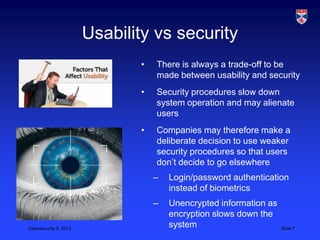
Usability vs security
                               •   There is always a trade-off to be
                                   made between usability and security
                               •   Security procedures slow down
                                   system operation and may alienate
                                   users
                               •   Companies may therefore make a
                                   deliberate decision to use weaker
                                   security procedures so that users
                                   don‟t decide to go elsewhere
                                   –   Login/password authentication
                                       instead of biometrics
                                   –   Unencrypted information as
                                       encryption slows down the
Cybersecurity 2, 2013
                                       system                       Slide 7
Procedural failures
 •      Procedures that are intended to maintain security
        may be badly designed or implemented
 •      This may introduce vulnerabilities into the system or
        may mean that users have to circumvent procedures
        – thus introducing new vulnerabilities
      –         Example
            •       Companies request strong passwords but do not provide any
                    help to users how to construct strong easy to remember
                    passwords such as “My_hamster.spot”

            •       Requirements for regular password change. Thought to improve
                    security but actually means that users can‟t remember
                    passwords so they write them down
Cybersecurity 2, 2013                                                       Slide 8
Human carelessness
                                •   People will inevitably be careless
                                    –   Leave systems unattended
                                        whilst they are logged on
                                    –   Use authentication in public
                                        places where they can be
                                        observed
                                    –   Lose keys
                                    –   Etc.
                                •   Some technical controls against
                                    carelessness but impossible to
                                    completely control this
                                    vulnerability without incurring
                                    very high costs
Cybersecurity 2, 2013                                            Slide 9
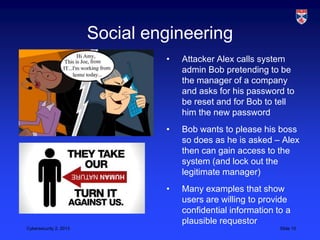
Social engineering
                                 •   Attacker Alex calls system
                                     admin Bob pretending to be
                                     the manager of a company
                                     and asks for his password to
                                     be reset and for Bob to tell
                                     him the new password
                                 •   Bob wants to please his boss
                                     so does as he is asked – Alex
                                     then can gain access to the
                                     system (and lock out the
                                     legitimate manager)
                                 •   Many examples that show
                                     users are willing to provide
                                     confidential information to a
                                     plausible requestor
Cybersecurity 2, 2013                                          Slide 10
Multiple points of failure
 •    These „social‟ vulnerabilities may be exploited in
      connection with each other or with technical
      vulnerabilities to gain access to system
 •    For example, a successful password attack may
      require:
     –       Social engineering to convince system administators to reset
             a user‟s password
     –       A poor password change procedure, which does not include
             a check to ensure that the requestor is legitimate
         •      Require text confirmation of password change request or text
                password change details to users mobile

         •           Requests made by phone should require callback to registered
Cybersecurity 2, 2013number                                                   Slide 11
Improving cybersecurity
 •       Deterrence
       –       Increase the costs of making an attack on your systems

 •       Awareness
       –       Improve awareness of all system users of security risks and
               types of attack

 •       Procedures
       –       Design realistic security procedures that can be followed by
               everyone in an organisation (including the boss)

 •       Monitoring and logging
       –       Monitor and log all system operations

Cybersecurity 2, 2013                                                   Slide 12
Deterrence
 •       It is impossible to develop a completely secure
         personal, business and government system. If an
         attacker has unlimited resources and motivation, it
         will always be possible to invoke some attacks on a
         given system.
 •       However, attackers NEVER have unlimited resources
         and motivation so, aim of security is to increase the
         costs of making a successful attack to such an extent
         that attackers will (a) be deterred from attacking and
         (b) will abandon attempted attacks before they are
         successful

Cybersecurity 2, 2013                                      Slide 13
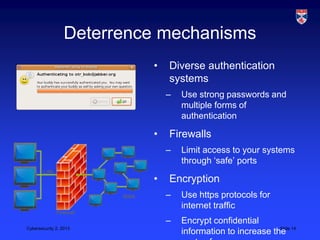
Deterrence mechanisms
                           •   Diverse authentication
                               systems
                               –   Use strong passwords and
                                   multiple forms of
                                   authentication

                           •   Firewalls
                               –   Limit access to your systems
                                   through „safe‟ ports

                           •   Encryption
                               –   Use https protocols for
                                   internet traffic
                               –   Encrypt confidential
Cybersecurity 2, 2013
                                   information to increase the 14
                                                             Slide
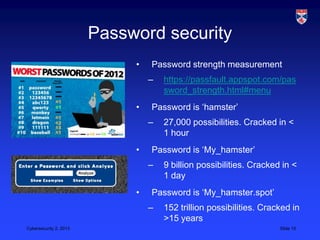
Password security
                             •   Password strength measurement
                                 –   https://passfault.appspot.com/pas
                                     sword_strength.html#menu
                             •   Password is „hamster‟
                                 –   27,000 possibilities. Cracked in <
                                     1 hour
                             •   Password is „My_hamster‟
                                 –   9 billion possibilities. Cracked in <
                                     1 day
                             •   Password is „My_hamster.spot‟
                                 –   152 trillion possibilities. Cracked in
                                     >15 years
Cybersecurity 2, 2013                                                Slide 15
Encryption
 •       Encryption is the process of encoding information in
         such a way that it is not directly readable. A key is
         required to decrypt the information and understand it
 •       Used sensibly, encryption can contribute to
         cybersecurity improvement but is not an answer in
         itself
       –       Security of encryption keys
       –       Inconvenience of encryption leads to patchy utilisation and
               user frustration
       –       Risk of key loss or corruption – information is completely lost
               (and backups don‟t help)
       –       Can make recovery more difficult
Cybersecurity 2, 2013                                                    Slide 16
Awareness
 •       Educate users into the importance of cyber security and provide
         information that supports their secure use of computer systems
 •       Be open about incidents that may have occurred
 •       Take into account how people really are rather than how you
         might like them to be
 •       Bad information
       –       Use a different password for every website you visit

 •       Good information
       –       If you use the same password for everything, an attacker can get
               access to your accounts if they find that out
       –       Use a different passwords for all online bank accounts and only
               reuse passwords when you don‟t really care about the accounts
Cybersecurity 2, 2013                                                        Slide 17
Procedures
                            •   Design appropriate procedures
                                based around the value of the
                                assets that are being protected
                            •   If information is not confidential,
                                make it public as this reduces
                                the need for users to
                                authenticate to access the
                                information
                            •   Cybersecurity awareness
                                procedures for all staff
                            •   Recognise reality – people will
                                use phones and tablets and
                                derive procedures for their safe
                                use
Cybersecurity 2, 2013                                          Slide 18
Monitoring and logging
                                 •   Monitoring and logging
                                     means that you keep track
                                     of all access to the system
                                 •   Use tools to scan log
                                     frequently looking for
                                     anomalies
                                 •   Can be an important
                                     deterrent to insider attacks
                                     if attackers know that they
                                     have a chance of being
                                     discovered through the
                                     logging system
Cybersecurity 2, 2013                                         Slide 19
Protection levels
                             •   Personal protection
                                 –   What should individuals do?

                             •   Organisational protection
                                 –   What should organisations do?

                             •   National protection
                                 –   What should government do?

                             •   International legal frameworks
                                 and agreements
                                 –   What should governments do?


Cybersecurity 2, 2013                                              Slide 20
Personal protection
     •       Protection of information and devices belonging to individuals
     •       Security awareness and attention
           –      This can happen to you
           –      Don‟t make security mistakes e.g. clicking on unknown
                  email links
     •       Secure defaults
           –      Require password to log in to PC/ PIN for phone
     •       Regular checks
           –      Scans for malware
           –      Information integrity

Cybersecurity 2, 2013                                                  Slide 21
Organisational protection
•   Senior management commitment to cyber security
•   Audits of existing systems and procedures for
    security weaknesses
    –   Actions to strengthen systems where vulnerabilities are
        discovered

•   Creation of „sensible‟ security procedures that do not
    stop people doing their job
    –   Support use of personal phones/tablets but raise awareness
        of the dangers to confidentiality
    –   Backup and recovery strategies

•       Creation of a „cybersecurity response team‟ to handle
        security incidents
Cybersecurity 2, 2013                                    Slide 22
National protection
•   National protection should be concerned with
    protecting the critical physical, digital and
    organisational infrastructure
    –   Infrastructure is managed and delivered by a wide range of
        private and public „owners‟
    –   Role of government is to ensure cooperation between them

•   Provision of information and advice to business and
    public sector
    –   Backed up by resources for public sector bodies

•       Legislation and regulation to ensure that
        organisations involved in CNI have appropriate
        security in place
Cybersecurity 2, 2013                                          Slide 23
International agreements
 •       Cybersecurity is an international rather than simply a
         national problem
 •       Attackers may be based anywhere in the world
 •       Danger of reciprocal attacks and escalation if
         attackers are government sponsored
 •       Need for consistent international laws (and penalities)
         so that attackers cannot hide behind national
         boundaries
 •       International reporting and response systems


Cybersecurity 2, 2013                                      Slide 24
Key points
 •       Technology is important but it cannot, on its own,
         solve the cybersecurity problem
 •       Deterrence is a critically important strategy. Make it
         too expensive for attackers to breach your security
 •       Organisations cannot fall back on unrealistic security
         procedures then blame individuals when they go
         wrong
 •       Regulation and legislation is required to ensure
         cybersecurity in CNI providers
 •       Cybersecurity is an international problem – so
         international action is required.
Cybersecurity 2, 2013                                         Slide 25

CS5032 L20 cybersecurity 2

  • 1.
    Cybersecurity 2 Making our systems more secure Prof. Ian Sommerville Cybersecurity 2, 2013 Slide 1
  • 2.
    Technological approaches • Computer security/Security engineering focuses on the technical aspects of the problem • By reducing vulnerabilities in code and by adding more checks to code, many security incidents can be avoided – However, this can significantly increase costs and time required for development • Necessary but not enough for cybersecurity achievement • Cybersecurity is a socio-technical rather than a technical problem Cybersecurity 2, 2013 Slide 2
  • 3.
    “If you think technology can solve your security problems, then you don't understand the problems and you don't understand the technology.” • "Security is a chain; it's only as secure as the weakest link." Cybersecurity 2, 2013 Slide 3
  • 4.
    Why technology isnot enough • Technology reliability cannot be guaranteed • Insider attacks • Technical security compromises made for usability reasons • Failure of organisational procedures or poorly designed procedures • Human carelessness • Social engineering Cybersecurity 2, 2013 Slide 4
  • 5.
    Unreliable technology • In the same way that it is practically impossible to guarantee that a complex system is free from bugs, it is also impossible to guarantee that a system is free from security vulnerabilities • Even if a system A is „secure‟, it may rely on other systems that are potentially insecure. If these are owned by different people, „system wide‟ security validation is impossible Cybersecurity 2, 2013 Slide 5
  • 6.
    Insider attacks • Insiders have legitimate credentials that allows them access to the system – Therefore, strong access control technology is not a barrier • Insiders in an organisation are aware of the technical safeguards built into the system and may know how to circumvent these – especially if they have privileged system access • Insiders have local knowledge that may be used for social engineering and so may be able to discover privileged information. Cybersecurity 2, 2013 Slide 6
  • 7.
    Usability vs security • There is always a trade-off to be made between usability and security • Security procedures slow down system operation and may alienate users • Companies may therefore make a deliberate decision to use weaker security procedures so that users don‟t decide to go elsewhere – Login/password authentication instead of biometrics – Unencrypted information as encryption slows down the Cybersecurity 2, 2013 system Slide 7
  • 8.
    Procedural failures • Procedures that are intended to maintain security may be badly designed or implemented • This may introduce vulnerabilities into the system or may mean that users have to circumvent procedures – thus introducing new vulnerabilities – Example • Companies request strong passwords but do not provide any help to users how to construct strong easy to remember passwords such as “My_hamster.spot” • Requirements for regular password change. Thought to improve security but actually means that users can‟t remember passwords so they write them down Cybersecurity 2, 2013 Slide 8
  • 9.
    Human carelessness • People will inevitably be careless – Leave systems unattended whilst they are logged on – Use authentication in public places where they can be observed – Lose keys – Etc. • Some technical controls against carelessness but impossible to completely control this vulnerability without incurring very high costs Cybersecurity 2, 2013 Slide 9
  • 10.
    Social engineering • Attacker Alex calls system admin Bob pretending to be the manager of a company and asks for his password to be reset and for Bob to tell him the new password • Bob wants to please his boss so does as he is asked – Alex then can gain access to the system (and lock out the legitimate manager) • Many examples that show users are willing to provide confidential information to a plausible requestor Cybersecurity 2, 2013 Slide 10
  • 11.
    Multiple points offailure • These „social‟ vulnerabilities may be exploited in connection with each other or with technical vulnerabilities to gain access to system • For example, a successful password attack may require: – Social engineering to convince system administators to reset a user‟s password – A poor password change procedure, which does not include a check to ensure that the requestor is legitimate • Require text confirmation of password change request or text password change details to users mobile • Requests made by phone should require callback to registered Cybersecurity 2, 2013number Slide 11
  • 12.
    Improving cybersecurity • Deterrence – Increase the costs of making an attack on your systems • Awareness – Improve awareness of all system users of security risks and types of attack • Procedures – Design realistic security procedures that can be followed by everyone in an organisation (including the boss) • Monitoring and logging – Monitor and log all system operations Cybersecurity 2, 2013 Slide 12
  • 13.
    Deterrence • It is impossible to develop a completely secure personal, business and government system. If an attacker has unlimited resources and motivation, it will always be possible to invoke some attacks on a given system. • However, attackers NEVER have unlimited resources and motivation so, aim of security is to increase the costs of making a successful attack to such an extent that attackers will (a) be deterred from attacking and (b) will abandon attempted attacks before they are successful Cybersecurity 2, 2013 Slide 13
  • 14.
    Deterrence mechanisms • Diverse authentication systems – Use strong passwords and multiple forms of authentication • Firewalls – Limit access to your systems through „safe‟ ports • Encryption – Use https protocols for internet traffic – Encrypt confidential Cybersecurity 2, 2013 information to increase the 14 Slide
  • 15.
    Password security • Password strength measurement – https://passfault.appspot.com/pas sword_strength.html#menu • Password is „hamster‟ – 27,000 possibilities. Cracked in < 1 hour • Password is „My_hamster‟ – 9 billion possibilities. Cracked in < 1 day • Password is „My_hamster.spot‟ – 152 trillion possibilities. Cracked in >15 years Cybersecurity 2, 2013 Slide 15
  • 16.
    Encryption • Encryption is the process of encoding information in such a way that it is not directly readable. A key is required to decrypt the information and understand it • Used sensibly, encryption can contribute to cybersecurity improvement but is not an answer in itself – Security of encryption keys – Inconvenience of encryption leads to patchy utilisation and user frustration – Risk of key loss or corruption – information is completely lost (and backups don‟t help) – Can make recovery more difficult Cybersecurity 2, 2013 Slide 16
  • 17.
    Awareness • Educate users into the importance of cyber security and provide information that supports their secure use of computer systems • Be open about incidents that may have occurred • Take into account how people really are rather than how you might like them to be • Bad information – Use a different password for every website you visit • Good information – If you use the same password for everything, an attacker can get access to your accounts if they find that out – Use a different passwords for all online bank accounts and only reuse passwords when you don‟t really care about the accounts Cybersecurity 2, 2013 Slide 17
  • 18.
    Procedures • Design appropriate procedures based around the value of the assets that are being protected • If information is not confidential, make it public as this reduces the need for users to authenticate to access the information • Cybersecurity awareness procedures for all staff • Recognise reality – people will use phones and tablets and derive procedures for their safe use Cybersecurity 2, 2013 Slide 18
  • 19.
    Monitoring and logging • Monitoring and logging means that you keep track of all access to the system • Use tools to scan log frequently looking for anomalies • Can be an important deterrent to insider attacks if attackers know that they have a chance of being discovered through the logging system Cybersecurity 2, 2013 Slide 19
  • 20.
    Protection levels • Personal protection – What should individuals do? • Organisational protection – What should organisations do? • National protection – What should government do? • International legal frameworks and agreements – What should governments do? Cybersecurity 2, 2013 Slide 20
  • 21.
    Personal protection • Protection of information and devices belonging to individuals • Security awareness and attention – This can happen to you – Don‟t make security mistakes e.g. clicking on unknown email links • Secure defaults – Require password to log in to PC/ PIN for phone • Regular checks – Scans for malware – Information integrity Cybersecurity 2, 2013 Slide 21
  • 22.
    Organisational protection • Senior management commitment to cyber security • Audits of existing systems and procedures for security weaknesses – Actions to strengthen systems where vulnerabilities are discovered • Creation of „sensible‟ security procedures that do not stop people doing their job – Support use of personal phones/tablets but raise awareness of the dangers to confidentiality – Backup and recovery strategies • Creation of a „cybersecurity response team‟ to handle security incidents Cybersecurity 2, 2013 Slide 22
  • 23.
    National protection • National protection should be concerned with protecting the critical physical, digital and organisational infrastructure – Infrastructure is managed and delivered by a wide range of private and public „owners‟ – Role of government is to ensure cooperation between them • Provision of information and advice to business and public sector – Backed up by resources for public sector bodies • Legislation and regulation to ensure that organisations involved in CNI have appropriate security in place Cybersecurity 2, 2013 Slide 23
  • 24.
    International agreements • Cybersecurity is an international rather than simply a national problem • Attackers may be based anywhere in the world • Danger of reciprocal attacks and escalation if attackers are government sponsored • Need for consistent international laws (and penalities) so that attackers cannot hide behind national boundaries • International reporting and response systems Cybersecurity 2, 2013 Slide 24
  • 25.
    Key points • Technology is important but it cannot, on its own, solve the cybersecurity problem • Deterrence is a critically important strategy. Make it too expensive for attackers to breach your security • Organisations cannot fall back on unrealistic security procedures then blame individuals when they go wrong • Regulation and legislation is required to ensure cybersecurity in CNI providers • Cybersecurity is an international problem – so international action is required. Cybersecurity 2, 2013 Slide 25

Editor's Notes

  • #16 Mystery why some organisations limit length of passwords and do not allow characters apart from letters and numbersSay you live at 15 south street so make up a password you can remember:SO51street Cracked in &lt; 1 daySO_51_street Cracked in 23 years